


Learn XSS mitigation techniques for developers that help prevent scripting attacks in modern web applications. Discover encoding, CSP, sanitization, secure coding practices, and browser security controls.
XSS mitigation techniques for developers remain essential in 2026 because cross-site scripting continues to be one of the most common web application vulnerabilities. Developers circumvent security features, add risky third-party code, and let old or AI-generated scripts create holes. It leads It leads MITRE’s 2025 CWE Top 25 Most Dangerous Software Weaknesses list at #1. The issue isn’t missing tools, it’s that they’re ignored. Think about a rushed patch, a snippet from a forum, a plugin added without checking. That’s where you get hit. Building for the web means you must handle this. There’s no way around it. See how to lock things down.
XSS Mitigation Techniques for Developers: Essentials at a Glance
Preventing XSS requires more than a single security control. Effective protection comes from combining secure coding habits, framework-aware development, and browser-enforced defenses to reduce both vulnerability exposure and attack impact.
- Context is everything. Output encoding must match the exact HTML, JavaScript, or URL context where data is rendered.
- Frameworks protect you, until they don’t. Built-in escaping is your first line of defense, but escape hatches like dangerouslySetInnerHTML nullify it completely.
- Adopt a layered strategy. Rely on a combination of secure coding practices, strict Content Security Policies (CSP), and defensive HTTP headers.
How XSS Maintains Its Position Among the Most Common Web Vulnerabilities
The frameworks have defenses. React and Vue auto-escape. The real answer is us. We face deadlines, we integrate third-party widgets, and we take that one shortcut, telling ourselves we’ll fix it later.
As noted by arXiv
“Cross-site scripting (XSS) poses a significant threat to web application security.” – arXiv
Modern XSS doesn’t look like old tags. In our courses, we see it in a compromised analytics library, a rich-text editor with loose sanitizer rules, or an internal API that passes raw data to a template. These are the kinds of DOM-based XSS attack vectors that often slip past basic tools.
Legacy systems and microservices multiply the risk. Data flows through five services; if one skips encoding, the whole chain is vulnerable. Retrofitting security into an old .NET or PHP app is much harder than building it in from day one, something we stress constantly.
Frameworks give us an “out” React’s dangerouslySetInnerHTML, Vue’s v-html. They’re warnings. Every time we use them, we accept full security responsibility. In our code reviews, we’ve seen the shrug: “It’s just internal data.” That’s exactly where it starts.
Context-Aware Output Encoding Explained
What is context-aware output encoding? It’s a translation. We take data that could be read as a command, like <, and turn it into harmless text: <. The browser then shows the character, not a tag. This is our bedrock defense.
The catch? Context changes everything. HTML encoding works inside a <div>, but it’s worthless inside a <script> block. There, you need JavaScript Unicode escaping. Using the wrong method is like speaking Spanish in Tokyo. The intent is good, but it fails.
Encoding Requirements by Context
| Context | Recommended Encoding | Primary Risk |
| HTML Body | HTML Entity Encoding | Script Injection |
| HTML Attribute | Attribute Encoding | Attribute Breakout |
| JavaScript | Unicode Escaping | Script Context Escape |
| URL | Percent Encoding | URL Manipulation |
We often see double-encoding mistakes. Backend logic encodes data, stores it, then the frontend encodes it again. The user sees &lt; instead of <. It breaks the UI. To fix it, a developer might bypass the frontend encoding, letting raw data through.
The solution is a clear rule: encode at the final output, not in storage. Keep raw, validated data in the database. Apply the correct encoding in your templates or API as the last step before the client. This stops a whole category of bugs we regularly encounter.
Safely Handling Rich Text in Web Applications
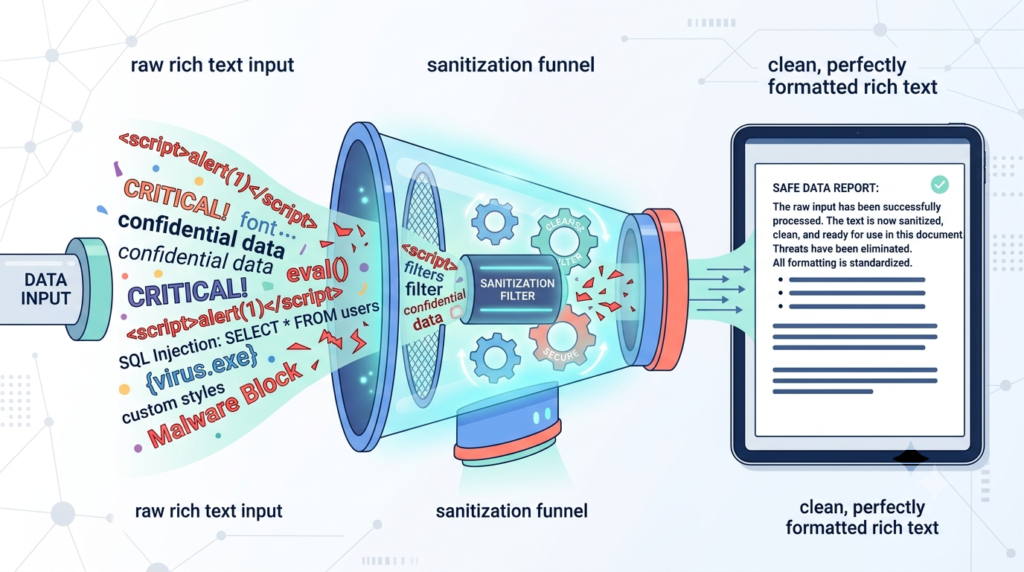
Sometimes you have to let users style content, a comment section, a blog editor, a support ticket. Encoding would break it, turning <b> into plain text. We can’t encode here. We have to sanitize. Sanitization isn’t translation; it’s surgery, cutting out dangerous parts while keeping the rest.
Encoding is straightforward. Sanitization is complex and based on risk. A tool like DOMPurify parses the HTML, walks the tree, and strips blacklisted items: <script>, <iframe>, onclick attributes. What’s left should be safe. But configuration is everything. An overly permissive allowlist brings risk back. We once tracked a bug for a week where a custom SVG tag with a sneaky attribute got through.
Our strategy is to allowlist, not blacklists. Define the exact safe tags and attributes (<b>, <i>, <a href>), and reject all else. It’s more initial work, but teams that consistently prevent XSS vulnerabilities in web applications tend to follow this approach.
For markdown, use a trusted parser that converts to HTML and then sanitizes. Don’t trust the conversion alone. That [click me](javascript:alert()) syntax is valid markdown, and it’s a classic XSS hole we’ve seen exploited.
How Framework Escape Hatches Reintroduce XSS Risks
We rely on frameworks to handle security automatically. Yet they give us escape hatches for performance, or to use old plugins, and that’s where trouble starts. Soon, every case feels like a “special case.”
| Framework | Safe Default | High-Risk Escape Hatch |
| React | Auto Escaping | dangerouslySetInnerHTML |
| Angular | Template Escaping | BypassSecurityTrust APIs |
| Vue | Template Escaping | v-html |
Using these should force a formal code review. No excuses. The reviewer must ask: where does this data come from? Was it sanitized for this exact context? Is there truly no other way? In our experience, there’s almost always another way, a sanitized component, a different state structure. The escape hatch is just the easiest shortcut, and we’ve seen it cause real breaches.
The Impact of AI-Generated Code on XSS Risk

AI-generated code probably is increasing XSS risk. I’ve seen junior developers use Copilot for boilerplate. The AI learns from public code, and much of that is insecure. It might suggest old patterns like string concatenation to build HTML, something we stopped doing years ago. The developer, trusting the tool, adds it. Now a clean-looking vulnerability is in the code.
These tools don’t grasp context. An AI sees a function placing a username in a div. It might generate code that does just that, without any encoding, because it found a similar example in its training data. It won’t know we have a specific helper function for that job. The onus is on us to review every AI-suggested line with a security eye.
Teams that regularly perform testing for XSS examples and tools are often better equipped to spot these subtle weaknesses before they reach production. Treat it like code from a keen intern. We appreciate the help, but we have to check the work.
Why Nonce-Based Content Security Policies Provide Stronger Protection
Think of output encoding as your front door lock. A nonce-based Content Security Policy is the alarm system if a window breaks. It tells the browser, “Only run scripts with this specific, random token from this page load.” A basic CSP allows scripts from ‘self’. A nonce-based one is far stricter.
A solid starting policy is: script-src ‘self’ ‘nonce-{RANDOM}’; object-src ‘none’;. This means scripts must come from our domain and carry the correct nonce. It blocks plugins like Flash. We always avoid ‘unsafe-inline’; it negates the whole point. Allowing the data: scheme is another trap. Permitting data: in your script-src is almost as bad as inline scripts. Attackers can embed full code in data URIs.
I’ve seen an exploit breakdown where a data: URI held an SVG with a hidden script. If your CSP allows data: in img-src thinking it’s safe, an SVG attack can slip through. CSP is powerful, but its setup is precise. We test our policies with tools like CSP Evaluator because mistakes here are costly.
The Limitations of Content Security Policy in Preventing XSS Attacks
Credits: Jan Goebel
No, CSP isn’t a cure-all. It’s a crucial safety net, but not a complete solution. CSP excels at blocking script execution. Yet XSS isn’t only about scripts. What if an attacker injects HTML instead? They could alter a form’s action attribute to steal login credentials, or inject a <meta> tag to redirect users to a phishing site. That’s HTML injection, and CSP does almost nothing to prevent it.
In a recent analysis by PortSwigger
“CSP specification has known gaps. For example, WebRTC DataChannels are not addressed by the W3C CSP specification.” – PortSwigger
This is the key limitation. Suppose your encoding fails in a way that lets an <input type=”hidden” name=”csrf” value=”attacker_value”> tag slip in. No script runs. Your CSP passes. But your application logic is now compromised. Our defense must be layered. Proper encoding and validation stop the injection itself. CSP stops the script execution. They work together, covering each other’s weaknesses, which we’ve seen firsthand in penetration tests.
HTTP Headers and Cookie Settings That Help Reduce the Impact of XSS
Assume a breach. If a malicious script runs despite our efforts, the goal changes to limiting damage. This is where HTTP headers and cookie settings prove their worth. They make an attack less useful by restricting what it can do.
Key controls include:
- HttpOnly: Stops JavaScript from accessing the cookie. Set this on session cookies so document.cookie is empty for an attacker.
- SameSite: Set to Lax to prevent the browser from sending the cookie on most cross-site requests, blocking certain attack paths.
- Secure: Ensures the cookie is only sent over HTTPS.
XSS Mitigation Checklist for Developers
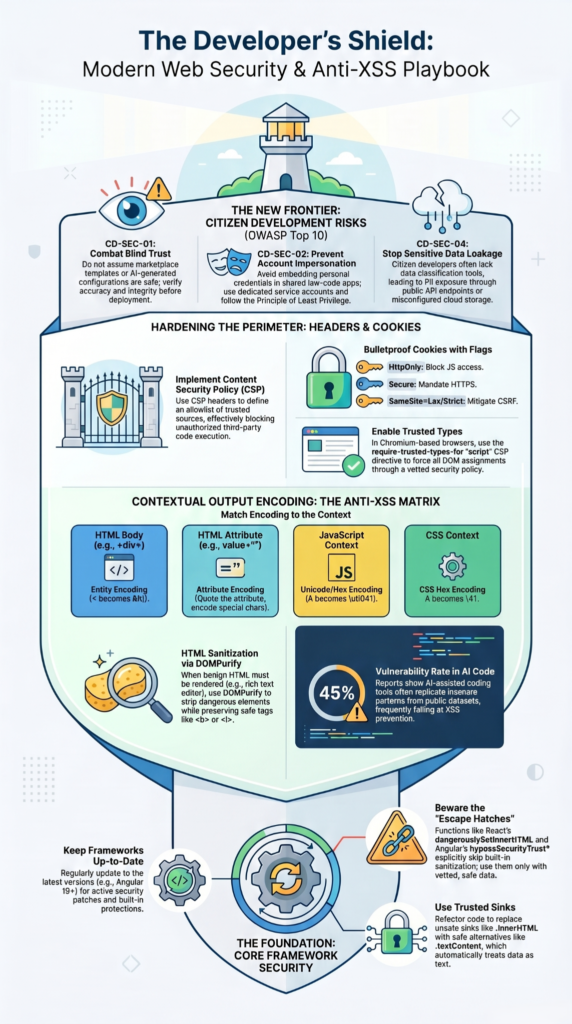
Theory is one thing, but you need a concrete plan. Before pushing any feature that touches user data to production, run through this list.
Priority Actions Before Production Release
- Identify all sinks. Where does user-controlled data finally render? Map every innerHTML, template variable, and attribute assignment.
- Apply context-specific encoding. Use a trusted library (OWASP Encoder, htmlspecialchars with ENT_QUOTES) at each sink. Match the context.
- Validate & sanitize rich text. If accepting HTML, use DOMPurify or a server-side equivalent with a strict allowlist.
- Review framework escape hatches. Any use of dangerouslySetInnerHTML, v-html, or BypassSecurityTrust must be justified and peer-reviewed.
- Implement a strict CSP. Start with script-src ‘self’ ‘nonce-{RANDOM}’ and object-src ‘none’. Avoid unsafe-inline and data:.
- Harden cookies. Set HttpOnly, Secure, and SameSite=Lax on authentication and session cookies.
- Test with malicious payloads. Don’t just test for functionality. Try inputs like “><script>alert(1)</script> and javascript:alert(1).
FAQs
How does context-aware encoding improve cross-site scripting prevention?
Context-aware encoding applies appropriate output encoding techniques for HTML, JavaScript, URLs, and attributes, preventing data from executing as code.
Why are blacklist filtering limitations a problem for XSS defense mechanisms?
Blacklist filtering limitations allow attackers to bypass blocked patterns, while stronger input validation strategies focus on acceptable input.
How do HttpOnly cookie flag and Secure cookie attribute reduce XSS impact?
The HttpOnly cookie flag blocks JavaScript access to cookies, while the Secure cookie attribute restricts cookie transmission securely.
What makes postMessage validation important for DOM-based XSS prevention?
PostMessage validation and message origin checking ensure applications process trusted messages only, preventing malicious scripts from manipulating content.
How often should security code review XSS and vulnerability scanning occur?
Teams should perform security code review XSS activities and vulnerability scanning during development, testing, releases, and maintenance.
Building a Sustainable XSS Defense Strategy
XSS issues rarely come from one bad line of code, they happen when security checks get skipped during everyday development. That’s the problem. When safe coding habits aren’t built into the process, small gaps can turn into real risks that are hard to catch later.
The fix is to make security part of how your team works every day. Start with one practical step, whether that’s rolling out CSP on a key service or improving how developers handle output encoding. If you want structured, hands-on guidance, Secure Coding Practices Bootcamp can help your team build stronger skills in XSS prevention and secure development fundamentals. Consistent habits beat one-time fixes, and over time they create a much stronger security foundation.
References
- https://arxiv.org/abs/2502.19095
- https://portswigger.net/web-security/cross-site-scripting