


Output encoding stops XSS by forcing browsers to treat user input as plain text, not code. It neutralizes malicious scripts before they execute. When your app displays user data, like a comment, that data must be transformed.
Encoding changes special characters into a safe format the browser renders as inert text. Without it, the browser can’t tell your code from an attacker’s. A single missed encoding context can create a major security hole.
This article covers the correct, context-aware approach, which is the most reliable way to prevent Cross-Site Scripting. Read on to understand how and why it works.
XSS Defense Fundamentals: The Rules That Actually Protect Apps
These key points explain the core principles behind effective output encoding and why most XSS prevention failures happen when these basics are ignored.
- Encoding must match the context: HTML, JavaScript, URLs, and attributes all require different encoding rules, and using the wrong one leaves gaps attackers can exploit.
- Encode at the point of output: Store data in raw form and only encode it when rendering content into its final destination to avoid double-encoding problems and missed contexts.
- Automation reduces human error: Modern frameworks and trusted escaping libraries are safer and more reliable than custom, manual encoding logic.
What Does Output Encoding Actually Do?
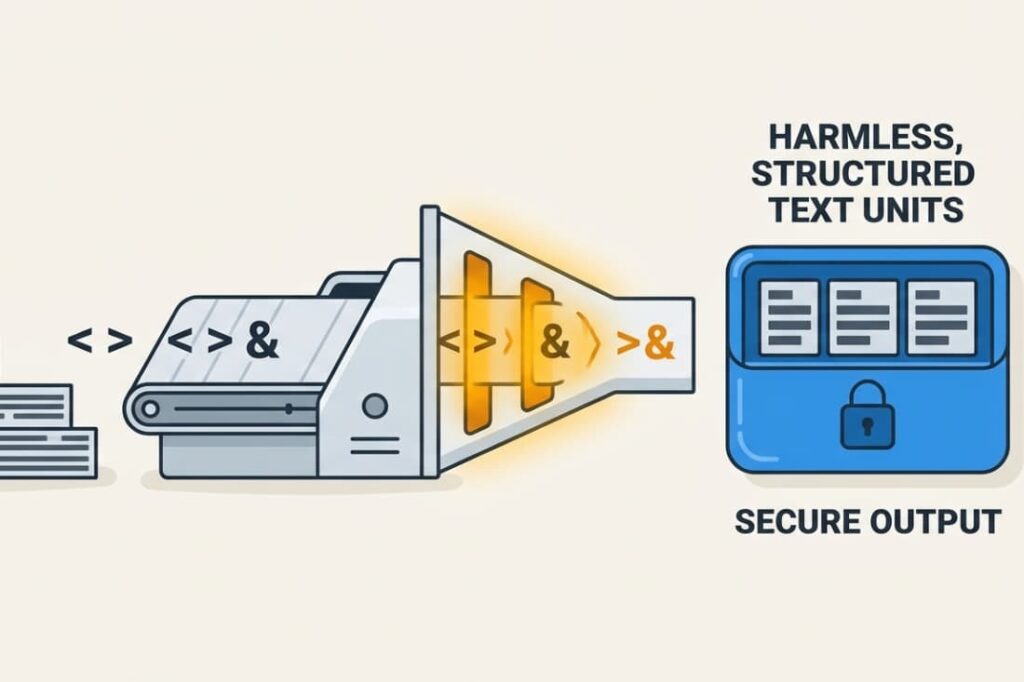
At its core, output encoding changes dangerous characters into harmless representations so browsers display content instead of running it as code. It’s about altering the meaning of characters that have special power in a programming or markup language.
Take HTML, for example. The less-than symbol (<) and greater-than symbol (>) are used to define tags. If a user’s input contains <script>, the browser will see it as the start of a script tag.
That’s where encoding steps in. It replaces these characters with their corresponding HTML entities: < and >. The browser then simply shows the literal text <script> on the screen.
Understanding how cross-site scripting attacks work makes it easier to see why these transformations are necessary.
The same principle applies to other contexts, like inside a JavaScript string or a URL attribute, but with a different set of dangerous characters and escape sequences. It’s crucial to understand that this process doesn’t “clean” or “validate” the data.
We’re not judging whether the input is good or bad. We’re ensuring it’s interpreted as passive content, not active code. The transformation is straightforward, but in our experience, it must be applied consistently and with the right rules for each context.
Here’s a basic example of how it works in HTML:
- < becomes <
- > becomes >
- ” becomes "
- ‘ becomes ' (or ')
- & becomes &
Why Does Context Matter in XSS Prevention?
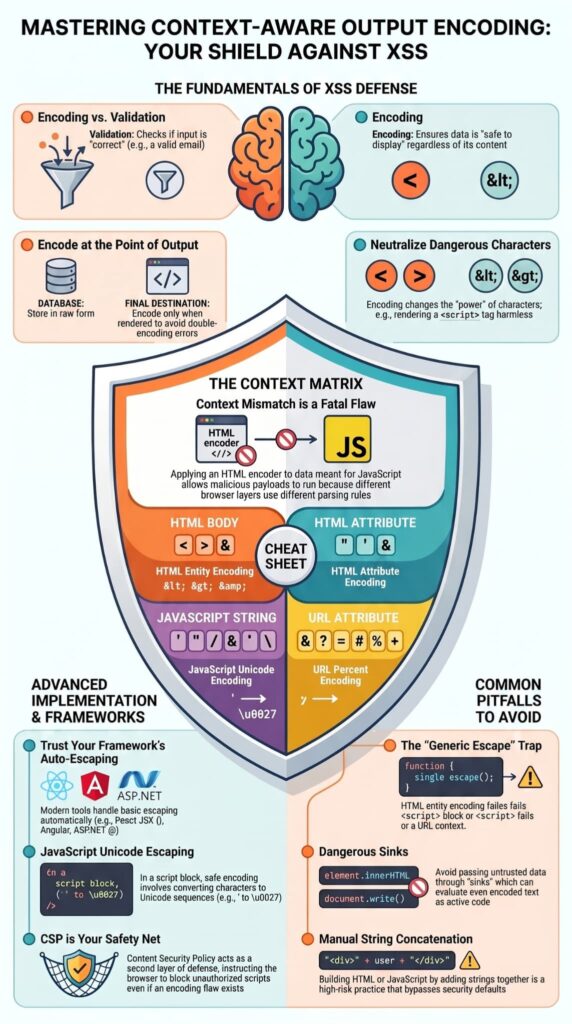
We often see developers trip up here: different browser contexts interpret characters differently. The encoding rules must match the exact output location. A string that’s perfectly safe inside an HTML paragraph can be dangerous when placed inside a <script> block or an HTML attribute. This mismatch is one of the most common mistakes we find in code reviews.
Browsers switch parsing states dynamically based on the current execution context. Applying an HTML encoder to data destined for a JavaScript execution layer creates a context mismatch, allowing malicious payloads to run as active code.
| Output Context | Dangerous Characters | Correct Encoding Type |
| HTML Body | < > & | HTML Entity Encoding |
| HTML Attribute | ” ‘ & and the attribute delimiter | HTML Attribute Encoding |
| JavaScript String | ‘ ” \ / & < > and line breaks | JavaScript Unicode Encoding |
| URL Attribute | & ? = # % + | URL Percent Encoding |
For example, putting user data into an onclick handler requires JavaScript string encoding, not just HTML encoding. In our training, we stress that failing to match the context is a primary reason many XSS filters get bypassed.
The SAP NetWeaver Enterprise Security Guidelines explicitly codify this boundary under standard architectural controls:
“Production telemetry mirrors the core directive established in the OWASP XSS Prevention Cheat Sheet (Rule #0): never insert untrusted data directly into a <script>block. Even valid HTML-encoded text gets evaluated instantly by browser JavaScript engines when passed through dangerous execution sinks like element.innerHTML.” – SAP Help Portal
This engineering limitation confirms that server-side character modifications fail to alter client-side runtime compilation blocks.
Why HTML Encoding Alone Does Not Stop XSS
HTML entity encoding protects standard HTML text nodes exclusively. This specific encoding method fails to neutralize cross-site scripting risks within script blocks, style components, or URL attributes. Developers often implement a generic HTML escape function and think the job is done, but XSS can still slip right through.
Consider a common example. A developer safely HTML-encodes a user’s name, turning < into <. That’s correct if the name is rendered as text inside a <div>.
But if that same encoded name gets placed inside a JavaScript variable like var userName = ‘<script>alert(1)</script>’;, the browser’s JavaScript parser sees the literal string <script>alert(1)</script>. Since < isn’t a special character in JavaScript, it stays inert.
The real problem happens if the data is placed into a sink like document.write() or .innerHTML without proper JavaScript encoding.
The OWASP Top 10 mitigation criteria for Injection Vulnerabilities explicitly details this multi-context parsing rule:
“HTML entity encoding is okay for untrusted data that you put in the body of the HTML document, such as inside a tag. It even sort of works for untrusted data that goes into attributes, particularly if you’re religious about using quotes around your attributes. But HTML entity encoding doesn’t work if you’re putting untrusted data inside a tag anywhere, or an event handler attribute like onmouseover, or inside CSS, or in a URL. So even if you use an HTML entity encoding method everywhere, you are still most likely vulnerable to XSS. You MUST use the escape syntax for the part of the HTML document you’re putting untrusted data into.” – OWASP Foundation
The browser will decode the HTML entities first, reverting < back to < within the JavaScript execution context. Suddenly, the script runs. This is why understanding the final rendering context isn’t just a best practice, it’s non-negotiable for secure code.
How Should User Input Be Encoded in HTML?
For HTML, you must encode characters like <, >, “, ‘, and & before showing any user input. This stops the browser from seeing them as code.
Don’t write your own encoding function. Use your framework’s built-in, auto-escaping feature. Modern frameworks automate basic escaping, such as React’s JSX {} or ASP.NET’s @ operator.
However, reliance on defaults introduces vulnerabilities if untrusted data is placed inside unquoted attributes, where spaces or trailing characters allow attackers to inject executable code without breaking out of quotes.
Only output raw HTML if you must. This is rare and dangerous. If you do:
- Use a special, safe method from your framework, like @Html.Raw().
- Be 100% sure the content is from a source you completely trust.
Our simple rule:
For any data from an untrusted source, like a user, an external API, or even your database, always use the framework’s default escaping or a trusted library like OWASP’s Java Encoder or PHP’s htmlspecialchars.
How Does JavaScript Output Encoding Work?
JavaScript encoding protects dynamic script contexts by escaping quotes, slashes, and special control characters. When you need to insert user data into a <script> block, a JSON object, or an event handler attribute like onclick, HTML encoding simply won’t cut it.
Secure JavaScript encoding requires converting alphanumeric characters into safe Unicode escape sequences, such as mapping single quotes to \u0027. This transformation prevents runtime interpreter manipulation during standard DOM mutation operations.
For example, a single quote (‘) would be encoded as \x27 or \u0027, a backslash (\) as \\, and a newline as \n.
In our training, we emphasize the safest approach: avoid putting dynamic data directly into JavaScript whenever you can. Instead, use data attributes on HTML elements and read them with your script, or use JSON encoding to safely serialize data from the server to the client. Most modern frameworks provide safe methods for this.
For instance, you can serialize a .NET object to JSON using JsonSerializer.Serialize(), which handles the proper escaping for a JavaScript context. Manually concatenating strings to build JavaScript is a high-risk practice we consistently advise against.
What Is the Correct Way to Encode URLs and Attributes?
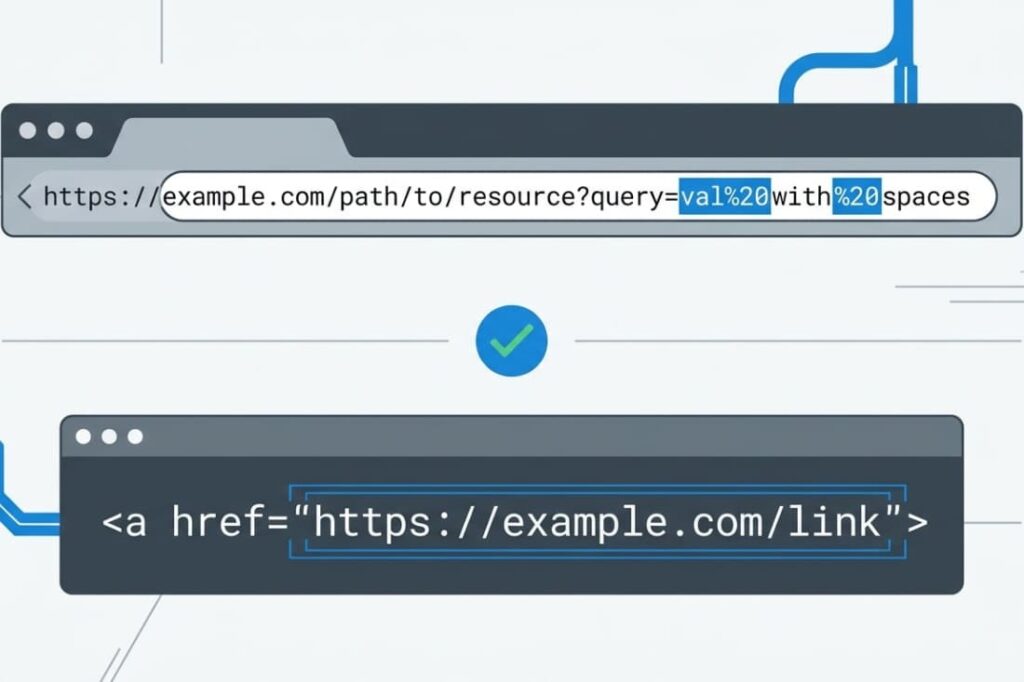
URLs and HTML attributes need special encoding because browsers read them differently than normal text.
When you build a URL with user input, you must use URL encoding (percent encoding). This changes unsafe characters. For example, a space becomes %20.
For HTML attributes, you must encode characters that could escape the quotes. If your attribute uses double quotes (“), encode any ” inside it as ".
A big mistake is putting raw user data into a link’s href. This can let an attacker run JavaScript, like with javascript:alert(1). Always use a library function made for URL or attribute encoding. Don’t just add strings together.
| Where You Put Data | Safe Encoding Method | Common Mistake |
| URL Query String | Use encodeURIComponent | Using encodeURI (it doesn’t encode &, +, =) |
| HTML Attribute Value | Encode & < > ” ‘ | Only encoding < and > but forgetting the quotes |
| Full URL in href | First, only allow http:// or https://. Then URL encode. | Allowing dangerous schemes like javascript: |
Why Is Output Encoding Different From Input Validation?
Credits: webpwnized
Input validation controls what data we accept, while output encoding controls how that accepted data is safely displayed. They are complementary layers of defense, not substitutes for each other. In our secure coding practices, we emphasize using both.
Input Validation is about enforcing rules on data as it enters your system. For example:
- Is this a valid email address?
- Is this username within the allowed character length?
It can reject obviously malicious input, but it can’t reliably tell all bad patterns from good ones. A user might legitimately need to type <script> in a forum post about web security.
Output Encoding works differently. It assumes the data is untrusted and ensures it’s safe for its specific output destination. Even if “bad” data slips past validation, proper encoding renders it harmless.
We’ve seen that relying solely on input validation, or “sanitization” that strips characters, is fragile and often gets bypassed.
The robust strategy has two clear steps:
- Validate input for correctness and business rules.
- Encode all output for the specific context where it will be used.
Why Framework Auto-Escaping Is Safer Than Manual Escaping
Modern frameworks significantly cut down XSS risk by automatically applying context-aware escaping when they render content.
When you use a framework like React, Angular, Vue, or ASP.NET Core Razor, the default is to escape any dynamic content. This lifts a huge burden off developers and wipes out a whole category of human error.
We see several key benefits in our training:
- Consistency: The framework applies the same encoding rules everywhere, so a developer can’t forget to call an encoding function.
- Context-Awareness: Advanced templating engines know if data is going into HTML, an attribute, or a JavaScript block, and they apply the correct encoding for that spot.
- Security Maintenance: The framework library is kept up-to-date by a community or company that responds to new browser quirks or attack methods.
- Reduced Complexity: Developers can focus on building their application’s logic instead of manually sprinkling encodeForHTML() or escape() calls all over their templates.
The risk with handwritten escaping is that it’s easy to miss a single output, use the wrong function, or create a helper with subtle bugs. Trusting the framework’s well-tested auto-escaping is a cornerstone of the secure development practices we teach.
What Common Mistakes Break XSS Protection?
In our code reviews, we keep seeing the same XSS prevention mistakes: encoding too early, using the wrong encoder, and trusting sanitization alone.
These issues become more serious when developers do not fully understand different types of cross-site scripting attacks and how each one behaves.
A frequent error is encoding data as soon as it’s received and then storing that encoded version in the database.
Later, when that data is output in a different context, like a JavaScript string, it might be encoded again (causing double-encoding) or not encoded at all because it was assumed to be “safe.” This breaks functionality and can still leave security gaps.
Other common mistakes include:
- Using a generic escape() function everywhere, not realizing it only works for HTML body content.
- Manually building HTML strings with concatenation (e.g., innerHTML = “<div>” + userData + “</div>”), which completely bypasses any framework auto-escaping.
- Over-relying on client-side sanitization, which is dangerous because an attacker can send a malicious payload directly to your backend API.
- A simple lack of secure coding training, which means developers might not even know these context-specific rules exist.
How Does CSP Support Output Encoding?

Content Security Policy adds a second security layer by telling browsers which scripts they’re allowed to execute. It’s a crucial defense-in-depth measure, but it is not a replacement for proper output encoding.
We like to think of it this way: output encoding makes the data safe, and CSP instructs the browser not to run unsafe things even if they somehow slip through.
A strong CSP can lessen the impact of an XSS flaw. For instance, a policy that disallows unsafe-inline JavaScript will stop any injected script tags that don’t have the correct cryptographic nonce.
However, in our experience, CSP can be complex to deploy correctly, especially in older applications. Certain directives can also be bypassed if they aren’t configured meticulously.
That’s why the primary line of defense must always be correct output encoding. Strong XSS mitigation techniques usually combine encoding, CSP, secure frameworks, and regular testing practices together.
CSP is a valuable safety net, not the main barrier. It works best when combined with other secure coding practices, like using trusted frameworks and running regular security tests.
FAQ
Why is output encoding important for preventing XSS attacks?
Output encoding helps stop XSS attacks by converting user input into safe text before a browser displays it. Proper HTML encoding, JavaScript encoding, and URL Encoding prevent malicious scripts from running inside a web page.
Without the correct encoding method, attackers can exploit XSS vulnerabilities through HTML attributes, DOM manipulation, or dangerous attack payloads that lead to session hijacking or credential theft.
How does output encoding differ from input validation?
Input validation checks whether user input follows expected rules, while output encoding protects the browser when displaying that data. Both methods help reduce Cross-site Scripting risks, but they solve different security issues.
For example, input validation may reject dangerous input value formats, while HTML Entity Encoding and JavaScript encoding stop malicious scripts from executing inside HTTP response content or server-generated client-side javascript.
Which XSS attack types require output encoding protection?
Output encoding helps defend against Stored XSS, Reflected XSS, and DOM-Based XSS attacks. Attackers often use attack vectors such as javascript: URI payloads, HTML Injection, bbcode img tag exploits, or Cross-Site Script Inclusion techniques to inject malicious scripts into web applications.
Proper HTML Sanitization, Trusted Types, and secure templating engine configurations help reduce these risks across modern and legacy enterprise applications.
What security tools help detect XSS vulnerabilities early?
Security teams often use static analysis, AST analysis, data flow analysis, and security testing tools to detect XSS vulnerabilities before deployment.
Many developers also rely on Burp Scanner, web application firewalls, and guidance from the OWASP XSS Cheat Sheet and OWASP XSS Prevention Cheat Sheet.
Running security checks inside CI/CD pipelines helps identify filter bypass strategies, browser-specific behaviors, and hidden DOM manipulation risks earlier.
Which coding mistakes commonly create XSS vulnerabilities?
Common mistakes include inserting user input directly into HTML attributes, HTTP header values, Cascading Style Sheets, or dynamic JavaScript without proper output encoding.
Developers also create risks when using unsafe DOM manipulation methods, weak HTML Sanitization, or insecure HtmlString class handling in ASP NET and ASP.NET Core MVC projects. Missing security headers and poorly configured Content Security Policies can further increase exposure to XSS attacks.
Building Safer Applications Starts with Secure Coding Habits
Context-aware output encoding is one of the most reliable ways to stop XSS attacks before they happen. When developers consistently match encoding methods to the correct output context, they close critical security gaps and strengthen the overall resilience of their applications. Combined with validation, CSP, and secure frameworks, this approach creates a practical foundation for long-term web security.
To build these skills in real-world development environments, join the Secure Coding Practices Bootcamp and learn hands-on techniques for writing safer, more secure code from day one.
References
- https://help.sap.com/docs/SAP_NETWEAVER_701/6f3a120f6c4b1014a34d8b05a486f746/47814743532348c3a8485de6dfd76899.html
- https://wiki.owasp.org/index.php?title=XSS_Prevention_Cheat_Sheet&oldid=135616