
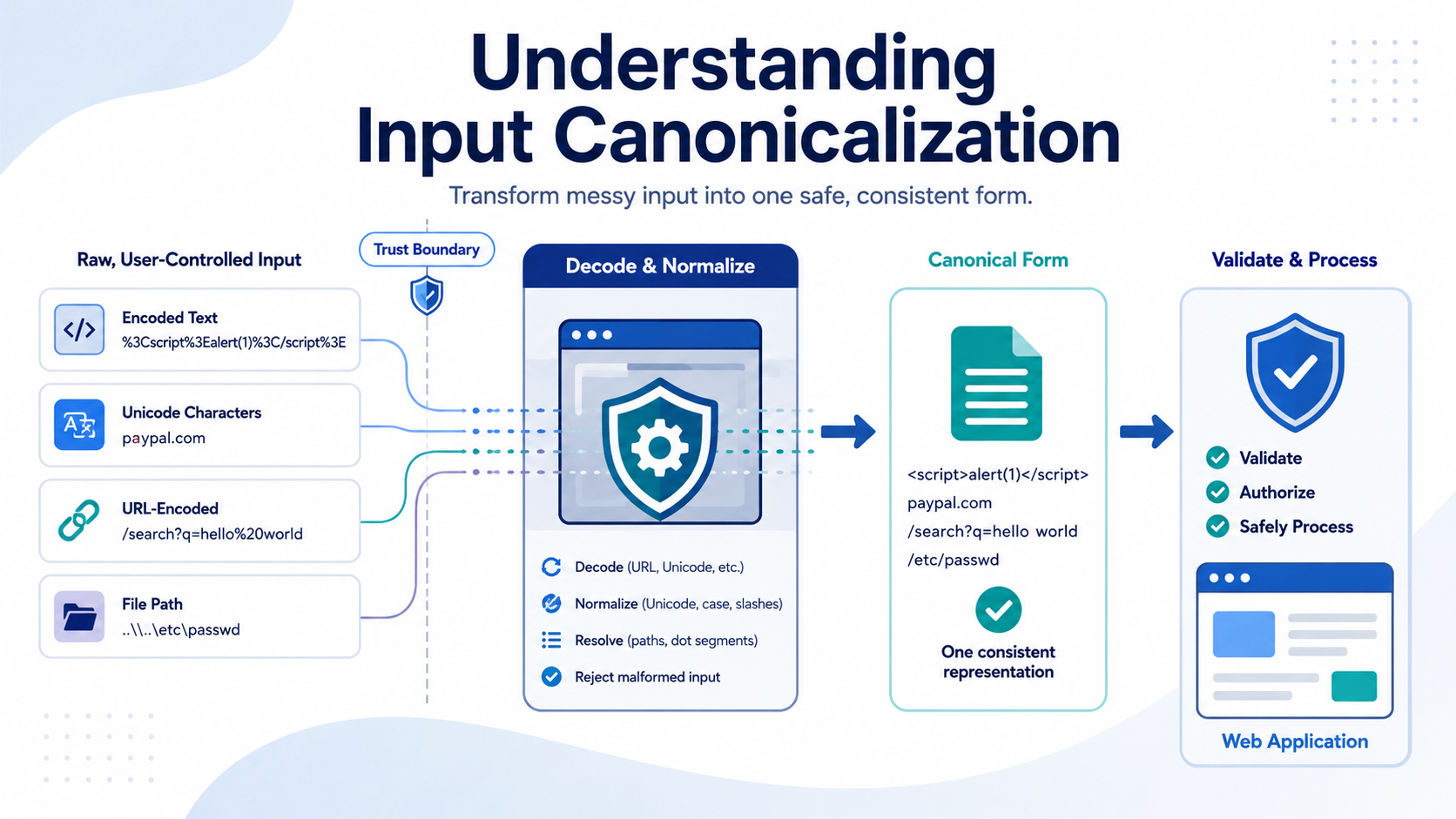

Understanding input canonicalization means converting user-controlled data into a consistent form before validation, authorization, logging, or processing. This matters because the same input can be interpreted differently by different parts of an application. OWASP recommends normalization as part of input validation.
At Secure Coding Practices, we treat canonicalization as part of secure input handling, especially at trust boundaries where data moves between systems. The right process helps prevent encoding, path traversal, Unicode, and validation bypasses. Keep reading to see how canonicalization works and how teams can apply it safely.
Quick Reads: Canonicalization Security Wins
A consistent canonicalization process helps applications interpret, validate, and safely process user-controlled input the same way across every layer.
- Input canonicalization converts different representations of user data into a form that security checks can evaluate consistently.
- The safest sequence is to decode and normalize at the trust boundary, then validate the resulting canonical form before making security decisions.
- Path traversal, double encoding, Unicode normalization, URL parsing, and inconsistent middleware decoding can all create a canonicalization bypass.
What Is Canonicalization Security Risk?
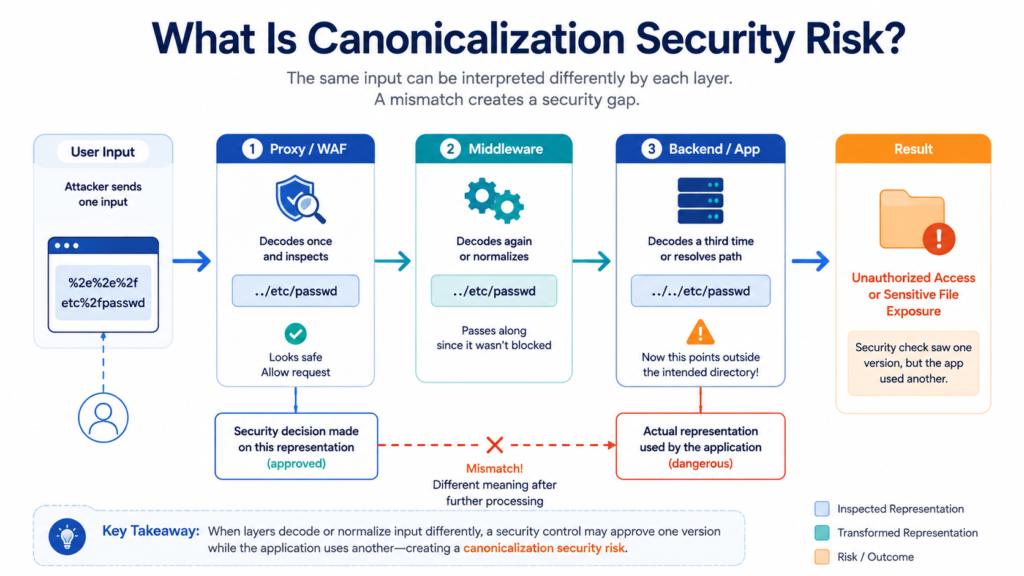
A canonicalization security risk appears when two parts of an application read the same input differently. One layer may approve it, while another later turns it into something dangerous.
We see this most often at trust boundaries. A request might pass through a proxy, middleware, framework, and backend service. If each layer decodes or normalizes the value differently, the security check may inspect one version while the application uses another. That gap can lead to a WAF bypass, authorization error, or misleading log entry.
As highlighted by Hexnode Blog
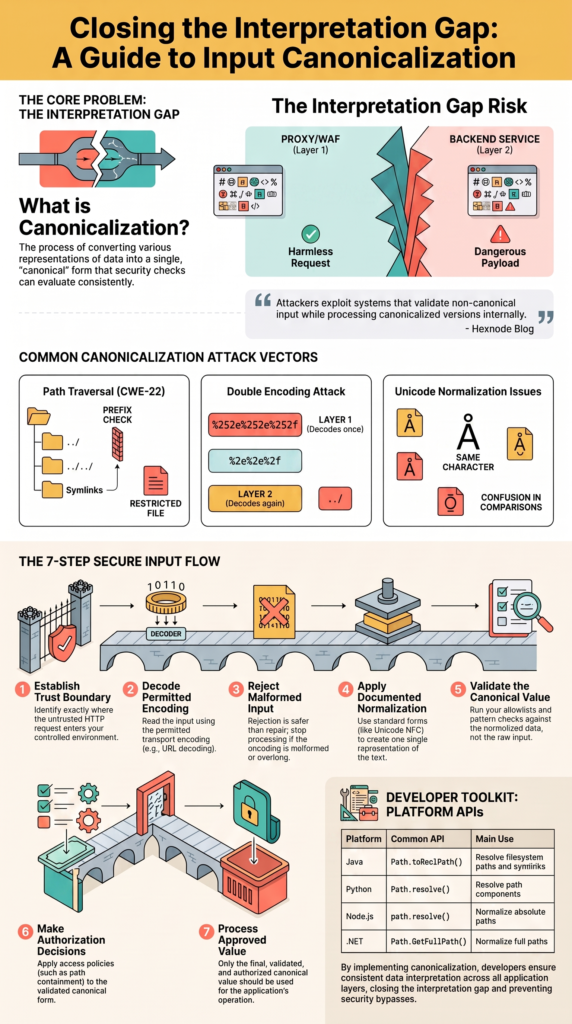
“Attackers often exploit systems that validate non‑canonical input while processing canonicalized versions internally.” – Hexnode Blog
CWE-180 describes the core mistake clearly: validation happens before canonicalization. MITRE gives a path example where /safe_dir/../ can pass a prefix check before canonicalization moves it outside the intended directory.
Common trouble spots include:
- URL and query parsing
- File path handling
- Usernames and account IDs
- Unicode normalization
- Proxy and middleware decoding
The same idea applies to URLs and identifiers. If our security code checks raw text but another component changes that text first, the original check may no longer protect the operation.
How Does Path Traversal Canonicalization Create Security Problems?
A path traversal canonicalization example makes the problem easier to see. Imagine our application serves files from /srv/uploads. It receives a filename, joins it to that directory, and assumes the result stays inside the approved location.
An attacker may submit parent-directory components such as ../. The operating system can resolve those components after a simple string check has already passed. The final path may then point somewhere outside /srv/uploads.
MITRE CWE-22 defines path traversal as a failure to properly restrict a pathname to an intended directory. Its examples show how traversal sequences can move file access beyond the directory an application meant to protect.
Our safer approach is to:
- Resolve the approved base directory.
- Resolve the requested path with a trusted API.
- Check path containment after resolution.
- Use that validated path for the operation.
That third step matters. A basic string prefix check can treat /srv/uploads-old as if it were inside /srv/uploads. It isn’t.
Symlinks add another concern. A path can look safe before filesystem resolution, then point somewhere else through a symbolic link. So our check has to match how the filesystem will actually resolve the path.
How Can Teams Prevent Canonicalization Attacks in Web Apps?
Preventing canonicalization attacks in web applications starts with one clear interpretation of input. We don’t want the proxy decoding once, the framework decoding again, and application code making another change.
OWASP recommends server-side validation and allowlists where practical. That guidance fits canonicalization well because the server, not the browser, owns the security boundary.
Research from OWASP Wiki
“To be secure against canonicalization attacks does not mean that every application has to be internationalized, but all applications should be safe when Unicode and malformed representations are entered.” – OWASP Wiki
| Stage | Security purpose | Example |
| Receive | Establish trust boundary | HTTP request |
| Decode | Read permitted encoding | URL decoding |
| Normalize | Create one representation | Unicode normalization |
| Validate | Check canonical data | Filename rules |
| Authorize | Apply access policy | Path containment |
| Process | Use approved value | File access |
A useful engineering rule is to decode at the trust boundary and establish which representation downstream code receives. Repeated decoding creates uncertainty.
Client-side checks can’t solve this. An attacker can send requests without using the browser at all. Our validation rules should also match the data type. A filename, URL, username, and free-form comment don’t need identical rules. Forcing one sanitizer across all inputs can damage valid data or leave gaps.
How Does a Double Encoding Attack Work?
A double encoding attack happens when data is encoded more than once, then decoded at different points in a request.
Picture a request moving through a proxy, WAF, framework, and backend. The first layer may decode the value once and see harmless text. The backend may decode it again and reveal a character sequence that the earlier security check never inspected.
The problem isn’t encoding by itself. There is disagreement about when decoding happens and how many times it should happen.
We can reduce this risk by defining the decoding process in advance:
- Which layer decodes input
- Which character set is allowed
- What happens to malformed encoding
- Which representation security controls inspect
- What downstream services receive
Malformed input should normally be rejected rather than repaired into an uncertain value. That gives our application one clear rule instead of several guesses. A URL allowlist can fail if one component validates an encoded delimiter while another component decodes it before using the URL.
We’ve found that request tracing helps during reviews. When we map each transformation from the first HTTP byte to the final application value, hidden decoding steps become much easier to spot.
Why Can UTF-8 Encoding Attacks Create Canonicalization Problems?
UTF-8 handling can create canonicalization problems in UTF-8 encoding attacks when applications disagree about valid byte sequences or Unicode representation.
Modern applications should reject malformed UTF-8 rather than trying to repair unclear input. OWASP recommends specifying UTF-8 for input sources and validating after decoding.
Older attacks included overlong UTF-8 sequences, which represented characters with more bytes than the valid encoding allowed. Modern compliant UTF-8 implementations should reject these invalid forms.
Unicode adds another layer. Two strings can represent the same text while using different underlying sequences. Unicode Standard Annex #15 defines NFC, NFD, NFKC, and NFKD normalization forms.
For many text fields, NFC is a practical choice. Restricted identifiers can need different treatment. NFKC can remove compatibility differences, but it can also erase distinctions that an application considers meaningful.
This matters for usernames, account identifiers, domain names, and access-control comparisons. Visually similar characters can also create confusion, especially when users expect two identifiers to be different but the application treats them as equivalent.
Our goal isn’t to force every string into one shape. It’s to decide which differences matter, then apply that decision consistently before security checks.
Really, that policy should be documented before code is written.
What Are the Best Practices for Normalizing User Input?
Secure input normalization starts with one question: what type of data are we handling? A filename isn’t a username, and a URL isn’t a free-form comment. Each has different rules.
We should define the accepted representation before validation, authorization, logging, or processing. OWASP recommends allowlist validation where practical, while Unicode guidance supports clear normalization rules for structured identifiers.
A useful policy should cover:
- Accepted character encoding
- Unicode normalization form
- Case-folding rules
- Whitespace handling
- Maximum length
- Malformed input behavior
The length check deserves attention. If an application checks length before decoding, encoded data can expand later and bypass the intended limit. We need to know which representation the limit applies to.
The same issue appears with case sensitivity. If our account system treats usernames as case-insensitive, registration and login need to use the same rule. Don’t rely on broad string replacement as a security strategy. It can remove characters without understanding what the final value means.
For security decisions, rejection is often safer than repair. If input is malformed or ambiguous, stop processing it.
Our APIs need the same policy across services. Otherwise, one service may normalize a value while another assumes it has already been checked.
Why Is Validating Input After Canonicalization Important?
Validating input after canonicalization is important because the application must check the value it will actually use.
CWE-180 describes the opposite order as a weakness. An application checks the original input, transforms it later, then trusts a new representation that never went through the same security rule.
It may reject an obvious traversal sequence in the raw request. A later decoder can turn an encoded form into that same sequence. The first check then means very little.
A username may have multiple Unicode representations, while the account system normalizes the value before comparison. If registration and login use different rules, an attacker may find a canonicalization bypass.
Our security flow should look like this:
- Establish the trust boundary.
- Decode permitted transport encoding.
- Reject malformed encoding.
- Apply documented normalization.
- Validate the canonical value.
- Make authorization decisions.
- Process the approved value.
That order gives every security check the same input representation.
Exceptions should have a clear reason. Otherwise, a forgotten middleware route or older API endpoint can quietly bring the weakness back.
A security decision should never depend on raw input if another component will transform it before the operation. The approved representation has to be the representation the application uses.
How Can Teams Test for Canonicalization Vulnerabilities?
Credits: Google Search Central
Testing for canonicalization vulnerabilities means checking whether different parts of the application interpret equivalent inputs in the same way.
Security testing needs alternate representations, malformed values, encoding changes, and platform-specific path behavior.
PortSwigger Web Security Academy includes controlled path traversal labs that demonstrate how encoding and validation differences can affect applications.
For file paths, our tests can include:
- Parent-directory components
- Mixed separators
- Absolute paths
- Encoded separators
- Double encoding
- Symlink resolution
- Trailing dots and spaces
URL tests can cover encoded delimiters, repeated encoding, case differences where relevant, and parser differences between a proxy and the application.
Unicode testing should include equivalent normalization forms and malformed UTF-8. We also need tests for identifiers that contain visually similar characters. A test harness can generate several representations of the same logical value, then compare the decisions made by each layer.
We should also inspect what the application actually did. A request might return an error while still causing an unexpected file lookup, redirect, database action, or log entry.
From our own security testing perspective, the most useful cases are often the boring ones. A strange input that changes meaning between two layers can reveal more than a large collection of random payloads.
Which Libraries Can Handle Canonicalization Securely?
Trusted libraries handling canonicalization securely are a better starting point than custom string manipulation. Path handling is especially easy to get wrong because operating systems have their own rules.
Java, Python, Node.js, and .NET all provide APIs for path processing. These APIs reduce common mistakes, but they don’t automatically create a complete authorization boundary.
| Platform | Common API | Main use |
| Java | Path.toRealPath() | Resolve filesystem paths |
| Python | Path.resolve() | Resolve path components |
| Node.js | path.resolve() | Normalize absolute paths |
| .NET | Path.GetFullPath() | Normalize full paths |
After resolving a candidate path, we still need to check whether it belongs inside the approved directory.
That distinction is important because lexical normalization and filesystem resolution aren’t always the same. Removing .. components from a string doesn’t necessarily account for a symbolic link that redirects the final path.
For file uploads, we can reduce the risk further by avoiding user-controlled paths. Our application can assign an internal identifier to each uploaded object and store the original filename as metadata for display.
Developers should also read the exact behavior of the API they use. A method that normalizes a path string may not resolve links, while another method may require the target to exist.
What Is the Impact of Improper Canonicalization Handling?
The impact of improper canonicalization handling can go beyond a simple validation error. If an attacker crosses a security boundary, they may gain unauthorized file access, cause account confusion, alter data, or disrupt services.
CWE-22 describes how path traversal can allow access outside an intended directory. Depending on application permissions, this could expose configuration files, source code, credentials, or other sensitive resources.
The impact can include:
- Confidentiality: Reading protected resources
- Integrity: Changing or replacing files
- Availability: Deleting or damaging resources
- Authorization: Reaching restricted objects
- Monitoring: Hiding activity through misleading representations
A well-known example is CVE-2021-41773, which affected Apache HTTP Server 2.4.49. The vulnerability involved path traversal and could also lead to remote code execution in certain configurations.
The wider lesson isn’t about one server. Modern applications often place several components between the request and the final operation. Each can parse URLs, paths, or encoded data differently.
If those components disagree, attackers can look for the gap.
We should therefore treat canonicalization as an architectural security concern. It belongs in design reviews, API contracts, code reviews, and security tests.
One missed transformation can be enough to break an otherwise solid validation rule.
How should teams build a canonical form validation process?
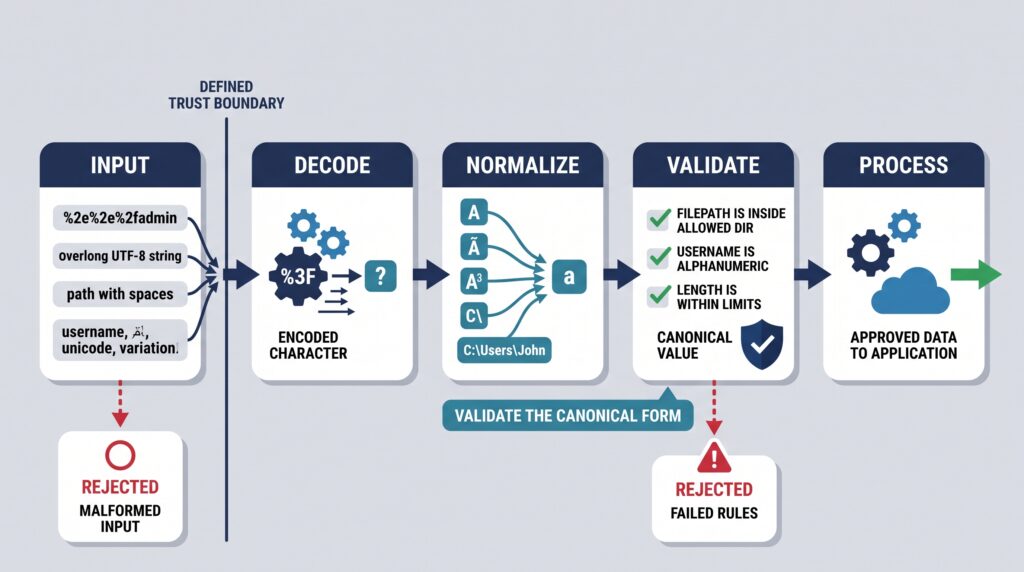
A canonical form validation process should show developers how input validation & sanitization handles data from an untrusted request before it reaches a security-sensitive operation. Written rules help here. Without them, different developers may make different assumptions about decoding, Unicode, case, or path handling.
Our policy should define:
- Accepted character encoding
- Decoding location
- Unicode normalization
- Case and whitespace rules
- Allowed characters
- Length limits
- Validation order
- Authorization checks
- Logging format
- Malformed-input behavior
For paths, the process should include canonical resolution and a path containment check against the approved base directory.
For usernames, normalization and case rules should be used consistently during registration, login, account recovery, and authorization.
For URLs, teams should agree on one authoritative parser. Hostnames, schemes, ports, paths, and encoded delimiters may need separate checks.
Logging needs care too. Security teams need enough information to understand an attack, but logs shouldn’t create another confusing representation of the same value.
A useful approach is to record the canonical security-relevant value and carefully controlled details about the original request when there is a legitimate monitoring need.
A clear contract can be enough. The important part is making that contract part of development, not leaving it in someone’s notes.
FAQ
What is a canonicalization bypass, and how can it affect an application?
A canonicalization bypass occurs when security controls inspect one version of input, but the application processes another. Differences in decoding, normalization, or parsing can create this gap.
Attackers may use it to bypass validation, authorization, or filtering. Consistent encoding normalization, server-side validation, and defined processing rules help ensure security controls evaluate the same data the application will use.
How does URL canonicalization security help protect web applications?
URL canonicalization security helps applications process URLs consistently before making security decisions. Differences in encoding, separators, case, or query strings can cause different components to interpret the same URL differently.
Teams should define how URLs are parsed, decoded, and normalized. They should then apply web application input validation to the resulting representation before the application processes the request.
Why is decoding at the trust boundary important?
Decoding at the trust boundary gives an application a defined point for processing external data. This reduces differences between proxies, middleware, frameworks, and backend services.
After decoding, the application should reject malformed data and normalize the result when required. This approach supports input normalization security and gives developers a consistent representation for validation and other security checks.
How can teams test for canonicalization vulnerabilities effectively?
Testing canonicalization vulnerabilities requires more than checking common malicious strings. Teams should test alternate encodings, repeated decoding, Unicode variants, mixed path separators, and malformed input.
Fuzzing encoding variants can expose differences between processing layers. Tests should compare the data inspected by security controls with the data the application actually processes, including authorization results and error handling.
What should a secure canonical form validation process include?
A canonical form validation process should define the accepted character encoding, decoding order, normalization rules, validation requirements, and response to malformed input.
Security checks should run against the same representation that the application will process. Teams should document exceptions and apply these rules consistently across APIs, authentication, file handling, and other functions where user-controlled data can affect security decisions.
Make Canonicalization Part of Secure Development
When your application validates one version of input but processes another, security checks can fail without being directly bypassed. The real issue is simple, different layers may interpret the same input differently. Canonicalization helps keep those decisions consistent, especially when handling alternate encodings or Unicode forms.
For developers, practicing these concepts makes secure input handling easier to apply. Ready to put them into practice? Join Secure Coding Practices for hands-on training built around real coding scenarios.
References
- https://www.hexnode.com/blogs/explained/what-is-canonicalization/#1
- https://wiki.owasp.org/index.php?title=Canonicalization,_locale_and_Unicode&diff=next&oldid=27126
Related Articles
- https://securecodingpractices.com/what-is-canonicalization-security-risk/
- https://securecodingpractices.com/path-traversal-canonicalization-example/
- https://securecodingpractices.com/preventing-canonicalization-attacks-webapp/
- https://securecodingpractices.com/double-encoding-attack-explained-simply/
- https://securecodingpractices.com/utf-8-encoding-attacks-canonicalization/
- https://securecodingpractices.com/normalizing-user-input-securely-best-practices/
- https://securecodingpractices.com/validating-input-after-canonicalization-important/
- https://securecodingpractices.com/testing-for-canonicalization-vulnerabilities-methods/
- https://securecodingpractices.com/libraries-handling-canonicalization-securely/
- https://securecodingpractices.com/impact-improper-canonicalization-handling/
- https://securecodingpractices.com/input-validation-sanitization/