


Preventing canonicalization attacks webapp starts with converting security-sensitive input into one trusted representation before validation and authorization. This helps stop attackers from exploiting different interpretations of paths, URLs, encoded values, or identifiers across application layers.
Secure Coding Practices recommends treating canonicalization as part of the security flow, not as an afterthought. Applications should parse, decode, normalize, validate, and authorize input consistently before using it. This approach reduces parser mismatches and access-control errors. Keep reading to see practical ways web applications can prevent these attacks.
Canonicalization Defense Essentials
This article details how normalizing inputs before validation and authorization prevents attackers from bypassing access controls through parser mismatches and alternate encodings.
- Normalize Before Deciding: Convert paths, URLs, and identifiers into a single trusted representation before running any validation or authorization logic.
- Eliminate Parser Mismatches: Align encoding rules, path resolution, and routing logic across all proxies, WAFs, and application layers to prevent security bypasses.
- Enforce Strict Containment: Rely on canonical path containment, explicit allowlists, and immutable IDs instead of fragile string matching or denylists.
What Is a Canonicalization Attack in a Web Application?
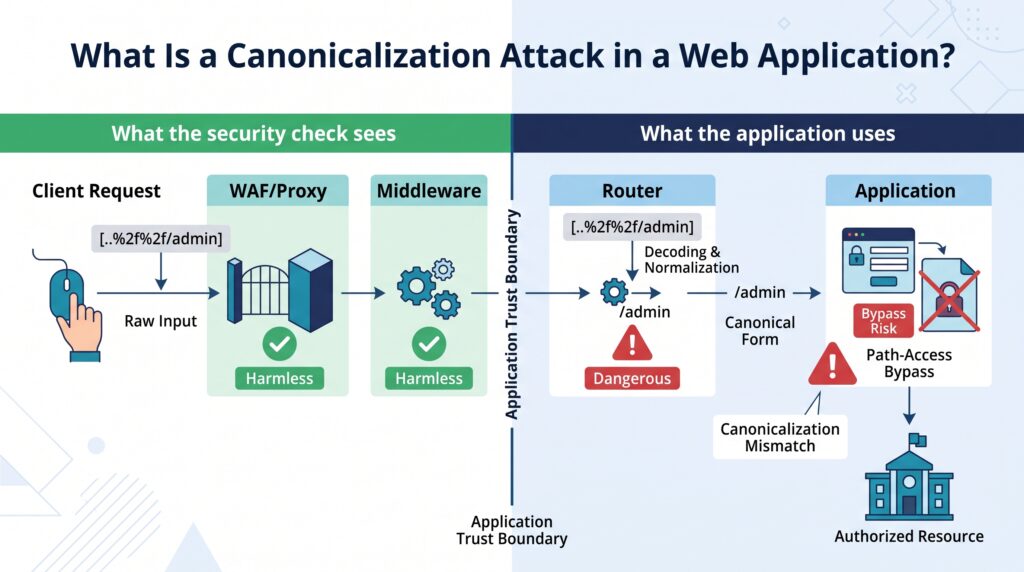
A canonicalization attack happens when an application treats two versions of the same input differently. One version may pass a security check, while another component later interprets it in a more dangerous way.
We often see this with paths and URLs. An attacker may send encoded characters or unusual path segments. The first security check sees harmless text. Then a router, filesystem, or framework decodes it and reaches a different resource. That mismatch is the real problem.
MITRE CWE-180 covers this issue when validation happens before canonicalization. The weakness can affect file paths, URLs, user identifiers, XML data, and access-control checks. Our security rules need to work on the representation the application will actually use.
The safer flow is:
Parse → Decode → Canonicalize → Validate → Authorize → Use
Canonicalization also has nothing to do with an HTML canonical tag. That tag helps search engines understand preferred URLs. It does not protect an application from hostile input.
Get the data into one trusted form before making a security decision.
- Canonicalize paths before file access.
- Normalize URLs before security checks.
- Normalize identifiers before account matching.
- Resolve encoding before filtering.
That order matters more than another layer of string filtering.
Why Does Validation Before Canonicalization Create a Security Gap?
Validation before canonicalization creates a security gap because the value being checked may not be the value the application finally uses. For a broader view of what is canonicalization security risk, the key issue is that different components can interpret the same input differently.
A request can contain percent encoding, dot segments, duplicate separators, Unicode variations, or other representations that change. If authorization happens first, the application may approve one value and later use another.
MITRE CWE-180 recommends canonicalizing data before validation when alternate representations can affect the security decision. We can apply that idea to input validation, path handling, URL processing, and access control.
Insights from GIAC
“To prevent this, avoid accepting file names as input, and if there is a need for accepting input, convert the name to its canonical form before providing security decisions.” – GIAC
The unsafe sequence looks like this:
Input
↓
Validate raw input
↓
Canonicalize
↓
Authorize
↓
Use resource
A safer sequence looks like this:
Input
↓
Parse and decode
↓
Canonicalize
↓
Validate
↓
Authorize
↓
Use canonical value
Web requests can pass through several interpreters. A proxy may parse a path one way. The WAF, middleware, router, and application may each handle it differently. An attacker only needs one disagreement to create trouble.
So teams should define how each type of input is parsed and normalized. A username does not need the same rules as a filesystem path. A URL has different rules again. That small design choice can prevent a much larger class of bugs.
Which Web Application Components Are Most Exposed?
Credits: Cyber Skill
Some parts of a web application are more exposed to canonicalization problems because they constantly translate user input into another form.
File paths are a common example. A path can contain encoded characters, traversal segments, symbolic links, or platform-specific separators. URL handling has similar concerns because hosts, ports, paths, and encoding can all affect where a request goes.
Authentication identifiers can also cause problems. If registration treats Admin and admin as different names but login treats them as the same, account handling becomes inconsistent. Unicode adds another layer because different character representations can look similar.
XML and SAML systems need careful attention too. Their parsers may build structured data from several possible representations. If one component verifies a signed value while another consumes a different value, authentication can fail.
| Attack surface | Representation issue | Possible impact |
| File paths | Encoding or .. | Path traversal |
| URLs | Host or path parsing | SSRF or bypass |
| Usernames | Case or Unicode | Account confusion |
| XML/SAML | Parser differences | Authentication bypass |
| Proxy requests | Different parsing rules | WAF bypass |
The common thread is not the technology itself. It is the gap between what one component sees and what another component uses. A narrow input filter won’t cover all of these cases.
How Should Developers Canonicalize File Paths Before Authorization?
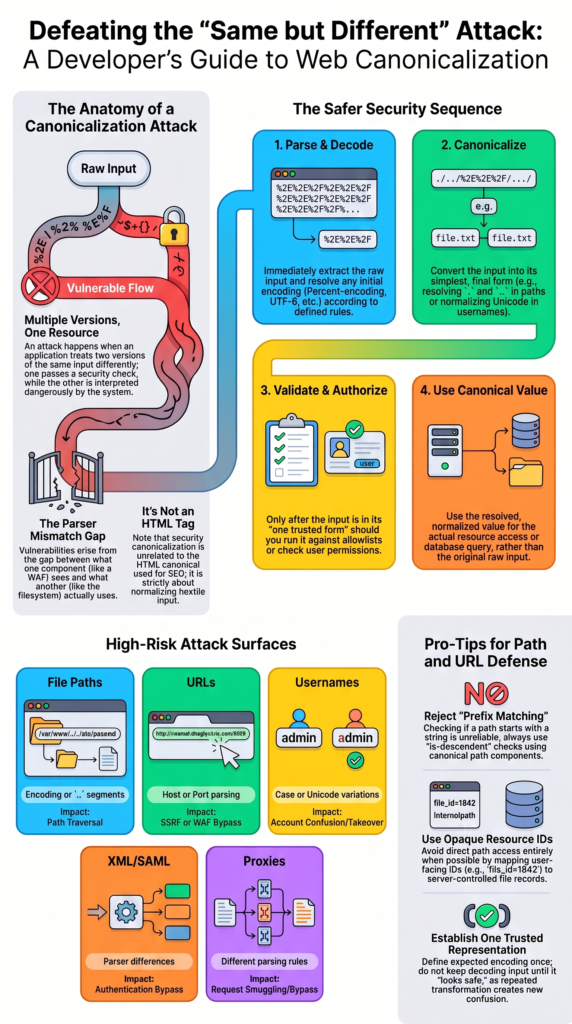
Developers should resolve a user-supplied path into its canonical filesystem form before deciding whether access is allowed. The resolved path must stay inside an approved directory.
This is where path canonicalization, directory traversal mitigation, and filesystem permissions meet. We should never approve a raw path and assume the operating system will interpret it in the same way.
As highlighted by Microsoft Learn
“When dealing with such data, it is critical that it is converted to a canonical format before any authorization or resource access decisions are made based on it. This is known as canonicalization, and is frequently the source of many security vulnerabilities in software.” – Microsoft Learn
A practical flow looks like this:
- Parse the path with the correct platform API.
- Decode it according to request rules.
- Resolve . and .. segments.
- Resolve symbolic links when needed.
- Canonicalize the trusted base directory.
- Check real path containment.
- Access only the approved resource.
The key check is containment. If /var/app/data is the approved directory, the application should confirm that the resolved target is that directory or a genuine child of it.
A path can begin with an approved string and still resolve somewhere outside it. Symbolic links matter too. A path without .. can still point to another location through a link.
Our applications should also avoid direct path access when an opaque resource ID can do the job. For example, file_id=1842 can map to a server-controlled file record.
Why Are Raw Prefix Checks Unreliable?
Raw prefix checks look at text, not actual filesystem containment.
Imagine an application accepts paths below /var/app/data and checks whether the requested value begins with that string. The check may pass before the operating system resolves traversal segments or symbolic links. After resolution, the target could be somewhere else.
A proper is-descendant check works with canonical path components. A path traversal canonicalization example makes this distinction clearer by showing why the resolved path, rather than the raw input string, should drive the authorization decision.
This difference is easy to miss during a code review. The code may look harmless because the approved directory appears in the requested path. But the filesystem does not care about that visual appearance. It resolves the path according to its own rules.
A user might provide a path that looks safe while a link redirects it outside the approved directory.
Physical path resolution, trusted filesystem APIs, and restrictive permissions should work together. On Windows systems, teams may also need to review drive letters, backslashes, alternate path forms, and legacy NTFS 8.3 naming. Our goal isn’t to create a huge collection of filters for every possible path trick.
Why Do Encoded Paths and Parser Differences Defeat Simple Filters?
Encoded paths can defeat simple filters because the security layer may inspect one representation while another component later decodes it.
For example, a filter might search for a literal traversal pattern. An encoded version may not match that rule. MITRE CWE-20 covers the broader problem of improper input validation and inconsistent input handling.
Security tests should cover more than obvious traversal strings:
- Percent-encoded characters
- Double encoding
- Dot segments
- Alternate separators
- Unicode variations
- Duplicate delimiters
- Case variations
- Ambiguous URL parts
The same issue applies to UTF-8 canonicalization and Unicode normalization. Every layer needs to know what encoding it accepts and when decoding happens.
We should not keep decoding input until it “looks safe.” That creates another source of confusion. Define the expected encoding, parse it once, canonicalize the result, then validate it.
Denylist filtering has the same weakness. Blocking known dangerous strings does not solve the representation problem. There may always be another encoding or parser behavior that the filter does not expect.
A better design establishes one trusted representation. This is the core idea behind understanding input canonicalization, where security checks operate on the normalized value rather than an earlier, potentially misleading representation.
How Can URL Canonicalization Protect Authorization and SSRF Controls?
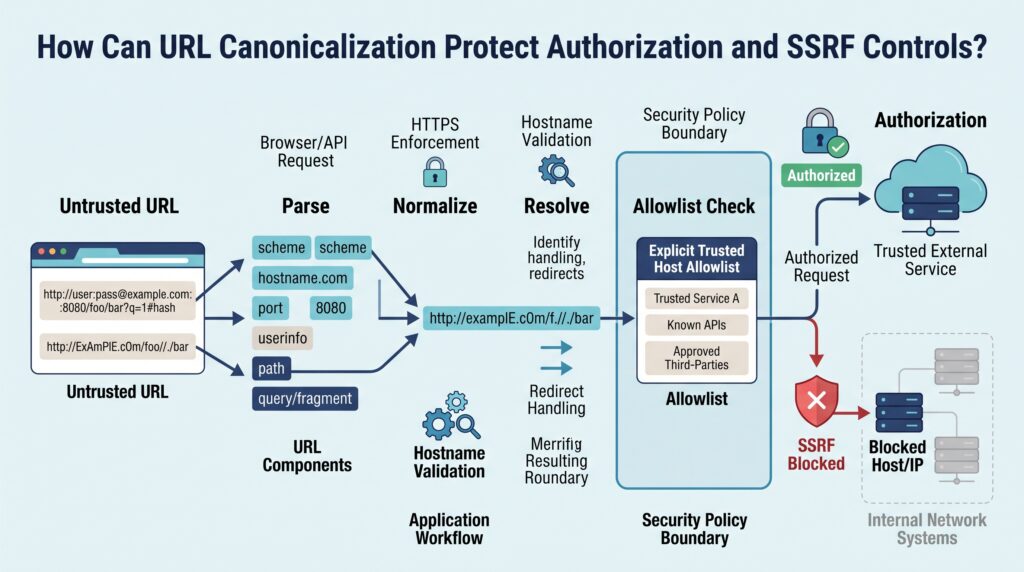
URL canonicalization helps authorization and SSRF controls by making sure security checks examine the actual URL components before the application makes a decision.
A trusted URL parser should identify the scheme, hostname, port, path, credentials, and relevant encoding. The application can then compare those components against an explicit policy.
The basic flow is:
Parse URL
↓
Normalize relevant parts
↓
Resolve policy target
↓
Compare with allowlist
↓
Authorize request
Normalization rules depend on the application. They may include consistent handling of hostname case, default ports, dot segments, trailing slashes, and percent encoding.
Our URL policy should also define which schemes and hosts are allowed. If an application only needs HTTPS, it should reject other schemes rather than trying to repair them later.
Redirects need the same care. A trusted-looking string at the beginning of a URL does not prove. The parser must identify the real host before the comparison.
This matters for open redirect prevention, SSRF controls, CORS checks, and URL-based authorization.
We should also make sure the proxy and application agree about the request. If the proxy sees one URL while the origin server sees another, a security rule can approve the wrong target.
FAQ
How does URL normalization help prevent canonicalization attacks?
URL normalization makes different URL forms follow the same rules before the application processes them. It can cover case normalization, trailing slash handling, and consistent URL processing.
A clear canonical URL policy also helps with HTTPS enforcement and domain name enforcement. These controls reduce URL spoofing protection gaps and make it harder for attackers to exploit inconsistent URL interpretation across application components.
How can developers improve path traversal protection?
Developers can improve path traversal protection by using physical path resolution before granting access to a requested file. File path validation should confirm that the resolved path remains inside approved allowlist directories.
A reliable is-descendant check is safer than prefix matching or substring match. Directory traversal mitigation should also include base directory validation and restrictive file system security controls.
What helps prevent encoding bypasses in web applications?
Encoding bypass prevention starts with character encoding enforcement and a standard representation enforcement policy. Applications should decode input according to defined rules before validation rather than repeatedly transforming it.
Double encoding detection can identify values that contain multiple encoding layers, while UTF-8 canonicalization and Unicode normalization help handle alternate character representations. This reduces improper input handling caused by inconsistent decoding between application layers.
How should applications handle canonicalization during authorization?
Applications should perform canonical form conversion before making authorization decisions. Authorization before parsing can create an incorrect behavior order when different components interpret the same input differently.
Access control lists and ACL configuration should therefore operate on the normalized resource or identifier. This supports authorization bypass prevention by ensuring security decisions use the same representation that later processing actually uses.
How can security teams test canonicalization attack prevention?
Security teams can test canonicalization attack prevention through penetration testing and security audits that target alternate input representations. Tests should include percent encoding abuse, Unicode normalization, special character filtering, path canonicalization, and router canonicalization discrepancy.
Logging canonicalization events can also reveal repeated bypass attempts. Regular testing helps identify security bugs before attackers exploit inconsistent parsing, validation, or authorization behavior.
Keep Host Canonicalization Consistent
Secure host handling depends on parsing the actual hostname before validation, then applying the same rules across the proxy, WAF, middleware, and application. A mismatch can make one layer trust a value that another interprets differently. That’s the real risk. Consistency matters.
To help developers apply these practices in real projects, explore the Secure Coding Practices Bootcamp and practice secure input handling through hands-on coding exercises.
References
- http://www.giac.org/paper/gsec/4201/challenge-security-deploying-aspnet-application-internet/106716#2
- https://learn.microsoft.com/zh-tw/archive/msdn-magazine/2005/november/design-and-deploy-secure-web-apps-with-asp-net-2-0-and-iis-6-0#3