
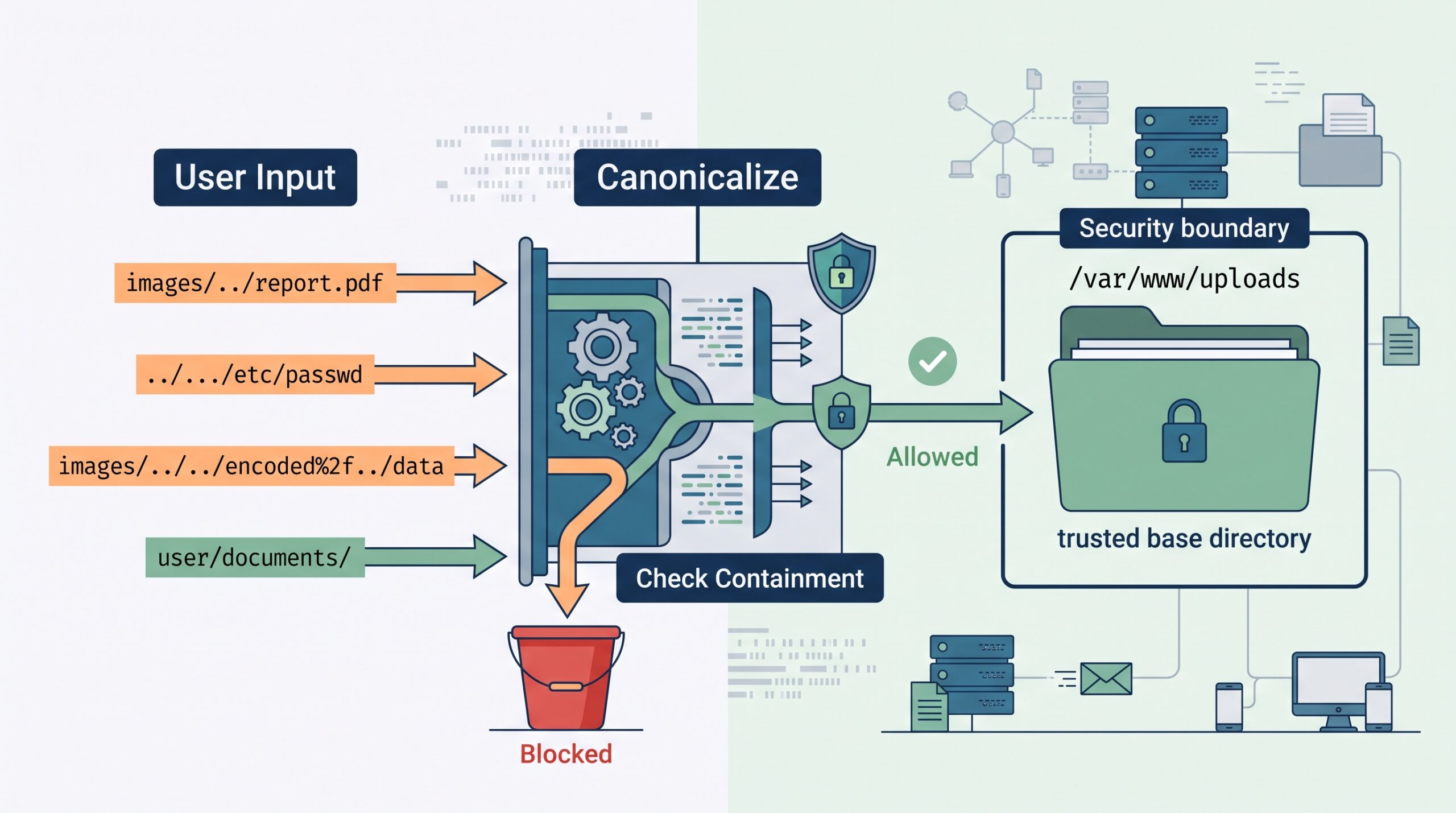

Path traversal canonicalization example shows how resolving a user-controlled path before validation can prevent unauthorized file access. CWE-22 covers improper limitation of a pathname to a restricted directory, which can let attackers reach files outside an approved location. In practice, the problem is not always an obvious ../ sequence.
Different layers may decode, normalize, or resolve the same input differently. Secure Coding Practices uses this principle when reviewing file-handling logic: establish the trusted directory, resolve the requested path, verify containment, and access the file only after validation. Keep reading to see practical examples, bypass cases, and safer implementation patterns.
Path Traversal Defense: 5-Second Security Core
To effectively prevent path traversal attacks, applications must standardize inputs into a single, reliable filesystem representation before making access decisions.
- Canonicalize Before Checking: Always resolve user input and the base directory into their final filesystem representation before evaluating permissions.
- Path-Aware Containment: Avoid naive string matching; use component-aware methods (like commonpath or startsWith with a path separator) to verify boundaries.
- Access Post-Validation: Execute all file reads, writes, and processing strictly after containment checks are completely validated.
What Does Canonicalization Mean in Path Traversal?
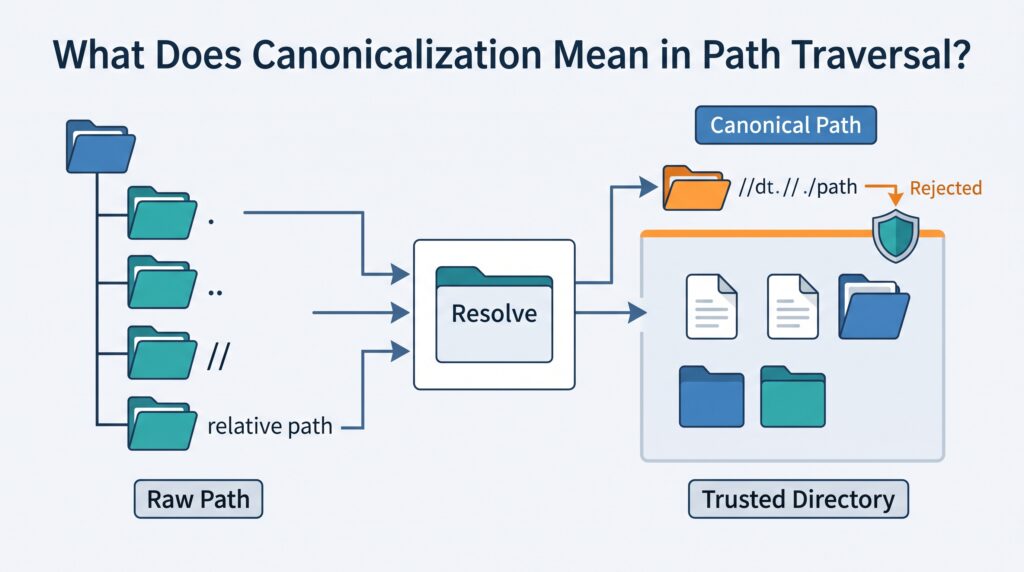
Canonicalization means converting a path into a form that represents how the filesystem will interpret it. Depending on the platform and API, this can include resolving . and .., converting relative paths, removing redundant components, and resolving symbolic links.
For a broader explanation of what is canonicalization security risk, the same principle applies whenever different representations of data can lead to different security decisions.
MITRE CWE-22 recommends decoding and canonicalizing input before validation because path traversal can use different representations to reach an unintended location.
Suppose our application stores uploaded files under:
/var/www/uploads
A request might contain:
images/../report.pdf
After path resolution, that points to:
/var/www/uploads/report.pdf
That case is harmless if the final path remains inside the trusted directory.
But consider:
../../../etc/passwd
When joined to the upload directory and resolved, the result can escape the intended location.
The important question is where the completed path points. Canonicalization can involve:
- . and .. components.
- Relative and absolute paths.
- Redundant separators.
- Platform-specific path rules.
- Symbolic links, when the API resolves them.
One detail matters here. Not every “normalize” function performs full filesystem-aware resolution. Some APIs only clean the path text.
Why Does Validating the Raw Path Fail?
Raw string validation can fail because path syntax changes the meaning of a filename after the security check.
Consider:
Raw path:
/var/www/images/../../../etc/passwd
Resolved path:
/etc/passwd
A weak check might see the /var/www/images/ prefix and approve the value. The filesystem does not care about that prefix once .. components move the path upward.
The problem is the assumption that a string prefix proves filesystem containment.
For example, these two paths are different locations:
/var/www/uploads
/var/www/uploads-archive
A basic string comparison can treat the second path as though it belongs under the first. A path-aware comparison checks path components instead.
We see this issue in file download endpoints, upload handlers, image processing code, archive extraction, and APIs that accept filenames. The code can look harmless because it contains validation.
A better review question is: Where does this path resolve before the application opens it?
That question usually reveals more than searching for ../.
Common weak approaches include:
- Blocking only ../.
- Checking a raw prefix.
- Decoding at several stages.
- Validating before path joining.
- Assuming extension checks prove safety.
The last one catches people often. A filename ending in .pdf can still point outside the permitted directory.
What Is the Canonicalize Then Containing Pattern?
The safer pattern is simple: join → canonicalize → check containment → access. The important part is making the authorization decision against the path the filesystem will actually use, not just the value supplied by the user.
Start with a trusted base directory and resolve it into a known form. Then join the user-controlled component to that base. Resolve the combined path, check that it remains inside the trusted directory, and only then perform the file operation.
A practical code-review checklist is:
- Is the base directory trusted and resolved?
- Is the user-controlled value joined before the security check?
- Is the complete path canonicalized or resolved?
- Does the containment check compare path components rather than raw strings?
- Are decoding and symlink behavior understood?
- Does validation finish before any file access occurs?
The sequence gives developers a repeatable rule instead of another blacklist to maintain. If the application opens, writes, deletes, or processes the file before confirming containment, the check is happening too late.
The process looks like this:
Untrusted input
↓
Decode into the intended representation
↓
Join with trusted base
↓
Canonicalize or resolve
↓
Check containment
↓
Filesystem access
For teams building secure applications, this also makes automated testing easier. A shared path helper can enforce the same rule across download, upload, and file-processing features. This approach is also central to understanding input canonicalization because the security decision needs to use a consistent representation of the input.
OWASP also recommends avoiding unnecessary user-controlled filesystem paths and using known-good values where possible. Canonicalization is useful when the application genuinely needs to construct a path from request data.
We should also be careful with errors. A failed path resolution should not quietly become an approved request. Reject it.
That sounds obvious, but error paths are where security checks sometimes disappear.
Which Bypass Patterns Should a Canonicalization Example Cover?
Credits: TORHAT
A useful canonicalization test should cover more than a visible ../ sequence. Attackers can use different representations to make the value seen by validation differ used by the filesystem.
| Weak assumption | Example | Defensive lesson |
| Prefix proves containment | /base/../../../target | Resolve before checking |
| Blocking ../ is enough | Absolute path | Reject unexpected forms |
| One decode is enough | Double encoding | Control decoding |
| Extension proves safety | Traversal ending in .pdf | Check the resolved target |
| Cleanup handles links | Symlink outside base | Resolve links when required |
Double encoding deserves particular attention when several application layers process the request. One layer might validate an encoded value, while another decodes it later and exposes traversal syntax. This is why validating input after canonicalization matters: validation should apply to the representation the application actually intends to process.
For each test, trace the value through the full request flow:
- What representation reaches validation?
- Is the value decoded again?
- Which function resolves the path?
- What location does the filesystem receive?
Other useful cases include:
- Relative traversal.
- Absolute paths.
- . and .. combinations.
- Encoded separators.
- Double-encoded input.
- Symbolic links.
- Platform-specific separators.
- Invalid paths.
- Similar directory prefixes.
The common issue is representation. A security check is only useful when it evaluates the same path that the application eventually accesses. Our bootcamp exercises use this distinction because it helps developers reason about the bug instead of memorizing payloads.
Why Do Symlinks Make String Normalization Insufficient?
Symbolic links can make lexical path cleanup insufficient because the visible path may remain inside the trusted directory while the linked target points somewhere else.
Imagine this structure:
/base/uploads/link/passwd
`|`
`+– link → /etc`
A text-based normalization step may still produce a path that appears to sit below /base/uploads.
But if link points to /etc, the filesystem can reach:
/etc/passwd
That is why filesystem-aware resolution matters when symlinks are part of the threat model.
As highlighted by arXiv
“Weakly_canonical() is not a security primitive, it is a normalization convenience that silently consumes the evidence needed for symlink detection.” – arXiv
Java’s Path.toRealPath() provides a useful example. Oracle’s documentation distinguishes it from normalize(): normalization is primarily about the path representation, while toRealPath() resolves the real path of an existing filesystem object and can resolve symbolic links.
The distinction is worth remembering:
- Normalization cleans path syntax.
- Canonicalization establishes a canonical representation.
- Symlink resolution follows filesystem links.
- Containment decides whether the result is authorized.
Not every application needs identical symlink handling. A read-only upload directory has different requirements from a writable shared workspace.
How Can You Implement the Pattern in Python?
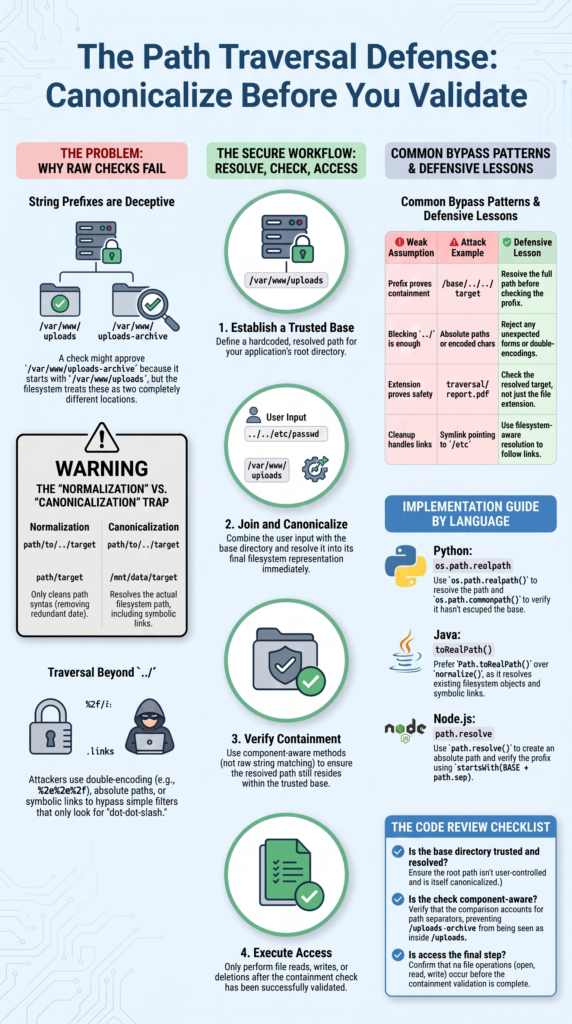
Python can implement the canonicalization-first approach with os.path.realpath() and a path-aware containment check.
For example:
import os
BASE = os.path.realpath(“/var/www/uploads”)
def safe_path(user_input):
if “\x00” in user_input:
raise ValueError(“Invalid path”)
candidate = os.path.realpath(
os.path.join(BASE, user_input)
)
try:
if os.path.commonpath([BASE, candidate]) != BASE:
raise PermissionError(“Path escapes base directory”)
except ValueError:
raise PermissionError(“Invalid path”)
return candidate
The order matters.
First, the trusted directory is resolved. Then the user-controlled value is joined to it. After that, the complete path is resolved. Only then does the application check containment.
MITRE CWE-22 lists realpath() as one possible built-in canonicalization function for this type of weakness.
The containment check also avoids the raw-prefix problem. /var/www/uploads-archive should not pass because its characters happen to begin with /var/www/uploads.
We should also handle failures deliberately. Different drives, malformed paths, invalid values, and resolution errors should not become accidental authorization successes.
One more point: this example assumes the application has a clear rule for missing files and symlinks. If the target does not exist yet, realpath() behavior and the required design can differ from an application that only reads existing files.
How Should Java Handle Canonical Paths?
Java provides filesystem APIs that can help us resolve a path before making an access decision. Two useful methods are normalize() and toRealPath(), but they do different jobs. normalize() cleans the path structure. It does not, by itself, prove where a symbolic link leads. toRealPath() resolves an existing filesystem path and can follow symbolic links.
Research from arXiv
“Assuming that no path string contains symbolic links and that whitelisted path string is canonicalized while user-supplied path string S₂ may or may not be canonicalized” – arXiv
A basic pattern looks like this:
Path base = Paths
.get(“/var/www/uploads”)
.toRealPath();
Path candidate = base
.resolve(userInput)
.toRealPath();
if (!candidate.startsWith(base)) {
throw new SecurityException(“Invalid path”);
}
The order still matters. Resolve the trusted base first. Join the requested path. Resolve the result. Then check whether the result remains below the trusted directory.
Java’s Path.startsWith(Path) compares path components, so it avoids the common raw-string problem where /uploads-archive might appear to belong under /uploads.
We should also define what happens when the requested file does not exist. toRealPath() can fail in that case, so applications that create files need a slightly different design. Reject unexpected errors safely. Don’t turn them into permission grants.
What Should Node.js and Other Languages Do?
The language changes, but the security rule doesn’t. We still need to resolve the candidate path, check its relationship to the trusted directory, and access the filesystem only after that check.
Node.js provides path.resolve() for producing an absolute, normalized path. That helps with . and .., but it does not by itself prove that a symbolic link cannot escape the trusted directory. For that reason, applications with symlink concerns may also need filesystem-aware resolution.
A basic lexical example looks like this:
const path = require(“path”);
const BASE = path.resolve(“/var/www/uploads”);
function safePath(userInput) {
const candidate = path.resolve(BASE, userInput);
if (
candidate !== BASE &&
!candidate.startsWith(BASE + path.sep)
) {
throw new Error(“Invalid path”);
}
return candidate;
}
This handles an important prefix mistake because /uploads-archive does not begin with /uploads/.
Other languages have similar tools. Go has filepath.Clean(), C provides realpath(), and .NET has Path.GetFullPath(). Each has its own behavior.
So don’t assume that a function named Clean, Normalize, or FullPath performs authorization. It doesn’t.
Our code reviews focus on the final property: does the resolved resource stay inside the approved directory?
How Should You Test a Canonicalization Defense?
Testing should cover how the application processes a path from the request to the final filesystem call. Checking one ../ payload isn’t enough. A defense can block that exact form while missing another representation.
Build tests around different path behaviors:
- Relative traversal.
- Absolute paths.
- Encoded separators.
- Double-encoded input.
- . and .. combinations.
- Symbolic links.
- Platform-specific separators.
- Invalid paths.
- Similar directory prefixes.
For each case, the expected result should be clear.
| Test | Expected result |
| File inside base | Allowed |
| Resolved path outside base | Rejected |
| Absolute path outside base | Rejected |
| Invalid path | Rejected |
| Symlink outside base | Rejected when links aren’t trusted |
| Similar prefix | Rejected |
A useful test also confirms that the application never performs the unauthorized file operation. A rejected HTTP response alone doesn’t prove that. The server might still open the file before deciding what response to send.
We should test logging and error handling too. Failed traversal attempts shouldn’t expose filesystem details through stack traces or error messages.
Run these checks during development, then repeat them during security testing. Path handling often changes during refactoring, especially when developers move file access into a helper function.
That makes regression tests worth keeping.
What Additional Controls Reduce Path Traversal Risk?
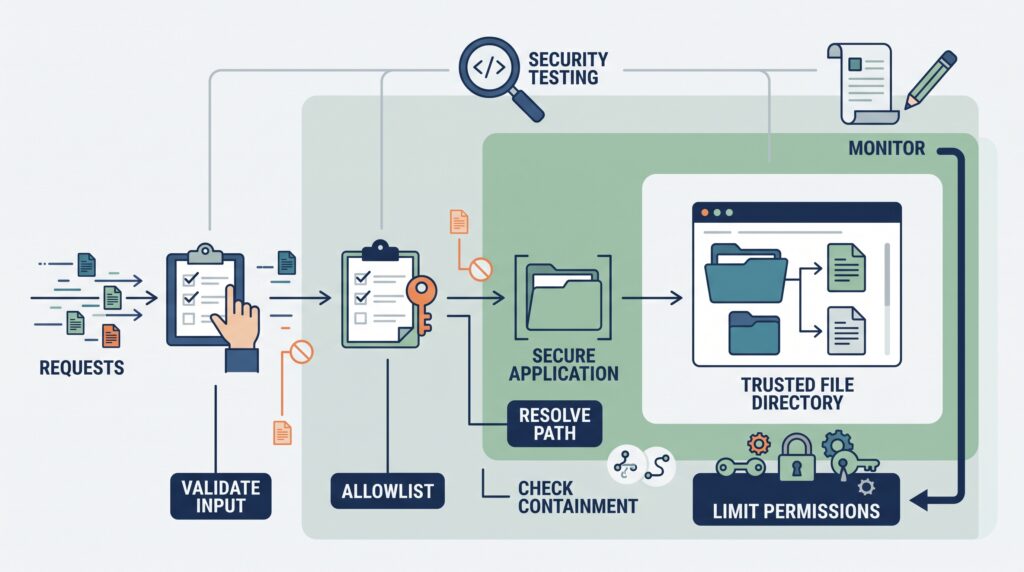
Canonicalization should not be the only defense. If an application can avoid accepting arbitrary filesystem paths, that’s usually a better design.
For example, instead of accepting:
/download?file=reports/2026/summary.pdf
the application could accept a record identifier and look up the server-controlled path internally.
That removes much of the path parsing problem.
Other useful controls include:
- Known-good filenames.
- Strict input validation.
- Canonical containment checks.
- Least-privilege filesystem permissions.
- Separate upload directories.
- Controlled decoding.
- Safe archive extraction.
- Security logging.
- Automated regression tests.
File permissions matter because a path traversal bug becomes far more serious when the application can read sensitive system files. Limit what the service account can access.
Uploads deserve extra care too. A writable upload directory should not normally sit beside executable application files. Archive extraction needs the same containment rule because archive entries can contain paths that escape the intended extraction directory.
We also need to think about the full request path. A gateway may decode input before the application receives it. The application may then decode it again. That can create two different views of the same request.
A web filter can add another layer of detection, but it shouldn’t replace the application’s containment check.
FAQ
What is the difference between directory traversal and a path traversal attack?
Directory traversal is the act of moving outside an intended directory by changing a file path. A path traversal attack uses this technique to access files or directories the application should not expose. Attackers may use ../ traversal, absolute paths, or encoded characters. A successful attack can lead to arbitrary file read, file write, or directory escape.
Why is a canonical path important for path traversal prevention?
A canonical path gives an application a consistent representation of a file location before it makes an access decision. Without path canonicalization, different path forms can confuse security checks.
Relative paths, redundant separators, and encoded traversal can represent unexpected locations. Resolving the path against a trusted base directory helps the application confirm the requested file stays within the permitted location.
Is canonicalization before validation always required for file paths?
For security-sensitive file paths, canonicalize before validate is a safer approach. The application should first resolve the path into the form it expects to use. It can then perform input validation and containment checks.
This order helps prevent encoding bypasses, path prefix errors, and normalization issues from changing the destination after the application has already approved the request.
Can URL encoding cause a path traversal vulnerability?
Yes. URL encoding can hide traversal characters from an early security check. For example, %2e%2e%2f can represent ../ after decoding. Double encoding can create additional risk when different application components decode the value at different stages.
Applications should control when decoding occurs and validate the representation that will actually be used for filesystem access.
How can developers reduce the risk of a path traversal vulnerability?
Developers should avoid accepting arbitrary filesystem paths when possible. When user input is necessary, the application should use a trusted base directory, resolve the requested path, and verify containment before accessing it.
An allowlist can further restrict permitted files or identifiers. Testing should also cover encoded input, symbolic links, mixed slashes, and other traversal payloads.
Apply Path Traversal Defenses at the Final Path
Path traversal defenses work best when you check the path your application will actually use. Resolve the trusted base, canonicalize the result, then confirm it stays inside the approved directory before access. That’s the key rule. Resolve first, check containment, access last.
Make this approach part of your development and code-review process with the Secure Coding Practices Bootcamp, where developers can practice secure coding techniques through hands-on exercises.
References
- https://arxiv.org/pdf/2604.04952v4#7#4
- https://ar5iv.labs.arxiv.org/html/1908.04502#2