


Examples security misconfiguration web server problems are more common than many teams expect. We were fixing a critical vulnerability when we saw the real issue. It wasn’t our patch. The server, a fresh Ubuntu machine, was giving out way too much detail in every error message.
At Secure Coding Practices, we see these invisible gaps as the bigger threat. Keep reading to see why they open wider than any single bug.
Quick Recap – Web Server Security Misconfiguration
Web server security depends on secure configuration from deployment through ongoing maintenance. Reducing risk means replacing unsafe defaults. You must also limit information exposure. Continuously validate every configuration change.
- Default settings are convenient, not secure. They will fail if left unchanged.
- A single verbose error can hand an attacker the exact map they need to bypass all other defenses.
- Prevention is not a one-time task. It is an ongoing process. This involves automated hardening. It also requires relentless validation.
Are Default Credentials Putting Your System at Risk?

The classic case is the unchanged default password. It feels almost silly, but it happens constantly. The pressure to deploy, to show something is working, takes over. A server installs with a pre-set admin:admin login, and in the rush to go live, that detail slips through. It’s a simple oversight with a catastrophic result.
An attacker with a basic scanner finds the /admin console, guesses once, and they’re in. They own everything. All the complex authentication logic you wrote becomes useless because of one unmodified setting.
We’ve seen the common pitfalls firsthand in our labs:
- Unchanged passwords for admin interfaces like Tomcat Manager.
- Factory credentials left in database config files.
- Default API keys sitting in cloud service consoles.
The vendor’s goal is a smooth first-run experience. Your goal is to replace those default settings before anything goes online. At our bootcamp, we drill this into our workflow: a deployment script’s first job is to hunt down and kill any factory-default logins. It isn’t glamorous work, but it slams the most obvious door shut.
Could Your Server Be Listing Its Contents Without You Knowing?
Directory listing starts with a good intention. It’s handy for internal file shares. On a live web server, it’s a gift to attackers. If it’s enabled, going to a path like yoursite.com/uploads/ won’t give you a “Forbidden” message. You’ll get a tidy, clickable list of every file in that folder.
We’ve pulled this up in student environments more times than I can count. It exposes backup.zip files full of database dumps, config.ini files with plaintext passwords, and raw user_data.csv exports. It isn’t a hack. It’s the server politely handing over its most sensitive stuff on a silver platter.
The setting lives in the web server’s main config. For Apache, it’s Options +Indexes. In Nginx, it’s autoindex on. Fixing it takes one line, but you have to set it right for every virtual host and every environment. The danger is straightforward information disclosure.
An attacker doesn’t need to guess filenames; they just click through. They find a .bak file, download it, and now they have old source code complete with secrets you thought were gone.
Could Debug Mode Still Be Running in Production?
Credits: Data Vids
This is a developer’s familiar mistake. You enable debug mode locally to trace a bug. It works. But that config file with DEBUG = TRUE often gets pushed to production. Now, a user error doesn’t show a generic message. It dumps raw stack traces and internal data to their browser.
That output is a goldmine. It reveals your exact software versions, filesystem paths, and even bits of SQL. It turns a generic attack into a targeted one.
Research from owasp.org shows
“The application server comes with sample applications that are not removed from the production server.” – owasp.org
We see this constantly. Our policy is strict: DEBUG must be an environment variable, never in a committed file. It’s set to FALSE everywhere except a developer’s own machine. It’s a simple rule that closes a huge door.
Could Missing Security Headers Be Putting Your Site at Risk?
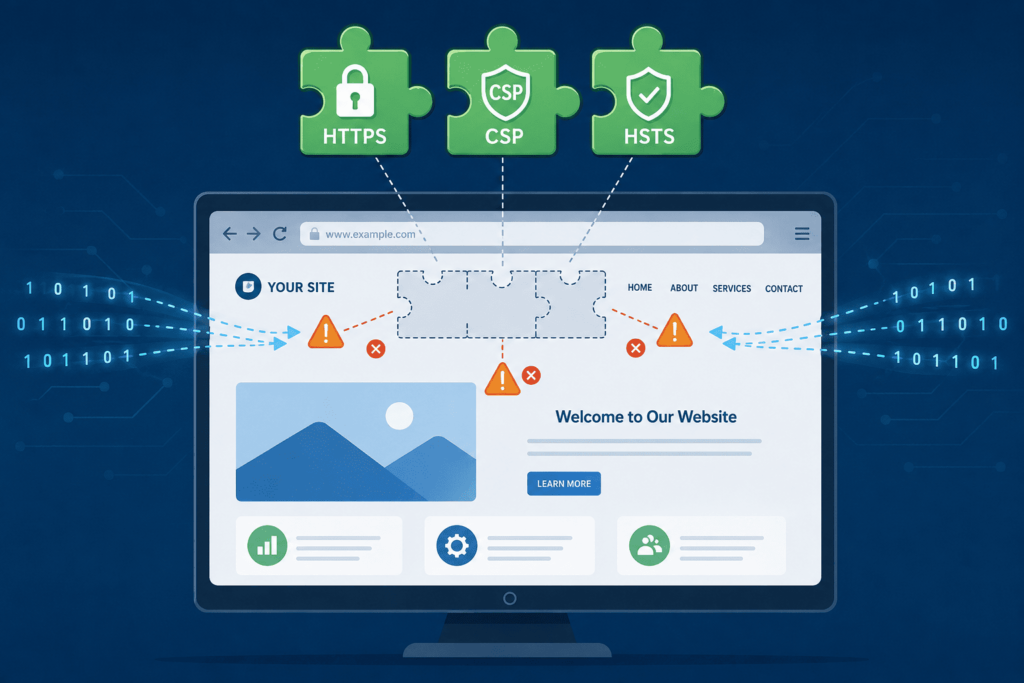
This is a subtle but critical hole. Modern browsers have defenses, but your server must activate them. Missing security headers is like forgetting to lock a strong door. The Content-Security-Policy (CSP) header, for instance, limits damage from XSS flaws by controlling script sources.
We enforce checks for key headers:
Strict-Transport-Security: Enforces HTTPS.X-Frame-Options: Prevents malicious framing.X-Content-Type-Options: Stops file type misreading.Referrer-Policy: Controls leaked URL data.
Configuring these is a server task in httpd.conf or nginx.conf. It’s separate from your code, but vital. No build passes our review until a scan confirms these headers are set. It’s a mandatory layer of armor.
Could Unnecessary Services Be Creating Security Risks?
Web servers come packed with optional modules, sample apps, and old protocols. Many of these become common security misconfigurations when they’re left enabled without a purpose. An enabled PUT method on a static server is a weapon. An outdated TLS 1.0 protocol is a weak link. An exposed .git directory hands over your source history.
The software itself is a risk. An unpatched server broadcasts its version in headers. Attackers match it against known bug lists. If you’re behind on patches, they have the key.
We teach minimal builds. Patching is active configuration. Every extra service is another door to guard. Our labs start from stripped-down images for this reason.
| Unnecessary Component | Security Risk | Recommended Action |
| Legacy protocols and unused services | Increase the attack surface and expose known vulnerabilities | Disable unused services and remove unsupported protocols |
Sample applications and exposed .git directories | Reveal sensitive files, source code, or internal information | Remove sample content and block public access to development artifacts |
| Outdated server software and unnecessary HTTP methods | Allow attackers to exploit known flaws or upload unauthorized content | Apply security patches promptly and disable unused HTTP methods such as PUT and DELETE |
How Can You Build the Habit of Secure Configuration?
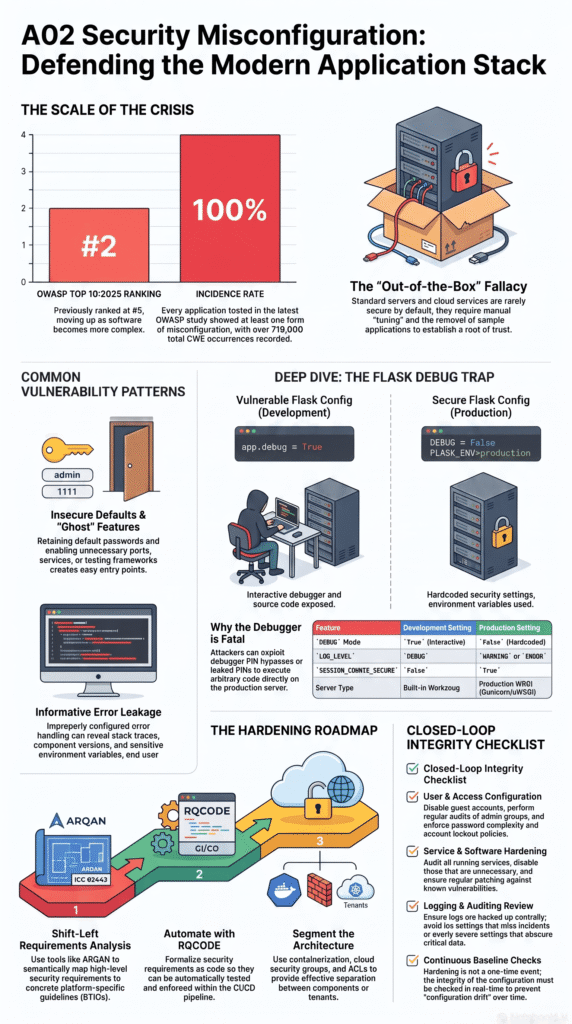
You stop this by rejecting defaults. Every new server or container must start from a hardened baseline. We rely on automation here. Ansible playbooks, Terraform modules, Dockerfiles with secure settings. These scripts codify the rules. They make sure disabling directory listing or setting security headers isn’t a manual step someone forgets at 2 AM.
Next, you need validation. Run automated checks against your staging and production environments to catch cloud misconfiguration risks alongside open ports, TLS issues, and verbose errors. This creates a feedback loop to catch configuration drift. It’s not about blame, it’s about visibility.
As highlighted by Semantic Scholar
“The tool can be used to identify insecure or missing configurations in online-sourced configurations and promotes best practices of having secure configurations for a stronger security posture.” – Semantic Scholar
Finally, it’s a mindset shift. We try to build this in our bootcamp. The application’s boundary includes the web server it runs on. Code reviews should sometimes look at deployment configs. Threat modeling should ask, “What if this server setting is wrong?” It’s the boring, systematic work of closing gaps no one should find.
FAQs
How can I find hidden web server security misconfiguration issues?
You can find web server security misconfigurations by checking for several common issues. Look for directory listing enabled, exposed debug endpoints, public debug logs, verbose error messages, information leakage in responses, sensitive data in source maps, source code disclosure, and verbose stack traces. These weaknesses reveal valuable information that attackers can exploit.
Which server settings should I review after deployment?
Review insecure default settings, default admin passwords, unpatched web servers, outdated server software, unnecessary running services, leftover sample applications, unsecured staging servers, unsecured FTP and Telnet services, and exposed management interfaces. Every unnecessary or outdated component increases your server’s attack surface.
What file and access problems commonly expose sensitive information?
Check for improper file permissions, accessible backup files, backups stored in the webroot, exposed sensitive files, exposed .git directories, improper or broken access control, insecure directory traversal, and unsecured database admin panels. These issues can expose confidential data or allow unauthorized access.
Which web security headers and TLS settings deserve immediate attention?
Verify the presence of security headers. Look for missing HSTS headers, X-Content-Type-Options, X-Frame-Options, Content-Security-Policy, and Referrer-Policy headers. Also, assess your TLS configuration for weaknesses such as weak cipher suites, SSLv3 enabled, TLS 1.0 enabled, expired SSL/TLS certificates, certificate chain misconfigurations, and hostname mismatch certificates. These problems weaken browser security and encrypted connections.
What configuration mistakes increase the risk of server compromise?
Attackers often exploit certain weaknesses to compromise servers. You should fix these issues. These include unsecured API endpoints. Also, fix insecure CORS policies. Permissive cross-origin settings are a risk. The HTTP methods allowed are important. Be careful with PUT and DELETE methods. Cookies should have HttpOnly. They should also have the Secure flag.
Insecure session cookies are dangerous. Session fixation vulnerabilities must be addressed. Handle file uploads safely. Improper XML parser settings (XXE) need fixing. Unsafe deserialization endpoints are a threat. Misconfigured rate limiting is a problem. Improper firewall rules are risky. Load balancers can be misconfigured. Insecure redirect or forward configurations are a weakness. Insufficient logging configuration is also an issue.
Close the Gaps Before They Become Problems
Even small web server mistakes can leave your systems open to attacks, and fixing them later often costs far more than preventing them now. Make security checks part of your regular workflow, not a one time task. If you want practical, hands-on training that helps developers write safer code from day one, join the Secure Coding Practices Bootcamp and build the skills to spot common risks before they reach production.
References
- https://www.semanticscholar.org/paper/Assessing-the-NGINX-Server%E2%80%99s-Configuration-Security-Lekcharuthas-Khurat/2c2be49c12695cc50802fb9f146953bcb76ff9dc
- https://owasp.org/Top10/2021/A05_2021-Security_Misconfiguration/