

A character encoding validation allowlist helps protect applications by accepting only the characters that belong in a specific input and rejecting everything else. Instead of trying to block every possible malicious character, this approach creates clear rules that reduce risk and simplify validation.
As part of Secure Coding Practice, an allowlist strengthens input handling, improves consistency, and makes applications easier to secure. Keep reading to learn how this simple strategy can strengthen your defenses.
What You’ll Learn
Before diving deeper, here are the key ideas you’ll take away from this guide:
- An allowlist is a proactive “yes list” that only permits pre-approved, safe characters, fundamentally preventing a wide range of injection attacks.
- Implementing a centralized validation function ensures consistency, reduces human error, and makes security maintenance manageable across an entire application.
- This practice is a core, non-negotiable component of secure coding, shifting the mindset from reactive filtering to proactive design-by-control.
The Problem With Playing Defense

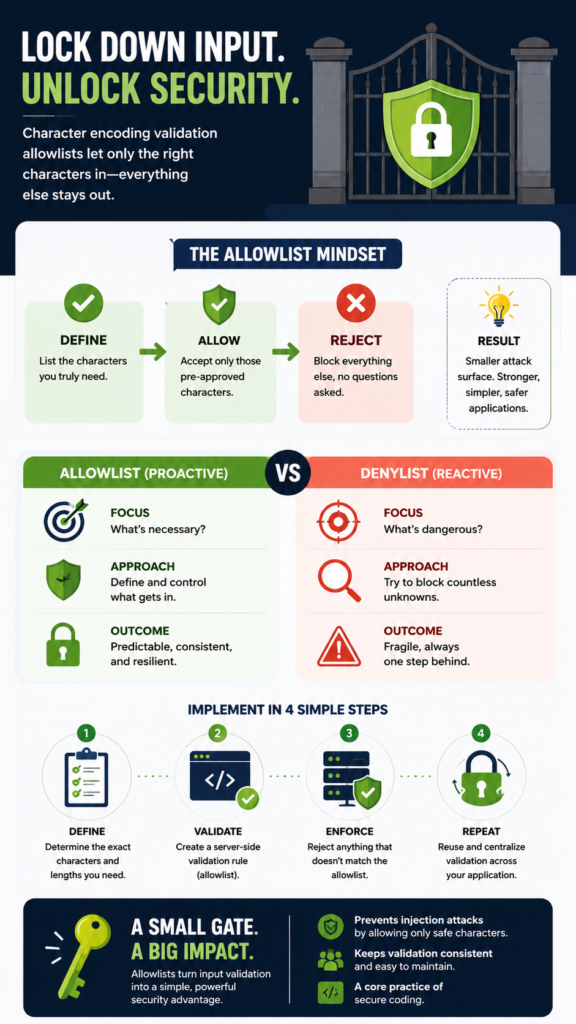
We used to think about security in terms of blacklists. You’d make a list of bad things, SQL keywords, script tags, special symbols, and try to filter them out. The difference between allowlist and denylist validation becomes obvious once you compare trying to block endless threats versus permitting only known-safe input.
An attacker only needs to find one permutation, one obscure encoding, one clever combination you forgot to ban. You’re in an endless race, and you’re always one step behind. The mental load is exhausting.
Every new feature introduces new input fields, and each one is a potential new front in this unwinnable war. You’re not building, you’re perpetually patching holes.
This reactive stance creates fragile software. It relies on the developer’s omniscience to foresee every possible malicious input. That’s an impossible standard.
- Attackers innovate faster than defensive lists can be updated.
- Context matters: a < character is dangerous in HTML but might be valid in a math forum’s text input.
- Filtering logic can often be bypassed with double encoding or unusual character representations.
The sheer volume of potential threats makes a blacklist strategy inherently unstable. It’s a foundation of sand.
How Does the Allowlist Mindset Help Define Your World?
So, we flipped the script. Instead of asking, “What’s dangerous?” we started asking, “What’s necessary?” For a user’s first name field, what do we truly need? Probably the letters A-Z, both cases, maybe a hyphen, an apostrophe for names like O’Connor. That’s it. We define that finite set.
“When building secure software, allowlisting is the recommended minimal approach. Denylisting is prone to error and can be bypassed with various evasion techniques and can be dangerous when depended on by itself.” – OpenSSF
This is the allowlist, the “yes list.” Anything not on that list is rejected immediately, no questions asked. This changes everything. The attack surface shrinks from “everything in the universe” to “these 54 characters.” You’re no longer chasing threats; you’re defining the boundaries of a safe zone.
The system’s behavior becomes predictable. You know exactly what will pass through, and so does anyone reviewing your code. It’s a shift from fear-based reaction to design-based control.
This philosophy acknowledges a simple truth: for any given function, the set of valid inputs is tiny compared to the set of possible inputs. Your job is to describe that tiny, safe island.
Building Your First Line of Defense
Implementing this starts with a decision. You need a validation function. Let’s say you’re working with a user registration form. You sit down and specify the rules for each field. For the “Username” field, you might decide: alphanumeric characters only, plus underscores, length between 3 and 20 characters.
You write a function, isValidUsername(), that enforces this. It doesn’t remove bad characters; it checks if the entire string matches the allowed pattern. If it doesn’t match, the function returns false, and the form submission is rejected with a clear error: “Username can only contain letters, numbers, and underscores.”
The key is to do this validation on the server-side. Client-side JavaScript validation is for user experience; server-side validation is for security. They must both be done, but the server is the final, non-negotiable authority.
This process forces clarity. It makes you think purposefully about each data point you collect.
- Username: [a-zA-Z0-9_]{3,20}
- Full Name: [a-zA-Z\s\.\’\-]{1,50} (Letters, spaces, periods, apostrophes, hyphens)
- Simple Address Line: [a-zA-Z0-9\s\.,#\-]{1,100}
You’re not just writing code; you’re writing a security policy for that piece of data. These practical rules are simple allowlist validation examples that can be reused across usernames, addresses, and other user inputs to keep validation consistent.
Where Allowlists Fit in Secure Coding Practices?
This isn’t an optional tip or a neat trick. In our work, we consider character encoding validation via allowlists a first principle of secure coding. It’s on the same level as using parameterized queries for SQL or hashing passwords. It’s a fundamental layer. Think of your application’s security like an onion. The outer layer might be a web application firewall.
The next layer is authentication. But right there at the core, where your code touches raw user input, is where you apply your allowlist validation. It’s the earliest point you can stop an attack, and often the most effective.
“Different or unexpected changes in encoding can allow attackers to workaround validation or input sanitation. Using a compatibility mode can allow attackers to disguise malicious strings by using characters that are beyond the ASCII range. Using non-compatibility normalization or stripping of characters can lead to a harmless string such as <script生> turn into <script>.” – Wikipedia
Other practices depend on it. A parameterized query is useless if the malicious payload has already been transformed or accepted because of lax input validation. The allowlist simplifies the problem space for every other security component that follows.
We treat it as a non-negotiable entry in our project checklists. No feature goes to code review without a defined input validation strategy, and an allowlist is almost always the answer.
How Can You Implement This in Practice?
Credits: Tom Erickson
Let’s get concrete. You’re building a comment system. The input is text. A naive approach accepts everything, then tries to sanitize HTML. That’s a blacklist. The allowlist approach is different. First, you decide what a comment is. Plain text? Maybe basic formatting like bold and italics using Markdown syntax (**bold**, *italic*)? You define that rule.
Your validation function would allow alphanumerics, punctuation, spaces, and the specific Markdown symbols you support. Crucially, it would reject the raw <, >, and & characters. When you need to display the comment, you don’t just dump it to HTML. You run your Markdown parser on the already-validated safe text.
The dangerous characters were never there to begin with. This is the power chain: validate strictly, then process safely. The following table contrasts the two mentalities for this comment system scenario:
| Aspect | Blacklist (Reactive) Approach | Allowlist (Proactive) Approach |
| Mindset | “What bad things do I need to remove?” | “What good things do I need to allow?” |
| Security Stance | Defensive, always catching up. | Controlled, defining the rules. |
| Implementation | Regex that strips out /<script>/i and other tags. | Regex that matches only allowed character sets. |
| Maintenance | Constant updates as new attacks are found. | Stable; only changes if business rules change. |
| Outcome for Comment | Might allow strange encoded attacks. | Only allows pre-defined text and Markdown symbols. |
The difference isn’t just technical, it’s philosophical. One is a bouncer trying to spot troublemakers in a massive crowd. The other is a private event with a strict guest list.
Common Pitfalls and How to Avoid Them?
Even with the best intent, mistakes happen. The biggest pitfall is inconsistency. Teams also run into denylist validation pitfalls when different developers rely on separate filtering rules instead of sharing a centralized validation approach.
Everyone on the team uses ValidationUtils.isValidUsername(input). This becomes part of your team’s DNA. Another pitfall is overly restrictive lists. If you reject valid hyphens in last names, users will get frustrated and you’ll face support tickets. The fix is to gather requirements carefully.
What are the real-world use cases? Internationalization adds another layer. The name “José” or the city “München” contains characters outside basic A-Z.
Your allowlist needs to expand to include accented characters, which means using Unicode property escapes in your regex (like \p{L} for any letter) and setting the proper locale. It’s more work upfront, but it prevents problems later.
Don’t forget about length. An allowlist for characters is useless if someone can submit a ten-thousand-character string and crash your parser. Always pair character rules with sensible length limits.
How Can You Scale This Practice Across Your Project?

This starts small, with one form. But its real value is at scale. Imagine a large application with hundreds of inputs. Manually coding each validation is a nightmare and guarantees bugs. The strategy is to build patterns. Create a TextInput component in your frontend framework that has built-in validation props: allowedPattern, maxLength.
This component handles the client-side warning. Then, on the backend, you create a matching set of validation schemas, perhaps using a library like Zod or Yup. You define your UserRegistrationSchema once, and it validates the entire payload. The key is a single source of truth.
The validation rules are defined in one place (ideally on the backend), and the frontend component mirrors them for UX. When the business says, “We now allow emojis in bios,” you update the schema in one file, and the change propagates.
This turns security from a chore into a structured part of your development workflow. It becomes routine, not an afterthought.
Code reviews then focus on whether the correct schema was applied, not on deciphering a custom regex in every other function.
FAQ
Doesn’t this break things for users with unusual characters?
It can, if done poorly. The goal isn’t to be restrictive for the sake of it, but to be intentional. You research what’s needed. For a name field in a global application, your allowlist must include a wide range of Unicode letters and common punctuation. It’s a design requirement, not just a security one.
What about file uploads or binary data?
The principle still applies, but the technique changes. You don’t validate characters for an image; you validate file properties. Create an allowlist for allowed MIME types (e.g., image/jpeg, image/png). Also, validate file size limits. The core idea, defining what you accept, remains the same.
Can’t I just use a framework’s built-in escaping?
Escaping (like converting < to <) is a complementary practice, not a replacement. You should always escape output for its context (HTML, SQL, etc.). But relying solely on escaping is putting all your trust in one mechanism. Validation is an earlier, independent layer. Security is about layers.
How do I handle complex text like rich HTML from a WYSIWYG editor?
This is a tough case. A full HTML allowlist is complex. The practical approach is to use a reputable, security-focused rich-text editor library that sanitizes HTML on the server-side using a well-maintained allowlist of tags and attributes. You are, in effect, delegating this complex validation to a specialized tool, which is a smart strategy.
Why Is a Locked Gate So Simple?
A character encoding validation allowlist succeeds because it focuses on control instead of complexity. By defining exactly which characters are allowed, you eliminate countless unnecessary risks before they reach your application. This simple mindset creates stronger, more predictable software with less maintenance over time.
Ready to build secure coding habits that work in real projects? Join the Secure Coding Practices Bootcamp to gain hands-on experience with input validation, OWASP Top 10 defenses, secure authentication, and other practical techniques you can apply immediately.
References
- https://best.openssf.org/Secure-Coding-Guide-for-Python/02_encoding_and_strings/pyscg-0045/
- https://en.wikipedia.org/wiki/Character_encoding