


Not every piece of data should be validated the same way. Choosing right validation strategy scenario helps prevent bugs, security issues, and confusing application behavior before they reach production. At Secure Coding Practice, we encourage developers to treat validation as a context-specific decision instead of a universal rule.
When your validation matches the purpose and risk of the data, your code becomes more reliable, maintainable, and secure. Keep reading to learn how to choose the right validation strategy for every scenario.
What You’ll Learn
A good validation strategy starts with understanding the data, not just checking its format. Here are the key ideas you’ll take away from this guide.
- The right validation strategy is dictated by the data’s purpose and the potential impact of it being wrong, not by a one-size-fits-all rule.
- An allowlist (whitelist) is the strongest strategy for known, finite options, while a blocklist (blacklist) is a last resort for open-ended fields.
- Layering validation strategies (syntax, semantic, business logic) at different system boundaries creates a robust, defense-in-depth security posture.
What Defines a “Validation Scenario”?

A validation scenario is the combination of three things: the data’s source, its intended use, and the cost of failure. Think about a username field versus a product review comment box. Both are strings from a user. But the username is a functional key, used in URLs and database lookups.
Its failure cost is high: invalid characters could break routing or cause SQL errors. The review comment is display content. Its failure cost is different: malicious scripts could attack other users. The scenario dictates the strategy. For the username, you need strict syntactic validation, maybe only alphanumerics and underscores.
For the review, you need rigorous output encoding and perhaps a content moderation layer. Combining proper character encoding with an allowlist for acceptable input creates a much stronger defense than relying on input filtering alone. Ignoring the scenario leads to either overkill, wasting development time, or under-protection, creating vulnerabilities.
We learned to categorize inputs by their risk profile first. It saves time and makes our secure coding practices more targeted and effective.
How Do You Assess Risk for Different Data Inputs?
You start by asking simple questions. Where is this data from? A logged-in user, an anonymous post, a third-party API? Each source has a different trust level.
Then, what will your system do with it? Will it be executed as code (like a search query), stored and displayed (like a comment), or used to make decisions (like a payment amount)? The answers map to a risk level.
High-risk inputs demand the strictest validation, usually an allowlist. A “role” selection field is high-risk; it controls system access. It should only accept predefined values like “user,” “editor,” “admin.” An allowlist is perfect. A low-risk input, like a “favorite color” free-text field for internal analytics, might only need basic sanitization to prevent storage issues.
Medium-risk inputs, like a shipping address, need a balanced approach: allowlist for country (from a known list), structured format for postal code, and careful sanitization for the street name field to prevent injection in downstream systems like label printers.
This assessment isn’t formal, it’s a quick mental checklist we run for every new field added to a form or API.
When Should You Use an Allowlist Strategy?
Use an allowlist when you can define the complete set of valid values. It’s the gold standard. Understanding the tradeoffs between allowlist and denylist approaches helps explain why predefined acceptable values consistently provide stronger protection. It’s for scenarios where the data is categorical or follows a strict, predictable syntax.
“When building secure software, allowlisting is the recommended minimal approach. Denylisting is prone to error and can be bypassed with various evasion techniques and can be dangerous when depended on by itself. Even though denylisting can often be evaded, it can often be useful to help detect obvious attacks. So while allowlisting helps limit the attack surface by ensuring data is of the right syntactic and semantic validity, denylisting helps detect and potentially stop obvious attacks.” – Github
- User roles: [‘guest’, ‘user’, ‘moderator’, ‘admin’]
- Order status: [‘cart’, ‘paid’, ‘shipped’, ‘delivered’, ‘cancelled’]
- Allowed file upload types: [‘image/jpeg’, ‘image/png’, ‘application/pdf’]
- Country codes: A list of valid ISO 3166-1 alpha-2 codes.
The power of an allowlist is its simplicity and strength. Validation is a direct yes/no check against a known list. Anything not on the list is invalid. It eliminates ambiguity and is incredibly resistant to injection attacks. If your scenario involves a finite number of correct answers, an allowlist isn’t just an option, it’s the only correct choice.
When Is a Blocklist Strategy Acceptable?
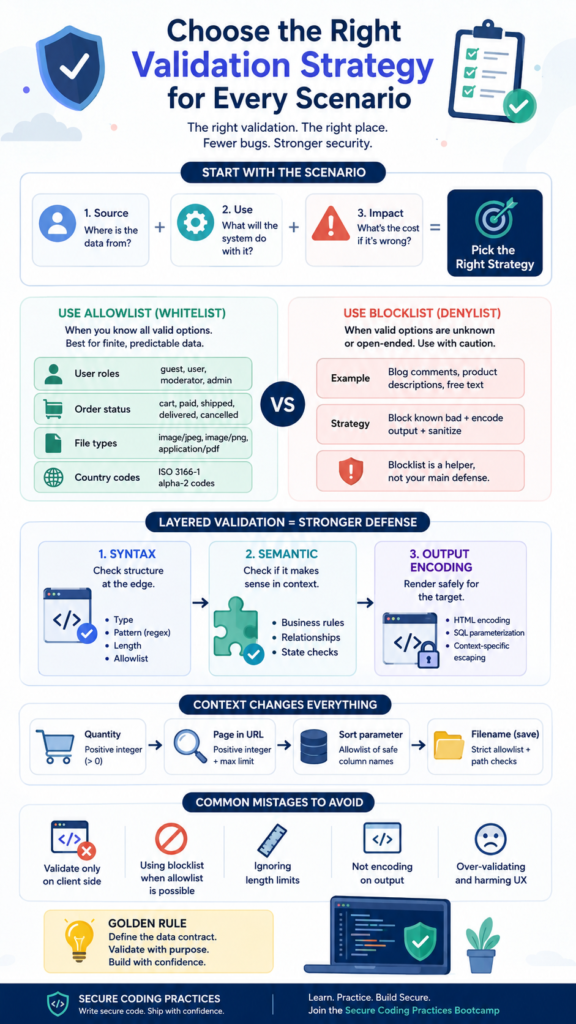
A blocklist, where you reject known bad values, is inherently fragile. The list of “bad” is infinite. We treat it as a last resort, only acceptable in specific, open-ended scenarios where an allowlist is impossible. The classic example is a “content” field: a blog post body, a product description, a comment. You can’t list all valid blog posts.
Here, you use a blocklist in combination with other strategies. You might block a list of obviously malicious script tags or profanity, but your primary defense is output encoding. You validate that it’s a string, store it safely, and then ensure it’s properly encoded when rendered to HTML. Another acceptable use is as a temporary, additional filter.
For instance, you might have an allowlist for usernames (alphanumerics), but also maintain a blocklist of reserved words like “admin” or “system” to avoid confusion. The blocklist adds a second layer, but it doesn’t bear the primary security burden.
The rule is: if you can use an allowlist, you should. If you can’t, your validation strategy must be more complex and focus on safe handling, not just input rejection.
How Does Context Change Your Validation Approach?
Credits: Cam Scholey
The same piece of data needs different validation in different contexts. A number is a great example. In a “quantity” field for adding items to a cart, you’d validate it as a positive integer. But if that number is part of a search query parameter (like ?page=3), the validation changes.
You still check it’s a positive integer, but you also need to consider maximum values to prevent denial-of-service through outrageously large numbers that could crash pagination logic.
Similarly, a string representing a “sort by” parameter (?sort=price) must be validated against an allowlist of known, safe database column names to prevent SQL injection, not just checked as a string. The context, where the data is used in your system architecture, is crucial.
A filename provided by a user needs brutal allowlist validation (only certain characters) and path traversal checks before it’s used in a file system operation. That same filename, once stored in your database and later displayed on a download page, only needs standard output encoding.
We design validation by following the data’s journey through the system and hardening each point where it’s interpreted or used.
What Are the Layers of a Robust Validation Strategy?
Strong validation isn’t a single check. It’s a series of layered defenses, a concept central to secure coding practices. We think in three main layers, applied at different boundaries.
- Syntax Validation: At the very edge, when data enters (API, form). This checks basic structure: is it the right type? Does it match a regex pattern? Is it within length bounds? Effective data type validation paired with an allowlist ensures unexpected values are rejected before they reach application logic. This layer uses allowlists wherever possible.
- Semantic Validation: Slightly deeper, often in the service or business logic layer. This checks if the data makes sense in context. Is the user trying to apply a coupon that’s expired? Is the shipping date in the past? This often involves checks against other data in the system.
- Output Encoding/Sanitization: When data leaves your system (to a database, to an HTML page, to a shell command). This ensures the data is rendered safely for that specific medium, neutralizing any potentially malicious content that slipped through.
The following table shows how these layers work together for a “user bio” field:
| Layer | Validation Strategy | Performed At | Example for “Bio” Field |
| Syntax | Allowlist for character set, length limit. | API Route Handler | bio: z.string().max(500).regex(/^[\p{L}\p{N}\s.,!?-]+$/u) |
| Semantic | (Optional) Check for spam links or profanity via a service. | Business Logic Service | Call to internal moderation service API. |
| Output Encoding | Encode for HTML context before rendering. | View/Template Layer | `{{ user.bio |
This layered approach means a failure in one layer doesn’t mean a total system compromise.
How Do You Implement This Without Over-Engineering?
The fear of complexity can lead to under-validation. The trick is to standardize. Don’t invent a new pattern for every field. Create reusable validation components. We use schema libraries (like Zod) to define syntax validation in one place. These schemas become our single source of truth for what data should look like.
For semantic validation, we write pure, testable business rule functions. For output encoding, we rely on framework defaults (like React’s automatic escaping) or use well-trusted libraries for contexts like HTML or SQL. Start by applying strict syntax validation with allowlists to all new features.
Retrofit old, critical features when you touch them. You don’t need to rebuild everything at once. Just make sure the new code you write follows the pattern. Over time, your codebase becomes more consistent and secure by default, not through heroic effort, but through routine practice.
It feels like over-engineering the first time you set up a schema for a simple form. By the tenth form, it’s just how you work, and bugs are noticeably fewer.
What Are Common Mistakes in Strategy Selection?

The most common mistake is using the wrong tool for the scenario, like our “admin” role bug. Others include:
- Validating only on the client side: This is for user experience, not security. Always duplicate validation on the server.
- Using a blocklist where an allowlist is possible: This creates a maintenance nightmare and a security hole.
- Forgetting about data length: Allowing a 10,000-character username can break your UI and stress your database.
- Not validating data on output: Assuming clean input means safe output. Different contexts (HTML, SQL, JSON) need different encoding.
- Over-validating and harming UX: Rejecting legitimate international characters in names because your regex is too narrow.
“An application should check that data is both syntactically and semantically valid (in that order) before using it in any way (including displaying it back to the user). Syntax validity means that the data is in the form that is expected. For example, an application may allow a user to select a four-digit ‘account ID’ to perform some kind of operation. The application should assume the user is entering a SQL injection payload, and should check that the data entered by the user is exactly four digits in length, and consists only of numbers (in addition to utilizing proper query parametrization). Semantic validity includes only accepting input that is within an acceptable range for the given application functionality and context.” – GetRightData
The antidote is to think in terms of the data’s contract. Define that contract clearly (type, format, length, constraints) at the start. The validation strategy flows naturally from the contract’s strictness.
FAQ
What’s the single most important factor in choosing a strategy?
The impact of being wrong. Ask: “If this data is malicious or malformed, what’s the worst thing that could happen?” If it could compromise security (like a user role), steal data (like SQL injection), or crash the system (like a huge number), you need the strictest strategy, always an allowlist.
Can I rely on my framework’s built-in validation?
Frameworks often provide good tools (like validation libraries or CSRF tokens), but they don’t make the strategy decisions for you. You must still decide what to validate and how strictly. Use the framework’s tools to implement your chosen strategy.
How do you handle validation for complex, free-text fields like a rich text editor?
This is a high-risk scenario. You cannot allowlist all valid rich text. The strategy shifts: you perform strict syntax validation on the server to allow only safe HTML subsets (using a library like DOMPurify), effectively creating an allowlist of tags and attributes, not content. Your primary defense is aggressive sanitization, not input rejection.
Doesn’t this make development slower?
Initially, yes. Defining schemas and thinking about risk takes a few extra minutes per feature. But it saves orders of magnitude more time later by preventing bugs, security incidents, and refactoring. It’s the classic “measure twice, cut once” principle applied to code.
Building With Intention, Not Hope
Choosing the right validation strategy for every scenario is about building software with confidence instead of guesswork. By defining clear data contracts and applying the right validation at every boundary, you reduce bugs, strengthen security, and create code that’s easier to maintain.
Ready to put these practices into action? Join the Secure Coding Practices Bootcamp to gain hands-on experience with input validation, secure authentication, OWASP Top 10 risks, and other practical techniques that help you ship secure software from day one.
References
- https://github.com/rampstackco/claude-skills/blob/1dad68ba1808719c9bffac2875773af29296e402/skills/multi-step-form-design/references/validation-strategy-patterns.md
- https://getrightdata.zendesk.com/hc/en-us/articles/18683538110100-Enabling-data-domain-prediction-of-columns-in-a-validation-scenario