
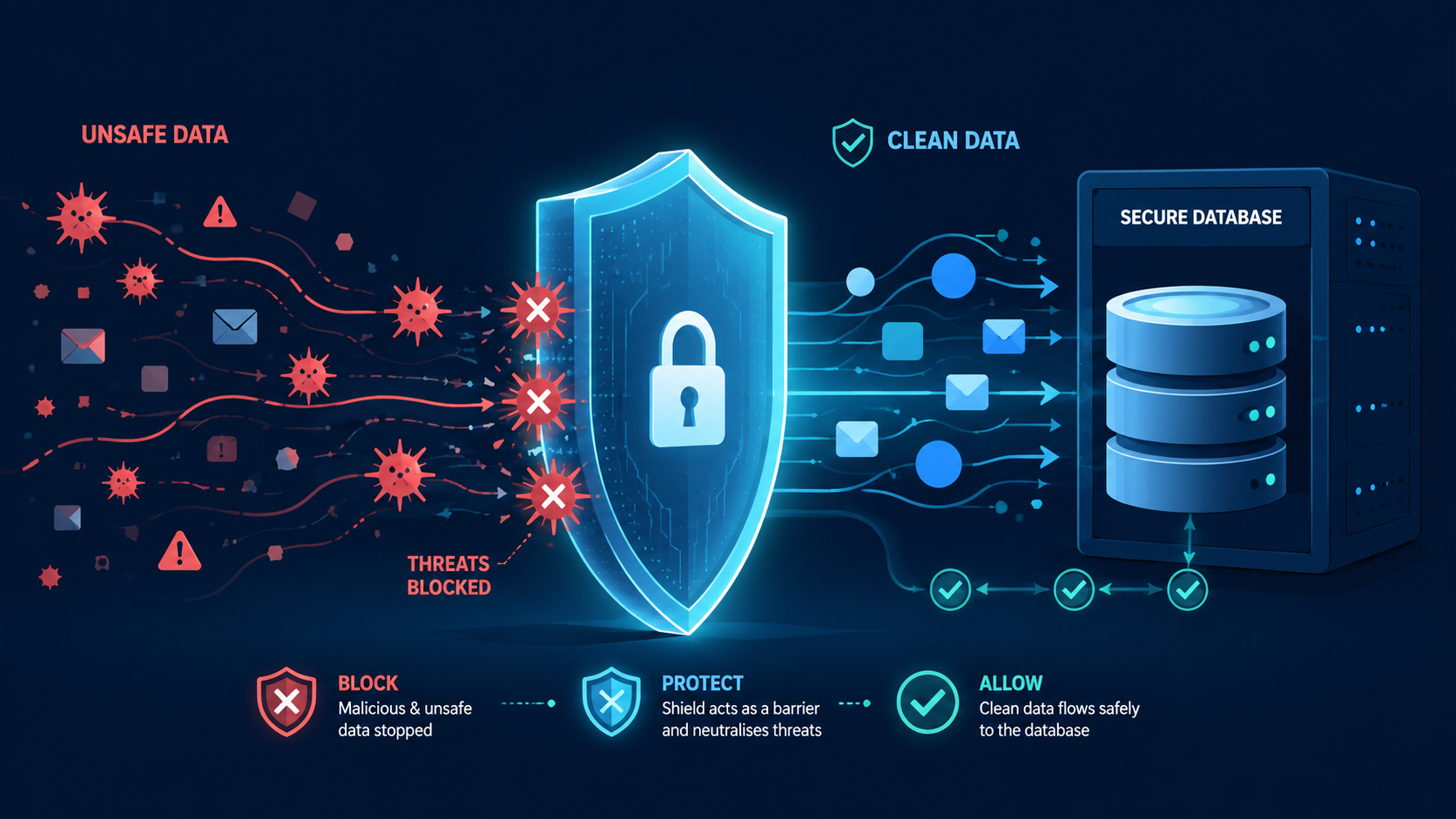

Input validation & sanitization is the essential guard at your code’s gate. It checks data for safety and correctness before you use it. Get this wrong, and you risk everything that follows: your database, your application logic, and your users.
Our secure coding practices break down the concrete steps to filter malicious input and handle clean data safely. This isn’t optional. It’s the foundation of a resilient application. Read on to build that foundation.
Validation Essentials at a Glance
Together, these practices create a stronger foundation for secure input handling and help protect your application from common security risks.
- Server-side validation is the final authority. Client-side checks improve user experience but are easy to bypass, so every request must be verified on the server.
- Allowlist validation is safer than denylist validation. Defining accepted input reduces errors and blocks unexpected data more effectively.
- Validation and output encoding work together. Validation accepts only valid data, while context-aware output encoding prevents attacks such as Cross-Site Scripting (XSS).
Why Is Server-Side Validation Non-Negotiable?
Validation in the browser is a user courtesy, not a security measure. An attacker can simply bypass it and send any data directly to your server.
This validation is the final checkpoint, showing the importance of server-side validation before data reaches your application. It examines data after it’s left the user and before your application uses it. The OWASP Cheat Sheet is clear: treat all external data as untrusted, including untrusted data sources such as APIs and uploads. This includes API calls, file uploads, and partner feeds.
We learned this lesson fixing an e-commerce bug. Orders failed at shipping because a partner’s “company name” field sometimes had a hidden newline character. Their client-side form blocked it, so the server-side code wasn’t ready. The server crashed. Our fix was a short server-side validation rule. The core principle for our secure coding practices is to trust nothing from the outside.
Allowlist or Denylist Validation?
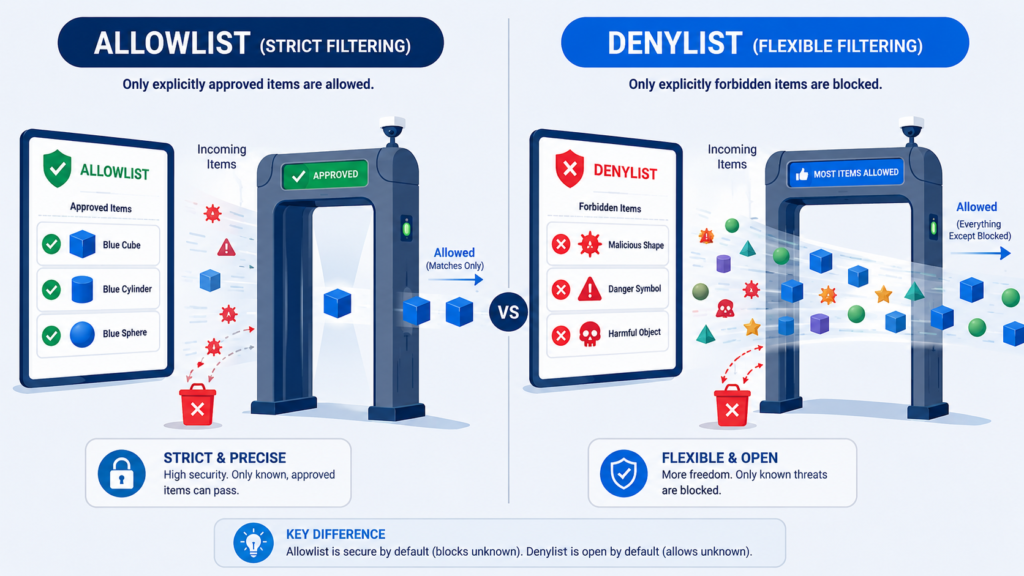
In practice, you have two choices.
A denylist blocks known bad inputs, like <script> tags or single quotes. It’s a flawed defense. Attackers use infinite variations, and you often block valid data, like the apostrophe in O’Brian.
The allowlist approach defines only what is acceptable. For a state field, accept only the 50 two-letter codes. For a zip code, accept five digits, maybe a hyphen and four more. Everything else is rejected. This is inherently more secure. The “allowed” set is small and known.
OWASP states denylists can be a secondary filter, but your primary strategy must be allowlisting. It’s clearer and enforceable. Our secure coding practices teach this as a fundamental rule.
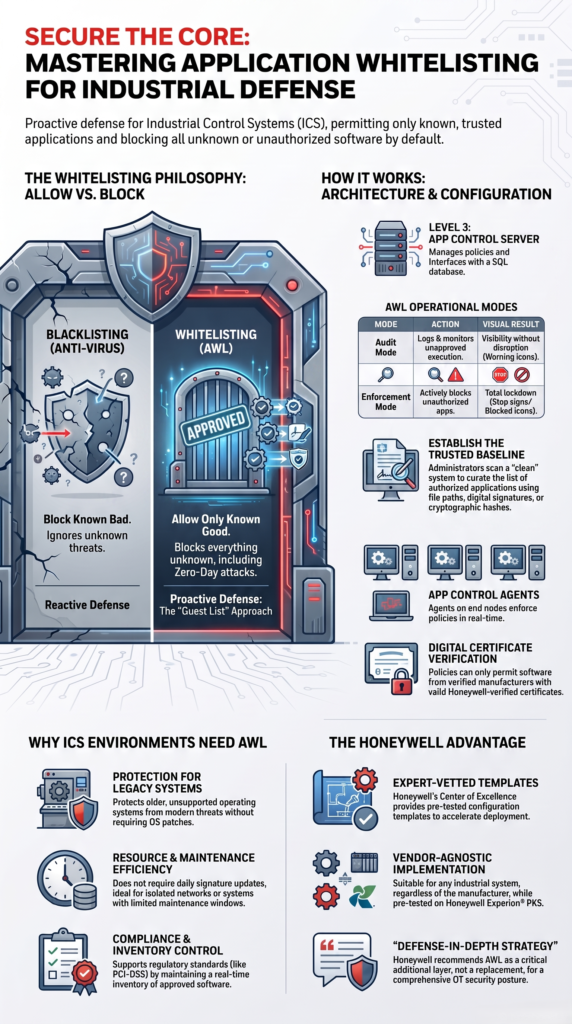
As noted by NIST
“Application whitelisting works on the opposite principle from antivirus software. Application whitelisting permits only that which is known to be acceptable to the organization and blocks everything else, malicious or benign.” – NIST
- Allowlist Example: A status field that can only be “active”, “pending”, or “closed”.
- Denylist Example (Weak): Trying to block “delete”, “drop”, and “insert” from a text field.
How to Implement Robust Type, Length, and Range Checks?
Start with type, length, and range checking before anything complex.
First, check the data type. If a field expects an integer, force a strict conversion. Use int() in Python or Integer.parseInt() in Java. Handle the error if it fails.
Second, enforce length. A “first name” field shouldn’t accept 10,000 characters. Set a sensible maximum to prevent attacks and system strain.
Third, validate ranges. A “quantity” should be a positive number with a reasonable cap. A “date of birth” must be in the past.
We teach these three checks as the essential foundation in our secure coding practices. They are simple to implement and stop most malformed data at the door.
| Validation Type | Example Rule | Security Benefit |
| Type Check | Quantity must be an integer | Prevents invalid data types |
| Length Check | Username limited to 50 characters | Reduces abuse and oversized inputs |
| Range Check | Age must be between 18 and 100 | Enforces valid business rules |
How to Use Regular Expressions Safely Without Creating New Risks?
For structured data like zip codes, phone numbers, or user IDs, safe regular expression patterns are your precise tool.
The key is precision. Anchor your patterns from start (^) to finish ($). A pattern for a five-digit zip code should be ^\d{5}$, not just \d{5}. The second pattern would match “12345” inside a string like “foo12345bar”, which isn’t a valid zip code. Avoid broad wildcards like .* or \S+; they defeat the entire point of validation.
There’s a critical performance trap called Regular Expression Denial of Service (ReDoS). A complex, poorly designed regex on a long input can make your CPU work for minutes. An attacker can submit crafted data to trigger this, crippling your app. We’ve seen systems slow to a crawl from this.
Our secure coding advice is to keep regex patterns simple, specific, and always tested with unusual inputs. It’s a powerful scalpel, but you must use it carefully.
What Is Input Canonicalization and Why Does It Matter?
It’s a technical term for a simple process of input canonicalization, reducing data to a standard form before you check it.
This matters because the same character can be represented multiple ways. Take the letter “é”. It can be sent as a single Unicode character. Or, it can be sent as a plain “e” followed by a separate accent mark. They look identical to us, but to a simple string comparison or a basic regex, they’re completely different.
Attackers exploit this. If your allowlist expects “café” in one form, they might submit it in the other. If you don’t normalize the data first, your validation might pass, but downstream systems could process it inconsistently. This creates errors or security gaps.
Research from MITRE-CWE shows
“Rule 00. Input Validation and Data Sanitization (IDS). IDS00-J. Prevent SQL injection. IDS01-J. Normalize strings before validating them” – MITRE-CWE
Our secure coding practice enforces a clear rule: normalize first, validate second. Use your language’s built-in Unicode normalization to convert text to a predictable format. Apply the same logic to file paths, URLs, and any text where encoding might vary. Handle the data once, in a standard way, before you decide if it’s allowed.
How Do Parameterized Queries Protect Your Database?
Credit: Server Logic Simplified
This is the top defense against SQL Injection. The rule: never mix user data with your SQL command’s syntax.
String concatenation is the flaw. Code like "SELECT * FROM users WHERE name = '" + userName + "'" is dangerous. If userName is admin'--, it changes the query’s meaning.
Parameterized queries fix this. You write a template: "SELECT * FROM users WHERE name = ?". You send the template and the data separately to the database driver. The driver knows userName is only data, not code. It cannot change the query’s structure.
OWASP has clear examples. In our secure coding practices, we teach that validation helps, but parameterization is the guaranteed shield against injection. Use both.
How to Sanitize Data to Prevent XSS Attacks?
XSS attacks inject malicious scripts to steal sessions. Validation helps, but encoding is key.
Alongside sanitizing data, encode data on output. Convert dangerous characters into safe HTML. Change < to < and > to >. This neuters HTML tags.
Match the encoding to its context. Data in an HTML body needs different encoding than data inside a <script> tag or an attribute like onclick. Use established, context-aware libraries. Don’t write your own.
For rich text (like a WYSIWYG editor), use a dedicated sanitizer library like DOMPurify. It allows safe HTML (<b>) while stripping dangerous code (<script>). Our secure coding practices stress: never try to build this yourself.
How Do You Validate and Secure File Uploads?
This is a high-risk feature requiring layered defense.
First, use an allowlist for extensions and MIME types when securing file uploads. Only accept what you need, like .jpg for images. Don’t just block “bad” extensions.
Second, validate the file’s content. A .jpg file could contain PHP code. Check the file’s actual header (magic bytes) on the server.
Third, rename files on storage. Use a random name like a3Fg7h2x.jpg. Never trust the user-supplied filename.
Our secure coding practices add these mandatory steps:
- Enforce strict size limits.
- Store files outside the web root when possible.
- Serve files with correct, restrictive
Content-Typeheaders. - Scan files with anti-malware tools.
- Treat
.svg,.htaccess, and.xmlfiles with extreme caution.
Use all these controls together.
How Should You Handle Untrusted Data Sources?
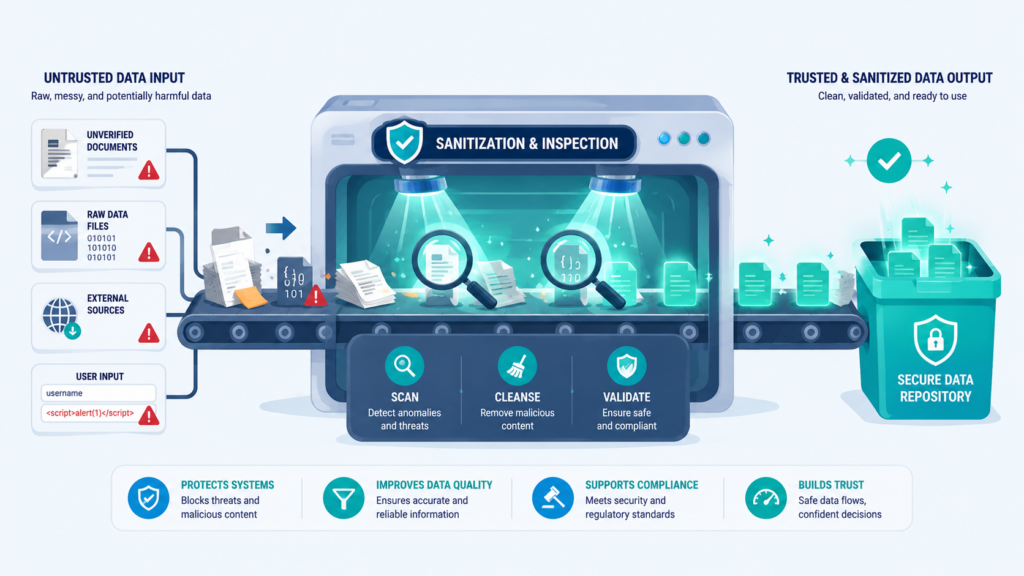
This is the overarching mindset. Untrusted data doesn’t just come from a “Hacker” form on the internet. It comes from anywhere outside your immediate control.
That includes:
- HTTP request headers (like
User-AgentorReferer) - Cookies (a client can modify their own cookies)
- URL query strings and parameters
- Data from third-party APIs or webhooks
- Import files from vendors or partners
- Data retrieved from a database that was originally populated by user input
The principle is to establish trust boundaries. Your core business logic operates in a “clean” zone. Any data crossing into that zone from an “unclean” zone must be validated and sanitized. A backend feed from a trusted partner is still an “unclean” zone if your application doesn’t directly control its code. That partner’s system could be compromised.
Validate at the boundary, as early as possible. Once data is inside your clean zone and has been validated, you can treat it as trusted for subsequent operations. This minimizes the places where you need to be paranoid, making your code cleaner and more secure.
How Can Input Validation Frameworks Improve Security?
You don’t have to build this all from scratch because input validation frameworks handle much of the work. Most modern web frameworks come with built-in validation mechanisms that handle the boilerplate.
In Java, you have Bean Validation annotations (@NotNull, @Size, @Email). In Python’s Django, you use Form classes or Validators. In Express.js, middleware like express-validator does the job. In .NET, Data Annotations are your friend.
These frameworks provide declarative ways to state your rules: “This field is required, must be an email format, and have a maximum of 254 characters.” The framework then handles the logic of checking incoming data and returning clear error messages.
Using a framework has huge benefits. It ensures consistency across your application. It’s often more performant than custom code. And it’s usually well-tested by the community. Your job becomes defining the rules clearly, not writing endless if statements. It lets you focus on what is valid, not the mechanics of checking it.
FAQs
Why is server-side input validation more important than client-side checks?
Server-side input validation verifies every request, blocks client-side validation bypass, enforces validation rules, and protects web application security from malicious untrusted input.
How does allowlist validation improve application security?
Allowlist validation accepts only approved values, rejects unexpected input, strengthens secure input handling, improves data validation, and reduces the application’s attack surface.
What makes file upload security different from regular form validation?
File upload security requires file type validation, MIME type validation, extension validation, malware scanning, content inspection, filename sanitization, and file size limits.
How do parameterized queries help prevent SQL injection?
Parameterized queries separate user input from database commands, improve query security, support SQL injection prevention, and reduce the risk of injection attacks.
Why should developers combine input sanitization with output encoding?
Input sanitization removes unsafe content from untrusted input, while output encoding prevents cross-site scripting attacks and strengthens secure coding and data integrity.
Make Secure Input Handling Your Default Habit
Every bug starts with data you chose to trust, and that’s where real problems begin. Keep your checks strict, treat every input with care, and make safe coding part of every commit. That’s what helps your software stay reliable.
If you want to build these skills faster, the Secure Coding Practices Bootcamp gives developers hands-on training with real coding exercises and practical techniques you can use right away.
References
- https://cwe.mitre.org/data/definitions/1134.html
- https://csrc.nist.gov/csrc/media/publications/shared/documents/itl-bulletin/itlbul2015-12.pdf#1#1
Related articles
- https://securecodingpractices.com/importance-of-server-side-validation/
- https://securecodingpractices.com/allowlist-vs-denylist-validation/
- https://securecodingpractices.com/safe-regular-expression-use/
- https://securecodingpractices.com/understanding-input-canonicalization/
- https://securecodingpractices.com/parameterized-queries-for-db-security/
- https://securecodingpractices.com/using-input-validation-frameworks/
- https://securecodingpractices.com/sanitizing-data-to-prevent-xss/
- https://securecodingpractices.com/validating-and-securing-file-uploads/
- https://securecodingpractices.com/handling-untrusted-data-sources/
- https://securecodingpractices.com/type-length-and-range-checking/