
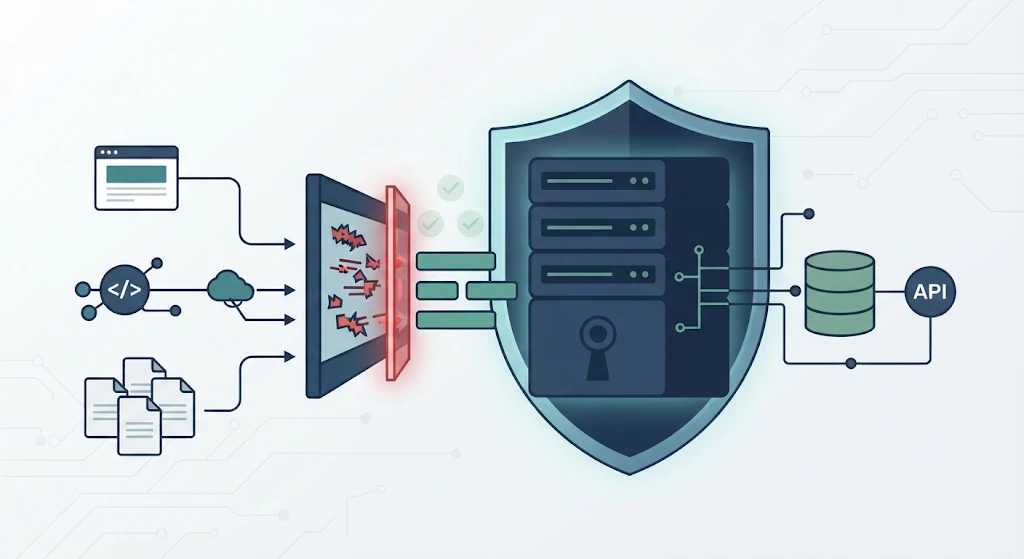

Server-side data sanitization importance comes from its role in stopping unsafe input before it reaches databases, files, APIs, or browsers. Browser-based checks can be bypassed, so developers must validate incoming data on the backend. A request that looks harmless may contain unexpected values or malicious code that affects application behavior.
At Secure Coding Practices, we focus on helping developers recognize these weaknesses and apply the right security controls through practical coding exercises. Understanding where data enters and how it is used helps prevent common mistakes. Keep reading to explore the risks and ways to secure backend data handling.
Server-Side Data Sanitization: 3 Security Essentials
Server-side data sanitization protects applications at every stage of data handling, from incoming requests to database operations and browser output. These three points summarize the main security practices developers should follow.
- Validate every incoming request: Apply server-side validation to forms, APIs, cookies, headers, and uploaded files because browser-based checks can be bypassed.
- Use the right protection for each data destination: Combine input validation, parameterized queries, HTML sanitization, and context-aware output encoding to reduce injection and XSS risks.
- Test security controls throughout development: Review validation rules, test unexpected input, check access permissions, and update security controls whenever application features change.
What Is Server-Side Data Sanitization and How Does It Work?
Server-side data sanitization is the process of checking and controlling untrusted information on the backend before an application stores, processes, or displays it.
Web applications receive data from many sources, including registration forms, URL parameters, cookies, HTTP headers, API requests, and uploaded files. We must treat these sources as untrusted because users can change requests before they reach the server.
Three related security techniques help manage incoming information:
- Input validation: Checks whether data matches expected types, formats, lengths, and allowed values.
- Input sanitization: Removes or neutralizes unwanted content when a specific use requires it.
- Output encoding: Changes special characters so browsers interpret information as text rather than executable code.
For example, a comment form might accept ordinary text while rejecting unsafe HTML. A database query needs a different defense, such as a parameterized statement.
We teach developers to identify the destination of each input before choosing a security method. This matters because one sanitization rule cannot protect every type of data.
Why Is Server-Side Data Sanitization Important?
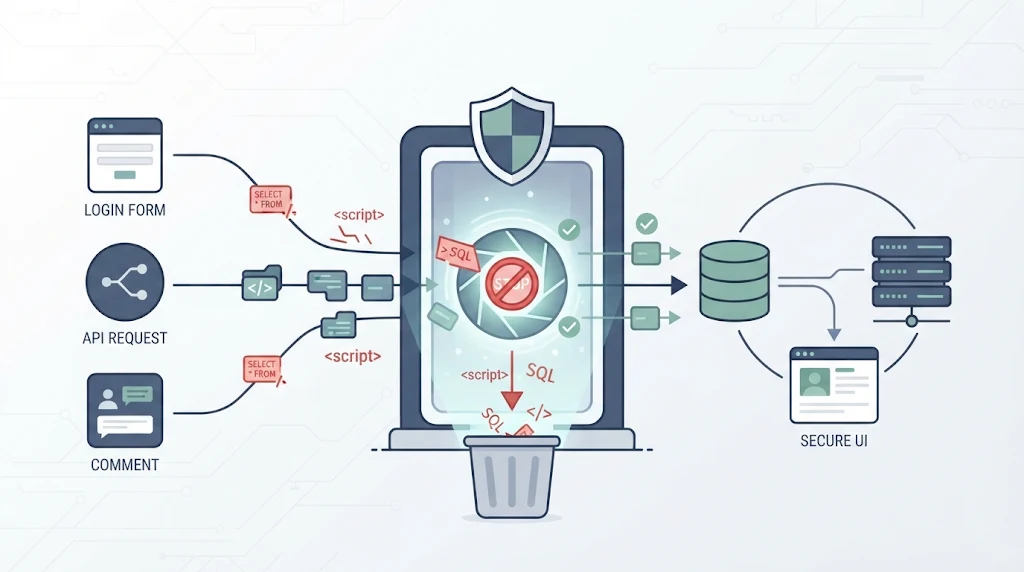
Server-side data sanitization creates an important security boundary. It checks incoming information before that information reaches databases, files, or other sensitive operations.
Without backend checks, attackers may submit unexpected values that interfere with application logic. They could also exploit injection vulnerabilities, damage stored records, or access information without permission.
Even a basic registration form can introduce security risks. Someone might submit an unusually long name or modify an account identifier before sending the request. If the backend accepts the value without checking it, the application may process incorrect information.
As highlighted by OWASP
“Input validation must be wholly server-side: client-side controls may be used for convenience.” – OWASP
Server-side controls help reduce these risks in several ways:
- Reduce injection risks: Prevent input from changing database queries or system commands.
- Protect stored data: Reject invalid values before saving them.
- Limit resource abuse: Restrict oversized requests and unexpected payloads.
- Protect backend services: Check information before passing it to external systems.
- Improve data consistency: Keep records within expected formats.
At our secure development bootcamp, we use practical examples to show how a small input mistake can affect an entire application. Developers need to understand these risks before building features that handle sensitive data.
Why Is Client-Side Validation Not Enough?
Client-side validation improves the user experience, but it cannot protect an application on its own. Server-side validation is necessary because attackers can bypass browser restrictions and send requests directly to backend services.
For example, a registration form might prevent users from submitting an empty email address. JavaScript can display an error before the form is sent. But an attacker can disable JavaScript, modify browser code, or send a request directly to an API.
As noted by Microsoft Learn
“All input arriving from a client must be validated and sanitized before use.” – Microsoft Learn
The difference becomes clearer in the following comparison:
| Client-side validation | Server-side validation |
| Runs in the browser | Runs on the backend |
| Helps users avoid mistakes | Enforces security rules |
| Can be modified or bypassed | Checks requests independently |
| Gives immediate feedback | Protects backend operations |
We recommend using both methods. Browser checks make forms easier to use, while backend checks enforce the rules. Every API endpoint must validate its own requests, even when the frontend already checks the same fields.
During our training exercises, we ask students to test APIs without using the frontend. It’s a useful way to see why browser restrictions cannot establish trust.
What Security Threats Can Unsanitized Data Introduce?
Credits: Enlight The Hack
Untrusted data becomes dangerous when an application interprets it as something other than ordinary information. A database might treat input as part of a query, while a browser might execute it as JavaScript.
Different attacks need different defenses. Developers must understand where information goes before deciding how to protect it.
How Does Unsanitized Input Enable SQL Injection?
SQL injection happens when an attacker changes the meaning of a database query through carefully crafted input. A vulnerable login system, for example, might add a submitted username directly to an SQL statement. This can allow attackers to interfere with the original query.
Parameterized queries provide a stronger defense because they separate SQL instructions from user values. We recommend using prepared statements, restricting database permissions, and avoiding direct string concatenation.
How Can Unsanitized HTML Cause Cross-Site Scripting?
Cross-site scripting (XSS) happens when an application allows untrusted content to run as code in another user’s browser.
There are three common forms:
- Stored XSS: Malicious content is saved and displayed later.
- Reflected XSS: Malicious input appears in an immediate server response.
- DOM-based XSS: Client-side code handles untrusted data through an unsafe browser operation.
Use safe rendering methods and context-aware output encoding. If rich HTML is required, use a maintained sanitizer such as DOMPurify with a strict allowlist. Applying sanitizing data to prevent XSS techniques also helps developers prevent untrusted content from becoming executable code.
What Other Risks Should Developers Consider?
SQL injection and XSS aren’t the only problems caused by unsafe input. File handling, operating system commands, and external services can also expose an application to attacks.
Path traversal happens when attackers change file paths to access directories outside the permitted location. Command injection occurs when untrusted input changes an operating system command. NoSQL and LDAP injection can also affect applications that use these services.
File uploads need extra attention. A system that checks only the filename or file extension may accept dangerous content. Developers should inspect file types, set upload size limits, and store files outside executable application directories.
XML processing also needs safe configuration. External entity processing can expose internal files or allow requests to restricted resources.
At our bootcamp, we use these examples to show why backend security must cover more than database queries. Every feature that accepts external information needs suitable checks. A secure upload system, for example, should verify file content rather than trust the information supplied by the browser.
Why Does Server-Side HTML Sanitization Require Extra Care?
HTML sanitization needs careful handling because browsers can interpret markup in unexpected ways. A filtering rule that looks safe on the server might not produce the same result when a browser processes the content.
One example is mutation XSS. This happens when HTML changes during browser parsing and creates unsafe content after sanitization. The difference between server-side processing and browser interpretation can create an opening for an attack.
Regular expressions are also poor tools for cleaning complex HTML. They search for text patterns but cannot reliably understand nested elements and browser parsing rules. Removing the word script, for example, doesn’t guarantee that the remaining markup is safe.
We recommend using a dedicated HTML parser and a maintained sanitizer with strict allowlists. Developers working on frontend and backend integration should also understand how sanitizing HTML input securely in JavaScripthelps prevent unsafe markup from reaching browser rendering methods.
Tools such as DOMPurify and sanitize-html can help filter unwanted elements and attributes.
Still, no sanitizer protects every output context. Developers must use safe rendering methods and apply the correct output encoding. A Content Security Policy can add another layer of protection.
How Can Developers Implement Secure Data Sanitization?
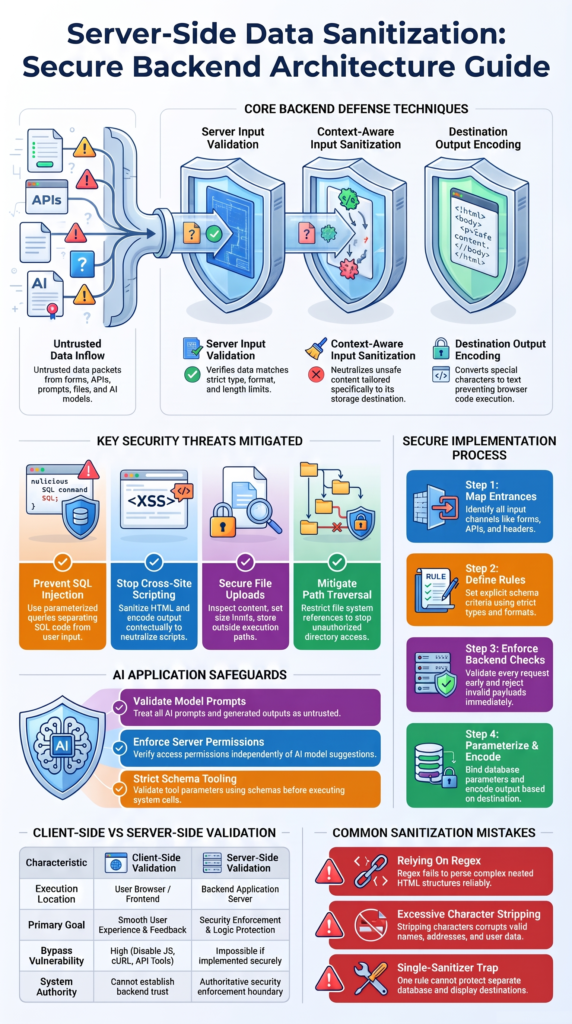
A good implementation begins by identifying where external data enters an application. Developers can then apply validation and other security controls before information reaches sensitive operations.
We recommend treating these controls as part of normal backend development rather than adding them shortly before deployment. Choosing suitable tools and using sanitization libraries effectively in code can also help developers apply consistent security rules.
Follow this process:
- Identify input sources, including forms, APIs, cookies, headers, and uploads.
- Define permitted fields, data types, lengths, and ranges.
- Validate incoming requests and reject unexpected values.
- Separate raw input from trusted application data.
- Use parameterized statements for database operations.
- Sanitize HTML when rich content is required.
- Encode output according to its destination.
- Test malformed requests and common attack patterns.
For example, a Node.js application can use Zod to validate incoming data:
import { z } from “zod”;
const userSchema = z.object({
name: z.string().trim().min(1).max(80),
email: z.string().email().max(254),
age: z.number().int().min(18).max(120)
}).strict();
const result = userSchema.safeParse(req.body);
if (!result.success) {
return res.status(400).json({
error: “Invalid request data”
});
}
const trustedUser = result.data;
The .strict() setting also rejects unexpected properties. But validation isn’t the end of the process. Developers must still check permissions, protect database queries, and encode output correctly.
What Are the Most Common Server-Side Sanitization Mistakes?
Many security problems happen because developers use the right technique in the wrong place. Others assume that one sanitization function can protect every part of an application. Neither approach is safe.
For example, removing suspicious HTML before saving a comment doesn’t automatically protect it when the application later displays it inside JavaScript. The output still needs protection based on its destination.
Another common mistake is removing special characters from every submitted value. This can damage legitimate information, including names and addresses. We prefer clear validation rules that reject unsafe input without changing valid user data.
Good application design can reduce these mistakes. Teams should use shared validation rules, separate raw input from trusted data, and restrict unsafe HTML rendering. They should also review database permissions and avoid exposing sensitive operations to unnecessary parts of the application.
At our bootcamp, we encourage students to build reusable security controls rather than repeat validation code across different features. This makes code reviews easier and reduces the chance of missing an important check.
How Can Teams Test Server-Side Data Sanitization?
Security testing checks whether backend controls can handle incorrect input and resist deliberate attacks. A validation function might work during normal use but fail when someone sends a modified request directly to an API.
Teams should test more than ordinary form submissions. They need to check how the application responds to unexpected values, unusual request structures, and known attack patterns.
For example, a developer can submit an invalid account identifier directly to an API endpoint. The expected result should be a controlled validation error, not an exposed database exception.
We recommend including security tests throughout development. Automated tests can check common problems after code changes, while manual reviews help identify weaknesses in more complex features.
Useful testing resources include the OWASP Web Security Testing Guide and Application Security Verification Standard (ASVS). They provide practical guidance for reviewing application security controls.
Remember that passing automated tests doesn’t prove an application is completely secure. Teams should also review authorization rules, test important user workflows, and consider penetration testing before releasing sensitive applications.
How Does Server-Side Sanitization Apply to AI Applications?
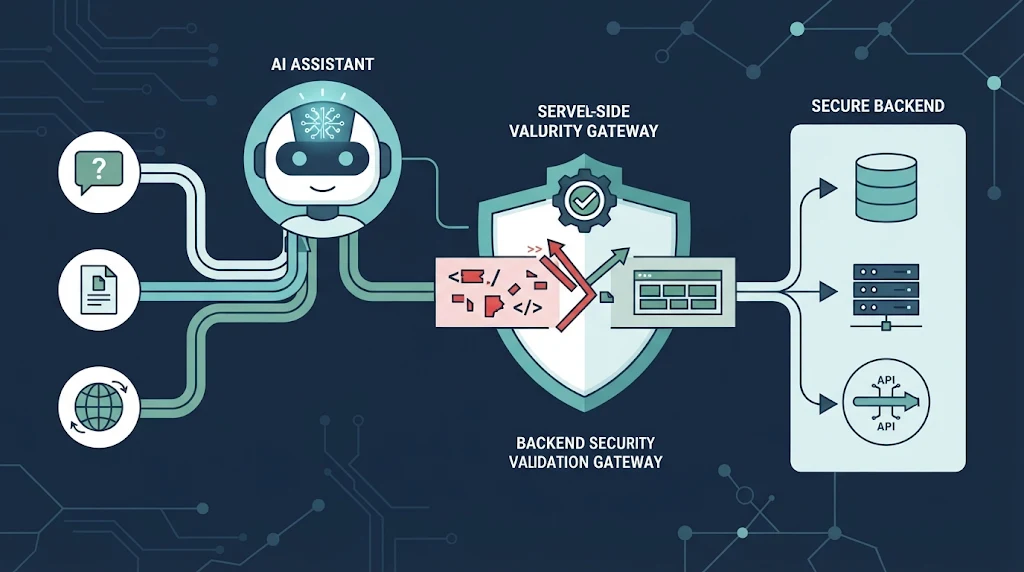
AI applications introduce additional security risks because they process user prompts, external documents, and model-generated instructions. These systems may also connect to databases, APIs, files, and other services.
A model-generated request must never receive automatic permission to perform sensitive operations. The backend must check every action before allowing it to run.
For example, an AI assistant might generate a request to retrieve a customer record. The server should verify the account identifier and confirm that the current user has permission to access that record.
AI applications also need security checks beyond input validation. Primesec provides additional context on AI security and protecting systems against emerging threats.
Developers should also apply several safeguards:
- Validate structured tool arguments.
- Restrict file and database access.
- Check permissions independently of AI output.
- Treat retrieved external content as untrusted.
- Validate generated data before database writes.
- Sanitize HTML before displaying generated content.
Tools such as Zod can help validate structured arguments in JavaScript applications. However, schema validation alone cannot prevent prompt injection.
We teach developers to keep access controls outside the model. AI can suggest an action, but the backend must decide whether that action is allowed.
FAQ
How Often Should Developers Review Server-Side Data Sanitization Rules?
Developers should review server-side data sanitization rules whenever they add features, update APIs, or connect new data sources. Regular reviews help identify outdated validation rules and security gaps. Teams should also retest input constraints and backend validation after major updates to ensure new fields and endpoints reject unexpected or invalid values.
Should Every API Request Include Input Validation?
Yes. Every API request needs server-side validation before the application processes its data. API input validation checks required fields, data types, permitted values, and request formats. Developers should also check user permissions before allowing an action. Valid input does not automatically mean that a user has permission to perform that action.
What Is the Difference Between Input Sanitization and Output Encoding?
Input sanitization removes or modifies unwanted content when necessary. Output encoding changes special characters so browsers or other systems interpret data correctly. These methods serve different purposes. For XSS prevention, developers should use context-aware encoding when displaying untrusted input. They should not rely on input sanitization alone to prevent cross-site scripting.
How Can Developers Protect User Data Without Removing Valid Characters?
Developers can use allowlist validation and clear input rules instead of removing every special character. Names and addresses, for example, may contain apostrophes, hyphens, or accented letters. Validation should reject values that break application rules while preserving legitimate information. This approach protects data integrity without unnecessarily changing what users submit.
How Should Developers Handle Untrusted Data From External APIs?
Developers should treat data from external APIs as untrusted input, even when it comes from familiar services. They should validate data types, check required fields, limit field lengths, and reject unexpected values before processing responses. When storing or displaying external data, developers should also use parameterized queries and context-aware output encoding to reduce injection risks.
Protect Applications with Context-Aware Server-Side Sanitization
Server-side data sanitization helps protect applications, but no single method stops every attack. Validate incoming values, use parameterized queries for database operations, and apply HTML sanitization with context-aware output encoding to prevent unsafe browser content. Each control serves a different purpose.
Build practical security skills through the Secure Coding Practices Bootcamp. Learn to recognize insecure code, apply suitable fixes, and test real applications to strengthen your team’s development process.
References
- “OWASP Top 10 Proactive Controls Project.” OWASP Foundation. Accessed November 6, 2026.
- “Threat mitigation guidance for ASP.NET Core Blazor static server-side rendering.” Microsoft Learn, July 22, 2026. Accessed November 6, 2026.