
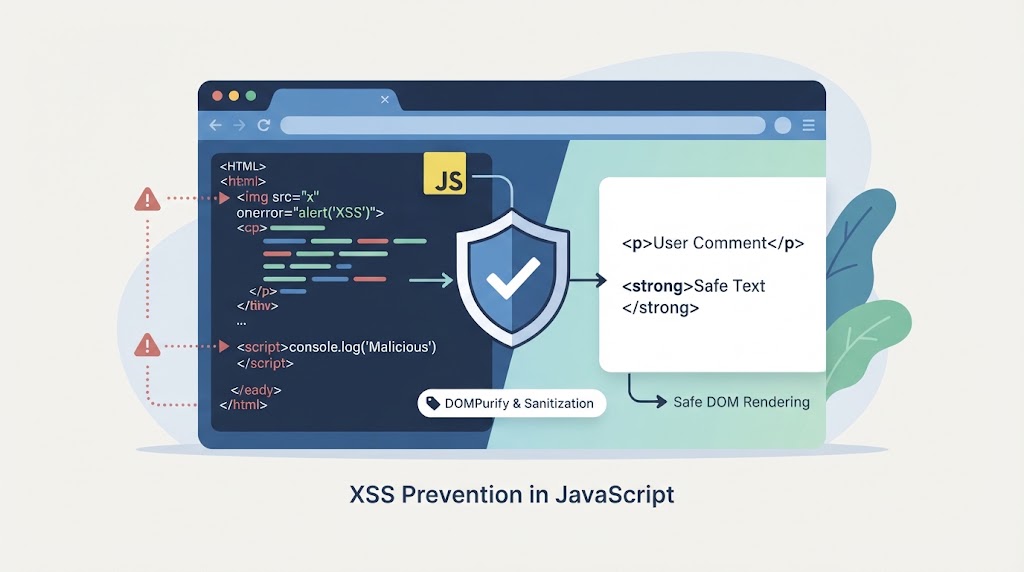

Sanitizing HTML input securely JavaScript means using the right method for each type of content. Use textContent to display plain text and a trusted HTML sanitizer when user input needs to retain formatting. This helps prevent cross-site scripting (XSS) caused by unsafe DOM operations.
At Secure Coding Practices, we focus on practical ways to handle untrusted data, review rendering methods, and apply security controls throughout an application. Developers also need server-side validation because browser-based protections alone are not enough. Keep reading to see how to sanitize HTML safely and reduce XSS risks in JavaScript applications.
Quick Reads: 3 Essentials for Secure JavaScript HTML Sanitization
Secure HTML sanitization requires the right combination of safe rendering, controlled markup, and consistent security checks throughout the application.
- Render plain text safely: Use textContent and standard framework interpolation instead of parsing untrusted strings as HTML.
- Sanitize rich HTML carefully: Use DOMPurify or the native HTML Sanitizer API with a narrow, tested allow-list.
- Protect the entire data flow: Combine server-side validation, context-aware output handling, CSP, Trusted Types, and regular security testing.
What is HTML sanitization, and why does it matter?
HTML sanitization removes unsafe markup while preserving the HTML features an application allows. Each control serves a different purpose, so we need to choose the right one for the task. Understanding sanitizing data to prevents XSS helps developers apply the right protection before untrusted content reaches the browser.
Consider a comment box. A user might enter text containing angle brackets. That’s harmless when the browser displays the characters as text. But if JavaScript parses that input as HTML, the same value could create an unsafe element.
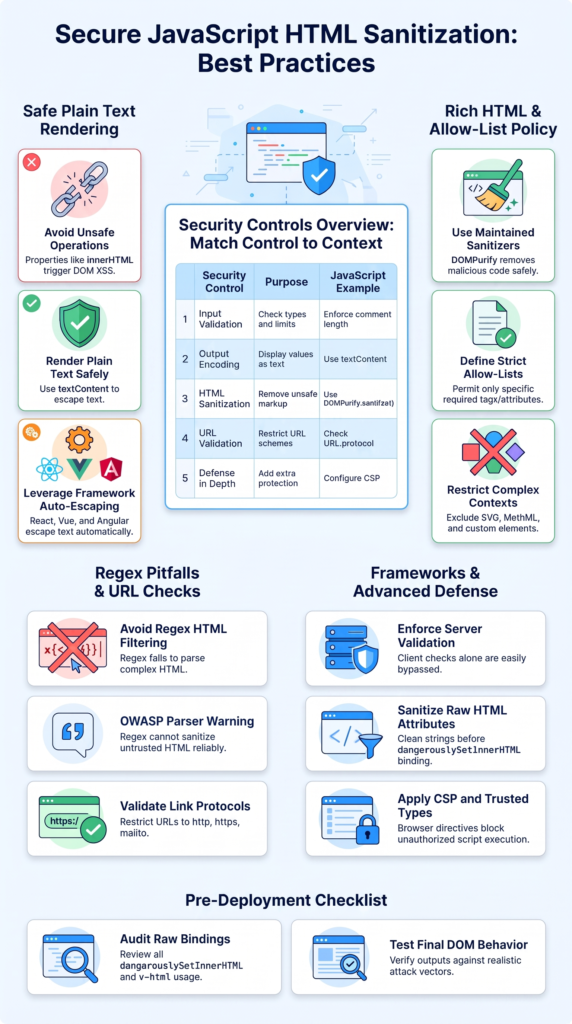
| Security control | Purpose | JavaScript example |
| Input validation | Check types and limits | Enforce comment length |
| Output encoding | Display values as text | Use textContent |
| HTML sanitization | Remove unsafe markup | Use DOMPurify.sanitize() |
| URL validation | Restrict URL schemes | Check URL.protocol |
| Defense in depth | Add extra protection | Configure CSP |
OWASP recommends avoiding unsafe DOM operations with untrusted data. Our first step is to identify where the data goes and how the browser will interpret it.
Treat form fields, API responses, cookies, and URL parameters as untrusted. Validate business rules separately, then choose the appropriate rendering method. If the feature only needs plain text, there’s no reason to parse HTML at all.
How can you avoid unsafe DOM operations and render text safely?
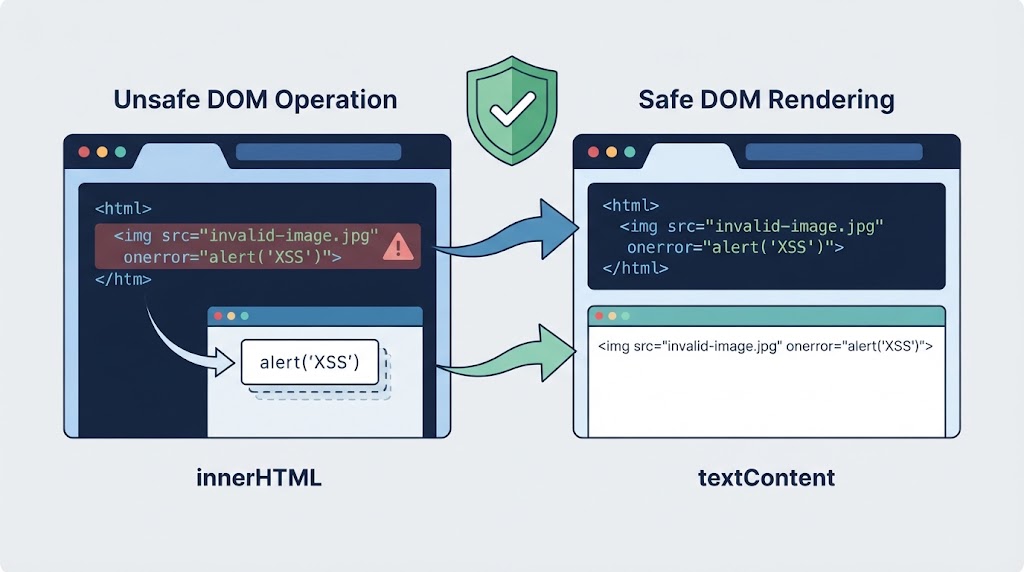
The innerHTML property tells the browser to parse a string as HTML. This creates a risk when the content comes from a user or another untrusted source.
Consider this example:
const userInput = ‘<img src=”invalid” onerror=”alert(1)”>’;
// Unsafe: the browser parses the input as HTML.
document.querySelector(“#comment”).innerHTML = userInput;
The browser may create an image element and run its error handler when the image fails to load. This is a basic example of DOM-based XSS. Depending on the application, a successful attack could expose data available to scripts or allow actions through a victim’s account.
Other operations also need attention, including outerHTML, insertAdjacentHTML(), document.write(), and iframe.srcdoc. Functions such as eval() and new Function() create separate risks when untrusted data reaches a JavaScript execution context.
The safest option is often to avoid HTML parsing altogether.
For plain text, use textContent:
const userInput = ‘<img src=”invalid” onerror=”alert(1)”>’;
const paragraph = document.createElement(“p”);
paragraph.textContent = userInput;
document.querySelector(“#comment”).append(paragraph);
The browser displays the characters as text rather than creating an image element. The event handler therefore doesn’t execute through this operation.
During our code reviews, this is one of the first things we check. Using textContent removes the need to filter attack strings for that particular rendering step.
Frameworks offer similar protection through ordinary text interpolation. React’s {comment}, Vue’s standard text interpolation, and Angular’s normal text binding escape text by default. Their raw HTML features need separate review.
When should you use DOMPurify and a strict HTML allow-list?
Plain text isn’t enough for every feature. A support portal might need bold text and links, while a content management system may need headings and lists. Removing all HTML would break those features.
DOMPurify is a maintained HTML sanitizer that can remove unsafe markup while preserving permitted formatting. Developers can configure it to allow only the elements and attributes their application needs.
import DOMPurify from “dompurify”;
const dirtyHTML = `
<p>Hello <strong>world</strong></p>
<img src=”invalid” onerror=”alert(1)”>
<script>alert(“XSS”)</script>
`;
const cleanHTML = DOMPurify.sanitize(dirtyHTML, {
ALLOWED_TAGS: [
“p”, “strong”, “em”, “ul”, “ol”, “li”, “a”, “br”
],
ALLOWED_ATTR: [“href”, “title”]
});
document.querySelector(“#comment”).innerHTML = cleanHTML;
This configuration permits basic formatting while excluding elements and attributes outside the allow-list. DOMPurify also applies built-in protections against dangerous markup and URL patterns.
A good allow-list reflects the feature’s actual needs. A comment box may only need paragraphs and emphasis. A help article may need headings and links. Don’t give both features broad permissions without a reason.
When building the policy, check these areas:
- HTML elements: Allow only the tags the feature needs.
- Attributes: Restrict attributes to approved uses.
- URLs: Permit only approved protocols.
- SVG and MathML: Exclude unless required.
- Custom elements: Disable unless the application needs them.
- Post-processing: Avoid changing sanitized HTML afterward.
Allowing a tag doesn’t make every attribute safe. Attributes can affect navigation, resource loading, and browser behavior. Custom elements may also trigger application code.
Keep DOMPurify updated, review security advisories, and test the final DOM. Sanitization lowers risk, but it doesn’t guarantee safety across every configuration or later transformation.
Why do regex filters fail, and how should you handle unsafe URLs?
Regular expressions can search for text patterns, but they can’t reliably reproduce the browser’s HTML parsing rules. HTML supports nested structures, encoded characters, unusual attributes, and different parsing contexts.
A filter that catches one pattern may miss another. Understanding how sanitization prevents XSS attacks makes it easier to recognize why parser-based sanitization is more reliable than manually removing suspicious strings.
As highlighted by OWASP
“A regular expression is not the right tool to parse and sanitize untrusted HTML.” – OWASP
For example:
// Unsafe: incomplete HTML filtering.
const clean = userInput.replace(/<script>/gi, “”);
This removes one recognizable opening tag. It doesn’t address every dangerous element, event-handler attribute, or URL. The problem becomes harder when content changes meaning during parsing or later DOM operations, as can happen in mutation XSS.
Use a maintained HTML sanitizer instead of writing a collection of replacement rules. Regular expressions can still help validate predictable text formats, but they aren’t a reliable substitute for an HTML parser and sanitizer.
URLs need separate attention, too. A permitted link element may still point to a dangerous destination.
This helper checks the protocol:
function isSafeUrl(value) {
try {
const url = new URL(value, window.location.origin);
return [“https:”, “http:”, “mailto:”].includes(
url.protocol
);
} catch {
return false;
}
}
This function accepts HTTP, HTTPS, and email links. It rejects malformed URLs and protocols outside the allow-list, including javascript:. But it doesn’t sanitize a full HTML document or prove that a destination is trustworthy.
Check href and src according to their purpose. Test mixed-case protocols, encoded characters, leading whitespace, and malformed input. Avoid substring checks that assume a dangerous scheme will always appear in one exact form.
If external links open in new tabs, review their target and rel attributes. The final destination and link behavior must match the application’s policy.
Should you sanitize HTML on the server or in the browser?
Credits: Plant an App
For applications that accept rich HTML, validate incoming data on the server and use a maintained server-side sanitizer. Node.js developers can evaluate libraries such as sanitize-html.
Configure the chosen library carefully and test its output in the browser where the content will appear. Following best practices for using sanitization libraries effectively in code also helps teams maintain consistent security policies across different rendering environments.
The rendering context also matters. HTML inserted into a page needs different treatment from a value placed in JavaScript, CSS, or a URL. Output encoding must match the context.
Stored XSS is a particular concern because malicious content may be saved and later shown to many users. Reflected XSS involves request data returned in a response, while DOM-based XSS occurs when client-side code moves untrusted values into unsafe operations.
Mutation XSS makes this process harder. Sanitized markup can become unsafe if the application wraps it in another HTML string, changes it with string replacements, or parses it in a different context. Advanced cases may involve template contents, shadow DOM, DOM clobbering, or confusion between HTML and SVG or MathML.
How do React, CSP, and Trusted Types strengthen HTML security?
React escapes ordinary text interpolation, but raw HTML rendering bypasses that default protection. The same concern applies to Vue’s v-html, Svelte’s {@html}, and similar framework features.
For plain text, use standard interpolation:
function Comment({ text }) {
return <p>{text}</p>;
}
When rich HTML is required, sanitize it before using a raw HTML feature:
import DOMPurify from “dompurify”;
function RichComment({ html }) {
const cleanHTML = DOMPurify.sanitize(html);
return (
<div
dangerouslySetInnerHTML={{ __html: cleanHTML }}
/>
);
}
This is safer than passing raw user input to dangerouslySetInnerHTML. Still, the result depends on the sanitizer version, configuration, and how the value is handled afterward.
Security linting can help identify unsafe rendering paths, but automated checks can’t replace a review of the complete data flow. Markdown-to-HTML conversion needs the same care because some Markdown processors allow raw HTML in their output.
Two browser security features add another layer of defense. Content Security Policy (CSP) restricts which scripts the browser can load or execute. A carefully configured script-src directive can reduce the impact of some XSS attacks. Avoid relying on permissive settings such as unsafe-inline where practical.
Trusted Types can control which values reach supported DOM injection sinks. A policy can use a sanitizer to create trusted HTML values.
What should your production HTML sanitization checklist include?
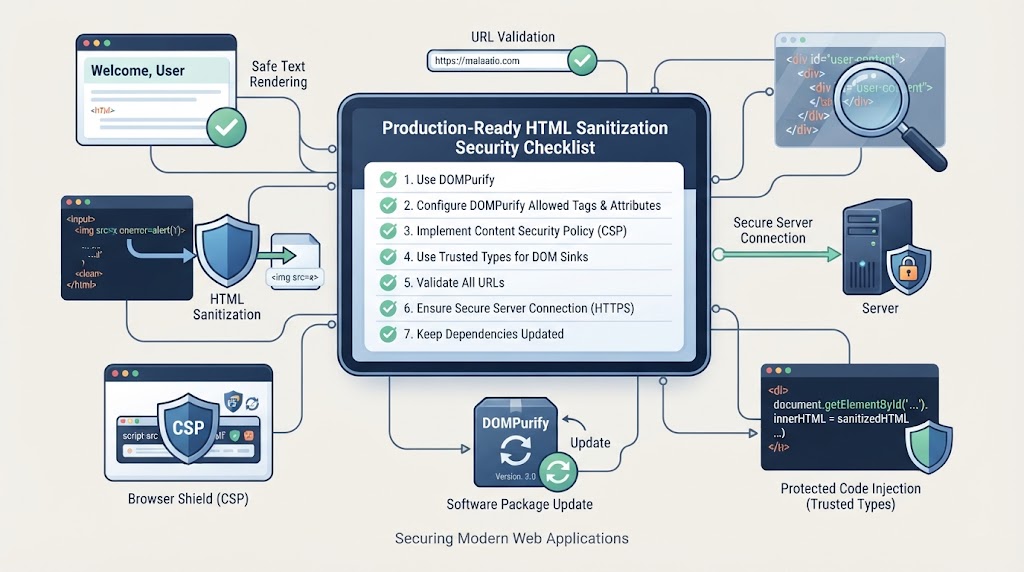
A production implementation needs a documented policy, maintained dependencies, and repeatable security tests. Testing one input string isn’t enough. We need to verify how the application handles content from submission to final display.
As noted by OWASP
“When HTML must be rendered, sanitize with a maintained allowlist sanitizer and enforce Trusted Types with no permissive default policy.” – OWASP
Our test suite should include image event handlers, script elements, dangerous URL protocols, malformed markup, encoded values, and relevant SVG or MathML cases. It should confirm that unwanted elements and attributes are absent while approved formatting remains intact.
Review these areas before deployment:
- Plain text uses textContent or safe framework interpolation.
- Rich HTML passes through a maintained sanitizer.
- Allowed tags and attributes match feature requirements.
- URL schemes follow a documented policy.
- Server-side validation and authorization are enforced.
- Sanitized HTML isn’t changed unsafely afterward.
- Dependencies and security advisories are reviewed.
- CSP and Trusted Types are considered where supported.
- The final DOM is tested in realistic workflows.
We should also review raw HTML rendering in React, Vue, and other frameworks, as well as any Markdown conversion pipeline. A safe text binding doesn’t protect a separate HTML string generated elsewhere.
Finally, test real application flows. A comment may be stored, retrieved, transformed, and displayed in different places. The same content should remain safe at every output point.
Automated tests are useful, but manual review still matters for complex DOM behavior. Document the policy, keep the tests current, and review changes whenever the application adds a new rendering feature.
FAQ
How should developers sanitize user input in JavaScript forms?
Sanitize user input in JavaScript based on how the application will display it. For plain text, use safe rendering methods instead of treating the input as HTML. For rich text, remove unsafe elements and attributes before displaying it. Also, validate data on the server because client-side checks alone cannot protect your application.
What is the difference between HTML escaping and HTML sanitization?
HTML escaping converts special characters into HTML entities so the browser displays them as text. HTML sanitization removes unsafe elements and attributes while keeping approved formatting. Use escaping for plain text and sanitization when users need formatted content, such as comments, descriptions, or other rich-text fields.
Can saved user-generated HTML create security risks?
Yes. Saved HTML can cause security problems when an application displays it without proper protection. Malicious code may run when other users view the content, putting their accounts and data at risk. To prevent stored XSS, sanitize rich HTML before rendering it and apply safe output handling wherever the content appears.
How can developers test whether HTML sanitization works correctly?
Test HTML sanitization with different inputs, including script elements, event-handler attributes, unsafe links, malformed markup, and encoded characters. Check the final DOM to confirm that unsafe content has been removed and approved formatting remains. Repeat these tests whenever you change sanitization rules, update dependencies, or add new HTML rendering features.
Is client-side HTML sanitization enough to protect a web application?
No. Client-side HTML sanitization cannot protect an application on its own because attackers can bypass browser checks and send requests directly to the server. Use server-side validation and sanitization where needed, along with context-aware output handling. Review the complete data flow to make sure untrusted content cannot reach unsafe rendering methods.
Apply Secure Coding Practices to Real Projects
When untrusted input reaches the browser, one unsafe rendering step can expose your application to cross-site scripting. A sanitizer alone isn’t enough. Review how data moves from the API to the page, use safe DOM methods, validate URLs, and keep server-side checks in place. Test the full path, not just the function that handles the input.
Build these habits through hands-on practice with the PrimeSec AI platform, alongside the Secure Coding Practices Bootcamp, to help your team develop safer software.
References
- “OWASP Proactive Controls.” OWASP. Accessed November 1, 2026.
- “JavaScript and TypeScript Security Cheat Sheet.” OWASP Cheat Sheet Series. Accessed November 1, 2026.