


Preventing secrets exposure source code starts with keeping credentials out of repositories before they are ever committed. A .env file in .gitignore is not enough, and exposed keys in public repositories can be discovered within minutes. We repeatedly see that API keys, passwords, and tokens leak because of weak processes rather than missing tools.
Teams that build Secure Coding Practices into their daily workflow experience fewer incidents and spend less time responding to exposed credentials. Our instructors regularly find secrets left behind during testing, debugging, or temporary fixes. Keep reading to see how modern engineering teams reduce secret exposure throughout the entire development lifecycle.
Secret Leak Prevention in 60 Seconds
One misplaced credential can expose entire systems. These quick points summarize the practical steps modern engineering teams use to keep secrets out of source code and reduce risk.
- Preventing secrets exposure requires multiple layers of protection rather than relying on a single tool.
- Modern teams replace hardcoded credentials with environment variables, secret managers, and identity-based access.
- When a secret is exposed, immediate revocation, rotation, and auditing are essential to limit damage.
Why Is Preventing Secrets Exposure in Source Code So Critical?

We often see teams pour effort into finding application vulnerabilities while a plaintext credential sitting in a config file gets ignored. But one leaked token can unlock databases, cloud consoles, CI/CD pipelines, or third-party services.
What often follows a leak includes data breaches, hijacked infrastructure, supply-chain attacks, regulatory fines, and surprise cloud bills. A single exposed API key can let an attacker move sideways, grab data, or even tamper with deployments.
Many organizations underestimate the long-term consequences of a data exposure breach until an exposed credential affects production systems. Our security reviews consistently show that keeping credentials out of repositories slashes the number of attack paths available.
How Quickly Can Exposed Secrets Be Discovered?
Automated scanners are constantly crawling public repositories. Cloud providers and platforms like GitHub actively hunt for leaked keys and alert the affected companies.
Industry reports confirm that thousands of secret leaks are found every day across public repos. That volume tells us that secret exposure in repositories is still a massive problem, even though everyone knows it’s a bad idea.
The takeaway is simple: when a team makes not putting API keys in code a non-negotiable standard, their overall risk drops fast.
What Causes Secrets to End Up in Repositories?
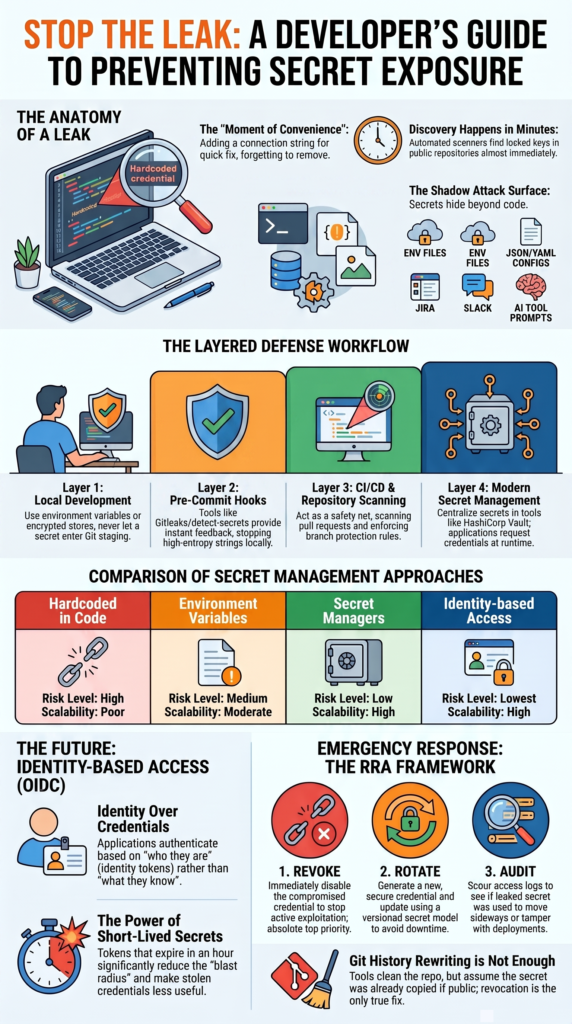
Developers don’t plan to leak credentials. It usually happens because of a quick test, a debugging session, copying a code sample, or just old, messy application design. We’ve dealt with cases where a dev added a database connection string to troubleshoot something, meant to remove it, and then forgot.
Months later, that same credential was still active in production. These stories are why we treat avoiding hardcoded secrets as a fundamental engineering rule, not just a nice-to-have.
Which Files Are Frequently Overlooked?
Teams often laser-focus on .java or .py source files but miss the places secrets love to hide.
The usual suspects are .env files, .pem keys, exported configs, backup zips, and build artifacts. JSON and YAML configuration files for deployments are also common culprits. Many leaks come from secrets in config files, not the main application code, which increases the overall risks of sensitive data exposure across development environments.
Most “oops” commits come from a moment of convenience, not carelessness. Human error is still a top cause. The guidance from groups like OWASP has been clear for years: stop the problem at the source by preventing hardcoded credentials early instead of just trying to detect them later.
How Should Teams Manage Secrets During Local Development?
The safest method is to never let secrets enter the Git staging area at all. This is where secure coding practices become your first and best defense. If developers don’t commit secrets, every other security control you have becomes more effective.
What Should Developers Store Outside Source Control?
Here’s a quick checklist we give teams:
- Environment variables (for local dev)
- References to a secret manager
- Encrypted local config stores
- Truly temporary runtime credentials
Many groups now treat using environment variables instead of secrets in code as a basic requirement. Are environment variables perfect? No. But they’re a lot safer than finding database passwords in source code or tokens baked into an app.
Do Pre-Commit Hooks Actually Help?
They do, if you set them up right. Common tools we see are detect-secrets, Gitleaks, Talisman, and git-secrets. They help by spotting high-entropy strings, recognizing tokens from specific providers, and giving the developer instant feedback before the commit is made.
Tools like Gitleaks and git-secrets create a workflow that stops accidental leaks before they ever leave a developer’s machine. It’s always cheaper to prevent a leaked secret locally than to manage the remediation chaos after it’s public.
Beyond .gitignore: Why Can History Rewrites Still Leave Risks Behind?
Simply deleting a secret from Git history doesn’t make it disappear. A lot of teams find a leaked credential and their first instinct is to rewrite the repo’s history with git filter-repo. That’s a useful step, but it doesn’t solve the core security issue.
Can git filter-repo Fully Eliminate Exposure?
Not reliably. You’re up against cached snapshots, forked repos, downloaded clones, and even third-party archival systems. The developer community has shown that deleting commits doesn’t guarantee eradication if the secret was already public.
If a secret was publicly accessible, you must assume someone has already copied it. Organizations use history rewriting tools to clean their repos, but invalidating the credential itself is far more important.
What Should Happen First After Discovery?
Your response should follow this order:
- Revoke the exposed credential immediately.
- Rotate to a new one.
- Audit logs for any misuse.
The goal is to revoke leaked API keys right away, then rotate the compromised credentials, and finally check what happened. Every security team we’ve worked with says revocation is the absolute top priority.
What Does Modern Secret Management Look Like?
Credits: IBM Technology
Modern teams keep credentials separate from application code. Instead of storing secrets inside files, applications request them only when they need them. We teach this approach in our secure coding practices training because we have seen how quickly exposed credentials can create larger security problems.
Many development teams still rely on static values, but that approach becomes difficult to manage as systems grow. During our workshops, we often find old credentials that were added for testing and never removed.
| Approach | Risk Level | Scalability |
| Hardcoded in code | High | Poor |
| Environment variables | Medium | Moderate |
| Secret managers | Low | High |
| Identity-based access | Lowest | High |
Organizations are moving away from long-lived credentials and adopting stronger secrets management practices. This shift reduces risk in both repositories and deployment pipelines.
In our experience, teams succeed when they make secret handling part of daily development work. Applications should retrieve credentials only when needed. The safest systems are the ones that know where to request a secret but never keep the actual value inside the code.
How Can Identity-Based Access Replace Static Credentials?
Applications should authenticate using who they are, not what secret they hold. Identity-based systems rely less on permanent credentials and fit well into modern DevSecOps strategies.
Why Are Short-Lived Credentials Safer?
They offer a few key benefits: a much smaller window for exposure if they are leaked, automatic expiration, easier rotation cycles, and a lower blast radius if something goes wrong. A token that lives for an hour is far less useful to an attacker than one that lives forever.
How Does OIDC Improve Security?
A typical workflow looks like this:
- The application requests an identity token.
- The provider (like your cloud) validates it.
- A temporary, short-lived credential is issued.
- The secret itself never touches source code.
We help teams pair concepts like least privilege access, zero-trust principles, and single sign-on (SSO) to reduce dependence on long-lived secrets. Dynamic systems, like those using Hashicorp Vault’s dynamic secrets, generate credentials only when needed and revoke them right after, which strengthens protection significantly.
Why Do Secret Scanning Programs Create Alert Fatigue?
Many security and development teams struggle with alert fatigue. We hear this often during our secure coding practices training sessions. When scanners produce too many warnings, people begin to ignore them, and real problems can be missed.
In several workshops, our instructors have seen teams spend hours reviewing alerts that turned out to be harmless. The large amount of noise makes it harder to find the secrets that truly matter.
What Creates So Much Noise?
Several types of data commonly trigger false alerts, including:
- Commit hashes and long IDs
- Random hexadecimal values
- Generic text patterns
- Test strings used during development
Some teams discover that most findings need manual review before the rules become accurate. That process takes time and can frustrate both developers and security staff.
How Can Teams Reduce False Positives?
Our experience shows that better tuning produces better results. Organizations often improve accuracy by using:
- Risk-based scoring
- Custom rules for their environment
- Approved allowlists
- Structured review processes
Some teams also combine scanning with logging controls and data handling policies described in this common data masking techniques guide, which helps reduce unnecessary exposure during testing and troubleshooting activities.
We encourage teams to treat scanning as an ongoing process. When detection rules improve over time, developers receive fewer alerts and security teams can focus on real risks.
Are CI/CD Pipelines the Right Place to Catch Secrets?
CI/CD pipelines should serve as a backup layer, not the first place where secrets are discovered. During our secure coding practices workshops, we often meet teams that depend only on pipeline scanning. While those checks help, they usually find problems after the code has already moved through several stages.
Many developers assume the pipeline will catch every mistake. In practice, that approach creates delays and extra work. We have seen teams stop deployments because a secret was found late in the release process.
Which Controls Should Be Added to Pipelines?
Strong pipeline protection usually includes:
- Secret scanning on pull requests
- Build policies that block unsafe code
- Repository monitoring
- Branch protection rules
- Regular security checks
Our instructors encourage teams to add these controls as part of daily development work rather than relying on one final scan.
What Does a Layered Detection Workflow Look Like?
A layered process often includes:
- Developer workstation checks
- Pre-commit validation
- Repository scanning after code is pushed
- CI/CD pipeline enforcement
- Continuous monitoring after deployment
From our experience, several smaller checks work better than one large security gate at the end.
What Is the Shadow Attack Surface Beyond Git Repositories?
Many teams focus only on source code repositories, but secrets often appear in places that security scans never check. During our secure coding practices training, we regularly show examples where the actual leak happened outside the codebase.
In our audits, operational tools often contain more exposed information than repositories. Developers may copy credentials into messages, tickets, or documents to solve a problem quickly. Months later, those secrets are still available.
Where Else Do Credentials Commonly Appear?
Common locations include:
- Team chat messages
- Project tickets and documentation pages
- Build and deployment logs
- Deployment packages and backup files
- Screenshots shared during support requests
Many investigations eventually lead back to these systems rather than the application repository itself.
Can AI Coding Tools Create New Exposure Risks?
AI-assisted development also creates new concerns. We have seen teams accidentally include sensitive information in prompts, debugging sessions, and local logs.
Our instructors encourage developers to review:
- Prompt histories
- Local transcripts
- Tool execution logs
- Generated code snippets
Organizations should protect collaboration and operational tools with the same care they give to their source code.
How Can Organizations Rotate Secrets Without Breaking Production?
Successful rotation needs planning and the right architecture, not emergency scripts. Rotating one secret in a simple app is easy. Rotating hundreds across a distributed microservices environment is a complex orchestration challenge.
Why Does Emergency Rotation Fail?
It often stumbles on legacy services that can’t fetch secrets dynamically, applications that cache credentials in memory, rollback scenarios where an old version needs an old key, and configuration files. You might rotate the secret in the vault, but a service running an old version could still be using the old, now-revoked value.
What Does a Safe Rotation Model Include?
You need a plan with versioned secrets, applications that retrieve secrets at runtime (so they always get the current one), automated deployment updates, grace periods for older services, and automated health checks after rotation. This approach follows secret rotation best practices and prevents outages during what should be a routine security task.
Insights from HashiCorp Developer indicate
“Applications configured to read from Vault automatically receive the updated credentials without code changes, eliminating downtime during rotation. The KV v2 secrets engine serves the new password on the next request or connection retry, making rotation seamless for workloads that don’t cache credentials.” – HashiCorp Developer
What Should Teams Do Immediately After a Secret Is Exposed?

Act as if you’ve been compromised and run your incident response process. Speed is critical here.
What Is the RRA Framework?
We coach teams on the RRA framework:
- Revoke
Disable the compromised credential immediately.
- Rotate
Generate a new one using your secret manager.
- Audit
Scour logs for any signs of unauthorized access.
What Mistakes Should Be Avoided?
Don’t wait to revoke. Don’t think just cleaning up the git history is enough. Don’t skip the log review. Never assume the attacker didn’t find it in time. The first few hours define the incident’s impact. Treat leaks of private keys, cloud access keys, or GitHub tokens as active security events that need a full response.
Research from Non-Human Identity Management Group (NHIMG) demonstrates
“Revoke the secret, check for copies in logs and mirrored repositories, rotate any dependent credentials, and confirm that the owning service or workload has a valid replacement before closing the case.” – NHIMG
FAQ
How can I keep API keys out of code during daily development?
Keeping API keys out of code starts with changing how developers handle secrets. Teams should use environment variables instead of storing credentials directly in applications.
This approach supports preventing secrets in source code and reduces repository secrets exposure. Developers should make sure that credentials are not hardcoded because passwords stored in source files are difficult to secure, monitor, and rotate.
Which files should I review for sensitive data exposure?
Sensitive data often appears in files that developers overlook. Teams should review secrets in config files, secrets in JSON config files, secrets in YAML config files, secrets in README files, and secrets in build scripts.
Developers should also inspect secrets in Python code, JavaScript files, Docker files, and Kubernetes manifests. Regular reviews help prevent hardcoded credentials and reduce the risk of sensitive data source code exposure.
How do pre-commit checks help prevent secret leaks?
Pre-commit hooks help stop secrets before code reaches a repository. Secret scanning tools can identify private keys in code, tokens exposed in source control, and cloud keys stored in applications. Secret entropy detection can also identify high-entropy strings that may contain credentials. These checks improve secure coding practices and reduce the number of secrets that enter repositories.
What should I do if credentials are exposed in source control?
Teams should revoke leaked API keys immediately and rotate compromised credentials as soon as possible. They should also remove secrets from Git history and sanitize code history to reduce future exposure. Reviewing build logs, deployment artifacts, and related systems can reveal additional leaks. Fast remediation reduces the chance that attackers will misuse exposed credentials.
Why are secret rotation practices important for application security?
Secret rotation limits the damage caused by stolen credentials. Short-lived credentials reduce the amount of time an attacker can use a compromised secret.
Centralized secret management supports credential management that eliminates static credentials and improves least-privilege access. Combined with DevSecOps practices, regular rotation helps reduce confidential data exposure and strengthens application security.
Build Secret Prevention Into Everyday Development
Secret leaks can quickly become security problems when prevention happens too late. Small mistakes in code or workflows often create risks that slow teams down. The strongest approach combines secure development habits with practical training that helps developers apply safer techniques in real projects.
Hands-on exercises and real examples make it easier to prevent secrets from reaching code and support long term security practices. Explore hands-on training with Secure Coding Practices.
References
- https://developer.hashicorp.com/well-architected-framework/secure-systems/secrets/manage-leaked-secrets/remediate-leaked-secrets
- https://nhimg.org/faq/how-should-organisations-respond-when-a-secret-is-exposed-in-code-or-a-workflow/