


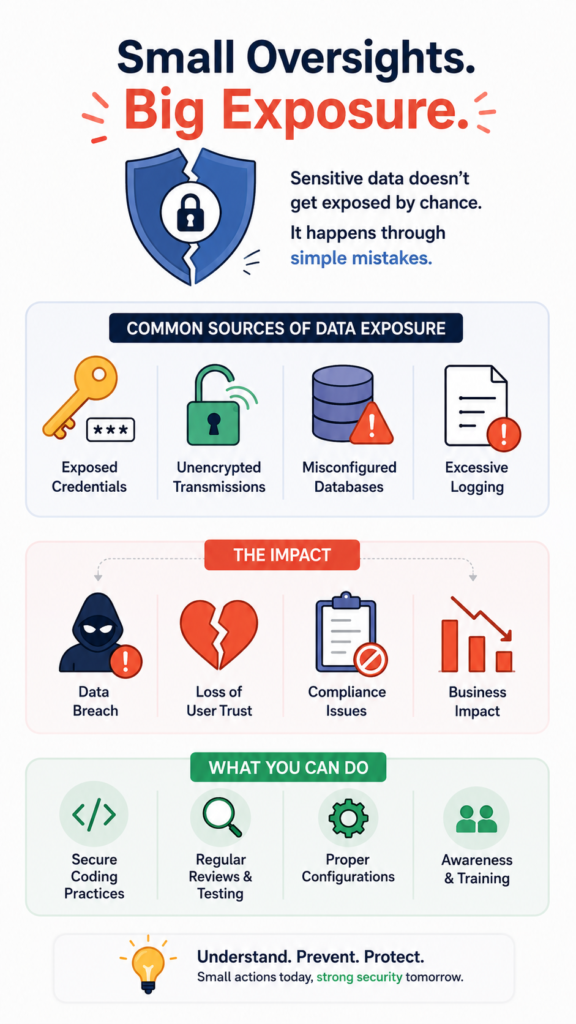
Building secure applications requires more than functionality and performance, it demands consistent secure coding practices at every stage of development. Yet many organizations underestimate the risks of sensitive data exposure, assuming that breaches only result from sophisticated cyberattacks.
In reality, exposed credentials, unencrypted transmissions, poorly configured databases, and excessive logging often create the biggest vulnerabilities. These seemingly minor oversights can reveal valuable customer information, damage user trust, and trigger compliance issues. Keep reading.
What You’ll Learn in This Guide
Protecting sensitive information starts with understanding where exposure happens and why it matters. In this article, you’ll discover:
- Exposure often happens through mundane errors in code, configuration, and data handling, not just sophisticated attacks.
- The fallout from a breach extends far beyond fines, damaging user trust and your application’s long-term viability.
- Proactive protection hinges on a few core practices: encrypting data in motion and at rest, minimizing what you collect, and masking what you show.
How Does Sensitive Data Get Exposed, Anyway?
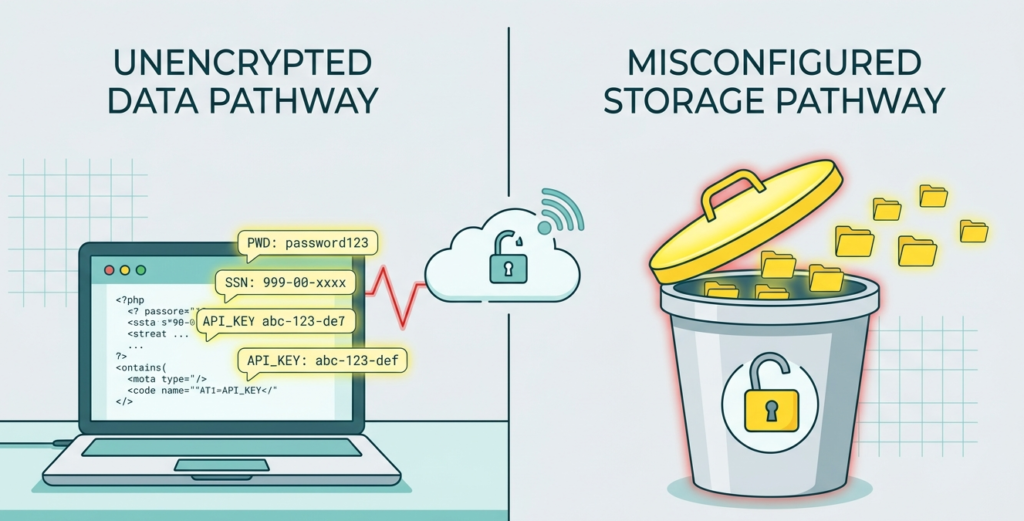
It’s rarely a single, catastrophic failure. More often, it’s death by a thousand cuts. A developer, rushing to meet a deadline, hardcodes a database password into a configuration file and pushes it to GitHub and sensitive data.
An API endpoint, meant for internal use, gets deployed without authentication, sitting on the open web like an unlocked diary. An application logs detailed error messages for debugging, and those logs, full of personal details, get stored on a server with lax permissions.
You can almost see it happening. The chain of small, reasonable decisions that leads to a very big problem. We’ve observed traffic from applications where session tokens were passed in URL parameters, visible to anyone and logged by every intermediate server.
Data gets exposed because the systems we build are complex, and security is an afterthought, something bolted on if there’s time.
Common exposure vectors include:
- Source code repositories containing secrets (API keys, passwords).
- Misconfigured cloud storage (S3 buckets set to “public”).
- Unencrypted data transmission (using HTTP instead of HTTPS).
- Over-permissive logging practices.
What Are the Real Consequences of a Data Exposure Breach?
People talk about fines first, GDPR, CCPA, the potential millions in penalties. And that’s real, it hurts. But the cost that lingers is the trust. So, what the real consequences of a data exposure breach?
Imagine your users, the people who chose your application, finding out their email addresses, their purchase histories, maybe even their physical addresses, are now on some forum. They feel violated, and they associate that feeling with your brand.
“Companies that fail to promptly disclose a breach have lower repaired trust than companies that promptly disclose.” – “Despite its legal significance and endorsement by global data protection regulations, the data minimization principle lacks a mathematical formalization suitable for operationalizing it in real-world ML applications… [T]he current discourse on data minimization practices often overlooks two crucial aspects: (1) the individualized nature of minimization (e.g., information that is unimportant for an individual may be critical for another) and (2) its intrinsic link to data privacy.” – DL.ACM
There’s a tangible silence that follows a breach announcement. Support tickets slow down, because people are afraid to log in. New sign-ups drop off. The engineering roadmap gets derailed for months by mandatory security audits and rebuilds.
Your team’s morale takes a hit, shifting from building features to fixing foundational mistakes under intense pressure. The business spends its energy on damage control instead of growth.
Can You Give Examples of Protecting Data at Rest and in Transit?
Sure, let’s get practical. Protecting data in transit is about ensuring no one can eavesdrop on the conversation between your user’s browser and your server, or between your microservices. This starts with enforcing TLS everywhere, not just on your login page.
You redirect all HTTP traffic to HTTPS with HSTS headers, so there’s no fallback. You keep your TLS configuration tight, disabling old, broken protocols like SSLv3 and using strong cipher suites.
For data at rest, think about the database. That’s where everything lives. Full-disk encryption on the server is a good baseline, but it’s like locking the front door of a building. If an attacker gets the key (server access), they’re in. You need to lock individual rooms. That’s where application-level encryption comes in.
You encrypt specific, sensitive fields before they ever hit the database. A credit card number isn’t stored as 1234-5678-9012-3456, it’s stored as an unreadable jumble of characters, and only your application, with the correct key, can decrypt it for processing.
A layered approach looks like this:
| Layer | In Transit Protection | At Rest Protection |
| Network | Enforced TLS 1.2+, secure cipher suites. | Firewalls, network segmentation. |
| Application | Validated certificates, secure API tokens. | Field-level encryption, secure key management. |
| Storage | Encrypted connections to databases (e.g., TLS). | Full-disk encryption, encrypted database tables. |
What Are the Non-Negotiable Data Encryption Best Practices for Developers?
First, never, ever roll your own crypto. Use the battle-tested libraries provided by your language or framework. In Node.js, that’s crypto. In Python, it’s cryptography. In Java, the JCE. These libraries are maintained by experts who understand the subtle flaws that break encryption schemes.
Second, manage your keys like they’re the only copy of a priceless manuscript. Your encryption keys should not live in your application code or in your config files next to the data they protect.
Use a dedicated key management service (KMS) from your cloud provider. AWS KMS, Google Cloud KMS, Azure Key Vault. These services handle the secure generation, storage, and rotation of keys. Your application requests to use a key, it never actually sees the raw key material itself.
Finally, think beyond “encrypt the database.” Encrypt backups before they’re shipped to long-term storage. Encrypt files uploaded by users before they land in your cloud bucket. Encrypt internal messages if they pass through a queueing system.
Is There a Simple Guide to Common Data Masking Techniques?
Data masking is for when you need to use real data but don’t need to see all of it. It’s showing just enough. In a development environment, you want production-like data to test with, but you can’t have real customer emails flying around.
So you mask them. john.doe@realcompany.com becomes j******e@example.org. The structure is preserved for testing, but the identity is protected.
The most common technique is substitution. You replace real data with realistic but fake data from a lookup table. A real name like “Maria Garcia” gets swapped for “Lisa Chen.” Another method is shuffling, where you randomize values within a column. All the zip codes in a dataset are real, but they’re no longer attached to the original addresses.
For displaying data in a UI, partial masking is key. You never show a full Social Security Number on a screen. You show ***-**-6789. You show the last four digits of a credit card, not the whole thing.
This lets the user confirm information without exposing it to someone looking over their shoulder. It’s a courtesy and a critical security control, all at once. Implementing it is often just a few lines of code in your display logic, a small step for a huge gain in privacy.
How Do Data Minimization Principles Work in Software?
Only collect what you absolutely need. It sounds obvious, but in practice, it’s revolutionary. When you’re designing a sign-up form, ask why you need a birth date. Is it for age verification? Then maybe you just need a “Are you over 18?” checkbox.
Do you really need a phone number if you only communicate via email? Every field you add is a liability, a piece of data you must protect, forever.
The principle extends to retention. Don’t keep data forever just because you can. Use data minimization set a clear retention policy. Audit logs might be kept for 90 days for troubleshooting, then purged. Inactive user accounts might be anonymized after two years.
This isn’t just good security, it’s often a legal requirement under laws like GDPR, which enshrines the “right to be forgotten.” Data you don’t have can’t be stolen. It simplifies your architecture, reduces your storage costs, and shrinks your attack surface in one move. It forces you to be intentional, and intentional design is almost always more secure.
What’s the First Step in Identifying Sensitive Data in Application Code?
You have to go looking for it. You can’t protect what you don’t know you have. Start with a manual, but systematic, code audit. Search your codebase for patterns. Look for variable names like ssn, credit_card, password, token, secret.
Look for SQL SELECT * statements that pull entire rows, potentially hauling sensitive fields into your application layer unnecessarily.
Then, use automated tools. Static Application Security Testing (SAST) tools can scan your source code and flag potential leaks. They can find hardcoded credentials, identify where sensitive data might be logged, and point out insecure function calls. It’s tedious work, but it’s foundational.
You’ll be surprised what you find, comments with old passwords, test files with real API keys. Once you know where the data flows, from the point it enters your API to where it’s stored in the database, you can start to build controls around those points. You map the journey of a piece of data through your system, and then you secure every stop along the way.
How Do You Securely Handle PII Data Under Regulations Like GDPR?
Credits: SoniSec Insights
You treat it with care, legally mandated care. GDPR and similar laws give individuals rights over their data. They can ask what you have, they can correct it, and they can demand you delete it. Your architecture has to support that.
It starts with knowing, for every user, what PII you store and where it lives. Is it just in the main user database? Or is it also in backup tapes, in analytics platforms, in archived support tickets?
You need procedures. A documented process for when a “right to erasure” request comes in.
How do you verify the requestor’s identity? How do you find all their data across all your systems? How do you delete it, and prove it was deleted? This often means building soft-delete functionality that can later be purged, instead of hard deletes that break referential integrity.
It means having a clear privacy policy that explains all this to the user in plain language.
What Are the Most Effective Ways to Prevent Secrets Exposure in Source Code?
Get them out of the source code entirely. That’s the only effective way. Configuration like API keys, database passwords, and encryption secrets should be fed into your application through environment variables or a dedicated secrets manager at runtime.
In your code, you reference process.env.DATABASE_URL or make a call to AWS Secrets Manager, you never write the actual value.
To enforce this, use tools that scan every commit. Git pre-commit hooks or CI/CD pipeline checks that run tools like git-secrets or truffleHog. These tools scan for high-entropy strings that look like keys and block the commit if they find one. They catch the mistakes before they become a permanent part of your repository’s history.
Because once a secret is committed, even if you remove it in the next commit, it’s still in the git history and can be retrieved. You’d have to rewrite history to truly remove it, a messy and risky process. Prevention is infinitely simpler than the cure. Make using environment variables the team norm, the default, the only way you know how to do it.
Which TLS Configuration Mistakes Most Often Lead to Data Exposure?
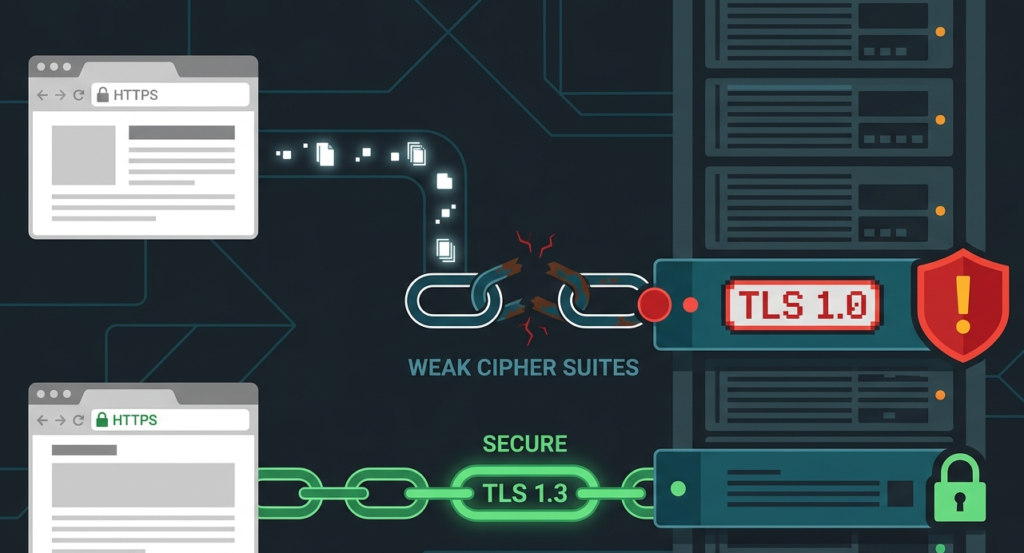
Using outdated protocols is a big one. SSLv2 and SSLv3 are cryptographically broken. TLS 1.0 and 1.1 are deprecated. You should mandate TLS 1.2 or, better yet, 1.3 as your minimum. Another mistake is poor certificate management.
Letting certificates expire, which causes browser warnings and can push users toward insecure connections. Using self-signed certificates in production, which offers encryption but no identity verification, opening the door to man-in-the-middle attacks.
“Integrating privacy into the structure of the organization is one way to change people’s behavior… However, there are still some challenges to overcome when implementing [Privacy-by-Design]: this concept has been characterized as ‘vague’, leaving many unanswered concerns relating to how to apply it in system design.” – Arxiv
Cipher suite choice matters, too. You need to disable weak ciphers that attackers can crack. Tools like SSL Labs’ SSL Test can grade your server’s configuration. You might think HTTPS is HTTPS, but the details in the handshake determine how strong that lock on the door really is.
A misstep here means the data is technically encrypted, but with a lock that a determined attacker can pick. It’s an illusion of security, and those are the most dangerous kind. Regular audits of your TLS config are as important as updating your application code.
FAQ
Does using a cloud provider like AWS or Azure make my data automatically secure?
No, it doesn’t. Cloud providers operate on a shared responsibility model. They are responsible for the security of the cloud, the physical data centers, hardware, and hypervisor.
You are responsible for security in the cloud, your data, your platform and application configuration, your identity and access management. You can still expose data in a perfectly secured AWS data center if you misconfigure an S3 bucket or leave a database port open to the internet.
How often should we rotate our encryption keys and passwords?
It depends on the sensitivity of the data, but a common best practice is to rotate keys at least once a year. Passwords for service accounts should be long, randomly generated strings (think 64+ characters) and rotated whenever an employee with access leaves the team or project.
Better than passwords, use short-lived access tokens or IAM roles that provide temporary credentials, eliminating the need for long-term password management altogether.
Is data masking the same as encryption?
No, they serve different purposes. Encryption is a reversible transformation using a key; you encrypt data to protect it at rest or in transit, and you decrypt it to use it. Data masking is often irreversible (like showing only the last 4 digits).
You mask data to reduce risk when a full dataset is not needed, like in development or analytics. Masked data cannot typically be turned back into the original data.
What’s the single biggest action our team can take to reduce exposure risk?
Conduct a dedicated, threat-modeling session. Get everyone in a room, developers, ops, product managers. Whiteboard how data flows through your application. Ask “Where could this break?” for each step. You’ll find the obvious holes fast.
This collaborative exercise builds a shared security mindset and almost always uncovers critical risks that individual coders, focused on their own feature, would never see. It turns security from a checklist into a shared mission.
Building a Culture of Data Respect
Data respect separates secure applications from cautionary tales. Look at your code today—where is that trust fragile? Don’t just patch bugs; build a genuine culture of security.
The Secure Coding Practices Bootcamp offers hands-on, jargon-free training covering the OWASP Top 10, encryption, and practical defense skills to help your team ship safer code from day one.
Ready to shore up your defenses? Join the Bootcamp Today.
References
- https://dl.acm.org/doi/10.1145/3715275.3732195
- https://arxiv.org/abs/2603.12195
Related Articles
- https://securecodingpractices.com/how-sensitive-data-gets-exposed/
- https://securecodingpractices.com/consequences-of-data-exposure-breach/
- https://securecodingpractices.com/protecting-data-rest-transit-examples/
- https://securecodingpractices.com/data-encryption-best-practices-developers/
- https://securecodingpractices.com/common-data-masking-techniques-guide/
- https://securecodingpractices.com/data-minimization-principles-software/
- https://securecodingpractices.com/identifying-sensitive-data-application-code/
- https://securecodingpractices.com/secure-handling-pii-data-gdpr/
- https://securecodingpractices.com/preventing-secrets-exposure-source
- code/
- https://securecodingpractices.com/tls-configuration-mistakes-data-exposure/