


Regex is a fundamental part of input validation, but inefficient patterns can quietly undermine both performance and security. When developers focus on optimizing regex performance secure coding, they reduce CPU overhead, prevent Regular Expression Denial of Service (ReDoS) attacks, and build more resilient applications.
At Secure Coding Practice, we believe secure code should also be efficient, because security mechanisms should never become system bottlenecks. Keep reading.
Why Regex Performance Matters for Secure Coding
Before diving deeper, here are the three most important things to remember about optimizing regex performance for secure coding:
- A poorly written regex can be a performance sinkhole and a security risk, opening the door to ReDoS (Regular Expression Denial of Service) attacks.
- Optimized regex patterns use specific character classes, avoid excessive backtracking, and anchor patterns tightly to make validation faster and more reliable.
- Writing efficient regex is a core, often overlooked, component of professional secure coding practices, ensuring security controls don’t become the point of failure.
Why Should You Care About Regex Performance in Security?
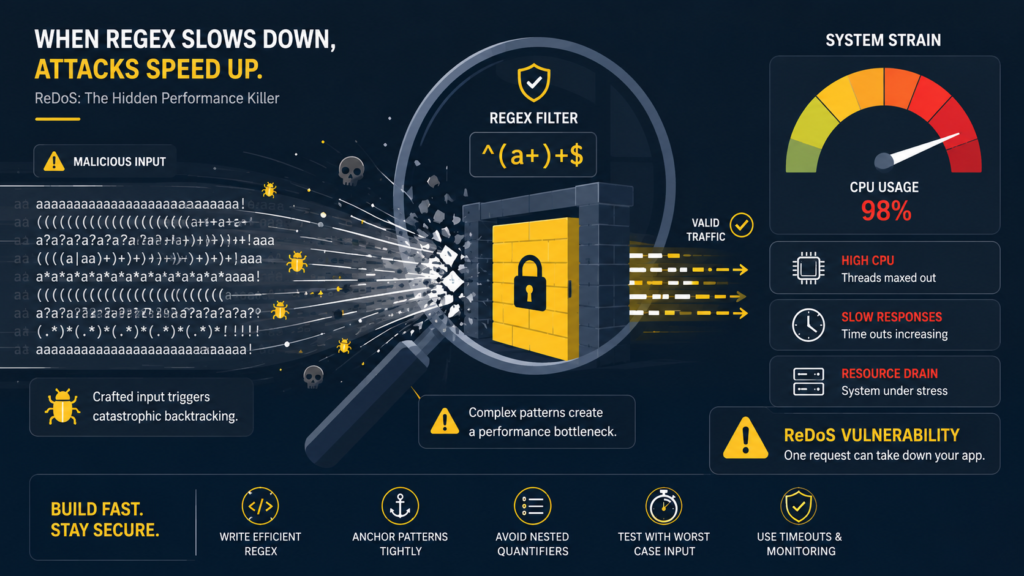
Regex is the workhorse of input validation, a key part of secure coding. We use it to allowlist usernames, validate email formats, and sanitize strings, and safe regular expression use ensures those validation rules remain both efficient and resistant to abuse.
A simple rule, “must be 8 digits”, is quick. A convoluted rule, “must start with a letter, not be a palindrome, and have an even number of vowels”, forces the guard to stare at each ID for minutes. In computing terms, this is catastrophic backtracking.
An attacker can craft a malicious input string that triggers this worst-case behavior, causing the regex engine to get stuck in a loop, consuming 100% of a CPU core. This is a ReDoS attack. It uses your own security check to cripple your application. So, regex performance isn’t a luxury, it’s a necessity for robust security. A fast regex is a secure regex.
We treat regex patterns like any other piece of performance-critical code. They get reviewed, tested, and profiled.
What Is a ReDoS Attack and How Does It Work?
A Regular Expression Denial of Service (ReDoS) attack exploits a regex engine’s backtracking behavior. Backtracking happens when the engine tries different paths to match a pattern. Some patterns have exponential time complexity, meaning adding one character to the input string can double or triple the processing time.
An attacker submits a carefully crafted string that triggers this worst-case path. For example, a pattern like ^(a+)+$ (matching one or more groups of one or more ‘a’s) is notoriously dangerous. Against a normal string like “aaaa”, it’s fine.
Against “aaaaaaaaaaaaaaaaaaaaaaaa!” (many ‘a’s followed by a non-matching ‘!’), the engine can spin for seconds or minutes, trying every possible way to group the ‘a’s before failing. A single malicious request can tie up a server thread completely.
This turns your validation layer, meant to protect you, into the attack vector. It’s a sobering reminder that in secure coding, the implementation details of your defenses matter just as much as their intent.
We’ve seen this happen in staging environments. A tester entered a long, malformed email, and the entire service froze for 30 seconds.
What Are the Most Common Regex Performance Pitfalls?
Several patterns scream “performance problem.” Knowing them helps you write better validation rules.
- Nested Quantifiers: Patterns like (a+)+ or (.*)* create massive backtracking states. The engine has too many ways to try and match the string.
- Overly Broad Wildcards: Using .* at the start of a pattern makes the engine greedy, consuming the entire string and then painfully backtracking character by character to satisfy the rest of the pattern.
- Excessive Use of Alternation (|): Long lists of alternatives, like (jpg|jpeg|png|gif|bmp|tiff), are okay if kept reasonable. But a giant alternation in the middle of a complex pattern slows things down as the engine checks each option.
- Redundant Character Classes: Using [0-9] is slightly less efficient than \d in most engines, but the real issue is using [\s\S] when you could be more specific. Unnecessary complexity costs cycles.
- Lack of Anchors: Not using ^ (start of string) and $ (end of string) allows the engine to try matching at every position in the string, which is far less efficient.
Avoiding these isn’t just about speed, it’s about writing clear, maintainable, and secure validation logic.
How Do You Write an Optimized, Secure Validation Pattern?
Start with the principle of specificity. Be as precise as possible about what you want to match. For a username allowlist, don’t use .* and then try to filter. Define the exact set, because using regex securely for input validation starts with limiting patterns to exactly what your application expects.
- Anchor your patterns: Always use ^ and $ for whole-string validation. This tells the engine exactly where to start and stop, eliminating unnecessary search.
- Use specific character classes: Prefer \d over [0-9], and [A-Za-z] over .*? when you mean letters. Use possessive quantifiers (*+, ++) or atomic groups (?>…) if your engine supports them to prevent backtracking.
- Order alternations wisely: In a pattern like (jpg|jpeg|png), put the most common matches first (jpg before jpeg).
- Pre-compile your regex: In most programming languages, you can compile a regex pattern once and reuse the compiled object. This avoids the overhead of parsing the pattern string on every validation call.
For example, a good email validation regex is anchored and relatively specific: ^[a-zA-Z0-9._%+-]+@[a-zA-Z0-9.-]+\.[a-zA-Z]{2,}$.
“A Regex pattern is called Evil Regex if it can get stuck on crafted input. Evil Regex contains: Grouping with repetition, Inside the repeated group: Repetition, Alternation with overlapping. Examples of Evil Regex: (a+)+$, ([a-zA-Z]+)*$, (a|aa)+$, (a|a?)+$. All the above are susceptible to the input aaaaaaaaaaaaaaaaaaaaaaaa!.” – OWASP
It’s not the most robust RFC-compliant pattern, but for most allowlist use cases in secure coding, it’s efficient and safe from ReDoS. We keep a library of these pre-compiled, well-tested patterns for common validations.
How Can You Test Your Regex for Performance and Safety?
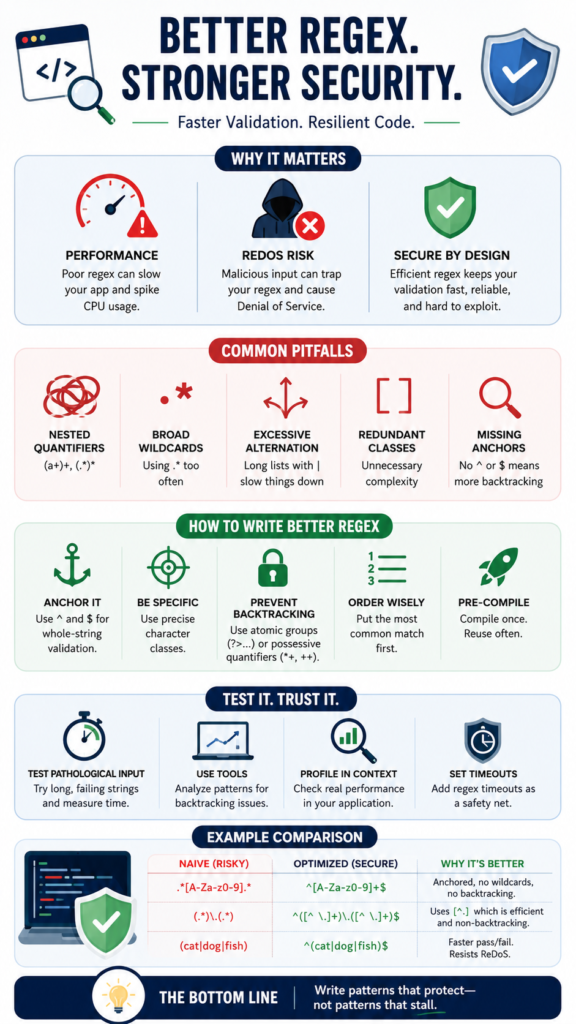
You can’t just assume a regex is fast. You need to test it. We use a few simple methods.
- Test with pathological input: Feed your regex a long string that should fail the match. For a pattern meant to match ^[a-z]+$, test it against “aaaaaaaaaaaaaaaaaaaaaaaa!” (50 ‘a’s and a bang). Time it. If it takes more than a few milliseconds, you have a problem.
- Use a regex analyzer: Online tools and IDE plugins can visualize your regex’s execution path and highlight potential catastrophic backtracking.
- Profile in context: Use your language’s profiling tools while running integration tests that include your validation layer. Look for unexpected time spent in the regex engine.
- Set timeouts: Some regex libraries allow you to set a timeout (e.g., 100ms). If the match takes longer, it throws an exception. This is a critical safety net in production to prevent a single bad request from blocking everything.
We make this part of our code review for any new validation pattern. “Have you tested it with a long, failing input?”
What Tools and Techniques Help with Optimization?
Credits: Titan IC Systems
Beyond writing better patterns, your toolchain matters. Modern regex engines have features designed for performance and safety.
- Pre-compilation: As mentioned, always compile static patterns once at application start-up.
- Benchmarking Libraries: Use micro-benchmarking tools to compare two potential patterns for the same job. A 10% speedup on a pattern run millions of times a day is significant.
- Static Analysis: Linters and security scanners can sometimes detect obviously dangerous regex patterns, like nested quantifiers, and flag them before they reach production.
- Alternative Approaches: Sometimes, regex isn’t the best tool. For a simple allowlist of known strings (like [‘admin’, ‘user’, ‘guest’]), a direct string comparison or a Set lookup is infinitely faster than a regex with alternation like ^(admin|user|guest)$.
The following table contrasts a naive, risky pattern with an optimized, secure alternative for validating a simple alphanumeric ID:
| Validation Goal | Naive, Risky Pattern | Optimized, Secure Pattern | Why It’s Better |
| Match an ID like “abc123” | .*[A-Za-z0-9].* | ^[A-Za-z0-9]+$ | Anchored, no wildcards, no backtracking. |
| Extract a filename without extension | (.*)\.(.*) | ^([^\.]+)\.([^\.]+)$ | Uses negated character class [^\.] which is non-backtracking and efficient. |
| Match “cat”, “dog”, or “fish” | `(cat | dog | fish)` |
| Performance Impact | High on mismatch. Must scan entire string. | Low. Fast pass/fail. | Prevents ReDoS, uses less CPU. |
| Security Posture | Vulnerable to slow inputs. | Resilient, predictable performance. | Security control is robust, not a liability. |
Choosing the right pattern is a direct investment in your application’s stability.
How Does This Fit into Overall Secure Coding Practices?
Optimizing regex is a perfect example of secure coding in practice. It’s not a separate “security task.” It’s writing good, robust code with security implications in mind. A slow regex can lead to a denial of service, which is a security incident. It can cause timeouts that lead to degraded service for legitimate users.
“Rewrite risky patterns. For instance, replace (.*a){10} with more precise character classes or anchored fragments. Avoid catastrophic patterns by testing with worst-case inputs and setting judicious timeouts at higher layers if the service model allows it. Keep an eye on error logs: sporadic spikes in CPU tied to certain requests may signal regex abuse.” – Cleverence
In our secure coding guidelines, we have a simple rule: validation must be fast and predictable. This applies to regex, but also to any logic checking user input. We encourage developers to think about the computational complexity of their validation, not just the logic.
It’s part of building systems that are resilient under stress, not just functionally correct in a test environment. This mindset elevates the entire codebase.
It turns a potential weakness into a strength, ensuring your security measures are assets, not liabilities.
What Are the Trade-offs and When to Be Less Strict?
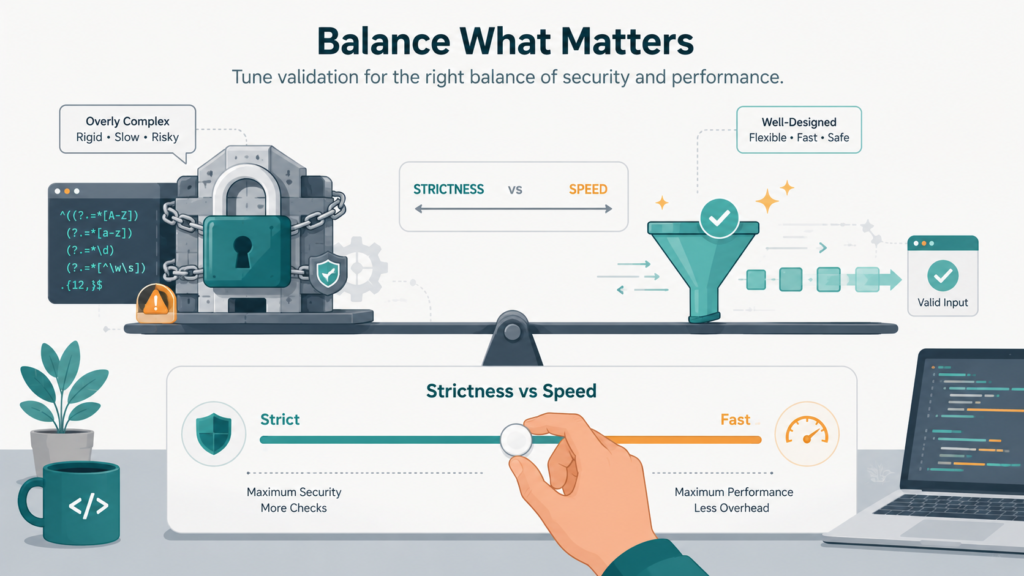
There’s a balance. The most performant regex might not be the most readable. A highly optimized, atomic-group-heavy pattern can look like line noise. The trade-off is maintainability. Our rule is: optimize for performance when the pattern is on a hot path (like user login or API request validation) or when it’s complex enough to be a ReDoS risk.
For a simple, internal utility that runs once an hour, readability might win. Also, perfect validation sometimes conflicts with performance. The official RFC for email addresses is incredibly complex. A fully compliant regex is huge and slow.
For most applications, a simpler, faster, “good enough” pattern that catches obvious malformed input is the better choice. The risk of a ReDoS from a complex pattern is often greater than the risk of a user accidentally entering a technically valid but weird email address that your simpler pattern rejects. You make a risk-based decision.
The goal is conscious design, not blind optimization. You choose the right tool for the job, knowing the implications.
FAQ
Can’t I just use a regex timeout and call it a day?
Timeouts are a crucial safety net and you should use them. But they’re a reactive control, like a circuit breaker. It’s better to not trip the breaker in the first place. An optimized regex is a preventative control. Use both: write efficient patterns and set timeouts for defense in depth.
Are some programming languages’ regex engines safer than others?
Yes, there are differences. Most modern engines (like PCRE2, RE2) have mitigations and are smarter about avoiding catastrophic backtracking. Some, like Google’s RE2, guarantee linear-time execution but sacrifice certain features like backreferences. Know your engine’s capabilities and limitations.
How do I optimize a regex I didn’t write (like one from a library)?
First, check if the library is actively maintained and if there’s a known issue. If it’s a critical dependency, you might need to fork it and patch the pattern, or wrap the call with a strict timeout.
For internal code, profile it. If it’s a bottleneck, refactor it. Often, you can replace a complex regex with a series of simpler, faster string operations or a parser for complex formats.
Is avoiding regex altogether the best optimization?
Sometimes, yes. For simple string equality or prefix/suffix checks, use string functions. For parsing structured data like JSON or XML, use a dedicated parser, not regex. Regex is a powerful tool for pattern matching on unstructured text, but it’s not the only tool in the box. Choosing a simpler method is often the ultimate optimization.
Writing Patterns That Protect, Not Impede
Optimizing regex performance for secure coding helps ensure your validation remains fast, reliable, and resilient against malicious input. Efficient regex patterns strengthen security without sacrificing application performance, making them an essential part of professional development.
Ready to sharpen your secure coding skills? Join the Secure Coding Practices Bootcamp to gain hands-on experience with OWASP Top 10, secure input validation, authentication, encryption, and practical techniques that help you build safer software from day one.
References
- https://owasp.org/www-community/attacks/Regular_expression_Denial_of_Service_-_ReDoS?from_column=20423&from=20423
- https://www.cleverence.com/articles/oracle-documentation/pattern-java-platform-se-7-4821/