


Identifying sensitive data application code requires teams to find secrets, credentials, and personal data before production. Stolen credentials remain a common cause of security incidents, making early detection part of everyday development work. In our training programs, we have seen that developers achieve better results when security checks happen.
Secure Coding Practices encourage combining secure coding habits, secret scanning, and data flow analysis to reduce risk. Teams that automate these checks spend less time chasing alerts and more time fixing real problems. Keep reading to see how organizations detect sensitive data, reduce false positives, and build security into development workflows.
Sensitive Data Detection: Quick Wins for Faster, Safer Development
A strong sensitive data detection strategy combines secure coding practices, automated scanning, SAST analysis, and continuous monitoring to reduce risk without slowing developers down.
- Learn how to effectively identify sensitive data across modern codebases.
- Discover why combining secret scanning and SAST provides broader coverage than using either approach alone.
- Explore practical ways to reduce false positives while supporting GDPR, HIPAA, and PCI DSS compliance.
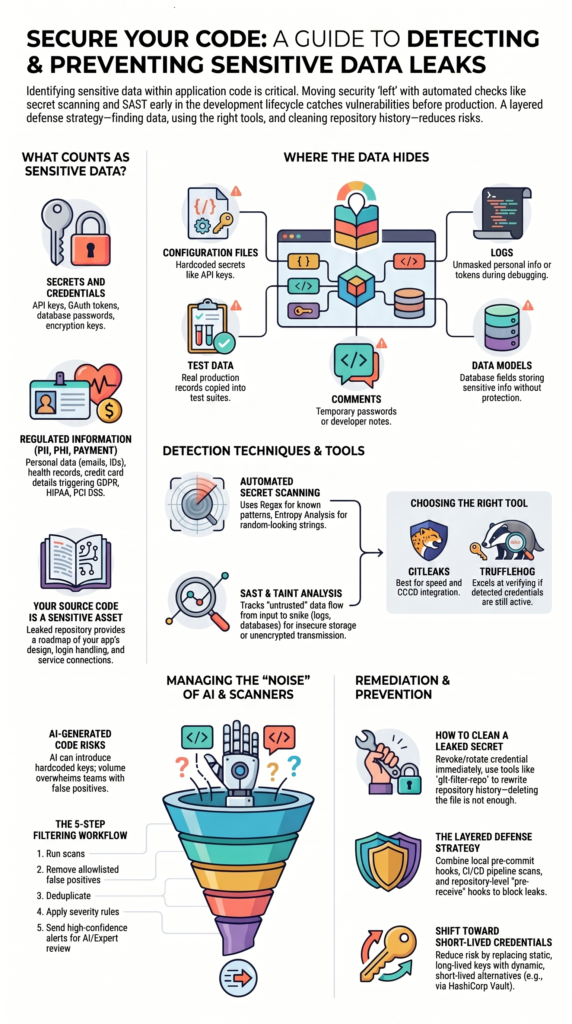
What Counts as Sensitive Data in Code?

Sensitive data covers secrets, regulated customer info, and business assets that could cause security, legal, or compliance headaches if they leak. Many companies focus on stopping breaches after the software is already live.
We’ve found it’s much more efficient to start with secure coding habits during development. That’s when engineers can spot and classify data before it ever gets saved in a repository.
Categories to watch for:
- Secrets and credentials: API keys, OAuth tokens, database passwords, and encryption keys.
- Personally Identifiable Information (PII): Names, emails, phone numbers, government IDs.
- Protected Health Information (PHI): Medical records, patient info, insurance IDs.
- Payment Data: Credit card numbers, bank account details.
IBM’s data consistently shows that stolen or compromised credentials are a leading cause of security breaches. It’s also easy to forget that your source code itself is a sensitive asset. A leaked repo can give away your app’s design, how it handles logins, and how it connects to other services, giving attackers a roadmap.
Several major compliance frameworks, like GDPR, HIPAA, and PCI DSS, require you to find and protect this kind of data, making detection a must-do.
Where Does This Data Usually Hide?
Most leaks happen in predictable spots that developers work with every day.
| Location | Typical Risk |
| Configuration files | Hardcoded secrets like API keys. |
| Logs | Unmasked personal info or tokens written to log files. |
| Test data | Real production records copied into test suites. |
| Comments | Temporary passwords left in code comments. |
| Data models | Database fields that store sensitive info without protection. |
Many developers think credential leaks only happen in the main app logic, but that’s not the whole picture. Logs are a frequent culprit because apps often dump entire request details for debugging. A single log line can expose a user’s session token or email address. This is why preventing sensitive data in logs is a key part of any secure development program.
Test suites create unexpected risks too. We’ve seen cases where developers copied real customer records into test environments as a shortcut. Those records ended up sticking around in repos and backups for years, long after the original project was done.
Understanding how sensitive data gets exposed helps teams recognize these hidden problems before they become security incidents. OWASP guidance consistently flags improper data handling as a major source of security failures.
How to Automatically Find Hardcoded Secrets?
Credits: Vickie Li Dev
Manual reviews can’t keep up with large codebases. You need automated secret scanners that use a mix of techniques:
| Technique | What It Finds |
| Regex patterns | Known credential formats (things that look like AKIA… for AWS keys). |
| Entropy analysis | Random-looking strings that could be crypto keys or tokens. |
| Provider validation | Checks if a found credential is actually active (more advanced). |
What’s entropy analysis?
It measures how random a string is. High entropy often points to API secrets or encryption keys that don’t match a simple pattern. In one of our own internal code checks, we found several high-risk secrets that regex missed completely because they were custom formats. Entropy analysis flagged them right away due to their random look.
Regex is great for structured patterns, but developers often create custom tokens that don’t match any known format. For the best coverage, your scanning workflow should use both pattern matching and entropy checks. Run entropy analysis alongside your regex rules to catch more types of secrets.
Choosing the Right Secret Detection Tool
The best tool depends on what your team needs most: speed, deep verification, or tight integration with your platform.
| Tool | Best For |
| Gitleaks | Fast, configurable scanning that fits well into pre-commit hooks and CI/CD pipelines. |
| TruffleHog | Verifying if a detected credential is still active, which helps reduce noise from old secrets. |
| detect-secrets | Lightweight workflows and simple integration. |
| GitHub Secret Scanning | Native, automatic scanning if you’re using GitHub repositories. |
When to pick Gitleaks?
It’s a solid choice if your priorities are speed, flexibility to create custom rules, and fitting smoothly into developer workflows. The community often praises its balance of finding secrets quickly without slowing things down too much.
When does TruffleHog make sense?
It adds value when you want to know if a found secret is still “alive.” This can save your team time by filtering out expired keys or test credentials. Of course, no scanner works perfectly out of the box. Trust from developers usually comes down to how easy it is to deal with the results, not just how many secrets it finds.
How SAST Helps Track Sensitive Data Flows?
While secret scanners look for exposed values, SAST tools analyze behavior. They help you understand how sensitive information moves through your application code, which is just as important.
What is taint analysis?
This is a technique SAST uses. It tracks data from an untrusted source (like user input) through the app’s processing and all the way to a sensitive destination (like a database query or log file). It can spot risky data flows before you deploy.
What risks can SAST reveal?
- Insecure storage of sensitive data.
- Unsafe logging practices that expose personal info.
- Data being sent over the network without encryption.
- Gaps in how privacy controls are implemented.
Enterprise security programs are increasingly combining SAST with secret scanning. Using just one method leaves blind spots. Platforms like SonarQube have expanded their features to include these kinds of code analysis for sensitive data, making it easier to bring both techniques into your workflow.
As noted by CISA
“…the agency uses its NOC/SOC tools to perform data sanitization and enrichment functions to process the raw data. The raw data may be filtered to remove agency ‘private/internal’ sources, personally identifiable information (PII), or other sensitive information in conformance with agency sanitization and sharing requirements.” – NCPS Cloud Interface Reference Architecture (Volume Two)
Why Is AI-Generated Code Creating New Challenges?
AI coding assistants help developers move faster, but speed can create new security risks. In our secure development training programs, we often see teams focus on delivering features quickly and leave security reviews until later. By that stage, fixing problems usually takes more time and effort than catching them early.
Developers may accept AI-generated suggestions without fully reviewing the code. As a result, applications can end up with hardcoded API keys, unnecessary dependencies, or weak security controls that were never properly checked. During code review exercises, we’ve seen these mistakes appear even in projects built by experienced teams.
Another challenge comes from the sheer volume of code AI tools can produce. More code means more findings for scanners to analyze. Security teams often face:
- Increased false positives
- Duplicate alerts
- Larger review workloads
- Slower investigation times
Without strong secure coding practices, this growing noise can overwhelm teams. Developers may start ignoring alerts because too many appear unimportant. We have found that combining secure coding practices with regular code reviews helps teams manage AI-generated code more effectively while keeping security part of the development process.
Cutting Down Scanner Noise Before Using AI
Sending every single scanner alert directly to an AI for review is expensive and slow. A better approach is to filter the results first.
A practical workflow looks like this:
- Run your secret scans.
- Remove known false positives using your allowlists.
- Deduplicate findings so you see each unique issue once.
- Apply your own severity rules.
- Only then, send the high-confidence alerts for deeper review.
Sending raw, unfiltered scanner output to a large language model burns through your budget and context window, and often gives inconsistent advice. Several teams we’ve worked with cut their AI review costs significantly by setting up a simple filtering step first.
Research from William & Mary Computer Science
“…practitioners are generally more tolerant of false positives than the 20% upper bound proposed in literature, given their preferences and the tools they currently use, with some finding even 80% or more false positives practical.” – Security Testing of Software for Hostile Environments (Page 116)
What works better?
A layered process: use regex filters and allow lists to handle obvious cases, set severity thresholds, and then use AI-assisted review for the tricky, remaining alerts. In our experience, teams that build strong secure coding habits first end up needing a lot less AI triage later on.
Finding Contextual PII (Beyond Simple Patterns)
Finding sensitive information is not always as simple as matching a pattern. While regular expressions work well for structured data, they often miss information hidden. We frequently show developers examples where important personal data appears without any obvious format.
| Method | Best For |
| Regex | Structured data such as credit card numbers, account numbers, and government IDs. |
| NLP Models | Understanding meaning and context within sentences. |
| Entity Recognition | Identifying names, locations, relationships, and other key details in text. |
A common challenge appears when sensitive information is written naturally. Consider the sentence, “My doctor is John Smith.” There is no special pattern, number, or identifier to match. Even so, the statement contains personal and healthcare-related information. Traditional regex rules cannot understand that context on their own.
Throughout our training exercises, we encourage teams to look beyond pattern matching. Effective detection often combines multiple techniques, including:
- Context analysis
- Named entity recognition
- Language processing models
When paired with secure coding practices, these methods help teams identify sensitive information more accurately and reduce the risk of exposing personal data in applications, logs, and internal systems. We also discuss the broader risks of sensitive data exposure so developers understand the business and compliance impact of missed data.
What to Do When a Secret Gets into Your Git History?
If you find a secret in your repo, you need to act fast. Rotate the credential immediately, don’t wait, and then clean it from your repository’s history.
Why deleting the file isn’t enough: If you add a secret in one commit and delete it in a later commit, the secret is still sitting there in the history of your repo. Anyone with access can still find it. Many organizations learn this the hard way.
How to fix it safely:
- Revoke the credential on the service it belongs to (AWS, GitHub, database, etc.).
- Identify all commits that contain the secret.
- Use tools like git-filter-repo or BFG Repo-Cleaner to rewrite your repository’s history and remove the secret.
- Force-push the cleaned history to your main branch.
- Make sure everyone on the team updates their local copies.
A maintainer from a large open-source project put it well: “We replaced all our secrets with placeholders and rewrote history.” Never delay rotating a live credential while you plan the cleanup.
How to Stop Sensitive Data From Getting Into Repos in the First Place?
Prevention is always better than cleanup. You need controls at multiple points.
Controls before commits:
Local secret scanning on a developer’s machine, IDE plugins that warn about bad practices, and pre-commit hooks. We always encourage teams to start building these secure coding habits early, because preventing a secret from being written is far easier than removing it later.
Many teams also adopt a common data masking techniques guide when handling test data so sensitive information never reaches development environments.
Why pre-commit hooks aren’t a full solution:
Developers can bypass them with a git commit –no-verify flag. You can’t rely solely on the developer’s machine.
What a layered defense looks like:
- Developer-side: Local scanning and training.
- CI/CD Pipeline: Automated scans on every pull request.
- Repository Server: Pre-receive hooks on GitHub/GitLab that block commits with secrets.
- Operations: Using secret management systems (like HashiCorp Vault or AWS Secrets Manager) so code never contains real secrets.
| Control Layer | Purpose |
| Secure Coding Practices | Reduce the chance of secrets being written in the first place. |
| Automated Secret Scanning | Catch exposed credentials that slip through. |
| SAST Analysis | Understand how sensitive data flows through the application. |
| Continuous Monitoring | Catch new exposures that appear over time. |
The Most Effective Long-Term Strategy

Building a strong program for identifying sensitive data takes more than adding another security tool. Over the years, we have seen that the most successful teams focus on prevention, detection, and continuous improvement at the same time. Rather than reacting to every new issue, they create processes that reduce risk before problems appear.
From our experience training developers in secure coding practices, the teams that make steady progress tend to follow a few consistent habits:
- Scan code automatically throughout development
- Review how sensitive data moves through applications
- Remove exposed secrets from repository history when needed
- Reduce alert noise before starting deeper investigations
- Replace long-lived credentials with short-lived alternatives whenever possible
Many organizations start by searching for secrets after they have already been committed. While that helps, it does not solve the root problem. A stronger approach is to prevent sensitive data from entering codebases in the first place through secure coding practices and better development workflows.
As security programs mature, their goal often changes. Instead of constantly finding and replacing exposed secrets, they work toward reducing the need for static credentials altogether. That shift lowers risk, saves time, and creates a more sustainable security program.
FAQ
How does identifying sensitive data application code improve software security?
Identifying sensitive data application code helps developers find exposed credentials, personal information, and other sensitive data before software reaches production. Early detection reduces the risk of data breaches and unauthorized access.
It also supports application code security audit activities and improves secure development sensitive data practices. By identifying problems sooner, teams can fix issues before they affect users or business operations.
How does PII detection in source code protect customer information?
PII detection in source code helps teams locate personal information such as names, email addresses, phone numbers, and account details. Customer data code scanning can identify sensitive records that developers may accidentally store in applications or test environments.
These practices support GDPR sensitive data code and HIPAA sensitive data code requirements while improving data privacy code implementation across software projects.
Why are hardcoded API key detection and password detection important?
Hardcoded API key detection and hardcoded password detection code help prevent attackers from accessing applications and internal systems. Developers sometimes leave credentials in source files, configuration files, or test code.
Finding hardcoded secrets source code early reduces credential leakage source code risks. It also helps organizations protect databases, cloud services, and authentication systems from unauthorized access.
How does SAST sensitive data identification improve code reviews?
SAST sensitive data identification examines application code to find security issues before deployment. Static analysis sensitive data detection can identify insecure data storage, unsafe logging, and sensitive data exposure code.
These findings help developers perform better code review sensitive data activities. Security testing sensitive data during development allows teams to fix problems early and improve overall application security testing data processes.
Which tools support automated secrets detection and sensitive data monitoring?
Automated secrets detection helps teams identify exposed credentials, tokens, and keys in application code. Secret scanning application code and source code secrets detection can locate problems before code reaches production.
Sensitive data monitoring code activities also help teams track new risks over time. Combining code security scanning tools with sensitive data flow analysis provides better visibility into how sensitive information moves through applications.
Build Security Into Everyday Development
Sensitive data issues slow your team and leave you fixing problems after code ships. That’s costly.Make secure habits part of daily work so risks stay smaller and fixes happen sooner. Hands on training helps developers use secure authentication, input validation, and safer dependencies in real projects.
It builds better habits across teams and keeps security work practical, with useful labs that stick every day at work for teams now and grow safely together. Get started now, join Secure Coding Practices today.
References
- https://www.cisa.gov/sites/default/files/2023-02/NCPS%2520Cloud%2520Interface%2520RA%2520Volume%2520Two%25202021-05-14.pdf#6#4
- https://www.cs.wm.edu/~denys/pubs/Amit_thesis.pdf#29#18