
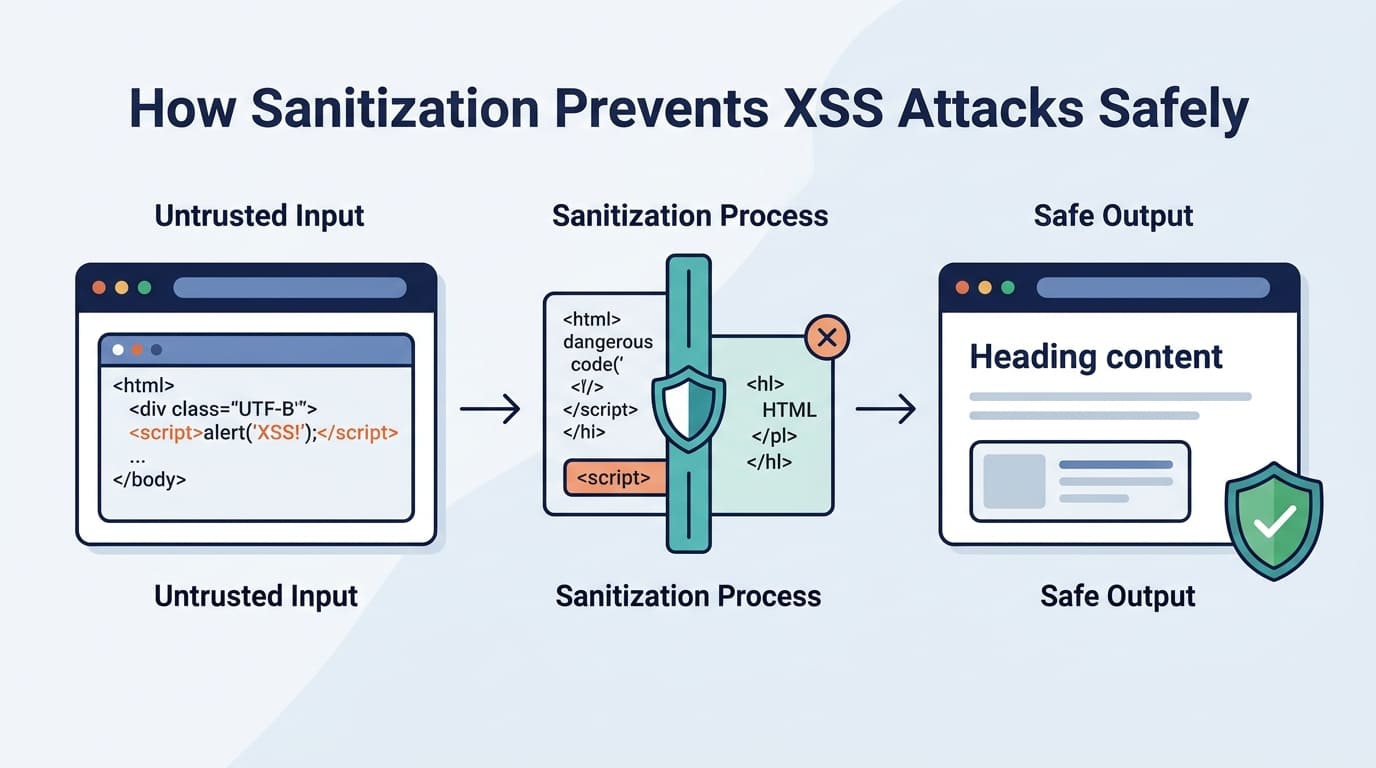

Cross-site scripting (XSS) lets attackers inject malicious scripts into web pages when browsers treat untrusted data as executable code. HTML sanitization helps block these attacks, but it’s not enough on its own. Developers also need contextual output encoding and safe rendering practices. OWASP recommends using defenses that match how and where data appears, rather than relying on basic input filtering.
At Secure Coding Practices, we cover practical ways to reduce XSS risks throughout software development. Learn when to use DOMPurify, where browser frameworks fall short, and how to handle untrusted data safely. Keep reading to strengthen your XSS defenses.
Quick Wins: Essential XSS Sanitization Practices
- Sanitize and Validate Inputs: Remove dangerous HTML and validate inputs on the server.
- Use Safe Output Handling: Apply context-aware encoding and prefer textContent over innerHTML.
- Layer Security Defenses: Combine sanitization with CSP, Trusted Types, dependency updates, and security testing.
What Is XSS, and How Does It Threaten Web Applications?
Cross-site scripting, or XSS, is when an attacker gets a website to run their code in someone else’s browser. The browser trusts the site, so it runs the code without question. That can leak user data or make the site do things the user never asked for. OWASP’s Web Security Testing Guide says XSS can pop up in any app that takes input from users and doesn’t protect its output.
How Does an XSS Attack Work?
Every app is built a little differently, but most attacks go like this:
- An attacker sends bad content through a form, a link, a comment, or an API request.
- The app saves it or sends it back without checking it well enough.
- The content ends up on a web page in an unsafe spot.
- The browser sees the content as code and runs it.
- The code can steal session info, change the page, or act as the user.
Picture a comment box that puts whatever you type right onto the page. If someone posts a comment with a script inside it, everyone who opens that page runs the script. We build this exact mistake into one of our labs on purpose. Students are usually surprised at how little it takes to break the page. Once they see it happen on their own screen, they stop thinking of XSS as a textbook word.
What Are the Main Types of XSS?
Security folks group XSS into three types:
- Stored XSS: The bad content is saved in a database or other storage, and visitors get hit later when they load it.
- Reflected XSS: The bad input comes straight back in the server’s reply, often when someone clicks a link an attacker made.
- DOM-based XSS: The page’s own JavaScript puts untrusted data somewhere unsafe in the page.
MDN Web Docs points out that stopping XSS means controlling how untrusted data gets to places where code can run. Each type follows its own path, so you need to protect both the server side and the browser side. We’ve noticed that students who only practice one side tend to miss bugs on the other.
How Does Sanitization Prevent XSS Attacks?

Sanitization cleans up risky HTML before the browser ever sees it. A good sanitizer looks at each tag, attribute, and link type and compares it to a list of rules. Anything that breaks the rules gets removed.
What Happens When a Sanitizer Encounters Malicious HTML?
Take this simple bad example:
<script>alert(1)</script>
If an app drops this into a page with no protection, the browser might run it as code. A sanitizer can take out the script tag and leave behind only what the rules allow.
A sanitizer might:
- Remove tags that aren’t allowed, like script tags.
- Strip event handlers such as onclick and onerror.
- Block link types like javascript:.
- Keep safe formatting, like paragraphs and lists.
- Limit attributes that could make the browser act strangely.
The final result changes from tool to tool. Some sanitizers throw out the whole bad tag. Others keep the harmless text that was inside it.
Why Does Sanitization Reduce Security Risk?
Sanitization cuts down the amount of HTML the browser is allowed to run. This approach to sanitizing data to prevent XSS makes it a good fit for user comments, rich-text editors, and any site that lets people add a little formatting.
The OWASP Cross Site Scripting Prevention Cheat Sheet says to use a trusted HTML sanitizer when your app has to show HTML from users. It also says sanitizing doesn’t cover everything. JavaScript strings, CSS values, and some URLs and attributes need different handling.
At Secure Coding Practices, we teach sanitization as one piece of the puzzle. New students often ask us if they can just run all their data through one filter and be done. We tell them no, and then we show them a case where that filter fails. Our goal is for your app to keep the content it needs without letting anyone sneak in code.
How Do Sanitization, Encoding, and Validation Differ?
Sanitization cleans HTML, while input sanitization and output encoding address different parts of data protection. Output encoding makes data safe for the place where it will show up, while validation checks that input follows the rules. Each one solves a different problem, so you can’t swap one for another.
| Defense | Primary purpose | Typical use |
| HTML sanitization | Removes disallowed markup and attributes | User-generated rich text |
| Output encoding | Stops special characters from being read as code in a specific context | Names, comments, and plain-text values |
| Input validation | Rejects values outside defined rules | Numeric identifiers and constrained fields |
| URL validation | Limits allowed URL schemes and destinations | Links, redirects, and navigation fields |
| Safe DOM manipulation | Keeps data out of unsafe browser parsing contexts | Dynamic page updates |
When Should Developers Use Each Defense?
The right choice depends on what your app does with the data.
- Sanitization: Use it when users need HTML formatting, such as in comments, rich-text editors, or content management systems.
- Output encoding: Use encoding that matches the spot where you show plain text from users.
- Validation: Check that data fits the format you expect, like a number for an account ID or a real date.
- URL validation: Check the link type and other rules before you let users decide where a link goes.
- Safe rendering: Choose DOM methods that add text to the page without treating it as HTML.
A username is a good example. It can pass validation and still have characters in it that need HTML encoding before you show it. Passing one check doesn’t make data safe everywhere.
OWASP treats HTML entity encoding, HTML attribute encoding, JavaScript escaping, CSS encoding, and URL encoding as separate jobs, because each spot on a page has its own rules. Using the wrong one can leave your app open to attack. In our classes, we’ve seen students fix a bug with the wrong kind of encoding and feel done, until we tested it and the attack still worked. That moment teaches more than any slide we could show.
When we coach teams, we tell them to pick the defense based on where the data is going, not just where it came from.
How Can Developers Implement DOMPurify Safely?
DOMPurify cleans up untrusted HTML before it reaches the page. It strips out tags and attributes that could run harmful code. You only need it when your app has to show HTML that a user wrote. If you just need to show plain text, you can skip it.
How Can You Sanitize HTML With DOMPurify?
Here is the basic workflow we teach in our first sanitization lab:
javascript
import DOMPurify from “dompurify”;
const untrustedHTML = userInput;
const safeHTML = DOMPurify.sanitize(untrustedHTML);
container.innerHTML = safeHTML;
This only works if DOMPurify is installed correctly and kept up to date. It also works only if you use the clean result as it is, without changing it again afterward.
Plain text is even easier to handle. Use this instead:
javascript
container.textContent = userInput;
The textContent property treats the value as text, never as HTML. So if you don’t need bold words, links, or images, this is the simplest and safest choice.
What Practices Help Keep DOMPurify Effective?
After watching many students build their first sanitizer, we put together this checklist. It covers setup, upkeep, and what happens after cleaning. Following sound practices for using sanitization libraries effectively also means keeping dependencies updated, limiting unnecessary configuration changes, and testing the final rendered output.
- Keep DOMPurify updated to a maintained release.
- Stick with the strict default settings unless you have a clear reason to change them.
- Avoid extra hooks that could weaken the cleaning.
- Think about turning on SANITIZE_NAMED_PROPS to help block DOM clobbering.
- Allow only the HTML elements and attributes your app really needs.
- Don’t edit the clean markup with risky string tricks.
- Test what actually shows up on the page, not just what the sanitizer returns.
The most common mistake we see in student projects is thinking clean HTML stays clean forever. It doesn’t. A quick string replace, a template step, or a framework that re-reads the markup can bring the danger right back.
Sanitizing is just one step in the path your data takes. Developers need to know what happens before that step and what happens after it.
Why Doesn’t React Automatically Prevent Every XSS Attack?
Credits: Ankit Saxena
React protects you in many cases, but not all of them. It escapes most text you put inside curly braces. Once you tell React to show raw HTML, though, cross-site scripting (XSS) risks come back. A framework helps a lot, but safe coding habits still matter.
Why Is SetInnerHTML Rizky?
Take a look at these two ways to show a comment.
Ordinary text rendering:
jsx
function SafeComment({ comment }) {
return <div>{comment}</div>;
}
Direct HTML rendering:
jsx
function RiskyComment({ html }) {
return <div dangerouslySetInnerHTML={{ __html: html }} />;
}
In the first one, React escapes the text for you. In the second, the HTML goes straight into the page. That means your app is now responsible for making sure the content is safe.
We often hear students say, “But I’m using React, so I’m covered.” Our answer is that a framework is a helpful seatbelt, not a force field. Unsafe spots can still hide in third-party components, Markdown tools, and custom DOM code.
How Can React Developers Reduce XSS Risks?
- Use normal JSX curly braces for plain text.
- Sanitize untrusted HTML before you show it.
- Skip dangerouslySetInnerHTML when plain text will do the job.
- Add server-side checks, since attackers can send requests without using your browser.
- Look closely at any package that turns Markdown or HTML into page content.
- Retest how things render after you update React or other dependencies.
Rich-text editors need extra care. Their output can include headings, links, images, and formatting that your app wants to keep. A tightly set up sanitizer can allow those things and block everything else.
The key idea is simple. Decide what content your app needs, then allow only that.
Where Should Sanitization Happen: Client Side or Server Side?
Both places matter, and each one does a different job. Client-side sanitization protects what the browser shows. Server-side checks make sure the rules apply no matter who sends the request. If your app accepts user-written HTML, you should decide what each side is responsible for.
What Are the Differences Between Client-Side and Server-Side Sanitization?
Client-side and server-side sanitization protect applications in different ways. Each approach has its own benefits and limitations, so understanding their differences can help developers choose the right strategy for handling untrusted input.
- Client-side sanitization: Helps prevent unsafe markup from being rendered in the browser. However, attackers can bypass client-side code, so it should not be the only layer of protection.
- Server-side sanitization: Applies sanitization rules to incoming API requests before processing input. However, it does not eliminate the need for proper output handling in different contexts.
- Combined sanitization: Uses both client-side and server-side methods to provide layered protection. However, implementing both approaches requires careful planning and coordination across the development team.
How Should Applications Handle Untrusted HTML?
In our training, we start on the server. The browser is in the user’s hands, so we can’t trust it to enforce our rules.
- Treat direct API requests as untrusted.
- Validate data on the server so it matches the format you expect.
- Sanitize HTML on the server when your app accepts rich text.
- Store the data in the way your app needs.
- Encode output for the place where it will be used.
- Add browser-side sanitizing when untrusted HTML reaches a separate rendering path.
Here is a story that shows why this matters. Picture a comment form that cleans the text in the browser. A student in one of our labs skipped the form completely and sent a crafted request straight to the API. The server accepted it, and the bad HTML was waiting for the next person who opened the page. It only takes a few minutes to see how easy that is.
That is why we always say server-side enforcement matters. Cleaning in the browser makes things safer for users, but it can never replace checks on the server.
What Common Mistakes Make Sanitization Ineffective?
Sanitization can fail when developers overlook dangerous HTML elements, rely on browser-side checks alone, or modify content after sanitizing it. These mistakes can leave applications vulnerable to cross-site scripting (XSS). To reduce the risk, developers should understand common sanitization weaknesses and apply the right security measures.
- Removing only <script> tags: Attackers can exploit other dangerous HTML elements and attributes to execute malicious code. Use a maintained HTML sanitizer with an appropriate allowlist instead of relying on simple tag removal.
- Relying only on client-side checks: Attackers can bypass browser-side controls by sending requests directly to the server. Enforce input validation and other necessary security controls on the server.
- Using sanitization for every output context: HTML sanitization does not automatically make data safe for use in JavaScript, CSS, or other contexts. Apply context-aware output encoding and appropriate validation based on where the data will be used.
- Allowing unnecessary HTML attributes: Some attributes can introduce security risks when handled incorrectly. Restrict permitted HTML elements and attributes to those required by the application.
- Modifying HTML after sanitization: Subsequent changes can introduce unsafe markup or attributes that were not present during the initial sanitization. Avoid unsafe post-processing and sanitize the content again when necessary.
- Skipping security tests after updates: Changes to dependencies or rendering logic can introduce new vulnerabilities. Keep sanitization libraries updated, test them with malicious input, and inspect the final rendered output after changes.
Which Sanitization Mistakes Should Developers Avoid?
Developers can reduce sanitization risks by following a few practical rules throughout the development process. These practices help ensure that untrusted input is handled consistently and that security controls remain effective as applications change.
- Use a maintained sanitizer: Choose a reliable HTML sanitization library rather than stripping specific tags manually.
- Enforce server-side controls: Do not rely on browser-side checks to protect application endpoints.
- Apply a strict allowlist: Permit only the HTML elements and attributes the application actually needs.
- Choose the right defense for each context: Remember that input validation, HTML sanitization, and output encoding serve different purposes.
- Review post-sanitization changes: Check any transformations that occur after sanitization to ensure they do not introduce unsafe content.
- Test regularly: Update dependencies and test sanitization behavior with malicious input to identify potential weaknesses.
Why Is Context Important After Sanitization?
Students in our bootcamp make the same move again and again. They clean a string with an HTML sanitizer, then paste it into a script block and call it done. It’s a fair guess, but it’s wrong. An HTML sanitizer only knows about HTML. It can’t make a string safe inside JavaScript, CSS, or every kind of URL. Even a plain link can carry a value that looks fine and still sends people to a bad site or runs code.
As noted by OWASP
“If you sanitize content and then modify it afterwards, you can easily void your security efforts. If you sanitize content and then send it to a library for use, check that it doesn’t mutate that string somehow. Otherwise, again, your security efforts are void. You must regularly patch DOMPurify or other HTML Sanitization libraries that you use. Browsers change functionality and bypasses are being discovered regularly.” – OWASP
Browsers make this harder because they read markup in quirky ways. Mutation XSS is when markup changes meaning as it passes through different steps. Something that passed the security check can turn dangerous one step later.
DOM clobbering, framework template expressions, risky URL schemes, and filters that run twice can cause trouble too.
We tell every class the same thing. Please don’t write your own blacklist to catch every bad payload. Attackers can write one attack in hundreds of ways, and browsers go along with a lot of messy syntax. A homemade filter will always miss a few.
How Do Advanced XSS Techniques Bypass Sanitizers?

Advanced attacks sneak through the gaps. Two parsers may read the same text differently, a framework may do something unexpected, or app code may undo the sanitizer’s work. Even a good sanitizer needs careful setup and testing.
How Does Mutation XSS Challenge HTML Sanitizers?
With mutation XSS, the HTML gets parsed, cleaned, changed, and then read by the browser, and the meaning shifts along the way. A payload can look harmless at one step and act very differently after the next. PortSwigger researchers have written about these tricks and about ways around sanitizers. So we check the final DOM, not just the cleaned string. In our labs, students often stare at a log that looks totally clean while the page builds something else. After that, they stop trusting the string.
What Other Edge Cases Should Developers Test?
- DOM clobbering: Unexpected HTML elements or attributes mess with JavaScript variables and DOM properties.
- Framework gadgets: Template expressions or framework behavior turn harmless-looking markup into code that runs.
- Unsafe URL handling: Allowed URL schemes or attribute combos open up surprising ways to run code.
- Multi-pass filtering: Repeated changes add unsafe markup after the sanitizer is done.
- Rich-text processing: Markdown converters and editor plugins change the markup after an earlier security check.
Security reminder: A sanitizer is only as strong as its settings, its updates, and what the rest of your app does with its output.
When we review student projects, one rule catches the most bugs. Follow the data through every step. Say your app sanitizes HTML and then hands it to a template engine. Test those two together, because testing the sanitizer alone can fool you.
How Do CSP and Trusted Types Strengthen XSS Prevention?

Content Security Policy and Trusted Types add extra layers on top of sanitization, output encoding, and safe DOM methods. They can limit the damage when someone makes a mistake. They don’t make unsafe rendering okay.
How Does Content Security Policy Help?
A Content Security Policy (CSP) tells the browser which scripts and other resources it may run or load. We’ve seen teams get the most from CSP when the policy fits what the app really needs.
- Choose strict script policies.
- Use nonces or hashes where they make sense.
- Don’t count on loose directives as your main defense.
- Test each policy change against the app’s features.
- Read the violation reports to find unsafe code paths.
CSP can reduce the harm from some XSS bugs. It can’t take the place of handling data safely.
How Do Trusted Types Reduce DOM-Based XSS Risk?
In browsers that support it, Trusted Types only lets risky DOM sinks take values made by approved policies. For example, a team can require that any HTML going to a sensitive sink must first pass through an approved sanitizer.
Insights from W3C indicate
“Authors may define a policy that will sanitize an HTML string, allowing only a subset of tags and attributes that are known not to cause JavaScript execution. Any TrustedHTML object created through this policy can then be safely used in the application, and e.g. passed to innerHTML setter, even if the input value was controlled by the attacker, the policy rules neutralized it to adhere to policy-specific contract.” – W3C
- Look at where your code uses innerHTML and similar sinks.
- Add policies that require proper sanitization.
- Test for compatibility before you enforce anything in production.
- Watch for violations and fix the unsafe data flows behind them.
Together, CSP and Trusted Types give you defense in depth. They work best alongside safe DOM APIs, output encoding that matches the context, and a reliable HTML sanitizer.
How Can Developers Test and Maintain XSS Sanitization?

Teams should test sanitization against real attacks, trace how data moves through the app, and keep their security tools up to date. Security platforms such as PrimeSec can also be explored as part of a broader approach to application security. Regular testing helps identify weaknesses that normal feature tests might miss.
What Should an XSS Sanitization Test Plan Include?
A good security test suite covers many kinds of untrusted input:
- Script elements and inline event handlers.
- Dangerous URL schemes.
- Broken HTML and odd attribute combinations.
- SVG and MathML content, if your app supports them.
- Mutation XSS and DOM-clobbering cases.
- Requests sent straight to your API that skip browser controls.
- Unsafe changes made after sanitizing.
- Output from rich-text editors and Markdown converters.
How Can Teams Verify Their Defenses?
Our bootcamp teaches a process you can repeat. It checks security and normal features at the same time:
- List the HTML elements and attributes your app truly needs.
- Test approved content alongside banned payloads.
- Check the rendered output in the browser setup your users have.
- Run dependency checks and automated security tests.
- Review any sanitization changes before they ship.
- Retest the affected pages after every update.
Good testing proves that real formatting still works and that banned markup is either removed or harmless. Test your API endpoints directly too, since anyone can skip the browser and send requests by hand.
Measurement note: How well a sanitizer works depends on your app, its settings, your test cases, and your threat model. A single percentage for XSS prevention would be misleading without a clear benchmark and time period. Teams should track their own test coverage, the bugs they find, and how they fixed them.
The classroom and lab moments here are general. If you have real stories from your own cohorts, such as a specific bug a student found, swapping them in will make this read even more like you wrote it.
FAQ
How does HTML sanitization help prevent script injection?
HTML sanitization removes or modifies dangerous HTML elements and attributes before browsers process them. This helps prevent attackers from injecting scripts through user comments, forms, and other content. However, sanitization alone cannot stop every XSS attack. Developers should also validate input, apply context-aware output encoding, and render HTML safely to strengthen cross-site scripting prevention.
What is the difference between input sanitization and output encoding?
Input sanitization removes or modifies unsafe HTML elements and attributes, while output encoding converts special characters into a safe representation for a specific context. HTML entity encoding, JavaScript escaping, and HTML attribute encoding serve different purposes. Developers must choose the correct method for each output context to prevent browsers from interpreting untrusted data as executable code.
How can developers prevent DOM-based XSS attacks?
Developers can prevent DOM-based XSS attacks by handling browser-side data carefully and avoiding unsafe DOM manipulation. For example, using innerHTML with untrusted content can expose an application to script injection. Using textContent to display plain text, validating URLs, and choosing safe DOM methods helps prevent DOM injection and reduces the risk of malicious code execution.
Is server-side sanitization better than client-side sanitization?
Server-side sanitization provides an important security layer because attackers can bypass client-side checks. Client-side sanitization can improve user experience, but it should never serve as the only defense. Developers should validate input on the server, sanitize HTML when users need to submit formatted content, and apply context-aware output encoding before displaying untrusted data.
How can developers test whether their XSS protection works?
Developers can test XSS protection by submitting safe test payloads through forms, comments, and other input fields to check how applications handle untrusted data. Testing should cover reflected XSS, stored XSS, and DOM-based XSS. Automated security testing can identify potential weaknesses, while manual testing helps confirm that sanitization and output encoding prevent browsers from executing injected scripts.
Build a Stronger XSS Defense With Secure Coding Practices
If your application handles untrusted data, a single unsafe HTML injection point can expose users to cross-site scripting (XSS). Sanitization alone isn’t enough. You need the right defenses in place.
Secure Coding Practices helps you strengthen your approach to web security by focusing on secure coding techniques that reduce XSS risks. Start by reviewing your application’s HTML injection points and testing how untrusted data moves through your system. Then, build a repeatable testing process to catch vulnerabilities before they reach production.
Ready to strengthen your web security skills? Explore the Secure Coding Practices Bootcamp and take the next step toward building safer web applications.
References
- https://cheatsheetseries.owasp.org/cheatsheets/Cross_Site_Scripting_Prevention_Cheat_Sheet.html
- https://www.w3.org/TR/2025/WD-trusted-types-20250626/#2