


Security benefits allowlisting input is one of the most effective ways to strengthen application security because it accepts only known, valid input and rejects everything else. At Secure Coding Practice, we teach developers to make input validation a default habit rather than an afterthought.
This simple strategy reduces vulnerabilities, improves code quality, and blocks many common attacks before they can start. Keep reading to learn why allowlisting should be part of every secure development process.
Why Allowlisting Is Your First Line of Defense
Good security starts by assuming every input could be risky. Here are the biggest reasons allowlisting remains one of the most trusted secure coding techniques:
- Allowlisting is proactive, defining only known-safe inputs, which makes it inherently more secure and maintainable than reactive blocklisting.
- It drastically reduces the attack surface by making entire categories of injection attacks (SQLi, XSS, command injection) impossible with properly configured rules.
- Implementing input allowlisting is a cornerstone of professional secure coding practices, leading to predictable, stable, and easier-to-audit software.
What Exactly Is Input Allowlisting?
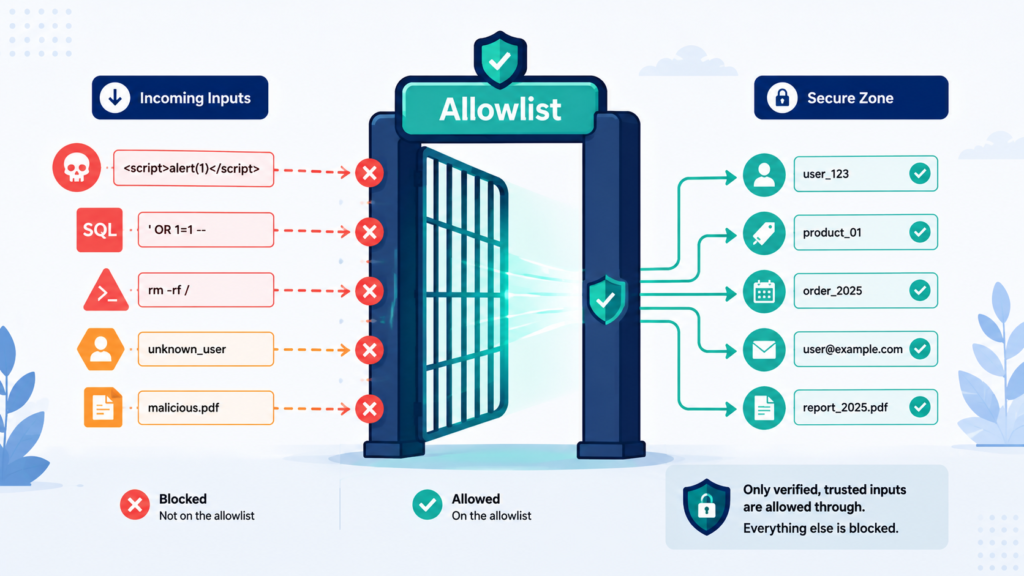
Input allowlisting, often called whitelisting, is the security practice of validating data by checking if it matches a set of pre-defined, acceptable patterns. It’s a “yes list.” For a username field, the allowlist might be: lowercase letters, numbers, and underscores, 3 to 20 characters long. The validation logic doesn’t look for bad things.
It simply checks, “Does this input match our safe pattern?” If yes, it proceeds. If no, it’s rejected immediately. This is the opposite of blocklisting, which tries to identify and remove known bad patterns, like <script> tags. The difference in mindset is everything.
Blocklisting asks, “Is this dangerous?”, a question that gets harder every day. Allowlisting asks, “Is this allowed?”, a question you can answer definitively, right now. In our work, we treat allowlisting not as an optional technique, but as the default stance for any external input.
It’s the digital equivalent of a guest list at a private event, not a bouncer trying to spot troublemakers in a crowd of thousands.
How Does Allowlisting Prevent Injection Attacks?
Injection attacks succeed by convincing an application to treat user input as executable code. Allowlisting stops this by accepting only predefined, expected values and rejecting everything else before it reaches the application logic.
- SQL Injection: If a “sort by” parameter only allows “price” or “date”, an input like “price; DROP TABLE users–” is rejected immediately. The malicious SQL never reaches the query builder.
- Cross-Site Scripting (XSS): If a “name” field only accepts letters, spaces, hyphens, and apostrophes, an input such as “<script>alert(‘hacked’)</script>” is blocked because characters like <, >, and & are not permitted.
- Command Injection: When input is restricted to a known set of safe values, attackers cannot insert shell commands or special characters needed to execute system commands.
“Important When building secure software, allowlisting is the recommended minimal approach. Denylisting is prone to error and can be bypassed with various evasion techniques and can be dangerous when depended on by itself. Even though denylisting can often be evaded, it can often be useful to help detect obvious attacks. So while allowlisting helps limit the attack surface by ensuring data is of the right syntactic and semantic validity, denylisting helps detect and potentially stop obvious attacks.” – Security Boulevard
Even sophisticated obfuscation techniques fail because the required malicious characters or values are never accepted. This makes allowlisting a strong preventative security control that removes entire categories of injection attacks before they can begin.
Why Is Allowlisting More Effective Than Blocklisting?
Blocklisting is a losing game. It’s reactive. You must constantly update your list of “bad” things as attackers find new bypasses. Miss one obscure Unicode representation of, and your XSS filter is useless.
The contrast between allowlist and denylist validation becomes clear here because one defines exactly what is permitted instead of chasing every possible malicious pattern. Allowlisting is proactive and stable.
The list of “good” characters for a username field doesn’t change unless your business requirements change. An attacker can spend all day crafting a new zero-day exploit, but if it uses characters not on your allowlist, it’s automatically blocked.
The effectiveness comes from simplicity and certainty. An allowlist rule is easy to reason about, test, and audit. You can look at the regex ^[a-z0-9_]+$ and instantly know what’s allowed. A blocklist is a sprawling, ever-growing collection of edge cases.
From a maintenance perspective, allowlists are sustainable. They make your security model predictable and robust over time. We’ve seen teams burn out trying to maintain blocklists. Switching to allowlists transformed their security from a source of anxiety into a structured part of the development workflow.
What Are the Direct Security Benefits?
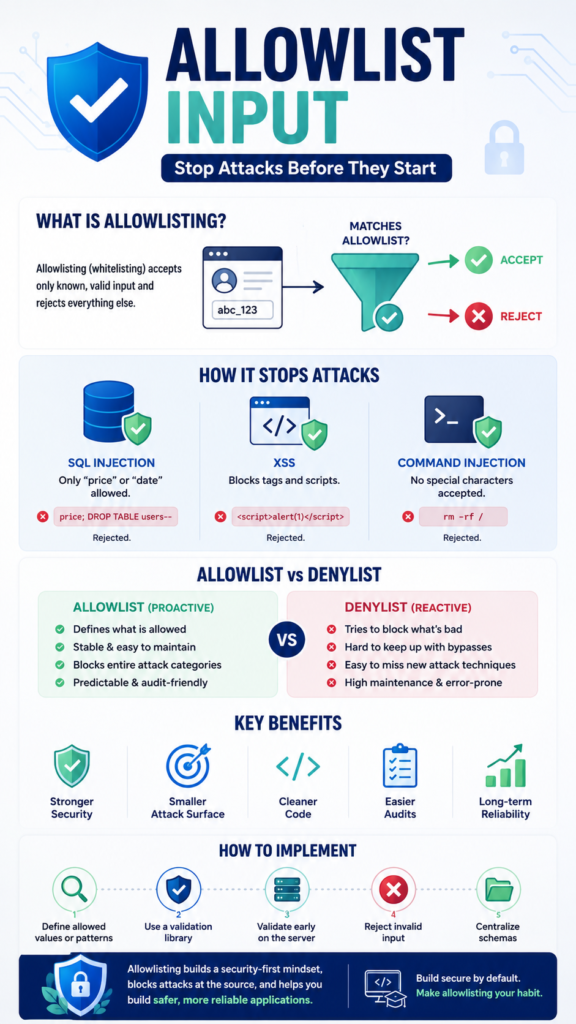
The benefits cascade through your application’s entire security posture. First, it provides defense in depth. Even if another layer fails, the allowlist provides a strong, primary barrier. Second, it reduces the attack surface to a known minimum. You’re not defending against infinite possibilities, just the finite set you’ve approved.
Third, it leads to more stable and predictable code. Functions that receive allowlisted data can operate with confidence, leading to fewer logic errors and crashes that themselves could be security vulnerabilities. Fourth, it simplifies security auditing.
A reviewer can look at your input validation schemas and quickly understand what data is permitted, making it easier to spot weaknesses. Finally, it future-proofs against new variations of old attacks.
A novel SQL injection technique still needs special characters like quotes or semicolons. If those aren’t allowed in the relevant field, the novel technique is irrelevant. It’s a strategy that pays continuous dividends, making every other security control more effective.
How Does Allowlisting Improve Code Quality and Maintenance?
Credits: QAFox
This is the hidden, non-security benefit. Allowlisting forces you to think precisely about your data requirements from the start. What is a valid username? What is a valid product category? This clarity translates into cleaner, more intentional code. Your data models become self-documenting.
A new developer can look at the validation schema and instantly understand the business rules for a field. It also localizes validation logic. Instead of scattered if statements checking for malicious input throughout your codebase, you have a single, centralized validation layer at the point of entry.
Changing a rule, like allowing hyphens in usernames, happens in one place. This reduces bugs caused by inconsistent validation. In our projects, adopting allowlisting drastically reduced a whole category of support tickets related to “weird input” causing errors. The system became more robust because its boundaries were well-defined.
It shifts the team’s mindset from “What could go wrong?” to “What do we explicitly want?”
Where Should You Apply Allowlisting in Your Application?
The rule is simple: anywhere untrusted data enters your system. This is a core tenet of our secure coding practices. The most critical boundaries are:
- User-facing inputs: Form fields, URL query parameters, HTTP headers (like User-Agent), and file uploads (validate file type, name, and content).
- API endpoints: Every parameter in every POST, PUT, or GET request must be validated against a strict schema.
- Data from third-party services: Just because it’s from another API doesn’t mean it’s safe. Validate the structure and content of the responses before processing.
- Configuration and environment variables: These are often overlooked but can be manipulated in compromised environments.
The following table illustrates the stark contrast in outcomes between the two approaches for a common “search query” parameter:
| Attack Scenario | Blocklist Approach | Allowlist Approach | Result with Allowlist |
| SQL Injection | Attempts to filter ‘, ;, –. | Allows only alphanumerics, spaces, hyphens. | ‘ OR ‘1’=’1 is rejected. No SQLi possible. |
| Cross-Site Scripting (XSS) | Attempts to filter <script>, onerror=. | Allows only alphanumerics, spaces, hyphens. | <img src=x onerror=alert(1)> is rejected. No XSS possible. |
| Command Injection | Attempts to filter &, ` | , ;`. | Allows only alphanumerics, spaces, hyponds. |
| Maintenance Burden | High. Must update list for new bypasses. | Low. List changes only if business rules change. | Team spends less time on security patches. |
The allowlist approach consistently neutralizes the threat at the source.
What Are the Practical Steps to Implement It?
Start small, but start now. Pick one new feature or one critical endpoint. A strong allowlist strategy also begins with data type validation, ensuring every field accepts only the expected format before applying more specific business rules. For each input field, ask:
- Define the allowlist: Use a regex pattern or an explicit list of values (for enums).
- Choose a validation library: Use a schema validation library (like Zod, Yup, or your framework’s built-in tool). Don’t roll your own parser.
- Validate early and on the server: Apply the allowlist validation at the very first point the data touches your backend code. Client-side validation is for UX only.
- Reject, don’t sanitize: If the input doesn’t match the allowlist, reject the entire request with a clear error. Do not try to “fix” or sanitize the input by removing bad characters; this leads to bypasses.
- Centralize your schemas: Keep your validation rules in a shared location so they’re consistent across your application.
We made it a team rule: no controller or route handler touches request data without it first passing through a defined validation schema. It quickly became habit.
Are There Any Downsides or Challenges?

The primary challenge is balancing security with usability. Choosing the right validation strategy for each input scenario helps maintain strong security without unnecessarily rejecting legitimate user data. An overly restrictive allowlist can frustrate users. Rejecting a last name like O’Connor because you forgot the apostrophe is a problem.
“Allowlist validation is usually the better default. It defines what is permitted, such as a known set of characters, a fixed length, a specific date format, or a bounded numeric range. Blocklist validation tries to exclude known bad patterns. Blocklists are fragile because attackers can often find alternate encodings, separators, or parser behaviours that bypass them. Allowlists are especially effective for identifiers, codes, flags, and structured fields.”– Deep Wiki
This requires gathering requirements and, sometimes, supporting internationalization (like Unicode letters for names). It’s more work upfront than a naive blocklist, but it’s work that improves the overall design. Another challenge is legacy systems. Retrofitting strict allowlists onto an existing, large application can be daunting.
The strategy is incremental. Apply allowlists to new features and to old features whenever you modify them. Over time, your coverage increases. The key is to start the practice and be consistent moving forward.
The initial investment in thinking through your data contracts pays off massively in reduced security incidents and support overhead.
FAQ
Isn’t allowlisting too restrictive for fields like a “Bio” or “Product Description”?
For truly free-form text, you can’t allowlist content, but you can still allowlist characters. You can allow letters, numbers, punctuation, and spaces while disallowing <, >, and &. Your primary defense for these fields then becomes strict output encoding when you display the data. The allowlist provides a first layer by removing the most dangerous characters.
What about mobile apps or single-page applications (SPAs)? Doesn’t validation happen on the client?
Client-side validation is for user experience, to give immediate feedback. It can and should mirror your allowlist rules. But server-side validation is non-negotiable for security. An attacker can send a malicious request directly to your API, bypassing your mobile app or SPA entirely. The server must enforce the allowlist.
How do you handle complex data like JSON objects or file uploads?
The principle is the same. For a JSON API request, you define a schema that allowlists the allowed keys, their data types, and the allowed formats for their values. For file uploads, you allowlist based on file signatures (magic numbers) and MIME types, not just file extensions. You validate the content structure, not just the metadata.
Does this protect against all attacks?
No security measure is a silver bullet. Allowlisting input is a foundational, powerful control that stops a huge range of injection attacks. It must be combined with other secure coding practices like proper output encoding, using parameterized queries, and implementing the principle of least privilege. It’s a critical layer in a defense-in-depth strategy.
The Foundation of a Secure Mindset
The security benefits of allowlisting extend beyond preventing injection attacks, it builds a mindset of validating every input before trusting it. This approach creates applications that are more predictable, resilient, and easier to maintain. To strengthen these skills in real-world development, explore the Secure Coding Practices Bootcamp.
The hands-on training covers input validation, the OWASP Top 10, authentication, encryption, and other essential secure coding techniques, helping developers and teams build safer software from day one.
References
- https://securityboulevard.com/2026/07/external-input-cannot-be-trusted-input-validation-and-encoding-strategies/
- https://deepwiki.com/OWASP/CheatSheetSeries/4.5-input-validation-and-output-encoding