


Importance security hardening checklist practices are fundamental for protecting production systems from unauthorized access. At Secure Coding Practices, we frequently encounter systems that appear secure but are actually riddled with default configurations and open ports.
Without a structured checklist, even experienced teams often miss critical gaps that lead to exploitation. Hardening systematically reduces your attack surface, ensuring that only necessary services run. In this article, we explain why a hardened environment is non-negotiable and how to build a checklist that works. Read on to strengthen your defenses.”
Essential Points
A security hardening checklist provides a repeatable, standardized framework to identify and eliminate vulnerabilities in your production environment.
- It forces teams to move beyond “out-of-the-box” settings that are inherently insecure.
- It ensures consistent security postures across distributed cloud and on-premise systems.
- It provides a clear audit trail for compliance and continuous security monitoring.
What Is a Security Hardening Checklist?
A security hardening checklist is a comprehensive document that outlines the specific configuration changes and security controls required to secure an operating system, application, or network device. It serves as a blueprint for minimizing your attack surface.
By systematically disabling unnecessary services, closing unused ports, and enforcing strict access controls, you limit what an attacker can exploit. We frequently audit systems that suffer from common security misconfigurations, and in almost every case, a rigorous hardening checklist would have prevented the vulnerability from existing in the first place.
Instead of relying on tribal knowledge, a checklist creates a standard. It ensures that every server or container deployed follows the same security baseline. This consistency is critical in modern development cycles, where infrastructure changes happen hourly. Without this checklist, you are relying on manual, error-prone processes that inevitably leave doors open for adversaries.
- Hardening targets: Operating systems (OS), web servers, databases, and network hardware.
- Goal: Disable non-essential functionality while maintaining system utility.
- Outcome: A minimized attack surface that is harder to compromise.
Why Is a Security Hardening Checklist Important?
Without a checklist, your security strategy is just a guessing game. We often see teams apply random patches hoping for the best, but that is not how you secure a system. A checklist forces you to address the unnecessary features enabled in security configurations that often act as backdoors for attackers.
It provides a standardized baseline that eliminates the “it worked on my machine” mentality, ensuring that every server, cloud instance, or container is defended equally.
| Benefit | Explanation |
| Reduced Attack Surface | Disables unused ports and services, leaving fewer entry points for attackers. |
| Consistent Posture | Guarantees that every asset meets your security baseline, regardless of who deployed it. |
| Easier Auditing | Provides a clear trail of what was changed and secured, simplifying compliance reporting. |
| Faster Incident Response | Known-good configurations make it easier to identify anomalies during a breach. |
“The CIS Controls are a prioritized set of Safeguards to mitigate the most prevalent cyber-attacks against systems and networks. Implementing these controls provides a clear, repeatable path to hardening your environment against known threats.” – Center for Internet Security (CIS)
When we teach our bootcamp students, we emphasize that hardening is about consistency. If your production environment is inconsistent, your defenses will fail at the weakest link. The checklist acts as your single source of truth for what “secure” actually looks like in your environment.
How Does a Security Hardening Checklist Work?
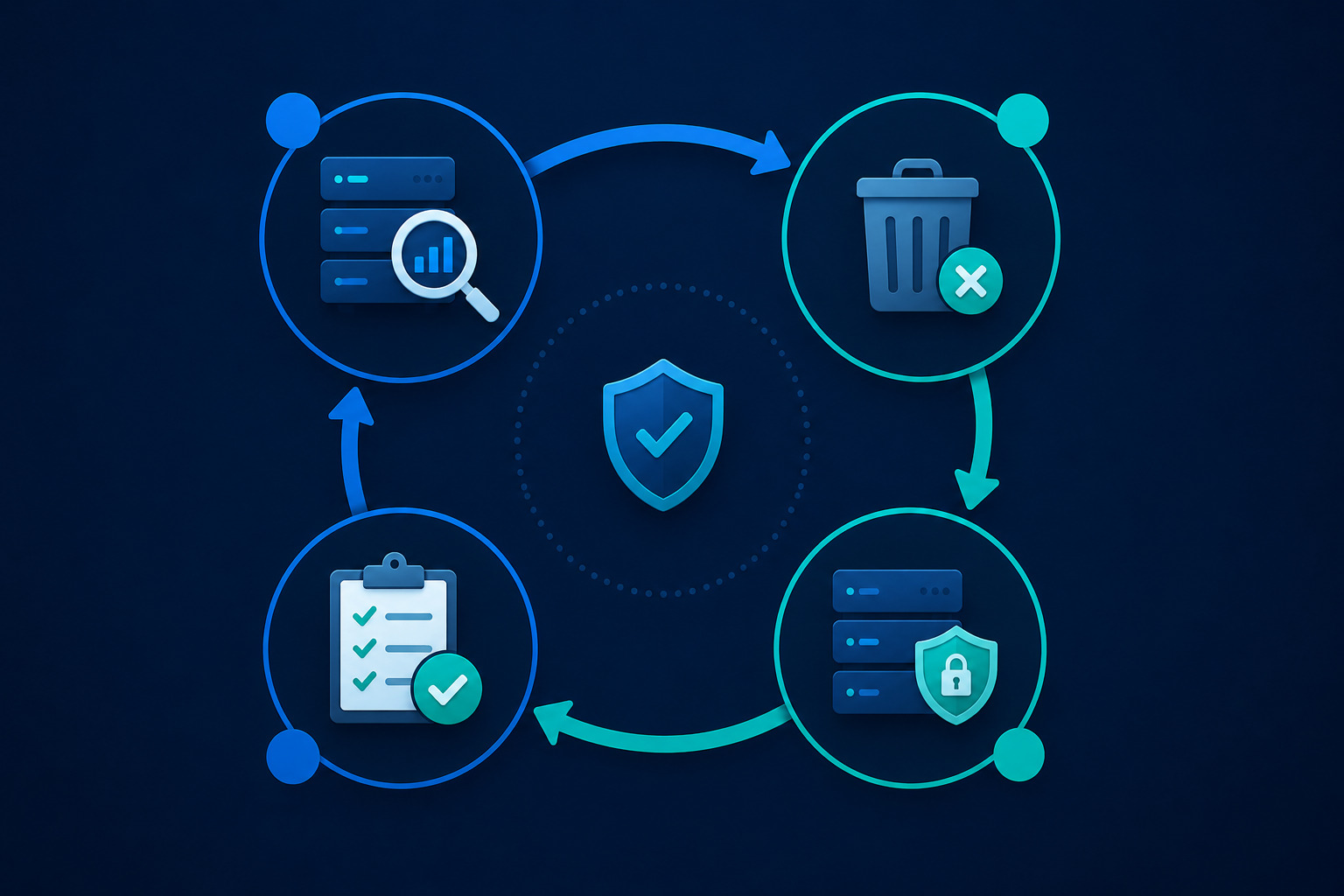
Hardening isn’t a one-time fix; it is a lifecycle. When we implement hardening for our clients, we follow a repeatable, four-step process.
- Baseline Assessment: Identify every service, port, and account currently running. You cannot secure what you do not know exists.
- Removal Phase: Delete or disable anything that does not serve a business function. If it’s not required, it is a liability.
- Configuration Enforcement: Apply the security controls defined in your checklist, such as password policies, encryption requirements, and access restrictions.
- Continuous Validation: Regularly audit the system to ensure that configuration drift hasn’t reintroduced insecure settings.
In our experience, teams often skip the removal phase. They leave old scripts, test accounts, and management tools installed. These forgotten items are exactly what an attacker uses to pivot deeper into your network after an initial entry.
What Are the Main Components?

A detailed hardening checklist breaks down into specific technical areas. Each component must be reviewed individually to build a complete defense.
OS and Server Hardening
The operating system is the foundation of your software. If the OS is weak, your application security doesn’t matter. We focus on removing default user accounts, disabling unnecessary services, and setting strict kernel-level parameters. This creates a “stripped-down” environment where only essential processes run.
Network Configuration
Your network settings control who can talk to your services. A proper checklist enforces firewall rules that follow the “deny-all” principle. We also ensure that communication happens over encrypted channels.
We frequently find developers failing to handle verbose error messages as a security risk, which can leak sensitive infrastructure details to unauthorized network observers. By limiting what your services say about their internal state, you make reconnaissance significantly harder for an attacker.
Access and Identity Management
This is where most breaches start. A hardening checklist must mandate Multi-Factor Authentication (MFA), role-based access control (RBAC), and strict password rotation policies. We have seen too many systems compromised simply because an old, weak service account was left with administrative privileges.
What Are the Benefits?
A well-implemented hardening checklist offers more than just security; it improves overall operational stability. When we train teams, we notice that environments with clear hardening standards often suffer from fewer production outages.
“Security foundations provide a baseline for your security configuration, helping you to implement defense-in-depth and reduce your attack surface.” – Google Cloud Security Foundations
- Minimized Attack Surface: By stripping away unused services, you remove potential entry points that attackers frequently scan.
- Example: Disabling unused ports on a web server prevents unauthorized scanning attempts.
- Compliance Readiness: Many regulatory frameworks, like PCI-DSS or HIPAA, explicitly require systems to be hardened.
- Example: A pre-hardened baseline makes passing an external security audit significantly faster.
- Operational Efficiency: Standardized configurations mean your team spends less time troubleshooting “unique” server issues.
- Example: Automated patching works reliably when all servers share the same underlying configuration.
What Challenges Should You Expect?
Hardening is not without friction. We often see teams struggle with the balance between “locked down” and “functional.” According to the Center for Internet Security (CIS), the biggest hurdle is usually backward compatibility, not the security controls themselves.
| Challenge | Solution |
| System Breakage | Test hardening scripts in a staging environment before pushing to production. |
| Operational Overhead | Automate the hardening process to ensure it keeps up with new deployments. |
| Configuration Drift | Use Infrastructure as Code (IaC) to continuously enforce your desired state. |
| Vendor Limitations | Work with vendors to identify which security controls can be safely applied. |
What Are the Best Practices for Hardening?
Security hardening is a continuous discipline. If you treat it as a one-time project, you will fall behind. Follow these steps to keep your environment resilient.
- Automate Everything: Manual hardening is prone to human error. Use tools like Ansible or Terraform to apply configurations consistently.
- Apply Least Privilege: Ensure users and services only have the permissions necessary to perform their specific tasks.
- Document the Baseline: Maintain an updated version of your hardening checklist in your documentation repository.
- Regular Audits: Schedule periodic scans to detect and remediate configuration drift automatically.
What Are the Common Mistakes in Hardening?
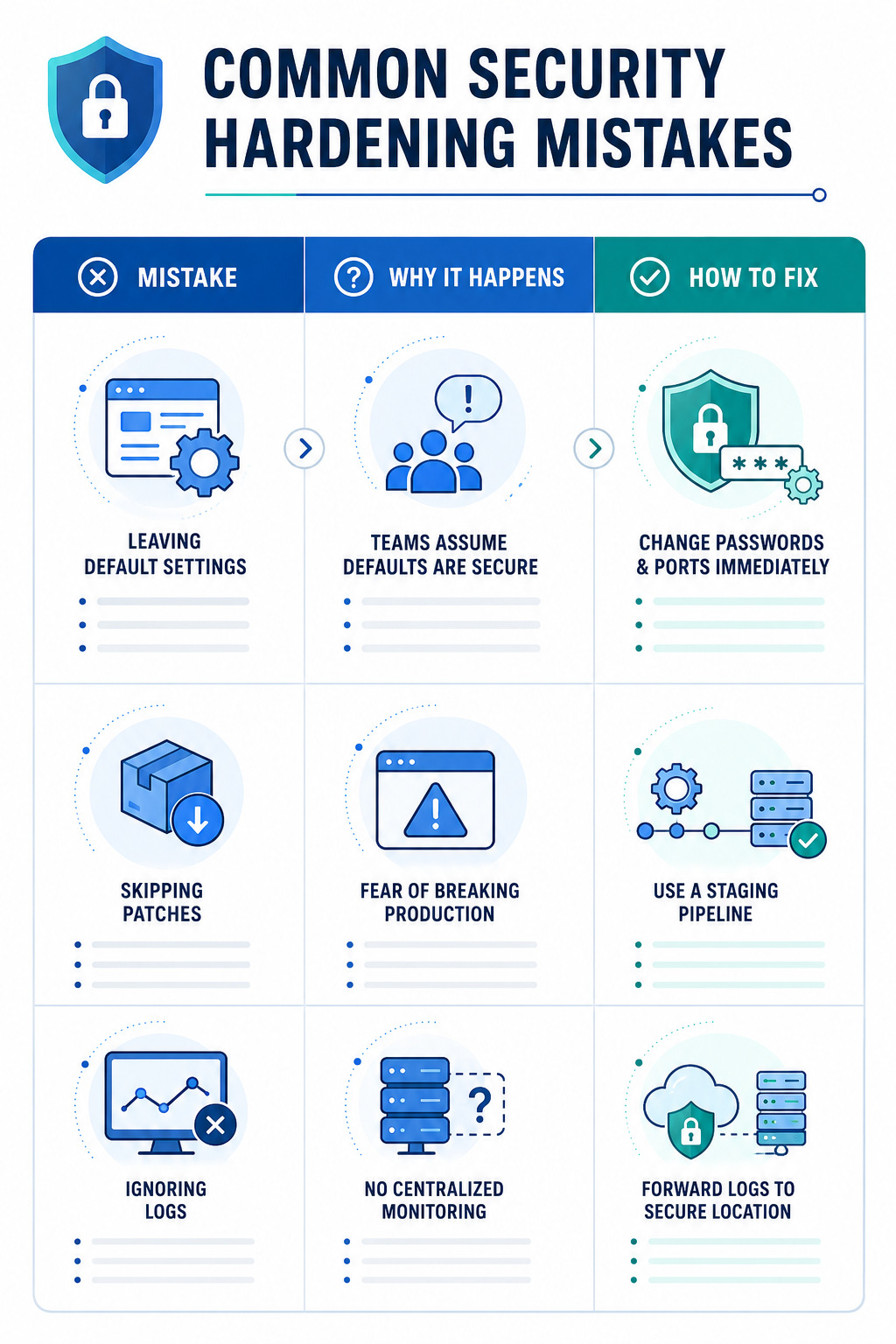
We often see the same patterns of failure when teams attempt to harden their infrastructure. These mistakes often negate the security benefits you are trying to achieve.
| Mistake | Why It Happens | How to Fix It |
| Leaving Default Settings | Teams assume defaults are secure. | Always change default passwords and ports immediately. |
| Skipping Patches | Fear of breaking production services. | Implement a robust staging and testing pipeline. |
| Ignoring Logs | Lack of centralized monitoring. | Forward all system logs to a secure, remote location. |
What Is a Real-World Example of Hardening?
We once consulted for a fintech client struggling with frequent unauthorized access attempts. They had a massive infrastructure but lacked a unified hardening strategy. Different teams deployed servers using different “golden images,” leading to inconsistent security postures across their environment.
We implemented a centralized hardening checklist that defined the exact state every server needed to be in, from the kernel level up to the application layer. We specifically focused on disabling unused services and enforcing strict network access.
Within a month, the number of alerts related to basic reconnaissance dropped by 60%. The client realized that most of their security “incidents” were actually just automated bots finding open, insecure ports on misconfigured legacy servers. By standardizing, they didn’t just stop attackers; they simplified their entire operations team’s workflow.
FAQ
How often should I review my system hardening audit process?
You should conduct a system hardening audit at least quarterly or whenever a major infrastructure change occurs. Regular reviews ensure that configuration drift hasn’t reintroduced vulnerabilities after patches or updates.
What is the difference between hardening and patch management?
Hardening focuses on reducing the attack surface by disabling unnecessary services and restricting configurations. Patch management is the specific process of updating software to fix known vulnerabilities. Both are critical for a secure environment.
How does infrastructure hardening impact legacy applications?
Infrastructure hardening can sometimes break legacy applications that rely on outdated services or protocols. We recommend testing your hardening controls in a dedicated staging environment to identify compatibility issues before deploying them to production.
Does compliance hardening guarantee total security?
No, compliance hardening is just the baseline, not the ceiling. While frameworks like CIS or NIST provide a strong foundation, they should be supplemented with continuous monitoring and proactive threat modeling to defend against sophisticated attacks.
Can automation hardening tools replace manual reviews?
Automation tools are essential for scaling, but they cannot replace manual expertise entirely. Use automation to enforce your standard baseline, but keep human oversight for reviewing complex architecture and identifying edge cases that scripts might miss.
Turning Security Hardening into a Continuous Discipline
Importance security hardening checklist principles highlight why organizations need a consistent approach to identifying weaknesses, reducing attack surfaces, and maintaining secure system configurations. A structured checklist helps teams verify critical controls, disable unnecessary services, enforce secure access, and prevent configuration drift. By integrating hardening checks into regular development and deployment workflows, organizations can move beyond one-time fixes and build infrastructure that remains resilient as systems and threats evolve.
Ready to strengthen your secure development and security practices? Join the Secure Coding Practices Bootcamp and learn practical, hands-on techniques for applying security hardening, identifying configuration weaknesses, and building more resilient systems.
References
- https://docs.cloud.google.com/architecture/blueprints/security-foundations
- https://www.cisecurity.org/controls