

Preventing XXE injection Java .NET means killing DTD processing. It’s mandatory, not optional. The instant a parser loads an external DTD, you’re compromised. This flaw persists, even in trusted libraries. Your ideas about safe defaults are likely mistaken. Let’s get into real Secure Coding Practices and fix this. Keep reading.
XXE Defense Quick Wins You Should Apply Immediately
These are the most critical safeguards that reduce XXE risk by addressing parser configuration, legacy exposure, and common attack entry points.
- Disable DOCTYPE declarations entirely in every XML parser instance.
- Modern .NET defaults are safer, but legacy code and dependencies reintroduce risk.
- File uploads and third-party libraries are the most common hidden attack paths.
What Is the Most Effective Way to Prevent XXE Attacks?
Disable DTDs. That’s it. The OWASP cheat sheet puts it first for a reason: the safest way to prevent XXE is to disable Document Type Definitions entirely. We don’t tweak settings, we remove the capability. That’s the core of XML external entity prevention. If your app doesn’t have a strict, documented need for DTDs, you shut them off. Do that, and you kill the whole attack class, data exfiltration and XML bombs like Billion Laughs vanish.
Why is this step non-negotiable? In our audits, we’ve seen what happens when it’s skipped. First, it blocks external entity definitions, stopping file reads and server-side request forgery. Second, it prevents internal entity expansion, which mitigates those denial-of-service attacks. Finally, it simplifies everything. No DTDs, no XXE. Your security model gets cleaner overnight.
We treat every XML parser as hostile until proven otherwise. Default configurations are never safe. A parser tries to be helpful, resolving entities and fetching references by itself. That helpfulness is the vulnerability. We learned this through hands-on audits, not theory.
Why Does XXE Remain a Persistent Security Threat?
You might think XXE is a legacy issue, something for old SOAP services. It’s not. It persists because XML is buried in modern workflows. A single XXE vulnerability attack can hide in any of them. It’s in the SAML assertion your cloud login uses. It’s inside that .docx reports a user’s uploads. It’s in the configuration file for a microservice. The attack surface is fragmented and often invisible.
The recent vulnerability in AssertJ, a library used in testing, proves the point. Versions 1.4.0 through prior to 3.27.7 were affected. This wasn’t production code, it was test code. It shows that the vulnerability can exist anywhere XML is parsed, even in environments you consider safe or non-production. The community reaction was a mix of frustration and resignation. Another thing to patch, another dependency to scrutinize.
Common blind spots we consistently find:
- Third-party libraries that parse XML internally (like document converters).
- File upload functionality for Office files, SVG images, or PDFs.
- Integration endpoints with older partners or government systems.
- Build and CI/CD tools that process XML reports or configurations.
How Do You Secure Java’s DocumentBuilderFactory Against XXE?
In Java, you have to be explicit. There is no magic secure mode. You must set the features, every time. The boilerplate is tedious, but it’s your armor.
Here is the minimal safe configuration. You start by trying to disallow DOCTYPEs altogether.
DocumentBuilderFactory dbf = DocumentBuilderFactory.newInstance();
try {
// This is the primary defense. If DTDs are disallowed, almost all XML entity attacks are prevented.
dbf.setFeature(“http://apache.org/xml/features/disallow-doctype-decl”, true);
dbf.setXIncludeAware(false);
dbf.setExpandEntityReferences(false);
} catch (ParserConfigurationException e) {
// Handle the fact that this feature might not be supported
logger.warn(“Failed to set disallow-doctype-decl feature”, e);
}
If you absolutely cannot disable DTDs, you must disable every external access point.
- http://xml.org/sax/features/external-general-entities -> false
- http://xml.org/sax/features/external-parameter-entities -> false
- http://apache.org/xml/features/nonvalidating/load-external-dtd -> false
You also set the XMLConstants.ACCESS_EXTERNAL_DTD and ACCESS_EXTERNAL_SCHEMA attributes to empty strings. It’s a ritual. Miss one step, and you’ve left a window open. We’ve built shared, validated utility classes in our projects to enforce this, because trusting every developer to remember the incantation is a gamble.
How Do You Secure Java’s StAX and SAX Parsers Against XXE?
Research from the Stack Overflow shows
“Research indicates Java XML parsers often lack secure defaults, requiring explicit configuration” – Stack Overflow
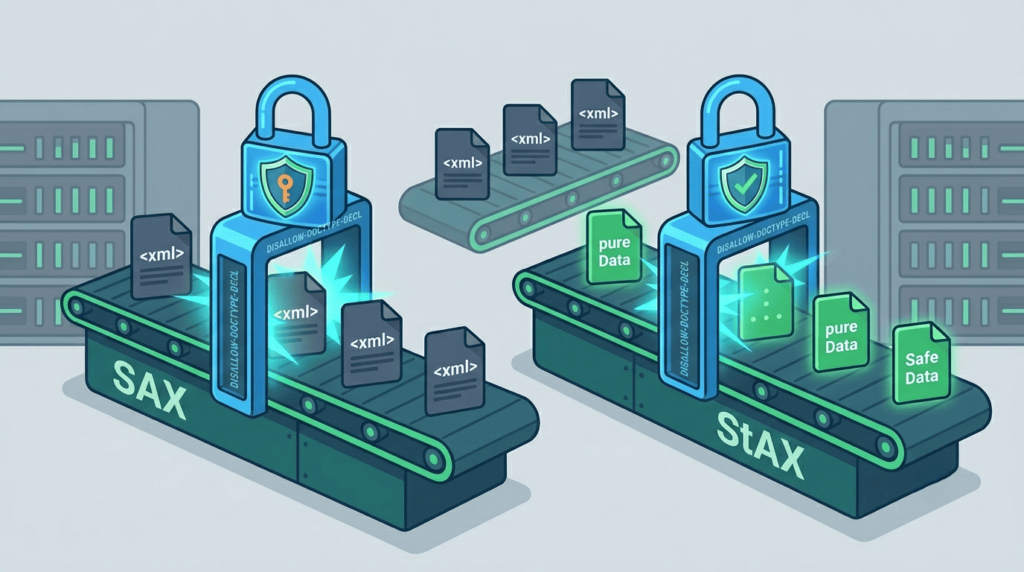
The streaming parsers need the same treatment, just with different property names. For XMLInputFactory (StAX), you have two properties to kill.
- XMLInputFactory xif = XMLInputFactory.newInstance();
- xif.setProperty(XMLInputFactory.SUPPORT_DTD, false); // Disable DTD support entirely
- xif.setProperty(“javax.xml.stream.isSupportingExternalEntities”, false); // Disable external entities
For SAXParserFactory, you go back to the feature approach.
- SAXParserFactory spf = SAXParserFactory.newInstance();
- spf.setFeature(“http://apache.org/xml/features/disallow-doctype-decl”, true);
The pattern is consistent: find the switch that controls DTDs and external connections, and flip it to ‘off’. The problem is that the switch has a different name and location in every factory. This inconsistency is where mistakes happen.
How Can XSLT Transformations Reintroduce XXE Risks?
This is a classic oversight. You secure your DocumentBuilderFactory, but then your data goes through an XSLT transformation for rendering. If the TransformerFactory isn’t locked down, it will happily fetch external stylesheets or DTDs, reintroducing the risk you just eliminated.
The fix in Java is straightforward, but it must be done.
- TransformerFactory tf = TransformerFactory.newInstance();
- tf.setAttribute(XMLConstants.ACCESS_EXTERNAL_DTD, “”);
- tf.setAttribute(XMLConstants.ACCESS_EXTERNAL_STYLESHEET, “”);
Any XML processing component needs scrutiny. It’s not just parsers, it’s validators, transformers, and schema factories. They all can initiate network calls or access the file system if left in their default state.
Why Can Safe .NET Defaults Still Lead to XXE Vulnerabilities?
Modern .NET, meaning .NET Framework 4.5.2+ and all of .NET Core/.NET 5+, has better defaults. The XmlReader class, which is the cornerstone of safe XML parsing, defaults to DtdProcessing.Prohibit. This is good. It means a simple XmlReader.Create() is relatively safe out of the box. The community often points this out as a win over Java’s hostile defaults.
But here’s the paradox. This safety can breed complacency. You assume you’re safe because you’re on a new framework. Meanwhile, your codebase has:
- An old XmlDocument instance in a legacy module, with its XmlResolver still active.
- A third-party library from NuGet that instantiates its own parser for parsing configuration.
- A custom XmlReaderSettings object where someone set DtdProcessing = Parse for “compatibility.”
The safe defaults only protect the standard path. Any deviation can revert to danger. Our job is to hunt down those deviations.
How Do You Configure XmlReader Securely in .NET?
Even with good defaults, you should be explicit. It makes your intent clear in code reviews and prevents someone from “helpfully” changing a setting later.
XmlReaderSettings settings = new XmlReaderSettings();
settings.DtdProcessing = DtdProcessing.Prohibit; // Explicitly state the intent
settings.XmlResolver = null; // Redundant in modern .NET, but definitive
using (XmlReader reader = XmlReader.Create(inputStream, settings))
{
// Process XML
}
The XmlResolver = null line is crucial for older frameworks, and harmless on newer ones. It’s a definitive statement: this reader shall not resolve external resources. This is the pattern we enforce.
| Setting | Value | Purpose |
| DtdProcessing | Prohibit | Disables DTD processing to prevent XXE attacks |
| XmlResolver | null | Blocks external resource resolution |
| XmlReader.Create | with settings | Ensures secure parsing pipeline is enforced |
How Do You Secure Legacy .NET XmlDocument Implementations?
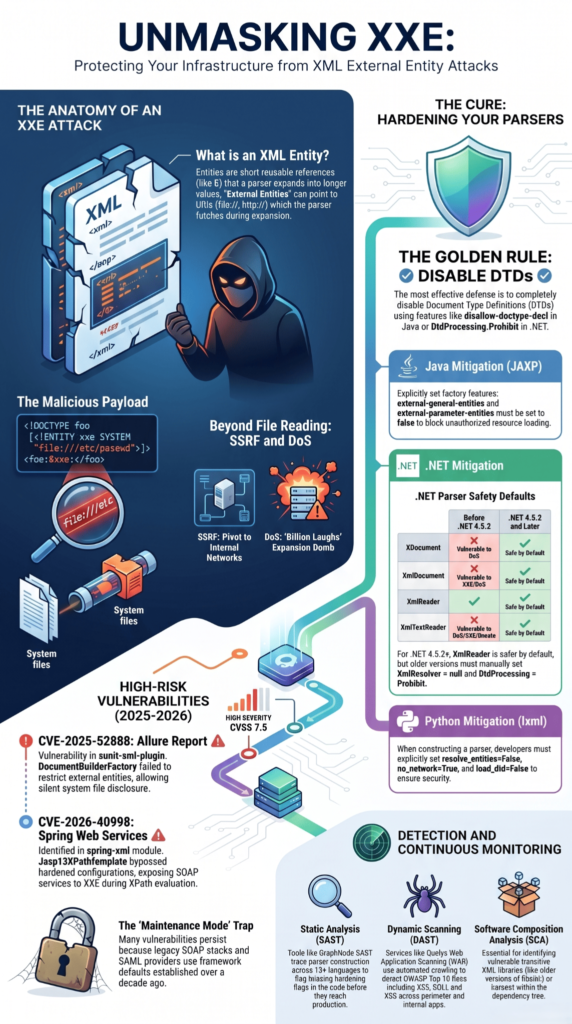
XmlDocument is the old DOM parser. In .NET Framework versions before 4.5.2, its XmlResolver property is not null by default. This means it’s inherently vulnerable to XXE. Even in newer versions, explicitly nullifying it is a critical best practice.
- XmlDocument doc = new XmlDocument();
- doc.XmlResolver = null; // The most important line for this class
- doc.LoadXml(xmlString);
You should grep your codebase for XmlDocument. Every instance needs to be checked for this setting. It’s a manual process, but it’s non-negotiable for application security.
How Can File Uploads Become a Hidden XXE Attack Vector?
This is where many well-intentioned defenses fail. You’ve hardened your API endpoints. Your SOAP service is locked down. Then a user uploads an “invoice.xlsx.” Your application uses a library like DocumentFormat.OpenXml or EPPlus to read it. Those libraries, under the hood, are parsing XML. Because .xlsx and .docx files are ZIP archives full of XML parts.
If that library uses an unsecured parser, or if you extract the XML parts yourself and parse them, you’ve just invited an XXE payload straight into the heart of your server. The same goes for SVG images, which are literally XML files. Many XXE attack examples start this way.
Mitigation here requires a two-pronged approach:
- Know your dependencies. Understand what XML parsers your file-processing libraries use and how they are configured.
- Sanitize the pipeline. If you must parse extracted XML, ensure it passes through your secured parser utilities first, with DTDs disabled.
How Can Third-Party Dependencies Reintroduce XXE Vulnerabilities?
Credits: OliveStem
The AssertJ vulnerability, CVE-2026-24400, is a textbook example of transitive risk. Your code is clean. Your parsers are secured. But a method you call from a test library isn’t. The XmlStringPrettyFormatter.toXmlDocument() method didn’t disable external entities. Suddenly, your test suite, processing a mock XML response, becomes a vector for local file disclosure.
As noted by GitHub.com
“A critical XML External Entity (XXE) vulnerability exists in the xunit-xml-plugin used by Allure 2. The plugin fails to securely configure the XML parser (DocumentBuilderFactory) and allows external entity expansion when processing test result .xml files.” – Github.com
The fix was to upgrade to AssertJ 3.27.7, where the class was deprecated, and to migrate XML comparisons to a dedicated library like XMLUnit. The lesson extends far beyond one library.
- Use Software Composition Analysis (SCA) tools to track dependencies and get alerts.
- Pay attention to security advisories for all your dependencies, not just the web frameworks.
- Have a process to quickly vet and apply security updates. The affected window for AssertJ was over 300 versions.
How Can You Enforce XXE Prevention with Secure Coding Practices?
Ultimately, preventing XXE is about moving from reactive patching to proactive design. It’s a secure coding practice. We do this by making safe patterns the easiest path.
- Create and mandate secure utility classes. Provide a SafeXmlParser class that teams must use. It encapsulates all the boilerplate and error handling.
- Automate detection in CI/CD. Use static analysis (SAST) rules to flag insecure instantiations like new DocumentBuilderFactory() without the secure features, or new XmlDocument() without XmlResolver = null.
- Implement security unit tests. Write tests that feed known XXE payloads into your XML processing endpoints and verify they do not return sensitive data or make external calls.
- Conduct focused code reviews. Any PR that touches XML parsing gets extra scrutiny on parser configuration.
The goal is to engineer the vulnerability out of existence. It’s not about finding bugs later, it’s about making them impossible to write in the first place.
FAQs
How does preventing XXE injection java differ from preventing xxe injection .net in real implementations?
Java uses secure xml parser java features while .net relies on xml parsing security and strict XXE mitigation configuration settings.
What secure xml parser java and secure xml parser .net settings prevent XXE vulnerability effectively?
Enable DocumentBuilderFactory setFeature java, XMLInputFactory support DTD false, and XmlReaderSettings DTDProcessing .net to block external entities safely in applications today.
How do disable doctype decl java and disable DTD .net prevent xml external entity injection?
Set external general entities false java, external parameter entities false java, and XMLResolver null .net to prevent entity expansion attacks.
How do XXE curl test java and XXEcurl test .net detect XXE exploitation risks?
Testing identifies XXE exploitation java and .net including SSRF, local file read, billion laughs attack, and DOS via XXE payloads.
What XSD schema validation .net XXE and JAXB XXE prevention java techniques ensure safe xml input?
Validate XML input Java and .NET, use XXE safe parser Java .NET, apply input sanitization and OWASP prevention guidelines consistently.
How do you build XXE-free code?
Preventing XXE requires more than fixes, it starts with disabling DTDs in every XML parser and understanding how risks differ across Java and .NET. Strengthen defenses by updating dependencies, securing file upload handling, and embedding secure coding checks into your development workflow so issues are caught early.
To build these habits in real projects, the Secure Coding Practices Bootcamp offers hands-on training you can apply immediately.
References
- https://stackoverflow.com/questions/40649152/how-to-prevent-xxe-attack
- https://github.com/advisories/GHSA-h7qf-qmf3-85qg