


Testing broken access control flaws is the most critical web app security risk. It’s about apps failing to stop users from seeing or doing things they shouldn’t. This guide gives you a direct, hands-on method to test for these problems yourself.
You’ll learn exactly what to check for and how to confirm the backend is protecting your data. We’ll help you build a practical testing workflow. Follow this guide from Secure Coding Practices to start finding these flaws today.
Quick Reads – Broken Access Control Testing Essentials
Testing broken access control flaws is about proving that every request follows the application’s authorization rules, regardless of how users interact with it. Keep these core principles in mind:
- Map every user role and the resources they should access before you start testing.
- Test the API directly, never trust that a hidden button or menu provides real security.
- Authorization must be enforced server-side on every single request, without exception.
What Should You Protect First?
To build a test plan, we first need to know what we’re protecting. We always start by mapping it out. Forget complex tools; just make a simple matrix.
On one axis, list every user role like an anonymous visitor, a paying customer, or a site admin. On the other, put your key resources. These are your important URLs, such as /api/v1/profile or /admin/reports, and sensitive actions like “download financial records.”
Our goal here is to define, in plain terms, who gets to do what. We’ve seen too many tests fail because teams skipped this step and missed entire parts of their own application. This matrix becomes your essential checklist.
| User Role | Resource | Expected Access |
| Guest | Public Pages | Read Only |
| User | Own Profile | Read & Edit |
| Admin | All Resources | Full Access |
You also have to figure out how the app knows who you are. Look for session cookies, JWTs in request headers, and predictable object IDs in the URL, like ?invoice_id=456. Spotting these identifiers is half the battle.
How Do You Test for Horizontal Access Control (IDOR) Flaws?
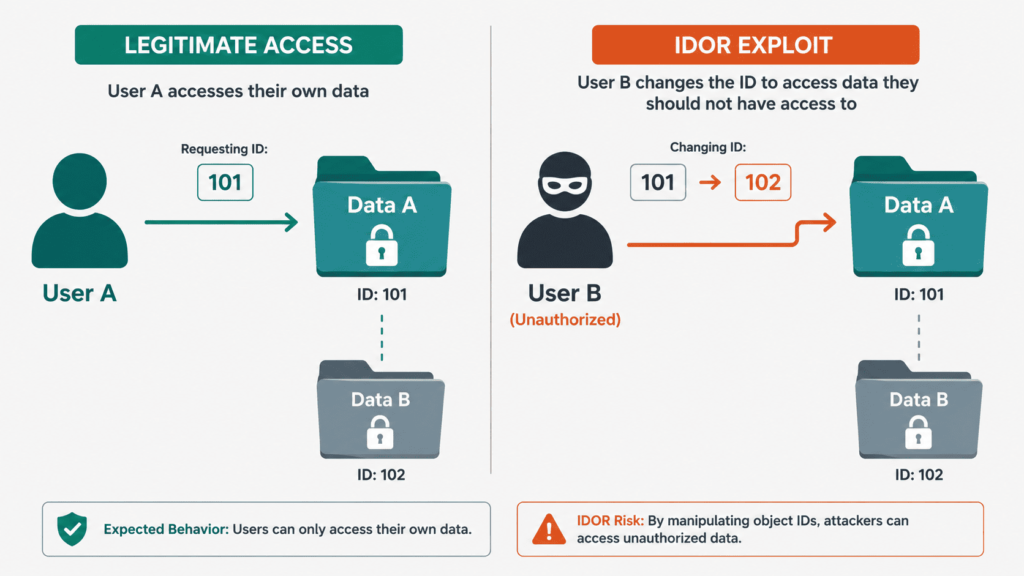
Let’s talk about horizontal access control flaws, often called IDOR. Many broken access control examples begin here.
For example, fetch your profile at GET /api/profile?id=1001. You see your data. Now, change the id to 1002 and send the request. If you see another user’s profile, that’s a critical flaw. The server didn’t check ownership, it just fetched the data.
As noted by TechScience.com
“BOLA: Improper authorization checks allowing unauthorized access to objects. IDOR: Attackers can manipulate object references to access unauthorized data by altering URL parameters.” TechScience.com
We always push beyond simple, sequential numbers. Look for UUIDs leaked in comments or search results. Test POST and PUT requests too; try modifying an account_id in a JSON body when updating your address.
Here’s our checklist:
- Change numeric IDs in URLs.
- Test UUIDs found elsewhere.
- Tamper with object IDs in request bodies.
- Look for mass assignment by adding fields like
"role":"admin".
The principle is simple. The server must validate, for every request, that the object belongs to the current user. Any skip in this logic is a breach.
How Do You Test for Vertical Privilege Escalation?
Credits: Ran$ome
Here, you’re trying to jump from a low-privilege role to a high-privilege one. You’re a customer trying to reach the admin panel. The most basic method is forced browsing. While logged in as a normal user, just try to navigate to privileged endpoints. Type /admin, /management/settings, or /api/v1/deleteUser directly into your browser’s address bar. See if it lets you in.
Another powerful technique is HTTP method tampering. Maybe a regular user can GET a list of users at /api/users for a limited view. What happens if you change that GET request to a DELETE? Or a POST to create a new admin? The server might only check permissions for the common methods and forget about the others.
Also, inspect and manipulate headers. Sometimes, applications use custom headers like X-User-Role for internal routing. Try adding X-User-Role: administrator to your requests.
Why Should You Test Beyond the User Interface?
This might be the most important habit you develop. The frontend is a suggestion, not a security control. Buttons are hidden, menus are disabled, links are removed. A developer might think checking a “Requires Admin Role” box on a page secures it. Often, that only hides the button in the HTML.
The real security comes from checking permissions in the backend API. To test this, you need an intercepting proxy like Burp Suite or OWASP ZAP. Use the application normally as a low-privilege user, but capture all the HTTP requests. Then, take a high-privilege user’s session token (like an admin cookie) and try replaying those captured requests with the admin’s credentials.
Does the admin request succeed where the user’s failed? More importantly, try the reverse. Use your proxy to manually send a request to an admin endpoint while using your low-privilege session cookie. If it works, the backend authorization is broken.
What Advanced Edge Cases Are Often Overlooked?

In our secure dev bootcamp, we see teams nail the basics but miss architectural flaws. Multi-tenant data isolation is a classic. A missing tenancy filter can let User A from Company A access Company B’s data, even with correct roles. Test it: create users in two tenants and try to cross-access objects.
Another oversight is relying on “secure” IDs. Switching from sequential numbers to UUIDs doesn’t fix IDOR. If the server doesn’t check ownership, a1b2c3d4 is as vulnerable as 1. UUIDs are about obscurity, not security.
We’ve also found hardcoded auth exceptions. One plugin skipped all 2FA and role checks if the request had a JiraMobile User-Agent. Spoofing that header granted access. Always test with different headers.
Research from arXiv shows
“Effective test suites must include delete, modify, and trigger operations across ownership boundaries as first-class test cases, not edge cases.” – arXiv
How Do You Build a Defensive Security Mindset?
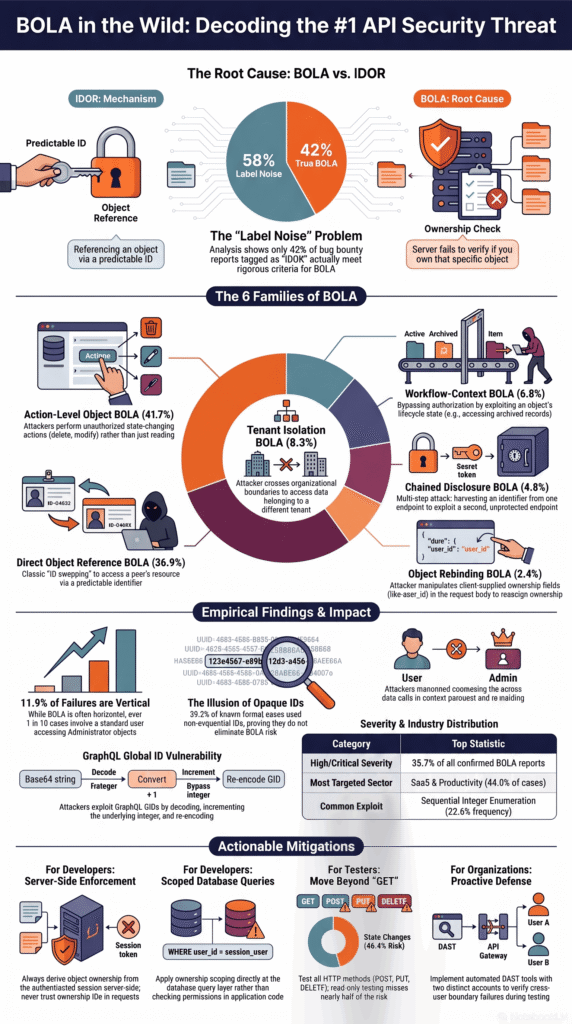
Finding flaws is one thing. Preventing them is the goal. The remedy is consistent, centralized, server-side enforcement. This is where secure coding practices become non-negotiable. We must design our systems to check permissions on every request, in a trusted piece of code that can’t be bypassed.
- Implement checks in a central middleware or filter.
- Follow the principle of least privilege.
- Use a deny-by-default policy.
- Validate object ownership, not just role.
- Test authorization with the same rigor as authentication.
Never, ever trust the client. Hidden form fields, client-side JavaScript checks, and disabled UI elements are all trivial to bypass. The only check that matters is the one performed on your server when it processes the request. This logic must be unambiguous and applied universally.
FAQs
Can broken access control exist even with secure login?
Yes. Authentication and authorization serve different purposes. Authentication confirms a user’s identity, while authorization determines what that user is allowed to access. Broken access control occurs when the application fails to enforce proper permission checks, server side authorization, or user access validation. Every request should verify the user’s role, permissions, and resource ownership before granting access to prevent unauthorized access.
How should I prioritize access control testing in a large application?
Start by testing features that expose sensitive data, administrative functions, or customer records. Effective access control testing should include API authorization, REST API access control, hidden endpoint testing, and restricted resource access. Review the access control matrix, confirm role based access control, and verify backend access validation because frontend only controls cannot enforce security.
What development mistakes most often lead to authorization bypass?
Developers often introduce authorization bypass by trusting client-side logic or skipping important validation steps. Missing resource ownership check, exposed direct URL access, weak access policy enforcement, and incomplete role verification can all create security gaps. Testing should also cover parameter tampering, HTTP method tampering, and request replay because these techniques frequently expose weaknesses in application authorization.
Which privilege escalation scenarios require the most attention during testing?
You should test both vertical privilege escalation and horizontal privilege escalation because each exposes different security risks. Include admin privilege testing, token privilege escalation, session privilege abuse, and role escalation in your review. Also verify protections against IDOR, insecure direct object reference, object level access control, function level access control, and cross-user access to reduce privilege misuse.
How can developers reduce access control failures over time?
Developers can reduce access control failure by applying least privilege, consistent backend role enforcement, and reliable access restriction throughout the application. Regular authorization testing, ACL testing, access control audit, and privilege boundary testing help identify new weaknesses as the application changes. Every release should also verify object ownership, defend against forced browsing, and review broken authorization logic before deployment.
Know Your Access Control Works
Broken access control often comes down to checking whether the application really enforces the rules it was built to follow. Test every role, every request, and every path instead of relying on what appears on the page. If you want to strengthen these skills with hands-on practice, join the Secure Coding Practices Bootcamp. You’ll learn practical secure coding techniques through real coding exercises that help you find and prevent access control flaws before they reach production.
References
- https://www.techscience.com/cmc/v84n3/63208/html
- https://ar5iv.labs.arxiv.org/html/2605.25865