


Checking permissions access control fail when software authenticates a user but then doesn’t verify what they’re allowed to do. It’s like a security guard checking your ID, then letting you walk into the vault. This flaw, Broken Access Control, tops the OWASP Top 10 risk list. We see it everywhere. The patterns are predictable, and your defenses might be an illusion. To fix it, you need proper Secure Coding Practices. Keep reading to rebuild them correctly.
Quick Reads: Permission Check Essentials
These points summarize the core lessons from this guide and highlight the practices that prevent access control failures before they become security incidents.
- Authorization is not authentication. Logging someone in tells you who they are, not what they can do.
- The server must decide. Any permission check performed in the browser can be bypassed by a motivated user.
- Centralize your logic. Scattering if (
user.isAdmin) statements across fifty controllers guarantees one will be forgotten.
What Is a Permission Check Failure?
A permission check fails when the software authenticates you but never asks if you’re allowed to do the thing you’re trying to do. You’re logged in, but can you actually view that file? The code often doesn’t check. We’ve seen this in our own training labs: a student validates a user’s session token correctly, but then forgets to verify that the user owns the account they’re trying to access.
Why isn’t just logging in enough? Authentication is like getting a hotel keycard. It gets you in the building. Authorization is the lock on your specific room’s minibar. Your key shouldn’t open every door on the floor.
In our code reviews, we constantly find this confusion. A developer checks the JWT signature, sees it’s valid, and lets the request fly. They don’t compare the user_id inside the token to the database record being fetched. That’s how breaches happen. This is the core flaw behind most data leaks.
| Authentication | Authorization |
| Confirms user identity | Confirms allowed actions |
| Happens before access | Happens on every request |
| Login succeeds | Permission is verified |
Why Does Broken Access Control Rank #1?
It’s number one because it’s everywhere, and it’s surprisingly easy to mess up. We see it in our students’ projects all the time. Modern apps are a tangle of APIs and services. A permission check in one service often doesn’t reach another.
A developer, under pressure, might assume a previous function already handled the authorization. It usually didn’t. We’ve all stared at a complex controller, wondering where exactly we put that check.
As highlighted by OWASP
“The OWASP Top 10 for 2025 confirms that Broken Access Control maintains its position as the most serious application security risk, with an average of 3.73% of tested applications having one or more weaknesses in this category.” – OWASP
The business risks are immediate, not theoretical.
- Data Exposure: One missed check can leak thousands of customer records.
- Unauthorized Modification: Attackers changing shopping cart prices or, worse, medical dosages.
- Privilege Escalation: A regular user stumbling into admin functions.
- Service Disruption: Critical data gets deleted because the ‘delete’ function didn’t verify ownership.
How Does Broken Object-Level Authorization Work?
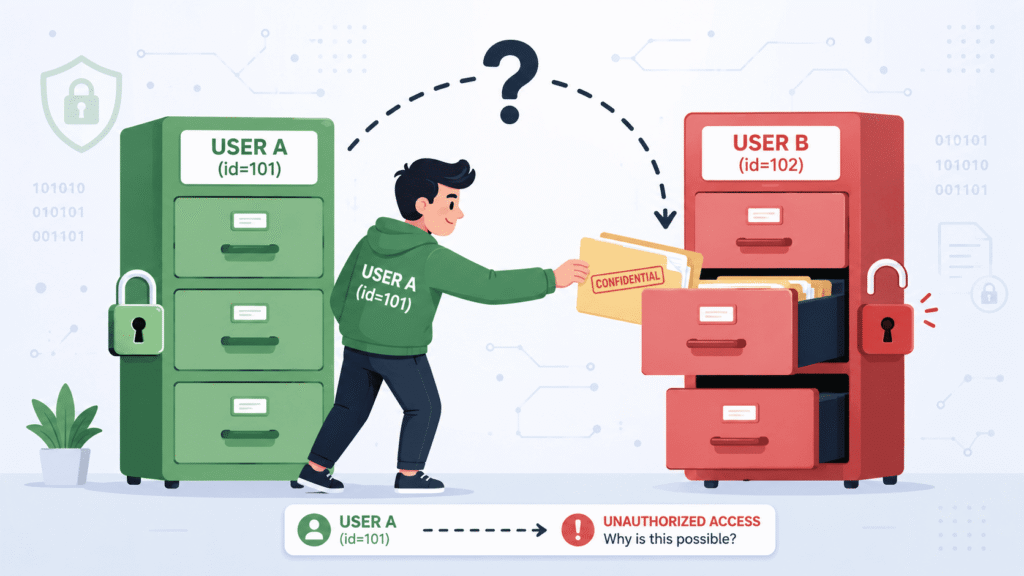
BOLA, or IDOR, is devastatingly simple and common. The app takes an identifier from the client, a ticket number, an account ID and trusts it completely to fetch an object.
Imagine viewing your support ticket at /api/tickets?id=1001. The server fetches ticket 1001. Now, what if you change the request to id=1002? If the server just fetches and shows ticket 1002 without asking, “Does this user own it?”, you’ve just accessed private data, a common broken access control example. We drill this into our students: validate ownership for every single object, on every single request. Never trust the parameter.
So how do you prevent it? You bake the check right into the database query. Don’t just run SELECT * FROM tickets WHERE id = 1002. You write SELECT * FROM tickets WHERE id = 1002 AND user_id = :loggedInUserId. If the query returns empty, you return a generic 404. The user sees “not found,” with no clues about permissions. It’s a small shift in thinking that changes everything.
Why Hidden Buttons Never Protect Applications?
Hiding a button to protect a function feels intuitive. If the user isn’t an admin, we hide the “Delete User” button with CSS or disable it with JavaScript. The front end looks perfectly secure.
But an attacker doesn’t use your UI. They send HTTP requests directly. In our labs, students find the real API endpoint by checking the browser’s network tab or just guessing the URL pattern, then send a POST request straight to it. If your server-side route for /admin/delete-user lacks the same permission check you used to hide the button, it will run the command. Every single time.
The frontend is just a suggestion. The backend is law. Force browsing attacks prove all enforcement must happen on the server.
Can Multi-Step Workflows Create Security Gaps?
Credits: Chandrakant Chaturverdi
Yes. Multi-step workflows are a classic source of gaps. Authorization gets checked at the start of a process, then everyone forgets about it.
Take an account upgrade flow. Step 1 asks for your password, which is verified. Step 2 shows you the new plan options. Step 3 has a client-side check to confirm payment. Finally, Step 4 sends a POST /api/upgrade-plan to the server.
If that final server endpoint just assumes the previous steps handled validation, it’s wide open. In our code reviews, we see this pattern. An attacker can craft a request directly to Step 4, skipping every check that came before.
The lesson is straightforward, but brutal. Every single request that touches a sensitive operation must re-validate the user’s permissions. You can never trust the client’s stated journey.
Which Design Mistakes Cause Permission Failures?
The root cause is usually architectural, not a simple bug. It’s a choice that doomed the system from the start.
- Manual Checks: Writing if (
user.role == 'admin') in every controller. One will be missed, making horizontal privilege escalation easier. - Scattered Logic: Authorization rules living in UI code, API gateways, and individual services with no single source of truth.
- The Authentication Confusion: Assuming a valid session means “allowed to do anything.”
- Trusting Client State: Using a cookie value or an unverified JWT claim as the sole source of permission truth.
- Default Allow: Starting from a position where users can do things unless you explicitly code a block.
Research from ACM Digital Library shows
“System administrators often grant too much access to resolve denial issues, leading to security misconfigurations that are notoriously hard to detect, as security misconfigurations do not manifest through symptoms of failures or anomalies.” – ACM Digital Library
Centralizing authorization is the only sane path forward. You build one engine, one policy decision point. Every service calls to it. Auditing is possible. Changing a policy doesn’t require searching through a million lines of code.
RBAC or ABAC?
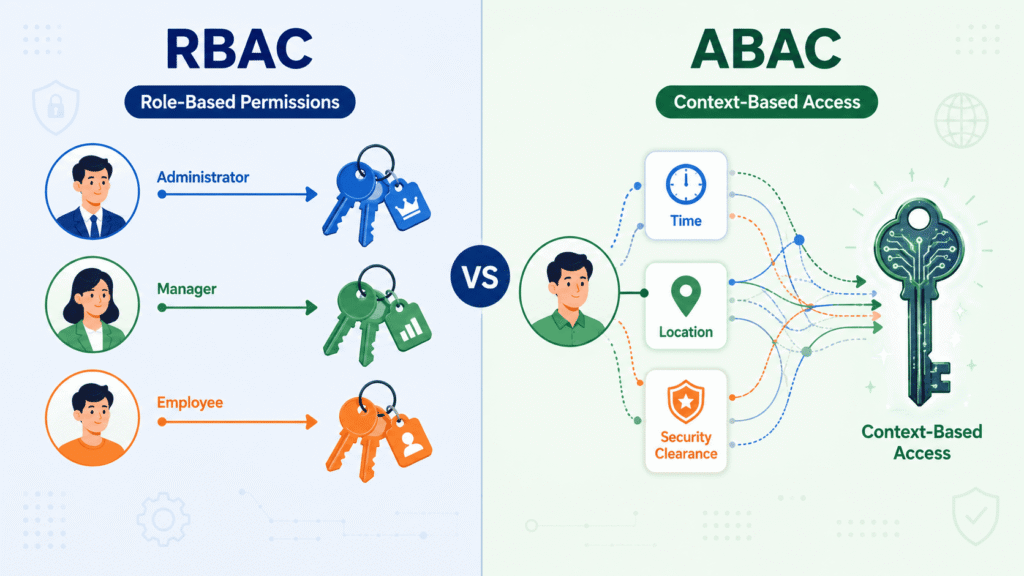
Role-Based Access Control (RBAC), is the classic model. Users get roles like Admin or Editor, and those roles have permissions. It’s simple and works for many situations. “If the user is an Editor, they can publish posts.”
But what about a rule like, “A user can edit a document if they own it, or if they’re an Editor and the document is still a draft, but never on a weekend”? That’s where Attribute-Based Access Control (ABAC) comes in. It checks dynamic attributes: the user’s department, the resource’s status, even the time of day. RBAC is a static badge. ABAC is a real-time security scan. For complex SaaS apps or strict compliance needs, ABAC is often necessary. The choice depends on your rule complexity.
How do we test this? You automate malicious tests. Write an integration test where a low-privilege user tries to call an admin endpoint. Expect a 403 Forbidden. If you get a 200 OK with data, you’ve caught a critical bug. We run these in our CI/CD pipeline on every commit to prevent new features from accidentally exposing old vulnerabilities.
How Does Modern Architecture Introduce New Security Risks?
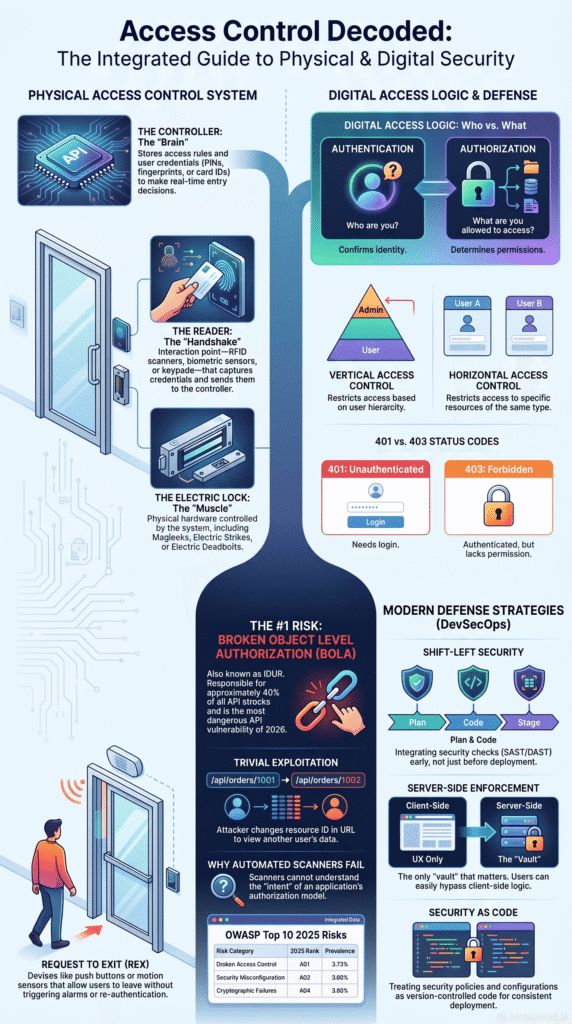
Modern, distributed architecture creates new failure modes. An OAuth token might be cryptographically valid, but was it issued for this specific API? If your token validation only checks the signature and not the aud (audience) claim, a token meant for the “billing-service” could be used to access the “user-profile-service.”
We see this in multi-tenant SaaS platforms. A user with permission to manage an organization’s settings might, through a chain of delegated app keys, gain access to code repositories they were explicitly blocked from. The attack surface shifts and expands.
The principle, however, stays the same. You must validate the full context of every single permission, not just confirm it exists.
FAQs
Can checking permissions fail even after a user logs in successfully?
Yes. Authentication failure and authorization failure are different problems. Every request should include authorization checks, permission validation, and server-side enforcement before granting resource permissions or data access.
How can I verify effective permissions for every user role?
Review user permissions, access rights, and the access matrix regularly. Compare entitlement checks with least privilege, role-based access control, and the current access policy to identify unnecessary permissions.
Why does client-side validation increase access control risks?
Client-side validation cannot enforce secure access because attackers can bypass it. Perform every permission check on the server to prevent unauthorized access and privilege escalation.
Which mistakes most often cause broken access control vulnerabilities?
Broken access control often results from missing ownership validation, record ownership checks, API authorization, or tenant isolation. These gaps can enable IDOR, force browsing, and unauthorized modification.
How often should access control testing be performed?
Perform access control testing throughout development, before every release, and after significant changes. Include vulnerability assessment, access audit, logging reviews, and secure coding verification to identify weaknesses early.
Build Security Into Every Line of Code
Secure software starts with the choices you make every day. Default deny, least privilege, server side validation, and consistent testing help reduce risk before it becomes a problem.
If you’re ready to turn these ideas into practical coding skills, the Secure Coding Practices Bootcamp is a simple next step. You’ll learn through hands-on coding sessions that cover real security challenges without unnecessary jargon. Join the bootcamp and start building safer applications with confidence: Secure Coding Practices Bootcamp.
References
- https://dl.acm.org/doi/epdf/10.1145/3025453.3025999
- https://owasp.org/Top10/2025/0x00_2025-Introduction/?referrer=grok.com