

A secure password reset flow is an alternate authentication path. It must be built with the same defense as your main login. Attackers target it because it’s often the weak spot, a backdoor to account takeover.
At Secure Coding Practices, we’ve seen strong login pages fail because the reset process stored plaintext tokens or left old sessions active. Security research consistently shows login vulnerabilities are among the most common critical flaws.
This guide covers the principles OWASP and NIST recommend, turning them into reliable code. Keep reading to build a reset process you can trust.
Password Reset Security: The Rules You Can’t Ignore
These key points summarize the foundational controls that turn a password reset flow from a security risk into a secure recovery mechanism.
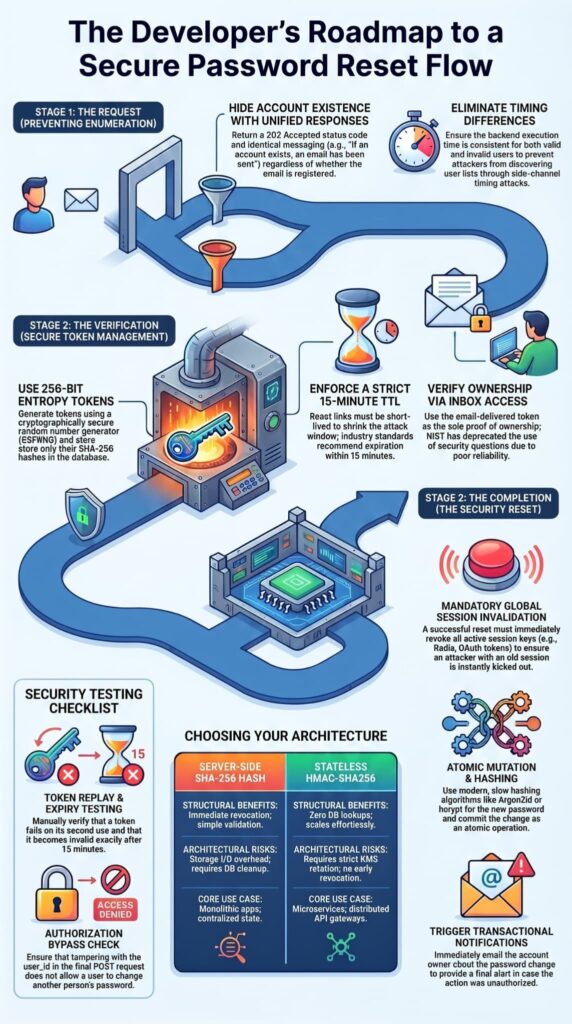
- Hide account existence: Never reveal whether an email address or username is registered, preventing account enumeration attacks.
- Use strong, single-use reset tokens: Generate cryptographically secure tokens and store only their hashed versions.
- Keep reset links short-lived: Expire tokens quickly, ideally within 15 minutes, to reduce the window of abuse.
- Terminate all active sessions: A successful password reset should automatically sign the user out on every device.
- Monitor reset activity closely: Log and track password reset events to detect suspicious behavior and abuse patterns early.
How Does a Secure Password Reset Flow Work?
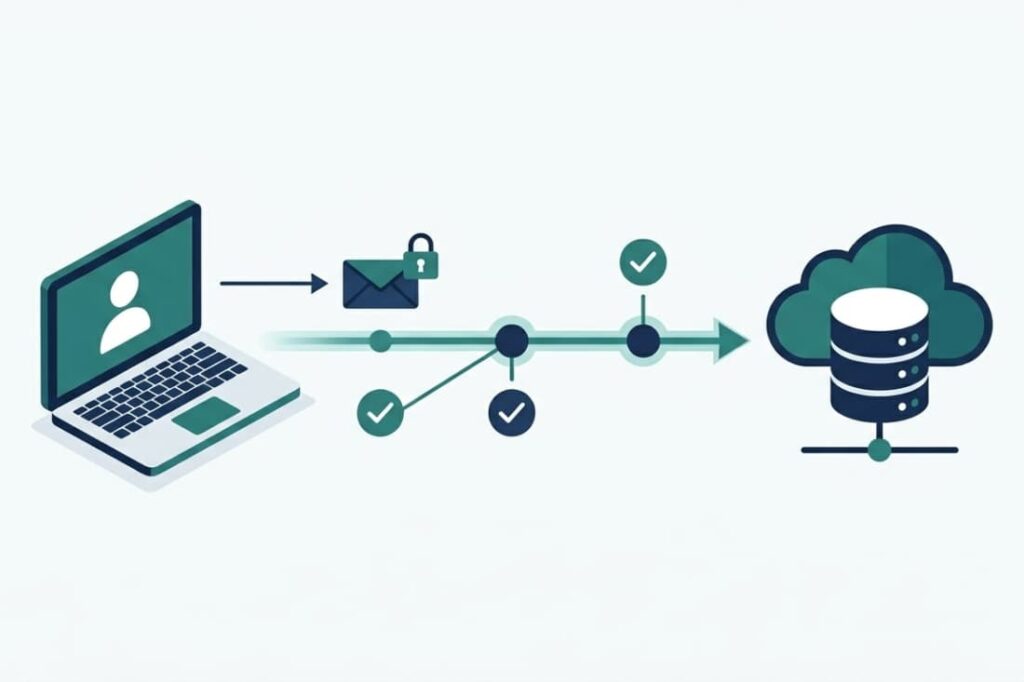
The process should be simple for users but built with strong safeguards. It’s a controlled handoff of trust, from an old password to a verified action and then a new secret. OWASP is clear: treat this as a high-risk authentication feature.
This is why analyzing broken authentication flaws remains an important part of reviewing any password recovery workflow.
The Secure Reset Flow
- Edge Request Processing: The user submits their identifier. The API returns a unified 202 Accepted status code to hide account existence.
- Cryptographic Token Issuance: The backend uses a secure random generator to create a 256-bit entropy token. It writes the SHA-256 hash to the database with a strict 15-minute TTL.
- Token Verification: The application validates the incoming URL parameter against the stored hash and confirms the timestamp is active.
- Atomic Mutation & Invalidation: The system commits the new Argon2id password hash, drops all active Redis session keys for that user, and fires a transactional confirmation email.
How Can You Prevent Account Enumeration During Reset Requests?
This is your first defense. The response must be identical whether the email exists or not. “If that email is associated with an account, instructions have been sent.”
We make sure there are no timing differences or error clues. Our code always runs the same dispatch logic, though the actual email only sends for valid users. This stops attackers from discovering your user list.
The strict pattern directly blocks the automated user enumeration risks flagged by the OWASP Cheat Sheet Series,
“When a user submits a reset request for an email address, return exactly the same message, the same HTTP status code, and the same response time whether the account exists or not. A message like ‘If an account with that address exists, you will receive a reset email’ closes account enumeration completely. The common mistake is returning ‘We sent you a reset email’ for real accounts and ‘No account found’ for non-existing ones. OWASP’s Forgot Password Cheat Sheet specifically flags this pattern as one of the most prevalent enumeration vulnerabilities in production applications.” – OWASP Cheat Sheet Series
How Should Credentials Be Updated After Verification?
Ownership is proven by having access to the email inbox. The token in the link is the proof. We never use security questions, NIST has deprecated them for good reason.
The verification endpoint checks two things: that the token hash matches a stored record and that it hasn’t expired. If either fails, a generic “invalid or expired link” message prompts a new request.
How Should Credentials Be Updated After Verification?
Once verified, the user lands on a form to set a new password. This form should enforce the same rules as registration. Upon submission, we hash the new password with your standard algorithm (like Argon2 or bcrypt) and save it.
Crucially, before returning success, we call the session revocation routine. In our training, we stress that this logic must be atomic and reliable; finding and destroying all sessions is a critical step.
What Makes a Password Reset Token Secure?
Credits: Brainova Engineers
Think of a reset token as a temporary password. If an attacker gets it, they own the account. Its entire life must be protected.
A secure token is unpredictable, made from a cryptographically secure random number generator. It’s single-use, killed right after the password changes or after one try.
It’s short-lived, expiring in minutes, not days. And it’s stored safely, we hash it with SHA-256 before saving it to the database, just like a password.
Stored Tokens vs Stateless HMAC Tokens
There are two main ways to build this. The choice depends on your system.
| Approach | Structural Benefits | Architectural Risks | Core Production Use Case |
| Server-Side SHA-256 Hashed Storage | Immediate programmatic revocation; simple schema validation. | Generates storage I/O overhead; requires automatic database cleanup cron jobs. | Monolithic web applications with centralized state management. |
| Stateless Cryptographic HMAC-SHA256 | Zero database lookups; scales effortlessly across distributed nodes. | Demands strict KMS key rotation; impossible to revoke before explicit expiration. | High-throughput microservice fabrics and distributed API gateways. |
The stored token method is more common and straightforward. You create a random string, hash it, save the hash with a user ID and expiry time, and email the plain token.
The HMAC method signs a string (like userID|expiry) with a secret key and sends the signature as the token. The server recalculates the signature to check it.
Industry guidance generally recommends the stored, hashed token approach for most applications. It gives you clear control to revoke a token, which is often more important than the scaling benefit of a stateless approach.
Why Should Reset Links Expire Quickly?
Time is the enemy of security in a reset flow. A link that lives for 24 hours is a sitting target in a forwarded email, browser history, or hacked inbox. Guidelines from groups like NIST support short lifespans by stressing the need to shrink the attack window.
We enforce a maximum lifetime of 15 minutes. This short window greatly cuts the risk of replay attacks, where someone intercepts and uses the link later. It also limits the damage if a user requests a reset and then remembers their old password, the old, possibly unsafe link just expires.
The expiry check is non-negotiable in your token verification logic. It’s a simple but critical line of defense we always implement.
How Should Passwords Be Updated After Verification?
The password update is the climax of the flow, and its security can’t be an afterthought. After the token is checked, the new password should be handled by your standard, trusted credential update function. This keeps things consistent and uses your existing secure code.
Required Security Actions After Reset
- Hash and Salt: Run the new password through your strong, slow hashing algorithm (like Argon2id) with a unique salt.
- Invalidate Active Sessions: Call your session service to delete all session records for this user. This covers web sessions, mobile app tokens, and OAuth refresh tokens.
- Revoke Existing Tokens: If using JWTs, add the user’s ID to a short-lived denylist or increase a token version number.
- Send Account Notification: Immediately email the account owner that their password was changed. This gives a critical alert if the action wasn’t authorized.
This last step is vital. Research shows password reuse is extremely common. A breach on another site could let an attacker trigger a reset on yours. The notification email is the user’s last chance to spot and report fraud.
Why Is Session Invalidation a Critical Security Requirement?
This is the step that turns a password change into real security recovery. Imagine a user’s laptop session is stolen by malware. They wisely reset their password from their phone. If the system doesn’t end the session on the stolen laptop, the attacker stays logged in with the old session. They get past the new password completely.
Letting old sessions stay active after a password reset is a big example. The fix must be complete:
- Clear the session stores on the server.
- Invalidate all refresh token rotations.
- If you use stateless JWTs, set up a token versioning or blacklist plan. This makes everyone log in again.
Our live environment audits mirror warnings from the GitHub Advisory Database,
“When a user changes their password via password reset endpoints, the system updates the password hash in the database but does not invalidate existing client sessions or tokens. This vulnerability serves as a persistence mechanism in attack chains… allowing attackers who have obtained session tokens through other attack vectors to maintain access even after password reset.” – GitHub Advisory Database
In our training, we stress that this step isn’t optional. It’s what separates a proper reset from a half-measure that leaves accounts exposed.
What Are the Most Common Password Reset Vulnerabilities?
These are the failure modes we test for constantly. They often come from treating the reset flow as a “simple” feature instead of a core part of authentication. Password reset vulnerabilities are among the most common causes of high/critical identity flaws, these vulnerabilities are usually the reason.
| Vulnerability | Security Impact | Prevention |
| Account Enumeration | Lets attackers find valid user emails/IDs for targeting. | Use generic response messages and uniform timing. |
| Plaintext Token Storage | A database breach leads directly to account takeover. | Always store a cryptographic hash of the token. |
| Long-Lived Tokens | Allows replay attacks using intercepted emails. | Enforce short expiry (e.g., 15 minutes). |
| Session Persistence | Lets attackers with old sessions keep access after a reset. | Invalidate all sessions and tokens globally upon password update. |
| Missing Authorization Checks | Lets a user change another’s password by tampering with IDs. | Ensure the verified token is explicitly tied to the user ID in the update request. |
| Weak Token Generation | Tokens are predictable (sequential or time-based). | Use a cryptographically secure random generator. |
In our code reviews, we see these mistakes often. Proper session invalidation is especially important because many session fixation attack steps rely on retaining access through previously established session identifiers. Fixing them is what moves a reset flow from being a liability to a secure recovery path.
How Should You Test a Password Reset System?
You must test this flow with the mindset of an attacker. Automated scanners help, but manual, creative testing finds the subtle flaws.
Testing Checklist
- Enumeration Testing: Submit both real and fake emails. Check for differences in response time, content, or behavior.
- Token Replay Testing: Use a valid reset link twice. The second try must fail.
- Expiry Validation: Request a link, wait past its expiry time (e.g., 15 minutes), then try to use it.
- Session Revocation: Log in on Device A, reset the password on Device B, then check if Device A is still logged in.
- Authorization Bypass: While finishing a reset for user_id=100, try changing the POST request to set a password for user_id=101.
- Rate-Limit Testing: Flood the reset request endpoint with attempts from different IPs and user agents to test the throttling controls.
In our labs, we run through this list rigorously. It’s how you find the gaps that automated tools often miss.
What Is the Recommended Implementation Roadmap?
Don’t try to build the perfect system in one sprint. Prioritize based on cutting the biggest risks. This phased approach gets the most important protections live first.
Phase 1: Core Security Controls
- Implement generic “success” messages on the reset request page.
- Integrate a cryptographically secure random token generator.
- Build the logic to hash tokens and store them with an expiry time.
- Create the function that invalidates all user sessions.
Phase 2: Session and Logging Controls
- Strictly connect the password update endpoint to the session invalidation function.
- Add full logging for all reset events (request, token use, completion).
- Put rate limiting on the request endpoint, based on IP and target email.
Phase 3: Monitoring and Risk-Based Verification
- Build alerts for strange reset patterns (e.g., many requests for different accounts from one IP).
- Add an optional multi-factor authentication step for high-value accounts during reset.
- Consider risk-based checks (unusual location, new device) to trigger extra verification.
In our projects, we follow this sequence. It lets us secure the flow quickly and then improve it over time, rather than getting stuck trying to build everything at once.
FAQ
How do developers prevent side-channel timing attacks on the reset request endpoint?
Attackers measure database execution speeds to see if an email exists in your system. To stop this, our authentication logic runs dummy cryptographic hashing routines for non-existent users. This step ensures identical response latency across all API inputs.
What should users do immediately after resetting a password?
After completing a password reset flow, users should sign out of other sessions, review account management settings, and check for unfamiliar login attempts.
They should update Multi-factor authentication settings, verify their recovery code and rescue email address, and confirm that no unauthorized changes were made. These actions help secure the account after a potential security incident.
Why are password managers important for account security?
Password Managers generate and store unique passwords for every account, which helps prevent password reuse. This reduces the risk that credentials exposed in security breaches can be used against other accounts.
Password Managers also help users follow Password policies by creating complex passwords that resist brute force attacks while remaining easy to manage securely.
How can organizations improve security without harming user experience?
Organizations can combine strong Authentication methods with simple account recovery procedures.
Features such as Self-Service Password Reset, Passwordless Authentication, Biometric authentication, and Two-factor authentication strengthen security while keeping access convenient.
Clear instructions, effective user verification, and rate limiting protect accounts from abuse without creating unnecessary frustration during the password reset feature process.
What technologies reduce reliance on traditional passwords?
Modern systems increasingly use FIDO2 credentials, FIDO2 security keys, Security Key devices, and passkey provider solutions instead of traditional passwords. These technologies help protect digital identity by reducing the risks associated with password storage and stolen credentials.
Many platforms also support cross-device authentication and Biometric authentication to provide secure and convenient account access.
Building A Password Reset Process Attackers Cannot Exploit
A secure password reset flow is more than a recovery feature. It is a critical security control that protects accounts when credentials are compromised. By using strong token management, preventing user enumeration, enforcing session invalidation, and supporting MFA, organisations can significantly reduce account takeover risk and strengthen user trust.
Ready to build stronger authentication and account security systems? Join the Secure Coding Practices Bootcamp and gain hands-on experience with secure development practices that help prevent real-world vulnerabilities.
References
- https://www.captcha.eu/how-to-prevent-password-reset-abuse/
- https://github.com/advisories/GHSA-rpw8-82v9-3q87