
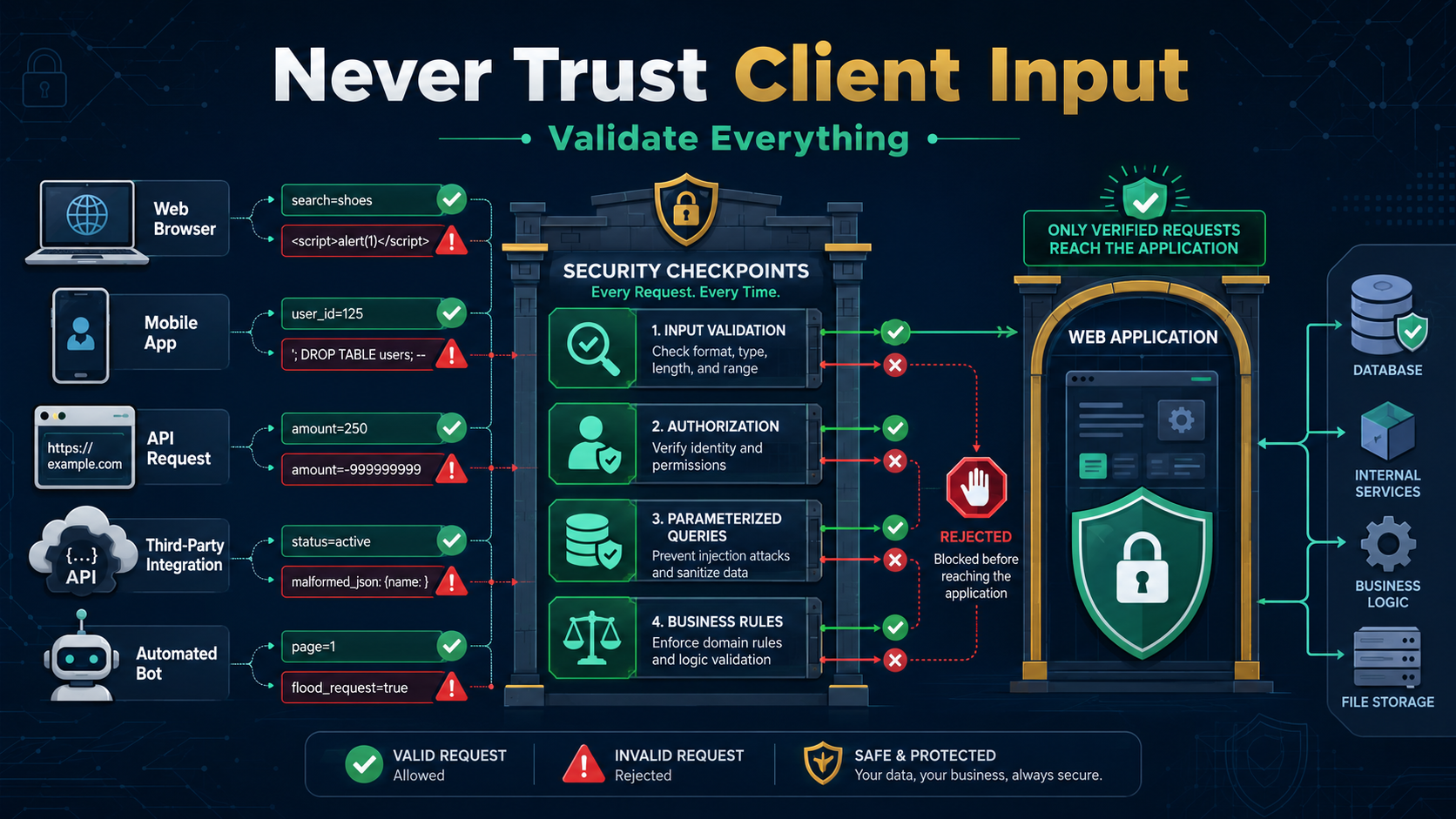

Never trust client input rule: Secure Coding Practices begin with one fact: data from clients is untrusted until checked. The browser, app, or API caller can send anything, and your code has to handle it safely. This isn’t fear, it’s how the internet works. Skip this and problems follow: leaks, bugs, and damaged systems.
Build checks into your code early so security stays part of the process without slowing development down. Don’t assume client data is safe. Treat every request carefully. Attackers won’t wait for your next fix. Keep reading
Quick Reads – Trust Nothing, Validate Everything
Following the never trust client input rule creates a stronger foundation for secure applications, where server-side validation reduces common security risks before they become vulnerabilities.
- Client-side validation is for user experience only; server-side validation is for security.
- Treat all data from outside your server boundary as untrusted, including cookies, headers, and files.
- Use allowlisting (defining what’s allowed) and context-aware output encoding as your primary defenses.
Why is a browser’s “Submit” button only a polite suggestion?
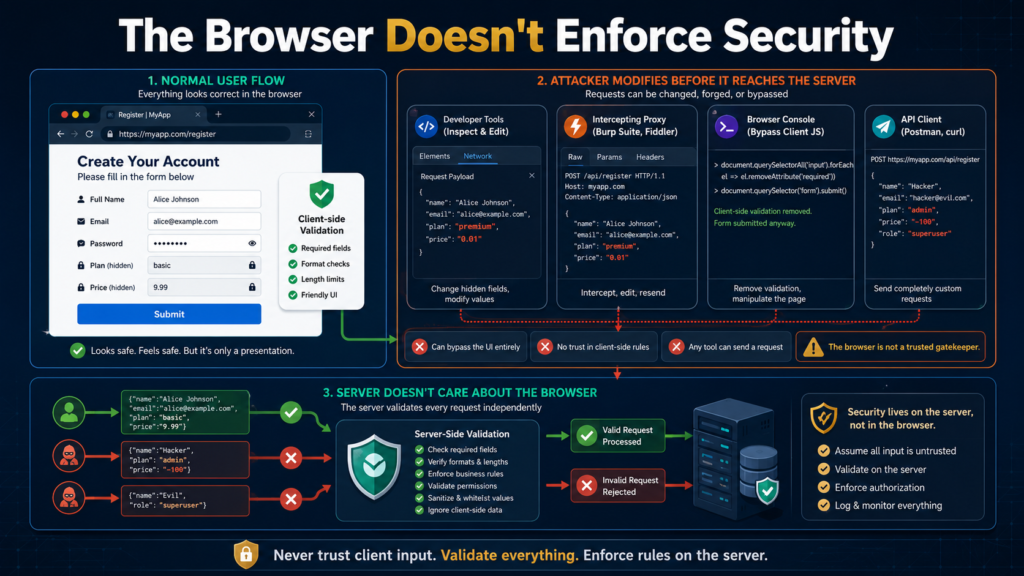
We’ve built forms with checks for required fields, formats, and limits. Looks safe. But those rules live in the browser, and attackers don’t have to follow them. A developer console, proxy tool, or direct API call can change the data before our server sees it. We learned this during a checkout test where someone changed a price value before the request arrived. Our backend trusted it. That mistake didn’t last long, but it taught us a lesson.
Research from OWASP shows
“Industry guidance (e.g., OWASP) states that all client‑side input must be treated as potentially malicious and validated server‑side.” – OWASP
What Exactly Is “Client Input”?
It’s more than form text. A client sends a full request, and we can’t assume every part is honest.
- Form fields and JSON
- URLs and parameters
- Headers and cookies
- Files and metadata
- WebSocket messages
Secure developers treat all of it as untrusted because attackers don’t need permission to tamper. Keep reading.
What is the Belt and Suspenders Model, and why does it matter for defense in depth?
In our secure development training, we explain it this way: the front end is the belt. It improves the experience. The backend is the suspenders. It holds everything up when that belt gets cut.
As noted by NCSC
“Defence in depth as using multiple, overlapping security measures so the failure of any single measure does not lead to compromise. ” – NCSC
We’ve seen teams rely too much on browser checks and regret it later. That’s why our rule stays simple: validate twice. A React form can use tools like Zod for quick feedback, but the Node.js server must verify the same data again. PHP server-side input validation gets the final decision.
| Scenario | Frontend Validation | Backend Validation |
| User enters an invalid email | Shows an immediate error | Rejects invalid requests that bypass browser checks |
| User changes request data manually | May be skipped completely | Detects and blocks tampered input |
| API receives a direct request | Does not run | Applies the same validation rules before processing |
| Final security decision | Improves user experience | Determines whether the request is accepted or rejected |
How do attackers exploit the gap in security systems?
Credit: CyberTech Hub
When you trust data you shouldn’t, you open doors. Specific, well-known doors.
- SQL Injection: Concatenating user input directly into a query string. The classic
' OR '1'='1that can dump your database. - Cross-Site Scripting (XSS): Taking unescaped user input and rendering it in a browser. Suddenly, their comment on your blog is running JavaScript in another visitor’s session.
- Mass Assignment: Blindly binding request data to an object. A user sends
{"role": "admin"}in a profile update, and your code saves it, escalating their privileges. - Path Traversal: Using filenames like
../../../etc/passwdin a file download request to read sensitive system files.
The pattern is always the same. The client sends something unexpected, and the server, lacking proper checks, processes it as if it were legitimate. The damage is done on your machines, with your permissions.
What are the four pillars of secure input handling?
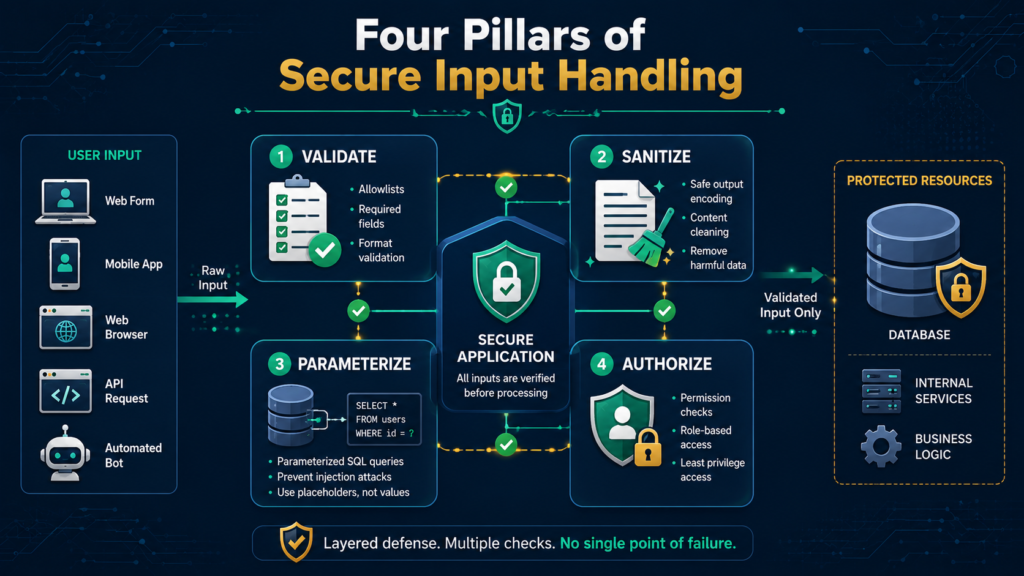
Knowing the risks is only the start. At our secure development bootcamp, we focus on turning those lessons into code that holds up under pressure.
- Allowlisting: Define What’s Good
We don’t chase every possible bad input. That fight never ends. Instead, define what valid data should look like.
- Correct data type
- Allowed length
- Expected format
- Safe value range
If input breaks the rules, reject it. No guessing. No silent fixes.
- Context Matters: Encode on Output
A value can be safe in one place and dangerous in another. We’ve seen teams block valid names because they feared special characters. The better move? Keep the data, handle it correctly. Use parameterized queries and proper encoding for each destination.
- Manage State on the Server
The client-side can request. The server-side decides.
- Prices from the database
- Identity from sessions
- Workflow checks from storage
Our learners often test this with simple requests and quickly see why client-side values can’t be trusted.
- File Uploads: A Serious Risk
Uploads need extra checks. Validate real file content, rename files, store them away from public access, and remove unnecessary metadata. A filename can lie. The file itself tells the story.
What common pitfalls exist, and what lessons do they hide?
We used to see “clean the input” as the answer. Removing <script> tags sounds safe, but attackers can find ways around those filters. A better approach is keeping valid data unchanged, then encoding it for where it’s used. HTML needs HTML escaping. SQL needs server-side validation for preventing injection.
A number can look correct and still be wrong. We teach our learners to check both sides. Is the value a number? Does it make sense? A future birthdate or a negative payment may pass the first check but fail the real-world test.
Third-party tools don’t always protect your data. A package might parse input but expect our code to validate it first. The same applies to APIs and internal services. Data can be unsafe before it reaches us. Never trust client input rules that have to extend everywhere.
| Pitfall | What Goes Wrong | Correct Approach |
| Sanitization | Removes “bad” input but misses edge cases | Use context-aware encoding |
| Syntax-only validation | Checks format but ignores meaning | Add semantic validation |
| Blind trust in libraries | Assumes third-party tools validate input | Validate before passing data |
| Trusting internal data | Assumes upstream systems are safe | Apply validation at every boundary |
How can organizations build a culture of distrust in security practices?
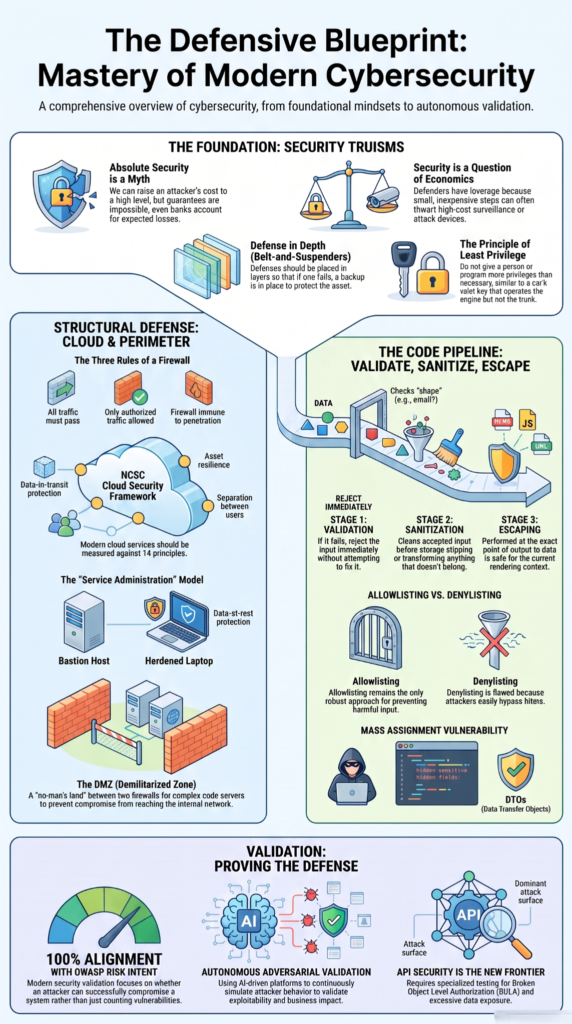
Security isn’t only a checklist. It’s a habit. At our secure development bootcamp, we show teams that Secure Coding Practices should be built into daily work, not saved for emergencies.
So how does that happen? Organizations can standardize validation tools, share schemas between frontend and backend, and make code reviews include security checks. We’ve seen teams catch serious issues by asking one simple question: where did this data come from?
Good security also needs practice. Run SAST and DAST tests, review rejected inputs, and teach everyone why hidden fields aren’t protected. Developers and product teams both need that mindset.
Over time, secure habits become normal. The code gets reviewed, the risks get questioned, and trusting client input becomes the exception.
FAQs
How does server-side validation differ from client-side validation?
Client-side validation improves usability, but server-side validation enforces security. Backend validation verifies untrusted data after every request, preventing attackers from bypassing checks and protecting application security consistently.
When should input sanitization replace input validation?
Input sanitization should never replace input validation. Validate data first with strict validation rules, then sanitize output where appropriate. This sequence supports injection prevention and preserves accurate, reliable application behavior.
Why can hidden field tampering become a security problem?
Hidden field tampering lets attackers modify values that should remain protected. Request validation, authorization checks, and business logic validation detect request tampering before unsafe input affects sensitive operations or stored data.
How does an allowlist approach improve request validation?
An allowlist approach accepts only expected values and rejects everything else. Combined with type checking, length checking, and range checking, it rejects unknown input and reduces the application’s attack surface.
Why does the never trust client input rule matter for APIs?
The never trust client input rule protects API security because every request crosses a client trust boundary. Robust validation and parameter validation block malicious input before the application processes any request.
Make Server-Side Validation Your Security Foundation
When your application accepts outside data, every input can become a risk. Skipping validation creates problems that are harder to fix later.
Building a habit of checking data on the server helps keep your systems safer from the start. Secure Coding Practices Bootcamp gives developers a clear way to handle these risks and build software with stronger protection.
References
- https://cheatsheetseries.owasp.org/cheatsheets/Input_Validation_Cheat_Sheet.html
- https://www.ncsc.gov.uk/collection/operational-technology/secure-rf-communications/principle-9