

The best brute force defense isn’t one tool. It’s a layered strategy that makes password guessing too slow, expensive, and useless. You must slow the attack, disrupt the automation, and ensure a guessed password is never enough.
At Secure Coding Practices, we saw this firsthand, watching logs flood with thousands of tries per minute from botnets. The fix is architectural, blending secure coding with smart system design.
Keep reading to build a defense that adapts, turning your login into a hardened target.
Brute Force Prevention At A Glance
These key points highlight the defenses that provide the greatest protection against password-guessing attacks and account compromise.
- MFA is the strongest safeguard: Even a correctly guessed password becomes useless without the additional authentication factor.
- Smart rate limiting beats simple lockouts: Progressive delays and adaptive controls slow attackers without creating new denial-of-service risks for legitimate users.
- Strong password hashing limits breach damage: Modern algorithms like Argon2id make stolen password databases far more difficult for attackers to crack.
What Makes Brute Force Attacks So Persistent and Dangerous?
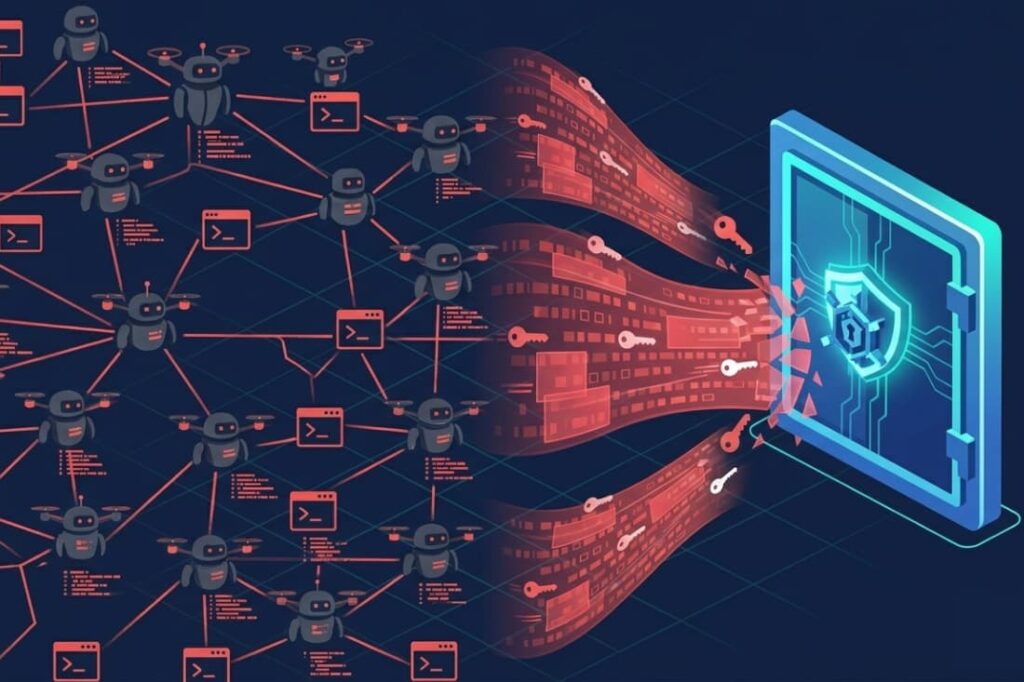
A brute force attack is a trial-and-error assault on your login. Attackers use automated tools to try countless username and password combos until one works.
The idea isn’t complex, but the execution is. They target everything: web logins, SSH, RDP, and API gates. The automation is cheap, the lists of common passwords are huge, and the prize, a hacked account, is valuable.
The real danger is how they’ve evolved. It’s not just about raw power now.
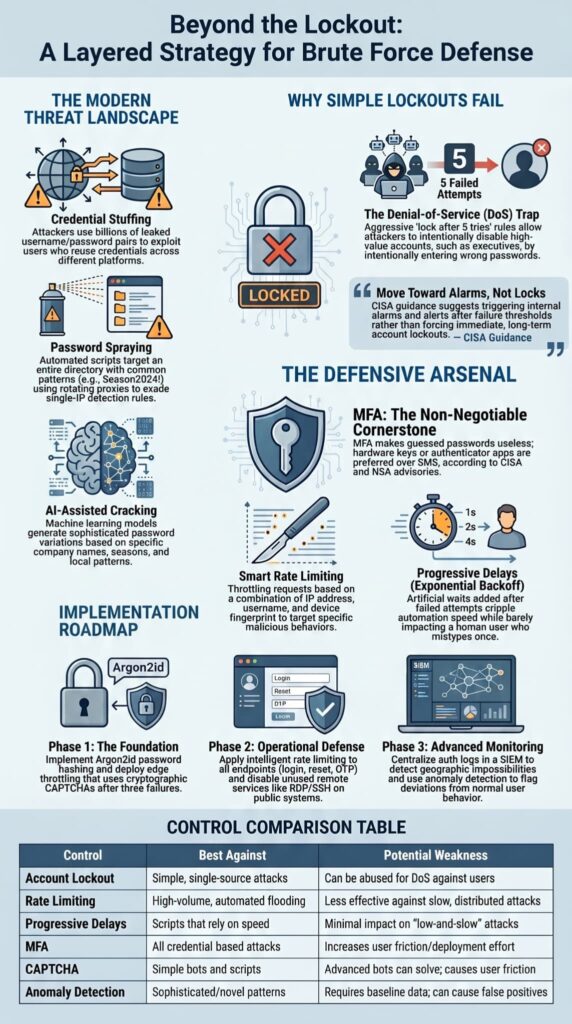
- Credential Stuffing: Uses billions of breached username/password pairs, exploiting how people reuse passwords. This is why teams regularly review broken authentication flaws that allow valid credentials to be abused even when passwords appear legitimate.
- Password Spraying: Automated scripts target your entire user directory using high-probability corporate patterns like [Season][Year][SpecialCharacter]. Because attackers space these attempts across hundreds of clean rotating proxies, they completely evade basic single-IP threshold rules.
- AI-Assisted Cracking: Uses machine learning to create password variations based on company names, seasons, and patterns.
These methods get around simple defenses. A basic account lockout policy does nothing to stop a spray attack trying one password against ten thousand users. In our work, we see this pattern constantly.
Why Can Simple Account Lockout Policies Backfire?
The old advice was simple: lock an account after five wrong tries. We put that rule everywhere. Then the support calls started. “I’m locked out of my account.”
A quick look showed a single IP, from a datacenter we didn’t recognize, hammering a vice president’s account with bad passwords. The attacker wasn’t trying to guess; they were trying to lock. It was a denial-of-service attack using our own security rule.
This is the core problem with aggressive, all-or-nothing lockouts. They guard against a simple, single-source brute force attack but create a new weakness. Attackers can use them to disable important accounts.
Guidance from groups like CISA points to a smarter way. It suggests setting off alarms after specific failure thresholds, not forcing immediate, long-term lockouts.
The goal is to stop the attack without hurting the real user. In our systems now, we follow this principle, using alerts and progressive delays instead of hard locks.
How Intelligent Rate Limiting and Progressive Delays Throttle Attacks?
If lockouts are a blunt instrument, rate limiting and progressive delays are a scalpel. Instead of saying “no” after five tries, you make each next try slower and more costly. This targets the attacker’s most valuable resource: time.
The Layered Approach:
- Smart Rate Limiting: Set limits based on the IP address, targeted username, and device fingerprint. A single IP trying many usernames gets throttled. Many IPs targeting one username triggers a step-up challenge.
- Progressive Delays: After the first few failed attempts, add an artificial wait (1 second, then 2, then 4). This exponential backoff cripples automated attacks. A real user who mistypes feels only a brief pause.
Our defensive baseline mirrors Yale Cybersecurity standards for mitigating high-velocity script automation,
“Rate limiting and temporary account lockouts are effective ways to thwart automated, rapid-fire password guesses… Limit the number of consecutive, invalid login attempts to something reasonable within a modest period of time… When the threshold…has been exceeded, a temporary account lockout should be triggered for some reasonable duration…” – Yale University Cybersecurity
This method stops bots without harming legitimate users.
Why Is Multi-Factor Authentication (MFA) Non-Negotiable?
All these controls make guessing harder. MFA makes it pointless. This is the cornerstone. If an attacker guesses a password, they still need the second factor—a code from an app, a physical key, or a fingerprint.
Guidance from groups like CISA puts hardware-based MFA or authenticator apps first, with SMS as a last resort. This aligns with current National Security Agency advisories:
“To mitigate against this activity, the CSA recommends measures such as implementing phishing-resistant multi factor authentication (MFA), continuously reviewing MFA settings, providing cybersecurity training to users, and ensuring password policies meet minimum password strength guidelines.” – National Security Agency (NSA)
We’ve seen accounts with strong, unique passwords get hit by spray attacks. We have not seen a single account with properly set up MFA get broken by brute force.
The implementation is what counts. MFA must be required, not optional, for every user account, especially admin ones. It must also cover every way into your system, including APIs and command-line tools. A common mistake is turning on MFA for the web portal but leaving an old API endpoint open. Secure coding means treating every login point with the same strict rules.
Choosing the Right Defense: A Control Comparison
Not every control is right for every situation. Some are foundational, others are tactical responses.
The table below breaks down the common mitigations, their strengths, and where they can fail. Your strategy should mix controls from different columns to cover the weaknesses of any single one.
| Control | How It Works | Best Against | Potential Weakness |
| Account Lockout | Locks account after N failed attempts. | Simple, single-source brute force. | Can be abused for Denial-of-Service (DoS) against legitimate users. |
| Rate Limiting | Slows requests from an IP/user/endpoint. | High-volume, automated flooding. | Less effective against slow, distributed attacks from many IPs. |
| Progressive Delays | Adds increasing wait times after failures. | Automated scripts that rely on speed. | Minimal impact on patient, low-and-slow attacks. |
| Multi-Factor Authentication | Requires a second proof of identity. | All credential-based attacks. | User friction; requires deployment and user adoption. |
| CAPTCHA/Challenge | Presents a human-solving test. | Simple bots and automated scripts. | Advanced bots can solve them; creates user friction. |
| Anomaly Detection | Flags logins deviating from normal patterns. | Novel or sophisticated attack patterns. | Requires baseline data; can generate false positives. |
The key is depth. Relying solely on CAPTCHA or basic rate limiting is like locking your front door but leaving a window open. MFA is your strongest lock, but it must be paired with monitoring and intelligent throttling to handle the noise before it even gets to that gate.
How Do You Build Your Defensive Layers?
Credits: Cyber Education World
You can’t build this wall in a day. A phased approach lets you stack defenses without ruining the user experience. Start with the controls that cut the most risk.
Phase 1: Foundation (Stop the Obvious)
- Secure Cryptographic Baselines: Before exposing any endpoints, compute all password verifications using Argon2id with unique salts to ensure leaked data stores cannot be rapidly cracked offline. This approach also reduces exposure to insecure password storage risks that can turn a database breach into a large-scale credential compromise.
- Edge Throttling and Step-Up Triggers: Deploy distributed rate limiting across your API routes, substituting hard user lockouts with exponential backoff delays and cryptographic CAPTCHA tasks after three failures.
- Behavioral Telemetry Integration: Once your baseline throttling rules are stable, funnel all auth-state logs into a central SIEM platform to flag anomalies, such as concurrent geographical authentications or systemic dictionary patterns.
Phase 2: Operational Defense (Slow the Attack)
- Set up intelligent rate limiting on all login endpoints (login, password reset, OTP verification).
- Replace hard account lockouts with progressive delays and step-up challenges (like a CAPTCHA) after a few failures.
- Disable or hide unused remote access services like RDP and SSH on public systems, or move them to non-standard ports.
Phase 3: Advanced Monitoring (Detect the Stealthy)
- Log all login attempts, successful and failed. Centralize these logs.
- Set alerts for patterns that point to spraying or stuffing: many failed logins across different accounts from one IP, or many IPs targeting a single account.
- Consider using anomaly detection systems that learn normal login behavior for your users and flag anything strange.
This phased roadmap is widely recommended. It gets critical protections in place quickly, then builds on them to create a resilient, layered defense.
What Should You Monitor and How Do You Respond?

Logs are your early warning system. You’re looking for the story they tell. A sudden jump in HTTP 401 errors.
Geographic impossibilities, a login from Berlin followed by one from Tokyo five minutes later. Groups of failed attempts against service accounts, which often have weaker passwords.
When you spot an active attack, your response should be precise. You might temporarily tighten rate limits for the targeted group of users. You could force a password reset for accounts that had many failed attempts, as they might be using a password on the attacker’s list. During remediation, it is also important to invalidate active sessions to prevent session fixation attacks from preserving unauthorized access after credentials are updated.
The key is to have a plan ready before it happens. Frameworks like CISA stress logging and alerting for a reason: spotting the attack is the first step to stopping it.
FAQ
How do you prevent high-volume credential flooding from degrading auth database performance?
High-velocity botnets can quickly exhaust database connection pools. We decouple our rate-limiting layer from the core data store by tracking client request frequencies inside an in-memory Redis cluster, blocking malicious traffic at the network edge before it hits our expensive hashing routines.
Why should password reset pages use multi-factor authentication?
Multi-factor authentication requires users to complete an additional verification step before changing account credentials. This protection remains effective even when compromised credentials have been exposed through credential stuffing or Password Cracking attacks.
Adaptive multifactor authentication can evaluate device information, geographic location, and behavior variation to identify suspicious password reset requests before access is granted.
How do strong password policies improve password reset security?
Strong password policies require unique, difficult-to-guess passwords that resist Dictionary Attack techniques, rainbow table attacks, and other password-guessing methods.
Organizations should combine these policies with modern hashing algorithms to protect stored credentials.
Strong password requirements reduce the chance that attackers can successfully reuse stolen authentication credentials obtained from previous data breaches.
What warning signs can indicate a password reset attack?
Unexpected password reset emails, unrequested 6 digit code messages, repeated security check prompts, and multiple failed account recovery attempts can indicate an attack. Users should also be cautious when they receive notifications about password changes they did not request.
These events may signal credential stuffing, a password-guessing attack, or an attempt to gain unauthorized access.
How can organizations monitor password reset abuse effectively?
Organizations should use behavioral analytics, threat intelligence, anomaly detection systems, and AI-Driven Threat Detection to monitor password reset activity. These tools can identify repeated reset requests, unusual login patterns, and suspicious behavior that differs from normal user authentication activity.
Security teams should also maintain an incident response plan and review authentication logs regularly to strengthen Zero Trust Security.
How does credential stuffing affect password reset security?
Credential stuffing occurs when attackers use compromised credentials from previous breaches to access accounts. Automated tools test large numbers of login credentials until they find a match.
If users reuse passwords, attackers may gain access to password reset features and change account settings. Multi-factor authentication helps reduce the risk of unauthorized account access.
Can password reset systems detect suspicious user behavior?
Yes. Modern systems use behavioral analytics, threat intelligence, and attack detection tools to identify unusual activity. For example, repeated reset requests from proxy servers, unusual locations, or abnormal behavior patterns can trigger additional verification steps.
These security measures help stop attackers before they can misuse authentication credentials or gain control of user accounts.
Why is Zero Trust important for account recovery security?
Zero-trust security assumes that every password reset request must be verified, regardless of where it originates. A Zero Trust architecture may use adaptive multifactor authentication, identity checks, and continuous validation before granting access.
This approach reduces the chance that stolen digital credentials can be used to bypass account recovery protections.
How do organizations prepare for password reset security incidents?
Organizations should maintain an incident response plan and conduct regular security assessments. Security operation centers can monitor authentication activity and investigate suspicious events.
Following frameworks such as the MITRE ATT&CK Framework helps teams understand attacker behavior and improve defenses against Brute-Force Attack techniques, password spraying, and other account-targeting threats.
Building Authentication Defences That Stand Up To Real Attacks
Brute force attacks may be constant, but successful account compromise is not inevitable. Strong password hashing, intelligent rate limiting, multi-factor authentication, and continuous monitoring work together to create a resilient authentication strategy. The goal is not to stop every attack attempt. It is to make your systems significantly harder to compromise and easier to defend.
Ready to strengthen your secure authentication and application security skills? Join the Secure Coding Practices Bootcamp and learn practical techniques for building secure software through hands-on, real-world development training.
References
- https://cybersecurity.yale.edu/mss/9/9
- https://www.nsa.gov/DesktopModules/ArticleCS/Print.aspx?PortalId=75&ModuleId=12594&Article=3935330