
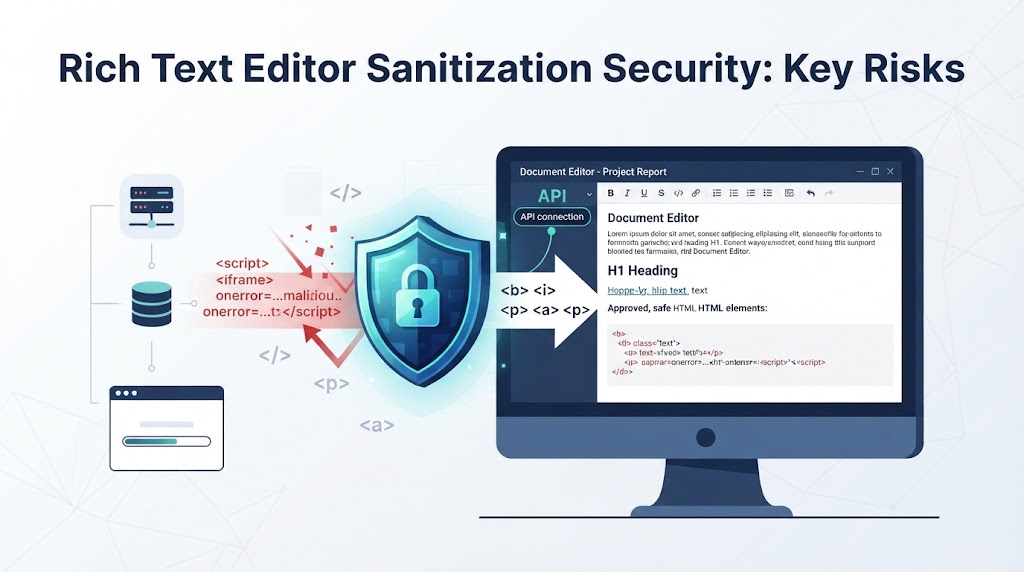

Rich text editor sanitization security prevents stored cross-site scripting (XSS) by removing unapproved HTML tags, attributes, and unsafe URLs before content reaches users. Browser-side filtering alone is not enough because attackers can bypass editor controls and submit malicious markup through application APIs.
At Secure Coding Practices, we focus on server-side sanitization, strict HTML allowlists, and safe output rendering to reduce these risks. Tools such as DOMPurify can also help developers handle user-generated HTML when properly configured. Keep reading to understand how these practices protect rich text content from submission to display.
Rich Text Editor Security: 3 Essential Points
Rich text editor sanitization security depends on controlling how HTML enters, moves through, and appears in an application. These three practices help reduce stored XSS risks:
- Apply strict server-side allowlists: Accept only approved HTML tags, attributes, and URL schemes instead of relying on browser-side filtering.
- Sanitize and render content safely: Clean submitted HTML before storage and use context-appropriate output handling when displaying it.
- Test the entire content workflow: Review DOMPurify settings, editor-specific attributes, pasted HTML, uploaded files, and unsafe DOM operations regularly.
Why Is a Rich Text Editor a Security Risk?
Rich text editors let users format content with headings, links, images, and other HTML elements. However, the same flexibility can create security problems when an application accepts markup without checking it. Attackers can change the submitted HTML instead of using the editor’s normal formatting tools.
For example, someone could submit:
<img src=”invalid-image” onerror=”alert(‘XSS’)”>
The onerror attribute can execute JavaScript when the image fails to load if the application renders the markup without proper protection.
Other attack methods include script elements, unsafe javascript: links, event handlers, and embedded content. Attackers may also use malformed HTML to trigger mutation XSS (mXSS).
Stored XSS is particularly concerning because malicious content remains in the application. It can affect other users whenever they open the page containing that content. Developers must therefore examine how HTML enters the application, how it is stored, and what happens when the browser displays it.
Why Is Client-Side Editor Filtering Not Enough?
Browser-side filtering can improve the editing experience, but it cannot protect an application by itself. Attackers can bypass the editor and send requests directly to backend endpoints.
For example, an editor may remove script elements before submitting a form. That check does not stop someone from constructing an HTTP request containing the original HTML. If the server accepts the request without sanitizing it, the malicious content may reach the database.
We treat the backend as the main security boundary in our secure development training. Client-side validation is useful, but the server must apply its own rules regardless of where the request originated.
Developers should also test API endpoints separately from the editor interface. This helps reveal weaknesses that ordinary browser testing may miss.
How Does Allowlist Sanitization Protect Rich Text Content?
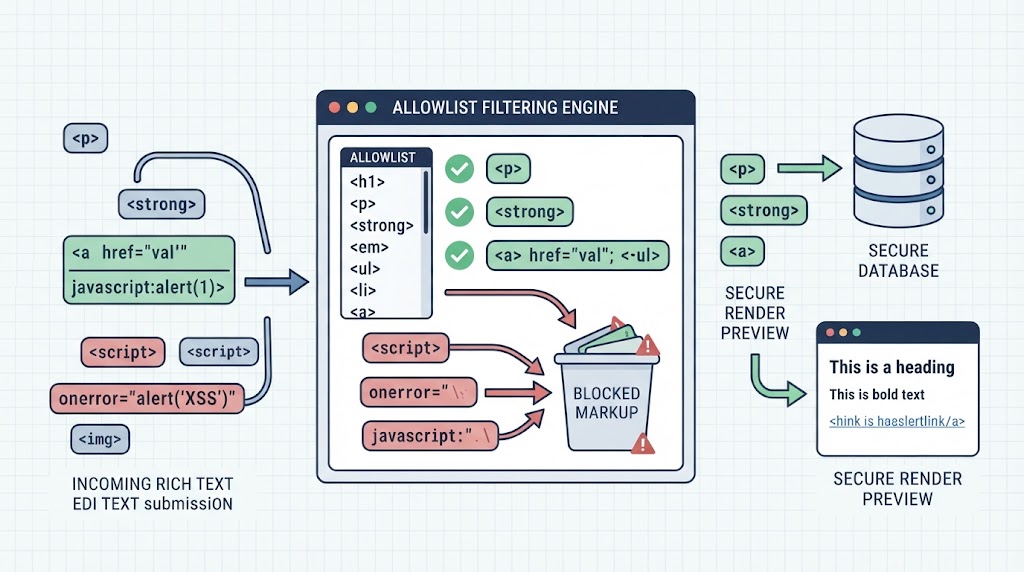
Allowlist sanitization accepts only predefined HTML elements, attributes, and URL schemes. Anything outside the approved policy is removed or rejected before the application stores or renders the content.
As highlighted by IEEE Xplore
“The reason for using an HTML sanitizer is to allow the user to preserve some form of user-provided markup.” – IEEE Xplore
Instead of trying to identify every possible malicious pattern, they define which formatting options the application needs. Understanding how sanitization prevents XSS attacks also helps developers recognize why removing dangerous markup is more reliable than relying on basic input filtering.
For a basic publishing platform, approved elements might include paragraphs, headings, bold text, lists, and links. More advanced features should be added only when there is a clear requirement.
Why Are Allowlists Safer Than Blocklists?
Blocklists attempt to identify dangerous HTML, while allowlists define what an application can accept. Blocklists may miss unfamiliar payloads or unusual combinations of attributes. Regex-based filtering has similar limits because regular expressions cannot reliably understand complex HTML structures.
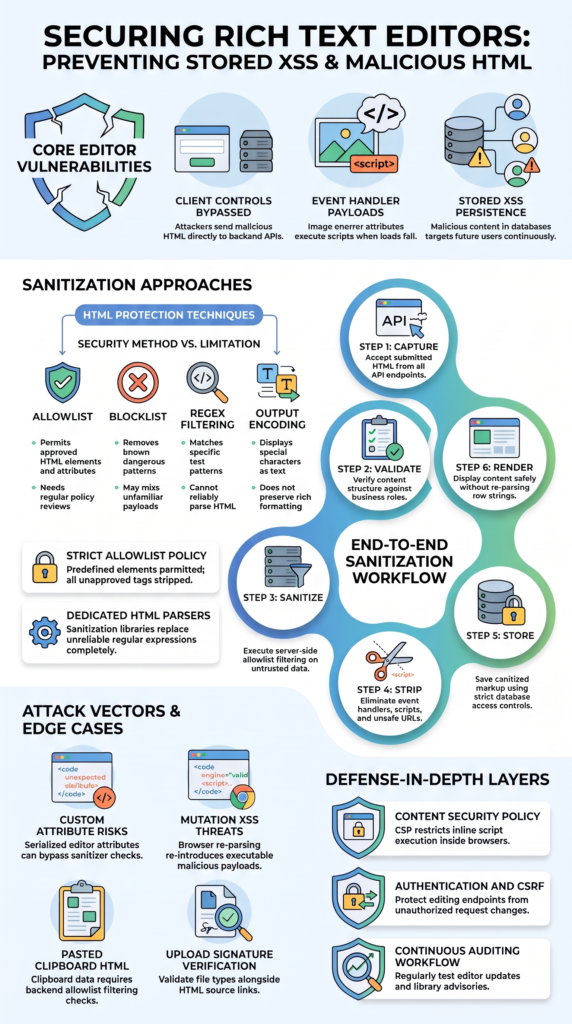
| Security method | Purpose | Main limitation |
| Allowlist | Permits approved HTML elements and attributes | Needs regular policy reviews |
| Blocklist | Removes known dangerous patterns | May miss unfamiliar payloads |
| Regex filtering | Matches specific text patterns | Cannot reliably parse HTML |
| Output encoding | Displays special characters as text | Does not preserve rich formatting |
We recommend using a maintained HTML sanitizer with a clear allowlist. Regular expressions can support simple input checks, but they should not replace an HTML parser.
Which HTML Elements and Attributes Should Be Allowed?
The permitted HTML should match the features users actually need. A simple content editor may require only basic formatting, while a collaborative platform may need additional elements.
Developers should review each element and its attributes separately. Allowing an image, for example, does not mean every image attribute or source URL should also be accepted.
A practical starting policy includes paragraphs, headings, lists, and basic formatting elements such as strong and em. Links should use approved URL schemes, while images need checks for their sources and permitted attributes. Event handlers such as onclick and onerror should be removed.
Custom attributes also deserve attention. An editor may use them to store information that another component later interprets. Review those behaviors before adding attributes to the allowlist. The same applies to inline CSS, which should be restricted to reviewed properties and values.
When Should Developers Sanitize Rich Text Content?
Developers should sanitize untrusted HTML on the server before storing it. Sanitization belongs at the backend input boundary because users, integrations, and API endpoints may submit content through different routes. Following a consistent approach to sanitizing data to prevent XSS helps developers reduce the risk of malicious input reaching the database or browser.
As noted by OWASP
“When accepting user-authored HTML, use a maintained HTML sanitization library. Input validation and regular expressions cannot replace that control.” – OWASP Cheat Sheet Series
We recommend following a consistent process:
- Receive the submitted HTML or structured editor data.
- Validate the content against the application’s formatting requirements.
- Apply server-side allowlist sanitization.
- Remove dangerous elements, attributes, and URL schemes.
- Store the sanitized content with appropriate access controls.
This process reduces the amount of unwanted markup that enters the database. It also gives developers a clear point to review during security testing.
Why Is Safe Output Rendering Still Necessary?
Sanitizing content before storage does not remove the need for safe rendering. Other components may modify stored HTML, convert it into another format, or insert it into the page through an unsafe DOM operation.
For ordinary text, use framework-provided escaping or textContent. When formatted HTML is necessary, render only approved content through controlled methods. Avoid changing sanitized strings without checking the result. A second processing step can change how the browser interprets the markup.
Is DOMPurify Enough to Secure a Rich Text Editor?
DOMPurify helps protect rich text editors by removing dangerous HTML while preserving approved formatting. However, installing the library does not automatically make an application secure.
Developers must configure it correctly and understand how the sanitized content is used afterward. Following good practices for using sanitization libraries effectively in code helps teams maintain consistent sanitization rules and avoid unsafe changes to cleaned HTML.
A basic implementation looks like this:
const cleanHTML = DOMPurify.sanitize(dirtyHTML, {
ALLOWED_TAGS: [
‘p’, ‘strong’, ’em’, ‘ul’, ‘ol’,
‘li’, ‘a’, ‘blockquote’
],
ALLOWED_ATTR: [‘href’, ‘title’]
});
This example permits a limited set of HTML elements and attributes. A production configuration should also account for URL validation and application-specific formatting requirements.
We recommend reviewing the DOMPurify Security Goals and Threat Model before implementation. It explains the library’s protections and limitations, including risks related to changing sanitized content before inserting it into the DOM.
What Can Cause DOMPurify Sanitization Bypasses?
Sanitization problems can occur when an application changes how HTML is parsed or interpreted after cleaning. Mutation XSS (mXSS) is one example. Markup that appears harmless during one parsing step may become dangerous when another component processes it again.
Other risks include unsafe template expressions, poorly reviewed sanitizer hooks, and changes made by editor integrations. These problems show why testing the sanitizer alone is not enough.
Developers should keep the configuration narrow and review security advisories regularly. We also recommend testing the complete content workflow whenever the sanitizer or editor changes. Pay particular attention to serialization and re-parsing because these steps can change the final markup.
How Do Editor-Specific Attributes Create New XSS Risks?
Rich text editors sometimes use custom HTML attributes to store formatting details or serialized content. These attributes can create security problems when the editor interprets them differently from the sanitizer.
For example, a sanitizer may allow a custom data-* attribute because it does not appear dangerous. Later, the editor might read its value and use it to rebuild HTML inside the page. If that process does not validate the content, malicious markup could reach the DOM.
A reported Trix security issue involving data-trix-serialized-attributes demonstrates this problem. The attribute could pass through sanitization before the editor processed its serialized value. The reported fix was included in Trix 2.1.17.
Another reported Lexxy vulnerability involved JSON-encoded HTML stored in a content attribute. The application later inserted that content through insertAdjacentHTML without sanitizing it at the insertion point.
These cases show why developers must examine how editors process stored attributes. Review import functions, restoration logic, and DOM insertion methods. Test the editor and sanitizer together rather than assuming that each component is secure on its own.
Can Markdown or JSON Replace Raw HTML for Rich Text Storage?
Markdown and JSON can reduce the need to accept unrestricted HTML, but neither format automatically prevents XSS. Their safety depends on how the application validates, converts, and displays submitted data.
A structured JSON document model can limit users to predefined content types, such as paragraphs, headings, and links. The application controls which nodes and attributes it accepts. Developers should validate supported node types, formatting values, document structures, and link destinations.
This approach can reduce exposure to arbitrary HTML. However, JSON is a data format, not a security control. An application can still introduce XSS if it converts untrusted values into HTML without proper validation.
Does Markdown Eliminate Cross-Site Scripting Risks?
Markdown also needs careful handling. Some parsers allow embedded HTML, while generated HTML may contain unsafe links or attributes.
For example:
<script>alert(‘XSS’)</script>
If a Markdown processor preserves embedded HTML and the application renders the result without sanitization, malicious content may reach the browser.
We recommend disabling raw HTML support when it is not required. If the application needs to accept HTML inside Markdown, sanitize the generated output before displaying it. The same principle applies to structured JSON: validate the input and secure the final rendering process.
How Should Developers Secure Pasted Content and Uploaded Files?
Pasted content and uploaded files need separate security checks because they can introduce data that users did not create through the editor’s normal controls. Copying content from a website or document may bring unexpected HTML, inline styles, custom attributes, or embedded elements.
Pasted HTML should follow the same sanitization policy as manually submitted content. We recommend checking how the editor handles clipboard data before allowing it into the content model.
Why Does Pasted HTML Need Separate Sanitization?
Pasted content may contain markup that the editor’s toolbar does not normally allow. Developers should:
- Parse pasted HTML before accepting it.
- Remove unsupported elements and attributes.
- Validate links and embedded resource URLs.
- Apply the same allowlist used for submitted HTML.
- Test content copied from websites and office documents.
Do not assume that normal editor filtering covers every clipboard or import workflow.
What Additional Upload Security Checks Are Necessary?
File uploads need their own validation process. Check file extensions, actual file types, and file signatures. Set file size limits and apply appropriate access controls. Authentication, authorization, and CSRF protection should also cover content-management endpoints. Validating an uploaded file does not replace sanitizing the HTML that references it.
Which Additional Security Controls Strengthen Rich Text Sanitization?
Credits: CodersArts
Rich text security benefits from several layers of protection. HTML sanitization handles unwanted markup, while other controls protect application access, browser behavior, and content submission.
A broader application security strategy also helps teams identify weaknesses beyond HTML handling, including vulnerabilities in APIs, access controls, and application logic. PrimeSec supports this wider approach to application security and vulnerability management.
How Does CSP Help Prevent Stored XSS?
Content Security Policy (CSP) controls which scripts and other resources a browser can load or execute. A carefully configured policy can restrict script sources and reduce reliance on unsafe inline scripts.
CSP provides another layer of protection, but it cannot replace server-side sanitization. Unsafe HTML may still affect application behavior even when certain scripts are blocked.
Why Should Developers Add Authentication and CSRF Protection?
Authentication and authorization control who can create or modify stored content. CSRF protection helps stop unauthorized state-changing requests made through an authenticated browser session.
We recommend reviewing permissions for content editing, administrative features, file uploads, and API integrations. Each endpoint should follow the same access rules as the main editing interface.
What Should Developers Check Before Deployment?
Before releasing a rich text editor, review the complete content-processing workflow. Our recommended security checks include:
- Use a maintained HTML sanitization library.
- Configure strict HTML allowlists.
- Remove dangerous tags and event handlers.
- Validate URL schemes and custom attributes.
- Review editor-specific serialized content.
- Test malformed HTML and mXSS payloads.
- Check unsafe DOM insertion methods.
- Review library updates and security advisories.
- Apply CSP and other supporting controls.
Repeat these checks whenever the editor, sanitizer configuration, or rendering components change. Functional testing alone cannot confirm that user-generated HTML is safe.
How Can Secure Coding Practices Help Developers Implement Safer Rich Text Handling?

Secure Coding Practices focuses on helping developers understand and apply secure coding principles during application development. Rich text security is a useful example because it involves input validation, backend processing, and browser-side rendering.
We encourage developers to examine the full content lifecycle rather than treating sanitization as an isolated task.
What Should a Secure Rich Text Implementation Include?
A secure implementation needs clear rules for accepted content and consistent enforcement across the application. Developers should understand why each control exists, not only how to configure it.
Our recommended priorities include strict server-side HTML allowlists, removal of dangerous attributes, URL validation, and controlled output rendering. Teams should also review sanitizer configurations and security advisories as part of regular development work.
These practices help establish a repeatable security process. They also give developers a clear starting point when reviewing existing applications or building new content-management features.
How Can Developers Apply These Practices in Their Applications?
Begin by identifying where rich text enters the application. Check editor submissions, API endpoints, imports, and pasted content. Then examine how the backend processes that information and how the browser displays it.
Our training approach focuses on applying secure coding principles to real development tasks. Developers can use these lessons to identify unsafe input handling, review rendering operations, and improve application security testing.
Code reviews should also cover custom sanitizer hooks, framework escape hatches, and editor updates. A configuration change can affect the entire content workflow, so teams should test the complete process after making changes.
FAQ
How often should I review my rich text editor security settings?
Review your rich text editor security settings whenever you update the editor, change its configuration, or add new features. Regular reviews help you find sanitizer bypasses, unsafe attributes, and outdated security rules. You should also check security advisories and test submitted HTML to make sure your XSS prevention measures still work as expected.
Can HTML sanitization prevent every type of cross-site scripting?
HTML sanitization helps prevent stored XSS by removing dangerous markup, but it cannot stop every type of attack. Reflected XSS and DOM-based XSS require other security measures because they involve different ways of handling data. Use input sanitization, output encoding, and safe HTML rendering together to reduce XSS risks across your application.
What should I do if my HTML sanitizer removes legitimate formatting?
First, check which HTML elements and attributes your content needs. Then, update your allowlist sanitization rules to support those features without accepting dangerous tags or event handler attributes. Test links, images, tables, and text formatting after each change. Do not disable sanitization just because some content loses its original appearance.
How can I safely handle HTML copied from external websites?
Treat copied HTML as untrusted content, even when it comes from familiar websites. Pasted content may contain hidden attributes, unsafe URLs, embedded elements, or unwanted formatting. Apply server-side sanitization before storing it, and validate links and image sources. Also, test clipboard handling because pasted markup may bypass the editor’s normal filtering rules.
Does using Markdown instead of HTML improve rich text security?
Markdown can reduce security risks when raw HTML support is disabled. However, it does not prevent XSS on its own. Some Markdown processors allow embedded HTML or generate unsafe links. Sanitize the generated HTML before displaying it, validate URL destinations, and use output encoding when displaying plain text. These steps help protect users from malicious content.
Keep Rich Text Content Secure Throughout Your Application
Rich text editor sanitization security requires more than browser-side filtering. Attackers can bypass editors and send malicious HTML directly to backend APIs. Use strict allowlists, server-side sanitization, and safe rendering methods to reduce stored XSS risks. Tools like DOMPurify also need regular configuration reviews and testing.
Make secure input handling part of your team’s development process. The Secure Coding Practices Bootcamp offers hands-on training to help developers recognize security risks and apply safer coding methods in real projects.
References
- “IEEE Xplore Document 10646837.” IEEE Xplore. Accessed November 1, 2026.
- “Input Validation Cheat Sheet.” OWASP Cheat Sheet Series. Accessed November 1, 2026.