
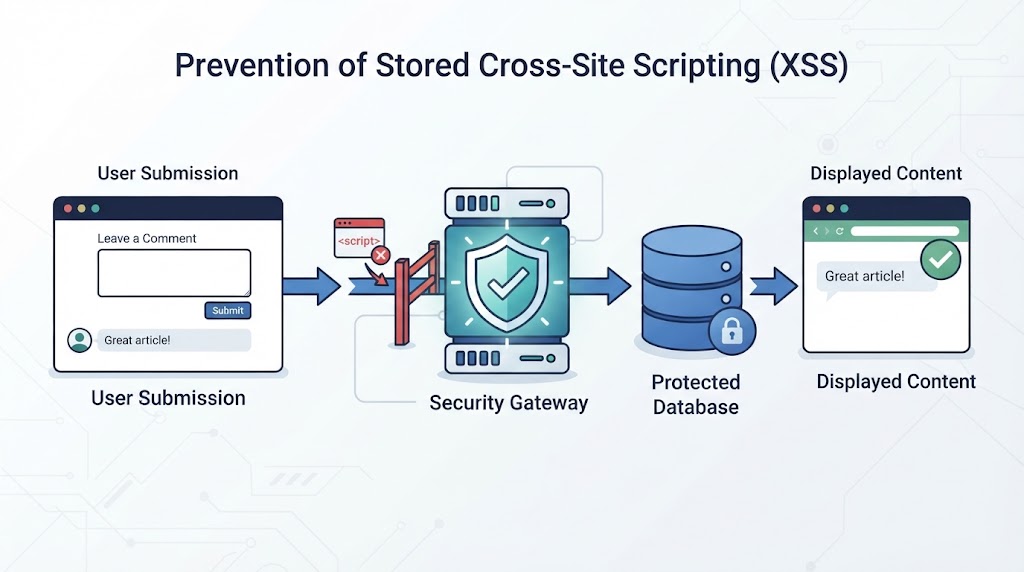

Stored XSS prevention starts with server-side validation, context-specific output encoding, and proper HTML sanitization. Applications must treat all user-submitted data as untrusted, including content already saved in a database. Relying on input filtering alone leaves gaps that attackers may exploit when stored content appears on a webpage.
At Secure Coding Practices, we focus on practical security methods that help developers validate input, handle user-generated HTML, and render saved content safely. This guide covers the key steps for reducing stored XSS risks and improving application security. Keep reading to understand how to apply these protections in your code.
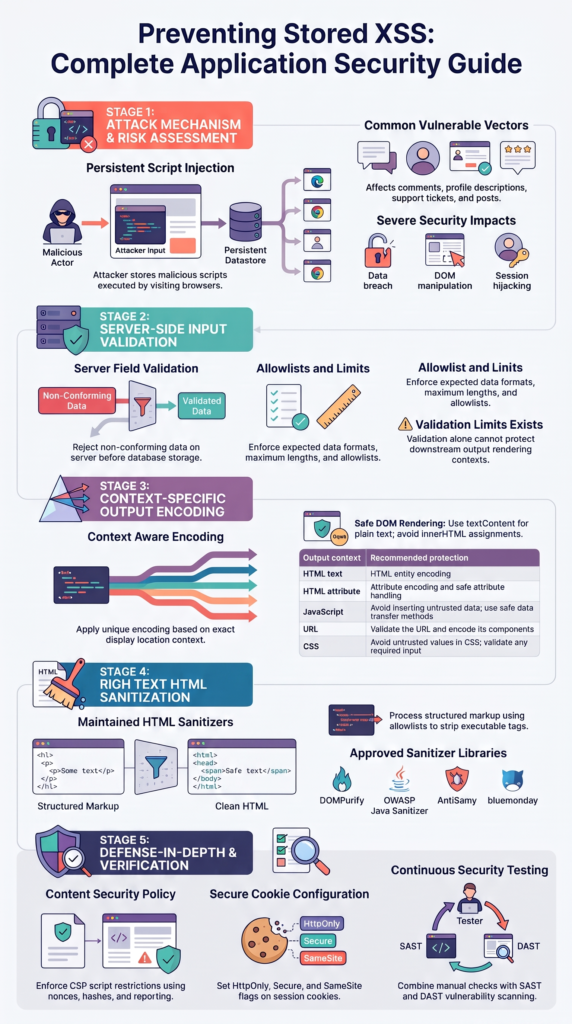
Stored XSS Prevention: 3 Essential Security Points
Preventing stored XSS requires protecting user data from submission through storage and display. These three practices cover the main steps developers should follow:
- Validate input on the server: Apply field-specific rules and reject invalid data before storing it.
- Encode output and sanitize HTML: Use context-specific encoding, safe rendering methods, and trusted HTML sanitizers when rich content is required.
- Add security checks: Apply CSP, review saved content across the application, and test regularly for stored XSS vulnerabilities.
How Can Developers Prevent Stored XSS Attacks?
Stored cross-site scripting (XSS) happens when an application saves attacker-controlled content and later displays it to users without the right protections.
Unlike reflected XSS, which usually depends on a crafted request, stored XSS can affect anyone who views the saved content. Comments, profile descriptions, support tickets, product reviews, and discussion posts are common places where this risk can appear.
As highlighted by CISA
“Stored XSS occurs when user input is not properly sanitized and is stored on the server, allowing an attacker to inject malicious scripts that will be executed when other users access the affected page.” – CISA
A typical attack follows a clear path. An attacker submits content containing harmful JavaScript or HTML. The application stores that content in a database. Later, another user opens the affected page, and the browser interprets the unsafe content as part of the page.
The damage depends on the application’s features and the user’s access. An attack may expose information available to the victim, change page content, or perform actions through the victim’s active session. Developers should therefore treat every saved value as untrusted, regardless of who submitted it or where it is stored.
How Should Developers Validate Input to Prevent Stored XSS?
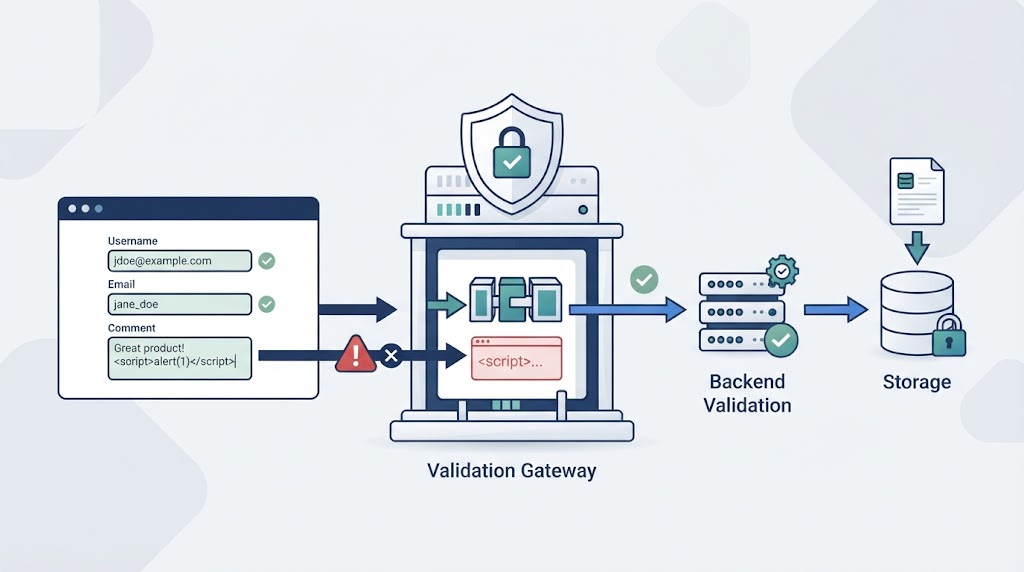
Server-side validation is an early control against stored XSS. It checks whether submitted data matches the rules for that field before the application accepts or stores it. A username, email address, phone number, and profile description each need different rules. The application should reject values that do not fit the expected format, length, or allowed content.
Validation alone does not make data safe to display. Some fields must accept punctuation, markup, or other characters that could also appear in an attack. Removing every unusual character can damage legitimate content without addressing how browsers interpret data later.
Our approach is to give each field a clear purpose and apply checks that match it:
- Set suitable length limits for submitted values.
- Check structured fields against the expected format.
- Use allowlists when a field has a known set of accepted values.
- Normalize data when consistent formatting is needed.
- Reject invalid input on the server, even when client-side checks are present.
These checks reduce unwanted input, but output protection is still necessary. Applying data sanitization to prevent XSS also requires understanding how the application processes and handles submitted content before it reaches users.
How Can Developers Safely Render User-Generated Content?
Credits: Web Dev Simplified
Output encoding helps stop a browser from treating ordinary user content as executable code. A single encoding method is not suitable for every location.
For example, a comment displayed as HTML text needs HTML encoding. A value placed inside a JavaScript string needs a different form of protection. Developers should avoid placing untrusted values directly into script blocks, event handlers, or other executable contexts.
| Output context | Recommended protection |
| HTML text | HTML entity encoding |
| HTML attribute | Attribute encoding and safe attribute handling |
| JavaScript | Avoid inserting untrusted data; use safe data transfer methods |
| URL | Validate the URL and encode its components |
| CSS | Avoid untrusted values in CSS; validate any required input |
Understanding input sanitization vs. output encoding helps developers apply the right protection at each stage instead of treating the two methods as interchangeable.
Safe rendering also depends on the tools used by the application. Frameworks such as React and Vue provide automatic escaping in common text-rendering patterns, while template engines often escape output by default.
Developers should not bypass those protections. In the DOM, use textContent for plain text instead of assigning untrusted values to innerHTML. A value that is safe in one location may be unsafe in another.
When Should Developers Sanitize HTML to Prevent Stored XSS?
Some applications need users to submit formatted content, such as bold text, links, headings, or lists. In these cases, rejecting all HTML may not be practical.
As noted by OWASP
“When an application needs to accept user-authored HTML, use a maintained HTML sanitizer.” – OWASP Cheat Sheet Series
HTML sanitization can help by allowing approved elements and attributes while removing unsafe markup. It is different from ordinary input validation because it examines HTML structure and removes content that could create a security risk.
A sanitizer should use a maintained allowlist rather than trying to identify every possible harmful string. For example, an application may allow basic formatting tags but reject script elements, inline event handlers, and unsafe URL schemes. The exact rules should match the features users need.
Libraries such as DOMPurify, the OWASP Java HTML Sanitizer, AntiSamy, and bluemonday provide established ways to sanitize HTML in supported environments. Choose a library that fits the application’s technology and keep updated.
We should also review its configuration and test the output before displaying it. Sanitized HTML still needs to be handled carefully in the context. Developers should avoid common input sanitization pitfalls that sanitized content is automatically safe in every output context.
How Does Content Security Policy Help Prevent Stored XSS?
A Content Security Policy (CSP) gives browsers rules about which sources can provide scripts and other page resources. It can reduce the impact of some XSS attacks by limiting the scripts a page is allowed to run. For example, a policy can restrict script execution to approved sources and use nonces or hashes for permitted inline scripts.
Organizations can also strengthen their broader security approach through PrimeSec that helps address emerging threats and security risks.
CSP should support the application’s other XSS defenses, not replace them. If unsafe content reaches a page, a policy may block some execution paths, but it does not make that content safe. A weak policy can also leave gaps, especially when it allows broad script sources or unsafe inline execution.
Developers should build a policy around the resources the application actually needs. Test it in report-only mode before enforcing it, then review reported violations and adjust the rules carefully.
Session cookies should also use suitable attributes. HttpOnly limits access through JavaScript, while Secure restricts cookie transmission to secure connections. SameSite can help control when browsers send cookies with cross-site requests. These settings add protection, but they do not replace XSS prevention.
How Can Developers Test and Monitor for Stored XSS?

Stored XSS testing should cover the full path from submission to storage and display. A value may pass validation and still become dangerous when another page uses it in a different context. Testing only the submission form can miss problems in dashboards, account pages, search results, or administrative tools.
Our review process should include automated checks and manual testing. Static analysis can identify risky code patterns, while dynamic testing can reveal issues in a running application. Neither method finds every flaw, so developers should also inspect how the application handles saved content.
A useful testing process includes:
- Submit test values containing HTML special characters and review how the application displays them.
- Check every page and component that reads the saved value.
- Review code for unsafe uses of innerHTML and similar rendering methods.
- Test rich-text fields against the sanitizer’s allowed and rejected content.
- Scan dependencies and update outdated security libraries.
- Retest affected features after code or configuration changes.
Monitoring can help identify unusual activity and repeated attempts to submit suspicious content. Keep useful security logs, but avoid recording sensitive information unnecessarily. Fix confirmed issues and test the affected paths again.
FAQ
How can I prevent stored XSS in user-generated content?
To prevent stored XSS, validate all submitted data on the server before saving it. Apply rules based on the type of information each field accepts. If users can submit formatted text, sanitize the HTML before displaying it. Do not rely on client-side validation alone because attackers can bypass browser checks and send harmful data directly to your application.
What is the difference between XSS input sanitization and output encoding?
XSS input sanitization removes or restricts content that does not meet application rules. Output encoding changes special characters so browsers display them as text instead of interpreting them as code. HTML encoding, JavaScript encoding, and URL encoding protect different contexts. Developers should use both methods where needed because input sanitization alone cannot prevent every XSS vulnerability.
How should I handle special characters in user input?
Do not remove every special character from submitted data. Characters such as quotation marks, brackets, and apostrophes are often necessary for normal text. Instead, validate input based on the field’s purpose and use HTML entity encoding when displaying plain text. This approach preserves legitimate content while helping prevent browsers from interpreting user input as executable HTML or scripts.
How can I safely display rich text submitted by users?
Use rich text sanitization to allow approved HTML elements, attributes, and URL schemes while removing unsafe content. Block script elements, inline event handlers, and dangerous links. Keep the sanitizer rules updated as application requirements change. Before displaying sanitized content, check how the application inserts it into the page to avoid introducing new XSS vulnerabilities.
How can I test whether my application has stored XSS vulnerabilities?
Test the full process, from submitting data to displaying it on other pages. Use harmless XSS test payloads to check whether stored content runs as code in a browser. Review forms, comments, dashboards, and profile pages. Combine manual checks with SAST and DAST testing. After fixing an issue, repeat the tests to confirm the vulnerability is no longer present.
Prevent Stored XSS Before Deployment
Stored XSS can expose users whenever saved content is displayed without proper safeguards. Removing suspicious characters isn’t enough. Validate input, encode output for its context, use safe rendering methods, and sanitize HTML when formatting is allowed. Add CSP and secure cookie settings as extra layers, not substitutes for safe data handling.
Review how your application accepts, stores, and displays untrusted content before deployment. Build skills through the Secure Coding Practices Bootcamp and support developers in writing safer code.
References
- “Rockwell Automation ArmorStart LT.” Cybersecurity and Infrastructure Security Agency (CISA), September 3, 2026. Accessed November 1, 2026.
- “Cross Site Scripting Prevention Cheat Sheet.” OWASP Cheat Sheet Series. Accessed November 1, 2026.