
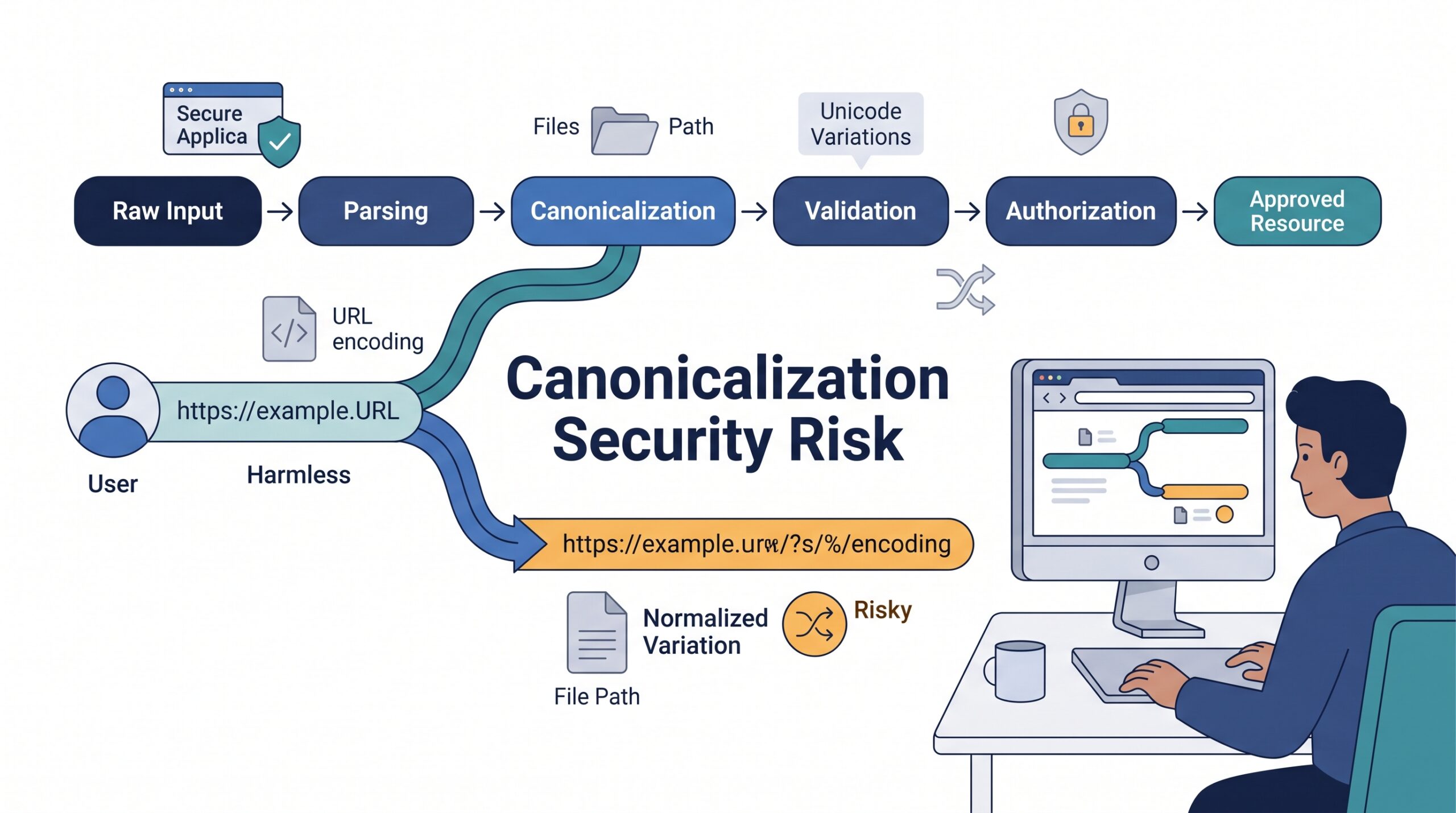

What is canonicalization security risk? It happens when an application checks one form of data but later processes another form of the same input. CWE-180 covers cases where validation happens before canonicalization, which can leave gaps attackers may exploit to bypass security controls. At Secure Coding Practices, we treat canonicalization as part of the security boundary.
These risks can affect file paths, URLs, user identities, signed data, and web applications. Understanding where representations change helps developers spot weak validation and authorization logic. Keep reading to see common examples, causes, and practical ways to prevent these security risks.
Canonicalization Security Quick Wins
These three principles capture the main security lessons from the article and provide a practical starting point for safer input handling.
- Canonicalize before security checks: Convert input into its trusted form before validation or authorization so attackers cannot exploit differences between representations.
- Keep processing consistent: Use the same canonical representation across parsing, validation, authorization, and resource access to prevent path, URL, identity, and signed-data mismatches.
- Fail closed when something changes: Reject malformed input and canonicalization failures instead of falling back to the original value or allowing another component to reinterpret it.
What Are the Key Canonicalization Security Risks?
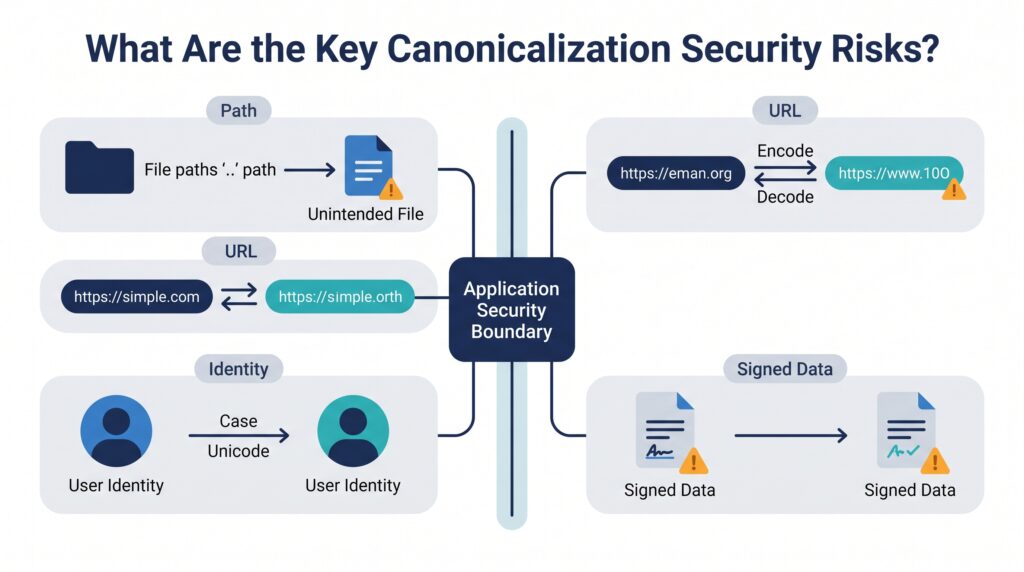
Canonicalization vulnerabilities appear when equivalent inputs are represented differently during validation, authorization, or processing. The problem isn’t always obvious. A value can look safe during one step, then become something else after normalization.
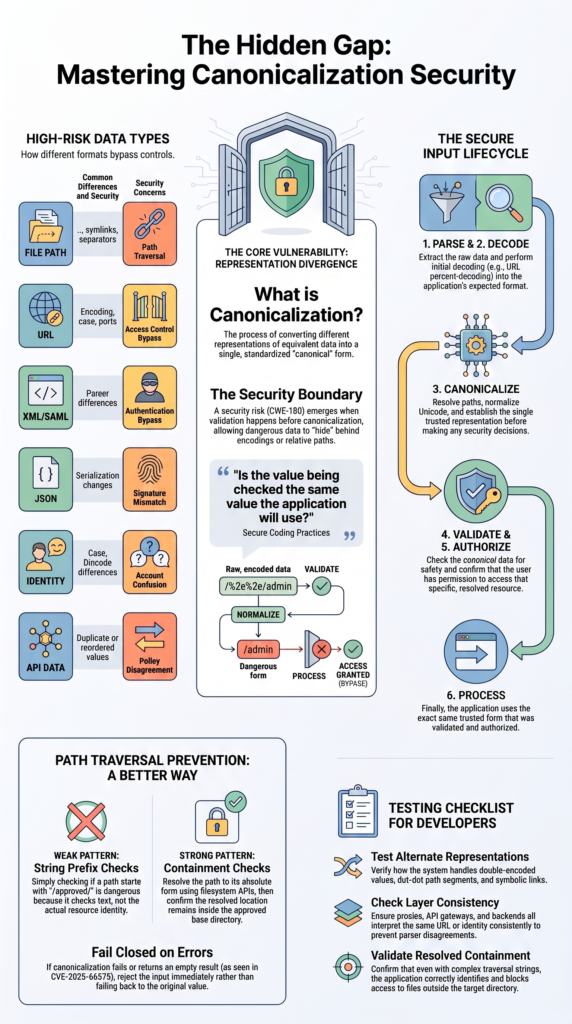
In our secure development training, we teach developers to ask one basic question: Is the value being checked the same value the application will use? If the answer is no, there may be a security gap.
Three practices help reduce that risk:
- Canonicalize before security decisions.
- Keep one trusted representation.
- Reject failed or unclear normalization.
The practical danger is representation divergence. An attacker might submit an encoded path or unusual URL that looks harmless to a filter. Another component may decode or normalize it later and reach a restricted resource.
MITRE describes CWE-180 as a weakness that occurs when input is validated before it is canonicalized. That order can allow dangerous data to appear only after the security check.
As noted by OWASP Foundation Wiki
“When security decisions are made based on less than perfectly canonicalized data, the application itself must be able to deal with unexpected input safely.” – OWASP Foundation Wiki
For developers, this means canonicalization isn’t routine cleanup. It belongs inside the security design.
What Is Canonicalization, and Why Does It Matter for Security?
Canonicalization turns different representations of equivalent data into one accepted form. Security problems appear when different parts of an application disagree about that form. A deeper look at understanding input canonicalization helps clarify why these representation changes matter during validation and processing.
The issue isn’t limited to paths and URLs. Representation differences can affect several types of security-sensitive data:
| Data type | Common differences | Security concern |
| File path | .., symlinks, separators | Path traversal |
| URL | Encoding, case, ports | Access control bypass |
| XML/SAML | Parser or canonicalization differences | Authentication bypass |
| JSON | Serialization changes | Signature mismatch |
| Identity | Case, Unicode differences | Account confusion |
| API data | Duplicate or reordered values | Policy disagreement |
The main rule is straightforward: validation, authorization, comparison, and processing should use the same canonical representation.
One component may decode a value, another may validate it, and a third may pass it to a filesystem or routing API. Each component can appear correct by itself. MITRE recommends bringing input into the application’s internal representation before validation. It also warns about decoding the same input more than once.
A useful habit is to treat every representation change as a security boundary. That includes URL decoding, Unicode normalization, path resolution, symlink handling, and data serialization.
How Does a Canonicalization Mismatch Become a Vulnerability?
A mismatch becomes dangerous when one component makes a security decision about a value that another component later interprets differently.
The flow often looks like this:
- Receive: The application accepts an alternate representation.
- Validate: A filter checks the raw or partly decoded value.
- Canonicalize: Another component changes the representation.
- Process: The application uses the resulting resource.
- Exploit: The resource falls outside the original security decision.
Imagine an application that allows access only below /safe_dir/. A developer might use a string comparison to confirm that a supplied path begins with that directory. The check can pass, while later path resolution removes traversal segments and reaches another location.
MITRE gives a similar example for CWE-180. A path can pass an initial check for /safe_dir/, then resolve through .. to a location outside that directory.
That turns an input handling issue into an authorization problem. The filter may be working exactly as written. It’s checking the wrong representation.
Common causes include:
- Multiple decoding stages
- Different URL parsers
- Late path normalization
- Case-sensitive comparisons
- Unicode differences
- Late symlink resolution
- String-based path checks
This pattern can affect web applications, APIs, authentication systems, filesystems, and signed data. So canonicalization isn’t limited to one type of attack.
How Do CWE-180 and CWE-551 Relate to Canonicalization?
CWE-180 and CWE-551 describe closely related security mistakes: making a security decision before the application has established what the input actually means.
CWE-180 focuses on validating input before canonicalization. CWE-551 focuses on authorization before parsing and canonicalization are complete. In both cases, an attacker may exploit a difference between the representation that passes the check and the representation the application eventually processes.
That distinction matters during code review. A developer might validate a request correctly but still authorize it too early.
Look for signs such as:
- Authorization performed on raw URLs or paths
- Different parsers or decoders across application layers
- Normalization performed after access control
- Case or encoding differences between services
A safer sequence is:
Parse → Decode → Canonicalize → Validate → Authorize → Process
We use this sequence in secure development exercises because it gives developers a clear way to trace input flow. The exact functions vary by language and protocol, but the order gives the review a useful starting point.
The key question is simple: Does authorization use the same representation that the application will process? If not, an endpoint can have an access-control weakness even when its authorization code looks reasonable.
Which Path Canonicalization Errors Can Lead to Unauthorized Access?
Path canonicalization errors can expose files when an application checks a path string instead of the location the filesystem will actually access.
The classic example uses . or .. segments. Other cases can involve encoded traversal, symbolic links, alternate separators, case differences, or operating-system-specific path rules.
Insights from arXiv preprint indicate
“Classical software and operating-system security has long known that multiple representations of the same object can subvert a check, for example under names such as ‘canonicalization’ attacks, in the resolution of equivalent file paths, or in authorization via non-canonical URLs.” – arXiv preprint
A weak pattern looks like this:
input → prefix check → access
A safer pattern is:
input → resolve → canonical path → containment check → access
The difference is important. A string check asks whether text begins with an expected prefix. A canonical containment check asks whether the resolved resource remains inside the approved directory.
Common failure modes include:
- Dot-dot traversal
- Encoded traversal
- Backslash injection
- Symlink differences
- Case differences
- Windows and POSIX parsing differences
- Absolute path injection
- Late normalization
For example, an application may allow /srv/uploads/. A supplied path can appear to stay inside that directory until traversal segments or links are resolved later.
The filesystem ultimately works with the resolved location. In our secure coding labs, this is a useful distinction for learners. The fix isn’t usually another blacklist entry. The better approach is to resolve the path, confirm containment, and reject failures.
How Can URL Canonicalization Bypass Authorization?
Credits: Google Search Central
URL canonicalization can create an authorization bypass when a security layer and backend interpret the same request differently.
A URL can have several textual representations that reach the same endpoint. Problems can appear with percent encoding, double decoding, case differences, dot segments, alternate separators, or parser differences.
| Difference | Possible result |
| Percent encoding | Filter sees another path |
| Double decoding | Restricted characters appear later |
| Case handling | Route interpretation differs |
| Default ports | Allowlist disagreement |
| Dot segments | Effective path changes |
| Separators | Parser disagreement |
A percent-encoding attack becomes risky when input is checked before decoding but consumed after decoding. Double decoding creates another version of the same problem.
MITRE recommends decoding and canonicalizing input into the application’s expected representation before validation. That reduces the chance that a later stage changes the value after the security decision.
This matters in API gateways, routing middleware, reverse proxies, and web applications. Practical preventing canonicalization attacks in web apps also depends on keeping parsing and authorization rules consistent across these layers.
The concern begins when the representation change crosses a trust boundary and changes a security decision. For that reason, teams should rely on well-defined URL parsing and normalization rules instead of building a collection of regular expressions.
How Can Canonicalization Break XML and SAML Signatures?
Canonicalization can cause serious problems in cryptographic verification when the signer, verifier, and application don’t agree on the data being authenticated.
XML signatures are a clear example. Canonicalization determines the representation used for digest and signature operations.
The wider lesson is easy to apply: a signature is only useful when every security-sensitive component agrees on what was signed. Using maintained libraries handling canonicalization securely can also reduce the risk of implementation errors in parsing and canonicalization.
CVE-2025-66578 provides a useful real-world example. The National Vulnerability Database reports that affected versions of xmlseclibs could receive an empty result from canonicalization for certain invalid input. A digest could then be calculated over an empty string instead of the intended XML content. The issue was fixed in version 3.1.4.
The dangerous assumption is easy to miss. Code may effectively treat “canonicalization returned nothing” as “canonicalization succeeded with empty content.”
Defensive rules include:
- Stop when canonicalization fails.
- Verify the data actually consumed.
- Avoid silent parser differences.
- Use deterministic signed representations.
- Limit XML transformations.
- Patch affected dependencies.
This case is useful for secure coding training because it shows how a low-level canonicalization failure can cross into authentication logic.
What Are the Most Common Canonicalization Security Anti-Patterns and How Can Developers Prevent Them?
The biggest anti-pattern is letting different stages of an application make security decisions about different representations.
During secure development reviews, we look for patterns that often point to canonicalization problems. Avoid designs such as:
- Validation before canonicalization
- Authorization against raw URLs
- String prefixes for path containment
- Repeated decoding
- Different parsers across layers
- Ignored canonicalization errors
- Fallback to unresolved paths
- Signing one serialization and consuming another
- Inconsistent identity normalization
A common example is prefix validation:
if user_path.startswith(“/approved/”)
That checks text, not resource identity. The filesystem may later resolve traversal segments or symbolic links and reach somewhere else.
The safer approach is to establish the correct representation first and then use it consistently:
Parse → Decode → Canonicalize → Validate → Authorize → Process
For path traversal prevention, resolve the path with the appropriate filesystem API. Then confirm that the resolved location remains inside the approved base directory.
For URLs, use standards-based parsing and normalization instead of manually rebuilding URLs with regular expressions. For signed data, define the canonical serialization before generating or checking the signature.
Developers should also reject malformed representations, stop when canonicalization fails, keep parsers aligned, apply Unicode rules consistently, and test alternate representations.
How Can Teams Test for Canonicalization Security Risks?
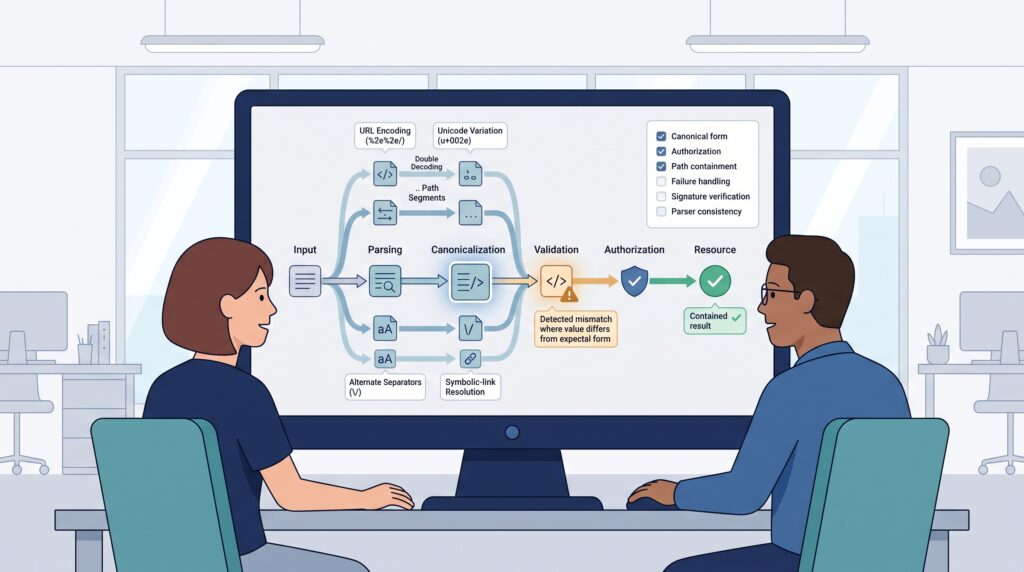
Security testing should include alternate representations that are expected to resolve to the same resource or object.
A useful assessment isn’t limited to finding a suspicious string. The tester needs to see whether two layers disagree about what that string means.
Test areas can include:
- URL-encoded values
- Double-encoded values
- Dot-dot path segments
- Symlinked paths
- Case variations
- Slash differences
- Unicode variations
- Duplicate parameters
- Alternate serialization
- Malformed input
- Parser differences
| Security check | Expected result |
| Validation uses canonical data | Yes |
| Authorization uses canonical data | Yes |
| Processing uses the same data | Yes |
| Canonicalization failure stops processing | Yes |
| Repeated decoding is controlled | Yes |
| Resolved paths stay contained | Yes |
Automated scanners can find common path traversal patterns, but they can’t replace application-specific testing.
We encourage learners to trace a request through every layer. If a proxy decodes once and the application decodes again, test whether that second operation changes authorization.
The same method applies to cryptographic systems. Compare equivalent serializations and check whether verification and consumption use the same data.
Record the underlying design problem when a mismatch appears. Calling it only “bad input” can hide the real cause.
The real issue is often a disagreement between security inspection and resource resolution.
FAQ
What is the difference between a canonicalization vulnerability and an input validation failure?
A canonicalization vulnerability occurs when security checks inspect one form of data, while the application later processes another. An input validation failure happens when unsafe or unexpected input is accepted without proper checks.
Canonicalization issues often involve alternate path representations, encoding changes, or normalization differences that alter how an application interprets the same input.
How does path canonicalization help prevent file path traversal?
Path canonicalization converts a supplied path into a consistent form before the application decides whether access is allowed. This process can reveal .. segments, relative path manipulation, and other unexpected changes.
When combined with base directory restriction and canonical form validation, it helps keep requested files inside their approved location and reduces unauthorized resource access.
Can URL canonicalization cause an access control bypass?
Yes. URL canonicalization can cause an access control bypass when security filters and backend components interpret the same URL differently. Percent encoding, double decoding, case differences, and alternate separators can change the effective request.
Applications should use consistent parsing and canonicalization rules before making authorization decisions about protected endpoints or resources.
How does a directory traversal attack expose sensitive files?
A directory traversal attack manipulates a file path so an application accesses files outside its intended directory. Common methods include a dot-dot-slash attack, absolute path injection, and backslash path injection.
If the attack succeeds, it may expose configuration files, source code, credentials, or other sensitive files that should remain protected by resource access controls.
What should developers check when testing path traversal prevention?
Developers should test how an application handles different path representations, including encoded traversal, repeated .. sequences, absolute paths, symbolic links, and case variations.
Effective path traversal detection should also verify that canonicalization occurs before authorization and that resolved paths remain inside the approved directory. Testing should cover normal requests and deliberately malformed or unexpected input.
Apply Canonicalization Before Security Decisions
Secure canonicalization starts by creating one trusted representation before validation and authorization. If different components interpret the same input differently, a filter may approve a value that gets used another way. That’s where serious security gaps can appear. The goal is simple: parse, canonicalize, validate, authorize, then use the trusted form consistently.
Want to build this habit through practical exercises? Explore the Secure Coding Practices Bootcamp and put secure coding techniques into practice.
References
- https://wiki.owasp.org/index.php?title=Canonicalization,_locale_and_Unicode&diff=next&oldid=27126
- https://arxiv.org/abs/2608.06508