
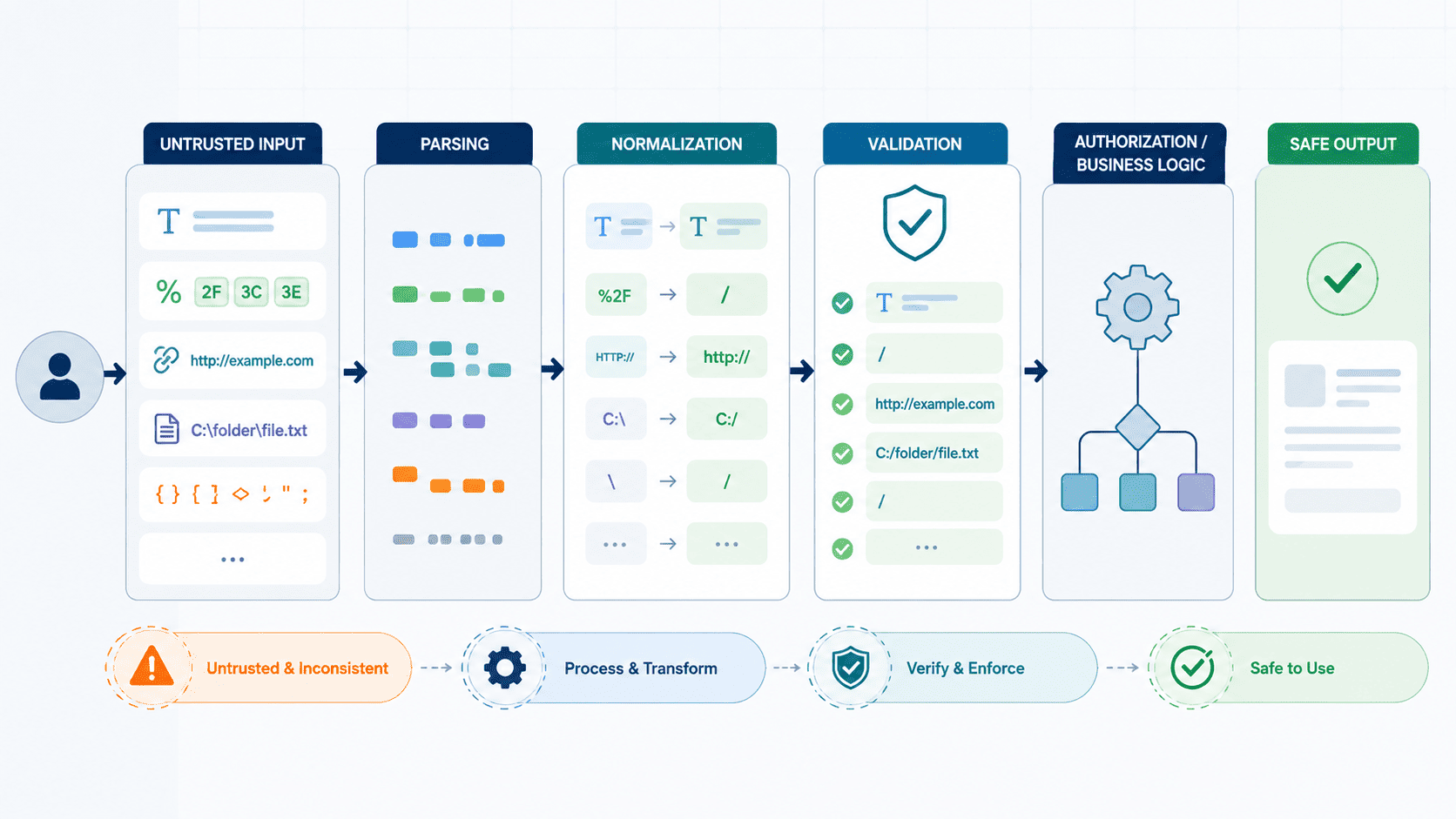

Secure Coding Practices explains why secure input normalization should happen before validation and security checks. Untrusted data needs a consistent internal form first. If validation runs too early, later decoding or canonicalization may reveal content that bypassed those checks.
So keep parsing, normalization, validation, and output encoding as separate steps. Unicode can introduce lookalike characters or unexpected forms. File paths can also change meaning after decoding or separator cleanup. Encoded input may hide characters used in SQL, HTML, shell, or template injection.
Test each boundary with alternate encodings, Unicode forms, mixed separators, null bytes, and nested decoding. Define one normalization policy across application layers.
Keep reading for practical rules and test cases.
Secure Input Normalization Essentials
- Parse, decode, and canonicalize deliberately before validating the representation that security decisions will use.
- Use field-specific policies instead of a universal sanitizer, with server-side validation and safe APIs at sensitive sinks.
- Treat normalization as one layer of defense alongside parameterized queries, output encoding, authorization, rate limiting, and secure architecture.
Why is secure normalization more than “cleaning” user input?
Most teams treat normalization like tidying up a room: strip a few weird characters, make everything lowercase, and call it done. But that framing misses the point entirely. Normalization isn’t about aesthetics; it decides how your application fundamentally interprets input before it makes any security decision. It handles input canonicalization, establishing a single, consistent representation, so downstream controls actually evaluate what the system will execute or store. If canonicalization fails, every security check that follows operates on a lie.
MITRE’s CWE-20 highlights this exact pitfall: improper input validation occurs when an application fails to account for how data is actually represented underneath, rather than what it looks like on the surface.
The Five Distinct Input Operations
To build secure data pipelines, you have to decouple input processing into separate, single-responsibility phases:
- Parsing: Turns raw, unstructured strings into a typed, known shape.
- Normalization: Converts equivalent representations into a single canonical form (only when the field’s business rules require it).
- Validation: Checks the canonical version against the field’s strict security and business contract.
- Encoding: Contextually escapes data (e.g., HTML entities, URL encoding) so downstream interpreters don’t execute it as code.
- Parameterization: Separates data from command structures entirely at the driver or API level.
When one monolithic function quietly tries to handle parsing, normalization, and validation all at once, subtle security bugs emerge.
Why Blind Normalization Destroys Security?
Applying generic “cleaning” rules across all fields destroys data integrity and introduces severe vulnerabilities:
- Identity Collisions: Over-normalizing can strip critical details or mapping logic, causing two distinct user IDs or resource identifiers to evaluate as identical.
- Context Misalignment: Stripping or transforming characters on an API token or password hash corrupts the secret, breaking authentication mechanisms entirely.
- Parser Differential Exploits: If the normalization layer mutates data after initial validation, or if one microservice normalizes input differently than a downstream service, attackers can bypass security filters (e.g., Unicode equivalence attacks or null-byte injections).
Normalization must be intentional, field-specific, and completed strictly before validation occurs. If you don’t control the canonical form, you don’t control the security boundary.
What is the correct normalization and validation order?
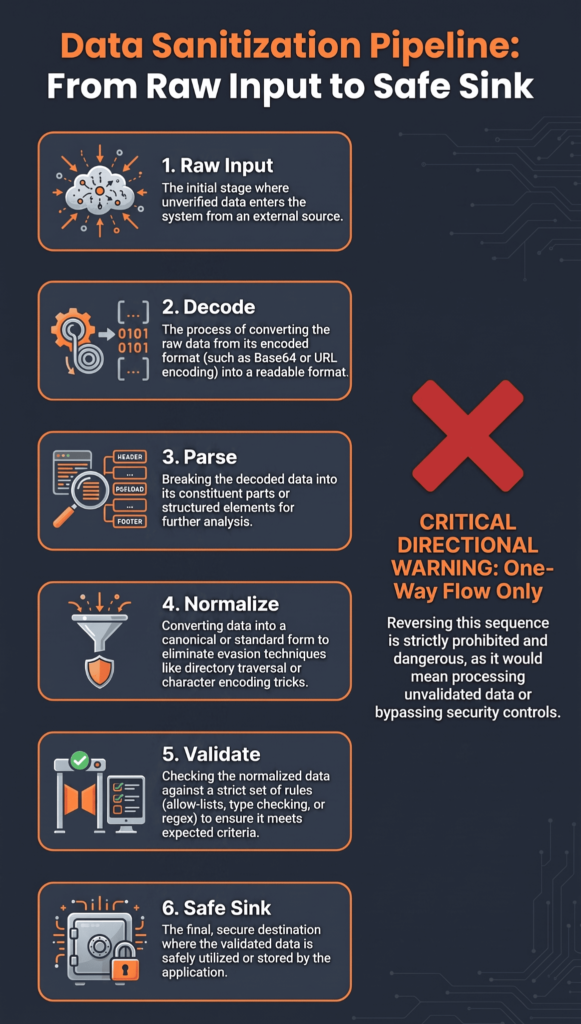
The rule we teach on day one: decode and clean up the data based on its own format first, then validate what’s left. Do it backwards, and you might approve something that looks fine, while the dangerous part only shows up after the cleanup happens. CWE-180 calls this out directly. Validating before you canonicalize is its own known weakness, because the danger can hide until after the conversion. MITRE CWE-180
Here’s the flow we put on the board in week one:
Raw input
↓
Character decoding
↓
Protocol parsing
↓
Controlled canonicalization
↓
Validation
↓
Typed application value
↓
Authorization and business rules
↓
Safe sink
Step by step, it looks like this:
- Find where the trust boundary actually is.
- Know what character encoding you expect.
- Parse the input the way its format expects.
- Decode each layer exactly by the book, no skipping steps.
- Normalize only when the field really needs it.
- Validate the cleaned-up version, not the raw one.
- Send that checked value to the rest of the app.
- Add extra defenses at the destination, parameterized queries, output encoding, whatever fits.
The main rule we keep repeating: never check one version of the data and then send a different version to the sensitive part of your app. Most bugs like this come from exactly that mismatch.
In multi-layer applications, the most difficult normalization failures usually appear when different components interpret the same value differently. For example, a reverse proxy may decode a URL before forwarding it, while the application framework performs another decoding step.
The security check can then evaluate one representation while the downstream component receives another. A proxy decodes a URL one way, the framework decodes it another way, and the database or file system does its own thing on top. Once those layers stop agreeing, your security checks don’t mean much anymore.
How can double decoding bypass validation?
Double decoding vulnerabilities happen because security filters often operate on data at a different stage of representation than the downstream application logic that processes it. When validation occurs too early, before the data reaches its final, canonical form, the security controls are effectively evaluating an illusion.
The Execution Flow Gap
- Layer 1 (The Gateway/WAF): Evaluates %252e%252e%252f. It inspects the string, sees no path traversal sequences (like ../ or %2e%2e%2f), marks it safe, and passes it through.
- Layer 2 (The Application/Framework): Receives %2e%2e%2f after the gateway automatically performs its standard protocol-level decoding. The application layer, or an internal helper function, decodes the value a second time, turning it into ../.
- The Sink (File System / Database / Execution Engine): Receives the fully decoded ../ string and executes the dangerous action, completely bypassing the initial security check.
As noted by MITRE
“The product validates input before it is canonicalized, which prevents the product from detecting data that becomes invalid after the canonicalization step. This can be used by an attacker to bypass the validation and launch attacks.” – MITRE
This misalignment between validation and processing components introduces a severe canonicalization security risk across the system.
Why Downstream Decoding Happens?
This vulnerability usually stems from architectural boundaries where different components make different assumptions about who owns data normalization:
- Framework Middleware Aggression: Web frameworks or API gateways often run default URL-decoders on incoming params, but custom application utilities (e.g., custom path resolvers or sanitizers) call functions like urllib.parse.unquote() or URLDecoder.decode() a second time.
- Multi-Tier Processing: Microservices or proxy chains (e.g., NGINX → API Gateway → Application) may each decode incoming inputs independently before forwarding them along the pipe.
- Nested Formats: Inputs wrapped inside other formats (like JSON inside a query parameter, or base64 inside a URL) force developers to manually decode payload strings without realizing a previous layer already unescaped them.
Common Attack Scenarios Beyond Path Traversal
- Cross-Site Scripting (XSS): Filters block <script>, but double-encoded payloads like %253Cscript%253E slip past the WAF and execute in the browser after two decoding passes.
- SQL Injection (SQLi): Quotes or comment characters are double-encoded (e.g., %2527), dodging input filters before standard database driver layers expand them into active SQL syntax.
- SSRF & Request Forgery: Internal hostname checks look for [http://internal.local](http://internal.local), but pass double-encoded representations like http%253A%252F%252Finternal.local, allowing the request to hit restricted internal endpoints.
Remediation & Boundary Enforcement
To fix canonicalization flaws, enforce single-point decoding and validate inputs only at their final canonical state:
- Centralize Normalization: Designate a single, explicit component to handle decoding. Do not pass decoded values to downstream modules that might decode them again.
- Validate at the Sink: Perform input validation, allowlisting, and sanitization after all decoding and normalization steps are completely finished.
- Reject Ambiguity: Configure gateways to reject inputs containing unexpected residual encoding (e.g., raw % signs in fields that should already be plain text) rather than trying to fix or re-decode them.
Does this breakdown align with how you structure this topic for your students, or would you like to explore specific proxy-to-backend payload examples next?
Why should normalization policies differ by input type?
Normalization changes raw data into a standard, canonical representation before processing. Because every input type carries distinct semantic rules, applying a single blanket rule across all fields corrupts data or introduces security vulnerabilities.
- Data Integrity Loss: Trimming leading or trailing spaces from a password permanently alters the user’s secret. Case-folding a cryptographic token invalidates its signature.
- Bypassed Security Controls: Stripping specific “dangerous” characters from free-text fields creates false confidence while allowing obfuscated attack payloads through.
- Semantic Distortion: Standardizing a free-text field can strip away legitimate punctuation, changing the author’s intended meaning entirely.
Normalization and Validation Matrix
| Input Type | Normalization Approach | Primary Validation |
| Username | Apply a defined Unicode and case policy | Allowed characters, length, and uniqueness |
| Free Text | Use minimal transformation | Length, encoding, and content rules |
| Numeric Value | Convert to a strict numeric type | Range, precision, and overflow |
| Date/Time | Parse into a standard date/time format | Valid date, range, and timezone |
| Filename | Canonicalize according to filesystem rules | File type, size, and trusted directory containment |
| URL | Parse into structured components | Scheme, hostname, port, and network policy |
| Token | Usually avoid normalization | Protocol-defined alphabet and length |
| Password | Follow the authentication system’s exact policy | Length, authentication requirements, and strength rules |
Field-Specific Policy Requirements
Different inputs serve vastly different roles across your application stack. Aligning your transformations with specific field types keeps your data intact and your boundaries secure.
- Usernames and Free Text: Usernames require strict Unicode normalization (like NFKC) and consistent case mapping to prevent spoofing attacks. Free-text inputs require minimal transformation to preserve human meaning while relying on encoding downstream.
- Numeric Values and Dates: Cast numbers to strict native types to prevent buffer overflows and out-of-range values. Parse dates directly into standardized ISO-8601 objects to eliminate timezone confusion.
- Filenames and URLs: Canonicalize paths to eliminate ../ traversal tricks, and parse URLs into structured components (scheme, host, port) to enforce strict Server-Side Request Forgery (SSRF) defenses.
- Passwords and Cryptographic Tokens: Never strip, lowercase, or alter passwords, passwords must reach the hashing algorithm exactly as typed. Leave tokens un-normalized to avoid breaking protocol-defined alphabets.
Complete Security Demands Complete Mediation
Input normalization is only a preliminary sanity check, not a total defense. Saltzer and Schroeder’s principle of Complete Mediation dictates that every access to every object must be checked, operating under the most restrictive environment possible.
Research from Saltzer and Schroeder shows
“A protection mechanism should mediate every access to a protected object, [and] be designed to operate in the most restrictive environment possible.” – Saltzer and Schroeder
A clean, normalized input is not universally safe; it is only safe for its specific context. A valid username can still break an unparameterized SQL query if inserted raw, and safe text can still trigger Cross-Site Scripting (XSS) if rendered without proper HTML entity encoding. Contextual output encoding and parameterized queries must always handle the final execution step.
How should Unicode normalization handle security sensitive identifiers?
Handling Unicode in security-sensitive identifiers isn’t about applying a quick filter and calling it a day, it’s about defining precisely what equality means for your system and enforcing it relentlessly across every boundary.
Establish the Permitted Character Set First
Before picking a normalization strategy, decide the scope of your identifier space:
- Restricted / ASCII-Only: Ideal for system handles, internal IDs, or machine-parsed fields. It eliminates an entire class of homograph attacks at the cost of international flexibility.
- Expanded / Internationalized: Necessary for display names, email local-parts, or user-facing handles. If you open the door to Unicode, you must enforce explicit boundaries (e.g., restricting allowed scripts to prevent mixed-script spoofing).
Normalize Deliberately with NFC
Canonical Decomposition followed by Canonical Composition (NFC) converts canonically equivalent sequences into a single, predictable bit pattern.
- Canonical Equivalence Only: NFC resolves structural differences, like turning e + ´ (combining acute accent) into é. It ensures that characters with identical semantic definitions match reliably.
- Not a Homograph Defense: NFC does not collapse visually identical characters from different scripts (e.g., Latin A U+0041 and Cyrillic А U+0410 remain completely distinct).
- Never Auto-Repair Invalid Data: Reject malformed UTF-8 sequences at the edge. Silently repairing or stripping invalid bytes introduces dangerous parser differential bugs.
Separate Display from Comparison Data
Never force a single string representation to do two different jobs. Retain the user’s original, sanitized input for display purposes, but generate a dedicated Comparison Representation for canonical lookup and authorization.
| Field Type | Target Representation | Key Handling Rules |
| Passwords & Tokens | Binary / Byte-Exact | No normalization. Treat every byte literally; altering bytes changes the secret. |
| Display Names | Preserved Original | Strip control/invisible characters; apply layout sanitation; leave scripts intact. |
| Usernames / Handles | Comparison Key | Apply NFC, explicit case-folding (e.g., NFKC_Casefold or standard uppercase/lowercase mapping), and locale-independent rules. |
Enforce Universal Consistency Across the Lifecycle
Security failures usually happen when components disagree on string equality. The comparison representation must be generated once and used uniformly at every touchpoint:
- Account Creation: Derive the comparison key and check for collisions before storing.
- Database Lookup: Search directly using the derived comparison key, not the raw input.
- Permission & Auth Checks: Evaluate authorization rules against the normalized comparison key.
- Duplicate Detection: Rely on unique constraints over the comparison key column.
Homograph risks are real, but they aren’t fixed by normalization alone. Combine NFC with strict script-mixing restrictions, enforce locale-independent comparison rules, and keep your display and comparison pipelines strictly isolated.
Why does path normalization not prove file authorization?
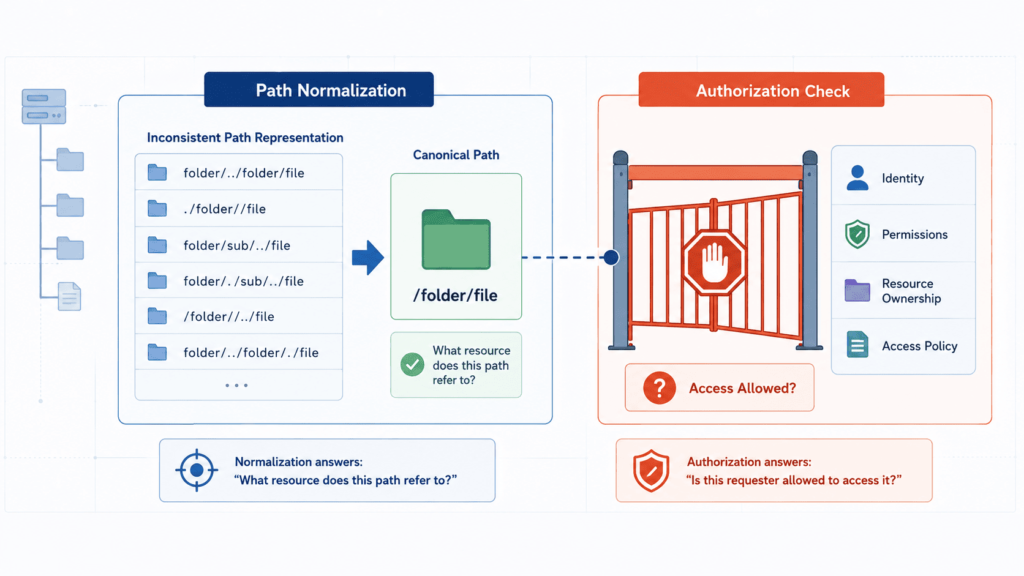
Path normalization (canonicalization) is merely a string manipulation process. It standardizes path syntax by removing dot-segments (. or ..) or resolving slashes, but it operates purely on a string level. It does not resolve how the underlying operating system and filesystem actually interpret and access that target.
Understanding preventing canonicalization attacks helps explain why cleaning up a path string fails to prove file authorization:
String Syntax vs. Operating System Reality
Normalizing a string only checks what the path looks like, not where the operating system routes it.
- Symlinks and Junction Points: A normalized path like /var/app/public/user_file.txt may look entirely contained inside a trusted directory. However, if user_file.txt is a symbolic link pointing to /etc/passwd, the operating system follows the link outside the safe boundary when opening the file.
- Naive String Prefix Flaws: Developers often check containment using simple string matching (e.g., verifying that a path starts with /var/app/public). A path like /var/app/publicity/secret.txt satisfies a naive string check because of the shared prefix, even though it points to an entirely different directory.
- Platform-Specific Rules: Filesystems handle case sensitivity, alternate data streams (like NTFS $DATA), or trailing slashes differently. String normalization in application code frequently fails to reflect these low-level OS behaviors.
Path-Based Authorization Process
To ensure a path is both properly formed and genuinely authorized, follow this step-by-step verification process:
- Decode Protocol Inputs: Safely decode the raw input for its specific protocol (e.g., URL decoding) before inspecting the string.
- Reject Malicious Characters: Strip or block control characters, null bytes (%00), and unexpected encodings immediately.
- Resolve Full Canonical Path: Resolve the target path against your base directory using native filesystem APIs (such as realpath() in PHP or Path.of().toRealPath() in Java) to resolve all symlinks and relative elements.
- Validate True Containment: Check that the fully resolved absolute path strictly starts with the fully resolved base directory path, ensuring a trailing directory separator is enforced (e.g., /var/app/public/).
- Implement Indirect References: Swap raw user-supplied file paths for server-generated file IDs or mapped lookup tables wherever possible.
Beyond Path Resolution
Even when a file path is safely contained within a trusted directory, path validation alone does not grant access. Authorization requires confirming that the current user context holds explicit permission to read, write, or execute that specific resource.
For complete security, especially with user-uploaded content, enforce strict size limits, inspect actual file content bytes rather than trusting extensions, store files outside the web root, and serve them from non-executable directories. Authorization must always be evaluated at the filesystem level, matching how the operating system reads data.
How should URLs and hostnames be normalized safely?
Credits: Vickie Li Dev
Don’t treat a URL like plain text. We teach students to break it into its real parts first, scheme, hostname, port, path, query, before making any security decisions. Simple text checks miss too much, like weird ports, sneaky redirects, or different ways to write the same IP address.
Habits we push hard in class:
- Only allow schemes you trust.
- Use a real URL parser. Don’t build your own.
- Check the hostname the parser found, not the raw text someone typed.
- Block odd or risky ports.
- Check every redirect, not just the first link.
- Apply network rules at the moment of connection.
- Block private, loopback, and internal IP ranges where it makes sense.
- Be careful with login info in URLs and unusual IP formats.
This is the core of stopping SSRF attacks. We’ve seen URLs that look totally safe after cleanup but end up somewhere different because of DNS lookups, redirects, or IPv6.
Say your app only needs to talk to a few outside services over HTTPS. Checking the URL is just one piece. You also want DNS checks, firewall rules, an outbound proxy, and proper permission checks working together.
Redirects need the same caution as the first link. If you allow them, check every stop along the way, not just where it started. That way you’re protecting the whole path, not just the front door.
Why is “strip dangerous characters” an unreliable defense?
Stripping “dangerous” characters fails because it relies on guessing what an attacker might use rather than defining what the system requires. It treats security as a game of exclusion, which almost always leaves edge cases exposed.
Here is why character removal falls short as a primary defense:
- Context blindness: A character that is dangerous in SQL (‘) is harmless in HTML, and a character dangerous in HTML (<) is harmless in a shell path. Stripping characters globally without knowing where the data goes fails to protect the downstream interpreter.
- Evasion through encoding: Attackers bypass simple removal rules using Unicode variations, double URL-encoding, or alternative syntax that bypasses basic string replacement while still executing in the browser or database.
- Data corruption and collisions: Deleting characters mutates user data unpredictably. Removing punctuation from usernames can cause account collisions, while removing symbols from free-text fields destroys legitimate user input.
- Incomplete coverage: Security through subtraction requires predicting every malicious combination. Miss one character, like a null byte or backtick, and the defense collapses.
Weak Approach vs. Better Security Practice
| Weak Approach | Better Security Practice |
| Strip “dangerous” characters | Define the expected input format |
| Block known attack patterns | Validate the exact syntax and data type |
| Apply the same cleanup to every field | Use field-specific normalization policies |
| Encode everything when data enters the application | Encode data for its specific output context |
| Rely on browser-side validation | Perform validation on the server |
| Build SQL queries by joining user input | Use parameterized queries or prepared statements |
| Trust a sanitized filename | Canonicalize the path and verify directory containment |
| Use a blocklist as the primary defense | Use allowlists where the input format permits them |
For fields with a strict format, like country codes, UUIDs, or dates, listing allowed characters works far better than trying to block bad ones. Blocklists can catch known attack signatures, but they should never be the solo defense against XSS, SQL injection, command injection, or LDAP injection.
Validation vs. Sanitization
- Validation: Rejects invalid data upfront based on strict rules (length, data type, pattern).
- Sanitization: Cleans messy input that is expected to contain complex formatting, like rich text HTML using DOMPurify.
- Contextual Encoding: Translates characters safely right before output rendering, preserving the original data in storage.
When setting up defenses, the core question remains: what is this field actually supposed to hold? Defining expected formats, length limits, and data types makes security controls far more reliable than deleting “scary” characters on sight.
How does output encoding complement normalization?
Normalization cleanses and standardizes input to ensure it adheres to expected formats, while output encoding translates data safely into the specific syntax of a downstream interpreter.
They complement each other by solving two distinct problems in the data lifecycle: validation and normalization make sure data is safe for your application to process, whereas output encoding ensures that same data remains safe for external systems (like browsers, databases, or operating systems) to render.
Why Output Encoding Belongs at the Exit Boundary?
Normalizing input before storing it keeps your database clean and searchable. However, relying solely on input modification fails because a single piece of data might be sent to multiple destinations, each reading characters differently.
- Context-specific protection: Standardizing text at the input phase cannot predict where that data will travel later.
- Preservation of raw business data: Prematurely encoding text (e.g., storing < instead of <) permanently alters the stored data, breaking features like search, sorting, and reporting.
- Prevention of double-encoding: Modifying data early often causes string corruption when the UI automatically encodes it a second time during rendering.
Handling Specific Output Destinations
Different interpreters parse syntax using completely different rules. Applying HTML encoding inside a script tag or a database query leaves severe vulnerabilities open.
| Destination | Appropriate protection |
| HTML | HTML context encoding |
| JavaScript | JavaScript safe APIs or encoding |
| CSS | CSS context protection |
| URL | URL specific handling |
| SQL | Parameterized queries |
| OS process | Argument based APIs |
| LDAP/XML | Context specific safe handling |
| Logs | Safe logging and control character handling |
The Dual-Layer Defense Strategy
Normalization standardizes input into a canonical form so that validation routines can evaluate it accurately without bypassing checks via alternative encodings (like UTF-8 variations). Once data passes validation, it lives in your system in its authentic, raw form.
When that data is ready to leave the application, output encoding takes over. It acts as the final defense layer, ensuring that even if potentially malicious content passes initial validation, it is rendered inert at the exact moment it reaches the destination interpreter.
What should secure normalization look like in an application architecture?
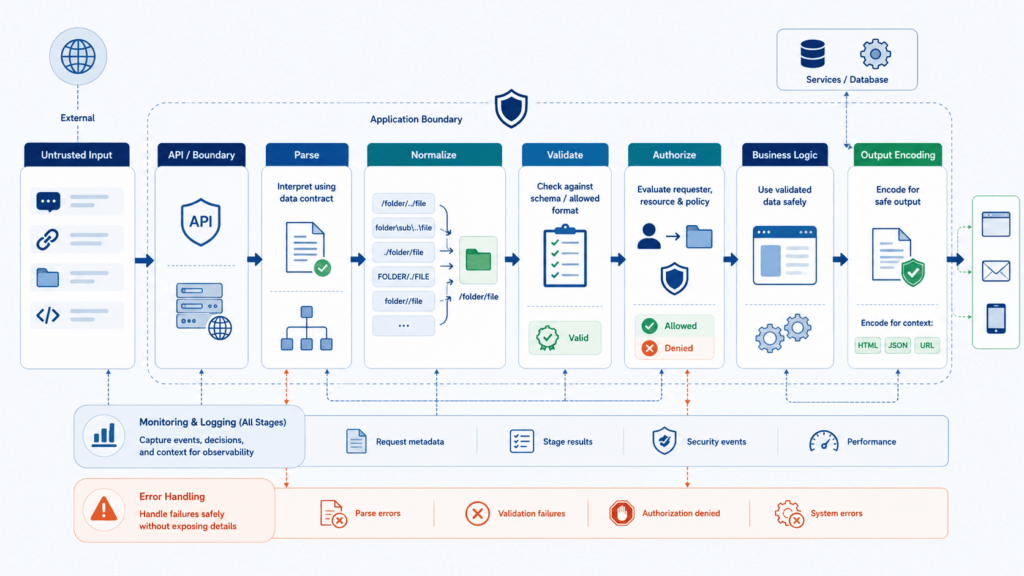
Good architecture stays centralized without becoming rigid. Parsing and validation happen in one place. Each field still keeps its own rules. Defenses show up at every boundary along the way. This is basically how we built our own labs.
Untrusted sources
↓
Character decoding
↓
Protocol parser
↓
Field specific canonicalization
↓
Syntax + semantic validation
↓
Typed application value
↓
Authorization/business rules
↓
Safe API / parameterization
↓
Context specific output encoding
Every step needs someone responsible for it. If one layer decodes percent encoding, no other layer should touch it again. We’ve watched this exact bug trip students up before. One layer quietly double decodes something, and a filter that should have caught it just walks right past.
A shared validation library helps keep things consistent, sure. But that’s not the same as building one giant sanitizer and calling it done. A password, an email, a JSON body, an image upload. They all need their own rules.
Here’s the checklist we walk every team through.
- Define the source and trust boundary.
- Establish the expected grammar.
- Reject malformed byte sequences.
- Normalize only when business semantics require it.
- Validate syntax, type, range, length, and permitted values.
- Preserve the validated representation downstream.
- Apply authorization to the protected resource.
- Use parameterized or safe APIs for sensitive operations.
- Apply output encoding at the final context.
- Log security events without exposing secrets.
Server side validation is the one that actually counts. Client side checks make things feel nicer for the user, sure, but anyone can skip your browser entirely and just send a raw request. Never trust the client. Never.
We also stick to least privilege. Whatever part of your app touches untrusted input should only get the access it truly needs. Nothing more. If that part ever gets compromised, the damage stays small.
How should teams test normalization and canonicalization controls?
Testing normalization and canonicalization controls comes down to ensuring every component in your stack interprets data identically. When a proxy, an application framework, and a database disagree on what a string means, security checks break.
Here is a practical, level-by-level approach to validating these controls effectively.
- Multi-Layer Testing Architecture
Testing must happen at every point where data changes hands, not just inside the application logic.
Unit Level (Parser Validation)
- Test individual parsers and sanitizers against strict schemas.
- Verify deterministic output: identical input must produce identical normalized output.
- Ensure invalid inputs fail fast with explicit errors rather than silent mutation.
Integration Level (Boundary Agreement)
- Proxy vs. App: Confirm reverse proxies (e.g., NGINX, Envoy) and backend frameworks agree on URI paths, headers, and query parameters.
- App vs. Storage: Test how ORMs, SQL databases, NoSQL stores, and filesystems persist normalized data.
- Character Set Handling: Ensure database collation matches application encoding to prevent truncation or character stripping during storage.
End-to-End Level (Request-to-Sink Trace)
- Trace raw payloads from the initial HTTP request to the final execution sink (e.g., SQL query, file write, command execution).
- Assert that the string evaluated by authorization logic is character-for-character identical to the string received by the execution sink.
- Core Test Vectors
Focus test cases on structural representation changes rather than just static attack signatures.
- Unicode Handling: Test NFC vs. NFD forms, homoglyphs, bidirectional markers, zero-width spaces, and invalid UTF-8 byte sequences.
- Path & Encodings: Test double URL-encoding, percent-encoded null bytes (%00), alternate path separators (\, /), and dot-dot-slash variations (..%2f).
- Numeric & Structural Limits: Send oversized payloads, deeply nested JSON/XML structures, integer overflows, and non-standard IP formats (e.g., dword, octal, hex).
- Structural Limits and Parser Resistance
Normalization controls frequently fail under heavy load or resource abuse.
- ReDoS Prevention: Run regular expressions against tailored catastrophic backtracking payloads while monitoring CPU utilization.
- Type Coercion: Validate strict typing across serialization boundaries to prevent JSON or form-data parameter pollution and type juggling.
- Size Enforcement: Apply length limits prior to running expensive normalization logic or regex evaluation to prevent denial-of-service.
Does your current pipeline record the exact string representation at each boundary during test runs, or are you primarily checking the final HTTP response status?
What should a secure input-normalization review checklist contain?
A solid input-normalization checklist prevents edge-case bugs and auth bypasses by turning implicit developer assumptions into explicit design contracts. When teams rely on a generic, global sanitize() function, they inevitably break edge cases, corrupt canonical data, or introduce subtle security flaws.
The core fields below must be defined per input parameter to ensure cross-team alignment across engineering, security, and QA.
Field-Level Normalization Checklist
- Source: Exact origin point (e.g., HTTP POST body, header, URL path, query string, gRPC payload).
- Type: Expected data structure (e.g., integer, UUID, email grammar, alphanumeric string).
- Encoding: Active transport character encoding (e.g., UTF-8, ASCII, ISO-8859-1).
- Decoding: Protocol-level decoding layers applied before application logic (e.g., URL decoding, Base64 decoding, HTML entity decoding).
- Normalization: Explicit, intentional data transformations (e.g., Unicode NFKC canonical decomposition, lowercase conversion, stripping control characters).
- Validation: Strict allowlist rules defining valid syntax (e.g., regex pattern ^[a-zA-Z0-9_-]+$).
- Limits: Hard boundary restrictions (e.g., min/max character length, max byte size, numerical range).
- Comparison: Equality matching mechanics for lookup operations (e.g., case-sensitive vs. case-insensitive, collation rules).
- Storage: Exact format persisted in database or cache layers (e.g., raw normalized, hashed, or encrypted).
- Authorization: The exact canonical representation used when evaluating access control checks and security policies.
- Output: Downstream target interpreters that consume the field (e.g., SQL engine, HTML DOM, shell process, JSON parser).
- Failure: Exact handling strategy for invalid or malformed data (e.g., immediate HTTP 400 rejection vs. fail-closed logging; never silent truncation).
Defining Transformation Rules & Edge Cases
Beyond the primary metadata fields, your documentation must explicitly state whether structural transformations are permitted on a given input. Silent mutation is a frequent root cause of vulnerabilities.
- Whitespace Handling: Specify whether leading, trailing, or internal whitespace is preserved, collapsed, or trimmed. Trimming during registration without trimming during login creates instant account lockout or shadowing bugs.
- Null Byte & Control Character Treatment: Mandate whether null bytes (\0) and non-printable control characters are rejected immediately or stripped. Stripping characters can alter payload semantics post-validation.
- Unicode Normalization Form: Select a specific Unicode normalization form (typically NFC or NFKC). Without explicit normalization, visual equivalents like é (e + accent) and é (precomposed) will evaluate as distinct strings during authentication but merge dangerously during storage.
Human-Readable vs. Machine-Opaque Inputs
Input fields broadly split into two operational categories, each requiring opposing normalization strategies:
Human-Readable Inputs
Display names, search queries, and bio fields demand flexible character sets to support internationalization and user expression.
- Allow broad Unicode ranges.
- Apply strict Unicode normalization (NFC) and canonicalization.
- Rely on contextual output encoding (e.g., HTML escaping) at render time rather than destructive stripping at input time.
Machine-Opaque Inputs
API keys, session tokens, passwords, and cryptographic hashes are machine-interpreted sequences.
- Zero Normalization Allowed: Never trim, lower, uppercase, or re-encode these fields.
- Exact byte-for-byte fidelity must be preserved throughout the entire processing pipeline.
- Any deviation between input bytes and stored bytes invalidates the token or bypasses authentication entirely.
Operational Integration
This checklist functions as a live contract across your engineering org:
- Developers use it to implement field-specific parsers rather than generic string cleaners.
- Security & QA use it to write deterministic test cases covering double-encoding, boundary overflow, and Unicode homograph attacks.
- Incident Response uses it during post-mortems to trace where raw input diverged from its expected canonical form.
How can Secure Coding Practices apply these principles?
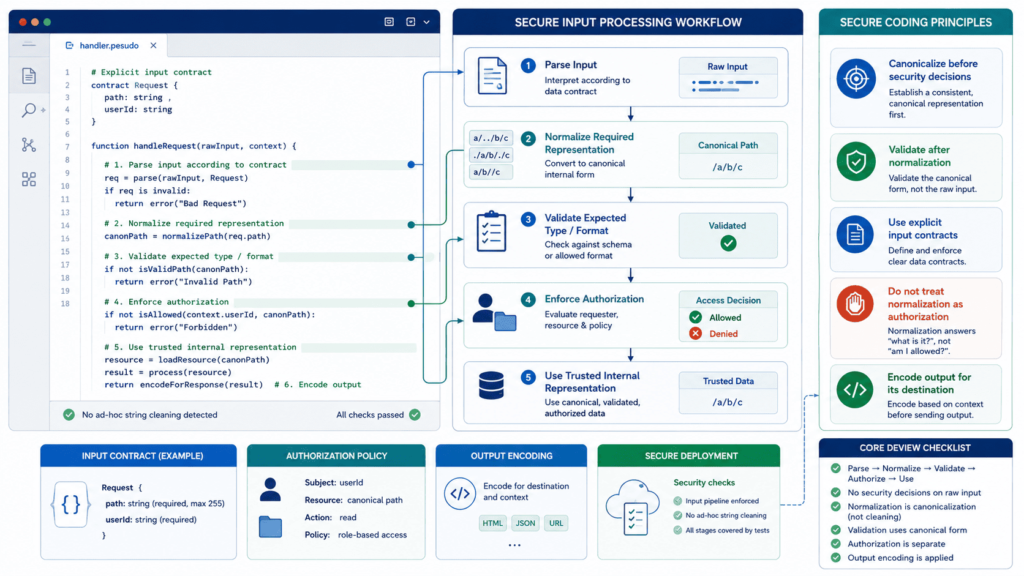
To apply these principles effectively, secure coding practices must treat input normalization and validation as an explicit, multi-layered workflow rather than a single pass-through function.
Defining and Enforcing Field Contracts
Before touching any incoming data, establish strict boundaries for what each field permits. This prevents unexpected structural shifts before processing even begins.
- Schema Definition: Explicitly define expected data types, character encodings (e.g., UTF-8), maximum lengths, and strict value ranges for every individual parameter.
- Allow-Listing over Deny-Listing: Match inputs against a pre-approved list of known valid characters or patterns rather than trying to filter out known malicious payloads.
- Early Rejection: Drop requests immediately at the border if they violate the schema contract, avoiding unnecessary normalization processing downstream.
Normalization and Transformation Sequencing
Normalizing data changes its representation, which means executing transformations in the wrong order can expose applications to bypass techniques like double-decoding vulnerabilities.
- Canonicalization First: Decode Unicode, resolve path traversal sequences (../), and unescape URL parameters before applying validation checks.
- Semantic Normalization: Trim whitespace, enforce standard case sensitivity, or format dates only where the field’s intended logic explicitly requires it.
- Post-Transformation Validation: Always run schema and safety checks on the final, canonical form of the data, ensuring no new structural characters were introduced during cleanup.
Downstream Handling and Safe Sinks
Once data passes validation, it must remain uncorrupted as it moves toward internal execution layers or presentation layers.
- Immutability: Pass the validated representation downstream without applying secondary, uncoordinated transformations that could re-introduce risks.
- Parameterized APIs: Use prepared statements for SQL, safe ORM interfaces, and explicit command-execution APIs that separate control logic from user-supplied data.
- Context-Aware Output Encoding: Encode data specifically for its destination, such as HTML entity encoding, JavaScript string escaping, or JSON serialization, right before it leaves the application boundary.
Extending Controls to AI and Non-Deterministic Interfaces
AI tools and LLM integrations require traditional input boundaries combined with specialized structural guardrails, as basic text cleanup cannot resolve semantic intent or indirect prompt injections.
- Layered Defense Strategy: Combine strict input limits, format restrictions, and system-level guardrails rather than relying on LLMs to self-police.
- Boundary Testing: Evaluate parser differences between application gateways, security proxies, and AI backends to catch discrepancies in how multi-byte or complex payloads are interpreted.
- Human-in-the-Loop Safeguards: Require explicit manual authorization for sensitive, high-impact actions triggered by AI outputs, using secondary AI detectors strictly as supporting layers rather than primary controls.
By structuring these rules into daily code reviews, security teams ensure input processing remains predictable, measurable, and resilient across traditional systems and modern AI architectures alike.
What are the essential secure normalization rules to remember?
Secure normalization only works if every part of the system agrees on what the data means before making a decision. This matches advice from both MITRE and OWASP. They both say: keep the cleanup step, the checking step, and the final-use step separate.
Here are the rules we always come back to:
- Parse before interpreting.
- Decode according to the protocol.
- Canonicalize before validating the relevant representation.
- Do not decode unexpectedly twice.
- Use field-specific policies.
- Reject ambiguity instead of silently repairing it.
- Validate on the server.
- Use allowlists for structured data.
- Keep normalization separate from output encoding.
- Use parameterized queries and prepared statements for SQL.
- Apply context-aware escaping at output boundaries.
- Use defense in depth for files, URLs, APIs, and commands.
- Test the complete parser and processing chain.
FAQ
What is the difference between input validation and input sanitization?
Input validation checks whether submitted data meets defined requirements, while input sanitization modifies or removes unwanted content. Applications should use server-side validation, allowlist validation, data type validation, and input length limits to reject invalid data. Input sanitization can provide an additional security layer, but it should not replace validation or context-specific security controls.
How can developers handle Unicode safely in user-submitted data?
Developers should apply Unicode normalization when consistent text representation is important. NFC normalization can combine equivalent character sequences, while NFKC normalization can reduce certain compatibility characters. Applications should also perform UTF-8 validation, byte sequence validation, and non-shortest-form detection to prevent malformed encoding from creating inconsistent processing or validation results.
When should applications normalize input before validation?
Applications should normalize input before validation when the security decision depends on a canonical representation. The transformation should follow the field’s format and protocol rather than a universal cleanup rule. Passwords, tokens, and other opaque values should generally remain unchanged unless their specification requires a defined transformation.
How should applications validate uploaded files and prevent path traversal?
Applications should treat every uploaded file as untrusted data. File upload security should include MIME type validation, file extension checking, and magic byte verification rather than relying on filenames alone. Developers should also apply path traversal prevention and directory traversal protection when processing file paths. Request size limits can further reduce risks from oversized uploads.
Why is defense in depth important when processing untrusted input?
No single security control can reliably detect every malicious or malformed value. Defense in depth combines data normalization, input filtering, server-side validation, output encoding, access controls, and monitoring. Strong secure coding practices should also include zero trust input handling and least privilege input processing so that one missed validation rule does not automatically create a serious security weakness.
Secure Input Normalization Helps Prevent Validation Bypasses
When input is interpreted differently across browsers, APIs, proxies, databases, or other systems, a small parsing difference can become a security gap. The reality check is simple. Normalization alone won’t stop every attack, so each field needs clear rules for how it’s parsed, validated, compared, stored, and used.
A better approach is to define those rules first, then validate the normalized value and keep that representation consistent through authorization and business logic. Secure Coding Practices can help turn that approach into a practical review process through its Input Normalization Review, giving your team a clearer next step for checking endpoints, APIs, file handlers, and AI features before they reach production.
References
- https://cwe.mitre.org/data/definitions/180.html?trk=article-ssr-frontend-pulse_little-text-block
- https://www.cs.ru.nl/~erikpoll/papers/TwentyYearsSDL.pdf#3#3