
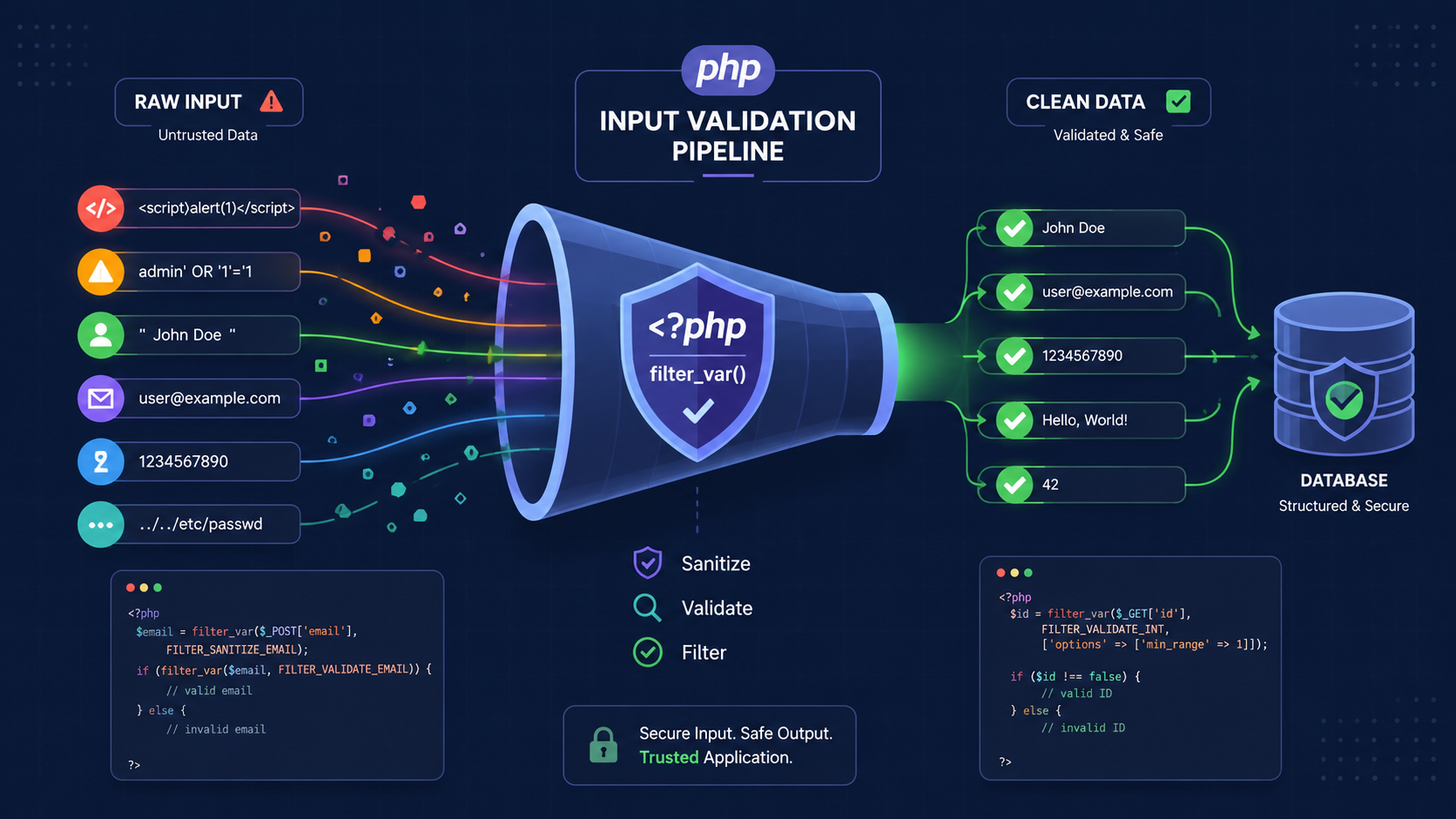

Server side input validation PHP examples is the only way to verify whether incoming data can be trusted. Browser checks help with usability, but they won’t stop modified requests or direct API calls. Every value should be checked before it reaches application logic, storage, or other users. Accept what matches clear rules. Reject everything else.
We follow Secure Coding Practices because even small input mistakes can lead to bigger security issues later. Keep reading for practical PHP examples that strengthen server-side validation and make applications more secure.
Quick Reads – PHP Validation Security Wins
Server-side validation is the final checkpoint that protects your application from unsafe input before it reaches your logic or data.
- Server-side validation is essential for security, while client-side validation only improves the user experience.
- Always validate input before processing it by using PHP built-in functions like
filter_var()as a first step. - Do not attempt to repair invalid data. If input fails your validation rules, reject the request immediately.
What Should You Know Before Writing Validation Rules?
You have to start with a simple, hard rule. Never trust anything that comes from the outside. Not from a form, an API call, or a file upload. Everything is guilty until proven innocent by your validation logic. It’s not paranoia.
We’ve seen perfectly normal-looking form submissions hide SQL injection attempts. We’ve watched log files fill up with requests where attackers just faked the data, bypassing all the JavaScript we carefully wrote.
The validation checklist is straightforward, but you have to check every box.
- Presence: Is the field even there?
- Type: Is it a string, a number, an array?
- Format: Does it match an email pattern, a date, a specific ID structure?
- Length: Is it too short or suspiciously long?
- Range: For numbers, is it within acceptable bounds?
- Business Rules: Does this username already exist? Is this coupon code still valid?
The importance of server-side validation starts here: validate first. Process second.
Why Isn’t Client-Side Validation Enough?
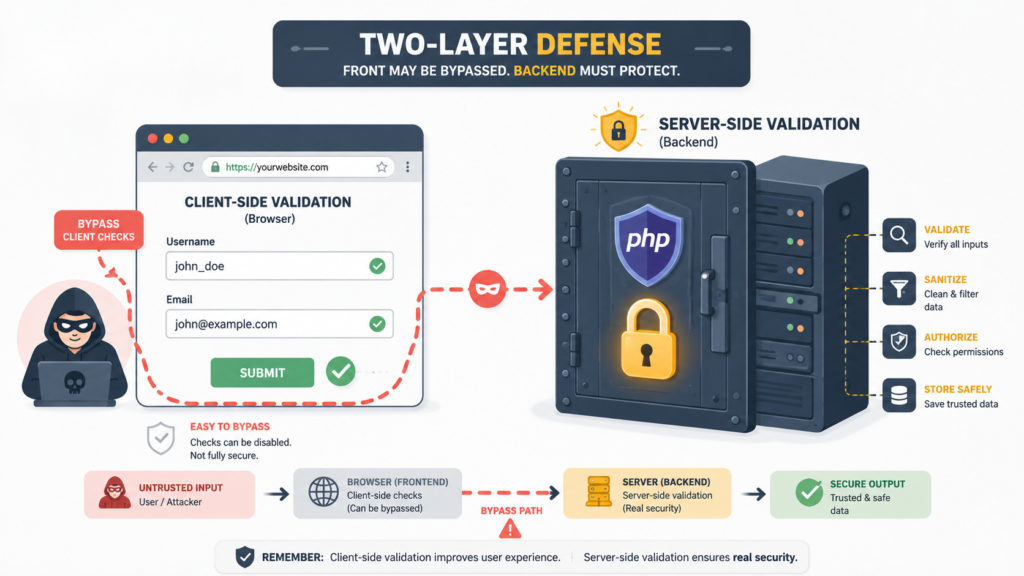
Think of client-side validation as a friendly user at a movie theater. It makes the experience smooth. But if someone really wants to get in, they can find another way. They can climb in through a window. In web terms, that window is the direct HTTP request.
Anyone with a browser’s developer tools can remove the required attribute from your HTML. They can write a small script to post JSON directly to your endpoint. Tools like Postman or even a basic curl command in a terminal completely ignore your frontend, making bypassing client-side validation much easier than many developers expect.
- An “age” field might suddenly be
"'; DROP TABLE users; --". - An “email” field could be 10,000 characters long in an attempt to crash something.
- A file upload might claim to be a JPEG but actually be an executable script.
As noted by NIST
“Input validation should be performed on the server-side, on a trusted system, and not on the client. Any validation performed on the client can be bypassed by an attacker who modifies the client code or substitutes their own client.” – NIST
How Do You Validate Required Fields in PHP?
You start simple. Is the data even there? It sounds trivial, but missing fields break assumptions and cause errors downstream. The process is a clean, linear check. You don’t need complex logic right away.
| What Often Goes Wrong | The Better Approach |
Checking if (isset($_POST['field'])) but not if it’s empty. | Use trim() and empty() to check for meaningful content. |
| Letting the request proceed with partial data. | Fail fast. Halt on the first validation error block. |
| Vague messages like “An error occurred.” | Specific errors: “The ‘email’ field is required.” |
How Can You Validate Email Addresses Safely?
For emails, PHP gives you a powerful tool: filter_var(). You use it like this: if (filter_var($email, FILTER_VALIDATE_EMAIL)). It checks against the RFC standards for email format, which is more thorough than any regex you’ll likely write on a Tuesday afternoon. It’s your first and best line of defense for format.
But validation has layers. filter_var() will tell you if user@[192.168.1.1] is technically valid (it is), but your mailing system might choke on it. So you add business rules.
- Length: Is it under 254 characters? Storage might have limits.
- Domain: If it’s a corporate app, does it end with
@yourcompany.com? - Disposable Addresses: Should you block known temporary email services?
You might combine the technical check with a domain lookup. if (filter_var($email, FILTER_VALIDATE_EMAIL) && checkdnsrr(explode('@', $email)[1], 'MX')). This sees if the domain part has mail servers. It’s a good, practical second step.
The checklist is simple:
- Use
FILTER_VALIDATE_EMAILfor format. - Enforce a reasonable maximum length.
- Add domain-specific rules if your business needs them.
How Do You Validate Numbers and Integer Ranges?
Numbers need two kinds of validation. First, are they actually numbers? Second, do they make sense for your purpose? filter_var() is again your friend here, especially for integers with ranges.
Validating an age field is a classic example. You get a string "25" from the POST data. filter_var($age, FILTER_VALIDATE_INT) would return the integer 25. That’s good. But you need to know if the person is an adult. So you add options.
$options = ['options' => ['min_range' => 18, 'max_range' => 120]];

if (filter_var($age, FILTER_VALIDATE_INT, $options) === false) {

    $errors['age'] = 'Age must be between 18 and 120.';

}
This does it all in one clean step: type checking and range validation. It rejects “seventeen”, "0", and "999".
Other common uses for this pattern:
- Product Quantity:
min_range => 1, maybemax_range => 100. - Product ID: Must be a positive integer
(min_range => 1). - User Rating: Between 1 and 5.
- Price: Often a
FILTER_VALIDATE_FLOATwith amin_rangeof 0.
The point is to be precise. Don’t just check is_numeric($input). That would allow "12.5" for an age, or "-1" for a quantity. Define exactly what you expect, and enforce it at the gate.
How Should You Validate Usernames with Regular Expressions?
Credit: Dr Python
When built-in filters aren’t enough, you turn to regular expressions with preg_match(). For a username, you define an allowlist the characters you will accept. This is always safer than a denylist, where you try to block bad characters. Attackers are creative, you’ll miss one.
A common, secure username rule might be: 3 to 20 characters, letters, numbers, and underscores only. The regex looks like this: /^[a-zA-Z0-9_]{3,20}$/.
$pattern = '/^[a-zA-Z0-9_]{3,20}$/';

if (!preg_match($pattern, $username)) {

    $errors['username'] = 'Username must be 3-20 chars (letters, numbers, underscore).';

}
Let’s break that down. ^ means start of the string. [a-zA-Z0-9_] is our allowlist. {3,20} sets the length. $ means end of the string. It’s tight and predictable.
The mistakes we see? Overly complex patterns that become unreadable and unmaintainable. Or, worse, patterns that are too loose, like /.{3,20}/ which would allow spaces, punctuation, anything. That’s asking for trouble.
The best regex for validation is usually the simplest, most restrictive one that meets the requirement. Clarity beats cleverness every time.
Which PHP Validation Functions Should You Use?
PHP has a toolkit. Knowing which tool to reach for makes your code cleaner and more secure. Here’s your go-to set.
| Function | What It’s For | Example Use |
filter_var() | Your primary validator. Great for emails, URLs, IPs, numbers with ranges. | filter_var($url, FILTER_VALIDATE_URL) |
filter_input_array() | Validates a whole batch of input (like $_POST) at once with defined rules. Perfect for form handlers. | (See next section) |
preg_match() | Pattern matching for custom formats (zip codes, phone numbers, usernames). | preg_match('/^\d{5}$/', $zip) |
ctype_* functions (ctype_alnum, ctype_digit) | Lightning-fast checks for character types. ctype_digit($string) checks if a string is all numbers. | Validating a numeric string without conversion. |
in_array() | For a field that must be one of a specific set of values (like a dropdown). | in_array($status, ['pending', 'active', 'archived']) |
You write custom validation for things these functions can’t know: business logic. Does this email belong to an existing user? Is this coupon code valid for this product? That’s your domain. Use the built-in tools for the heavy lifting of format and type, then layer your specific rules on top.
How Can You Validate Everything at Once?
Writing an if statement for every single field gets messy fast. That’s where filter_input_array() shines. It lets you define a rulebook for your incoming data and validates it in one operation.
Imagine a registration form with username, email, and age. You define a rules array that maps each expected input to a validation filter.
$rules = [

    'username' => [

        'filter' => FILTER_VALIDATE_REGEXP,

        'options' => ['regexp' => '/^[a-zA-Z0-9_]{3,20}$/']

    ],

    'email'    => FILTER_VALIDATE_EMAIL,

    'age'      => [

        'filter' => FILTER_VALIDATE_INT,

        'options' => ['min_range' => 13]

    ]

];

$validated_data = filter_input_array(INPUT_POST, $rules);
Now, $validated_data will contain either the clean, validated value or false/null if validation failed. You loop through it once to collect errors. This is cleaner, centralized, and harder to mess up than a dozen scattered if statements. The same structured thinking also applies when implementing server-side validation in larger applications, even across different programming languages.
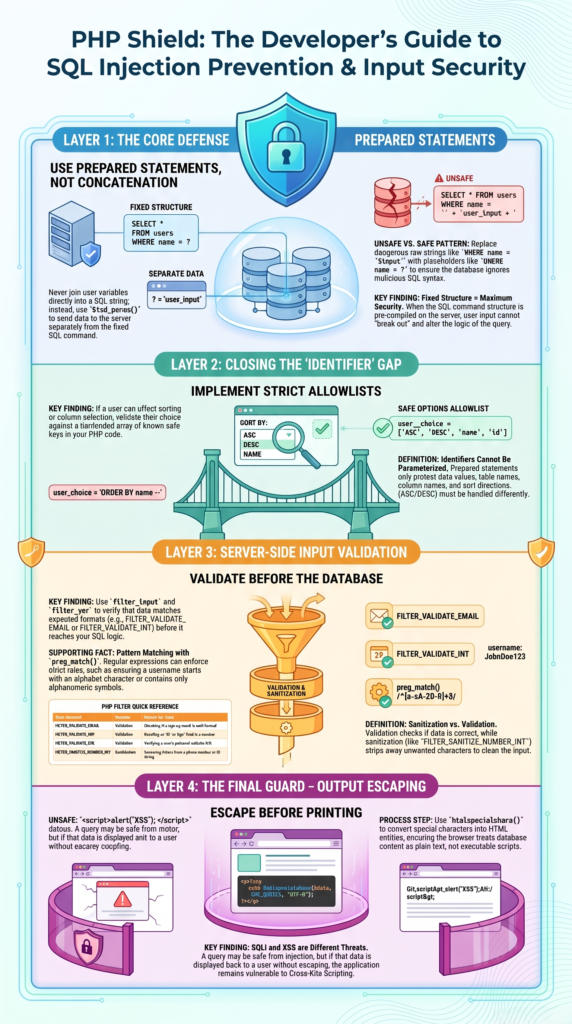
How Can Prevent SQL Injection Beyond Validation?
Validation ensures the data fits your business rules. “This must be a positive integer.” Prepared statements ensure that data, regardless of its content, cannot change the structure of your SQL query. They separate the instruction (the SQL) from the data.
Even perfectly valid input can be malicious. A valid email address like ' OR '1'='1 is a problem if you concatenate it into a query.
// DANGER: Validation won't save you here.

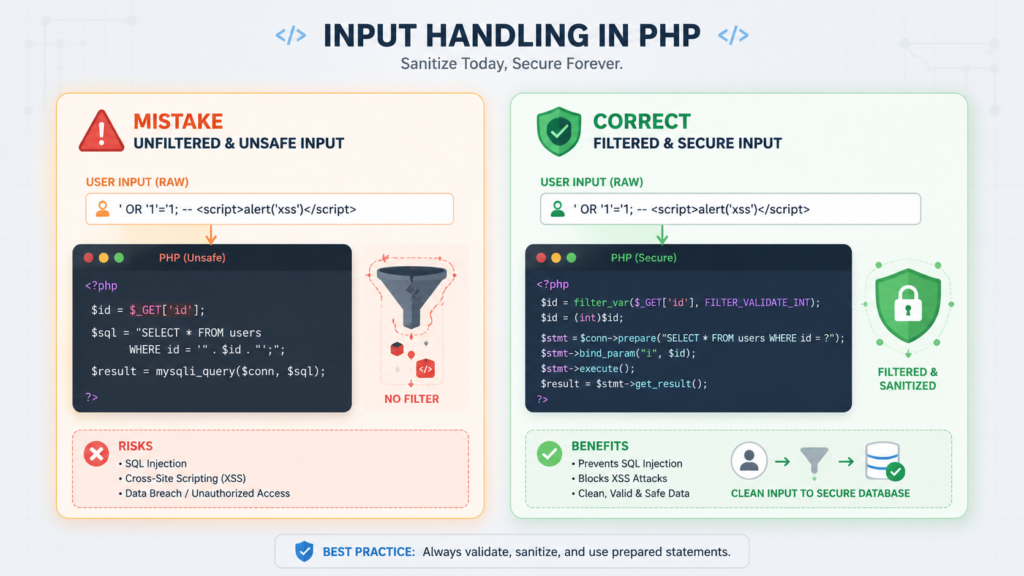
$id = filter_var($_GET['id'], FILTER_VALIDATE_INT); // Validates as integer 1

$sql = "SELECT * FROM users WHERE id = $id"; // SQL Injection if $id is "1; DELETE..."

// SAFETY: Prepared statements + validation.

$stmt = $pdo->prepare("SELECT * FROM users WHERE id = ?");

$stmt->execute([$id]); // $id is safely bound, even if it were malicious.
Research from OWASP shows
“SQL injection attacks are prevented by using parameterized queries (also known as prepared statements) instead of string concatenation within the query. This defense applies to all SQL queries, regardless of the source of the input.” – OWASP
Always use parameterized queries (prepared statements) with PDO or MySQLi. Validation cleans your data for your application. Prepared statements protect your database. You need both.
What Common Validation Mistakes Should You Avoid?
Over the years, we’ve seen the same patterns lead to security reviews and late-night bug fixes. Here’s the short list of what to stop doing.
- Trusting
$_REQUEST:It’s a blend of GET, POST, and COOKIE data. Be explicit. UseINPUT_POSTorINPUT_GETwithfilter_input_array(). - Using
stripslashes()as security: It’s for fixing old magic quote issues, not stopping attacks. - Forgetting file upload validation: Never trust
$_FILES['type']. Usefinfo_file()to check the actual MIME type from the file’s bytes. - Validating only some API endpoints: If it accepts input, it needs validation. No exceptions.
- Letting errors leak details: Don’t tell an attacker “the ‘email’ field failed the regex.” Use generic but actionable user messages: “Invalid email format.”
- Mixing validation and business logic: Validate first, in a dedicated step. Then pass the clean data to your services.
FAQs
What is server-side input validation in PHP?
Server-side input validation checks user data on the backend before processing, helping prevent unsafe input and protect application data.
Why should validate user input on the server?
Client-side validation can be bypassed, so server-side checks ensure every request follows defined validation rules before reaching application logic.
How do PHP form validation examples improve security?
PHP validation examples show how to check form fields, reject malicious input, and apply secure coding practices to protect web applications.
When should sanitize and validate PHP input?
You should sanitize and validate user input before storing it or displaying it to maintain data integrity and prevent security issues.
How can handle invalid form submissions in PHP?
You can handle invalid submissions by displaying validation errors, checking failed rules, and asking users to correct incorrect form data.
Standardize Secure Coding Before Gaps Appear
When you’re building code across projects, inconsistent validation can become a security headache. Small gaps happen when everyone follows their own approach. That’s the risk.
A reusable standard helps you avoid those gaps and build safer habits. The Secure Coding Practices Bootcamp gives developers a practical way to strengthen secure coding skills and apply them with confidence.
References
- https://csrc.nist.gov/pubs/sp/800/53/r5/upd1/final
- https://cheatsheetseries.owasp.org/cheatsheets/SQL_Injection_Prevention_Cheat_Sheet.html