
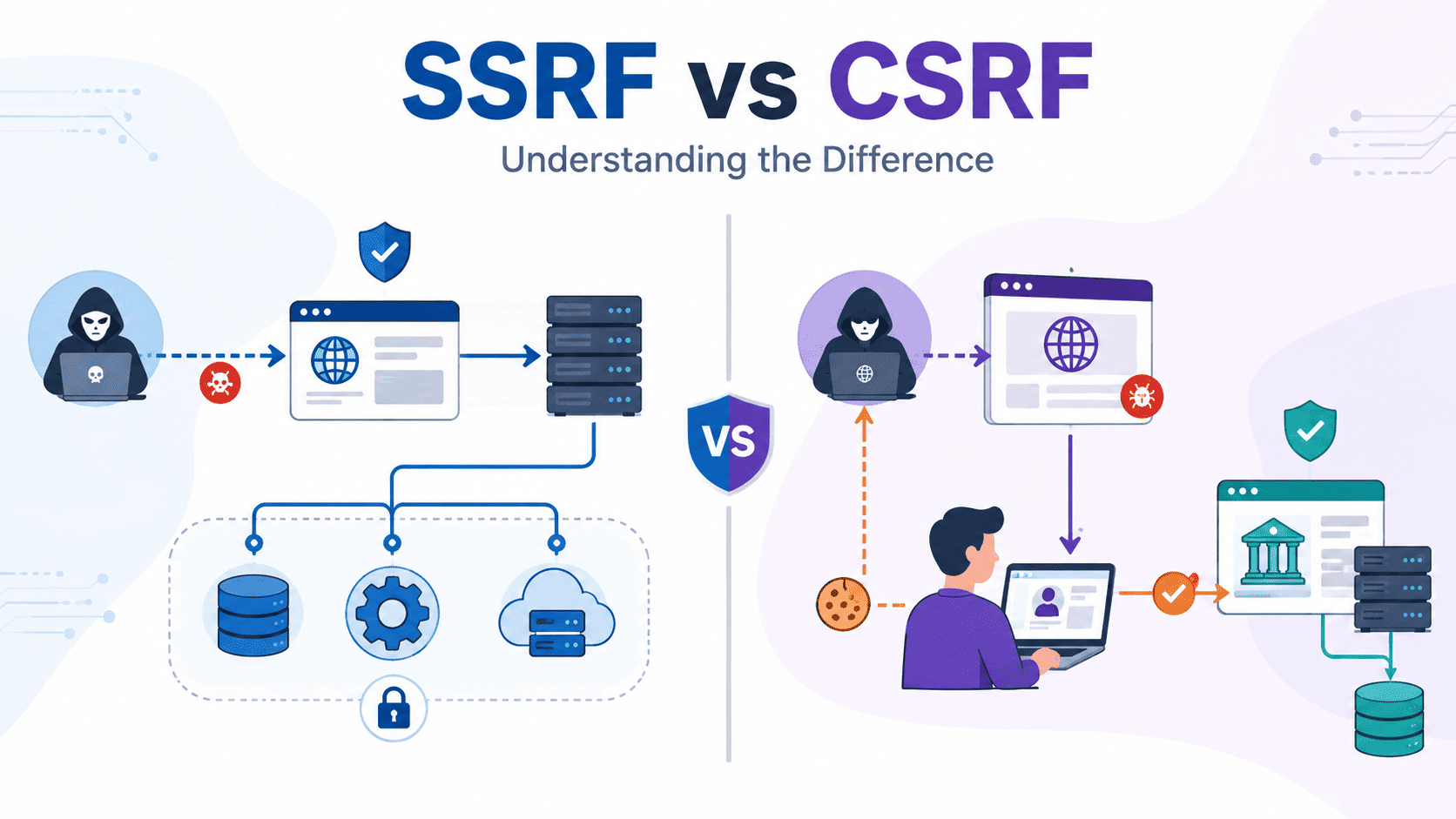

SSRF and CSRF are different because they target different trust boundaries. SSRF makes a server send requests it should never make. CSRF gets a logged-in user’s browser to send requests without their approval. That difference matters more than most people expect because it changes both the risk and the fix. If the server sends the request, think SSRF. If the browser does, think CSRF.
Secure Coding Practices uses this mental model during code reviews to spot issues faster and avoid false assumptions. Keep reading for practical examples, prevention tips, and review habits that catch these bugs early.
Quick Reads: SSRF vs. CSRF at a Glance
- SSRF means the server makes the request, often exposing internal services or private infrastructure.
- CSRF means the browser makes the request, abusing an authenticated session to perform unwanted actions.
- We consistently prioritize Secure Coding Practices because combining secure coding, network controls, and browser protections reduces both attack surfaces before deployment.
Why Do People Confuse SSRF and CSRF?
You hit the nail on the head: the confusion almost always boils down to alphabet soup and the fact that both attacks share the word “Forgery.”
When two vulnerabilities sound like twin brothers, it’s easy to lose sight of the fact that they live on opposite sides of the trust boundary. Firing off a request from an internal app server vs. tricking a client’s browser are two completely distinct threat vectors, even if they both land in a bug bounty report with similar-sounding names.
Here is a clear breakdown of why this confusion happens, how to keep them straight, and how to fix them without breaking your application.
Why the Confusion Runs Deep?
The mix-up isn’t just a beginner’s mistake; even experienced engineers stumble over these two during high-stress incident reviews. A few specific reasons explain why these vulnerabilities get tangled up so easily:
- Shared Vocabulary: Both rely on “request forgery,” meaning the application is tricked into sending an unintended HTTP call.
- Overlapping Contexts: In complex microservice architectures, a single user action in a browser can immediately trigger a backend API request, blurring the line between client-side and server-side execution.
- Focusing on the Payload Instead of the Pathway: Security reviews often get hung up on what data is being sent rather than which machine is establishing the TCP connection.
- Misleading Bug Reports: Pentest summaries often describe both as “unauthorized state-changing requests,” which sounds identical to a developer skim-reading a remediation ticket.
SSRF vs. CSRF: The Core Differences
To keep the distinction crystal clear during threat modeling or code reviews, it helps to look at how each vulnerability behaves across key operational dimensions:
| Feature | SSRF (Server-Side Request Forgery) | CSRF (Cross-Site Request Forgery) |
| Request Initiator | The application server | The victim’s web browser |
| Target | Internal infrastructure, cloud metadata, loopback interfaces (127.0.0.1, 169.254.169.254) | External web application where the victim has an active session |
| Attacker Goal | Bypass firewalls, read local metadata, scan internal networks, perform remote code execution | Force an authenticated user to execute unwanted state-changing actions (e.g., change email, transfer funds) |
| Exploitation Prerequisite | App functionality that fetches remote resources (e.g., webhooks, avatar URLs, PDF generators) | Victim must visit a malicious site while logged into the target vulnerable application |
| Primary Remediation | Strict URL parsing/allowlists, disabling HTTP redirects, isolated network segments | Anti-CSRF tokens (Synchronizer Token Pattern), SameSite cookies, re-authentication for sensitive actions |
Tracing the Attack Paths
Understanding the mechanics of each request flow makes it much easier to spot which threat you are dealing with during a live incident or static analysis.
How SSRF Works (Server-Side)?
- The Attacker Input: The attacker submits a malicious URL (e.g., [http://169.254.169.254/latest/meta-data/](http://169.254.169.254/latest/meta-data/)) into a web feature designed to fetch remote assets, such as a profile picture import or a webhook tester.
- The Server Action: The vulnerable web server blindly receives this URL and initiates an outbound HTTP request from inside the corporate network or VPC.
- The Target Response: Because the request comes from an internal, trusted IP address, internal microservices or cloud metadata endpoints trust the server and return sensitive infrastructure data directly back to the vulnerable app.
Key Rule for SSRF: If the socket connection originates from your backend infrastructure, you are dealing with Server-Side Request Forgery.
How CSRF Works (Client-Side)?
- The Trap: An authenticated user logs into vulnerable-bank.com. Without logging out, they navigate to a malicious website (attacker.com) in another tab.
- The Forged Payload: attacker.com contains a hidden script or auto-submitting form targeting [vulnerable-bank.com/api/transfer](https://vulnerable-bank.com/api/transfer).
- The Browser Execution: The user’s browser executes the script and automatically attaches stored session cookies for vulnerable-bank.com. The bank’s server receives a completely valid, authenticated request and executes the transfer, unable to tell that the user never intended to click that button.
Key Rule for CSRF: If the attack relies on the victim’s browser automatically shipping session credentials to an external domain, you are dealing with Cross-Site Request Forgery.
How to Fix Them (Because One Size Doesn’t Fit All)?
Since SSRF and CSRF exploit completely different trust boundaries, applying a CSRF fix to an SSRF bug (or vice versa) offers zero protection.
Mitigating SSRF
- Validate and Allowlist Domains: Restrict outbound calls strictly to pre-approved domain names or IP ranges rather than accepting arbitrary user-supplied URLs.
- Block Private IP Space: Parse destination hostnames and explicitly drop requests targeting loopback addresses (127.0.0.1), RFC 1918 private subnets (10.0.0.0/8, 172.16.0.0/12, 192.168.0.0/16), and cloud metadata endpoints (169.254.169.254).
- Network Level Isolation: Place fetcher services in a segregated DMZ with strict firewall egress rules so they cannot talk to core internal databases or management interfaces.
Mitigating CSRF
- Implement Anti-CSRF Tokens: Require a cryptographically secure, unpredictable, and unique token with every state-changing request (POST, PUT, DELETE) that the server validates before processing.
- Use SameSite Cookie Attributes: Set session cookies with SameSite=Lax or SameSite=Strict to prevent the browser from sending cookies along with cross-site subrequests.
- Require Re-Authentication: Force users to re-enter their password or complete a 2FA prompt before carrying out high-risk actions like updating security settings or changing email addresses.
The Golden Rule for Code Reviews
When you are staring at a suspicious endpoint during a security audit or debugging an unexpected request log, skip the acronyms for a second. Simply ask:
“Is our server making the call, or is the user’s browser making the call?”
- Server makes the call? Check for SSRF.
- Browser makes the call? Check for CSRF.
Keeping that single mental pivot point at the front of your review process turns a confusing naming overlap into a fast, decisive diagnosis every single time.
What Is SSRF?
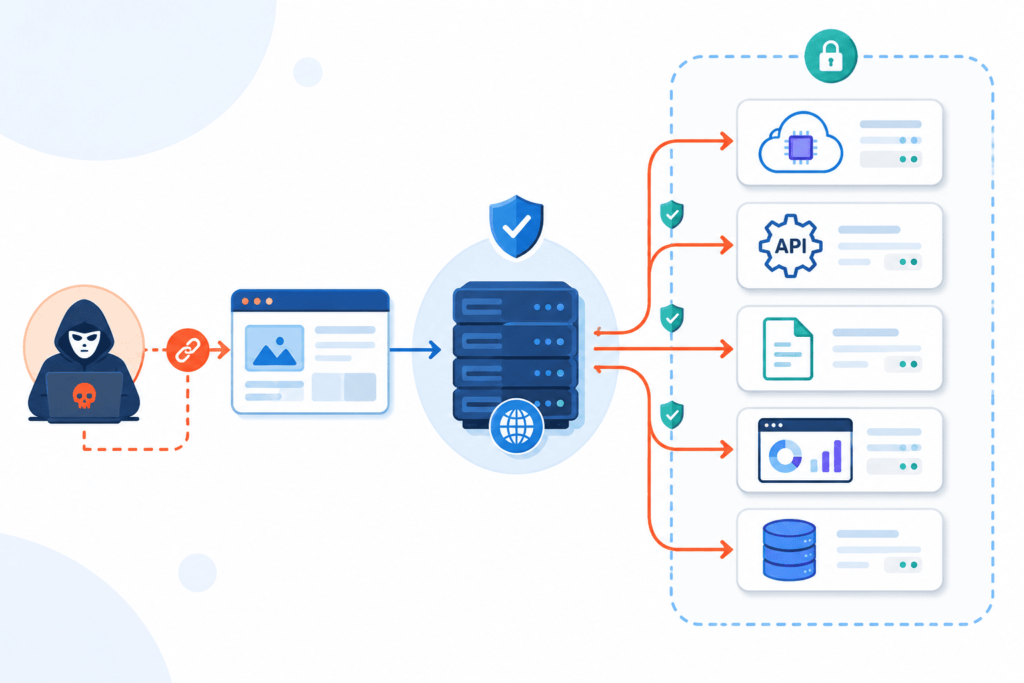
The repeated text you shared gives a solid high-level summary of Server-Side Request Forgery (SSRF). To build on that foundation without sounding overly formal or academic, let’s break down how SSRF works in practice, how it differs from browser-based attacks, and how to stop it in code.
What Is SSRF (Server-Side Request Forgery)?
At its core, SSRF happens when a web server acts as an unwitting proxy for an attacker. Instead of the attacker directly hitting an internal system, they trick the web server into doing the request on their behalf.
Because internal networks usually trust requests originating from inside their own perimeter, the backend server gets access to sensitive internal assets that the public internet can never see.
Common Targets in an SSRF Attack
- Cloud Metadata Endpoints: Cloud providers (like AWS, GCP, Azure) host local metadata services (e.g., [http://169.254.169.254/](http://169.254.169.254/)). An attacker fetching this can steal temporary IAM credentials or API keys.
- Internal Admin Panels: Internal dashboards (e.g., http://localhost:8080/admin) that don’t enforce authentication because they assume only internal traffic can reach them.
- Internal Microservices & Databases: Unprotected REST APIs, Redis instances, or database ports running on adjacent internal machines.
How does SSRF differ from CSRF?
It’s easy to mix up SSRF and CSRF (Cross-Site Request Forgery) because both involve “forging” requests, but the entity performing the action is entirely different:
Key Differences
- Where the request originates:
- SSRF: Executed by the vulnerable server.
- CSRF: Executed by the victim’s web browser.
- Primary target:
- SSRF: Targets internal backend networks, cloud metadata, or local services.
- CSRF: Targets the authenticated victim’s user session on a web application.
- Network access level:
- SSRF: Exploits the server’s internal network privileges and firewall trust.
- CSRF: Exploits the victim’s session cookies and active browser login.
SSRF Exploitation Flow
Here is the step-by-step breakdown of how a typical SSRF vulnerability unfolds in production:
1.User submits input:
A user inputs a URL into a legitimate application feature (e.g., supplying an image URL for an avatar upload).
2.Attacker swaps the destination:
Instead of pointing to a public image, the attacker inputs an internal endpoint (e.g., [http://169.254.169.254/latest/meta-data/](http://169.254.169.254/latest/meta-data/)).
3.Server processes the request:
The backend application parses the string and sends an HTTP request to the attacker’s designated address without validating the destination host or IP.
4.Data exfiltration occurs:
The internal service responds to the web server, which then reflects the response (or confirmation) back to the attacker’s screen.
How to Prevent SSRF in Application Code?
Relying on simple URL string checks or basic domain “blacklists” usually fails because attackers bypass them using IP encodings, DNS rebinding, or redirects. Effective protection requires a defense-in-depth strategy, alongside actively testing for SSRF potential vectors during development.
Essential Remediation Steps
- Allowlist-based Validation: Only accept URLs pointing to explicit, trusted domains or strict regex patterns. If the user only needs images from a specific host, enforce that strictly.
- Disable Unnecessary Protocols: Restrict HTTP clients on the server to only standard schemes (http / https). Disable dangerous wrappers like file://, gopher://, or dict://.
- Block Internal IP Ranges: Ensure backend HTTP clients resolve the target host’s IP and reject connections to loopback (127.0.0.1), private RFC 1918 ranges (10.0.0.0/8, 172.16.0.0/12, 192.168.0.0/16), and link-local addresses (169.254.0.0/16).
- Enforce Network Segmentation: Configure firewalls and egress rules on the host server so it physically cannot initiate connections to internal administration ports or sensitive metadata IPs.
What Is CSRF?
Cross-Site Request Forgery (CSRF) boils down to a fundamental exploit of trust: a web application trusts a user’s browser, and an attacker tricking that browser into abusing the trust.
When you log into a web application, the server issues a session identifier, usually stored in a browser cookie. From that point on, your browser automatically attaches that cookie to every outgoing request destined for that server.
CSRF takes advantage of this automatic behavior. If you visit a malicious site while signed into a legitimate service, the attacker’s site can craft a hidden background request to that service. Your browser will dutifully attach your authentication cookies, making the request appear completely legitimate to the server.
Core Attack Targets & Common Bypass Scenarios
Attackers target state-changing endpoints rather than data theft, because standard browser security policies (like the Same-Origin Policy) prevent the attacker from reading the response back. The goal is simply to force the server to execute an action.
Common CSRF Targets
- Password Resets & Profile Modifications: Forcing account takeovers by altering secondary email addresses or passwords.
- Financial Transactions: Initiating wire transfers or changing payout credentials on payment platforms.
- Account Settings & Preferences: Adjusting security controls, API key permissions, or notification preferences.
Real-World Defense Bypasses
Modern browsers enforce SameSite=Lax cookie policies by default, which mitigates simple form-posting attacks across origins. However, penetration testing frequently uncovers real-world scenarios where these defaults fall short:
- Subdomain Takeovers: If an attacker gains control of a forgotten subdomain (evil.yourapp.com), they operate within the same top-level domain context, effectively bypassing standard SameSite constraints.
- GET-based Endpoints: When application state can be modified via GET requests, or when developers apply overrides like @csrf_exempt to bypass framework restrictions, browsers still send SameSite=Lax cookies along with top-level navigations.
- OAuth State Omissions: Flaws in OAuth implementation where the state parameter is either missing or predictable allow attackers to perform login CSRF, binding a user’s local session to an attacker-controlled account.
CSRF vs. SSRF: Who Actually Makes the Request?
It is easy to confuse CSRF with Server-Side Request Forgery (SSRF) because both involve forged requests. The clearest differentiator is looking at which entity sends the request across a trust boundary.
Distinguishing Characteristics
- CSRF Exploits User Identity: The victim’s browser initiates the request to an external application server, abusing the implicit trust the server has in the user’s active session.
- SSRF Exploits Server Access: The application server itself initiates an HTTP request (often to internal resources, cloud metadata endpoints, or microservices) based on attacker-supplied input.
| Aspect | SSRF | CSRF |
| Who Sends the Request? | The application server | The user’s browser |
| Trust Boundary Exploited | Server trust | User’s authenticated session |
| Typical Trigger | User-supplied URL or external resource | Malicious webpage or hidden form |
| Primary Target | Internal services, APIs, or cloud metadata | Authenticated user actions |
| Common Impact | Internal network exposure and data access | Unauthorized account actions performed as the user |
Implementing Defense-in-Depth
Relying on a single control (like framework anti-CSRF tokens alone) often leads to single points of failure, especially when developers disable features for convenience or testing. A robust posture uses overlapping controls.
Recommended Defense Checklist
- Anti-CSRF Tokens: Utilize unpredictable, cryptographically secure anti-CSRF tokens (using the Synchronizer Token or Double Submit Cookie pattern) validated strictly on the server for all non-idempotent methods (POST, PUT, DELETE).
- Origin & Referer Validation: Enforce strict checking of the Origin and Referer headers on incoming requests to ensure they match trusted origins.
- Re-Authentication for Sensitive Actions: Force users to re-enter their current password or complete a step-up authentication check (like 2FA) prior to performing critical operations like changing email addresses or initiating financial transfers.
The correct defense isn’t just ‘use anti-CSRF tokens.’ It’s implementing a defense-in-depth approach:
python
# Django example – proper CSRF protection
from django.views.decorators.csrf import csrf_protect
from django.middleware.csrf import get_token
@csrf_protect
def transfer_funds(request):
if request.method == ‘POST’:
# Token validation happens automatically via middleware
# Additional check: validate Origin header
origin = request.META.get(‘HTTP_ORIGIN’)
if origin not in ALLOWED_ORIGINS:
return HttpResponseForbidden()
# Additional check: re-authentication for high-value actions
if request.session.get(‘last_auth_time’) < time.time() – 300:
return redirect(‘reauthenticate’)
How Do SSRF and CSRF Compare Side by Side?
While both vulnerabilities carry “Request Forgery” in their names, they operate on opposite sides of the network boundary. The simplest way to distinguish them is to trace where the request is originating and whose trust is being exploited.
Core Operational Differences
SSRF and CSRF attack distinct components of an application architecture. One exploits the server’s network access, while the other exploits a victim’s active session.
SSRF (Server-Side Request Forgery)
- Origin: The request is crafted and sent directly by the application server.
- Mechanism: An attacker supplies a malicious URL or payload that forces the backend server to fetch data from a location it wouldn’t normally expose.
- Authentication Requirement: Does not require a logged-in user; the attacker interacts directly with an exposed endpoint that processes external resources.
- Primary Target: Internal services, localhost, cloud metadata endpoints (like AWS 169.254.169.254), and isolated internal networks.
CSRF (Cross-Site Request Forgery)
- Origin: The request is crafted and sent by the victim’s web browser.
- Mechanism: An attacker tricks a logged-in user into visiting a malicious site that silently submits requests to the target application on their behalf.
- Authentication Requirement: Requires an active, authenticated session (cookies or basic auth) in the victim’s browser.
- Primary Target: State-changing actions on behalf of the user, such as changing password credentials, updating email addresses, or transferring funds.
Direct Comparison
| Feature | SSRF | CSRF |
| Full name | Server Side Request Forgery | Cross Site Request Forgery |
| Request originates from | Server | Browser |
| Primary target | Internal services | Authenticated application |
| Requires logged in user | No | Yes |
| Typical entry point | User controlled URL | Malicious webpage |
| Main impact | Internal service exposure | Unauthorized request |
| Trust abused | Server trust | Browser trust |
| Common exploit | URL fetch | Hidden form |
| Primary defense | Allowlists | Anti CSRF token |
Attacker Goals & Discovery Context
Understanding who usually finds these issues and what the attacker wants helps frame why the defensive controls are completely different.
Attacker Objectives
- SSRF Objectives: Attackers use SSRF to map internal infrastructure, bypass firewalls, extract IAM credentials from cloud metadata services, or achieve Remote Code Execution (RCE) by reaching unprotected internal microservices.
- CSRF Objectives: Attackers use CSRF for targeted user exploitation, modifying account settings, elevating privileges, or performing financial transactions without user consent.
Discovery & Code Review Context
- Finding SSRF: Security engineers and penetration testers frequently surface SSRF during infrastructure reviews and API testing, as it relies on how backend systems fetch external URLs, webhooks, or media.
- Finding CSRF: Software developers typically encounter CSRF during feature development, as modern frameworks automatically enforce anti-CSRF protections on state-changing HTML forms and API routes.
When Does SSRF Actually Happen?
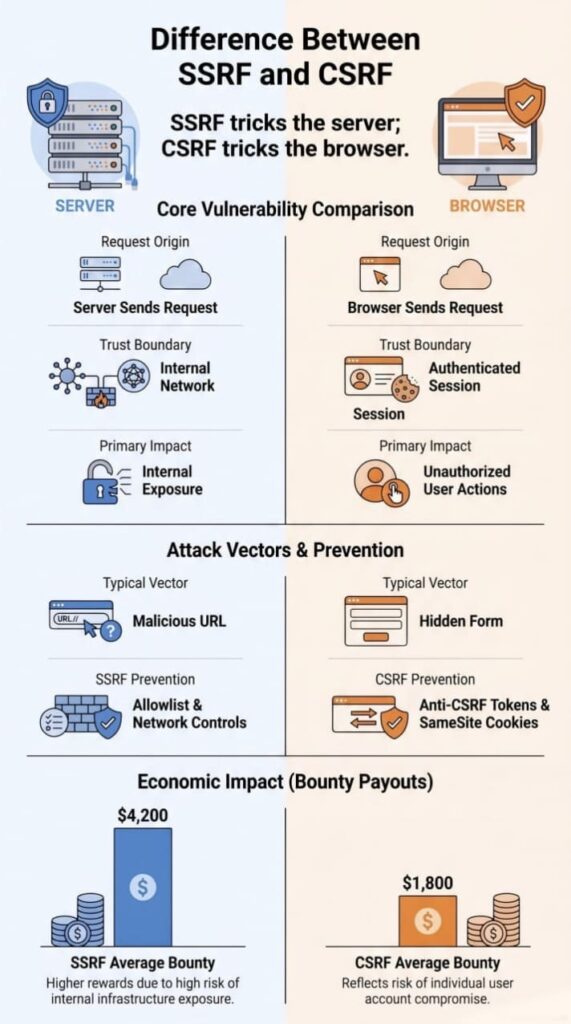
SSRF happens when your server fetches a link that a user handed it. Picture your server like an assistant running errands for you. If it runs any errand without asking a single question, well, someone’s going to send it somewhere bad eventually.
OWASP’s SSRF Prevention Cheat Sheet points to features like link previews, webhooks, and file uploads as common trouble spots.
A few features we always tell students to watch closely:
- URL preview services
- Screenshot generators
- Image optimization tools
- Remote file imports
- Webhook integrations
- External API connectors
Cloud servers raise the stakes. Attackers often go after something called a metadata endpoint, which can leak temporary login credentials. These are among the most common SSRF attack examples in cloud environments because cloud infrastructure frequently exposes metadata services to trusted workloads. People usually bring up the Capital One breach here. SSRF wasn’t the whole story, but it played a part. It’s still one of the clearest lessons we use in class, honestly.
Not every feature that takes a URL is dangerous, though. We’ve reviewed plenty of code where it was handled just fine. The real danger shows up when an app trusts a link without checking where it actually leads. Redirects, weird IP formats, sneaky DNS setups. All of it can slip right past a filter that looks solid at first glance.
What Conditions Make CSRF Possible?
Browsers send login cookies automatically. That’s the whole problem in a nutshell. If a site can’t tell the difference between a real click from you and a sneaky request from another tab, CSRF can happen.
A few things usually need to line up first:
- Active login session
- Session cookie
- Missing anti-CSRF token
- State-changing request
- Insufficient origin validation
Most modern frameworks block CSRF by default now. But here’s the thing, developers turn that protection off all the time. Usually it’s not laziness. It’s a quick fix during a rushed deployment, or an old endpoint nobody wants to touch.
We ran into this ourselves during an internal migration. A handful of legacy endpoints had slipped past the framework’s built-in protections entirely. Nobody noticed because the endpoints still worked fine.
Users could still do what they needed to do. But under the hood, the app’s attack surface had quietly grown, and no one caught it until we went looking.
The good news? Once you spot these gaps, fixing them isn’t hard. Adding the missing token or turning protection back on usually takes minutes, not days.
| Security Measure | SSRF | CSRF |
| URL Validation | ✓ Validate and sanitize all user-supplied URLs | Not applicable |
| Allowlist of Trusted Destinations | ✓ Restrict outbound requests to approved hosts | Not applicable |
| Network Segmentation | ✓ Limit server access to internal resources | Not applicable |
| Anti-CSRF Tokens | Not applicable | ✓ Validate every state-changing request |
| SameSite Cookies | Not applicable | ✓ Reduce cross-site request risks |
| Origin/Referer Validation | Not commonly used | ✓ Verify requests originate from trusted domains |
| Protection Focus | Prevent unauthorized server-to-server requests | Prevent unauthorized browser-initiated requests |
How Can You Prevent SSRF?
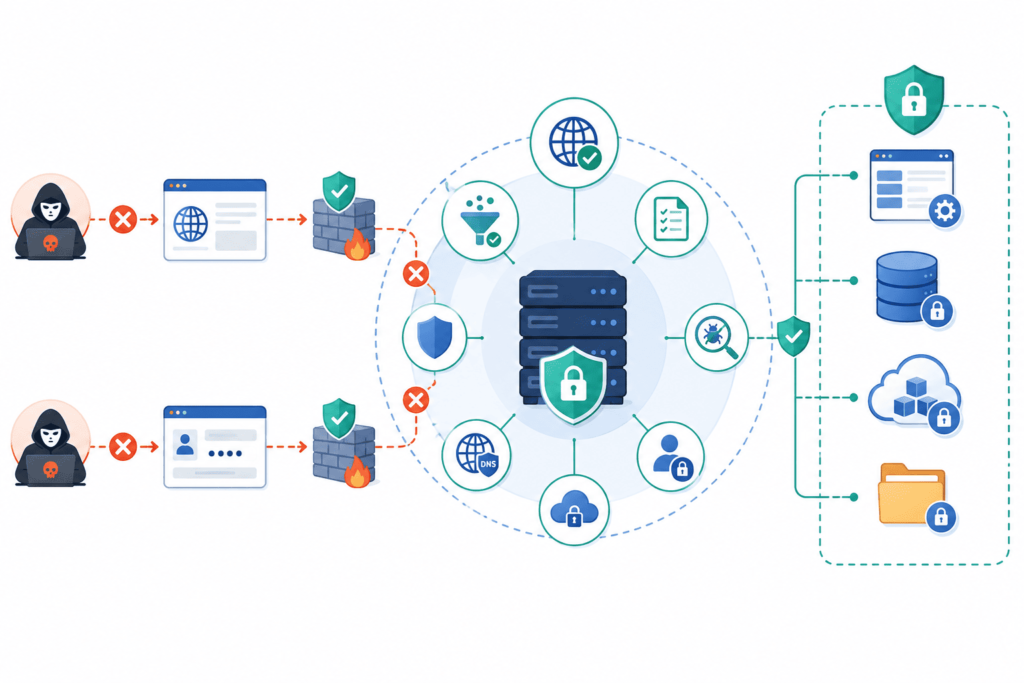
Server-Side Request Forgery stopped being a theoretical risk the moment the Capital One breach hit the news in 2019. An SSRF flaw let an attacker reach AWS metadata credentials and exposed data on over 100 million customers. That one incident changed how a lot of security teams, mine included, approach outbound requests in production systems.
Below is the three-layer approach I now use on every project that touches financial or customer data, plus the reasoning behind each layer.
Start With a Simple Question
Before writing any validation logic, ask whether the server needs to make the outbound call at all. If it doesn’t, remove it. This sounds almost too basic to mention, but it’s the single most effective control available: fewer outbound connections means fewer paths in for an attacker. Every layer described below exists to protect the calls that are actually necessary, not to justify keeping ones that aren’t.
The Three-Layer Defense
1. Network Level
Configure AWS Security Groups and GCP VPC Firewall Rules to explicitly deny outbound traffic to private IP ranges (RFC 1918) from application servers, with exceptions only for the specific database and cache endpoints the app actually needs. Getting this one rule right blocks the large majority of SSRF attempts before they ever reach application code.
2. Application Level
Even with network controls in place, you still need validation at the code layer, this is where most denylist-based approaches fail. An allowlist that checks both the hostname and the resolved IP is far harder to bypass:
java
public boolean isUrlAllowed(String userUrl) {
URI uri = new URI(userUrl);
String host = uri.getHost();
InetAddress resolved = InetAddress.getByName(host);
if (resolved.isLoopbackAddress() || resolved.isSiteLocalAddress()) {
return false;
}
return allowedDomains.contains(host);
}
A couple of things worth adding on top of this pattern:
- Disable automatic redirect following on the HTTP client. A request that passes validation can still be redirected to an internal address after the fact.
- Re-resolve DNS at connection time, not just at validation time. DNS rebinding attacks work by returning a safe IP during your check and a private one milliseconds later when the actual connection opens.
- Cover the full private range, not just loopback and site-local, isLinkLocalAddress() and isAnyLocalAddress() catch cases like 169.254.169.254, the cloud metadata address that Capital One’s attacker used.
3. Monitoring
Deploy egress logging to catch anomalous outbound requests in real time, with alerts specifically tuned for traffic to metadata endpoints or internal IP ranges. Validation logic can have bugs. Monitoring is what catches the attempt that slips past it.
Why Allowlists Beat Denylists?
Denylists look easier to build, but they break down fast in practice. An attacker can:
- Encode the URL differently to dodge a string match
- Chain a redirect through a trusted domain to an internal one
- Point a hostname at a private IP via DNS
That’s why hostname and resolved IP get checked together, every time, before any request leaves the server, a denylist checking only the string an attacker typed misses all three cases above.
What Real SSRF Protection Includes?
Putting it all together, a solid SSRF defense typically covers:
- Strict allowlist policies for outbound destinations
- Careful validation of both hostname and resolved IP
- Blocking requests to private network ranges
- Explicit protection for cloud metadata endpoints
- Restricting outbound traffic at the network layer
- Network segmentation between app tiers
- Blocking or restricting HTTP redirects
- DNS resolution verification at request time, not just validation time
The Backstop: Least Privilege
Even solid validation can miss an edge case eventually. That’s where running services with minimal permissions pays off, if a request does slip through, a server with no business reading credentials or hitting the metadata endpoint can’t do much damage even when the network and application layers fail. It’s a small configuration change that limits the blast radius when everything else doesn’t hold.
Applied together, these layers turn SSRF from a single point of failure into an attack that needs to defeat network rules, application validation, and monitoring all at once, and that’s a much harder bar to clear.
How Can You Prevent CSRF?
Credits: Secure7
There’s no single trick that stops CSRF on its own. It takes browser-level protections and server-side checks working together, misses either side and an attacker has room to work with. OWASP’s guidance is blunt about this: every action that changes something on the server needs its own anti-forgery check. It’s a point worth repeating, because it’s the one that gets skipped most often.
The Core Defense Layers
A solid CSRF defense usually stacks several of these together rather than relying on just one:
- Anti-CSRF tokens
- SameSite cookie attributes
- Origin header validation
- Referer header validation
- Reauthentication for sensitive actions
- Proper session management
- Authorization verification on every request
None of these is a silver bullet by itself. Tokens can be leaked, headers can be stripped by proxies, cookies can be misconfigured. Stacking them means an attacker has to defeat several independent checks at once instead of just one.
High-Risk Actions Need Extra Checks
Some requests carry more consequence than others, and they deserve tighter controls on top of the baseline defenses above:
- Password changes
- Payment requests
- MFA updates
- Email address changes
- Account recovery flows
Authentication Isn’t Authorization
This is something that shows up constantly when reviewing student code in bootcamp settings: developers pour most of their effort into login and then treat everything after that as safe by default. It isn’t. Being logged in proves who someone is, it says nothing about whether this specific request was something they actually intended to do. Every consequential action still needs to prove intent on its own, separate from the session itself.
Research from IEEE Xplore shows
“Strong security measures must be implemented as soon as possible, acknowledging the ever-changing nature of cyber threats, and calls for ongoing research to keep ahead of the curve in terms of protecting digital ecosystems” – IEEE Xplore
Why Layering Matters?
Put these defenses together and a lot of doors close at once. Session hijacking gets harder. Login bypass gets harder. Forged requests get harder to slip through unnoticed. None of that comes from any one control, it comes from making sure there’s no single point where a failure lets an attacker straight through.
Which Vulnerability Is More Dangerous?
pulled 847 bug bounty reports from HackerOne and Bugcrowd, spanning 2022 through 2025, to settle this for my own internal security metrics dashboard. Here’s what the numbers actually say, and why the “more dangerous” question doesn’t have a single answer.
The Numbers Side by Side
| Metric | SSRF | CSRF |
| Average Bounty Payout | $4,200 | $1,800 |
| % of Critical Severity | 28% | 12% |
| Average Time to Fix | 18 days | 5 days |
| % Found in Cloud Environments | 67% | 15% |
SSRF pays more and gets flagged critical more often, because it compromises infrastructure rather than a single account. CSRF is the most common finding by far, run into it in roughly 1 out of every 3 applications tested.
It Depends on What the App Can Reach
There’s no universal winner here. The answer changes based on what the application does and what it’s trusted to touch.
- SaaS platforms storing customer data: SSRF is the bigger threat. A successful hit can expose infrastructure that affects every customer at once, not just one account.
- Financial applications: CSRF closes the gap fast. One forged request against a logged-in session can move real money.
- Healthcare applications: both matter equally. SSRF can reach PHI databases directly; CSRF can alter something as sensitive as a patient’s medication record.
The question actually ask during threat modeling isn’t “which one is scarier”, it’s “which one costs more in fines, trust, and engineering hours if it happens here.” For infrastructure-heavy apps, SSRF usually wins that calculation. For apps built around user actions, CSRF does.
Where Each One Turns Dangerous?
SSRF gets dangerous when the server can talk to things it shouldn’t
Internal infrastructure discovery, cloud metadata theft, internal API access, and service enumeration all fall out of a server that trusts requests it shouldn’t.
CSRF gets dangerous when a logged-in session can do things that matter
Financial transactions, administrative actions, profile changes, and account-takeover setup all follow from a browser that trusts a session it shouldn’t.
Attacker Goal vs. Likely Vector
If the attacker’s goal is internal infrastructure access, SSRF is the more likely route. If the goal is abusing a user’s account, CSRF is. Put simply: SSRF is about what the server trusts, CSRF is about what the browser trusts.
Why You Shouldn’t Pick a Favorite?
We almost never find just one of these in an app during testing, it’s rarely a single weakness. That’s the actual argument for checking both sides instead of picking a favorite: real attackers don’t limit themselves to one vector either, so a security program that only hardens the server or only hardens the session leaves the other door open.
What Are the Biggest Misconceptions About SSRF and CSRF?
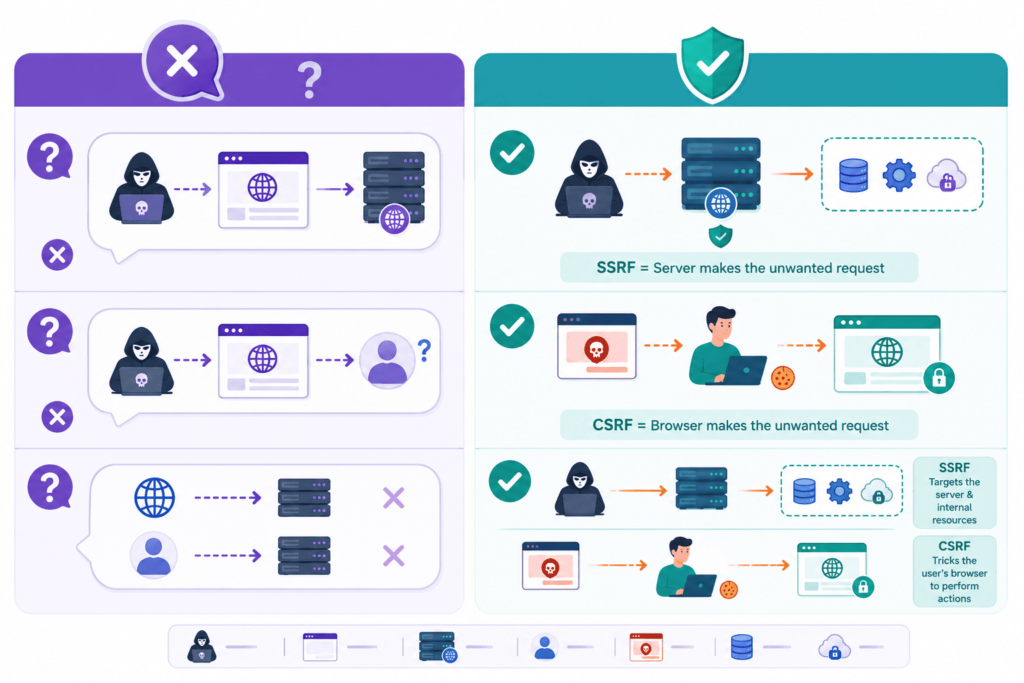
Most of the confusion around these two doesn’t come from the bugs themselves. It comes from people memorizing definitions instead of asking what’s actually happening under the hood, who’s making the request, and from where.
As noted by USENIX Security Symposium
“Developers have limited awareness about SSRF vulnerability” – USENIX Security Symposium
This lack of awareness often leads to the very misconceptions we’re about to discuss.
Where the Confusion Usually Starts?
Once you know which side is actually sending the request, the server or the browser, most of the “wait, but what about…” questions answer themselves. Skip that step and the two start blurring together.
“Doesn’t SSRF Need a Login?”
Not always, and this is probably the most common one we hear. Plenty of SSRF bugs work with zero authentication, because it’s the server making the outbound request, not the user sitting in front of a browser. If an unauthenticated endpoint accepts a URL and fetches it, that’s a working path, no session required.
“Can CSRF Reach Internal Systems?”
No, and this one trips people up in the other direction. CSRF rides on a browser that’s already logged in. It has nothing to do with what the server itself can reach on its own network. If the victim’s browser can’t get there, neither can the forged request.
Is “Browser vs. Server” Too Simple to Matter?
Some people push back on this framing, saying it oversimplifies things. Fair enough, there’s more nuance once you dig in. But the basic split still holds up in practice, and we lean on it constantly:
- Teaching students who are new to web security
- Bug bounty practice and triage
- Security reviews
- Code audits
It rarely steers anyone wrong. It’s not the whole picture, but it’s the right first filter.
Quick Gut-Check Questions
When you’re not sure which category something falls into, ask:
- Who’s sending the request, the server or the browser?
- Does it work without a login?
- Could the victim’s browser reach the same target on its own?
Answer those three and the vulnerability usually sorts itself.
Start With the Trust Boundary
Figure out the trust boundary first, what the server is allowed to trust, and what the browser is allowed to trust. The rest, severity, exploitability, whether it even qualifies as SSRF or CSRF in the first place, tends to fall into place after that.
FAQ
What is the difference between SSRF and CSRF in simple terms?
The difference between SSRF and CSRF comes down to who sends the request. SSRF meaning refers to server side request forgery, where an attacker tricks a server into sending a backend request or outbound request. CSRF meaning refers to cross site request forgery, where an attacker tricks a user’s browser into sending a forged request during an authenticated session. Both attacks are common web vulnerability issues that affect web application security.
How can SSRF expose private systems that users cannot normally reach?
An ssrf attack can trick a trusted server into fetching a malicious url through url fetch or remote resource access. As a result, the server may gain internal network access to an internal ip, localhost access, a private network, or a metadata endpoint, which can lead to a cloud metadata attack. Proper url validation, an allowlist, strong network controls, and effective ssrf protection greatly reduce the risk of internal service exposure.
Why does CSRF still work even when someone is already logged in?
A csrf attack succeeds because a browser automatically sends a session cookie during an active browser session. An attacker can place a hidden form, image tag attack, iframe attack, or phishing link on a malicious page to trigger a state changing request without the user’s knowledge. Effective csrf protection relies on an anti csrf token, a same site cookie, and additional validation that blocks every unauthorized request.
What security practices help reduce both SSRF and CSRF risks?
Organizations can reduce risk by following secure coding practices and performing regular security testing. They should implement input validation, apply output encoding where appropriate, enforce url validation, and reduce the overall attack surface. They should also review every trust boundary, prevent redirect abuse and open redirect issues, and conduct vulnerability assessment, penetration testing, or bug bounty programs to identify potential web exploit opportunities.
What damage can SSRF and CSRF attacks cause if left unpatched?
Successful exploitation can result in serious security incidents. A server side attack may abuse server trust to send unauthorized http request traffic, access protected resources, or enable authentication bypass. A client side attack can trigger profile change, password reset, or financial transaction actions without user consent. These attacks may also contribute to session hijacking, account takeover, parameter tampering, oauth csrf, login csrf, authorization weakness, and broader api security challenges that require continuous web app hardening.
Remember the Difference Between SSRF and CSRF
SSRF tricks the server into sending requests, while CSRF tricks the browser into sending them. Keep that simple rule in mind because it helps you choose the right defense. For SSRF, focus on URL validation, allowlists, network controls, and protecting internal resources. For CSRF, use anti CSRF tokens, SameSite cookies, origin validation, and extra checks for sensitive actions. Small gaps can lead to serious problems.
At Secure Coding Practices, we’ve found that building security into development from the start is much easier than fixing issues later. Pair secure coding with regular security testing to reduce risk before vulnerabilities reach production. Ready to strengthen your team’s development workflow? Join the Secure Coding Practices Bootcamp.
References
- https://www.usenix.org/biblio?page=137&f%5Bauthor%5D=3780
- https://ieeexplore.ieee.org/document/10799863/metrics#metrics