


Force browsing vulnerability examples show a critical authorization failure. You can’t just hide things and hope they stay safe. Imagine a raw config file left in a web root, returning a simple 200 status code. This isn’t a lab exercise. It happens when someone fiddles with a URL on a live system.
Fixing this isn’t complicated. It requires deliberate Secure Coding Practices. You must build applications that stop a curious or malicious user at the address bar. The path forward is clearer than you think. Keep reading.
Force Browsing Reality Check
Force browsing is when someone can see hidden pages or files they shouldn’t. The server just doesn’t check if they have permission. Hiding URLs may slow attackers down, but it won’t stop them. Only proper authorization checks can protect your resources.
- Force browsing is a symptom of missing server-side authorization checks, not a lack of clever hiding.
- Obfuscation, like using UUIDs, is not a security control; it merely slows down discovery.
- Every single request, for every single resource, must be validated for permissions.
Does Hiding the Admin Panel Actually Improve Security?
Hiding the admin panel doesn’t improve security. We’ve seen the comment in old code: “Admin panel, not linked from the main site.” That’s security through obscurity, and it’s brittle.
Attackers don’t follow links. Tools like dirb or ZAP’s forced browsing module brute-force common paths like /admin or /wp-admin. Sometimes, a curious user just types it in. If the server doesn’t check their role first, it’s over. The panel, with its power to modify everything, is wide open, enabling vertical privilege escalation.
As noted by OWASP
“When a web application does not properly enforce access control mechanisms, sensitive resources become exposed, allowing unauthenticated users to view them by directly requesting a different page via forced browsing.” – OWASP
Our training enforces a simple rule: you must check access on every request. We validate roles and permissions server-side, every single time.
- Validate user roles and permissions.
- Implement middleware for authorization.
- Never rely on the absence of a link.
It’s a foundational practice we drill into every developer.
How Do Predictable Paths Expose Deployment Leftovers?
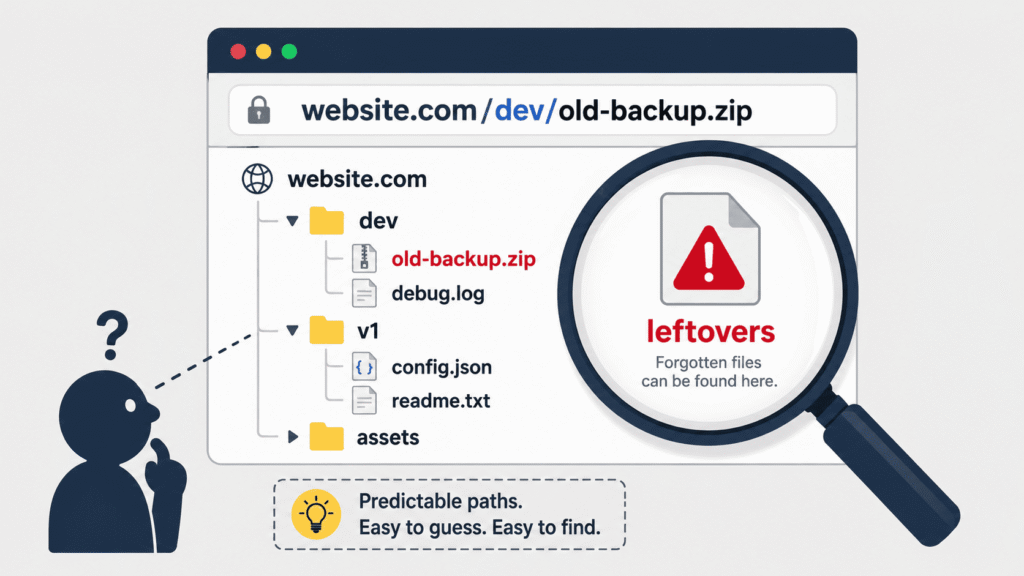
Predictable paths expose deployment leftovers like a haunting. It’s the .env file left in the public directory after a frantic deployment, or the database.backup.sql from last month’s migration. These files aren’t referenced by the app; they’re ghosts. But an automated forced browsing attack finds them by requesting /www.zip or /.env. The web server, configured to serve static files, happily obliges.
We’ve seen it happen. Suddenly, database credentials and source code are in the wild. That’s why we train developers to configure web servers to block sensitive extensions and keep web roots clean. Artifacts belong outside the publicly accessible space.
Our practice is discipline. We build scripts that scrub directories after deployment and use environment variables for configuration, never files in the webroot. The consequence of forgetting isn’t just a cleanup; it’s a headline.
Is Multi-Step Security Giving You a False Sense of Protection?
Credits: MassMutual
Multi-step security often gives a false sense of protection. Consider a checkout flow: cart, shipping, payment, confirmation. The logic is in the UI progression. But if a user types the direct URL /checkout/confirm, the backend might trust that reaching the page means the steps were followed. Without validating that payment was actually processed, an order could be confirmed for free.
This forced browsing bypasses business logic. It assumes the UI is the gatekeeper. The server must be the gatekeeper.
Research from Mid Sweden University
“A forced browsing vulnerability is not merely a static access control configuration issue but also a runtime problem involving insufficient enforcement of user navigation flow.” – Mid Sweden University
We implement server-side state tracking for sensitive workflows. Our code checks that prerequisite steps are complete before allowing the final action. We store workflow state in the session or database. The confirm endpoint verifies a payment_successful flag is true for that session. If not, it redirects or errors. The UI is a guide, not a guard.
Can Static Assets Become a Security Risk?
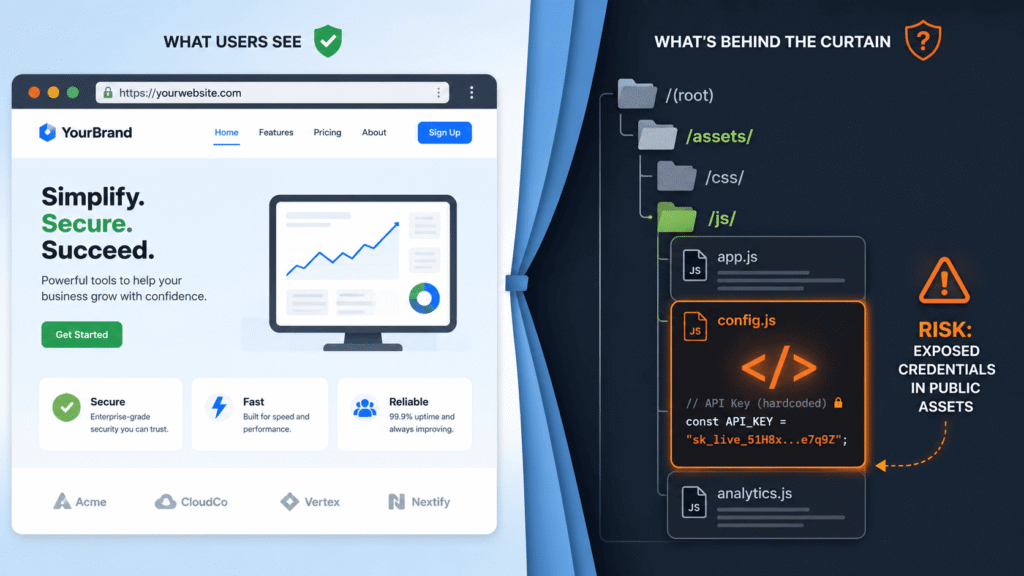
Static assets can absolutely become a security risk. A premium video site might protect its listing page, requiring a subscription. But the page embeds a player sourcing a file from /videos/premium/lecture_101.mp4. If a non-subscriber guesses that direct URL and the web server delivers the file without checking authorization, the entire paywall is bypassed.
We see this forced browsing attack exploit a disconnect between page logic and resource logic. The page is protected, but the file is not.
Our solution is to implement authenticated access to static assets. This means serving them through a controller or using pre-signed URLs, never directly from a public folder. We write a controller, like /serve/video/:id. It checks the user’s subscription first, then reads the file from a private storage location and streams it. The direct path is never exposed.
How Have APIs and SPAs Changed the Security Landscape?
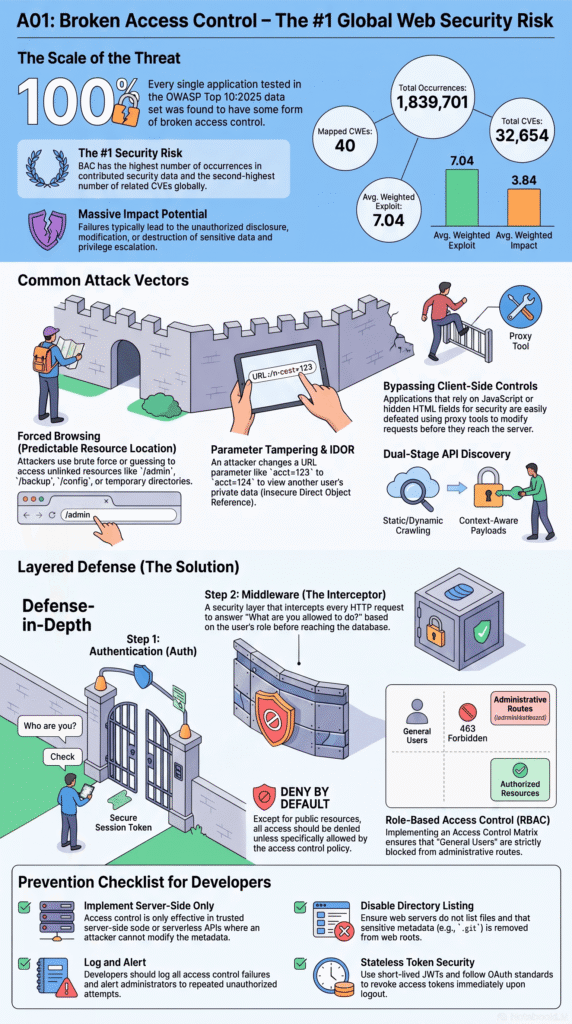
APIs and SPAs have fundamentally changed the security landscape. The old examples involved simple page requests, but today, forced browsing is primarily an API problem.
Your single-page application fetches user data from /api/users/me. But what about /api/users/? Does it list all users? What about /api/admin/stats? These endpoints exist on the server, even if they don’t appear in your frontend code. Automated tools now fuzz these API paths constantly.
We’ve seen shadow APIs forgotten endpoints from previous versions remain active and unprotected. The attack surface becomes the entire API schema, not just the pages your UI uses. Our approach requires inventorying every endpoint. We ensure every API route, even those not used by the frontend, has proper authorization middleware attached.
In a microservice world, this gets complex. Each service must enforce its own access controls; we can’t rely on the gateway alone.
We document our APIs rigorously. We audit network logs to find uncatalogued endpoints. We treat our API as a first-class security boundary. Every GET, POST, PUT, and DELETE is a door that needs a lock.
Can UUIDs Alone Protect Your Application?
Using UUIDs alone doesn’t protect your application. A common reflex is to replace predictable IDs like /invoice/50462 with something like /invoice/a3f8c7b0-2e4d-11ef-9e6a-0242ac1c0004. This is good; it makes blind enumeration harder. But it is not authorized.
If your endpoint doesn’t check that the authenticated user owns that specific invoice UUID, the vulnerability remains, just like many broken access control examples. An attacker could steal a valid UUID from a leaked email or guess one from a pattern. Obfuscation is not a security control. It’s just a layer that works alongside a real control: server-side ownership validation.
We use UUIDs, absolutely. But we pair them with rigorous checks. Our database query must include the user’s ID: SELECT * FROM invoices WHERE id = :uuid AND user_id = :current_user_id. No results? Return a 404.
We embrace this pattern everywhere. It shifts the mindset from “Is the URL guessable?” to “Does this user have permission for this specific resource?”. That’s also key to preventing horizontal privilege escalation.
| Method | Slows Discovery | Prevents Unauthorized Access |
| UUIDs | Yes | No |
| Server-side authorization | No | Yes |
FAQs
What makes force browsing different from a forced browsing attack?
Force browsing involves requesting resources directly. A forced browsing attack exploits this vulnerability. Attackers use direct URL access. Understanding the difference helps developers choose the right testing and prevention methods.
Why are predictable URLs still a security problem?
Attackers can exploit predictable URLs, resource locations, and file paths. This helps them guess paths, enumerate URLs, and find endpoints. Attackers can discover hidden routes, unlisted pages, and secret admin routes. They don’t need to exploit software flaws. Every resource still requires proper authorization, even if its location becomes known.
How can developers find hidden endpoints before attackers do?
During security testing, developers should review all unprotected and exposed endpoints. They should also look for predictable resource names. Techniques like hidden page discovery and directory enumeration are crucial. Static resource discovery, file, resource, and app route enumeration are also recommended. These activities help identify unnecessary exposure before attackers discover those resources.
Why doesn’t logging in prevent unauthorized page access?
Authentication verifies who a user is. It does not confirm what they can access. Missing authorization checks allow users to access restricted resources. This can happen through access control bypass, authorization bypass, or session bypass. Every request must include a server-side authorization check to prevent broken access control.
Which resources deserve extra attention during force browsing testing?
Developers need to check for several types of exposure. This includes privileged pages or admin panels. They should also test for vulnerabilities like Insecure Direct Object Reference (IDOR). Parameter tampering and direct object access are also important to test. Weaknesses in authentication and authorization must be addressed. Unauthorized content access is another risk. These issues can expose sensitive data through predictable or accessible URLs.
Secure Your Code Before Attackers Test It for You
A strong defense comes from treating every request as untrusted and every endpoint as something that must be protected. Security isn’t about hiding resources, it’s about enforcing access at every layer so mistakes don’t become breaches. If you want practical, hands-on training that helps you build secure software from day one, join the Secure Coding Practices Bootcamp and learn secure development through real coding exercises that you can apply immediately.
References
- https://owasp.org/www-project-web-security-testing-guide/latest/4-Web_Application_Security_Testing/05-Authorization_Testing/02-Testing_for_Bypassing_Authorization_Schema
- https://miun.diva-portal.org/smash/get/diva2:1996836/FULLTEXT01.pdf#4#2