
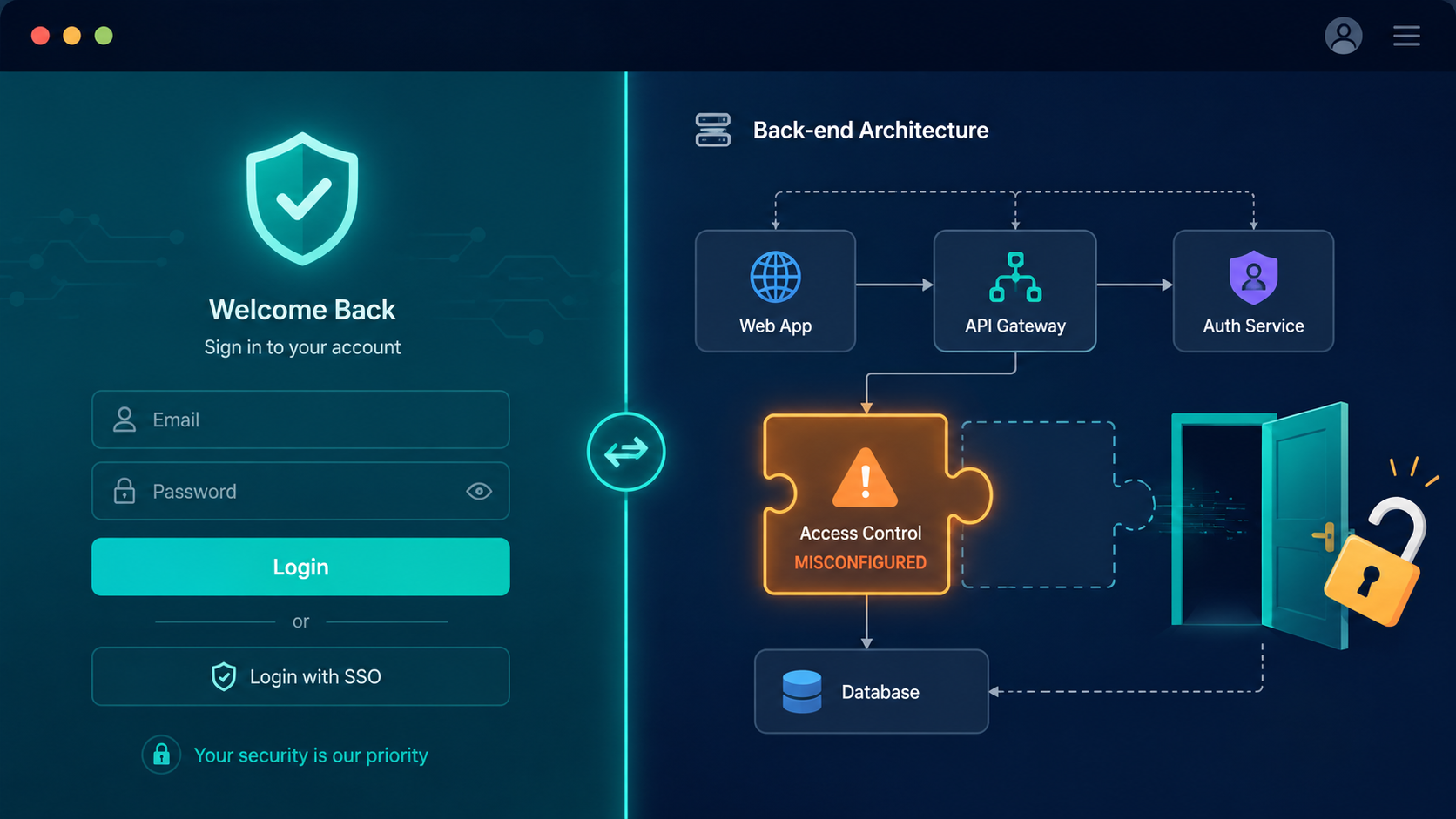

Access control mistakes are one of the easiest ways attackers gain unauthorized access to applications. Many vulnerabilities happen because permissions are checked inconsistently or only on the frontend.
Understanding common access control misconfiguration examples helps developers identify weak points before they become security incidents. With the right security practices and continuous monitoring from Secure Coding Practice, organizations can spot suspicious activity early and strengthen application defenses. Keep reading.
The Biggest Lessons to Remember
Even small permission mistakes can create major security risks. Here are the most important lessons from this guide.
- Broken Object Level Authorization (BOLA) lets users access any data record by tampering with an ID.
- Missing function-level checks allow hidden admin panels or APIs to be reached by regular users.
- A secure-by-design approach, starting with principle of least privilege, prevents these flaws from being written.
Why Your “Secure” Application Isn’t?
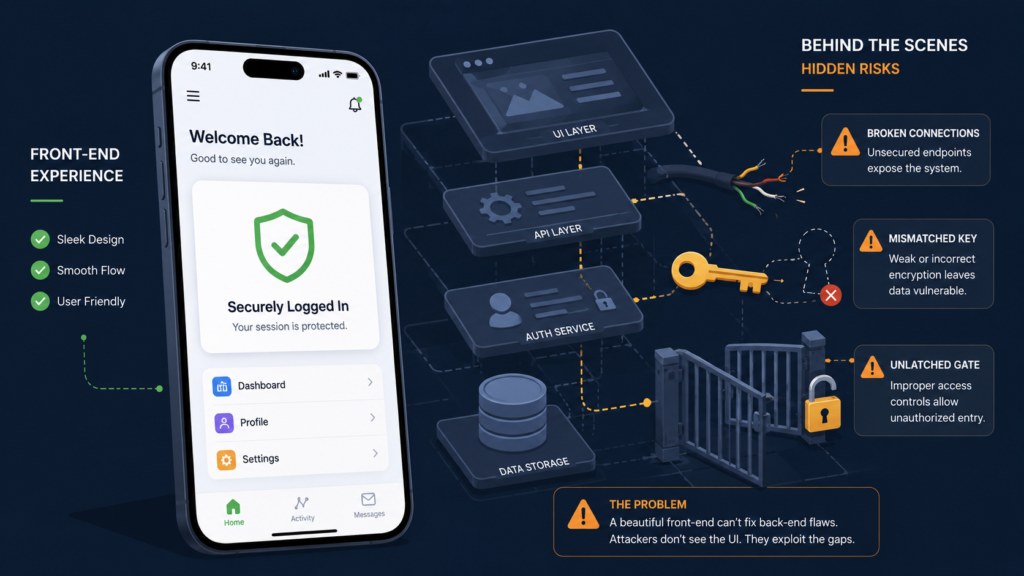
You build a feature, say a user profile page. The route is /profile/{userId}. You put a nice “Access Denied” message on the frontend if someone tries to visit another user’s ID. You ship it. It feels solid. The problem is, you only checked permissions in the browser.
The backend API endpoint, the one that actually fetches the user data for that page, just takes the userId from the request and returns the data. Reviewing real-world broken access control examples highlights how frequently these vulnerabilities occur when systems trust raw browser data.
Common BOLA attack vectors include:
- Modifying IDs in URL parameters (/api/invoice/101 to /api/invoice/102).
- Changing IDs in JSON request bodies.
- Tampering with encoded or hashed IDs that can be decoded.
The fix isn’t a single line. It’s a mindset. Every single request that involves an object identifier must have a server-side check: “Is the currently authenticated user allowed to access this specific object?” You have to query the database with the user’s context.
“Common failures include endpoints that omit role checks entirely, authorization logic trusting client-supplied parameters, overly broad default permissions, and identifier tampering (BOLA) to bypass intended restrictions. These lapses allow attackers to sidestep intended controls, modify or delete protected resources, and disrupt critical business workflows.” – OWASP
SELECT * FROM invoices WHERE id = :invoiceId AND user_id = :currentUserId. If that AND clause is missing, you have BOLA. It’s that straightforward, and that easy to miss during a hectic sprint.
When the Admin Panel Is Just a URL Away?
Think about your admin controllers. How do you protect them? A [Authorize(Roles = “Admin”)] attribute at the top? That’s good. But what about the administrative function baked into the regular UserController, like DeleteUserAccount? Is it on a menu only admins see? That’s the frontend.
The backend must check the role again. Missing function-level access control is when those server-side checks are absent. This often happens with legacy APIs, or when new, powerful endpoints are added to existing controllers without updating the authorization logic.
When standard users bypass restrictions to reach administrative endpoints, this form of vertical privilege escalation leaves the entire underlying network open to deeper compromise.
You must enforce authorization on every function.
- Apply role-based checks at the controller and method level.
- For complex permissions, use a centralized access control service the business logic calls.
- Never rely on obfuscation (hidden URLs, “secret” parameters) as a security control.
The Default Setting That Grants Too Much Power
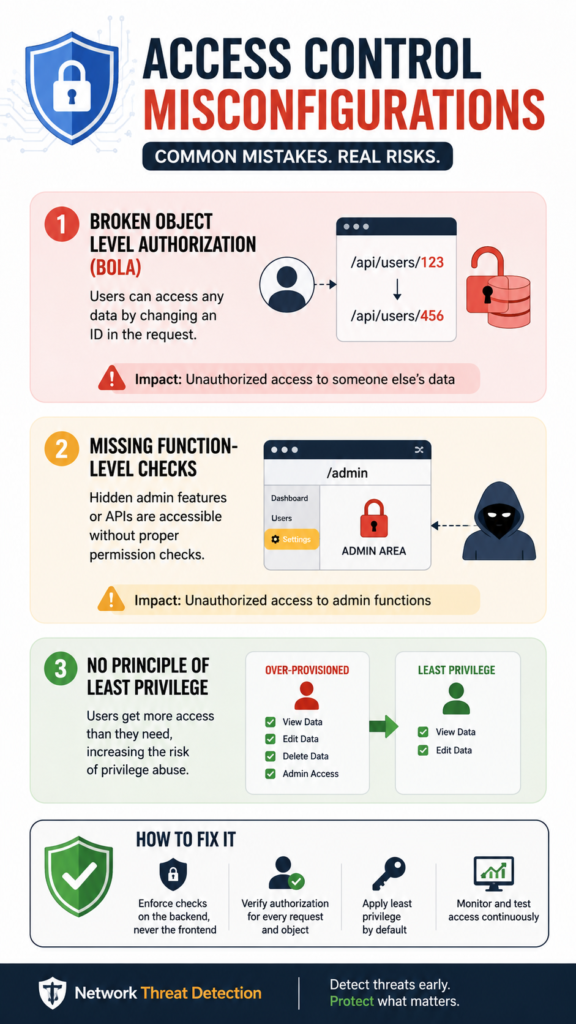
Modern frameworks and cloud services are amazing for productivity. They also come with shockingly permissive defaults. A new S3 bucket is often private. A new database user for your app might have ALL PRIVILEGES on its schema during development. Does that get trimmed back to SELECT, INSERT, UPDATE before production? Often, it doesn’t.
This extends to software. A popular content management system might default new user registration to “Subscriber.” But what if a plugin adds a new “Moderator” role, and that role is accidentally set as the default? You’ve just privilege-escalated every new sign-up. These aren’t code bugs in your application, they’re configuration flaws in its environment.
A quick audit can catch these:
- Review cloud IAM policies and S3 bucket ACLs.
- Check database user grants and API key permissions.
- Verify default user roles in application settings after any new module install.
Your First Line of Defense Isn’t a Firewall
All these examples point to one solution, and it’s not a web application firewall (though those help). It’s how you write code from the first keystroke. We call them secure coding practices, but that makes it sound optional. It’s just coding. It means designing the authorization model before you write the route. It means your data access layer automatically filters queries by the current user’s context.
Strategically scoping your application rules is the most reliable method for preventing horizontal privilege escalation and stopping users from messing with peers’ data.
It means your data access layer automatically filters queries by the current user’s context. It means writing tests, not just unit tests for functionality, but security tests that simulate attackers. Can a user with ID 123 access the profile for ID 456? Your test suite should have a test for that, and it should fail if the answer is “yes.”
This approach flips the script. Instead of bolting on security later, you build a system where the easiest way to code a feature is the secure way. The framework nudges you towards safe patterns.
We’ve found that when you bake the permission check into the standard getById() method of your data service, developers literally can’t write the insecure version without extra work. They have to actively bypass the safety mechanism. That’s the goal.
Start here:
- Implement a standard “ownership check” pattern all developers use.
- Use middleware or interceptors to validate permissions before requests hit business logic.
- Make authorization failure logs a critical monitoring alert.
A Practical Table of Mistakes and Immediate Fixes
Credits: Rana Khalil
It helps to see the flaw and the correction side-by-side. The table below isn’t exhaustive, but it covers the critical, common patterns.
| Misconfiguration Example (The Flaw) | The Immediate Fix | The Long-Term Practice |
| Backend API trusts user-supplied ID without an ownership check. | Add a server-side check matching the object’s owner to the current user. | Implement a data access layer that automatically scopes queries by user context. |
| Administrative function lacks a server-side role check. | Add a mandatory authorization decorator (e.g., @PreAuthorize(“hasRole(‘ADMIN’)”)) to the method. | Use a centralized policy service (e.g., policy.can(user, “delete”, account)). |
| Cloud storage (e.g., S3) bucket has “Authenticated Users” read/write access. | Change bucket policy to grant access only to specific, least-privilege IAM roles. | Define infrastructure-as-code templates that enforce secure defaults for all new resources. |
| JWT tokens contain sensitive data (e.g., isAdmin: true) trusted without validation. | Validate token signature and permissions on the server; store only a minimal user identifier. | Use a dedicated authorization service (like OAuth) to issue and introspect tokens. |
How to Build a Wall, Not Just a Gate?
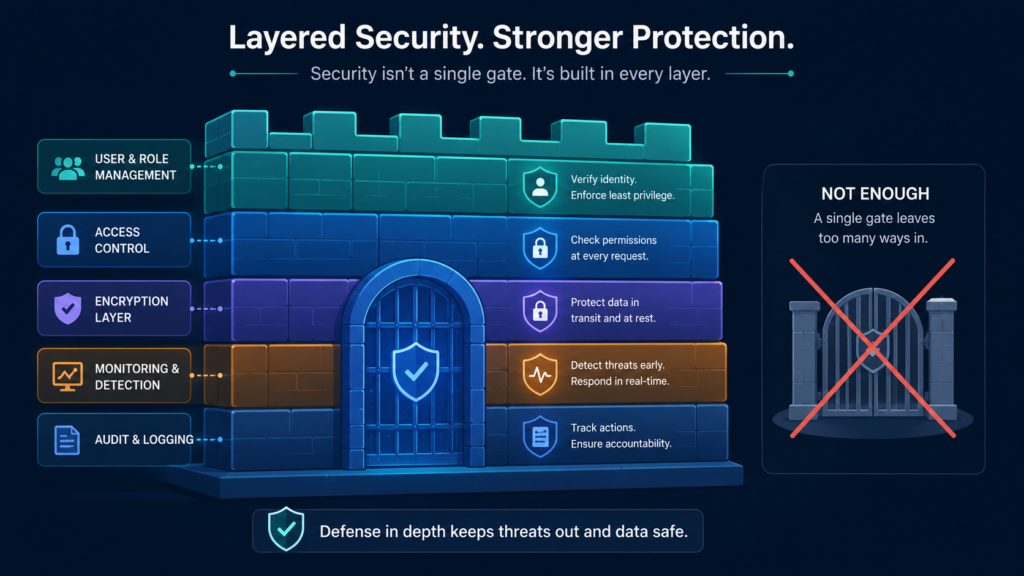
So where do you go after plugging these immediate holes? You change the development lifecycle. Security isn’t a final review step, it’s part of the definition of “done.” For every story that involves user data or privileged actions, the acceptance criteria must include the authorization test case.
“Given I am a regular user, when I call the API for another user’s data, then I receive a 403 Forbidden.” Make it part of the work, not an extra chore.
“Adopt a deny-by-default mentality both during initial development and whenever new functionality or resources are exposed by the app. One should be able to explicitly justify why a specific permission was granted to a particular user or group rather than assuming access to be the default position.” – OWASP
This also means investing in tools that scan for these misconfigurations automatically. Static Application Security Testing (SAST) tools can find missing authorization attributes in code.
Dynamic Application Security Testing (DAST) tools and regular penetration tests can probe your running application for BOLA and other access flaws. Use them in your CI/CD pipeline. Let the machine catch the simple stuff so you can focus on the complex business logic.
FAQ
What’s the most common access control misconfiguration?
Hands down, it’s Broken Object Level Authorization (BOLA). Developers consistently forget to add the server-side check that validates a user owns the specific data object they’re requesting. They rely on the frontend to hide the buttons and links, but the backend API remains wide open.
Can a Web Application Firewall (WAF) stop these attacks?
A WAF can help block some automated, pattern-based attacks, but it cannot understand your application’s business logic. It won’t know if userId=101 should be allowed to see invoiceId=205. Logical flaws like BOLA require fixes in the application code itself, not just network-layer filtering.
How do I test for function-level access control issues?
Use two authenticated sessions: one as a regular user and one as an admin. With the regular user’s credentials, try to directly access every administrative API endpoint (you can find these by reviewing code or using a crawler). Any successful request from the non-admin account indicates a missing function-level check.
Are these misconfigurations only a problem for custom code?
No, they are rampant in off-the-shelf software too. CMS plugins, SaaS platforms, and open-source projects frequently have vulnerabilities where default configurations are too permissive or where new features introduce access control gaps. Always review and harden permissions in any software you deploy.
Turning Awareness Into Architecture
Treating access control as an after-thought leaves systems vulnerable. Security shouldn’t rely on patches; it requires architecture where data layers inherently carry user context and frameworks enforce defaults.
Make insecure coding the hard path. Check your sensitive endpoints today: what happens if an ID changes? Actively expose blind spots and map vulnerabilities before attackers do. Ready to design defensively? Build sound walls and proactively secure your environment by checking out Secure Coding Practice.
References
- https://owasp.org/www-project-top-10-for-business-logic-abuse/docs/the-top-10/broken-access-control.html
- https://cheatsheetseries.owasp.org/cheatsheets/Authorization_Cheat_Sheet