


Content Security Policy Prevent XSS by restricting script execution in the browser. A strict CSP helps stop modern XSS attacks and improves web application security through safe configuration.
Content Security Policy Prevents XSS by controlling which scripts a browser is allowed to execute. It reduces the impact of XSS attacks by blocking unauthorized code, even if an attacker injects it into the application. CSP acts as a browser-enforced security layer that complements secure coding practices such as input validation and output encoding. Think of CSP as a final guardrail. It doesn’t replace secure coding, but it significantly reduces the damage a successful XSS attack can do. For a deeper look at how to implement it effectively, keep reading.
The Three CSP Rules That Matter Most
When configured correctly, these CSP practices dramatically reduce the risk of successful XSS attacks in modern web applications.
- Enforce a Zero-Trust Posture: A CSP shifts the browser from trusting all server content to executing only explicitly allowlisted resources, neutralizing most injected scripts.
- Eliminate Inline Execution: By banning inline scripts and event handlers, CSP attacks the most common delivery method for reflected and stored XSS payloads.
- Adopt a Strict, Nonce-Based Policy: Modern best practice uses cryptographic nonces and the strict-dynamic directive instead of maintaining brittle domain allowlists.
How a CSP Weaponizes the Browser
The system is simple. We send a web header. The browser reads it and follows our rules. We stop XSS with three rules..
First, we restrict script sources. We create an allowlist. An injected script from an evil domain gets checked and blocked. The request never leaves the client.
Second, it blocks inline scripts. A restrictive script-src policy can block inline scripts and many inline event-handler payloads, including onerror. Most common XSS payloads use inline HTML and many DOM-based XSS attack vectors depend on executing JavaScript in the browser, so this alone raises the barrier.
Third, it prevents dynamic code execution. Functions like eval() are disabled. This closes a tricky backdoor for attackers.
The Directives That Form Your Shield

Not every directive matters equally for stopping XSS. You need to know which levers to pull.
The default-src directive acts as a fallback. We use it to set a conservative baseline, like ‘self’. The script-src directive is your main defense, controlling all JavaScript execution.
Then there’s object-src. Set object-src to none. This stops old plugins like Flash. Attackers can use them to break sites. This rule is simple and safe.
Finally, base-uri restricts the <base> tag. This prevents attackers from hijacking relative URLs on your page.
The Problem with Simple Allowlists
For years, the standard advice was to list your trusted domains. Something like script-src ‘self’ https://apis.google.com. It seems logical, but we’ve found it’s fragile.
“A Google study found that many real-world CSP policies contained bypasses, which is why modern guidance prefers nonce- or hash-based strict policies over brittle allowlists..” – Google Research
Consider an open redirect on one of your trusted domains. An attacker uses it. The script loads from that approved source, passes the CSP check, and executes. Your policy is bypassed because you trusted a domain, not the specific code.
Third-party dependencies make this worse. A library from a trusted CDN might have a vulnerability, or its supply chain could be compromised. Your allowlist says the domain is okay, so any malicious code runs. We’ve seen teams struggle to maintain these lists; it becomes a chore, and any mistake opens a hole.
This model, which only cares about where code comes from, is fundamentally less secure than one that validates the code itself.
A Better Way: Nonces and Hashes
Modern CSP provides stronger tools than allowlists. The main one is the cryptographic nonce, a “number used once.”
Our server generates a random string for each page request. We put it in the CSP header and add it as an attribute to every legitimate inline script.
Content-Security-Policy: script-src ‘nonce-r4nd0m123’
<script nonce=”r4nd0m123″>// Legitimate code</script>
| Feature | Nonce | Hash |
| Best For | Dynamic scripts | Static scripts |
| Generated | Per request | Per script version |
| Maintenance | Low | Requires hash updates when code changes |
| Security Model | Trusts approved script tags | Trusts approved script content |
This validates the code itself, not just its origin.
Building a “Strict” CSP
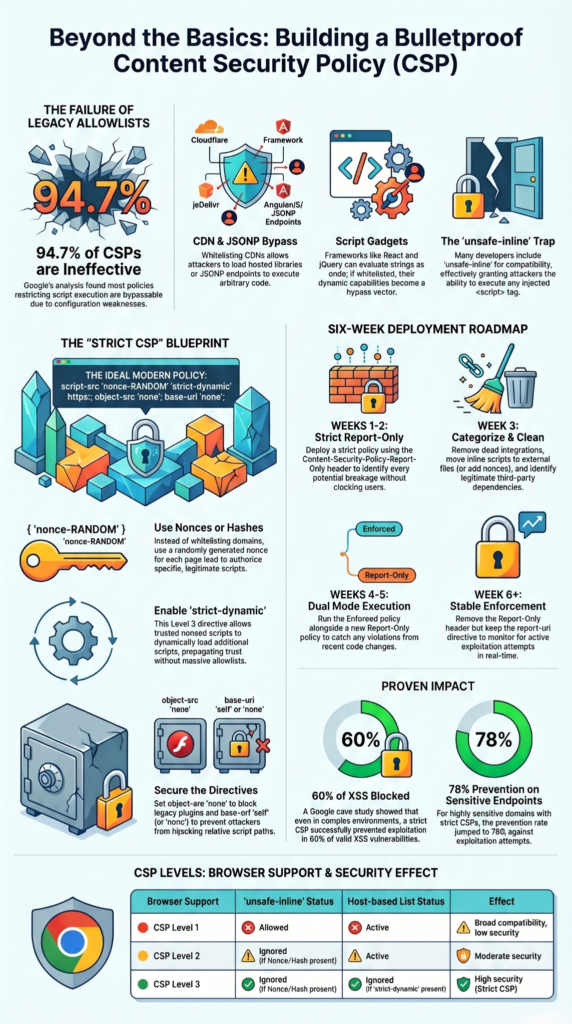
The current best practice, backed by major security teams, is a Strict CSP. It relies on nonces and the strict-dynamic directive. A typical policy looks like this:
script-src ‘nonce-r4nd0m123’ ‘strict-dynamic’;
object-src ‘none’;
base-uri ‘self’;
The ‘strict-dynamic’ keyword is key. It tells the browser to trust scripts that are loaded by an already-trusted script. This works perfectly with modern JavaScript frameworks that load their bundles dynamically.
Some deployments include legacy fallbacks for older browsers, but those fallbacks should be used cautiously because they can weaken the policy
This approach gives us strong security where it’s supported, without breaking the experience for older clients. It’s the model we recommend and implement.
Deployment is a Process, Not a Flip Switch
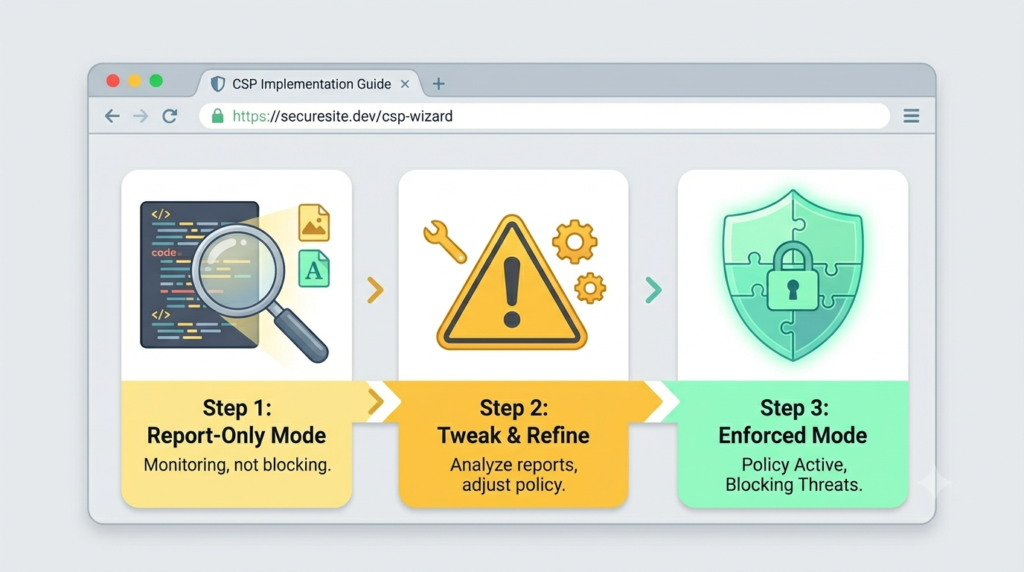
Turning on a strict CSP in blocking mode for a live site will break things. We’ve learned this the hard way. The safe path is to use Report-Only mode first.
You deploy the header as Content-Security-Policy-Report-Only. The browser evaluates the policy, logs every violation, but doesn’t actually block anything. These detailed reports get sent to an endpoint you specify.
You’ll get a flood of data initially. Browser extensions trying to inject styles, old analytics snippets, a forgotten inline script from 2018 it all shows up. We analyze these reports, adjust the policy, and apply appropriate XSS mitigation techniques. Only when the violation stream runs dry do we switch to the enforcing header.
This iterative process stops us from accidentally denying critical resources to users. You can’t skip it.
The “Unsafe” Trap
When you’re dealing with a legacy system full of inline scripts, it’s tempting to just add ‘unsafe-inline’ to your script-src directive. Our advice is simple: don’t do it.
“Using the ‘unsafe-inline’ directive means a website does not provide an adequate level of protection against XSS attacks.” – International Journal of Engineering and Computer Science
This directive significantly weakens the main XSS protection CSP provides. The same goes for ‘unsafe-eval’. These are escape hatches. We might use them temporarily during a migration to a proper nonce-based setup, but that’s it.
Using them permanently means your CSP provides a false sense of security. It might stop some remote script loads, but the most common attack vectors inline scripts and dynamic execution remain wide open. Your policy becomes a checklist item, not a real defense.
Where CSP’s Armor Has Gaps
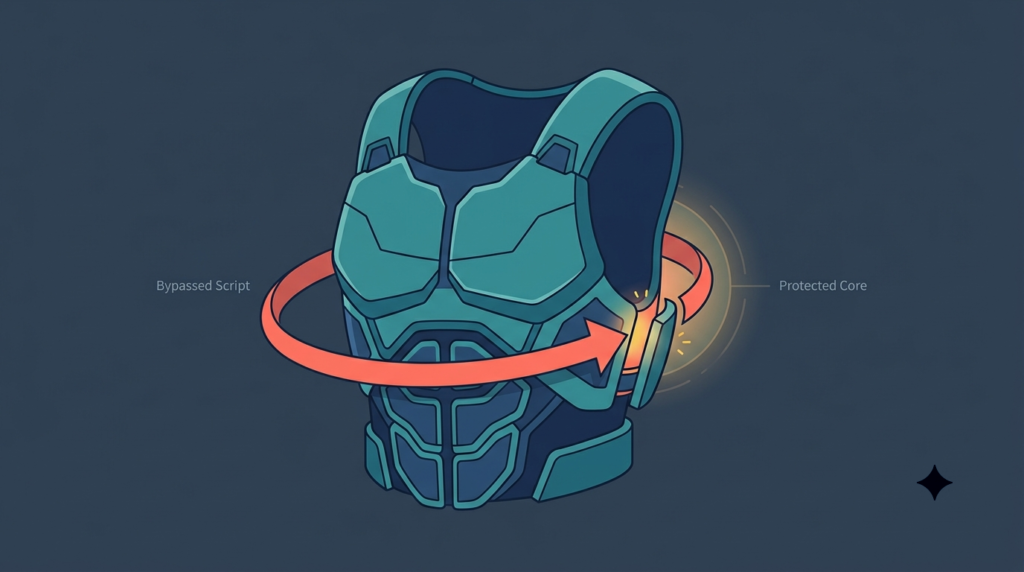
CSP is powerful, but it’s not a silver bullet. It can’t fix bad site code. If your site writes an unescaped URL parameter directly into the DOM, CSP may not stop the attack by itself. The browser sees it as trusted content. Secure coding output encoding and input validation must come first. CSP is the safety net.
Attackers pivot. If script-src is locked down, they might inject a malicious <form> to steal data. This is why directives like form-action also matter.
Other gaps exist. Static hosting platforms can restrict custom headers. Third-party widgets often demand flexible policies that weaken your stance. Organizations that consistently prevent XSS vulnerabilities through secure coding practices are less likely to depend on browser protections alone. You have to balance security with functionality.
Tools for the Job
Credits: Daniel Knott
You don’t have to craft these policies by hand. Use the right tools.
Google’s CSP Evaluator is fantastic for analyzing a header. It spots weaknesses and misconfigurations we might miss. Your browser’s developer console is also essential; it shows CSP violations in real-time during testing.
For handling reports, you can start with a simple logging endpoint. Many teams eventually use a service to aggregate and analyze violation data. These tools take the guesswork out of building and maintaining a strong policy. They turn a complex security task into a manageable process.
FAQs
How does a content security policy improve XSS prevention?
A content security policy improves XSS prevention by restricting script execution to approved sources. This browser-enforced policy blocks unauthorized scripts even when attackers inject code.
Which CSP directives help stop malicious script execution?
The script-src directive controls which scripts can run. Nonce-based CSP, SHA-256 hash CSP, and unsafe-inline prevention block unauthorized inline and dynamic script execution.
Can a CSP header protect against different XSS attack types?
Yes. A properly configured CSP header reduces the risk of reflected XSS, stored XSS, and DOM-based XSS attacks by limiting how browsers execute scripts.
Why are CSP violation reports useful for security teams?
A CSP violation report shows which resources browsers block. The report-uri directive or report-to endpoint helps teams identify policy gaps and suspicious activity.
What should I review before deploying a CSP configuration?
Before deployment, review trusted sources declaration, resource loading restrictions, third-party domain blocking rules, and CSP security best practices to minimize configuration errors.
Strengthening Your Security Posture Against XSS
XSS attacks can expose applications and users to serious risks when a single weakness allows malicious code to run in the browser. A strong Content Security Policy helps reduce that risk by adding protection where attacks often happen. Combined with secure coding practices such as input validation and output encoding, it creates a more reliable defense against common threats.
For teams that want to strengthen their skills, the Secure Coding Practices Bootcamp offers hands-on training built around real development challenges. It helps developers identify vulnerabilities earlier, apply secure coding techniques effectively, and build safer software with confidence everyday work.
References
- https://research.google.com/pubs/pub45542.html?authuser=0000&hl=pt-br
- https://www.ijecs.in/index.php/ijecs/article/view/4948
Related articles
- https://securecodingpractices.com/dom-based-xss-attack-vectors/
- https://securecodingpractices.com/how-to-prevent-xss-vulnerabilities-in-web-application/
- https://securecodingpractices.com/xss-mitigation-techniques-for-developers/
`