


How to prevent XSS vulnerabilities in web applications using output encoding, Content Security Policy, input validation, and sanitization. Learn the layered defenses that stop malicious scripts.
How to prevent XSS vulnerabilities in web applications is a question every development team should understand. You stop XSS by treating all user data as hostile. Never trust it. Your main job is to make sure any external input is displayed only as plain text, never as code that can run. The key technique is output encoding. Support it with a strong Content Security Policy and rigorous input validation. If you want your applications to be safe from malicious scripts, the next section shows how these defenses combine.
Your XSS Defense Cheat Sheet
A strong XSS defense relies on multiple layers working together, from safe coding practices to browser-enforced protections. Keep these essentials in mind:
- Encode data based on where it’s used. HTML, JavaScript, and URLs each need their own specific type of encoding to be safe.
- Use a Content Security Policy (CSP) as a safety net. It stops scripts from running even if your other defenses have a flaw.
- Never use innerHTML for untrusted data. It’s a direct pipeline for DOM-based XSS attacks.
These core principles form the foundation of how to prevent XSS vulnerabilities in web applications and should be applied consistently across every project.
How to Prevent XSS Vulnerabilities in Web Applications
Cross-site scripting happens when a browser mistakes your user’s data for your own instructions. In our ten years of fixing code leaks, we see this daily: a coder takes input from a form, a URL, or a database and drops it straight onto a page. We have watched real hacks happen just from this one step.
The attack comes in a few forms, but they all start from that same basic mistake. For example, the difference between stored and reflected XSS affects how broadly an attack spreads and how long the malicious payload remains active.
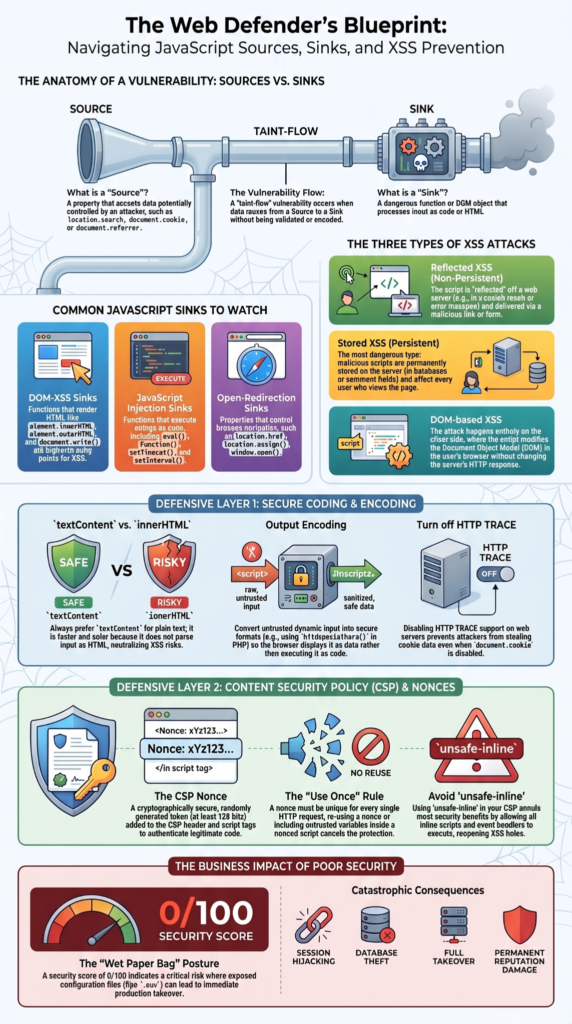
- Reflected XSS: The malicious code rides in on a single HTTP request, like a crafted search query, and is immediately reflected back in the page.
- Stored XSS: The script gets planted in a database, a comment or profile field, and lies in wait, served to every user who visits that page later.
- DOM-based XSS: Here, the flaw is in the client-side JavaScript itself. The code manipulates the page’s structure directly in an unsafe way.
In our courses, we drill this home: untrusted data must never be executed as code. It’s such a common, easy error that XSS has been a staple of the OWASP Top 10 for over a decade. The browser is just doing its job; the mistake is ours.
Why Context-Aware Output Encoding Prevents XSS
Your best defense against XSS is to keep data from becoming code. This is what output encoding does. It changes characters like < and & into a safe format, but the crucial part is picking the right format for where the data will go. You can’t use the same encoding for a URL that you’d use inside an HTML tag.
As noted by OWASP Wiki
“Even if you use an HTML entity encoding method everywhere, you are still most likely vulnerable to XSS. You MUST use the escape syntax for the part of the HTML document you’re putting untrusted data into.” – OWASP Wiki
We teach it like handling dangerous goods. You package a corrosive liquid differently from a flammable gas. For web code, you need specific rules for each context.
Encoding Requirements by Context:
| Context | Example Location | Recommended Protection | Common Mistake |
| HTML Body | <p>User data</p> | HTML entity encoding | Rendering raw user input |
| HTML Attribute | value=”data” | Attribute encoding | Failing to escape quotes |
| JavaScript | <script>var x = data;</script> | JSON serialization or JS escaping | Using HTML encoding instead |
| URL Parameters | href=”?q=data” | URL encoding (encodeURIComponent) | Concatenating untrusted input directly into URLs |
Students often ask why one encoding doesn’t fit all. The reason is that each context has its own parser. An apostrophe needs escaping in an HTML attribute, but not necessarily in a URL. Get this wrong, and your encoding does nothing.
How to Prevent XSS Vulnerabilities in Web Applications Beyond Framework Defaults
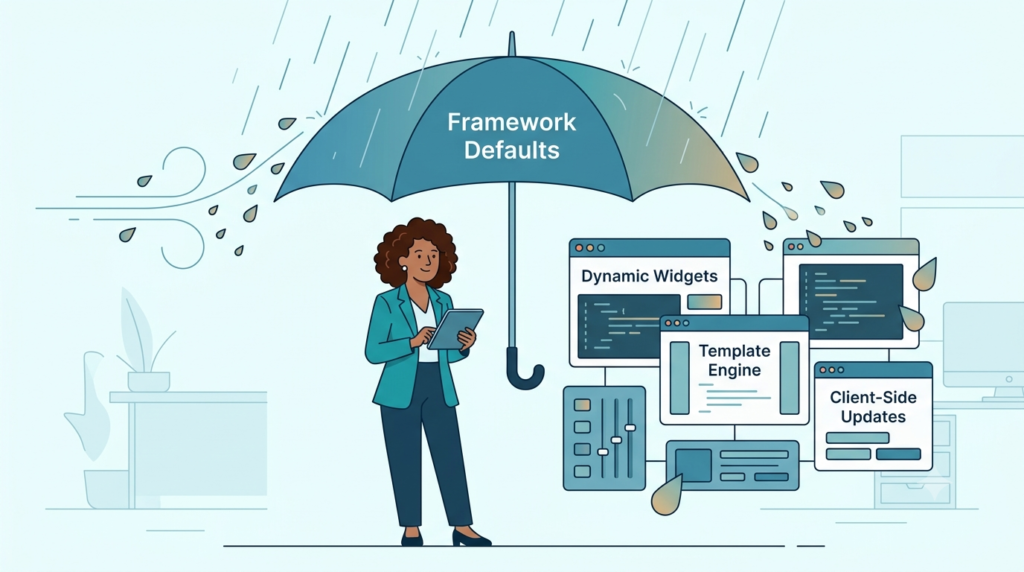
Frameworks like React and Vue will auto-escape your data, and that’s a great start. But in our bootcamp labs, we watch students hit the same wall: thinking the framework solved XSS for them. It didn’t.
The danger starts when you use the escape hatches dangerouslySetInnerHTML in React, v-html in Vue. These exist for when you know the HTML is clean. The problem is you can’t always trust that knowledge. A future code change or a third-party library can taint that data, and you’ve just disabled the main safety net.
We also stress that framework escaping only covers the first render. If your app later fetches new data via an API and slams it into the DOM with .innerHTML, the framework’s initial work is irrelevant. You’re back to manually encoding everything. The framework is a helper, not a replacement for your own vigilance.
The innerHTML Trap and DOM-Based XSS
Credits: WPDev
It’s easy to get this wrong. A developer fetches data from an API and needs to update the page. The quickest way is element.innerHTML = apiData. That single line is often a direct vulnerability because many DOM-based XSS attack vectors rely on unsafe DOM updates to execute malicious code in the browser.
If apiData contains something like <img src=x onerror=”stealCookies()”>, the script executes immediately upon insertion. This is DOM-based XSS, and it bypasses any server-side checks you’ve put in place.
We always tell our students: use textContent instead. It sets plain text, and the browser will never parse it as HTML. For building actual page structure, create nodes manually with document.createElement() and appendChild(). It’s a few more lines, but it’s explicit. The browser isn’t left guessing whether a string contains instructions.
If you truly must handle raw HTML from an outside source, maybe a rich text editor doesn’t try to filter it yourself. Use a dedicated sanitizer like DOMPurify on the client side before it touches the DOM. It’s built to strip out the dangerous parts while keeping safe formatting intact.
How Content Security Policy Strengthens XSS Protection
Even with perfect encoding, mistakes happen. A library you use might have a flaw. Content Security Policy, or CSP, is your backup plan. It’s a rulebook you send from your server via an HTTP header, telling the browser what it’s allowed to load.
According to MDN research
“CSP prevents malicious script execution even if injected.” – MDN
For stopping XSS, the key rule is script-src. A policy like script-src ‘self’; tells the browser to only run scripts from your own domain. The critical move is to not allow ‘unsafe-inline’. This blocks the inline <script> tags and onclick attributes that most XSS attacks rely on. If the malicious script can’t run, the attack is neutralized, even if the payload got onto the page.
Setting this up can be tricky if your site uses legitimate inline scripts. The standard method now is to use a nonce. Your server generates a random string for each page load, adds it to the CSP header (script-src ‘nonce-abc123’;), and you put that same string into your valid script tags: <script nonce=”abc123″>.
Only scripts with a matching nonce will execute. You can also use hashes of your known good scripts. Start with Content-Security-Policy-Report-Only mode first. It won’t block anything but will send you reports, so you can fix issues before turning on full enforcement.
Why Input Validation and Sanitization Work Together Against XSS

Input validation and sanitization are different jobs. Validation checks if data matches a rule before you accept it. Applying both consistently helps shrink the application’s attack surface and reduces opportunities for exploitation.
But validation breaks down for rich text, like a comment box that needs bold or italic formatting. You can’t just reject HTML here. You need to clean it, which is sanitization. A library like DOMPurify (for JavaScript) or Bleach (for Python) parses the HTML, strips out dangerous tags (<script>, onerror) and attributes, and gives you safe markup back. We never let students try to write their own regex sanitizer; the parsing rules are full of edge cases that these libraries have already solved.
Both are layers in your defense, but they don’t replace output encoding. Even sanitized HTML is still data that must be encoded correctly for its final context on the page.
FAQs
How often should I test my web app for XSS vulnerabilities?
You should perform automated XSS scanning, SAST XSS detection, DAST XSS detection, and penetration testing XSS regularly to identify weaknesses and strengthen cross-site scripting prevention.
Can cookies help reduce the impact of XSS attacks?
Yes. The HttpOnly cookie flag, Secure cookie flag, and SameSite cookie attribute help reduce session hijacking prevention risks and support cookie theft prevention efforts.
What security headers improve XSS mitigation beyond CSP?
Several headers strengthen XSS mitigation, including the CSP header, X-Content-Type-Options nosniff, and Reflected-XSS filtering via CSP. Note: X-XSS-Protection is deprecated and set to 0 if present. Proper unsafe-inline blocking and unsafe-eval blocking also reduce exposure.
How can development teams improve long-term XSS prevention?
Development teams can improve XSS mitigation through secure coding practices, security awareness training on XSS, runtime security monitoring, and recurring security reviews throughout development.
Does server-side rendering affect XSS security risks?
Yes. Server-side rendering security still depends on context-aware encoding, output encoding, user input sanitization, and safe HTML rendering to prevent malicious script injection.
XSS Defense Works Best When Every Layer Pulls Its Weight
Knowing how to prevent XSS vulnerabilities in web applications requires more than a single security control. Output encoding, CSP, sanitization, validation, and secure cookie settings all contribute to a layered defense that reduces the risk of malicious script execution.
We built the Secure Coding Practices Bootcamp to give your team real, hands-on tests. Let us show your devs how to check their code and find these gaps fast.
References
- https://wiki.owasp.org/index.php?title=XSS_(Cross_Site_Scripting)_Prevention_Cheat_Sheet&diff=prev&oldid=143615
- https://sec.inf.shizuoka.ac.jp/publications/20200915_IHMOHN2020/