



Natural language instructions work when they give you exactly what you asked for, without confusion or guessing. The gap between a vague prompt and a sharp, useful result usually comes down to how you phrase the request. Strong instructions share a few traits: they’re specific, well-ordered, and written with the reader or model in mind.
That mix lowers the mental effort for the listener and makes your intent obvious. If you want more consistent, reliable outputs instead of generic replies, you’ll want to build around these ideas. Keep reading to see how to actually do that in practice.
Key Takeaways
- Clarity and precision in language eliminate ambiguity from the start.
- A logical structure reduces cognitive load and guides the process.
- Defining constraints and safety guidelines ensures responsible, accurate outcomes.
The Anatomy of an Effective Instruction
Effective instructions work like a clean bridge between your idea and someone else’s action. When they fail, it’s usually for the same reason: vagueness.
The Anatomy of an Effective Instruction
“Add error handling” sounds clear, but it isn’t. One person adds try–catch blocks, another builds logging, another stalls with questions. Good instructions narrow the range of interpretation and point to a single, clear outcome.
Communication and Language
Use simple, active language and trim anything that doesn’t change the result.
- Use imperative verbs: “Write,” “Calculate,” “Summarize.”
- Avoid passive voice and soft hedging like “maybe” or “could you.”
- Define fuzzy terms right in the prompt to guide an AI assistant effectively.
Aim for short, direct phrasing, but keep details that influence the output. Imagine you’re talking to a smart person who doesn’t know your goal yet.
Cognition and Cognitive Load
Break big tasks into ordered steps:
- State the main goal.
- Split it into clear substeps.
- Refer back to earlier context instead of repeating everything.
This makes complex work feel concrete and doable.
Instructional Clarity, Logic, and Safety
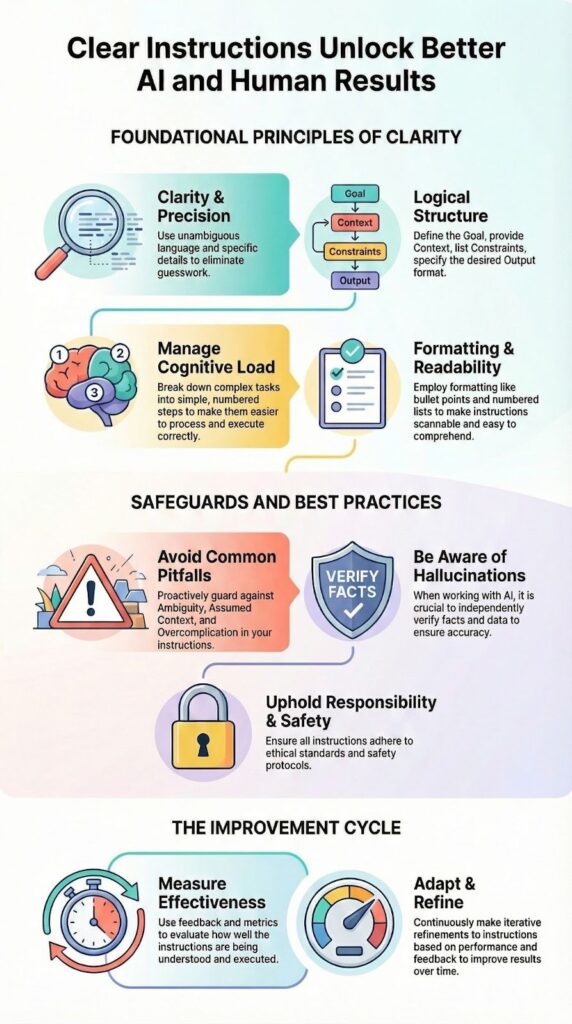
Spell out what “done” looks like: length, format, style, role, examples. Keep terms consistent and sequence your prompt from goal → context → constraints → output. With AI, ask for sources, separate facts from guesses, and avoid requests that could lead to harmful or unethical outputs [1].
| Aspect | Poor Instruction | Effective Instruction |
| Clarity | “Add error handling.” | “Add try-catch blocks for database errors and log exceptions to ‘errors.log’.” |
| Structure | Unordered steps, vague context | Step-by-step tasks: 1) Identify error sources, 2) Implement try-catch, 3) Log exceptions |
| Specificity | No measurable outcome | Clear expected output: error logs created in ‘errors.log’, no unhandled exceptions |
| Language | Passive, ambiguous | Active, imperative: “Add,” “Log,” “Check” |
The Power of Formatting and Readability

How you present your instructions matters almost as much as what you say. A wall of text is intimidating. It discourages careful reading. Breaking instructions into skimmable chunks makes them easier to digest. Numbered lists imply sequence.
Bullet points suggest a collection of equally important items. White space is your friend. It gives the eyes a place to rest. This style supports effective prompting by making each step clear and easy to follow.
Formatting acts as a visual guide. It highlights the structure you’ve so carefully built. A reader can quickly scan and understand the flow of the task. This is especially important for complex instructions that might be referenced multiple times. Good formatting reduces the time spent re-reading and clarifying.
- Use numbered lists for sequential steps.
- Use bullet points for non-sequential items or options.
- Bold key terms or critical constraints for emphasis.
- Keep paragraphs short, ideally 2-4 sentences.
Common Pitfalls and How to Avoid Them

You see the same patterns over and over when instructions miss the mark.
Ambiguity is usually the first culprit. Words like “better,” “improved,” or “user-friendly” sound clear, but they’re personal. Your “better” might be someone else’s “worse.” Swap them for something you can measure: instead of “make it better,” say, “Reduce page load time by 200 milliseconds.” Now there’s only one way to read it. This emphasizes the importance of clarity in all instructions.
Another common slip is assuming everyone shares your context. You might know exactly what “the Q3 report” is, but your assistant, teammate, or model may not. A single grounding line can fix that.
Overcomplication pulls in the other direction. When you stack on side goals and extra conditions, the main objective gets blurry. Stay close to what’s essential for the outcome you actually care about.
A few quick checks help catch most of this:
- Replace vague adjectives with specific targets or metrics.
- Add a short line of context for names, reports, or internal labels.
- Cut any requirement that doesn’t change the final result.
The last step is basic but effective: read the instruction out loud, or have someone paraphrase it. If they can’t restate it cleanly, it still needs work.
Measuring the Effectiveness of Your Instructions
We tend to trip over the same weak spots in instructions, and they show up more often than we’d like to admit.
Ambiguity leads the list. Words like “better,” “improved,” or “user-friendly” feel clear in your head, but they’re wide open to interpretation. Instead of “make the page better,” say, “Reduce page load time by 200 milliseconds” or “Cut the form from 6 fields to 3.” Now there’s a target.
A few practical checks help avoid trouble:
- Replace vague adjectives with measurable outcomes.
- Add the missing context: define terms like “Q3 report” or “dashboard” once.
- Remove extras that don’t affect the core goal.
Assuming shared context is another quiet trap. You know which report, which team, which version; your assistant may not. A single sentence of grounding can save a dozen follow-up questions.
Overcomplication pulls in the other direction. Every extra condition or side request is another chance for confusion. Keep the instruction focused on one main outcome.
A simple habit helps: read your instruction out loud, or have someone paraphrase it. If they can’t restate it clearly, it’s not ready yet [2].
Adapting Your Approach
Credits : IBM Technology
Good instructions follow the same core ideas, but how you apply them depends a lot on the task in front of you.
For simple questions, you don’t need heavy structure. A quick, direct prompt like “What’s the weather in Tokyo?” is enough. There’s a single, clear answer, and the model knows the pattern already.
Complex reasoning is different. Here, structure matters:
- Break the task into ordered steps.
- Describe the reasoning process you want followed.
- Specify the format of the final answer.
Creative work sits somewhere else again. You still need clarity, but with more emphasis on constraints than steps. For example: “Write a poem about the ocean, but avoid clichés like ‘deep blue sea’ or ‘endless horizon.’” That gives freedom, with guardrails.
The real craft is in tuning. You write an instruction, look at what comes back, then adjust. Over time, you pick up patterns: which phrases confuse, which clarify, which formats give you the kind of output you actually use. It’s less about getting it perfect once, and more about treating each attempt as a small step toward sharper communication.
FAQ
How do clear instructions improve understanding and results?
Clear instructions explain exactly what to do using simple wording and precise language. They rely on unambiguous directives, specific actions, and active voice to avoid confusion. Each step follows a logical sequence so users can complete tasks without guessing. This level of instructional clarity reduces mistakes, improves consistency, and helps users achieve expected outcomes efficiently.
Why does structure matter in natural language instructions?
Structure makes instructions easier to read and follow. A skimmable structure with clear hierarchy levels, numbered lists, or bullet points helps users process information quickly. Logical sequencing supports task decomposition and smooth progression between steps. Well-structured instructions also make validation checks, error handling, and success criteria clear and easy to apply.
How can examples make instructions more effective?
Examples show users exactly how an instruction should be applied. Input examples and output specification clarify expectations and reduce ambiguity. They support novel task handling by demonstrating correct patterns instead of abstract rules. Clear examples also reinforce boundary conditions and expected outcomes, which minimizes misinterpretation and reduces the need for repeated clarification.
What role does audience awareness play in instruction quality?
Audience awareness ensures instructions match the user’s skill level, context, and needs. Language simplicity, jargon avoidance, and direct engagement improve readability and accessibility. Considering cultural sensitivity, inclusivity principles, and accessibility compliance helps more users follow the instructions correctly. When instructions fit the audience, they feel practical, respectful, and easier to act on.
How do constraints and goals strengthen instructions?
Clear goals define what success looks like, while constraints set boundaries for acceptable actions. Objective definition, success criteria, and safety guidelines reduce failure modes and prevent misuse. Stating format requirements, ethical alignment, and contingency plans improves reliability. These elements guide users toward correct results and support iterative refinement through feedback.
The Final Word on Instructions
Writing a strong natural language instruction feels a lot like what we talk about in newsroom workshops at Yale: you pair an engineer’s precision with a reporter’s clarity, and you cut everything that doesn’t move the idea forward. It’s not about sounding smart, it’s about being understood on the first read.
When you get this right, you stop wasting time untangling confusion and you start getting reliable, repeatable results. Your prompts turn into tools you can trust. Lead with clarity, support it with simple structure, and keep your eye fixed on the outcome you actually want.
If you want to apply this same level of precision to how you write and ship secure code, you can join the Secure Coding Practices Bootcamp here and practice clear, concrete instructions in real-world security scenarios.
References
- https://learnprompting.org/docs/introduction?srsltid=AfmBOor7H_7LixBU-cFq4EtBKdZj-FXf1vktG-z62gCeSoL4jUOnBHs_
- https://wiki.ubc.ca/Generative_AI_-_What_is_it%3F
Related Articles
