



What is the best workflow for AI-driven TDD? It is a disciplined red-green-refactor loop where AI drafts precise tests and minimal code, while engineers review each change to prevent drift and security gaps.
Since Kent Beck formalized Test-Driven Development in 2002, teams that follow test-first practices have reported up to 40% fewer defects. AI can speed up each cycle, but only when boundaries stay firm and validation stays human.
We applied this method to modular backend systems and internal tools, and saw faster delivery, fewer regressions, and steadier releases under production pressure. Keep reading for the exact workflow that works.
AI-Driven TDD in a Nutshell
Successful AI-driven TDD depends on disciplined workflows and smart human–AI collaboration:
- Humans enforce strict red–green–refactor discipline.
- Secure Coding Practices anchor every cycle before speed or optimization.
- Hybrid human–AI collaboration cuts defects by 15%–35% versus test-last approaches.
How Does AI-Driven TDD Extend The Classic Red–Green–Refactor Cycle?
AI-driven TDD keeps the loop that Kent Beck introduced and adds structure around how AI participates. The foundation does not change. What changes is the speed and the way teams handle micro-decisions inside each step. In our secure development bootcamps, we teach developers to treat AI as an assistant inside the loop, not outside it.
As highlighted by Google Cloud
“AI can generate test cases and debug, but strong automated testing remains critical to prevent new issues.” – Google Cloud
Refactor still means improving structure without breaking tests. We let AI draft initial tests or suggest minimal implementations, but we review every line ourselves. When that discipline holds, progress feels steady rather than rushed.
Over time, a few principles have stayed firm in our training and in real projects:
- AI augments but does not replace red–green–refactor
- Secure coding practices come before performance tuning
- Small increments reduce defect leakage
- Tests define behavior, not implementation
When it is treated as an autonomous coder, quality slips. We have seen both outcomes, and the difference comes down to process, not tools.
What Is the Step-by-Step Workflow for AI-Driven TDD?
The best workflow sticks to a strict red–green–refactor loop, with AI assisting and developers validating every change inside version control. We teach this structure in our secure development bootcamps because without boundaries, AI quickly drifts.
As noted by IBM
“Test‑driven development reverses the traditional development process by putting testing before development.” – IBM Think
Red defines behavior before code exists. Either we write the failing test ourselves or prompt AI with a tight, single-purpose instruction. The test must fail first. If it passes, something is wrong.
Key safeguards:
- Confirm failure before moving on
- Test edge cases early
- Apply secure coding practices from the start
- Avoid hinting at the implementation
Clear prompts keep AI focused and prevent overreach.
Green means minimal. Just enough code to pass the test. No extra abstractions. We have seen AI overbuild when prompts mention performance or scalability, so we remove that language. Run tests immediately and commit after each passing result.
Refactor improves structure without changing behavior. Remove duplication, clean up naming, and tighten error handling. Tests must stay green, and security checks run again.
Then repeat the loop in small, controlled cycles.
Which AI tools integrate best with TDD workflows?
AI coding assistants work best in TDD when they stay inside repository boundaries and show clear diffs before anything is committed, especially when following advanced workflows and strategies for disciplined development cycles.
In our secure development bootcamps, we have learned that control beats speed. When a tool rewrites large sections without visibility, the red–green–refactor loop starts to slip.
| Tool | Strength in TDD | Best For | Limitation |
| GitHub Copilot | Inline test and code suggestions | Fast micro-iterations | May over-generate |
| Cursor | Structured agent workflows | Enforced loop discipline | Requires prompt precision |
| Aider | Repo-level edits with diff clarity | Strict red–green cycles | Slower in large refactors |
From our experience, developers benefit most when tools:
- Integrate directly with version control
- Preview diffs clearly before commit
- Support unit test frameworks like Jest and Vitest
- Make it easy to reject or roll back AI output
We position secure coding practices as the first filter before choosing any tool. Productivity matters, but reliability matters more. Teams that combine regression testing, AI-assisted code review, and structured TDD tend to release with fewer escaped defects and stronger confidence in their test suites.
What Common Pitfalls Undermine AI-Driven TDD?

Over-reliance on AI without steady validation leads to hallucinated edge cases, bloated code, and slower cycles than classic TDD, which can be mitigated by adopting vibe coding practices. We have watched teams assume the tool would “handle it,” only to spend more time cleaning up than building. Discipline still wins.
One pattern shows up again and again: green-phase expansion. Instead of writing the smallest code to pass a failing test, AI starts restructuring, abstracting, or optimizing too early. That breaks the core rule of minimalism. In our training sessions, we stop the loop right there and reset to the smallest possible change.
Another issue is subtle but dangerous. Sometimes AI generates tests that mirror its own implementation logic. The tests pass, but they prove nothing. Real confidence comes when tests assert behavior independently, even if the implementation changes later.
We regularly see these mistakes:
- Over-engineered green implementations
- Tests too closely tied to generated code
- Weak boundary and exception coverage
- Large agent loops that inflate token costs
- Skipping true fail-first confirmation
Across developer communities and in our own cohorts, hybrid human–AI pairing consistently outperforms fully autonomous setups. AI helps, but oversight keeps the system honest.
How Should Humans and AI Collaborate for Reliable Results?
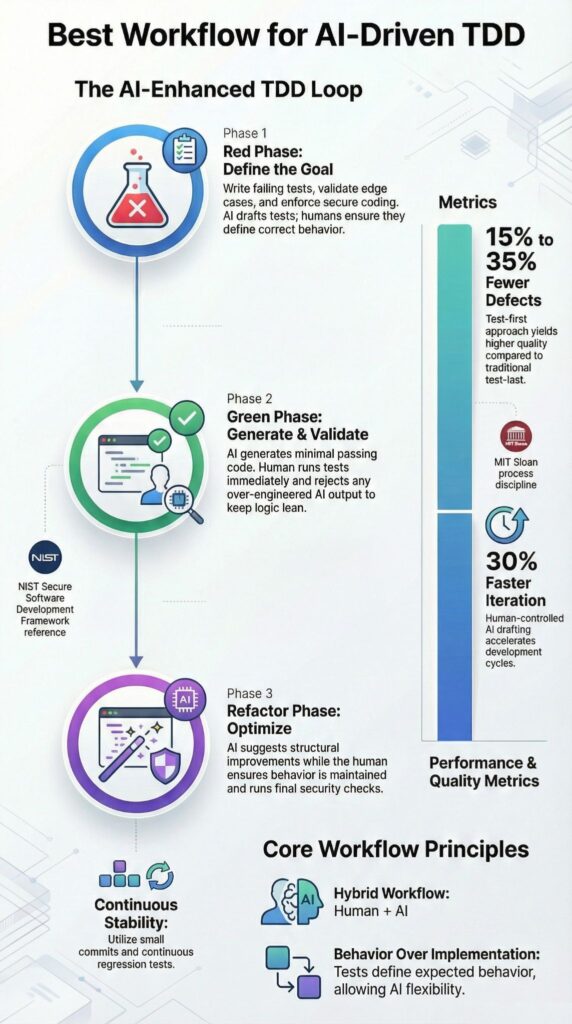
Reliable results come from treating AI as a constrained pair programmer, not an independent engineer. In our secure development bootcamps, we insist that intent always starts with the human. Then we review it line by line, test it, and refactor with purpose.
In practice, the flow stays simple. We describe the expected behavior and constraints, occasionally leveraging custom AI coding agents to draft the smallest workable solution.
A steady collaboration model looks like this:
- Human defines behavior and constraints
- AI drafts a minimal solution
- Human verifies correctness and edge cases
- Automated unit tests confirm green status
- Refactor with clear, limited prompts
Teams that follow strict TDD often report 15 to 35 percent fewer defects than test-last approaches. We have seen similar gains when AI is added carefully, provided secure coding practices remain mandatory.
From hands-on implementation, a few habits stand out:
- Keep prompts short and specific
- Work feature by feature
- Commit after each passing test
- Run regression tests daily
- Save prompt templates for reuse
When those habits stick, AI behaves like a disciplined collaborator. When they do not, it turns unpredictable. Reliability comes from the structure we enforce.
When Is AI-Driven TDD the Best Choice?
Credits : Microsoft for Java Developers
AI-driven TDD works best when the problem is narrow and behavior can be specified in clear, testable terms. In our secure development programs, we see it perform well in modular backend features, APIs, data transformations, and algorithmic utilities. When logic is concrete, tests act as firm guardrails, and AI stays aligned.
Teams tend to get strong results in cases such as:
- API endpoint development
- Data preprocessing logic
- Algorithmic utilities
- Refactoring legacy modules with well-defined specifications
We have guided cohorts through legacy refactors where documentation was solid and tests were explicit. In those situations, AI sped up repetitive changes without weakening control. The structure carried the process.
On the other hand, some environments introduce risk. AI-driven TDD struggles when:
- Requirements are ambiguous
- Exploratory UI prototyping drives decisions
- Large architectural rewrites lack documentation
A quick decision snapshot makes this clearer:
| Scenario | AI-Driven TDD Fit |
| Clearly defined logic | Strong |
| Rapid prototyping | Moderate |
| Ambiguous requirements | Weak |
Structured logic favors validation. Vague direction invites drift. In our experience, clarity determines whether AI strengthens the loop or complicates it.
FAQ
How does an AI-driven TDD workflow actually work step by step?
An AI-driven TDD workflow starts by defining expected behavior in plain language. A failing test is written first. AI assists by generating test cases and a basic implementation.
You run tests until they pass, then refactor. The developer reviews every change, ensuring correctness, readability, and alignment with requirements before moving forward. This keeps feedback fast and reduces defects early consistently.
What problems does AI-driven TDD solve for everyday developers?
AI-driven TDD solves common development problems like slow feedback, missing edge cases, and risky refactoring.
AI helps generate unit tests, suggest edge conditions, and review logic early. Developers spend less time on boilerplate and more on design decisions. The result is higher confidence, cleaner code, and fewer defects reaching production over time through consistent testing and validation practices across teams.
How can AI help create better failing tests without causing confusion?
AI helps create failing tests by turning requirements into concrete input and output checks. Clear prompts describe expected behavior, constraints, and edge cases.
Developers review and edit each test to confirm intent. This prevents misleading tests, avoids hallucinated logic, and ensures failures represent real user scenarios, not assumptions introduced by automation during early development stages when changes happen frequently safely.
How do teams prevent AI from breaking the TDD discipline?
Teams prevent AI from breaking TDD by enforcing strict test-first rules. Code cannot be merged without a failing test and a passing result.
Reviews check that AI suggestions match requirements. Small tasks, clear prompts, and continuous testing keep humans in control and ensure AI supports discipline instead of bypassing it through defined processes and accountability at every stage of development.
Is AI-driven TDD suitable for large, long-term projects?
AI-driven TDD works well for large projects when applied consistently. Tests define boundaries between components and protect against regressions.
AI accelerates test creation and refactoring support. Developers must keep iterations small and review outputs carefully. This approach maintains code quality, supports long-term maintenance, and scales with growing complexity across teams, systems, and evolving requirements over time without increasing delivery risk.
AI-Driven TDD Only Works When Discipline Leads
AI can generate code instantly, but without disciplined red, green, refactor cycles, it also generates fragile systems.
When you demand failing tests first, write the smallest passing code, and validate security before tuning performance, you build software that survives change. Speed feels productive, but stability builds trust. The real question is this, are you directing the tool, or letting it quietly direct you?
Ignore structure and defects multiply, confidence fades, and technical debt compounds. Choose rigor instead. Join the Secure Coding Practices Bootcamp to strengthen your foundation, protect your credibility, and prove that AI works best in disciplined hands.
References
- https://cloud.google.com/discover/how-test-driven-development-amplifies-ai-success
- https://www.ibm.com/think/topics/test-driven-development
Related Articles
