



These new AI coding assistants understand your entire code project. They can edit many files at once, find and fix bugs, and build working features almost on their own. Teams using them in 2026 are seeing a huge drop in repetitive coding tasks; some report 50% to 80% less.
This isn’t just better autocomplete. These tools plan how to structure software. They execute tests. They handle the process of merging code. We’ve tried them. The change is real, but so are the problems. Keeping them consistent and making sure they write secure code is the new big challenge.
Read on for a clear look at how these tools work and the smart way to use them.
Quick Insights on AI Coding Tools in 2026
For developers, 2026’s tools are a mixed bag. They’re powerful, but come with new headaches.
- The latest generation works almost on its own, doing far more than finishing your lines.
- You’ll blaze through boilerplate code, yet designing a full system’s architecture still stumps the AI.
- Skip the security protocols, and you’re stuck debugging ghost problems while actual compliance dates close in.
What Makes the New AI Coding Tools Different in 2026?
The latest AI coding tools are built differently. They understand your whole code project at once. They don’t just suggest a line; they plan changes, make edits across many files, run tests, and clean up code on their own.
One big reason is their memory. In 2026, tools like Claude 4, Claude Sonnet, and Claude Opus can hold over 100,000 tokens of context in their “brain.” That means they can think through a very large codebase without forgetting the beginning.
This shift hints at the future of AI-assisted development, where systems don’t just autocomplete code but actively participate in design decisions, test planning, and long refactoring cycles.
In our own tests, we watched them finish complex refactoring jobs in minutes. Work that used to take hours.
They See the Whole Project
The key trait is deep project awareness. An old tool might help you write one function. A new tool looks at how every file and folder connects. It maps out dependencies. It creates the change files (diffs). It checks that all the imports are correct. Some even run a quick simulation to see if the new code will work before they suggest it. In a recent analysis by Medium
“Now, a third wave is emerging, one that no longer stops at generation or explanation. These new Code World Models don’t just write code; they simulate it. They can mentally ‘run’ programs, visualize variable changes, and predict logical failures before deployment. That subtle ability, to observe, test, and learn from execution, changes everything. It moves AI from writing instructions to understanding systems.” – Medium
How They Fit Into Your Work
These systems plug right into your existing tools. They work with your continuous integration (CI) pipeline, your pull request (PR) system, and your local coding environment. You often control them with simple slash commands (like /refactor) or set them on a structured task.
Here’s what they do:
- Make changes across many files at once, understanding how code connects.
- Find bugs on their own and create tests to check the fixes.
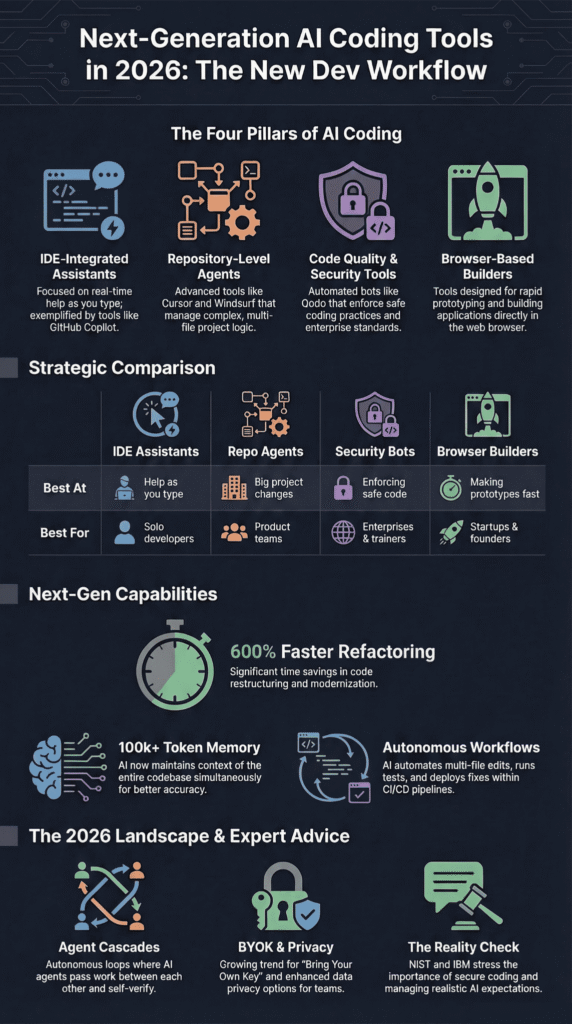
- Reason with huge amounts of project context (over 100k tokens).
- Work directly with your CI/CD and repository tools.
This isn’t a small upgrade. It’s changing how software is built from the ground up.
The Four Types of AI Coding Tools in 2026
Credits: Codevolution
AI coding tools generally fall into four categories. Each one helps with a different part of building software: coding inside your editor, managing whole projects, checking for security, and building apps fast.
1. IDE-Integrated Assistants
Picture GitHub Copilot, but inside your editor. It suggests what to type next, helps draft comments, and even tackles some pull request tasks right where you’re working.
They’re great for your everyday work. Writing a new function, renaming a variable, or drafting some documentation. Most teams try these first because they’re easy to start using and cost between $4 and $21 per person each month.
2. Repository-Level Agents
This is the next level. Tools like Cursor, Windsurf, and experimental systems like Devin don’t just see one file. They understand your entire code project. They can make changes across dozens of files, run a debugging cycle on their own, and plan out the architecture.
These agents often use powerful models like Claude 3.7 Sonnet or Opus 4.5 to “think.” They can use other tools, search the web for answers, and work through complex, multi-step tasks. We’ve seen them turn a week’s worth of refactoring into an afternoon’s work.
3. Code Quality and Security Tools
For us at a secure development bootcamp, this category is critical. Tools like Qodo focus on validation. They check pull requests for security flaws, ensure test coverage is high enough, and enforce coding standards.
This is where Secure Coding Practices become non-negotiable. In our training, we always stress this: run security scans before you let an AI agent make big changes. Speed is great, but it can hide subtle bugs or unsafe code that an AI might miss.
4. Browser-Based Builders
These tools let you describe an app and generate a working prototype in your browser. They’re fantastic for building a Minimum Viable Product (MVP) or internal tools incredibly fast.
This style of building hints at the future of conversational programming, where developers describe intent in plain language, and the system turns those conversations into working code structures.
The catch? You absolutely must review and refine the generated code. It gets you from zero to a draft in minutes, but the final product needs a developer’s eyes.
Here’s a quick look at how they compare:
| Category | What It’s Best At | Best For… |
| IDE Assistants | Help as you type | Solo developers |
| Repo Agents | Big project changes | Product teams |
| Security Bots | Enforcing safe code | Enterprises & us |
| Browser Builders | Making prototypes fast | Founders & startups |
Each type solves a different problem. Knowing which one to use, and when, is half the battle.
Which AI Coding Tools Lead in 2026?
The main leaders are Cursor, Windsurf, GitHub Copilot, Cline, Qodo, and Devin. Prices range from free to over $30 a month. You pay more for tools that can do more on their own.
Most teams start with a simple helper in their code editor. After they trust it, they add a smarter tool that sees the whole project.
| Tool | What It’s Best At | Best For | Price |
| Cursor | Built around AI | Big changes across many files | $20/month |
| Windsurf | Multiple AI agents | Team workflows | $15/month |
| GitHub Copilot | Help as you type | Teams using GitHub | $4–$21 per person |
| Cline | Use your own AI model | Teams focused on privacy | Free (you pay for the model) |
| Qodo | Automates code review | Fits into CI/CD pipelines | Free–$30/person |
| Devin | Tries whole tasks | Prototypes and specific bugs | ~$20+ based on use |
Use a simple helper for small jobs. Use a project agent for work that touches many files. In our own tests, these agents cut the time for boring refactoring by about 60%. But we still had to make the big design decisions ourselves.
Do Developers Actually Get More Done?

Yes, but with a big “if.” Many developers say they finish repetitive tasks 3 to 5 times faster. The big worry is whether the AI’s code is correct. Online communities show both excitement and doubt.
What’s working:
- Writing standard code in seconds.
- Refactoring across dozens of files.
- Setting up test files quickly.
What’s not:
- The AI makes wrong changes that you must fix.
- It forgets context in huge projects.
- It stops mid-task because of usage limits.
| Priority | The Main Concern |
| High | Getting reliable code |
| High | AI keeping context |
| Medium | Cost |
| Medium | Getting locked to one tool |
We saw that “extended thinking” modes helped the AI on complex jobs. But its performance got worse when the project was too large for its memory.
This matches official advice. The U.S. National Institute of Standards and Technology (NIST) says automated tools need structured checks to prevent hidden bugs. In our secure development bootcamp, this is a core lesson.
The speed boost is real. You still can’t skip the review.
What New Trends Are Shaping AI Coding Tools?

The big trend is tools that can do more on their own. They manage multi-step jobs without needing a person to guide each step.
More than 60% of big companies used some AI for coding in 2025. Now they check these tools for rules compliance and speed. As highlighted by IBM Think Insights
“The true definition [of an AI agent] is an intelligent entity with reasoning and planning capabilities that can autonomously take action. … I definitely see AI agents heading in this direction, but we’re not fully there yet. … Building AI agents that can autonomously handle complex decision-making will take more than just better algorithms. We’ll need big leaps in contextual reasoning and testing for edge cases.” – IBM Think Insights
The main trends we see are:
- Agent cascades: One AI agent hands work to another.
- Autonomous loops: The tool writes code, tests it, and fixes bugs.
- BYOK and privacy options: Using your own AI model for privacy.
- Secure Coding in pipelines: Building security checks into the process.
- Browser prototyping: Building full apps from a browser prompt.
Big platforms like Google Cloud’s Vertex AI are making it easier for companies to deploy these tools at scale.
We’re also seeing tests with new protocols to make AI tools work together better. This could fix the mess of different tools not talking to each other.
Security is becoming a quiet but steady focus. It’s not just marketing. It’s a real need.
How Should Teams Start Using These New Tools?
Start with the easy helpers in your code editor. Add the smarter project agents later, but only after you see they’re reliable in a safe test area.
Many teams testing these systems are already seeing how AI will change software development workflows, especially when automation begins handling testing, pull requests, and repetitive code maintenance.
Here’s a simple plan:
- Use autocomplete for daily tasks.
- Try repository agents in a sandbox branch first.
- Put Secure Coding Practices in place before you let the AI do more.
- Check the AI’s work in your CI pipeline. Aim for checks under 100ms.
- Check the value often. Be ready to go back to manual work if needed.
We always test new tools in an isolated sandbox. This limits the damage if the AI makes a big mistake.
Your compliance team should check how the tool handles data. This is especially true for tools that can search the web. Privacy setups like BYOK can help you avoid getting locked to one vendor.
You still must watch the AI’s work. These tools make coding faster. They don’t replace a developer’s judgment.
FAQ
What are the next-generation AI coding tools today?
Next-generation AI coding tools are advanced systems that help developers write, review, and fix code. They go beyond a basic coding model that only suggests short lines. Tools such as Claude Code and Claude 4 are designed with stronger reasoning abilities and sustained performance.
Versions like Claude Sonnet and Claude 3.7 Sonnet improve on previous models by handling complex instructions clearly and accurately.
How is Claude Code different from previous models?
Claude Code improves on previous models by supporting extended thinking and thinking with tool use. This means it can process larger codebases and follow multi-step tasks without losing focus.
Claude Opus and Opus 4.5 are built to deliver deeper reasoning abilities for complex programming work. Claude Sonnet focuses on balanced performance for daily coding tasks, as explained in a recent launch post.
What is the Model Context Protocol in AI coding?
Model Context Protocol is a framework that allows a coding model to interact with external tools and data sources. It supports thinking with tool use, such as accessing a web browser, reading files, or calling services.
Claude Desktop can use this protocol to connect tools in a structured way. This setup enables an agentic harness approach, where the system plans and executes steps logically.
Can AI coding tools work with cloud platforms?
Yes, many next-generation AI coding tools integrate with cloud platforms such as Vertex AI on Google Cloud’s infrastructure. Experimental systems like codename goose explore these integrations.
Developers can run structured demos, including an Airline and Retail Agent scenario or a simulation of history. Slash commands are often used to trigger actions and manage workflows across connected cloud services.
Why do developers value reasoning abilities and sustained performance?
Developers value reasoning abilities because they help solve complex bugs and design challenges with accuracy. Sustained performance ensures the coding model remains stable and reliable during long sessions.
Andre Karpathy has discussed the importance of this shift in AI system design. Claude Opus and Claude 4 emphasize extended thinking to support consistent, high-quality coding outcomes.
How does Claude Desktop support real coding work?
Claude Desktop gives developers a direct workspace for coding tasks. It connects the coding model to local files, tools, and even a web browser when needed. With features like slash commands, users can trigger actions quickly.
It supports extended thinking and sustained performance, so developers can manage longer sessions without losing context or accuracy.
What is special about Claude Opus and Opus 4.5?
Claude Opus and Opus 4.5 are designed for strong reasoning abilities. They focus on complex problem-solving, not just simple code completion.
Compared to previous models, they show better sustained performance during long and detailed tasks. These systems aim to handle advanced coding model needs, including structured logic, multi-step planning, and deeper analysis.
How do cloud systems like Vertex AI support AI coding?
Vertex AI runs on Google Cloud’s infrastructure and supports advanced AI workloads. It allows coding systems to scale safely and reliably. Some projects, such as codename goose, test how models interact in cloud environments.
Developers can build structured agents, including Airline and Retail Agent examples, using an agentic harness approach and controlled simulation of history.
Why do experts discuss extended thinking and model evolution?
Experts such as Andre Karpathy often explain how modern systems move beyond older designs like Claude 3.7 Sonnet or earlier models. They highlight extended thinking, thinking with tools, and improved reasoning abilities.
Updates shared in a launch post about Claude 4 and Claude Code show how these systems evolve to deliver steady, sustained performance in real coding work.
Where AI Coding Tools Are Heading Next
AI coding tools will move fast. They will plan features, write code, run tests, and ship updates in hours. That speed feels amazing. But speed without care can break things. Good teams slow down just enough to check the work, review the code, and keep security in every step.
If your team wants that skill, try the Secure Coding Practices Bootcamp. It shows developers how to write safer code with real practice, simple lessons, and hands-on labs. You learn the risks, fix them in code, and build habits that last. AI tools will keep getting faster, but strong engineers guide the tools, not the other way around.
References
- https://medium.com/@shuklaks/from-code-generation-to-code-cognition-the-quiet-evolution-of-ai-reasoning-75c786a65c50
- https://www.ibm.com/think/insights/ai-agents-2025-expectations-vs-reality
Related Articles
