


Broken access control happens when an app’s permissions fail. Users can then see someone else’s data or act like an admin. It’s the top critical flaw in web apps, and it’s a server-side logic failure. You need to guard against specific types of broken access control, like vertical and horizontal privilege escalation.
Fixing this requires strict server-side checks and consistent Secure Coding Practices. Read on to learn how to spot and stop these vulnerabilities.
Security Insights You Shouldn’t Miss
These points summarize the core risks in broken access control and show how small authorization gaps can lead to serious data exposure and privilege abuse.
- Vertical flaws let users climb the privilege ladder to admin power.
- Horizontal flaws, mainly IDOR, let users access each other’s private data.
- Prevention hinges on server-side checks, never trusting the client.
What Are the Four Ways Authorization Can Fail?
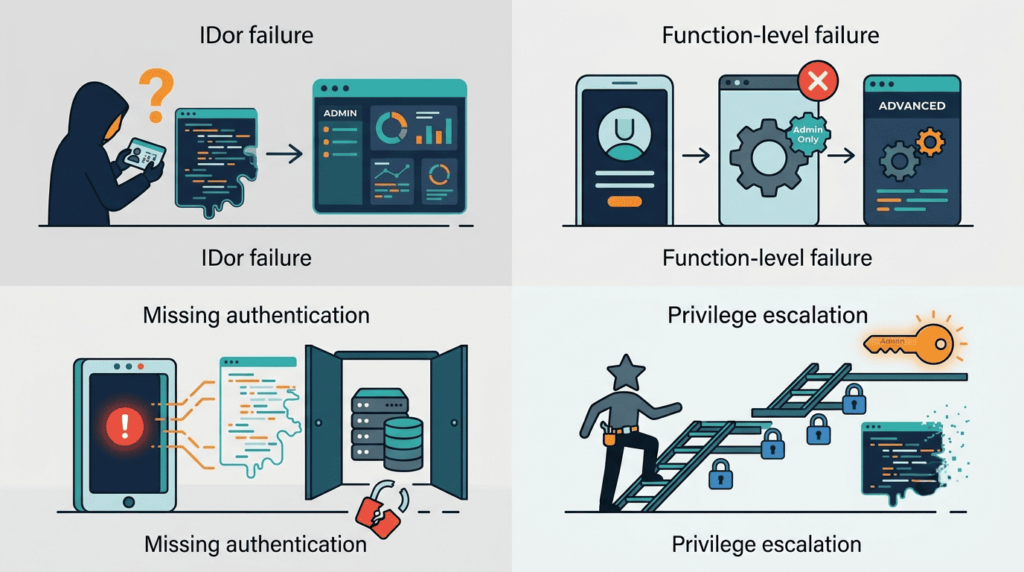
Authorization fails in four ways. First, vertical privilege escalation: a user becomes an admin because a server check is missing. We’ve fixed apps where an unprotected /admin endpoint was the only barrier.
Second, horizontal escalation via IDOR. Users access another’s data because the app uses predictable IDs and doesn’t verify ownership. Our labs are built on these examples.
Third, context-dependent failures. The app checks if you can act, but not when. A user might skip payment and call the “order complete” API directly.
Finally, misconfigurations. A new API route is deployed without authorization middleware. We help teams patch these oversights.
Vertical Escalation: Climbing the Ladder
This is moving up, from user to admin. Damage is total. It happens through URL manipulation, parameter tampering, or forced browsing.
Horizontal Escalation and IDOR
This is moving sideways. You stay a “user” but see others’ data. Changing ?id=456 to ?id=457 is classic. Even with UUIDs, if the ID is exposed publicly, the flaw remains. The backend must ask, “Does this token own this resource?”. That’s how insecure direct object reference flaws persist. We see this in APIs and file storage constantly.
How Can Business Logic Create Authorization Vulnerabilities?
Business logic creates vulnerabilities when code checks permissions but misses context. Imagine a support ticket system. A user can close their own tickets. The logic checks ownership, but not if the ticket is in a “pending approval” state. If that state isn’t checked, the user violates the workflow.
These flaws are insidious. Automated scanners miss them. Finding them requires understanding your app’s rules and testing if they’re enforced. We teach students to test sequences, states, and timing.
The Configuration Trap
Other flaws are forgotten into existence. You deploy a new feature but forget the @Authorize(Roles.Admin) attribute. It goes live. This isn’t a logic bug, it’s a missing line. Common misses we see:
- Overly permissive CORS headers.
- Directory listing enabled on a server.
- Default credentials on new cloud storage.
These are process failures. They demand a deployment checklist with a security review for every new route.
| Misconfiguration Type | What It Means | Risk |
| Overly permissive CORS | API allows requests from any origin | Data exposure through cross-origin abuse |
| Directory listing enabled | Server exposes file structure publicly | Sensitive file discovery |
| Default credentials | System deployed with unchanged login credentials | Full system compromise |
Why Do Security Tools Miss Broken Access Control Vulnerabilities?
Credits: OliveStem
Research by arXiv show
“Access control vulnerabilities enable the attacker to access web pages containing sensitive or private data and perform unauthorized actions. It happens when the intended access control policies are not enforced inside the web applications.” – arXiv
They work on signatures, which is great for known issues like old libraries.
But a logical access control bug isn’t a pattern. Many broken access control examples come from exactly this missing check. It’s a missing check, an if statement that was never written.
A scanner might hit an admin endpoint, get a 403, and call it secure. It can’t tell if that’s real security or just a dead page. It doesn’t understand that changing a user_id from 5 to 6 should be denied unless you are user 6.
Catching this requires manual, reasoning-based testing. You need to map user roles, test endpoints, and ask, “Can User A see User B’s data?” This is the skill gap we address. Our training moves you from theory to hands-on testing of a real, complex app. You learn to find what’s absent, not just what’s there.
How Can You Build Better Authorization?
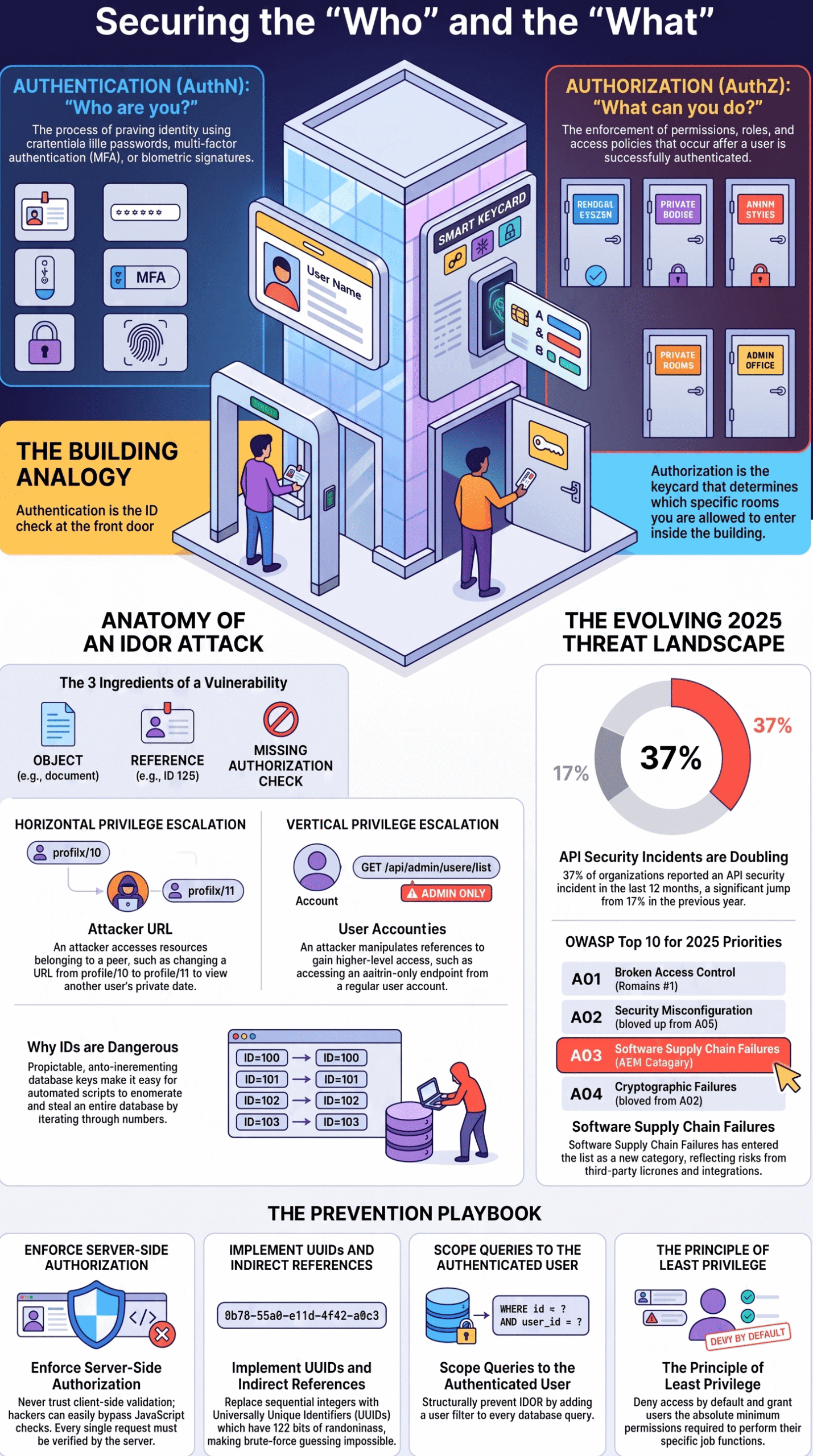
Build better authorization by never trusting the client. Verify every permission, role, and ownership claim on the server.
Research from OWASP Business Logic Abuse Project
“Common failures include endpoints that omit role checks entirely, authorization logic trusting client-supplied parameters, overly broad default permissions, and identifier tampering (BOLA) to bypass intended restrictions.” – OWASP
Start with a deny-by-default policy. Lock every new endpoint down; access must be explicitly granted. Use a centralized authorization service, not scattered checks in your code. This approach also helps in preventing IDOR. This makes rules consistent and auditable.
Enforce least privilege. Give users only the permissions they need. Audit regularly. Use RBAC for groups. For object control, always check ownership. Your query should be WHERE user_id = ? with the authenticated user’s ID.
Log access attempts, especially denials, for early warnings. Test it manually. Have a developer try to break the admin panel as a user. Have User A try to read User B’s data. Make this part of your culture.
FAQs
What are the main types of broken access control in web applications?
The main types of broken access control include insecure direct object reference (IDOR), privilege escalation, and authorization bypass. These issues occur when an application fails to enforce permissions correctly on the server side, allowing users to access data or actions beyond their assigned role.
How does IDOR lead to insecure direct object reference issues?
Insecure direct object reference (IDOR) happens when an application exposes object identifiers without proper checks. Attackers can modify these identifiers to access other users’ records, which results in unauthorized read access, data leakage, and object-level authorization failure because ownership validation is missing.
What causes privilege escalation in broken access control cases?
Privilege escalation occurs when a user gains higher permissions than intended due to missing role checks or weak authorization logic. Vertical privilege escalation allows access to admin functions, while horizontal privilege escalation allows access to other users’ data within the same role level.
How do URL manipulation and parameter tampering bypass access control?
URL manipulation and parameter tampering bypass access control when applications trust user-supplied values without validation. Attackers can change URLs or request parameters to reach restricted pages or modify data, which leads to forced browsing and endpoint authorization gaps.
Why do insecure APIs often suffer from authorization bypass issues?
Insecure APIs suffer from authorization bypass issues when they do not properly validate user permissions for each request. Missing function-level authorization and object ownership checks allow unauthorized modification, unauthorized deletion, and multi-tenant isolation failure across API endpoints.
Building the Guardrails
Broken access control is a silent failure because everything still works for the normal user until someone leaves the happy path. Real security comes from strict server-side authorization, where every request is verified and permissions are enforced by design, not hope.
This is exactly why access control gaps are so persistent, most of them are never introduced in the code at all, but in the design phase, where a missing role check or an unprotected new endpoint slips through unnoticed. Tools like Prime Security use AI to review product designs and flag these authorization gaps before development even starts, catching the “missing line” problem this article describes long before it reaches production.
If you want to strengthen these habits with hands-on practice, join the Secure Coding Practices Bootcamp and learn techniques like OWASP Top 10 defenses, authentication, and secure design so you can build safer systems from day one.
References
- https://ar5iv.labs.arxiv.org/html/2304.10600
- https://owasp.org/www-project-top-10-for-business-logic-abuse/docs/the-top-10/broken-access-control.html