


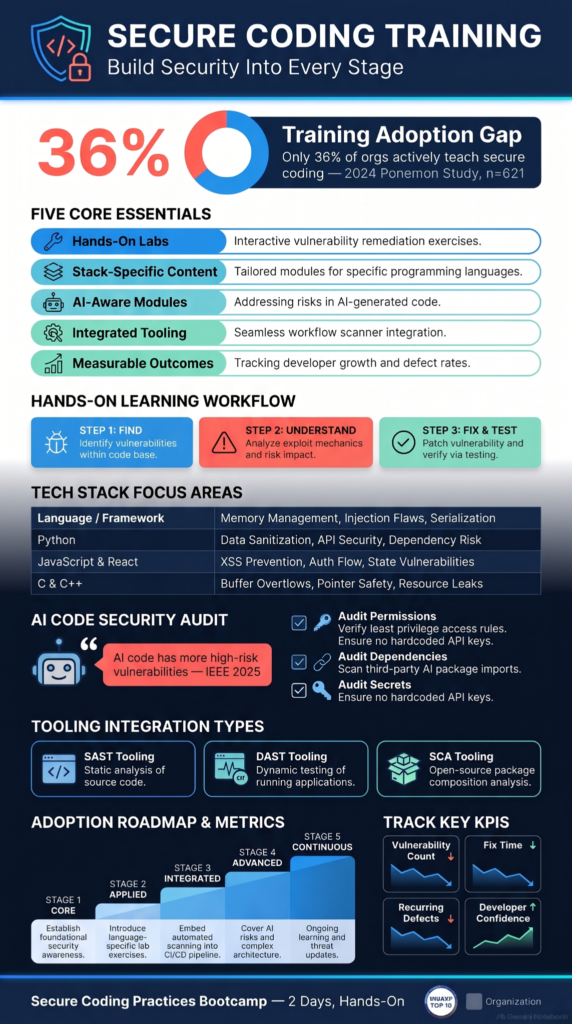
Secure coding training helps developers identify and fix vulnerabilities before they reach production. Yet, only 36% of organizations actively teach developers to write secure code, according to the 2024 Security Journey Study. At Secure Coding Practices, we believe effective training should reflect how developers work. Generic compliance courses rarely change coding habits.
Developers need hands-on exercises, real-world security scenarios, and practical guidance they can apply to everyday tasks. Training should also fit existing development workflows without creating unnecessary delays. A strong program builds better security habits across engineering teams. Keep reading to learn how to build one.
Secure Coding Training: 5 Essentials Developers Should Know
Good secure coding training does more than teach theory. It helps developers use security skills on real projects. As a result, they can prevent flaws and build safer software from the start.
- Hands-on learning: Replace passive compliance videos with interactive break-and-fix exercises.
- Stack-specific training: Match security lessons to Java, Python, JavaScript, and other development environments.
- Build AI-aware security by training developers to review AI-generated code. They should check for permission flaws, leaked secrets, and unsafe dependencies.
- Integrated tooling: Bring SAST, DAST, and dependency scanning into everyday development workflows.
- Measurable outcomes: Track remediation speed, recurring defects, and vulnerabilities reaching production.
Why Traditional Security Training Falls Short?
Many security courses focus on rules, definitions, and compliance. These topics matter, but they do not always prepare developers to handle real problems in code.
A developer may understand what SQL injection is but still make a mistake when building a database query. Knowing the definition is not the same as knowing how to prevent the issue.
Training works better when it connects security concepts to everyday development tasks. Developers should learn how to spot risks, understand why they happen, and fix them in realistic situations.
The 2024 Security Journey Study, conducted by the Ponemon Institute among 621 IT and security professionals, highlights the gap. Only 36% of organizations actively teach secure coding. The study also found that many organizations struggle to fix vulnerabilities.
This shows why security training needs to be practical, regular, and part of the development process.
How Can You Build Skills Through Hands-On Labs?
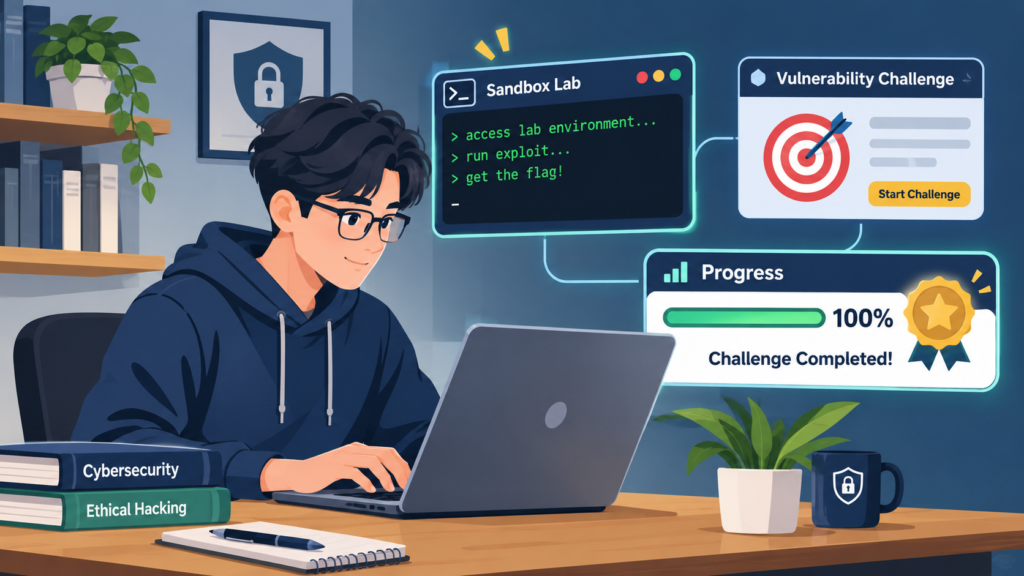
Reading about security is useful, but practice helps developers remember what they learn. Hands-on labs let them work with vulnerable code in a safe environment. This practical approach to secure code development helps developers recognize weaknesses and apply safer coding techniques before deploying applications.
A useful lab should include three steps:
- Find the weakness: Give developers code with a security flaw, such as weak input validation or broken access control.
- Understand the risk: Explain how an attacker could misuse the flaw and what data or systems might be affected.
- Fix and test it: Ask developers to improve the code, then test whether the weakness has been removed.
For example, a lab might show a login feature that does not handle user input safely. Developers can identify the problem, apply a safer approach, and test the result.
Short exercises can also fit into busy schedules. Rather than relying on a single long course, teams can use focused labs throughout the year.
How Can You Match Training to Your Development Stack?
Security risks vary across programming languages, frameworks, and platforms. A course built around one technology may not cover the problems developers face in another.
Training should reflect the tools a team uses. This makes lessons easier to apply and helps developers focus on relevant risks.
| Technology | Useful security topics |
| Java | SQL injection, authentication, secure deserialization |
| .NET | Access control, input validation, secure configuration |
| Python | Unsafe execution, input handling, dependency risks |
| PHP | Session security, SQL injection, file upload checks |
| JavaScript and React | Cross-site scripting, API security, unsafe data handling |
| C and C++ | Buffer overflows, memory safety, input validation |
| Go | API security, SQL injection, error handling |
These topics are examples, not a complete list. The right training plan should also consider the team’s architecture, libraries, and common coding tasks.
How Can You Teach Developers to Review AI-Generated Code?
AI coding assistants can help developers write code faster. They can also produce code with security weaknesses. Developers remain responsible for checking what these tools generate.
Research from IEEE shows
“AI-generated code also contains more high-risk security vulnerabilities compared to human-authored code, while exhibiting simpler and more repetitive structures.” – IEEE Xplore
Training should teach developers to review AI-generated code before using it. They should check how it handles user input, authentication, permissions, sensitive data, and errors.
A useful review process includes:
- Check whether the code follows the team’s security standards.
- Look for unsafe functions, weak validation, and exposed secrets.
- Confirm that access controls work as intended.
- Run suitable security tests before merging the code.
AI tools can support development, but they should not replace human review or security testing.
How Can You Make Secure Coding Standards Part of Daily Work?

Developers need clear standards they can use while writing and reviewing code. Long policy documents are difficult to apply when a team is working under time pressure. Consistent secure coding practices help developers apply security standards when handling passwords, validating input, managing sessions, and protecting API endpoints.
Keep guidance practical and easy to find. For example, teams can create short checklists for common tasks such as handling passwords, validating input, managing sessions, and protecting API endpoints.
As highlighted by OWASP
“define the SQL structure separately from its data values, then bind those values through the database API,” and warns that relying on manual escaping is “error-prone and is strongly discouraged“. – OWASP Cheat Sheet Series
Password storage guidance should cover suitable password-hashing methods, such as Argon2, rather than plain-text storage or general-purpose hashing alone. Input-handling guidance should explain how to validate data and use safe database queries.
Resources such as the OWASP Cheat Sheet Series can help teams build consistent guidance. The OWASP Top 10 can also introduce common web application risks.
The goal is not to make every developer memorize a long list of rules. It is to make secure choices easier during everyday work.
How Can You Use Security Tools Without Slowing Development?
Security tools can help teams find problems before code reaches production. Training should explain what these tools do and how developers should respond to their results.
Three common tool types are:
- Static Application Security Testing (SAST): Checks source code for possible security issues.
- Dynamic Application Security Testing (DAST): Tests a running application for weaknesses.
- Software Composition Analysis (SCA): Checks third-party libraries and dependencies for known vulnerabilities.
Developers should learn how to read findings, decide which issues need attention, and fix problems at their source. They should also understand that automated tools can produce false positives or miss certain risks.
Tools are most useful when they fit into existing workflows, such as code reviews and CI/CD pipelines. The aim is to find problems early without creating unnecessary delays.
How Can You Build a Security Champion Program?
Security should not be the responsibility of one person or department. Development teams can share that responsibility by appointing security champions.
A security champion is a developer who takes an active interest in secure coding and helps teammates apply good practices. They do not replace security specialists. Instead, they connect security teams with the people building and maintaining software.
Champions can help review code, share useful resources, discuss new risks, and raise security concerns during planning. They can also bring common questions from developers to the security team.
Give champions enough time and support to do this work. Regular training and access to security specialists can help them stay effective.
How Can You Measure Whether Training Works?
Course completion rates show who attended training, but they do not prove that developers have improved their security skills.
Teams should also look at practical results. Useful measures include:
- The number and severity of vulnerabilities found in code.
- How long it takes to fix security issues.
- Whether the same mistakes appear in later code reviews.
- Results from hands-on exercises and security assessments.
- Developer confidence when identifying and handling common risks.
No single measure tells the whole story. A rise in reported vulnerabilities, for example, may mean developers are getting better at finding problems.
Review results over time and use them to improve the training plan. Focus on better coding habits and fewer recurring weaknesses, not just higher course completion numbers.
How Can You Avoid Tool Fatigue?
Credit: Cybersecurity Tutorials
Adding more security tools does not always make development safer. Too many alerts can overwhelm developers, especially when many findings are low priority or repeated.
Start with the tools that address the team’s main risks. Set clear rules for which findings need immediate attention and which can be handled during normal development work.
Training should help developers understand how to respond to alerts rather than simply telling them to fix everything. Explain how to check a finding, confirm whether it is valid, and choose an appropriate fix.
A smaller set of well-configured tools is often easier to manage than a large collection that developers struggle to use.
How Can You Create a Practical Training Roadmap?
A good training program should build skills over time. Start with the risks developers are most likely to face, then add more advanced topics as their knowledge grows. The right secure coding training programs should also adapt to developers’ experience levels and the security challenges they encounter in their daily work.
A simple roadmap could look like this:
- Stage 1: Core skills. Cover secure input handling, authentication, access control, password storage, and common web risks.
- Stage 2: Practical exercises. Use hands-on labs based on the team’s programming languages and frameworks.
- Stage 3: Workflow integration. Teach developers to use code reviews, security testing, and dependency checks.
- Stage 4: Advanced topics. Introduce threat modeling, secure architecture, and more complex application risks.
- Stage 5: Ongoing learning. Refresh lessons as the codebase, tools, and security threats change.
The roadmap should fit the team’s experience and development needs. New developers may need more support with the basics, while experienced engineers may benefit from advanced application security exercises.
How Can You Keep Up With AI-Assisted Development?

AI-assisted development is changing how teams write and review code. It can help with routine tasks, but it does not guarantee that generated code is safe.
Developers should understand the risks of sharing sensitive information with AI tools. They should also check generated code for insecure dependencies, weak permissions, unsafe data handling, and exposed credentials.
Set clear rules for approved tools and the types of information developers can share. Include AI-generated code in normal review and testing processes.
Training should also explain the limits of AI-based security checks. These tools can support developers, but they cannot take full responsibility for secure software.
How Can You Choose a Training Program That Fits Your Team?
The right training program should help developers apply security knowledge to real projects. Before choosing one, look beyond course length and completion certificates.
Consider whether the program offers:
- Practical labs: Developers should work through realistic security problems.
- Relevant technologies: Lessons should match the languages, frameworks, and tools used by the team.
- Clear explanations: Complex security topics should be easy to understand and apply.
- Workflow guidance: Training should cover code reviews, testing, and secure development practices.
- Progress tracking: Teams should be able to check learning progress and identify areas that need more work.
- Ongoing support: Security knowledge needs regular updates as development practices and threats change.
A training program should also leave room for questions and discussion. Developers need to understand not only what to do, but why a particular approach is safer.
FAQs
What should developers look for in secure coding training?
Developers should pick training that teaches secure coding and basic application security. It should show how to prevent vulnerabilities and include hands-on labs. The courses also need to tackle real-world development challenges.
How can secure coding training improve everyday development work?
Secure coding training teaches developers how to spot security flaws early. They learn to follow secure coding guidelines and established security standards. This helps them protect applications at every stage of the development process.
Which security topics should a secure coding course cover?
A complete secure coding course should teach the OWASP Top 10 vulnerabilities. It should show how to prevent SQL injection and cross-site scripting. It should also cover safe login methods, threat modeling, and secure code reviews.
How can developers practice identifying and fixing security vulnerabilities?
Developers can improve their skills in several ways. They can complete hands-on coding exercises and capture the flag security challenges. They can also take training on how to fix vulnerabilities. In addition, interactive labs let them practice solving real-world security issues.
How often should developers receive application security training?
Developers need application security training at least once a year. They also need it whenever major tools, systems, or security rules change. This regular training builds security awareness and stops repeated flaws.
Make Secure Coding Part of Every Development Stage
Secure coding only works when developers can apply what they learn to real projects. Without regular practice, security knowledge can quickly fade. Teams need training that fits their technology stack and helps developers build safer coding habits from the start.
The Secure Coding Practices Bootcamp gives developers hands-on experience through real-world coding sessions, practical labs, and expert guidance. Its 2-day program covers essential security skills, including the OWASP Top 10, secure authentication, and input validation. Whether you’re training an individual developer or an entire team, join the Secure Coding Practices Bootcamp to build stronger secure development skills.
References
1. “Human-Written vs. AI-Generated Code: A Large-Scale Study of Defects, Vulnerabilities, and Complexity.” IEEE Xplore, 2025 IEEE 36th International Symposium on Software Reliability Engineering (ISSRE), October 21–24, 2025. Accessed November 11, 2026.
2. “SQL Injection Prevention Cheat Sheet.” OWASP Cheat Sheet Series. Accessed November 11, 2026.