



Predicting what’s next for developers means watching three things: AI, the cloud, and how teams actually get their work done.
The old collection of separate tools is fading. What’s replacing it is a single, connected workspace. This new environment leans on AI and lives entirely in the cloud. Studies show AI boosts productivity 20-50% in tasks like code gen. We’ve found the same thing in our own projects. The foundation for any good automation isn’t clever code, it’s secure code.
Let’s look at these shifts and what they mean for you and your team. Keep reading to see what’s changing.
Major Trends Shaping the Future of Developer Environments
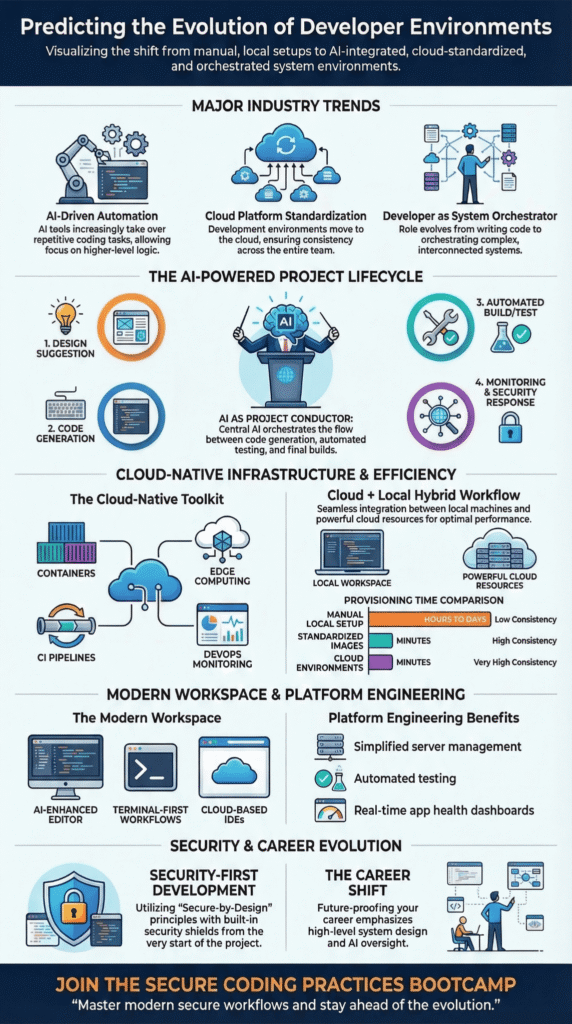
Three major trends are reshaping how software is built right now:
- AI tools are taking over repetitive tasks, freeing developers for system design.
- Cloud platforms now serve as the standard base for most new projects.
- The developer’s job is evolving into overseeing AI and orchestrating whole systems.
How AI is Changing What Developers Do
AI is absorbing the grunt work of coding. The result? Developers spend more time on architecture and complex problem-solving.
The change is embedded in the tools themselves. These systems train on mountains of existing code, analyzing patterns in updates, contributions, and revisions. This shift is a big part of the AI-assisted development direction many engineering teams are already moving toward. They use that history to predict future bugs and suggest fixes before a line is written.
We teach a simple rule in our bootcamp: secure your code first, then automate. Every project starts with secure coding practices. Only after that foundation is solid do we bring in AI to help with tests or generate boilerplate code. It’s the only way to keep things safe.
Research from groups like the IEEE Computer Society shows this works. Their studies found that AI trained on open-source projects can spot patterns. It can see if a file is growing too fast or if a part of the code isn’t getting enough attention. This helps teams predict what might break later.
So, what’s AI doing right now? It’s handling tasks like:
- Writing basic, repetitive code.
- Creating first drafts of documentation.
- Building unit tests automatically.
- Suggesting ways to clean up messy code.
The developer’s job isn’t going away. We’re still in charge of the overall design. We make the final call on how everything fits together and stays secure.
AI as the Project Conductor
Think of AI orchestration as the conductor of an orchestra. It doesn’t play one instrument; it makes sure all the sections work in harmony.
Instead of looking at one tool, it looks at the whole network. It sees how files connect to each other, how bugs link to specific code, and how every piece of software depends on another.
This big-picture view is powerful. Teams can use it for “Change Risk Prediction,” which is a fancy way of saying they can see how risky a code change is before they make it. They can also run simulations of their entire development process to find slow spots.
You’ll also see more “agent-based models” in research papers. These are computer simulations that act like different people on a team, a manager, a new coder, a tester. Researchers use them to understand how the way a team works together changes a project’s outcome.
Why Development is Moving to the Cloud
Credits: SCG Team; Seibert Consulting Group
Development is moving to the cloud for one main reason: it makes “it works on my machine” a problem of the past. Cloud-native environments give every team member the exact same setup, which stops a huge number of bugs before they start.
The shift is simple. Instead of installing a dozen programs on a personal laptop, developers now work in a ready-made environment that lives online. This environment is a perfect copy of the final server where the app will run, so there are fewer surprises at launch time.
Gartner forecasts 70% of workloads in the cloud by 2028, with 95% new digital workloads being cloud-native by 2026. They’re doing it to support teams that work from different cities or even different countries.
For us, the best part is consistency. When our bootcamp students code in an identical environment, from their own computer to the live website, debugging gets much easier. We spend less time fixing setup mistakes and more time teaching.
A few key technologies make this possible:
- Containers, which package an app with everything it needs to run anywhere.
- Edge computing setups, for apps that need to work fast on devices far from the cloud.
- Automated continuous integration pipelines that test every single code change.
- Built-in monitoring tools that are part of the DevOps way of working.
This is a big help for building Internet of Things (IoT) gadgets, too. Those projects need to work on local devices and talk to the cloud at the same time. A cloud-native approach keeps everything connected.
Why Your Developer Setup Will Look the Same by 2026
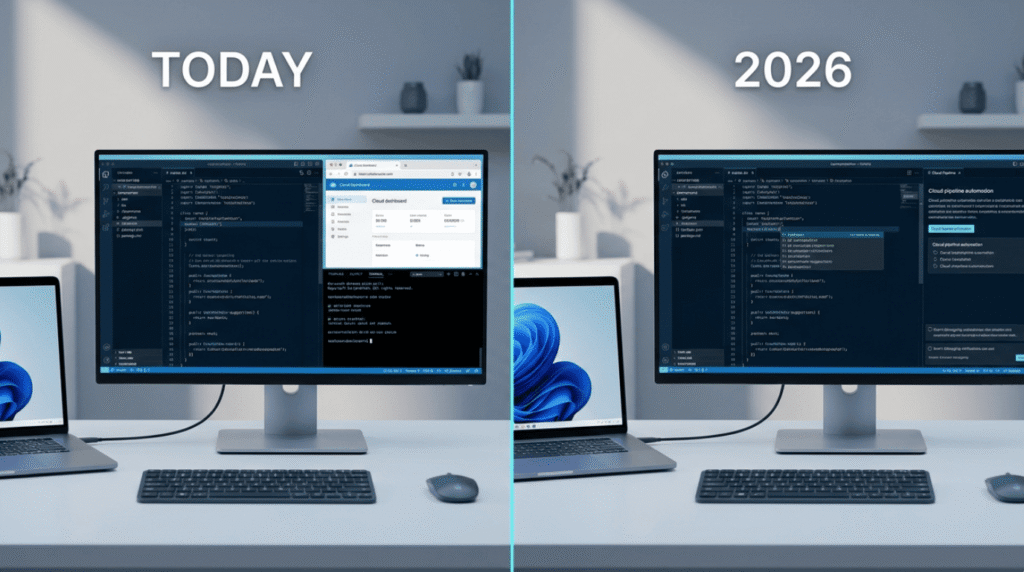
By 2026, every developer on a team will start with the same computer setup. This is called standardization. It makes three things better: you start working faster, the software you build is more reliable, and security is built right in.
More teams are doing this now. Surveys show 70-80% teams adopting standardized environments, e.g., DevOps trends. They do it to get new people working quickly and to help everyone get more done.
We see it in our bootcamp all the time. When a new student joins, they used to spend half a day just getting their computer ready. Now, it takes about 15 minutes. They get a pre-made setup with all the tools and security checks already running. They can start writing real project code right away.
Here are the clear benefits:
- New engineers, for machine learning or regular software, can help on day one.
- Every person on the team, no matter where they live, uses the same tools.
- Important security steps, like checking for holes in the code, happen automatically.
The table below shows the difference between the old way and the new standard.
| Setup Type | Provisioning Time | Consistency |
| Manual local setup | Hours to days | Low |
| Standardized development images | Minutes | High |
| Cloud development environments | Minutes | Very high |
This standardization makes security stronger. When secure coding is part of the setup itself, you can’t forget to do it.
Where Will You Write Your Code?
The place where you write code is becoming more than just an editor. It’s turning into the main control center for everything: writing code, working with your team, and releasing the software.
Old coding programs were like fancy text editors. The new ones have to handle the whole job, from the first line of code to putting it live for users. These shifts also help make development more accessible to new engineers who may not have years of infrastructure experience.
They now let you see what your teammate is typing, automate the release process, and let you turn new features on for just some users at a time.
A few different styles are competing to be your main screen:
- AI-enhanced coding environments: Where the tool suggests code and helps you as you type.
- Terminal-first workflows: For people who love using keyboard commands.
- Cloud-based workspaces: Everything, even the editor, runs in your web browser.
How these tools are designed changes how well we work. We use clear buttons and menus, built-in tools to find bugs, and shared team dashboards to keep big applications running well.
The tools that will win won’t just be for typing. They’ll be for the whole job of building software.
How Platform Engineering Helps Developers
Platform engineering fixes a common problem: “I want to build things, not fix servers.” It gives developers a simple menu of options so they can launch and watch their apps without being an expert in the underlying systems.
Think of it like this: a platform team builds a curated menu for developers. Instead of giving them raw cloud services and saying “good luck,” the platform offers clear, safe paths to follow. These are often called “Golden Paths.” These paths automatically handle testing, building, and monitoring the app.
In a recent analysis by DEV Community
“Gartner says 80% of software companies will adopt Internal Developer Platforms by 2026. That is not a slow trend. That is a land rush.” – DEV Community
In our training, this is a game-changer. Our students shouldn’t need to be cloud wizards to put a safe app online. A good platform gives them a few safe, simple buttons to press.
The main things a modern platform provides are:
- A simple way to get the servers and databases they need.
- Automated tests that run every time the code changes.
- Dashboards to see if their app is healthy and fast.
This way of working supports fast, agile development. It lets engineers focus on their real job: building a great experience for the people using their software, not managing technical complexity.
Why We Still Code on Our Own Computers
Even with all the great cloud tools, developers still work on their own laptops. It’s not going away. Local environments are perfect for trying out wild ideas quickly and for working when you don’t have internet.
Cloud platforms are amazing for team projects, but starting something new often happens right on your personal computer. It gives you instant feedback. You can change a line of code and see the result in a blink.
Talking to other developers, a few common reasons for keeping a local setup come up:
- You can code on a plane, a train, or anywhere offline.
- Finding and fixing bugs can feel faster when everything is on your machine.
- It doesn’t cost any extra money for server time while you’re experimenting.
The future isn’t one or the other. It’s both. We think the best workflow is to build and test early ideas locally. Then, when you’re ready to share, you push your code to a standard cloud environment where your team can test it all together.
This hybrid way also helps with security. It lets teams keep control. They can set up security tools that watch for strange activity, like weird data inputs or suspicious login attempts from unknown locations, right from the start.
How the Job of a Developer is Changing
AI is starting to do more of the routine work in coding. This is changing what companies look for when they hire. They need more engineers who can design whole systems, not just write the pieces.
As AI and machine learning get built into our tools, the developer’s role is shifting. Jobs like fixing code formatting, managing libraries, and running basic tests are being automated.
“As AI commoditizes productivity in software engineering, effectiveness is going to be assessed based on creativity and innovation, instead of traditional product-based measures such as velocity, deployment frequency, or lines of code.” – Gartner
Some reports say the market for “low-code” tools, which let people build apps with less traditional coding, could grow to about $65 billion by 2027. This means more people will help make software.
But complex, reliable systems will always need expert engineers. The skills that are getting more valuable now include:
- Designing the overall structure of a system.
- Managing AI analysis tools and machine learning pipelines.
- Building and maintaining the internal platforms teams use to deploy their apps (often called platform engineering or MLOps).
Developers are becoming more like supervisors. We’re overseeing automated workflows and making sure the entire system is solid and can grow over time.
A Peek at the AI-Powered Developer Tool of the Future

The next generation of developer tools will use AI to run the whole show. It will mix smart automation, cloud power, and prediction to handle the software lifecycle from start to finish.
These systems reflect the direction of next-generation AI coding tools that combine prediction, automation, and security checks directly inside the development workflow.
They will learn from everything: how past projects were built, how teams contributed, and data mined from old code. Machine learning will use this history to guess how risky a change is and even predict bugs before they happen.
Simulations will become a normal part of planning. Researchers already use “agent-based models” that act out how different types of developers work together. Teams could use similar simulations to see how a big design decision might play out long before they write the first line of code.
A day in the life with this future tool might look like this:
- The AI looks at the project goals and suggests a starting design.
- It helps generate and check the initial code modules.
- Automated pipelines build, test, and deploy updates.
- Built-in monitors watch for anything strange and trigger security responses automatically.
Security will be baked in deep. A request from a suspicious location could be flagged instantly. The system would use tracking codes (like a Cloudflare Ray ID) to follow it. Every action would be logged with details like the URL requested and a server ID, making it easy to trace any problem.
Following strong ethical and secure development rules will be non-negotiable. As the National Institute of Standards and Technology (NIST) advises, the best practice is to build security directly into the engineering workflow from the very beginning.
Research from places like the MIT Computer Science and Artificial Intelligence Laboratory (CSAIL) also shows that combining AI automation with human judgment is key for keeping complex systems reliable.
The winning tool of tomorrow won’t just help you type. It will weave all these ideas, smart AI, solid security, and human oversight, into one complete system for building software.
FAQ
How will Artificial Intelligence change daily software development work?
Artificial Intelligence will change how teams perform software development tasks every day. Many developers now use AI-powered tools and AI code generation to write and review code. These systems analyze software repositories and project data to suggest improvements.
Machine learning models also help monitor the software development lifecycle and support automated testing tools. This approach helps teams maintain software quality while completing tasks faster.
Why are cloud platforms important in the modern software development landscape?
Cloud platforms play a central role in the modern software development landscape. Software engineering teams use cloud computing to host Web Applications and store project data. Many Integrated Development Environments connect directly to cloud platforms, which allows developers to access code from different locations.
This setup supports real-time collaboration and Continuous Integration. Cloud platforms also help teams manage deployments and maintain stable services.
How do developer tools track change risks in software projects?
Developer tools analyze activity in software repositories to track change risks. These tools review commit behavior and commit frequency to understand how developers modify files. Repository mining techniques help detect change coupling between files.
The system then builds change coupling graphs and change coupling networks. Change Risk Prediction tools calculate change probabilities, which help teams reduce errors and protect software quality.
What role will the Internet of Things and Edge Computing play in future apps?
Internet of Things technology connects physical devices to software systems. Edge Computing processes data close to Mobile Devices or sensors instead of sending everything to cloud computing systems.
This approach improves speed and user experience for Web Applications and Voice assistant services. Developers often design software networks that link IoT technology, client-server architecture, and cloud platforms to support real-time responses.
How can developers improve security and avoid access restrictions online?
Developers improve security by protecting systems from online attacks and malformed data. Security services monitor IP address activity and inspect SQL command requests.
If a system detects suspicious behavior, it may block the client IP and show an access denied message. Security logs usually record the Requested URL, Server ID, and Error reference number to support vulnerability response and investigation.
What the Future of Developer Environments Means for Developers
Better tools will keep arriving, but strong habits still decide whether software survives the real world. If you want to build with the discipline modern development demands, it helps to learn from engineers who practice it daily.
One practical way to sharpen that mindset is to Join the Secure Coding Practices Bootcamp, where developers practice real security problems, learn OWASP risks, and leave with habits they can use in everyday code starting the next commit.
References
- https://dev.to/mashrulhaque/2026-developer-predictions-why-coding-gets-better-4hpl
- https://www.gartner.com/en/articles/top-technology-trends-2026
Related Articles
