


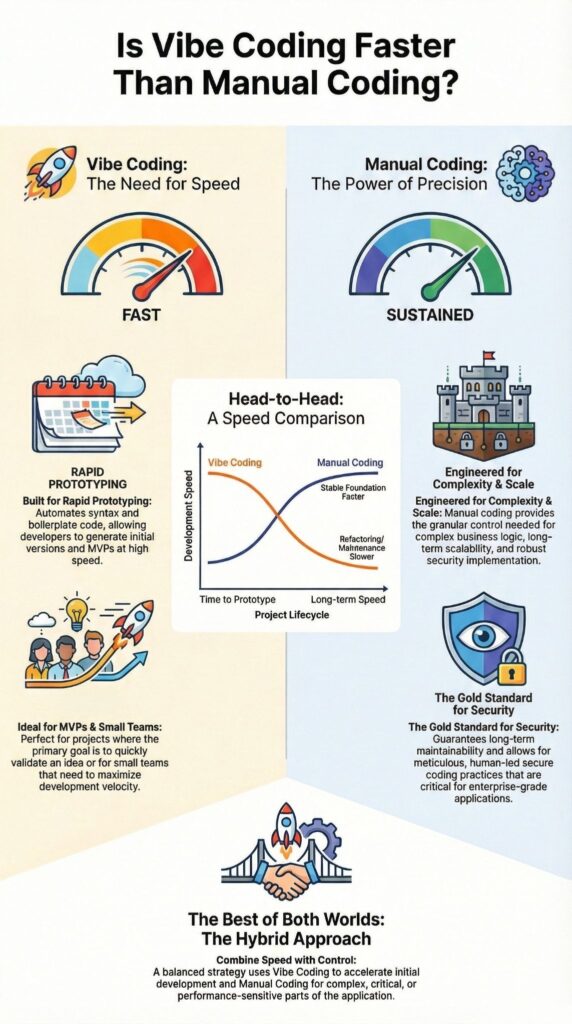
Vibe coding is generally faster than writing code manually for many early-stage and low-complexity tasks. We have seen it shorten prototyping time dramatically, especially when the goal is momentum rather than perfection. But speed is contextual. The moment complexity, security, or scale enters the picture, the definition of “faster” starts to shift.
This piece walks through where vibe coding wins, where manual coding still pulls ahead, and how teams like ours balance both without sacrificing Secure Coding Practices. Keep reading if you care about real-world velocity, not just impressive demos.
Key Takeaway
- Vibe coding accelerates early development by automating syntax and boilerplate.
- Manual coding often proves faster over time for complex, secure, or scalable systems.
- Hybrid workflows deliver the best balance of speed, control, and code quality.
What Vibe Coding Means in Practice
Vibe coding swaps manual syntax for natural language. You say what you want, the AI writes the first draft of the code, which reflects how vibe coding shifts effort away from syntax recall and toward intent, iteration, and outcome review. It feels more like giving directions than hammering out every line.
We’ve used it in fast prototyping when speed mattered more than clean architecture, and the drop in friction is very clear.
- You describe intent, the AI generates code.
- You review, tweak, and iterate through a chat-like loop.
- You focus less on syntax recall, more on what the system should actually do.
Core Principles of Vibe Coding
Vibe coding is prompt-based coding. Natural language is the interface, the LLM turns that into executable logic. Boilerplate, repetitive patterns, and common structures are mostly automated, so effort shifts toward:
- Writing clear prompts
- Supplying the right context
- Reviewing and editing AI output
Common Tools Used for Vibe Coding
Most setups plug straight into your editor, so code appears inline, ready to run or refactor. Tools handle code completion, refactoring, and conversational debugging in one flow. The real gain is compression: you move from idea to working draft much faster, without stopping to rebuild the same scaffolding over and over.
What Manual Coding Involves

Manual coding sticks to the classic path. Developers take requirements and turn them into architecture, logic, and syntax by hand. Every line is intentional, every abstraction is a choice, not an accident [1].
We still use this for systems where predictability and control matter more than speed. Having this as a baseline makes any comparison with vibe coding feel honest.
Typical Manual Development Process
Manual coding usually starts with planning. Requirements get mapped into logic, data structures, and algorithms, then translated into code step by step.
- You design the structure before writing most of the code.
- You handle syntax, edge cases, and performance concerns directly.
- You run tests, debug issues, and tune performance as you go.
This flow takes more time at the start, but it builds a deep understanding of how the system behaves.
Strengths of Manual Code Writing
Manual coding is strong on precision and control. Developers decide how data moves, how memory is used, and how algorithms run.
- Good for scalable, long-lived systems with clear patterns.
- Architecture and structure are explicit, not implied.
- Security is easier to reason about when humans shape the logic.
Development Speed Comparison
We’ve seen that speed is more than typing fast. It’s how quickly you get a first version running, how hard debugging feels, and how tight your feedback loops are, especially when comparing vibe coding vs traditional development across setup time, iteration cost, and long-term maintenance effort. Both manual and vibe coding can feel fast, but in our secure development bootcamps, the gaps show up at specific stages.
Time to First Working Prototype
For first prototypes, vibe coding usually wins. We’ve watched students ship working tools in hours:
- Boilerplate and setup appear almost instantly.
- Simple integrations get wired up with a few prompts.
Manual coding needs more groundwork: structure, config, and security scaffolding before anything meaningful runs. For MVPs, AI-assisted coding often takes the lead, while we step in to review security and logic.
Iteration and Feedback Cycles
Once something runs, iteration speed becomes key. Vibe coding lets you tweak a prompt, regenerate code, and test again in minutes. That fast loop supports experimentation.
Manual edits, by contrast, require careful changes and retesting, especially when security is involved. It’s slower, but it builds stronger understanding.
| Development Stage | Vibe Coding Speed | Manual Coding Speed | Practical Impact |
| Time to First Prototype | Very fast | Slower | AI quickly generates working drafts and boilerplate |
| Iteration Cycles | Fast | Moderate | Prompt-based changes enable rapid experimentation |
| Debugging Early Issues | Fast | Moderate | AI assists with syntax and surface-level fixes |
| Handling Complex Logic | Slower | Faster | Manual control reduces rewrites and logic gaps |
| Long-Term Maintenance | Slower | Faster | Hand-written code is easier to reason about and extend |
Where Vibe Coding Is Clearly Faster
Some situations lean heavily toward vibe coding, and we see the pattern repeat across our secure development cohorts. When mistakes are cheap and easy to undo, automation gives a real speed edge.
Rapid Prototyping and MVPs
For quick demos and MVPs, vibe coding usually takes the lead. Ideas move from rough concept to working prototype with very little setup.
In our bootcamps, we’ve used it to:
- Validate product assumptions before full builds.
- Spin up internal security tool demos.
Here, we accept that the first version may be thrown away later. Velocity matters more, and we layer security checks on top once the idea proves useful.
Non-Complex or Repetitive Features
Repetitive work is where vibe coding feels almost unfair. CRUD operations, simple APIs, and basic UI wiring are perfect candidates.
We often let the AI handle:
- Boilerplate and standard patterns.
- Routine request/response handling.
Manual syntax adds little value here, and time-to-code drops sharply.
Solo Developers and Small Teams
Small teams and solo developers feel the boost the most. With solid prompts and secure habits, one person can move like a small team, shipping working tools earlier than planned.
Where Manual Coding Can Be Faster Long-Term
Credits : Sajid
Over a longer timeline, we’ve watched projects that lean too hard on vibe coding actually slow down. The early speed is real, but some of the costs show up months later, especially in systems that need to be secure and long-lived.
From our secure development bootcamps, this has become an observed pattern, not just a theory.
Complex Business Logic
When business rules are dense and full of edge cases, manual coding often pulls ahead.
- AI can miss subtle constraints or misread rare paths.
- Developers then spend time rewriting and clarifying logic.
The manual path is slower upfront but builds a cleaner mental model of the domain, which pays off when you’re maintaining or extending the system.
Scalability and Architecture Decisions
Scalable systems demand structure. AI-generated code tends to optimize for local correctness, not long-term architecture.
We see fewer painful rewrites when teams:
- Design modules and boundaries by hand.
- Consider performance, scaling, and secure design from the start.
That upfront effort reduces refactors that would erase early AI gains.
Hybrid Approaches and Practical Choices
Most real teams don’t stick to just one method. They mix vibe coding and manual coding, shifting the balance as projects change, which mirrors how vibe coding differs from pair programming in ownership, collaboration style, and how responsibility for decisions is shared.. In our secure development bootcamps, that blended approach usually works best.
Hybrid coding lets you keep both speed and control, instead of trading one away.
Using Vibe Coding as a Starting Point
In the early phase, AI drafts help us get moving fast. Skeletons, examples, and scaffolding appear quickly, so no one is stuck at a blank editor.
- We treat AI output as a draft, not final code.
- Ownership of the logic stays with the developer.
Refining With Manual Coding
After the draft exists, manual work takes the lead. This is where we:
- Apply Secure Coding Practices on purpose.
- Review logic and assumptions.
- Harden inputs, outputs, and access control.
The Cybersecurity and Infrastructure Security Agency is clear that secure systems still depend on human oversight and validation, whatever tools you use.
Choosing Based on Project Goals
Project goals decide the mix. Fast demos, regulated systems, and long-term platforms each need a different balance. Teams that match their tools to their real risks usually move faster in the long run.
FAQ
Is vibe coding faster than manual coding for real-world development tasks?
Vibe coding can be faster because AI-assisted coding generates usable code from natural language prompts. It reduces time spent on manual syntax and repetitive boilerplate code. However, speed depends on prompt quality, problem complexity, and required logic control. Manual coding is slower at the start but provides consistent results, precise behavior, and reliable performance for complex systems.
How does vibe coding affect developer productivity compared to traditional coding methods?
Vibe coding increases developer productivity by automating syntax generation, code drafting, and early logic creation. It shortens iteration cycles and accelerates feedback loops during development. Traditional coding depends more on manual expertise and structured workflows. Productivity gains vary based on project scope, development phases, and how clearly developers define prompts and requirements.
Does vibe coding reduce prototyping time without harming code quality?
Vibe coding significantly reduces prototyping time by enabling rapid development and faster MVP creation. It allows developers to test ideas quickly and modify code with minimal effort. However, code quality still requires manual validation, testing, and refactoring. Without review, generated code may contain inefficiencies, logic gaps, or security weaknesses that affect long-term reliability.
Can vibe coding improve debugging speed compared to manual debugging?
Vibe coding can improve debugging speed by identifying syntax errors, suggesting fixes, and enabling quick code revisions. It helps developers test changes faster during early development. Manual debugging remains necessary for diagnosing logic flaws, performance issues, and edge cases. Combining AI suggestions with human analysis produces more reliable and maintainable code.
Is vibe coding suitable for beginners and experienced developers alike?
Vibe coding is suitable for beginners because it reduces the need for deep syntax knowledge and supports intuitive programming. It also benefits experienced developers by increasing coding speed and maintaining flow state. However, strong manual coding skills are still required for code optimization, precise customization, and ensuring accuracy, performance, and long-term maintainability.
Is Vibe Coding Faster Than Writing Code Manually in the Real World?
Vibe coding is faster when the goal is rapid output, experimentation, or early validation. Manual coding often proves faster when reliability, security, and scale dominate.
Speed isn’t just how fast code appears on the screen. It’s how long that system can run, be patched, be audited, and be extended without turning into a slowdown.
Join the Secure Coding Bootcamp to train your team to ship faster, safer code with hands-on, real-world practice.
References
- https://time.com/7302351/ai-software-coding-study/
- https://www.linkedin.com/posts/svpino_nobody-is-writing-90-of-their-code-using-activity-7379895758696726529-xFxO/
Related Articles
