



AI helps more people build software. It handles the tricky parts and checks for accessibility. This lets creators think about their ideas, not just the code. Since the CDC says 1 in 4 U.S. adults has a disability, making software everyone can use is a must.
We used to treat accessibility as a final step. Now, it’s part of the plan from day one. AI tools and automated checks help developers build for everyone as they work.
Doing a few things early saves a ton of trouble later. Using secure coding, writing clear image descriptions, and testing early saves time and money. More importantly, it makes the software work for millions more people. Curious how this is changing the way we build things? Read on.
A Quick Start on Accessible Development
Before we go further, here are a few simple things to remember:
- AI tools and secure coding lower the technical wall. This lets more developers build software that follows the Web Content Accessibility Guidelines (WCAG 2.2).
- Technologies like screen readers, voice commands, and closed captions are built right into modern development.
- Using inclusive design methods, like Universal Design and real user testing, helps teams build products that work for a wide range of people from the very start.
How AI Is Lowering the Barrier to Entry in Software Development
AI helps beginners and small teams build apps. It automates coding, testing, and design. You don’t need to be an accessibility expert anymore.
We build digital learning tools. Early automation changed our work. Before, fixing accessibility problems took weeks. Now, AI tools show us the issues right away.
Accessibility used to be a legal checklist for laws like the ADA or Section 508. Today, it’s part of our normal work.
Our development environments also push for Secure Coding Practices. We see this as the first step for both safety and accessibility. When these two things work together, the final product is better for everyone.
This change lets developers think more about the user’s experience. We spend less time on boring, repetitive setup tasks.
As highlighted by The New Stack
“These deliverables help make compliance more accessible and achievable for everyone across the broader open source community, from larger enterprises to smaller projects.” – The New Stack
Here are a few ways AI is lowering barriers:
- Using plain English to create UI code and layouts.
- Having accessibility scanners built right into our coding tools.
- Getting automatic ideas for alt text, video captions, and better HTML structure.
- Quickly making inclusive designs for the mobile web.
For our projects, this means we rarely have to rebuild things at the last minute. Our products are accessible from the very start.
What Core AI Technologies Make Development More Accessible
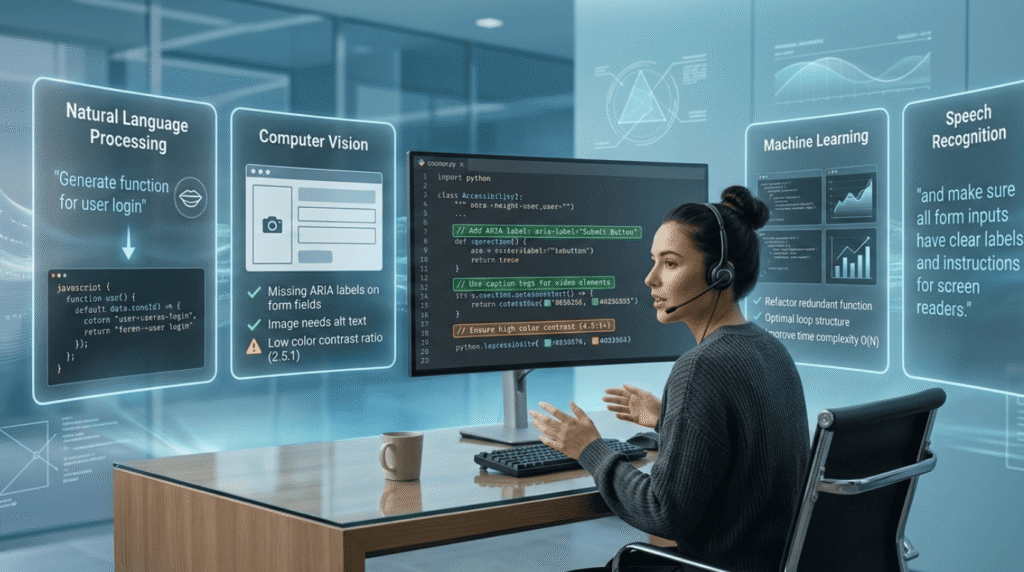
AI technologies let developers create code, test for accessibility, and improve apps using simple commands instead of complex code.
A key technology is natural language processing, or NLP. Instead of writing long code sections, a developer can describe what they want. The AI provides working code blocks instantly, which reflects the growing shift toward AI-assisted development where machines handle repetitive code structure while developers focus on ideas.
AI design systems can also suggest interface patterns. These suggestions follow the Web Content Accessibility Guidelines (WCAG 2.2). Studies show early a11y testing saves up to 30x cost vs. production fixes.
Another big help is automated accessibility auditing. Tools can now check color contrast, keyboard use, and page structure while we’re still building.
These tools often use a few core technologies:
- Automated accessibility audits that check against WCAG rules.
- Contrast checkers that make sure text is easy to read.
- OCR systems that pull text from images.
- AI that writes alt text for pictures and videos.
The World Wide Web Consortium (W3C) says testing for accessibility early saves a lot of money later. You can learn more from their Web Accessibility Perspectives page.
In our bootcamp workflow, we pair AI tools with secure coding. This makes accessibility and security work together, not against each other.
How AI Helps Build More Accessible Applications
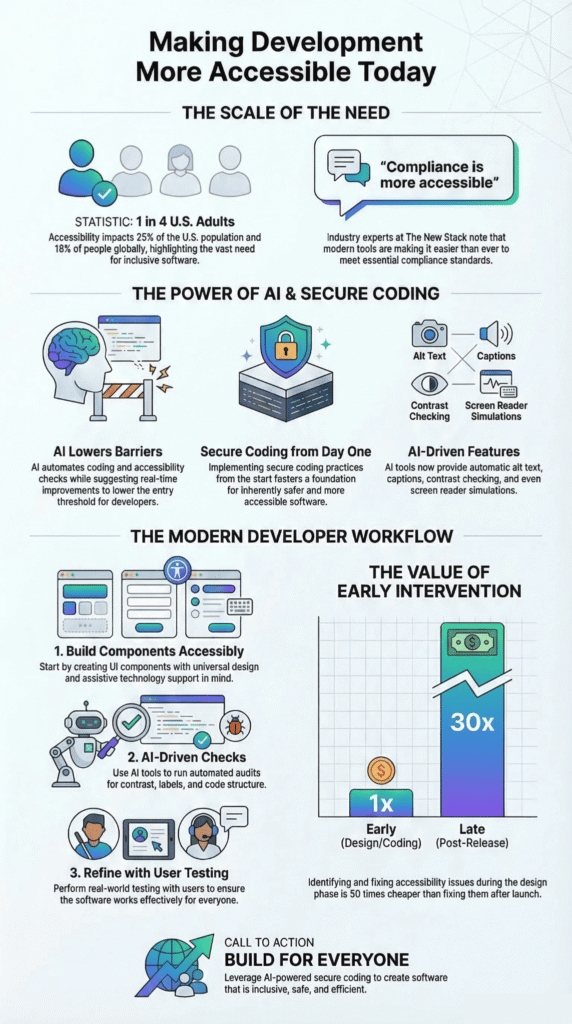
AI is great at adding basic accessibility features automatically. It can write captions, describe images, and adjust interfaces. For people who rely on assistive technology, this makes software much easier to use.
To build apps for everyone, you need tools like screen readers and voice commands. These let people with different abilities interact with your software.
About 16% of the world’s population has a disability, according to the WHO. That means accessible software isn’t a niche concern; it’s a global requirement.
We’ve tested this with our own learning tools. Adding features like closed captions and full keyboard navigation makes a real difference, especially in online classes or on video platforms.
AI commonly handles jobs like:
- Creating automatic captions and transcripts for videos.
- Writing descriptive alt text for images.
- Offering speech-to-text for voice commands.
- Adapting interfaces for screen reader users.
Even a simple fix, like structuring headings correctly in a Word doc, helps. It makes the document logical for someone using a screen reader.
Ultimately, these improvements aren’t just about following rules. They make the software work better for absolutely everyone.
How Universal Design and Inclusive Design Improve Development
Universal design builds accessibility right into the software’s foundation. The goal is to make digital products work for a wide range of people without needing special changes later.
For developers, Universal Design is about flexibility. An interface should work well on different devices and for users with different abilities.
The WebAIM Million study had a striking finding: 96.3% of homepages still have clear accessibility problems. This is exactly why inclusive thinking has to start at the beginning of a project, not be added at the end.
When a team uses inclusive design from the start, accessibility features feel like a natural part of the product, not an afterthought.
You can see universal design in action with things like:
- Interfaces that work perfectly with screen readers and keyboard-only navigation.
- Responsive layouts that look good on phones, tablets, and desktops.
- Content is organized with clear headings and labels.
- Captions and transcripts for all video or audio learning materials.
In our bootcamp, we always start with Secure Coding Practices. We’ve found that when code is secure and well-structured, it’s also far easier for accessibility tools to understand. A solid foundation makes everything else work better.
This method builds digital experiences, from learning platforms to government sites, that simply work for more people.
How AI Improves Developer Workflow and Productivity
Credits: Modern Software Engineering
AI takes over routine tasks like coding, debugging, and accessibility checks. That leaves developers free to concentrate on the bigger picture and the user’s experience.
On real projects, accessibility often gets saved for the final push. AI flips that script by building checks directly into the coding process itself.
Newer development tools can simulate the app experience for users with disabilities. They can mimic a screen reader’s path through a layout, letting developers find issues long before launch.
In a recent analysis by Open Source Security Foundation (OpenSSF)
“This helps shift the responsibility back to manufacturers and stewards through consistent data discovery rather than placing the burden of evidence upon voluntary communities.” – OpenSSF
A typical workflow for our accessible projects looks like this:
- Build components with accessibility-first templates.
- Run automated checks during active development.
- Validate with real assistive technology and user testing.
- Refine based on that feedback.
This is the “shift-left” approach we advocate: test accessibility, security, and performance from the start.
The U.S. Department of Justice confirms that early accessibility work reduces legal risk under the ADA.
For developers, this approach is simply less stressful. Catching problems early cuts down on chaotic last-minute fixes and builds more reliable software.
AI Development Tools and Accessibility Features

Many development tools now come with built-in features to help build accessible software from the beginning.
Different tools do different things, but they usually combine testing, design help, and automatic documentation. Many teams also share accessibility improvements through open source contributions, allowing accessibility fixes, design components, and testing tools to spread quickly across the wider development community.
This table shows how these tools fit into a developer’s work.
| Technology Category | What It Does for Accessibility | The Result |
| Automated testing tools | Finds contrast errors and missing image text | Faster fixes for accessibility problems |
| AI design assistants | Suggests accessible layouts and menus | Less time spent redoing designs |
| Assistive tech simulators | Acts like a screen reader for testing | Better, more realistic usability checks |
| Document accessibility tools | Makes PDFs and docs readable by assistive tech | Accessible learning materials and handouts |
We often use these tools with platforms like learning management systems, digital classrooms, or presentation software like Google Slides.
In education, this mix helps create an inclusive learning space. It makes sure digital content works for everyone, on any device.
How AI Could Expand Accessibility for Future Developers and Users
New tech like adaptive interfaces and smart personalization could change how both developers and users with disabilities work with software.
Accessibility tech is moving fast. Leaders like Sara Minkara, the U.S. Special Advisor on International Disability Rights, talk about how inclusive design lets more people participate worldwide.
We’re seeing new ideas in both hardware and software, and many of these improvements come from changes in modern software development workflows where AI assists testing, accessibility validation, and interface adaptation earlier in the build process.
For example, Ashirase Inc. makes in-shoe navigation tech to help people with visual impairments walk independently. Places like the Noor Rehabilitation Center test new digital learning tools.
Future improvements might include:
- AI that creates interfaces personalized to how each user works.
- Smart navigation systems for people who are blind or have low vision.
- Interface parts that adapt for different physical abilities.
- Software that works with wearable assistive devices.
The market for assistive technology is expected to grow past $35 billion by 2030. This shows demand is rising for inclusive software and gadgets.
For developers, this means thinking about accessibility will become a normal part of designing any app, not just special ones.
FAQ
How does accessible development help people with disabilities use digital technology?
Accessible development helps people with disabilities use digital technology independently. Developers design websites using web accessibility, Universal design, and inclusive design principles. They add alt text for images, support screen reader navigation, and ensure compatibility with assistive technologies like voice recognition.
These improvements allow users with visual, hearing, or mobility challenges to read, navigate, and interact with digital platforms more easily and confidently.
What rules guide developers when building accessible websites and digital tools?
Developers follow established accessibility rules to ensure equal digital access. The Web Content Accessibility Guidelines (WCAG 2.2) provide technical standards for accessible design.
In the United States, laws such as the Americans with Disabilities Act and Section 508 Standards support disability rights and require accessible information and communications technology. These regulations help developers create digital products that meet legal expectations while improving access for people with disabilities.
How do developers test if a website or app is accessible?
Developers use several methods to test accessibility. Teams run automated accessibility audits and use contrast checkers to detect color visibility problems. They also conduct usability testing and user testing with real users, including those who rely on assistive technologies.
Research projects such as the WebAIM Million show that many websites still have accessibility issues, which is why early testing helps teams identify and fix barriers before users encounter them.
How does accessibility improve digital learning for students?
Accessibility improves digital learning by creating an inclusive learning environment for all students. Educators use Universal Design for Learning to present information in different formats.
Digital learning solutions, learning apps, and learning management systems can include closed captions, closed captioning, and sign language support. These features allow students with hearing, visual, or learning differences to understand lessons and participate in digital education more effectively.
What future technologies may make development even more accessible?
Future technologies will continue improving accessibility in digital environments. Advances in adaptive design, the mobile web, and modern information and communications technology help websites adjust to different devices and user needs.
Tools such as OCR (optical character recognition) convert images into readable text for screen readers. Combined with stronger web accessibility planning, these innovations help developers create digital systems that more people can access and use.
Accessibility Development: What You Should Know First
Technology moves fast. New apps appear every day. People learn, work, and talk online now. But one quiet question still matters: who can actually use what we build? If the answer is everyone, accessibility must be part of the work from the start. Like a city with open roads and clear signs, good technology lets people move through it with ease.
Accessible design also makes software stronger and safer. When teams build with care, users get better tools and fewer problems. If you want to learn how to build safer, inclusive code, you can join the Secure Coding Practices Bootcamp and start creating technology that truly works for everyone.
References
- https://thenewstack.io/making-the-cyber-resilience-act-work-for-open-source/
- https://openssf.org/category/policy/cra/
Related Articles
