



AI-generated code often fails in predictable ways—calling wrong APIs, creating security gaps, or breaking in production despite looking fine in review.
AI speeds up development, but without structure it adds risk. This guide shares a simple, practical approach to secure coding and debugging when generated code doesn’t behave as expected.
Keep reading to learn how to handle it step by step.
Key Takeaways
- AI-generated code fails in repeatable patterns, not random ways, which makes systematic debugging far more effective than reactive fixes.
- A short triage using linters, type checks, and tests catches most issues before deep investigation.
- Treating AI code as untrusted by default and applying Secure Coding Practices early prevents costly production incidents.
Why does AI-generated code fail in production

AI-generated code often fails in real production systems because it focuses on code that looks right, not code that truly works in the real world. The model is good at writing believable syntax, but it doesn’t understand real system limits.
This leads to common problems like fake APIs, weak security, and slow or risky design choices.
Reports collected by OWASP show that about 45–70% of AI-written code samples include at least one security flaw.[1]
These flaws can pass simple tests but break when someone actually tries to attack the system.
In our experience, this usually happens when the code looks neat and polished but relies on perfect conditions. The model fills in missing details with confidence, even when those details are wrong. Real systems are not that forgiving. When assumptions fail, the code fails too.
The most common root causes appear again and again across teams and languages.
- Training data lacks real execution context.
- Models overfit to happy-path examples.
- Long prompts cause context collapse during complex reasoning.
These problems explain why syntax checks succeed while runtime failures emerge days later, a pattern we also see repeatedly in common AI coding challenges and pitfalls uncovered during production reviews. It is missing feedback from real environments, which is why Secure Coding Practices matter early, not after an incident.
Common logic gaps and hallucination patterns
AI code usually breaks in the same few ways, not because of new or rare mistakes. When teams learn to spot these patterns early, they spend much less time fixing bugs.
The most common issues are missing checks for empty values, wrong guesses about how data is shaped, and made-up functions that do not exist in real libraries. These problems happen because the model focuses on what looks right, not what has been proven to work.
We have seen real production outages caused by small details, like using first_name instead of firstname. The code passed tests because the tests were built on the same wrong assumption. In real systems, that small mismatch was enough to break everything.
The most common failure patterns include:
- Hallucinated APIs where methods or parameters do not exist in official documentation.
- Happy-path assumptions that ignore timeouts, partial failures, or empty responses.
- Outdated libraries referenced years after deprecation.
- Control-flow bugs that skip validation under specific branches.
In 2026, internal engineering surveys showed that mistakes happen more often when AI handles complex thinking than when it writes simple, repeatable code. Because of this, GitHub is still the most trusted place to check real API rules, not the generated code alone. These issues are not random. When teams know what to watch for, they can spot problems early and manage them on purpose.
What are the first steps to triage AI code errors?
The fastest way to handle unexpected AI code behavior is a short, disciplined triage before touching business logic. This approach consistently catches the majority of surface-level failures.
Start with a three-minute check that focuses on structure, not intent.
- Run linters to catch syntax, style, and unreachable code paths.
- Execute type checkers to expose hallucinated APIs and mismatched data models.
- Run existing unit tests to detect regressions and obvious runtime failures.
- Scan for missing dependencies and version conflicts.
- Flag high-complexity blocks that deserve manual inspection.
Static analysis platforms routinely flag deprecated APIs, insecure patterns, and excessive complexity early.
We treat this triage as non-negotiable Secure Coding Practices. It is not about mistrusting AI. It is about acknowledging that generated code has no awareness of your production constraints. Once triage passes, deeper analysis becomes far more focused and less frustrating.
How to implement a systematic debugging workflow for AI
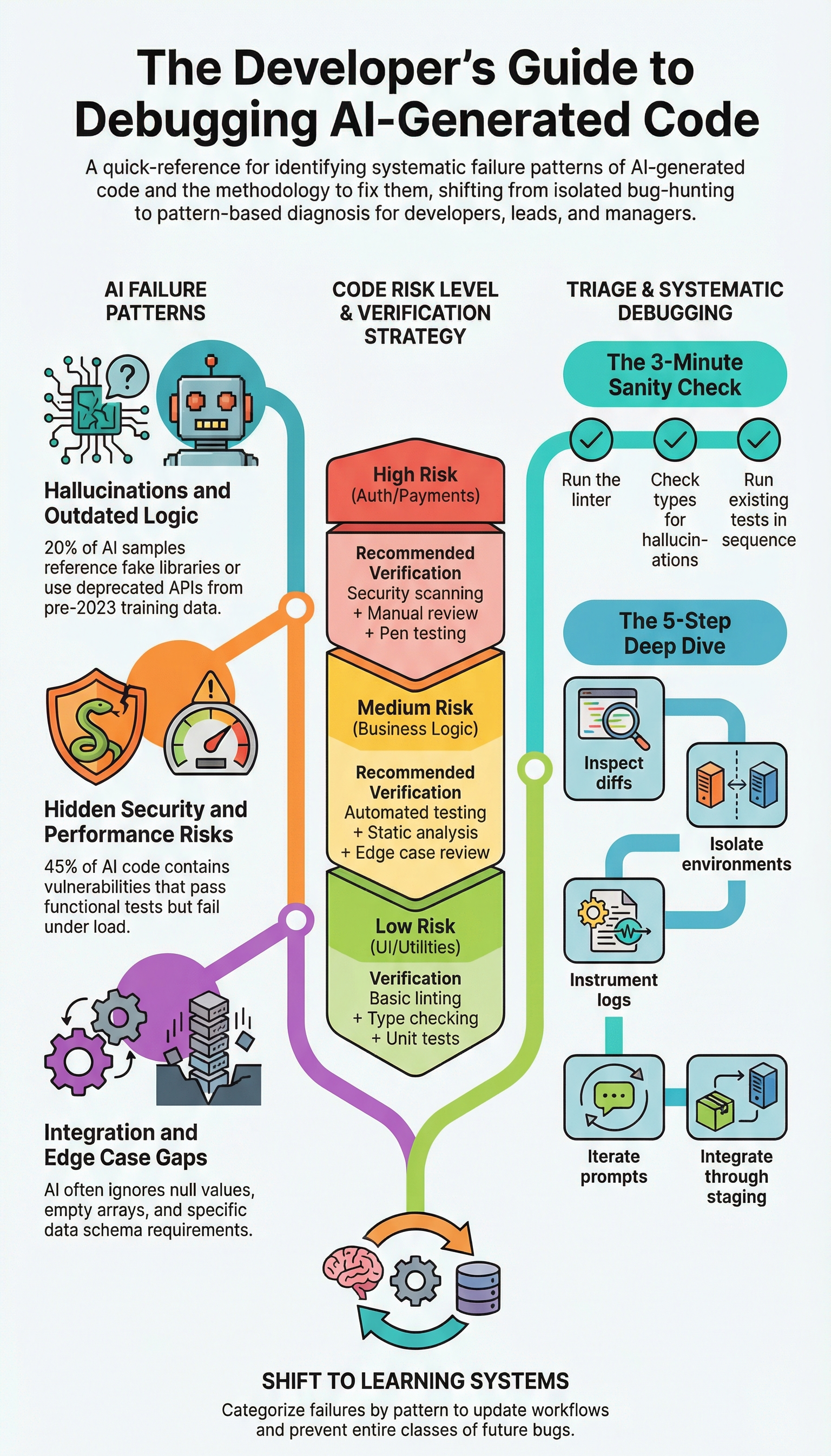
AI code debugging works best when treated as pattern validation, not creative problem-solving.
A reliable approach uses an eight-step checklist that forces verification at every layer. Teams that adopt this checklist report fewer repeat incidents and faster recovery.
First, trace control flow manually to confirm all execution paths behave as expected, especially when reviewing complex if-else logic generated by AI that can silently skip validation under specific branches.
Second, validate API contracts against official documentation. Third, review exception handling and resource cleanup. Fourth, assess security risks like injection or unsafe deserialization.
Fifth, verify data models and boundary conditions. Sixth, confirm dependencies and versions. Seventh, inspect diffs to understand what the AI actually changed. Eighth, validate business logic against requirements.
Below is a condensed pattern-based view used during reviews.
| Pattern | Detection Method | Fix Action |
| Hallucinated APIs | Import errors, registry verification | Replace with documented APIs |
| Performance anti-patterns | Profiling nested loops | Optimize data structures |
| Security vulnerabilities | Static analysis scanning | Parameterize and sanitize |
| Edge case gaps | Null and boundary tests | Add validation logic |
Using CodeQL for pattern scanning can save 30–60 seconds per block, which adds up quickly at scale. Isolation in containers and temporary logging instrumentation also help reproduce failures consistently before changes reach staging.
Which testing priorities ensure AI code reliability
Credit: TARTLE
AI-generated code requires stricter testing than human-written code because its failure modes cluster around blind spots. Testing strategy must reflect that reality.
The highest priority tests focus on interfaces, not internals. Contract tests validate inputs and outputs against real schemas. Exception-path tests simulate failures such as timeouts, partial responses, and corrupted data. Resource lifecycle tests ensure files, connections, and locks are released correctly. Security tests probe for injection, cross-site scripting, and authorization bypasses.
In practice, teams target 85–90% coverage for AI-generated components, compared to 70–80% for human code. This higher bar compensates for unpredictable logic gaps.
We avoid relying solely on AI-generated tests for AI-generated code because shared blind spots lead to false confidence, a risk that grows when teams neglect avoiding the programming skill gap in AI-assisted teams.
Security scans are built into CI pipelines so builds stop when risks are too high. This helps catch problems early, before the code goes live. NIST explains that testing for security all the time and giving systems only the access they need can greatly lower risk in automated systems.
This fits well with Secure Coding Practices we follow, where we treat generated code as unsafe until it proves it can be trusted.
Preventing AI hallucinations and logic gaps
Prevention has to start before debugging. The most effective teams we’ve worked with treat all AI output as untrusted by default. That shift in mindset prevents a lot of surprises.
Our main tactics include:
- Refining prompts with clear schemas, explicit constraints, and negative instructions to reduce ambiguity.
- Maintaining a shared error catalogue that logs recurring failure patterns across projects. This speeds up reviews and helps new engineers spot issues faster.
Teams using a structured catalogue often see review times drop 40–50% and catch problems earlier. One notable incident involved AI-generated database logic that silently corrupted records for days, a clear lesson in why human validation is non-negotiable.
Secure coding practices are our final safety net. We enforce:
- Input validation
- Least privilege access
- Defense-in-depth principles
This approach, emphasized by OWASP, assumes all inputs, including generated code, are untrusted. It shrinks the potential damage when a hallucination slips through and changes how teams fundamentally work with AI.
“Security is about layers, no single technique provides complete protection, but combining these methods significantly reduces your attack surface.” – security practitioner [2]
Best practices for prompt refinement

Prompt refinement taught me that clarity beats cleverness. It’s not about writing a lot, but writing precisely. My early attempts failed on edge cases I never mentioned. I was leaving too much for the model to guess.
My process now is built on specificity and patience. I start with the foundation:
- Define the data: I provide the full schema and naming conventions.
- State the exceptions: I explicitly list edge cases, nulls, empty lists, maximum values.
- Set the boundaries: I include negative constraints, stating what the code must not do.
For larger tasks, I break them into smaller, linked prompts. This prevents the model from getting overwhelmed and losing context.
A key shift came last year when my team began diagramming logic before any code generation. We sketch the flow first. This simple practice cut our errors significantly. It brings people and the model onto the same page from the start. This makes Secure Coding Practices easier to follow, because the rules and goals are clear before any code is written.
The work is quieter and more predictable now. Investing time in the prompt saves far more time on the output. It’s a method earned through trial, and it works.
FAQ
How do I debug unexpected AI-generated code behavior step by step?
Start AI code debugging by reproducing the unexpected code behavior in a controlled environment. Review generated code errors using a clear code review checklist and diff inspection method. Check AI syntax issues, control flow bugs, and runtime failures AI. Use debugging AI output with static analysis tools, type checker errors, and linter triage AI to find root causes.
How can teams fix AI hallucinations without introducing security vulnerabilities?
Teams fix AI hallucinations by treating untrusted code default and verifying every API call. Use API hallucination detection, schema validation code, and contract testing AI to confirm real interfaces. Apply defense in depth code and least privilege model consistently.
What testing practices catch AI code errors before production release?
Strong testing prevents production failures from AI-written code. Use unit test generation for business logic verification and edge case handling AI. Add null boundary tests, exception path coverage, and contract testing AI. Catch data model mismatches and type checker errors early. Enforce CI/CD gates AI, coverage threshold 85%, and peer review workflow before merge approval.
How do I improve production reliability of AI-generated code?
Improve production reliability AI by adding logging instrumentation and container isolation debug to observe failures clearly. Track runtime failures AI using a failure pattern catalogue. Monitor resource leaks code, performance anti-patterns, and scalability blind spots.
Avoid happy path assumptions by testing real traffic patterns. Address maintainability hell AI risks through consistent reviews and human-AI hybrid review practices.
How can prompt refinement reduce hidden bugs in AI-generated code?
Prompt refinement techniques reduce hidden bugs when teams guide the model clearly. Use diagramming logic first to define control flow. Apply prompt chain iteration and regenerate prompt strategy to avoid context collapse AI and token limit overload.
Prevent field name guessing and dependency resolution fails. Always review comments with comment hallucination check, not vibes over verification.
Handling unexpected AI code behavior with confidence
This is about using AI in a careful, responsible way. When teams learn the common ways AI code fails, fix issues in an orderly way, and debug step by step, AI becomes a helpful tool instead of a risk.
From our experience, real confidence does not come from perfect code. It comes from control, fewer surprises, clearer choices, and fewer late-night emergencies.
If your team wants to build that kind of confidence, the next step is learning how to use Secure Coding Practices in real AI-driven workflows. Join the Secure Coding Practices Bootcamp
References
- https://owasp.org/www-project-secure-coding-practices-quick-reference-guide/stable-en/02-checklist/05-checklist
- https://medium.com/%40veronicakylie1/defense-in-depth-a-layered-approach-to-web-application-security-e0c27789dcad
Related Articles
