


How to automate tedious refactoring tasks with AI? Use structured workflows where tools such as GitHub Copilot and Aider handle mechanical changes, renaming variables, extracting methods, reorganizing files, while tests and human review protect behavior.
Teams at Reddit and other large repositories have reported real productivity gains when guardrails are clear.
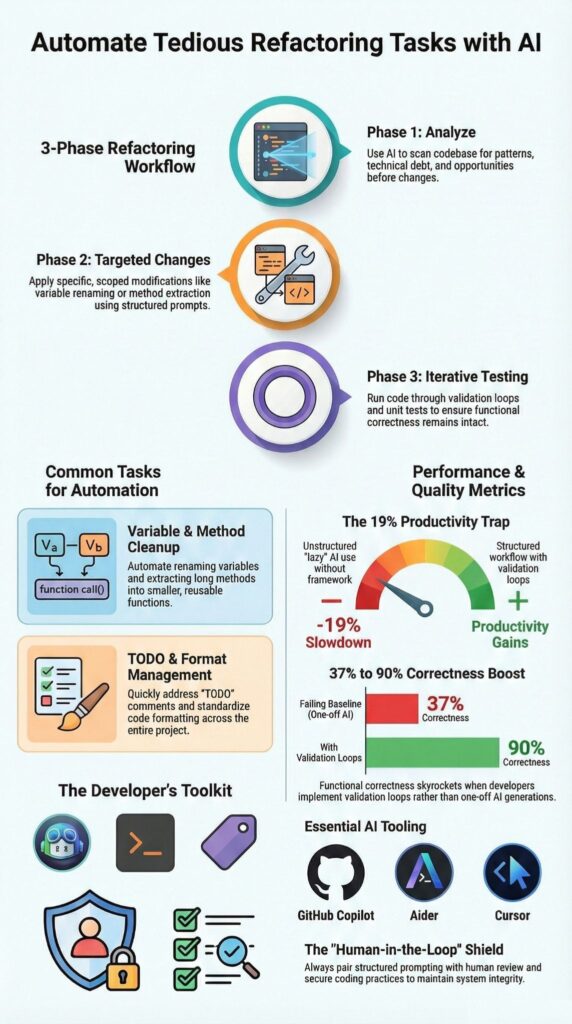
In contrast, community discussions on Reddit also cite cases where unstructured AI usage slowed experienced engineers by 19 percent. The difference comes down to process. We combine hands-on implementation with published findings to show how to automate refactoring safely. Keep reading to apply it in production.
Key Takeaways
- AI code refactoring works best for repeatable, pattern based changes backed by unit tests and secure coding practices.
- Structured, three phase workflows can improve functional correctness from roughly 37% to 90% with validation loops.
- Multi file and repo wide refactoring automation requires agent based tools and strict human review to avoid regressions.
What Does It Mean to Automate Refactoring with AI?
Automating refactoring with AI means using intelligent tools to carry out structural code improvements while preserving behavior through tests and review. The goal is not to add features. It is to improve the shape of the code without changing what it does.
As highlighted by Google Cloud
“…AI code intelligence can enable features such as … automated refactoring, and context‑aware vulnerability detection…” – Google Cloud
When refactoring runs without tests or review checkpoints, small changes ripple outward. In our Secure Coding Practices bootcamps, we treat automation as a transformation layer, not a decision-maker. The sequence is clear: define structure, validate with tests, then merge.
AI tends to perform well on mechanical improvements such as:
- Renaming variables consistently across modules
- Reducing cyclomatic complexity in methods with excessive branching
- Cleaning up outdated TODO comments
- Standardizing formatting and removing dead code
These are structural gains. They support the DRY principle and simplify code without rewriting architecture. The aim stays consistent: improve code quality while protecting behavior.
How Should You Structure an AI Driven Refactoring Workflow?

Use a three-phase workflow: analyze, generate targeted changes, then test in tight loops. That structure keeps hallucinations low and protects functional correctness.
Insights from Microsoft for Developers
“…the system intelligently identifies inefficiencies and … applies contextual recommendations to improve quality, security, and maintainability.” – Microsoft for Developers
Phase 1: Analyze Before Changing
Start with review, not edits. Ask the AI to map structural issues before touching code.
- Identify methods with high cyclomatic complexity
- Flag code smells
- Map multi-file dependencies
A simple prompt such as “List structural improvement areas. Do not rewrite yet.” forces discipline.
Phase 2: Generate Targeted Refactors
Make atomic changes only. Avoid sweeping rewrites.
- Refactor one high-complexity method
- Extract specific validation logic
- Rename a single variable across the repo
We also maintain an internal agents.md with preferred patterns and guardrails to keep changes aligned with secure coding practices.
Phase 3: Test Iteratively
Add characterization tests, apply small refactors, run CI, review diffs, then commit. That rhythm keeps the blast radius small and production stable.
Which AI Tools Are Best for Automating Refactoring?
Tool choice should match scope, file size, and validation needs, not trends, especially in structured approaches aligned with advanced workflows and strategies. In our secure development bootcamps, we see teams struggle when they pick tools based on popularity instead of workflow fit. Refactoring at scale demands clarity and control.
Below is a comparison grounded in community usage and hands-on experience:
| Tool | Strengths | Limitations | Best Use Case |
| Aider | Repo-wide changes, natural language refactors | Requires precise prompts | TODO cleanup and anti-pattern removal |
| GitHub Copilot | Inline suggestions in Visual Studio Code | Needs active review | Extract method and variable renaming |
| Cursor | Large file context, diff visibility | Output limits | Refactoring long Python files |
| CodeScene Ace | Code health metrics, smell detection | Limited smell coverage | Post-refactor validation |
That level of scale only works when repo-wide edits run inside strict version control boundaries.
From what we have implemented ourselves, a few patterns stand out:
- Use agent-based systems for multi-file refactoring
- Use inline tools for smaller, localized edits
- Pair refactoring with static analysis and security scans
At Secure Coding Practices, we run vulnerability checks before structural changes. It sounds minor, but catching security issues early prevents larger cleanup cycles later.
What Are the Best Prompting Techniques for Reliable Refactoring?

Staged prompts with clear constraints produce far better results than vague cleanup requests, reflecting principles common in AI-driven TDD workflows. We learned this early. When instructions were loose, the output drifted. When instructions were tight, the changes stayed predictable.
In our secure development bootcamps, we teach developers to break refactoring into controlled conversations. Instead of asking AI to rewrite everything, we guide it step by step.
A pattern that works well:
- “List structural issues only.”
- “Propose a refactor plan in numbered steps.”
- “Rewrite only function X.”
- “Show a unified diff.”
That sequence forces analysis before modification. It also keeps the scope narrow. In practice, few-shot examples help. When we provide a short sample of the desired refactor style, the AI mirrors the structure more reliably.
We avoid prompts like:
- “Make it cleaner.”
- “Improve everything.”
They sound simple, but they invite overreach.
Instead, we prefer direct instructions such as:
- “Apply the DRY principle to duplicate validation logic.”
- “Convert promise chains to async/await.”
We also keep prompts short to preserve context. Smaller chunks lead to smaller diffs, and smaller diffs are easier to review and secure.
What Common Pitfalls Should You Avoid?
AI struggles with architectural reasoning, hidden dependencies, and unwritten domain rules. That weakness becomes obvious in large refactors. We have seen tools confidently reorganize code while missing a quiet dependency buried in another module.
Two risk zones show up again and again.
The first is architecture blind spots. Cross-module coupling, configuration shifts in a service mesh, or a monolith-to-microservices migration demand real domain knowledge. Pattern detection is not enough. Someone has to understand why the system was built that way.
The second is over-refactoring. Developers sometimes apply complexity rules mechanically. The result looks cleaner on paper but becomes harder to read. In our training sessions, we pause when abstraction starts multiplying without a clear payoff.
Common warning signs include:
- Interfaces multiplying after method extraction
- Broken backward compatibility during API migrations
- Security checks disappearing after inline edits
At Secure Coding Practices, we put guardrails in place:
- Preserve and expand unit tests before changes
- Verify functional correctness after each step
- Run security scans before merging
- Use approval testing for sensitive legacy paths
AI agents can accelerate mechanical edits. Responsibility does not shift. Engineers remain accountable for every change that reaches production.
When Should You Automate vs Refactor Manually?
Credits : Learning To Code With AI
Automate repeatable, pattern-based changes. Refactor manually when architecture, business rules, or security boundaries are involved. That line has saved us more than once.
In our secure development programs, we encourage teams to pause before handing work to AI. Some transformations are mechanical. Others require judgment that tools cannot infer from code alone.
Automate when:
- Changes follow clear, deterministic rules
- Code health metrics consistently flag the same type of smell
- Strong unit test coverage already protects behavior
Those scenarios are predictable. AI handles them well, and we can review diffs quickly.
Manual refactoring is safer when:
- Migrating authentication flows such as OAuth2 updates
- Modifying RBAC policy logic
- Adjusting zero-trust security boundaries
These areas carry implicit domain knowledge. A small mistake can ripple into production risk.
Over time, we adopted a simple rule: if the transformation can be written as a clear rule without exceptions, AI-assisted refactoring is appropriate. If it depends on interpretation, trade-offs, or security context, we step in ourselves.
That balance keeps automation helpful instead of disruptive.
FAQ
How can AI code refactoring reduce technical debt quickly?
AI code refactoring reduces technical debt by systematically identifying duplication, unused logic, and structural weaknesses through code smell detection AI and semantic code analysis.
It helps teams automate refactoring in small, atomic code changes instead of risky rewrites. This technical debt automation approach supports incremental refactoring AI, improves maintainability, and keeps the system stable while continuous improvements are applied.
Can AI-assisted refactoring handle large codebase refactor safely?
AI-assisted refactoring can support a large codebase refactor by performing multi-file refactoring AI with context-aware refactoring across modules.
It enables repo-wide changes AI while validating results through unit test preservation AI and functional correctness checks. Diff analysis automation further verifies modifications, allowing teams to execute a structured, step-by-step code refactor without introducing regressions.
How do intelligent refactoring tools prevent refactor hell AI scenarios?
Intelligent refactoring tools prevent refactor hell AI scenarios by applying AI pattern recognition code to detect risky transformations before execution.
They recommend iterative code improvement instead of uncontrolled big refactor planning. Golden master testing AI and approval testing refactor techniques ensure behavior remains consistent. This controlled process protects stability and supports long-term code quality improvement.
Is it possible to automate tedious code tasks like renaming and extraction?
It is possible to automate tedious code tasks such as rename variables automation, extract method AI, and eliminate duplicates code AI using refactoring automation workflows.
An inline refactoring tool can apply atomic code changes consistently across multiple files. Combined with anti-pattern removal and TODO automation AI, this process enforces DRY principle automation and reduces unnecessary boilerplate.
How does AI support continuous code quality improvement over time?
AI coding agents monitor code health metrics AI and recommend opportunistic refactoring during regular development cycles.
Teams can apply test-driven refactoring practices alongside functional correctness checks to preserve stability. Prompt engineering refactoring and natural language refactor instructions provide clear guidance. Over time, incremental refactoring AI and strategic refactoring AI strengthen maintainability and architectural consistency.
Scale AI Refactoring Safely, Not Just Quickly
AI can transform tedious refactoring, but without structure it magnifies errors instead of reducing them. When you combine incremental testing, secure coding practices, and human review, automation stops being a risk and becomes a tool for stability. Ask yourself, do you want faster edits, or safer, reliable improvements that last?
Skipping discipline leads to hidden defects and compounding technical debt. Take control now. Join the Secure Coding Practices Bootcamp to implement AI refactoring safely, protect your codebase, and scale confidently without sacrificing quality.
References
- https://cloud.google.com/use-cases/ai-code-generation
- https://devblogs.microsoft.com/azure-sql/ai-based-t-sql-refactoring-an-automatic-intelligent-code-optimization-with-azure-openai/