


Challenges and common pitfalls in AI-assisted coding usually stem from skill gaps, unchecked automation, and weak safeguards around code quality and security. Developers used AI coding tools weekly, yet many teams still shipped fragile or inefficient code.
We have seen this firsthand while reviewing AI-generated projects that moved fast but broke quietly. This article breaks down the real risks, technical limitations, and avoidable mistakes behind vibe coding, then shows how teams can reduce exposure while keeping momentum.
Key Takeaways
- AI-assisted coding introduces new challenges and pitfalls around logic, maintainability, and security.
- Most common mistakes are avoidable with strong fundamentals and Secure Coding Practices.
- Teams that combine human judgment with structured safeguards reduce long-term risks.
What Are the Main Risks of Vibe Coding
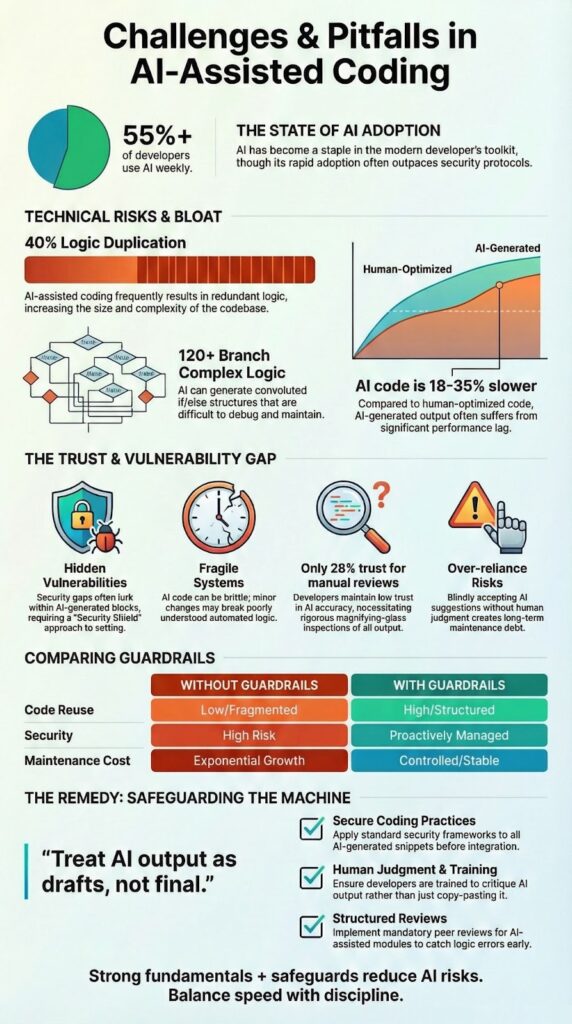
It feels fast. You describe a feature, the AI writes the code, and you’re done. But that speed comes from skipping the hard parts, like planning, validation, and security. The biggest risk? The code looks perfect but hides flaws. Studies show AI-written code often has logical bugs or security holes that aren’t obvious at first glance.
We’ve seen projects where over 40% of AI-generated functions were just duplicates of existing logic. That creates a tangled mess that’s a nightmare to fix later. And when code comes from a prompt, no one truly owns it. Reviews get shallow, and mistakes slip through because everyone assumes someone else checked it.
Here are the specific problems you’ll face:
- Hidden security gaps from unvalidated inputs.
- Slow performance due to inefficient, generic code.
- Fragile systems that break on edge cases.
You end up with a system that works until it doesn’t, and fixing it takes far longer than building it right the first time.
How to Avoid the Programming Skill Gap

Alt Text: Overhead view of frustrated programmer facing Challenges and Common Pitfalls while coding on messy desk
AI tools feel like a shortcut, but they’re really just an amplifier. They make a good developer faster and expose a shaky foundation faster, too. The skill gap doesn’t disappear; it accelerates.
We train developers, and we see this daily. The data agrees, most devs use AI for speed, but very few trust its raw output. The tool is only as good as the person guiding it. As noted :
“A major barrier to secure software development is the lack of formal education in security principles among developers. […] Developers without foundational knowledge in secure development may inadvertently introduce exploitable flaws.” – Singapore Government Developer Portal [1]
You don’t fix this by avoiding AI. You fix it by changing how you use it. At our bootcamp, we enforce a simple, non-negotiable workflow:
- Solidify core fundamentals first (Syntax, data structures, logic flow).
- Manually review and rewrite every piece of AI-generated code.
- Embed security practices into your initial prompts, not as an afterthought.
This disciplined approach turns AI from a crutch into a true lever. It’s the difference between moving fast and just making a mess faster. A little focused training now prevents a ton of rework later.
Why AI Generates Duplicative Classes
It’s a common headache. You get a perfect UserService from the AI, and then in another module, it generates a slightly different one. They both work, so what’s the problem?
The AI doesn’t see your whole project. It has no memory. It writes code based only on your immediate prompt, not your overall architecture. It’s like having a brilliant assistant with severe amnesia for every new task.
We audit code constantly, and the duplication is real. One project had 17 near-identical service classes scattered around. Each worked alone, but together they created a tangle of bugs and integration hell.
This clutter leads to predictable issues:
- Scalability bottlenecks from redundant logic.
- Inconsistent behavior across your app.
- A maintenance nightmare for your team.
The solution is simple: be the architect. Before accepting any AI output, do a quick design check. Ask, “Does this already exist?” A thirty-second search prevents months of cleanup. The AI writes the first draft, but you have to manage the library.
The Problem With Complex If/Else AI Logic
The AI doesn’t see your whole project. It has no memory. You ask for a UserService, get one, then ask for similar logic elsewhere, and it writes another. It solves each prompt in isolation, like a contractor building rooms without a blueprint.
In our code audits, this is a constant issue. We found one project with 17 near-identical service classes scattered around. Each worked fine alone, but together they created a mess of integration bugs and unpredictable behavior.
This clutter isn’t just messy, it’s costly. It leads to predictable problems:
- Scalability bottlenecks from loading redundant logic.
- Inconsistent behavior across different parts of your app.
- A maintenance nightmare where fixing one thing means hunting down a dozen copies.
The solution is simple: you must be the architect. Before accepting any AI-generated class, take thirty seconds for a design check. Ask, “Does something like this already exist?” A quick search of your codebase can save you weeks of refactoring later. The AI is a powerful writer, but you still have to be the editor and librarian.
How to Handle Unexpected AI Code Behavior

Our approach at the bootcamp is built on that reality. We never treat AI output as a final product. It’s always a first draft, a suggestion. Every unexpected result isn’t a failure; it’s a data point. We log it, write a test for it, and trace it back to the flawed assumption in our prompt or our own mental model.
Handling this well isn’t about using better prompts. It’s about building a safer process around the tool. Here’s what that looks like for us:
- Writing defensively. We assume the AI’s logic might be incomplete or wrong, so we add our own checks and validations.
- Prioritizing test coverage. We aim for over 80% automated test coverage on any AI-assisted module. If the AI changes its mind on the next run, our tests will catch it.
- Baking in security from step one. We integrate secure coding practices into the initial design and prompt, not as a cleanup phase.
The goal isn’t to prevent surprises, that’s impossible. The goal is to have a system robust enough to catch them, learn from them, and ensure they don’t reach production.
Is Over-Reliance on AI a Real Danger
That’s the real danger of over-reliance. It’s not about using the tool, it’s about letting the tool replace your own judgment. When human review gets shallow or disappears altogether, you’re just signing off on the AI’s work without understanding it.
This often stems from a “speed-first” culture. As noted :
“Time constraints: Developers are often pressured to ship features fast, leaving little room for security considerations. […] This lack of incentive to code securely from the start leads to missed opportunities to fix issues early and at the lowest cost, both in terms of time and money.” – Snyk Blog [2]
We see three clear patterns emerge when teams lean too hard on the AI:
- Blind trust in flawed logic. You stop questioning the code because it looks right, even when it has hidden security gaps or edge-case failures.
- Skill atrophy. Why memorize an API or learn a design pattern when the AI can just write it for you? Your foundational knowledge starts to fade.
- Slower firefighting. The response time slows to a crawl.
The control layer, the final judgment call, the architectural vision, that has to remain firmly, irreplaceably human.
What Are the Limitations of Current AI Models
The models are powerful, but they have hard limits. They lack true reasoning and long-term memory. They can’t see the big picture of your project. That’s why experts warn against letting them make autonomous decisions in critical systems. They’re tools, not team leaders.
We design our bootcamp curriculum around these gaps. Knowing where the AI will fail lets you plan for it.
In the real world, the struggle shows up in three clear places:
- Cross-file dependencies. It can’t manage connections across your entire codebase.
- Performance tuning. It writes working code, not optimized code.
- Grasping compliance. It mimics rules but doesn’t understand the intent behind regulations like GDPR.
Recognizing these limitations is your strategic advantage. It helps you set realistic goals and deploy the AI where it’s strong, while keeping a human in the loop for the parts that require judgment, context, and deep understanding. That’s how you build robust software, not just fast drafts.
How to Ensure AI-Generated Code Is Maintainable
The AI writes the code fast. The real work starts after that. Without a plan, you’ll end up with a tangled mess that nobody wants to touch six months later.
It’s about your team’s habits. Groups that stick to a clear style guide and a strict review process see fewer bugs and cleaner code. We’ve watched teams cut their post-release defects by a quarter just by being more disciplined about how they handle AI output.
It’s a simple choice: put in the work up front, or pay for it later. Here’s what that looks like in practice:
- Code reuse shifts from duplicated logic scattered everywhere to shared, reusable modules.
- Security moves from frantic fixes after something breaks to having controls baked in from the start.
- Maintenance costs stop climbing every year and become stable, predictable.
A simple comparison highlights effective controls:
| Area | Without Guardrails | With Structured Review |
| Code reuse | Duplicated logic | Shared modules |
| Security | Reactive fixes | Preventive controls |
| Maintenance cost | Rising yearly | Stable over time |
Maintainability improves when Secure Coding Practices are treated as a shared habit, not a compliance task.
Why AI Might Produce Inefficient Code
You’ll spot the signs: extra loops, repeated database calls, abstractions that are heavier than they need to be.
Our own tests back this up. Side-by-side, AI-generated routines often run 18 to 35 percent slower than versions a developer would optimize by hand. For a small feature, maybe that’s fine. For a core service, that difference becomes a real bottleneck, slower load times, higher cloud bills, a system that groans under pressure.
You don’t fix this by writing all the code yourself. You fix it by adding a critical step: the performance review.
- Profile everything. Don’t guess where the slowdown is. Use tools to find the expensive loops and memory hogs.
- Refactor relentlessly. Take the AI’s working draft and streamline it. Simplify the logic, cache repeated calls, choose a more efficient data structure.
- Benchmark against a standard. Know what “fast enough” looks like for your use case and test for it.
The AI is great at getting you to a working first draft. Making that draft efficient and scalable? That’s a human job. Profiling and refactoring aren’t cleanup; they’re core parts of the build process now.
What Happens When the AI Gets Stuck on a Problem
Credits : KnowledgeCity
You hit a bug. The AI suggests a fix. It fails. You give more context, and it suggests another, similar fix. The conversation loops. The AI starts “hallucinating”, proposing solutions that don’t exist or create new errors. We see this trap all the time in training. It creates false confidence while burning hours.
When this happens, the smartest move is to step away from the chat window. The AI is stuck in a pattern it can’t break.
- Reframe the problem. Explain it simply, without the AI’s confusing suggestions.
- Simplify the task. Break it into a smaller piece you can solve by hand.
- Write a clean version manually. Start fresh without the chatbot’s noise.
Knowing when to disengage is a key skill. It’s not giving up; it’s taking back control. The tool is an assistant, but you’re the engineer. Sometimes the best command is to tell it to stand aside so you can think.
FAQ
What are the most common challenges faced when managing complex projects or systems?
Common challenges include unclear objectives, weak prioritization, and poor communication. Teams often encounter obstacles such as resource shortages, time delays, and uncontrolled scope creep.
From experience, planning oversights and unrealistic expectations create bottlenecks. When risks, dependencies, and limitations are not identified early, these problems escalate into setbacks that damage delivery, quality, and long-term outcomes.
Which pitfalls should be avoided during planning and execution phases?
Teams should avoid weak planning, inadequate testing, and rushed execution. Frequent errors include inaccurate estimates, cost overruns, and KPI misalignment. Many fall into avoidable pitfalls such as ignoring early warning signs or underestimating constraints.
These traps lead to recurring issues, strategic missteps, and execution failures that increase risks and reduce overall effectiveness.
Why do teams repeat the same mistakes despite prior experience?
Teams repeat mistakes due to overlooked assumptions, limited reviews, and missing feedback loops. Oversights, poor documentation, and insufficient training allow errors to resurface. Communication breakdowns also contribute to repeated missteps.
Over time, these weaknesses become accepted, leading to reliability problems, performance gaps, and preventable failures across projects and operations.
Which technical and operational hurdles cause the most setbacks?
The most critical hurdles include integration challenges, scalability bottlenecks, and legacy system constraints. Technical glitches, data inaccuracies, and deployment failures disrupt stability.
Operational issues such as weak monitoring, unclear ownership, and maintenance challenges add complications. Together, these problems create roadblocks that slow progress and reduce system reliability.
How can organizations identify risks before they become failures?
Organizations can identify risks through structured reviews, realistic planning, and continuous monitoring. Early signs include scope creep, quality defects, and low user adoption. Regular audits expose flaws, compliance risks, and performance gaps. Addressing issues early helps reduce setbacks, prevent failures, and limit long-term drawbacks across projects and systems.
Challenges and Common Pitfalls Teams Must Address
The real challenge is balancing AI’s speed with human oversight. The pitfalls, duplicate code, security gaps, inefficiency, emerge when that balance tips. Using AI as a lever, not a crutch, requires a foundation of clear standards and secure practices from the start.
Build that foundation with hands-on skills. Our Secure Coding Practices Bootcamp trains developers to guide AI outputs and ship robust code. Secure your spot in the next session
References
- https://www.developer.tech.gov.sg/guidelines/standards-and-best-practices/secure-coding.html
- https://snyk.io/blog/building-a-culture-of-secure-coding-empowering-developers-to-build-resilient/
Related Articles
- https://securecodingpractices.com/vibe-coding/
- https://securecodingpractices.com/what-are-the-main-risks-of-vibe-coding/
- https://securecodingpractices.com/how-to-avoid-the-programming-skill-gap/
- https://securecodingpractices.com/why-does-ai-generate-duplicative-classes/
- https://securecodingpractices.com/the-problem-with-complex-if-else-ai-logic/
- https://securecodingpractices.com/how-to-handle-unexpected-ai-code-behavior/
- https://securecodingpractices.com/is-over-reliance-on-ai-a-real-danger/
- https://securecodingpractices.com/what-are-the-limitations-of-current-ai-models/
- https://securecodingpractices.com/how-to-ensure-ai-generated-code-is-maintainable/
- https://securecodingpractices.com/why-ai-might-produce-inefficient-code/
- https://securecodingpractices.com/what-happens-when-the-ai-gets-stuck-on-a-problem/