

You check AI-generated code for best practices by treating it like a draft from a lightning-fast, slightly overconfident intern. You trust its speed, but you never trust it blindly. Instead, you run every snippet through a structured, four-phase audit that looks at correctness, security, readability, and long-term maintainability as separate lenses.
This way, you catch hallucinations, security gaps, and quiet logic bugs before they ever touch production. The goal isn’t to fight the tool, but to guide it, and shape its rough output into reliable engineering. Keep reading to build your own audit framework, one that turns clever suggestions into trustworthy code.
Key Takeaways
- Secure coding practices are your first and most critical audit layer, scanning for secrets, injection risks, and compliance gaps AI often creates.
- Automated guardrails like linters and static analyzers must handle syntax and anti-patterns so you can focus on logic and architecture.
- Manual review for edge cases and “hallucination hunting” is the irreplaceable human step that catches the subtle flaws automated tools miss.
The “Trust but Verify” Mindset
AI writes code with a strange kind of confidence. It’s fast, fluent, and often wrong in ways that sound completely reasonable. You’ve probably seen it already:
- a function that leans on a library last touched in 2019,
- an API endpoint with no input validation,
- a clever-looking helper that fails on edge cases.
The code runs,until it doesn’t. And when it breaks, it breaks in quiet, brittle ways.
This isn’t about being paranoid, or distrusting the model entirely. It’s about being honest about how it works. When teams fall into vibe coding habits, they tend to accept fluent-looking output without questioning whether it fits their real constraints.
In fact, “AI solutions that are almost right, but not quite” is cited as the top frustration by 66% of developers, forcing them to spend more time fixing outputs than expected [1].
The model was trained on huge piles of public code, some excellent, some outdated, some outright unsafe. Its job is to predict the next likely token, not to design a secure, well-architected system for your stack, your users, your constraints.
So our role shifts. We move from “primary author” to expert editor. We become:
- guides, not just consumers,
- reviewers, not just spectators.
That’s where the “Guided How-To” approach comes in. You give the AI sharp, concrete instructions, then you audit what it returns against a professional standard,security, correctness, style, and maintainability. The mindset stays simple: don’t trust the first draft, trust the verification process that comes after it.
Phase 1: Immediate Execution and Syntax Validation
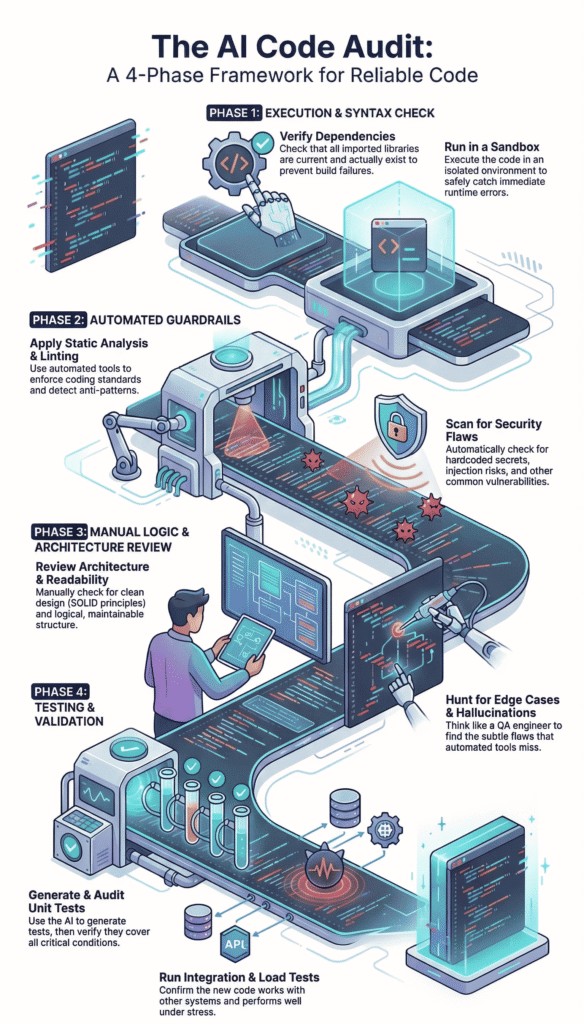
You get a block of code from your AI assistant. The first phase is the most straightforward, see if it even runs. This is about catching the low-hanging fruit, the obvious errors that would stop a build in its tracks.
1. Environment and Dependency Check Start right in your IDE. Whether you use VS Code, Cursor, or something else, the first step is looking at the import statements.
AI has a known habit of “hallucinating” packages. It might use a function from library_x version 2.4, but in reality, the latest version is 4.1 and the function signature changed completely. Or worse, the library doesn’t exist at all.
- Cross-reference every import or require statement with official documentation.
- Check for deprecated API calls, especially in fast-moving ecosystems like JavaScript or Python.
- Verify environment variables and configuration paths aren’t hardcoded with placeholder values.
You run a quick terminal command, pip list or npm list, and compare. It’s a mundane task, but it prevents the first major crash.
2. The Execution Test Now, run it. But not in your main project. Use a sandboxed environment, a Docker container, or a isolated virtual environment. The goal is to see it fail safely. You’re looking for NameError, ImportError, undefined variables, and syntax errors the linter might have missed.
Verification Prompt: After generating code, immediately prompt your AI: “Execute this code in a sandbox and list any runtime errors or undefined variables you encounter.”
Sometimes the AI can simulate this and report back potential issues. More often, you need to run it yourself. The key is to do this before any thoughtful analysis. If it can’t execute, there’s no point reviewing its architecture. You’d be reviewing a fiction.
Phase 2: Automated Quality and Security Guardrails
Once the code executes without crashing, the real audit begins. This is where we bring in the machines to check the machine. Automation handles the repetitive, rules-based checks, freeing you to focus on design.
Static Analysis and Linting This is your first automated guardrail. Tools like ESLint for JavaScript, Pylint for Python, or RuboCop for Ruby aren’t just about style, they enforce a baseline of quality and detect anti-patterns. They’ll flag unused variables, over-complex functions, and potential type mismatches.
We configure these tools to be strict. They catch what the AI misses because the AI is optimizing for “looks like correct code,” not “follows our team’s eslintrc.” The table below shows common catches.
| Tool (e.g., ESLint / Pylint) | Common AI-Generated Issue Detected |
| Complexity Checker | Functions with cyclomatic complexity > 10 (nested, hard-to-follow logic). |
| Style Enforcer | Inconsistent naming (e.g., fetchUserData vs. get_user_info in the same file). |
| Pattern Detector | Possible promise handling errors or missing await keywords. |
| Code Smell Alert | Long parameter lists or classes violating the Single Responsibility Principle. |
Integrating this into your CI/CD pipeline means every AI-suggested commit gets this scan automatically. It’s a non-negotiable gate.
Security and Secret Scanning Here’s where we apply secure coding practices as our primary filter. This is non-negotiable.
AI models, trained on public repos, have a terrifying tendency to replicate bad habits, including hardcoded secrets, placeholder credentials, and weak encryption calls. We use tools like CodeQL, SonarQube, or dedicated secret scanners like TruffleHog.
- Scan for hardcoded API keys, passwords, or tokens.
- Detect potential SQL injection or Cross-Site Scripting (XSS) vectors from unvalidated user input.
- Check for PII (Personally Identifiable Information) handling without proper redaction or encryption.
- Validate data schemas at ingress points to prevent malformed data exploits.
We don’t just scan, we structure the prompt to prioritize this. Before asking for a feature, we might prime the AI: “Using secure coding practices, generate a function that authenticates a user. No hardcoded secrets. Validate all inputs.” It sets the tone. The scan then verifies the tone was followed.
Phase 3: Manual Logic and Architecture Review
Automation can’t think. It can’t see the bigger picture or the business logic nuance. This phase is the human firewall, where experience and intuition catch what rules cannot.
SOLID Principles and Readability Now you read the code not as a syntax checker, but as a senior developer. Does it make sense? Is the function named process_data() actually doing three unrelated things?
You look for signs of over-engineering, where the AI might have created a complex design pattern where a simple function would suffice.
Check for the SOLID principles in spirit:
- Single Responsibility: Is each class/function doing one clear thing?
- Open/Closed: Is it extendable without modification?
- Liskov Substitution: Would swapping this module break things?
- Interface Segregation: Are interfaces lean and specific?
- Dependency Inversion: Does it depend on abstractions, not concrete details?
AI often gets the “S” wrong, creating monolithic blocks. It also loves to ignore the DRY (Don’t Repeat Yourself) principle, repeating the same logic in slightly different forms.
You also watch for performance killers, like an N+1 query problem in a database loop, or an unbounded loop that could run forever with unexpected input.
Edge Case and Hallucination Hunting This is the core of the manual review. AI models are brilliant at the “happy path,” the standard, expected flow of data. They are notoriously bad at edge cases. Your job is to think like a QA engineer trying to break the thing.
- What happens if the API returns null or an empty array?
- What if the user uploads a 5GB file?
- Does this date function handle timezone transitions correctly?
- Is there a race condition in this asynchronous code?
You interrogate the code. Then, you interrogate the AI. Use specific prompts to force it to find its own flaws:
“List five edge cases or potential failure modes for this code block.” “Generate unit tests for the error conditions in this function.” “Rewrite this section to handle a network timeout gracefully.”
This iterative dialogue, where you prompt, audit, and re-prompt, is where the AI truly becomes a collaborative partner.
Through careful debugging and refinement cycles, you’re not just taking its word for it, you’re teaching it the context of your specific, messy reality and tightening logic that looked correct at first glance but failed under pressure.
Phase 4: Testing and Validation Suites
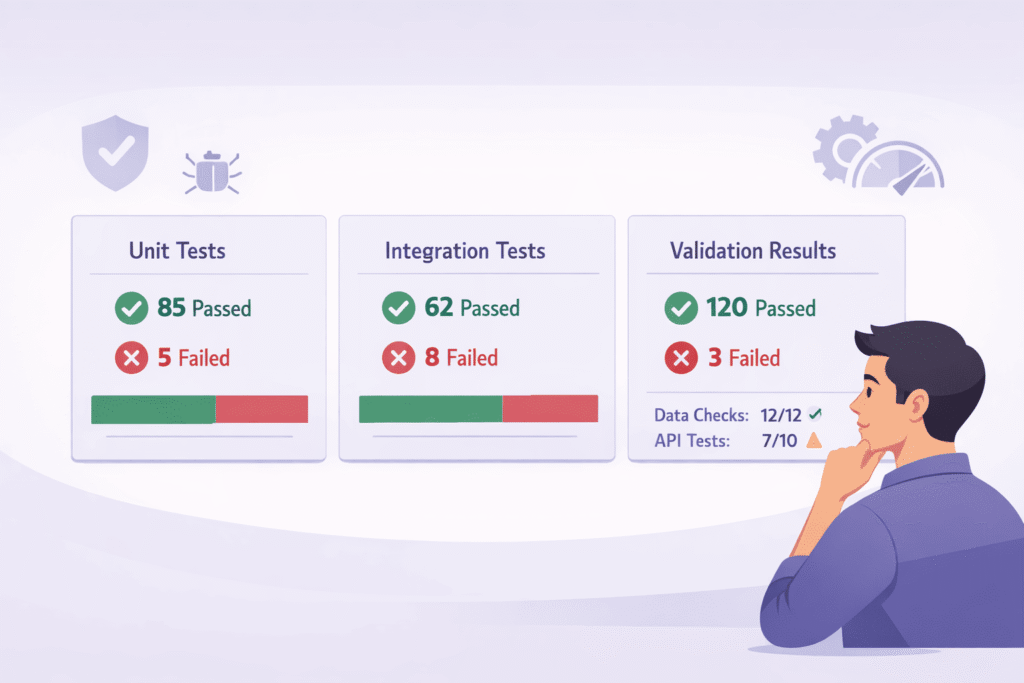
If it isn’t tested, it doesn’t work. This old adage is doubly true for AI-generated code. You cannot assume correctness, you must prove it through structured validation.
Generating Robust Unit Tests Ironically, one of the best uses of AI is to generate its own test suite. When you push it to fix its own bugs through testing, you surface hidden assumptions early.
Research also finds that AI-generated pull requests contain roughly 1.7x more issues than human code, with logic errors and security findings appearing significantly more often [2].
You prompt it: “Generate comprehensive unit tests for this Python function, covering edge cases like invalid inputs and network failures.“ It will often produce a decent starting point. But here’s the catch, you must then audit those tests.
Look for “circular logic,” where the test merely asserts what the function does without actually validating the outcome.
Check for coverage, are all branches and conditions tested? A tool like pytest-cov can give you a coverage percentage. For AI code, we aim higher, perhaps 90%+, because the risk of hidden logical gaps is greater.
Integration and Load Testing Finally, see how the code plays with others. Drop it into a staging environment. Does it integrate cleanly with the existing database layer or external APIs? Use a tool like Postman to hammer the endpoints. Then, think about scale.
Run a simple load test. Does the new endpoint slow down under 100 concurrent requests? Does it leak memory? AI is rarely asked to consider resource constraints, so it’s on you to verify performance and stability. This final, practical test is what separates a clever snippet from production-ready code.
Building Your Audit Workflow
So how do you make this stick? You systemize it. You don’t have to remember every step each time. Create a checklist in your note-taking app or a template in your project management tool. The framework might look like this:
1. The Sandbox Run: Isolate and execute. Fix basic syntax and import errors.
2. The Automated Gate: Run linter, static security scan, and secret detection. Fix all critical issues.
3. The Human Review: Read for logic, architecture, and edge cases. Prompt the AI for improvements.
4. The Validation Suite: Create and run tests. Verify integration and performance.
Iterate on steps 3 and 4 until the code meets your standard, not just the AI’s. The final output should be something you’d be willing to put your name on in a pull request. It has your fingerprints all over it, refined through a process of skeptical, guided verification.
FAQ
How do I start checking AI-generated code for best practices?
Begin with manual inspection and basic code auditing. Read the generated code line by line to judge clarity, naming conventions, and error handling.
Look for obvious syntax errors, missing input validation, or weak documentation tags. This first pass helps you spot risky assumptions before moving to deeper checks like static analysis or testing.
What security issues should I watch for in AI-generated code?
Focus on vulnerability scan basics such as secret detection, injection prevention, and proper auth mechanism handling.
AI-generated code may skip encryption checks, misuse inputs, or forget API timeout rules. Always review how sensitive data is handled, check for PII redaction, and think through simple threat modeling scenarios.
How can I tell if AI code is hard to maintain long term?
Check alignment with SOLID principles, readable structure, and a reasonable complexity metric. Watch for overcomplex loop, duplicated logic, or poor pattern detection.
Low readability scores and weak documentation tags are warning signs. Use refactoring tips early to fix issues before they turn into long-term maintenance debt.
What testing helps validate AI-generated code properly?
Use unit testing to verify logic, then add integration test coverage for real data flow. Confirm edge case test scenarios, especially where AI code makes assumptions.
Review test coverage gaps and run a small regression suite after changes. This helps uncover logical gap, hidden bugs, or fragile behavior.
How do I detect AI-specific problems in generated code?
Look for signs of AI hallucination, such as fabricated function, outdated pattern, or unused logic. Review loops for unbounded recursion or N+1 query risks.
Compare the model output against real requirements to ensure nothing critical was invented or omitted. Careful review prevents trusting code that only looks correct.
From Draft to Deployment
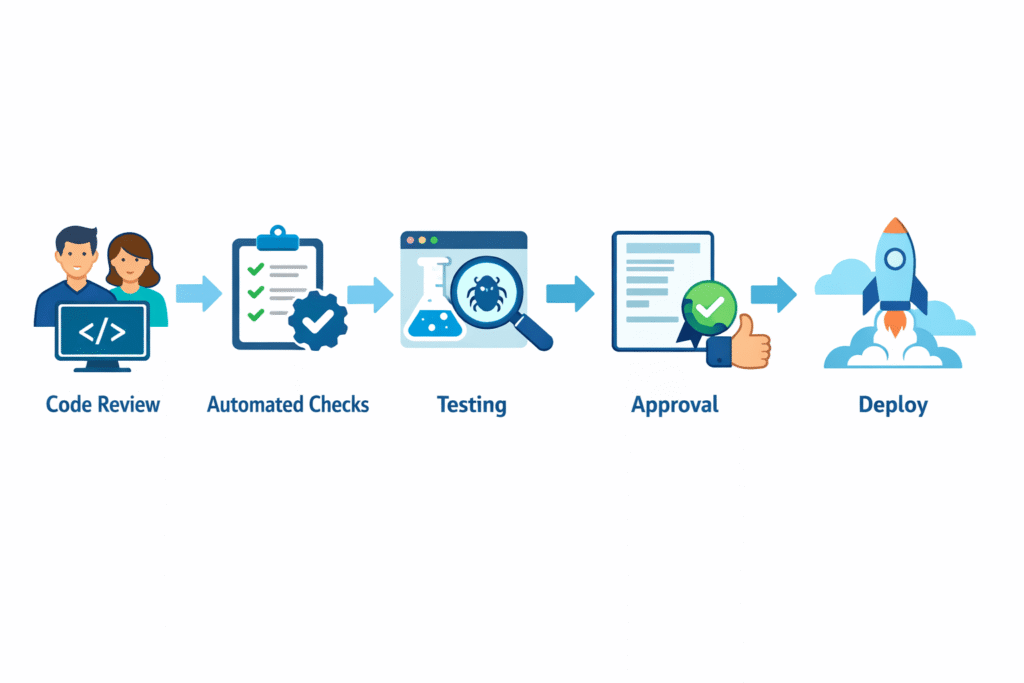
Checking AI code isn’t a passive approval step, it’s an active, layered process of refinement. You start with a raw, risky draft and run it through a professional audit: static checks, dependency reviews, security scans, and human reasoning on top.
You let automation handle rule-based issues, while your judgment covers design flaws, data handling, and edge cases. Security stays front and center from the very first prompt, not as an afterthought.
The result isn’t “AI code” anymore, it’s your code, hardened and trustworthy. Then you repeat. Ready to go deeper? Join the Secure Coding Bootcamp.
References
- https://byteiota.com/ai-coding-quality-crisis-1-7x-more-bugs-trust-crashes-29/
- https://theoutpost.ai/news-story/ai-generated-code-contains-1-7x-more-bugs-and-severe-defects-than-human-authored-code-22492/