


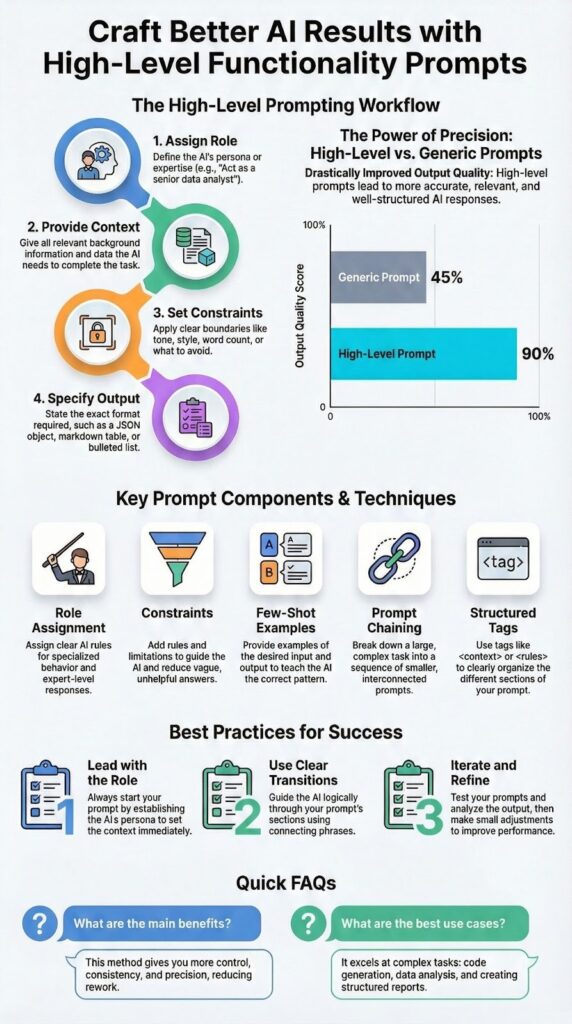
Smarter prompts come from treating AI like a hire, not a buddy. Instead of tossing vague questions at it, you give it a role, spell out the task, set limits, and define what the final output should look like.
That shift, from open-ended chatting to high-level functionality prompts, turns the model into a focused assistant you can actually rely on. You’ll see the difference in code quality, tighter writing, and clearer analysis, all because the instructions are structured, not bloated. Keep reading to see practical prompt templates you can copy, adapt, and use right away.
Key Takeaways
- Role assignment creates specialized AI behavior
- Structured constraints prevent vague responses
- Task-specific formatting yields ready-to-use outputs
What Makes These Prompts Different
Most people talk to AI like it’s a slightly smarter search bar. They type, “Can you help me with this?” and then feel let down when the answer sounds flat or recycled. High-level functionality prompts skip that whole dance and move straight into clear, actionable work.
These aren’t casual chats, they’re work orders. You’re not asking for a favor, you’re assigning a task to a competent teammate with instructions that leave less room for guesswork.
Instead of something loose like:
- “Write something about security.”
You’d use a prompt with structure and intent, such as:
- “Act as a senior cybersecurity analyst and draft three policy recommendations for data loss prevention.”
That one change, role, task, and format, pushes the model into a different mode. It’s no longer fishing around for what you might mean, it’s following a pattern you designed.
Under the hood, this works because these models don’t “understand” questions the way people do. They follow patterns in text. When your prompt is specific, scoped, and well-structured, you’re giving the model a pattern that’s easier to match, which means more focused, useful output instead of something that sounds like it was written on autopilot [1].
Core Components That Actually Work

Good prompts aren’t magic, they’re built from a few simple pieces that quietly do most of the heavy lifting. Once you know those pieces, you can mix and match them for almost any task, much like the foundational principles shared in writing effective prompts for AI coders.
First is role assignment. When you tell the AI, “You are a technical documentation specialist,” you narrow its lens right away. The model leans toward that voice and way of thinking, like switching from casual notes to a user manual without being told twice.
A solid prompt usually includes:
- Role: Who the AI is (for this task).
- Task: What it should do.
- Format: How the answer should look.
Constraints are the guardrails. Phrases like “Use only information from the provided text,” “Keep the answer under 200 words,” or “Format as a table with three columns” sound strict, but they remove uncertainty. The result isn’t less creative, just more useful, because the AI knows exactly where it’s allowed to move.
| Component | Purpose | Example Instruction |
| Role | Defines expertise and perspective | “Act as a senior cybersecurity analyst” |
| Task | Specifies the exact action to perform | “Draft three policy recommendations” |
| Context | Supplies relevant background or data | “Based on the following incident report” |
| Constraints | Sets boundaries and limits | “Limit to 200 words” |
| Format | Controls how the output is delivered | “Present the result as a table” |
Practical Examples Across Domains

You understand the idea faster when you see it working in real situations, not just as theory. The same basic structure, role, task, format, carries across very different kinds of work [2].
For text summarization, a prompt like this keeps the output tight and useful:
- “Act as an executive assistant. Summarize the following meeting notes into three bullet points highlighting decisions made and action items. Omit small talk and procedural details.”
Instead of a loose recap, you get decisions and next steps, which is what most people really want from notes.
In code generation, details matter even more. For example:
- “You are a senior Python developer. Write a function that takes a list of integers and returns the sum of even numbers. Include error handling for non-integer inputs. Provide a brief example of usage.”
Business analysis also becomes sharper with structure. Try something like:
- “As an HR analyst, review this job description and candidate resume. Identify three strength matches and two potential gaps. Present findings in a two-column table with evidence from both documents.”
Advanced Techniques for Complex Tasks
Some jobs are simply too layered for a single, monolithic prompt, and that’s where more careful strategies start to matter. You’re not just asking for output, you’re shaping a process, as emphasized in effective prompting techniques.
One helpful method is prompt chaining, where you split a large task into steps and run them in order. For example:
- Step 1: “Outline the sections for a detailed guide on X.”
- Step 2: “Expand section 2 of the outline into 500 words with examples.”
- Step 3: “Review the full draft for clarity and remove repetition.”
By doing this, you keep control over structure while still using the model for the heavy lifting.
You can also use structured formats to make instructions easier to parse. For instance:
xml
<role>Senior nutritionist</role>
<task>Create a 7-day meal plan for diabetics</task>
<constraints>Focus on low-glycemic ingredients, include preparation times</constraints>
Then there’s few-shot learning, where you teach by example inside the prompt. A simple pattern might look like:
- “Classify these emails as urgent, important, or routine.
Example 1: ‘Server down’ -> urgent
Example 2: ‘Monthly report ready’ -> important
Now classify: ‘Team lunch scheduled’.”
Implementation Best Practices
Credits : Anik Singal
Strong prompts tend to follow the same simple habits, no matter which model you’re using. These habits make outputs more steady and easier to control over time.
First, put the most critical instructions at the top. The model pays closer attention to the opening, so you lead with:
- Role: who the AI is.
- Primary task: what must be done.
- Key constraints: word limits, format, or data boundaries.
Details and long context can come after that, unless they’re absolutely required to understand the assignment.
When you’re working with long inputs, add a clear bridge back to the task. After pasting a document, use transition lines such as:
- “Based on the above information, do the following…”
- “Using this context, perform the steps below…”
These short cues help the model connect the background with the action you actually want, highlighting why prompt clarity is so important for focused and accurate AI results.
FAQ
How do high-level functionality prompts improve complex task outcomes?
High-level functionality prompts explain the goal, limits, and expected result before the task begins. They use clear instructions and context-aware prompts to guide the response. This approach reduces confusion and prevents off-topic answers. It helps the AI focus on the task and produce consistent, accurate, and useful results for complex requests.
What prompt engineering techniques work best for advanced workflows?
Advanced workflows work best with structured prompts and multi-step prompts. Techniques like few-shot prompting and zero-shot prompting help the AI understand the task faster. Constraint-based prompts and output formatting prompts control how answers are delivered. These methods improve accuracy and reliability in automation, analysis, and workflow-related tasks.
When should role-playing prompts and persona prompts be used?
Role-playing prompts and persona prompts are useful when tone, expertise, or viewpoint matters. Clear role assignment helps the AI respond as a teacher, analyst, or specialist. This makes answers more relevant and easier to use. These prompts are effective for professional, educational, and domain-specific tasks that require clear perspective.
How do structured output prompts support professional use cases?
Structured output prompts organize responses in a clear format. JSON response prompts, XML tagged prompts, and bullet point summaries make information easier to review and reuse. They reduce manual editing and support automation. These prompts are helpful for data analysis, resume reviews, and evidence-based reporting tasks.
What are best practices for optimizing high-level prompts over time?
Prompt optimization improves through testing and revision. Start with a clear objective and simple instructions. Adjust wording based on the results. Use concise prompts for simple tasks and detailed prompts for complex ones. Iterative prompting helps refine accuracy, improve clarity, and maintain consistent performance.
Better Prompts Start Today
High-level functionality prompts turn AI from a vague helper into a focused partner. The switch happens when you stop asking loosely and start directing with intent. You define a clear role, feed in only the context that matters, add practical constraints, and set a specific output format. Together, these pieces shape the model into something tuned to your work, not just talking back at you.
The real skill comes from doing, not just reading. Pick one task you repeat often, maybe summarizing security findings, reviewing pull requests, or drafting internal docs. Try three different prompt structures for that same task.
Change the role, tighten the constraints, or adjust the format, and watch how each version shifts the output. Those small experiments build a kind of muscle memory that no static guide can fully replace.
If you want to apply this mindset to how you write and ship code, not just how you talk to AI, there’s a clear next step. The Secure Coding Bootcamp gives you the same kind of structured, hands-on approach, but for real-world software security: live code-along sessions, OWASP Top 10, secure input handling, authentication, encryption, and practical labs you can plug straight into your daily work.
References
- https://www.sciencedirect.com/science/article/pii/S2666389925001084
- https://en.wikipedia.org/wiki/Prompt_engineering