


You’re probably wondering which AI chatbot actually helps you ship better code, not just toy examples. The short answer: Claude 3.5 Sonnet is currently the strongest for low-error, production-ready code, especially when problems involve multi-step logic or tricky edge cases.
Still, the “best” choice really comes down to how you work day to day, whether you live inside an IDE, need tight tool integration, or want a patient partner to explain concepts while you learn.
The right assistant doesn’t replace you, it sharpens you. Keep reading to find the best fit for your workflow and how it can reshape your development process.
Key Takeaways
- Claude 3.5 Sonnet excels at complex logic and generating reliable, secure code with fewer errors.
- ChatGPT (GPT-4o) is your best bet for learning and getting clear explanations across a huge range of languages.
- Cursor and GitHub Copilot integrate directly into your coding environment for real-time, context-aware help.
Claude 3.5 Sonnet: Deep Reasoning and Low-Error Code
When you’re working on something intricate,say, designing a new authentication system or trying to make sense of a tangled legacy codebase,Claude 3.5 Sonnet often feels less like a code generator and more like a careful architect looking over your shoulder.
Its real strength isn’t just in producing syntax-correct functions, it’s in understanding how different parts of a system relate and why a particular design might be safer or more maintainable.
You can hand it many files at once,a config, a model schema, a controller, maybe a helper module,and it will read across them to propose solutions that actually line up with your project’s structure.
In practice, that shows up most clearly in sensitive areas, where mistakes are costly. This is especially relevant for developers exploring vibe coding approaches, where speed and experimentation still need to align with secure coding practices such as proper input validation, safe authentication flows, and careful use of cryptographic primitives.
That kind of caution matters more as AI-written code becomes mainstream. According to Second Talent, “41% of all code is now generated with the help of AI tools,” a shift that makes disciplined, security-aware reasoning increasingly important as developers adopt vibe coding styles at scale [1].
Claude’s tendency to reason through these layers helps prevent subtle security regressions that often appear when moving too fast.
Compared with some other models, it seems less likely to recommend shortcuts that quietly weaken security. The tradeoff is that it responds best when you talk to it with the same precision you’d use in a code review.
A loose request like “make this faster” tends to produce shallow optimizations, while a focused prompt such as “optimize this SQL query by reducing nested loops and avoiding full table scans” usually leads to concrete, testable improvements.
It’s a system that pays you back when you slow down, think clearly about the problem, and treat it as a real collaborator rather than a one-click fix.
ChatGPT (GPT-4o): Versatile Explanations and Broad Language Support
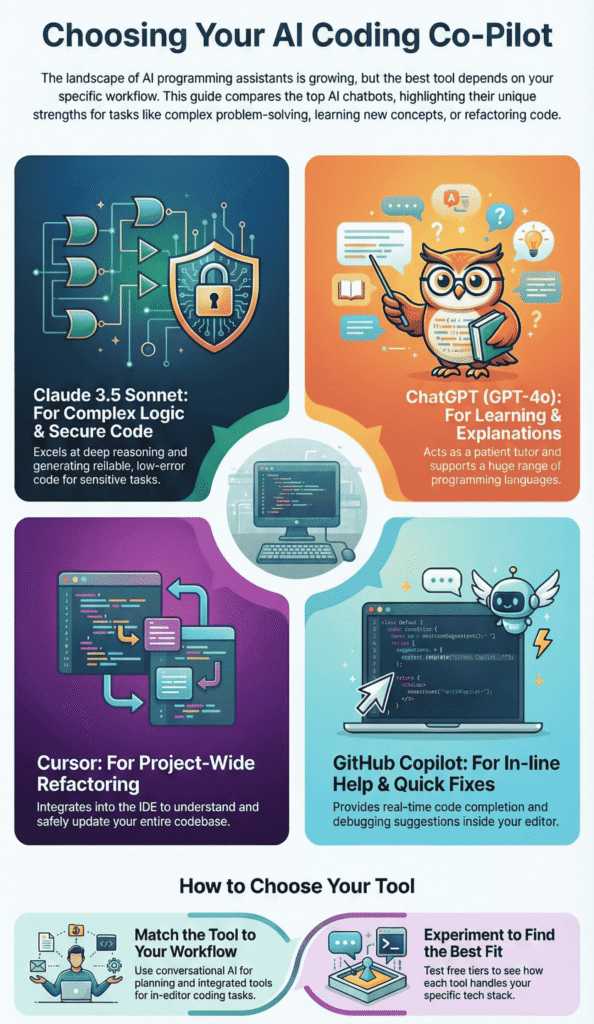
ChatGPT is the jack-of-all-trades. Its biggest advantage is its ability to act as a patient tutor. When you’re learning a new framework or a concept like React hooks, you can ask it to explain the code line-by-line in plain English.
It supports an enormous number of programming languages and can often provide relevant code snippets for all them, which is great for full-stack developers who switch contexts frequently.
The integrated web browsing feature is a game-changer for staying current. You can ask it to incorporate the latest best practices from a specific library’s documentation or explain a newly disclosed vulnerability (CVE).
The main weakness is that it can sometimes be overconfident, providing code that looks correct but has subtle logical flaws, especially on edge cases. It’s essential to treat its output as a strong first draft, not a final product.
- Learning & Onboarding: Ideal for explaining complex concepts to junior developers.
- Rapid Prototyping: Quickly generates boilerplate code in unfamiliar languages.
- Research Assistant: Uses web search to incorporate the latest documentation and security advisories.
Cursor: IDE Integration and Real-Time Preview

Cursor feels less like a simple chatbot bolted onto an editor and more like a full AI-powered workspace. This kind of tight coupling mirrors how many developers now evaluate essential tools and editors, not just by features, but by how well they understand project-wide context, dependencies, and refactor safety inside the IDE itself.
Productivity data backs this up. GitHub reported that developers using AI assistance completed tasks up to 55% faster, and as GitHub CEO Thomas Dohmke put it, “AI is becoming the new baseline for how software is built.” That speed advantage helps explain why tightly integrated editors are gaining traction [2].
When you ask it to refactor a function, it doesn’t just stare at that one file, it tracks imports, dependencies, and related modules across the repository.
That broader context makes higher-impact changes much safer. You can ask it to run project-wide updates such as:
- “Find all usages of this deprecated API and migrate to the new version.”
- “Update every call site to match the new function signature.”
- “Identify dead code paths related to this feature flag and remove them.”
Cursor then does the heavy lifting across your codebase, while the real-time preview window shows exactly what’s about to change before you commit.
That preview step matters, because it lets you catch odd suggestions and guard against surprise breakage.
The obvious downside is you’re tied to its editor experience, but for developers who already live inside an IDE all day, the trade feels reasonable given how much you gain from the tight, code-aware integration.
GitHub Copilot/Bolt: Inline Debugging and Quick Deployments
GitHub Copilot is the original “programmer’s pair.” Its most common use is as an advanced autocomplete, but its chat features have become powerful for inline debugging.
When your tests fail, you can highlight the error message and the relevant code block, and Copilot will often diagnose the issue and suggest a fix without you having to leave the flow of coding.
Bolt, which leverages similar technology, is interesting for its focus on the entire development lifecycle, especially for web apps.
It can help you go from a code snippet to a deployed application on a platform like Netlify with surprising speed.
These tools are fantastic for speed and convenience, though they can feel less customizable than a conversational AI like Claude. They work best when you want help without a full-blown conversation.
| Chatbot | Best For | Key Strength | Primary Limitation |
| Claude 3.5 Sonnet | Complex logic, secure code | Deep reasoning & low error rates | Requires very precise prompting |
| ChatGPT (GPT-4o) | Learning & multi-language work | Versatile explanations & web search | Can hallucinate incorrect code |
| Cursor | Refactoring & project work | Deep IDE and project context | Locked into its specific editor |
| GitHub Copilot | In-line help & fast debugging | Seamless integration into workflow | Less conversational, more autocomplete-driven |
Making Your AI Programming Choice
So how do you actually pick? It really comes down to your primary need and how you already like to write code.
If you spend most of your day inside VS Code or a similar IDE, an integrated assistant like Cursor or GitHub Copilot will usually feel the most natural, since they sit right beside your editor and cut down friction at the exact moment you’re typing.
If your work leans more toward planning, system design, or learning unfamiliar concepts, a conversational model like Claude or ChatGPT will often be more useful.
This is particularly true when developers are still choosing an AI model that fits their first real project, where clarity, reasoning depth, and tradeoff discussions matter more than raw code volume. In those moments, the assistant behaves more like a thinking partner than a simple generator.
You don’t have to guess, though. The smartest path is to experiment with the free tiers and see how each one fits your actual workflow. As you test, watch how the AI handles:
- Your main tech stack (frameworks, libraries, and build tools)
- Your project scale (small scripts vs large services or monoliths)
- Your usual problems (debugging, refactoring, or greenfield design)
You may find a mix works best. For example, you might use Claude for architecture and tradeoff discussions, then lean on Cursor inside the IDE for implementation details, refactors, and quick fixes.
The real goal isn’t to outsource your work, but to extend your reach,let the AI cover boilerplate and repetitive patterns, so you can keep your attention on the complex, creative decisions that still demand a human engineer.
FAQ
What can an AI coding assistant help developers do daily?
An AI coding assistant works as a programming chatbot and developer AI helper. It supports code generation AI, code completion tool features, and AI syntax helper tasks.
Many developers use a chatbot for developers to write snippets, explain logic, and act as an AI code writer or coding language bot across different programming language AI needs.
How do programming chatbots handle debugging and code quality?
A programming chatbot often includes a code debugging bot, bug detection chatbot, and error fixing assistant.
Some act as an AI refactoring tool or code optimization bot. With autocomplete programming and a snippet generator AI, developers reduce mistakes and improve accuracy in code gen without relying on one specific AI coding assistant.
Can one chatbot support multiple languages and frameworks?
Many tools act as a multi-language coder with framework-specific AI support. Examples include Python coding AI, JavaScript chatbot, Java developer bot, React code assistant, and Node.js AI helper.
Others cover C++ programming tool, SQL query generator, Rust code AI, Go language bot, and Swift iOS coder use cases.
How advanced are AI chatbots for large projects?
Advanced tools offer context-aware coding and multi-file project AI support. They help generate production-ready code with low-error code gen.
Some include a reasoning engine bot, architecture design AI, test case generator, API integration helper, deployment code bot, and version control AI for real development workflows.
How should developers compare free and paid coding chatbots?
When judging the best AI coder 2025, compare free coding chatbot and paid developer AI options. Look at accuracy in code gen, speedy code assistant response, and benchmark coding tool results.
Many test Claude vs ChatGPT code, Copilot alternative bot, Cursor AI features, and VS Code AI plugin support.
Final Thoughts on AI Coding Assistants
The landscape of AI programming tools is shifting quickly, and the “best” chatbot for you today might not hold that spot in six months. What does seem stable is their role in a modern workflow: they’re becoming core tools, not side experiments.
Used well, they don’t replace developers, they extend what you can handle,freeing you from boilerplate, nudging you toward better patterns, and leaving more room for design and security.
The developers who thrive will be those who treat AI as a true collaborator. If you want to sharpen the security side in particular, Join this Secure Coding Bootcamp.
References
- https://www.secondtalent.com/resources/ai-coding-assistant-statistics/
- https://www.wearetenet.com/blog/github-copilot-usage-data-statistics